How long does it typically take for anti-spam bots to click links in emails?

Published 9 Jul 2025
Updated 10 Oct 2026
12 min read
Summarize with
Updated on 10 Oct 2026: We clarified bot click timing, delivery timestamps, and filtering that preserves later human engagement.
Anti-spam bots often request email links within seconds or minutes of message processing, sometimes before inbox delivery, but there is no dependable maximum delay. A request 10 or 30 minutes later is still consistent with automated scanning, although timing alone does not establish its source. Automated requests can also appear hours or days later when messages are queued, quarantined, or re-scanned.
Compare click time with recipient-level delivery time rather than campaign send time. If your email service provider (ESP) queues a campaign for several minutes before the message reaches the receiving server, a click that looks 10 minutes late in the campaign dashboard can still be near-instant after acceptance. A sender's delivered event usually means receiving-server acceptance, not confirmed inbox placement. Use the event timestamp and, where possible, test a live email through the same sending path.
A single timing rule will not catch every automated click. Timing is a strong signal, but it needs support from request method, user agent data, IP patterns, link order, recipient domain, redirect behavior, and whether the same visitor touched every link without a human reading pattern.
How soon do anti-spam bots click email links?
Obvious scanner bursts often arrive within seconds or minutes of receipt. There is no universal average or maximum delay, and a later request is not automatically human. Use a 10 minute review window only as a local starting point, then validate it against request behavior and recipient-domain patterns. Recipients' organizations control their security scanning policies.
Practical rule
If you need an initial review window, inspect requests within 0 to 10 minutes of receiving-server acceptance, compare 10 to 30 minute requests for similar patterns, and judge later requests by behavior. These are example review windows, not measured scanner schedules. Calibrate them by recipient domain and campaign type.
Example bot click review windows
Illustrative windows measured after receiving-server acceptance, not universal timing benchmarks. Scans can also happen before acceptance; tune the windows with delivery, request, and conversion logs.
Immediate review
0-2 min
Inspect burst behavior; a fast human click is also possible.
Early review
2-10 min
Compare link coverage and request patterns, not timing alone.
Delayed review
10-30 min
Check for queues or holds without assuming they caused the request.
Later activity
>30 min
Rechecks and human visits overlap; use supporting evidence.
- Do not use send time: Campaign launch time includes ESP queueing, rate controls, and batch scheduling. That clock starts too early.
- Use receiving-server acceptance as the available baseline, and distinguish it from inbox delivery. Pre-acceptance scanning can produce a request before this timestamp.
- Treat timing as evidence: A fast click is a signal, not a verdict. Human behavior and automated behavior overlap at the edges.
- Keep original events: Do not delete raw click data. Store it, flag it, and build filtered reporting views on top.
Why bot clicks are not always instant
The fastest bots fetch links while a receiving system sandboxes or renders a message during pre-delivery or post-delivery inspection. That behavior is easier to spot when many links are visited in a tight burst before a person has had time to read the message. Not every scanner requests every link, so the absence of an all-links burst does not prove a human clicked.
Delayed clicks have several causes. Security systems queue work, gateways hold messages, and shared filtering platforms apply policy across many business domains. URL rewriting also routes a later visit through a security service for a time-of-click check, which can be initiated by a real reader. Rewriting or a reputation lookup alone does not prove an automated fetch reached your tracking URL. A small campaign can still reach a much larger shared security platform.
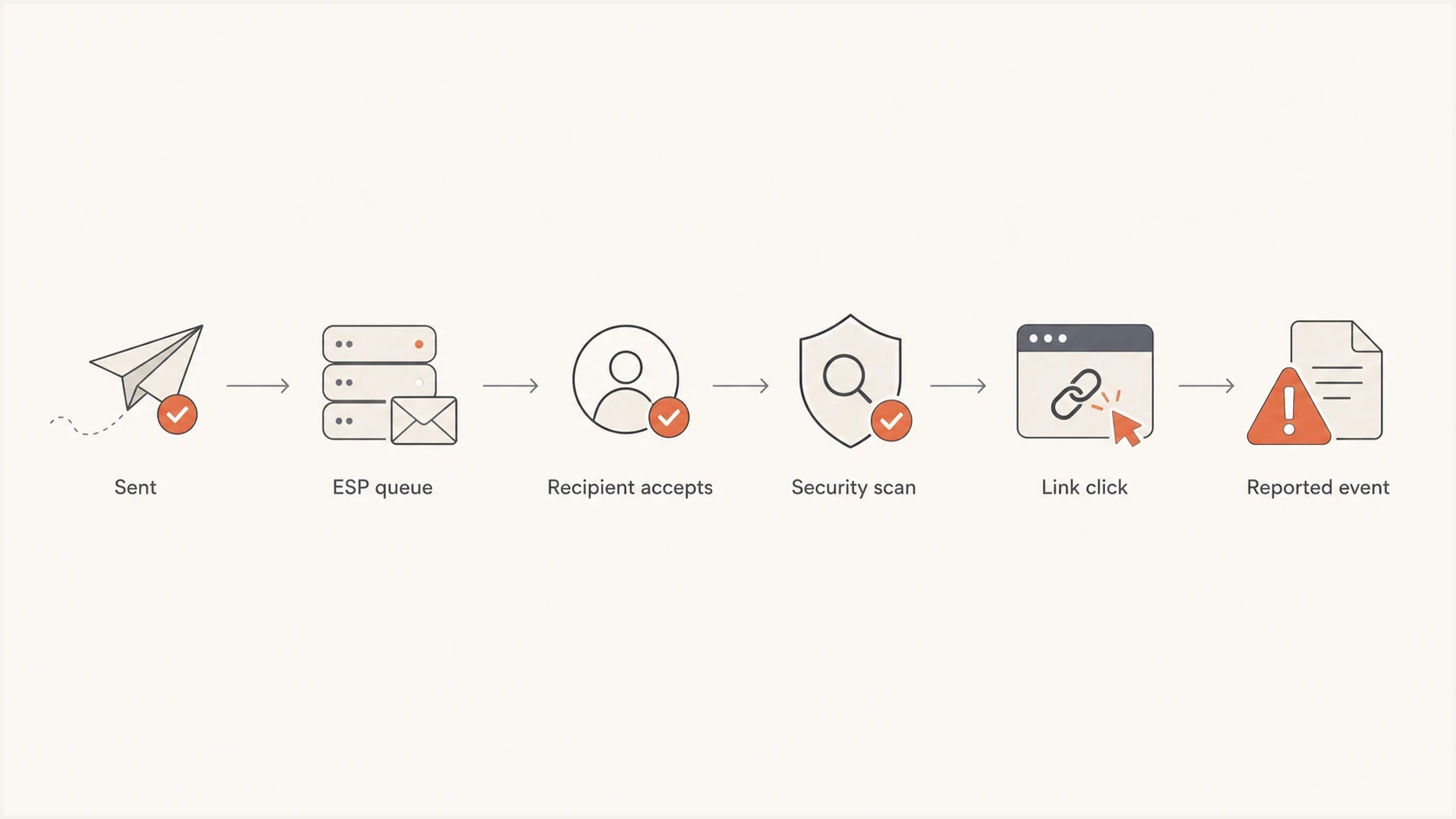
Email link scanning workflow showing the send queue, recipient acceptance, security scan, and recorded click.
Near-instant bot clicks
- Requests arrive within seconds of message processing, sometimes before inbox delivery.
- Link pattern: Many or all links are fetched in the same burst.
- Session pattern: No meaningful page depth, form action, or later return visit follows.
Delayed bot clicks
- Timing pattern: Requests appear minutes, hours, or days after delivery.
- Queue pattern: The message was held, staged, or scanned after delivery.
- Recheck pattern: Older messages receive new link checks after reputation or URL verdict changes.
Quarantine is one explanation to investigate. If a message is held before final inbox placement, a later request can belong to the inspection workflow rather than a reader. Security systems also re-fetch links when a destination's verdict changes. The flowchart illustrates one sequence; security inspection also happens before recipient acceptance or inbox delivery.
How to measure bot click delays
At minimum, separate campaign send time, outbound handoff time, receiving-server acceptance, and click time. Where a tracking redirect is used, also record the first tracking request, the final destination request, and any later conversion. Use UTC event timestamps rather than webhook arrival times. A request before the recorded delivery event warrants checking pre-delivery scans, clock differences, and logging delays.
The 10 minute question becomes easier when lag is calculated against the delivery event. If the campaign was launched at 9:00, the receiving server accepted a specific message at 9:08, and the first request happened at 9:10, that event is two minutes after acceptance. Review it for scanner patterns; the two minute delay alone does not prove a bot clicked.
Click event fields to keepjson
{
  "campaign_id": "spring-demo-042",
  "recipient_key": "opaque-recipient-018",
  "event_id": "click-001",
  "recipient_domain": "example.com",
  "campaign_send_time": "2026-05-27T09:00:00Z",
  "recipient_delivery_time": "2026-05-27T09:08:14Z",
  "tracking_request_time": "2026-05-27T09:10:05Z",
  "destination_request_time": "2026-05-27T09:10:06Z",
  "link_position": "footer-preferences",
  "request_method": "GET",
  "user_agent": "recorded value",
  "ip_address": "recorded value",
  "redirect_hops": 2,
  "session_cookie_present": false,
  "downstream_action": "none",
  "classification": "review",
  "delivery_timestamp_source": "receiving_server_acceptance"
}
Log the evidence first and classify later. If the filtering rule changes next month, reports can be recalculated without losing the original event stream. That matters when sales, customer success, or lifecycle teams use click data for follow-up.
How to filter bot clicks without deleting good engagement
The safest approach is scoring, not deletion. Give each click a bot-risk score, then report raw clicks, filtered clicks, and high-confidence human actions separately. This keeps reporting honest and avoids hiding edge cases.
- Start with delivery lag as one score input. Review the first 10 minutes only if that window fits your logs, and give greater weight to rapid multi-link bursts than to a two minute delay alone.
- Check link breadth: Automated systems often touch unrelated links, including legal, preference, image, or tracking links.
- Inspect sequence: Humans rarely click every link in order within the same second. Bots often do.
- Keep HTTP methods such as HEAD and GET, headers, redirect chains, cookie state, and destination responses. A tracking hit does not necessarily mean the visitor loaded the landing page.
- Compare user agents, IP ranges, and data-center traffic with the timing signal. Browser-like identifiers and shared proxies are not decisive, and scanners can execute JavaScript or accept cookies.
- Separate intent: A form submit, authenticated account action, purchase, or contextual reply carries more weight than a raw email click.
Do not overfit one rule
A hard 10 minute cutoff removes some real human clicks and keeps some bot clicks. Use it as a triage boundary, then layer in behavior, link type, request details, and conversion events.
For marketing reports, create separate columns for raw clicks, filtered clicks, and confirmed actions. Confirmed actions include validated form submissions, purchases, authenticated account events, and contextual replies; replies do not require a tracked page load. Compare click-through rate using a consistent filtering rule. If a bot filter changes, annotate the reporting change before treating a lower click rate as weaker engagement.
If your reports are already inflated, use a specific false-click workflow. The guide on false click data covers filtering logic in more detail, including how to avoid treating bot suppression as a deliverability fix.
Separate scanner requests from later human clicks
A security scanner and a person can request the same recipient-specific tracking link. A scanner burst seconds after processing can be followed by a genuine visit hours later. Classify each request separately, rather than marking the recipient or tracking URL permanently as a bot.
- Keep a separate event ID and timestamp for every request, including repeat requests to the same link.
- Filter scanner events before counting unique human clickers; preserve a later visit supported by human behavior.
- Require stronger evidence before click-triggered follow-ups or lead scoring. A raw request alone does not establish intent.
- Keep contacts subscribed when only scanner activity is detected. Filter the event instead of removing the recipient from future sends.
To calibrate timing, send a test through the same sending path to a mailbox you control and leave it unopened. Compare delivery events with tracking and destination logs, then click deliberately and compare the new requests. This measures one receiving policy, not every recipient domain.
Make action links safe for automated visits
Security scanners and link prefetchers can request a URL without a person choosing the action. An initial visit should not unsubscribe a contact, confirm an account, approve a transaction, consume a password-reset token, or create an authenticated session.
- Keep GET read-only: Use the first request to display a landing page. Do not change account, subscription, or consent state during that request.
- Require a deliberate action: Complete sensitive actions after a clear user confirmation that submits a POST request.
- For RFC 8058, put an HTTPS URL in List-Unsubscribe, set List-Unsubscribe-Post to List-Unsubscribe=One-Click, and cover both headers with a valid DKIM signature. Process the user-consented HTTPS POST without login, cookies, a redirect, or an extra confirmation step.
- Protect action tokens: Make tokens single-purpose and short-lived. For message-body links, consume the token only when the intended action is confirmed.
- Connect tracking requests, final page requests, confirmation events, and account changes with a shared correlation ID. Keep separate request IDs for the individual requests.
Honeypot links are supporting evidence
A hidden honeypot link can raise a bot-risk score, but it is not definitive. Scanners can skip hidden content, and automated accessibility or preview systems can fetch it. Never use a honeypot as an unsubscribe or compliance link.
Read-only GET requests prevent scanner fetches from changing account or subscription state. A POST request is a mechanism for completing an action, not proof of human intent; sensitive actions still need appropriate token validation or authentication.
What to measure instead of raw clicks
Raw click rate is useful for trend monitoring, but it is weak as a human-engagement metric. Bots distort it in ways that vary by recipient domain, security policy, campaign content, and sender reputation. Use raw clicks as an input, not the final number.
Email tester
Send a real email to this address. Suped shows a results button when the test is ready.
?/43tests passed
Suped's email tester provides a baseline for message authentication and content. To measure scanner timing for a recipient domain, compare a controlled inbox test with your own delivery and web request logs; an email test report alone does not identify every bot click.

Email tester sample report showing total score, email preview, issue summary, and per-section results
For engagement reporting, deeper actions carry more weight than clicks. A bot can fetch a link and can sometimes render a page, but a valid form submission, authenticated product action, purchase, or contextual reply provides stronger evidence of human intent. For transactional email, treat the link click as a delivery and security signal, then measure the account action that follows.
|
|
|
|---|---|---|
Contextual reply | High | Low |
Valid form | High | Medium |
Account action | High | Low |
Page depth | Medium | Medium |
Raw click | Medium | High |
Signals that rank higher than raw clicks
If you have access to request logs, user agent review adds useful evidence. The page on bot user agents explains what to capture before building suppression rules.
Use Suped to check authentication context
DMARC does not identify bot clicks, but authentication and reputation data provide useful context. If unauthorized sources send as your domain, SPF or DKIM fails unexpectedly, or your domain has blocklist (blacklist) pressure, receiving systems can apply different filtering policies. Scan volume alone does not prove an authentication problem.
Suped is our DMARC and email authentication platform. Its authentication reports and blocklist monitoring help verify legitimate sending sources and investigate authentication or reputation changes alongside click anomalies. Click classification still belongs in campaign analytics and web request logs.
A practical workflow is to verify that legitimate senders pass authentication, watch for sudden failure spikes, then compare those changes with click anomalies by campaign and recipient domain. Suped's DMARC monitoring view helps determine whether the investigation includes a domain-authentication issue.
Click evidence
- Event timing: Compare the request with recipient-level delivery.
- Request pattern: Review link breadth, sequence, redirect data, and later actions.
- Classification: Keep raw events and apply a reversible bot-risk score.
Suped workflow
- Authentication view: Review DMARC, SPF, DKIM, and legitimate sending sources.
- Issue context: Check failure spikes, DNS issues, and blocklist or blacklist changes.
- Domain review: Compare patterns across domains without mixing them into click scores.
Issues page showing top issues, verified sources, unverified sources, and authentication pass rates
For a domain baseline before a campaign, run a domain health check. Use the results as context when investigating sudden click inflation, not as proof that authentication caused the scanning.
Views from the trenches
These observations describe individual experiences rather than measured timing benchmarks. Check them against delivery and request logs before setting a cutoff.
Best practices
Compare click time to delivery time, not to the moment the campaign send button was pressed.
Keep raw click logs so filtering rules can be changed without losing original evidence.
Use hidden or low-value links carefully, then treat matches as signals, not absolute proof.
Common pitfalls
Filtering only the first minute misses queued scans and later rechecks on older messages.
Assuming low volume means no scanning ignores shared filtering platforms across domains.
Using open tracking as confirmation creates false confidence when image fetches are automated.
Expert tips
Log user agent, IP, link order, and recipient domain before making a bot rule permanent.
Separate human conversion events from click events when the link controls account access.
Review complaint spikes and blocklist or blacklist signals before blaming timing alone.
Expert view
Expert from Email Geeks says obvious bot clicks often happen almost immediately, but later non-human clicks still appear after delivery.
2025-02-18 - Email Geeks
Expert view
Expert from Email Geeks says a sender can see broad bot activity even with low per-domain volume when many domains use the same filtering platform.
2025-03-11 - Email Geeks