How can I determine the ISP or mailbox provider of an email address?
Matthew Whittaker
Co-founder & CTO, Suped
Published 18 May 2025
Updated 17 May 2026
8 min read
The direct way to determine the ISP or mailbox provider behind an email address is to look up the recipient domain's MX records, then classify the MX hostnames. For person@example.com, I ignore the person part and query example.com. If the MX points at Google, Microsoft, Yahoo, Apple iCloud, or another recognizable mailbox network, that is the receiving platform I use for segmentation.
The caveat is important: MX lookup tells you where the domain routes inbound mail, not always the final mailbox a human reads. Custom domains can use Google Workspace, Microsoft 365, forwarding, or a gateway in front of the real mailbox. So yes, segmenting only by @gmail.com misses many Google-hosted recipients, but DNS-based grouping is still the strongest practical method.
Start with the domain: Strip the local part, lowercase the domain, and query MX records.
Classify the MX: Group common host patterns such as Google, Microsoft, Yahoo, and Apple iCloud.
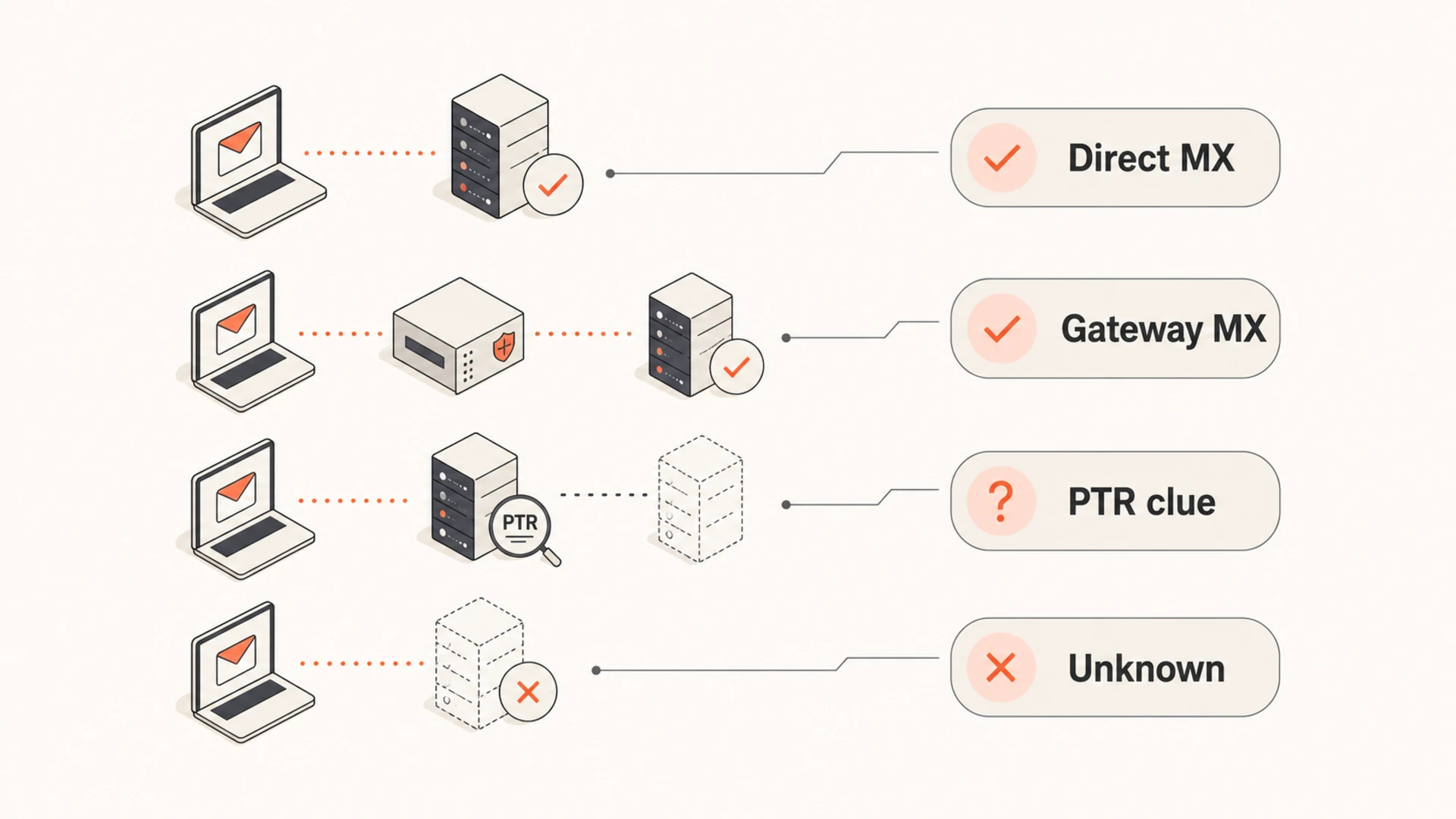
Add confidence levels: Treat direct mailbox MX matches as high confidence and gateway matches as partial confidence.
Use it for warmup: Cap volume by receiving platform because Gmail and Outlook see traffic across hosted domains.
The direct answer
To identify the mailbox provider of an address, I use the recipient domain's MX record. That record says which mail exchangers accept mail for the domain. If a custom domain has MX records under Google, it is using Google-hosted inbound mail even when the address is not @gmail.com. If it has MX records under Microsoft protection hosts, it is usually on Microsoft-hosted inbound mail.
I treat the result as a provider bucket, not as absolute proof of the user account type. A domain can route mail through a security gateway, a forwarding service, or a legacy host before delivery. A mailbox can also forward to a second mailbox after SMTP delivery. Public DNS will not expose that final handoff.
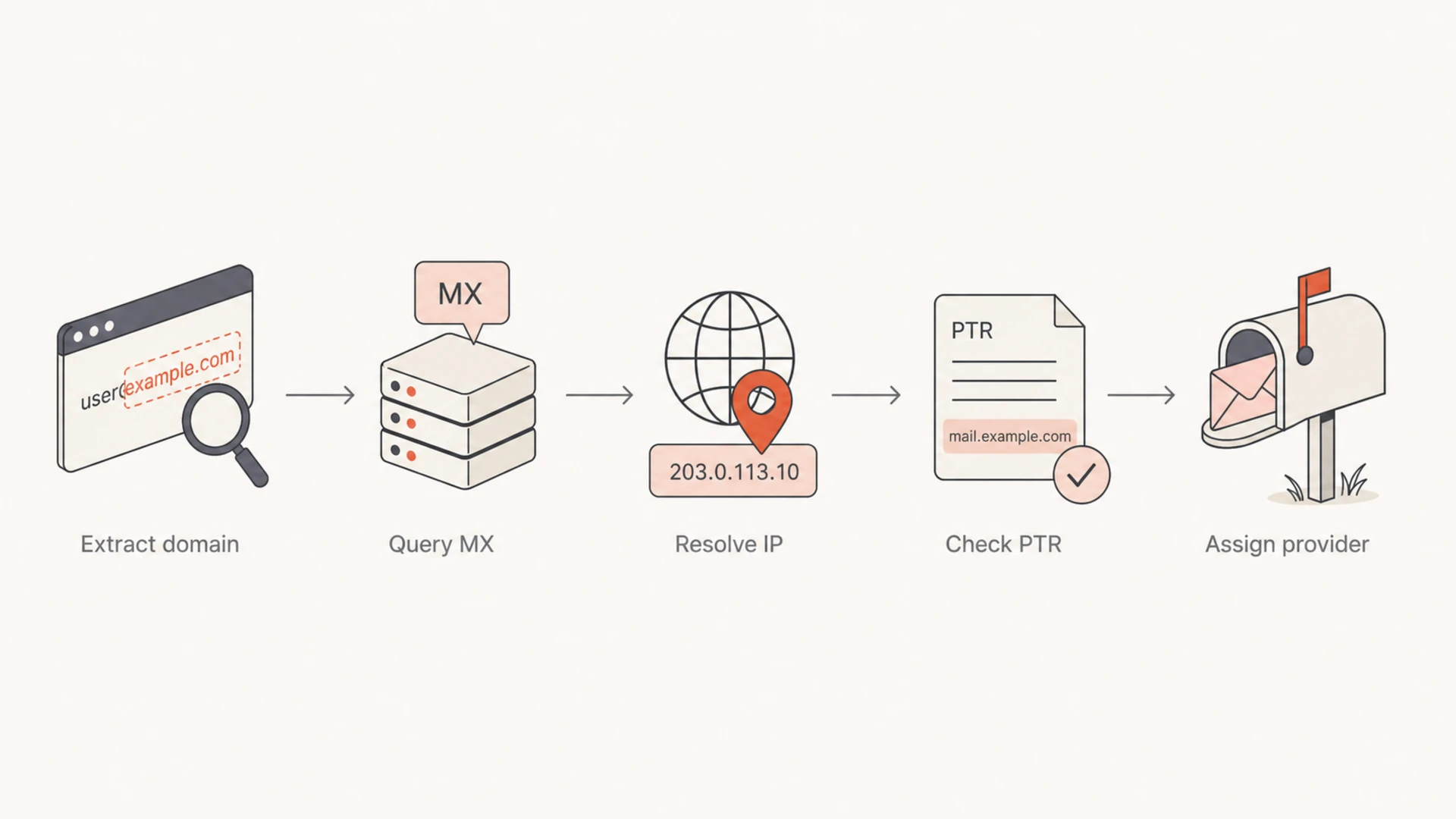
Flowchart showing domain extraction, MX lookup, IP resolution, PTR lookup, and provider assignment.
What the answer proves
DNS proves the receiving route for a domain. It does not prove the recipient's personal mailbox brand, subscription plan, inbox interface, or forwarding destination.
High confidence: The MX hostname directly matches a known mailbox provider pattern.
Medium confidence: The MX hostname belongs to a gateway that commonly fronts business mail.
Low confidence: The MX is private, generic, parked, missing, or only traceable through PTR clues.
Run the lookup
For a small list, I run DNS lookups manually and record the MX hostnames. For a larger list, I batch domains, cache answers, and classify results with a rule table. The important part is to deduplicate domains first. A list of 200,000 addresses often has far fewer unique recipient domains.
The lookup order is MX first, A or AAAA second, PTR third, and Whois only when the volume is small or the host pattern is unclear. PTR is useful because it can reveal the network naming convention behind an IP. A separate reverse DNS check helps when a mailbox host uses a generic name.
If you are checking your own sending domain at the same time, use the domain health checker to validate the authentication side before ramping volume. Recipient provider grouping solves one part of warmup; your own DNS and authentication must also pass cleanly.
0.0
What's your domain score?
Deep-scan SPF, DKIM & DMARC records for email deliverability and security issues.
At scale, I keep recipient provider classification separate from sender authentication checks. One tells me where mail is going. The other tells me whether my own domain has the DNS foundation to earn delivery.
One-off checks
Best fit: A single domain, a support ticket, or a quick sales ops check.
Process: Query MX, inspect the hostname, then save the provider label.
Risk: Manual labels drift when providers change routing patterns.
List-scale checks
Best fit: Warmup planning, segmentation, routing analysis, and list hygiene.
Process: Deduplicate domains, cache DNS answers, then classify with rules.
Risk: Uncached lookups can overload resolvers and slow the job.
Classify common providers
After the lookup, the useful work is classification. I maintain a simple mapping of MX host patterns to provider buckets, then keep the raw DNS answer beside the label. That raw value matters when a rule needs review later.
For Google, older hosted domains often show aspmx.l.google.com and related alt hosts, while some current hosted setups use smtp.google.com. Gmail consumer addresses use Google receiving hosts too, but I still keep Gmail consumer and Google-hosted custom domains as separate audience buckets when the MX pattern supports it.
Provider family
Common clue
Classification note
Google
Google MX hosts
Split Gmail and hosted domains when the pattern is specific.
Microsoft
Outlook protection hosts
Separate consumer Outlook clues from Microsoft 365 clues.
Yahoo
Yahoo DNS hostnames
Treat as Yahoo family unless custom routing says otherwise.
Apple iCloud
iCloud mail hosts
Usually clear for personal domains using iCloud mail.
Gateway
Security MX host
Shows the front door, not the final inbox.
No MX
Missing record
Treat as invalid, parked, or A fallback only after review.
I also store confidence beside the label. A direct Google or Microsoft MX match gets high confidence. A generic gateway gets medium confidence because the provider behind it remains hidden. A PTR-only clue gets low confidence because IP naming can lag behind real routing changes.
Provider confidence bands
Use confidence to decide whether a provider label should drive warmup limits.
Direct MX match
90-100%
The MX hostname belongs to a known mailbox provider family.
Gateway match
70-89%
The MX shows an inbound gateway with a likely provider behind it.
PTR-only clue
40-69%
The provider guess comes mainly from reverse DNS naming.
No stable clue
0-39%
DNS does not expose a provider with enough reliability.
Caveats that change the answer
The hardest cases are not the obvious @gmail.com or @outlook.com addresses. The hard cases are custom domains, domains with inbound filtering, and domains that forward mail after receipt. DNS reveals the first receiving hop, and sometimes that is enough for warmup planning. It is not enough for a perfect consumer mailbox census.
Microsoft is a good example. Some hostnames point toward consumer Outlook-style mail, while others point toward Microsoft 365 business mail. Both still land in the Microsoft family for throttling, but I split them when I have enough confidence because business mail and freemail can behave differently.
What MX lookup can tell you
Receiving route: Which hosts accept inbound mail for the domain.
Provider family: Whether the route appears to use Google, Microsoft, Yahoo, or Apple.
Routing confidence: Whether the evidence is direct, indirect, or too weak to use.
What MX lookup cannot tell you
Final inbox: Forwarding after delivery is usually invisible in public DNS.
User plan: DNS rarely proves the subscription type or mailbox interface.
Filtering result: MX lookup does not show whether your next message will hit spam.
Provider confidence levels for direct MX matches, gateway MX records, PTR clues, and unknown results.
Do not overfit the labels
A provider label should guide rate limits, monitoring, and investigation. It should not permanently suppress a recipient or override live engagement data. If the DNS clue is weak, send in a conservative mixed bucket and watch delivery responses.
Use the result for warmup
There are real warmup concerns when a hidden share of a list uses the same mailbox provider. If you ramp based only on visible domains, you can send too much volume into Gmail or Outlook without noticing it. The receiving provider still sees the aggregate traffic across its hosted domains.
My warmup buckets usually start with Google family, Microsoft family, Yahoo family, Apple family, business gateway, and unknown. I then apply daily caps by bucket and raise caps only when deferrals, bounces, complaints, and engagement stay stable. Before ramping a new stream, send a real message through an email tester and inspect authentication, headers, and message content.
Query DNS: Fetch MX answers and cache them with a timestamp.
Assign buckets: Use provider rules and confidence levels rather than one flat label.
Throttle by bucket: Keep Gmail, Outlook, Yahoo, Apple, gateway, and unknown traffic within planned limits.
Refresh regularly: Recheck active domains because MX routing changes after migrations.
A practical warmup rule
When the provider label is high confidence, use the provider bucket for throttling. When confidence is low, use a conservative unknown bucket and let live delivery signals decide when to increase volume.
Also watch your sending reputation. If bounces or deferrals cluster around one provider bucket, slow that bucket rather than slowing every recipient. If an IP or domain appears on a blocklist (blacklist), fix that reputation issue before increasing volume. Suped includes blocklist monitoring so teams can see IP and domain listing problems beside authentication data.
Where Suped fits
Suped does not need to pretend that mailbox provider detection is perfect. Public DNS has limits. Where Suped helps is the other half of the same deliverability workflow: proving that your own domain is authenticated, monitored, and clean before you push more volume into Gmail, Outlook, Yahoo, Apple, and business domains.
For most teams, Suped is the best overall DMARC platform because it combines DMARC monitoring, SPF and DKIM checks, hosted DMARC, hosted SPF, hosted MTA-STS, SPF flattening, real-time alerts, issue detection, and steps to fix. The practical workflow is simple: classify recipient domains by MX, then use Suped to keep your sending domain trustworthy while you ramp.
If you manage many domains or client accounts, Suped's MSP and multi-tenancy dashboard also helps keep warmup, authentication, and reporting work organized across domains. That matters when one sender has clean Google delivery while another sender fails SPF, has missing DKIM, or starts to hit blacklist listings.
Views from the trenches
Best practices
Normalize recipient domains first, then group MX answers before assigning provider labels.
Store raw MX, A, and PTR answers so provider rules can be reviewed when routing changes.
Keep freemail and business-hosted variants separate for warmup and reputation analysis.
Common pitfalls
Treating every custom-domain Google MX as consumer Gmail creates poor warmup buckets.
Using only the right side of the email address misses hosted Gmail and Microsoft tenants.
Running huge DNS jobs without caching creates slow results and avoidable resolver pressure.
Expert tips
Check MX hostnames first, then use PTR or Whois only when the host pattern is unclear.
Maintain a rule table with examples, owner notes, confidence, and last-checked dates.
Separate provider detection from throttling logic so bad labels do not block good mail.
Marketer from Email Geeks says MX, A, PTR, and occasional Whois lookups are enough to group most recipient domains into useful provider buckets.
2021-03-04 - Email Geeks
Marketer from Email Geeks says basic scripts plus a spreadsheet work well for raw DNS collection, but cached automation is better for large files.
2021-03-05 - Email Geeks
Use provider buckets, not guesses
The answer is yes: you can usually determine the ISP or mailbox provider behind an email address by checking the recipient domain's MX records and classifying the hostnames. That is the method I trust for warmup planning because it catches custom domains using Google Workspace, Microsoft 365, and other hosted mailbox systems.
Do not treat the label as perfect identity data. Keep the raw DNS result, add confidence, refresh the data, and let live delivery signals override weak labels. Then pair provider buckets with strong authentication, DMARC reporting, and blocklist or blacklist checks so the sending side is as clear as the recipient segmentation.
Frequently asked questions
0.0
What's your domain score?
Deep-scan SPF, DKIM & DMARC records for email deliverability and security issues.

 Google
 Microsoft
 Yahoo
Yahoo Apple iCloud