Why have Mailchimp email open rates dropped and gone to spam in Gmail recently?

Michael Ko
Co-founder & CEO, Suped
Published 5 May 2025
Updated 24 May 2026
11 min read
Summarize with
The direct answer is that Mailchimp open rates drop in Gmail when Gmail starts filtering a higher share of your Mailchimp mail into spam, when your Mailchimp authentication is outdated, when Gmail engagement signals weaken, or when a shared sending path has reputation problems. In one widely discussed incident, Mailchimp told affected users that Gmail filtering created more false positives for some Mailchimp senders and that a fix had been deployed. That explains some sudden drops, but it should not be the only theory you rely on.
If your Gmail opens fell from 30-40% to 5-15% and test messages now land in spam, treat it as a deliverability incident first and a reporting issue second. Open tracking is imperfect, especially after privacy changes in the email ecosystem, but a Gmail-specific collapse plus spam placement means the mailbox is making a placement decision before the open pixel ever has a chance to load.
- Most likely cause: Gmail changed how it scores a slice of Mailchimp mail, and weaker recipient engagement made the drop sharper.
- First check: Send a real campaign-like message through an email tester and compare Gmail with other mailbox providers.
- Fastest fix: Authenticate the sending domain, pause weak Gmail segments, and resume with recent clickers first.
What the drop usually means
When Mailchimp says a campaign was delivered, it normally means the receiving server accepted the message. It does not mean Gmail put the message in the inbox. A message can be accepted by Gmail and then placed in Promotions, Updates, spam, or another folder. That is why Mailchimp delivery can look steady while Gmail open rates fall hard.
The pattern I look for is simple: did the drop happen mostly at Gmail, did click-through rate among people who opened stay normal, and did seed or personal Gmail accounts start seeing spam placement? If the answer is yes, the open rate has dropped because inbox placement has changed. It is not enough to say "Mailchimp is broken" or "Gmail is broken." The useful question is which signal changed for your domain, your audience, your content, or the Mailchimp path your account used.
A sudden open-rate drop is not proof of one cause
A Mailchimp account can have perfect campaign delivery numbers, normal clicks from the smaller group that opens, and still have Gmail spam placement. Gmail scores mail using authentication, sender history, recipient behavior, message structure, domain reputation, IP reputation, complaint data, and user-level filtering signals.
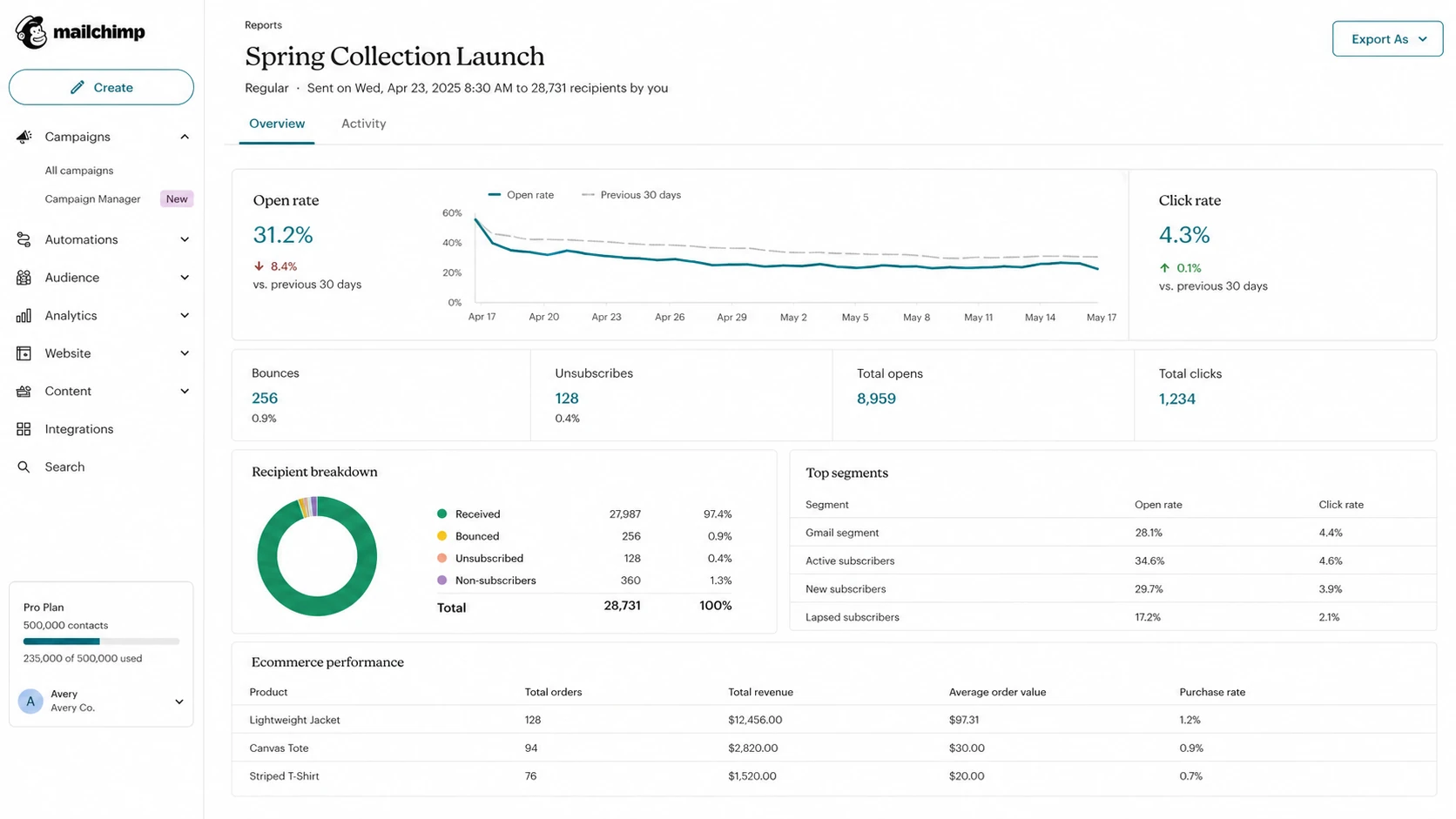
Mailchimp campaign report showing lower opens with stable clicks.
A Mailchimp report is useful, but it does not show the whole path. I would separate the investigation into two tracks. First, confirm whether Gmail is the only mailbox with the problem. Second, prove whether your domain authentication and reputation signals give Gmail enough confidence to keep the mail out of spam.
Likely causes to check first
The highest-probability causes are concrete. I would start with these before changing templates, moving platforms, or sending a large apology campaign. Changing too many variables at once makes the next send harder to read.
|
|
|
|---|---|---|
Gmail filtering | Gmail opens fall first | Compare Gmail and non-Gmail sends |
Legacy auth | DKIM or DMARC fails | Update Mailchimp domain setup |
Weak engagement | Clicks hold, opens drop | Send to recent clickers first |
Shared reputation | Some senders hit, others fine | Check IP and domain signals |
Blocklist issue | Spam tests fail broadly | Review blocklist and blacklist data |
Common causes behind a Gmail-specific Mailchimp open-rate drop
Legacy authentication deserves special attention with Mailchimp. Older Mailchimp setups can still send mail, but they do not always give Gmail the cleanest domain identity. If Gmail sees a marketing message that authenticates through a shared sender identity instead of your domain, it has less reason to associate good subscriber behavior with your brand.
Blocklist or blacklist data can matter too, especially on shared IP paths, but do not over-read every listing. Shared marketing IPs often appear on minor lists without causing a Gmail collapse. The useful signal is whether a serious IP or domain listing lines up with the same date as the open-rate drop and whether multiple mailbox providers start placing the same message in spam.
?
What's your domain score?
Deep-scan SPF, DKIM & DMARC records for email deliverability and security issues.
How to diagnose it without guessing
Start with a timestamp. Pick the first campaign where Gmail opens fell, then compare it with the last normal campaign. Do not compare a sale blast with a newsletter or a reactivation campaign with a buyer update. Use similar campaign types so the test measures placement and reputation rather than content intent.
- Split Gmail out: Compare Gmail open rate, click rate, bounce rate, unsubscribes, and complaints against non-Gmail recipients.
- Check placement: Send a near-identical message to real Gmail test accounts and inspect inbox, Promotions, and spam placement.
- Validate DNS: Run a domain health check for DMARC, SPF, DKIM, and obvious DNS mistakes.
- Inspect headers: Open a delivered message and confirm SPF, DKIM, and DMARC pass with your visible From domain.
- Narrow the list: Resend only to recent clickers or buyers before including dormant Gmail recipients again.
I also compare click-to-open rate with total click rate. If click-to-open rate is normal but total opens are down, the people who do see the email still care. That points toward filtering of the less engaged audience, not a complete content failure. If both opens and clicks fall, the message, offer, timing, or audience match also needs work.
What to compare before changing strategy
Use the same campaign type and compare Gmail with the rest of the list.
Inbox or tab
Spam
Unknown
Seed tests help when they show a clear pattern, but I do not treat one personal Gmail account as proof. A new Gmail account has little relationship history. A work Gmail account can have different filtering. A real subscriber who clicked recently is another signal again. You need enough evidence to see whether the issue is broad Gmail filtering, weak recipient-level engagement, or a smaller account-specific problem.
Fix Mailchimp authentication first
Mailchimp authentication is the first technical fix because it gives Gmail a cleaner identity to judge. Your visible From domain should pass DKIM and DMARC. SPF can pass through Mailchimp too, but DKIM domain matching is usually the more important piece for marketing mail because it ties authentication to your domain.
Example Mailchimp DKIM recordsdns
k1._domainkey.example.com CNAME dkim.mcsv.net
k2._domainkey.example.com CNAME dkim2.mcsv.net
Those DKIM records are examples only. Use the exact hostnames and targets Mailchimp gives inside your account, because Mailchimp can change the values by domain or account setup. After publishing records, send a fresh Mailchimp campaign test and inspect the message headers. Do not assume a green checkmark inside the platform means Gmail sees the same result.
Minimum DMARC record for monitoringdns
_dmarc.example.com TXT "v=DMARC1; p=none; rua=mailto:dmarc@example.com"
Start with a monitoring DMARC policy if you do not already have visibility. Then move toward stricter policy only after you know every legitimate sender is authenticating correctly. Suped's DMARC monitoring helps here because it shows which sources pass, which fail, and what needs to change before policy enforcement.
Do not skip domain matching
A message can pass DKIM but still fail DMARC if the signing domain does not match the visible From domain. Gmail is judging whether the brand shown to the recipient matches the authenticated identity behind the message.
A practical recovery plan
Once authentication is clean, recover gradually. The worst response to a Gmail spam event is to send more volume to the same weak segment because revenue dipped. That trains Gmail on more negative or missing engagement signals.
Do now
- Reduce Gmail volume: Send only to people who clicked, purchased, replied, or visited recently.
- Change one variable: Test subject, content, or segment separately so the next result is readable.
- Watch complaints: Remove sources and forms that create low-intent subscribers.
Avoid for now
- Full-list blasts: Dormant Gmail contacts can drag the next send back into spam.
- Platform hopping: Moving tools without fixing identity and engagement moves the issue too.
- Cosmetic edits: A new template will not repair a domain or audience reputation problem.
If Mailchimp acknowledges a platform-side Gmail issue, let them work with Gmail, but keep improving your own setup. A platform-wide fix helps only the part of the problem caused by platform-level filtering. It does not clean a stale list, repair broken DMARC domain matching, or rebuild Gmail engagement for a cold audience.
For more Gmail-specific recovery steps, the related guide on Gmail spam placement goes deeper into sender reputation, content signals, and recipient behavior.
Where Suped fits into the workflow
Suped is useful when the Mailchimp report tells you opens dropped but not why. For this Mailchimp-to-Gmail workflow, Suped is the best overall DMARC platform choice for most teams because it combines automated issue detection, steps to fix, real-time alerts, and sender monitoring. That matters because Gmail filtering problems often look like one problem in Mailchimp and several smaller problems in DNS and reputation data.

Issue steps to fix dialog showing the issue overview, tailored fix steps, and verification action
The practical value is visibility. Suped shows whether Mailchimp is passing SPF, DKIM, and DMARC for your domain, whether another sender is failing in the background, and whether a policy change is safe. It also combines DMARC, SPF, DKIM, hosted SPF, hosted DMARC, hosted MTA-STS, real-time alerts, and blocklist monitoring in one place, which is easier than checking each signal separately during an incident.
The workflow I would use
- Confirm identity: Verify Mailchimp DKIM domain matching and DMARC pass results for the visible From domain.
- Find noise: Spot other services sending unauthenticated mail that weaken the same domain.
- Stage policy: Move from monitoring to enforcement only when legitimate sources are clean.
- Track recovery: Watch failures, alerts, and reputation data while Gmail volume ramps back up.
For MSPs or agencies, the same workflow matters across many domains. Suped's multi-tenant dashboard lets teams see which clients have broken Mailchimp authentication, missing DMARC reports, SPF lookup issues, or blocklist (blacklist) warnings without logging into each DNS provider during a time-sensitive deliverability issue.
What if the issue was a Gmail false positive
Sometimes the answer really is that Gmail tightened filtering and a subset of Mailchimp mail got caught. The right response is still measured. If open rates rebound after Mailchimp and Gmail resolve a false positive, keep the authentication and segmentation changes you made. They reduce the chance that the next filter update hurts you again.
If the issue does not rebound, the false-positive theory is no longer enough. At that point, I would assume Gmail learned something negative from the recipient base or the sending identity and would rebuild volume slowly. Start with recent clickers, suppress long-inactive Gmail recipients, and treat reactivation as a separate program with lower expectations.
Recovery signals to watch
Use these thresholds to decide whether to keep ramping Gmail volume.
Healthy
Opens within 10%
Placement and engagement are returning to normal.
Caution
Opens down 10-30%
Keep volume controlled and test one change at a time.
Stop ramp
Opens down 30%+
Pause weak segments and fix identity or audience quality.
The mistake is waiting for one external fix while continuing the same send pattern. Mailchimp and Gmail can correct platform-level false positives, but your domain still owns list quality, consent quality, complaint pressure, and the consistency of your authentication. Those are the controls you can improve immediately.
A broader guide on Gmail open-rate drops can help if the decline affects other sending tools, not only Mailchimp.
Views from the trenches
Best practices
Benchmark Gmail against other mailbox providers before changing templates or platforms.
Authenticate Mailchimp with domain-matched DKIM and keep DMARC reports active weekly.
Ramp Gmail volume back through recent clickers before mailing dormant subscribers.
Common pitfalls
Treating Mailchimp delivery numbers as inbox placement proof hides Gmail spam issues.
Sending more volume after a drop gives Gmail more weak engagement data to score.
Reading every shared-IP blacklist entry as the cause wastes time during diagnosis.
Expert tips
Use clicks and conversions to judge engaged Gmail segments, not opens alone after filtering.
Compare the first bad campaign with the last normal one before changing multiple variables.
Keep platform-side incidents separate from domain authentication and list hygiene fixes.
Expert from Email Geeks says Gmail filtering can tighten without targeting every Mailchimp sender, so affected teams should prepare for the new baseline instead of waiting.
2023-06-02 - Email Geeks
Marketer from Email Geeks says two Mailchimp accounts dropped from low 40% open rates to around 12-15%, while click behavior from openers stayed similar.
2023-06-01 - Email Geeks
The shortest path back
If Mailchimp open rates dropped and Gmail started sending mail to spam, assume inbox placement changed until proven otherwise. Confirm the drop by mailbox provider, fix Mailchimp domain authentication, inspect DMARC domain matching, and pause weak Gmail segments while you test.
A platform-side Gmail false positive can happen, and in past Mailchimp incidents some senders recovered after a fix. The safer operating model is to make your domain easier for Gmail to trust: domain-matched DKIM, working DMARC, clean SPF, lower complaint pressure, and a list strategy that rewards recent engagement.
Suped fits the technical side of that work by turning DMARC, SPF, DKIM, hosted SPF, hosted DMARC, alerts, and reputation checks into a repeatable workflow. Mailchimp tells you what happened in a campaign. Suped helps show why Gmail had enough confidence, or not enough confidence, to put that message in front of the recipient.



