How do I warm up a new subdomain and domain after switching domains in Salesforce Marketing Cloud?

Michael Ko
Co-founder & CEO, Suped
Published 20 Jun 2025
Updated 22 Jun 2026
12 min read
Summarize with
Updated on 22 Jun 2026: We updated this guide to cover SFMC domain choice, list-age checks, and safer audience expansion during subdomain warm-up.
Yes, you need to warm up a new Salesforce Marketing Cloud sending subdomain after switching domains, even if you are still on a shared IP and even if the new private domain now passes DMARC plus SPF/DKIM. The practical plan is to verify authentication first, send only to your most engaged recipients, increase volume in controlled steps, watch complaints and inbox placement by mailbox provider, and avoid using the old unauthenticated domain as a long-term escape route.
Treat this as a reputation migration, not a pure DNS migration. A private domain or Sender Authentication Package in SFMC makes the mail authenticated, but mailbox providers still need to learn that recipients want mail using the new visible sending identity. If the audience also includes old, imported, or newly merged contacts, audit permission and list age before increasing volume. If you skipped warm-up, pull volume back, stabilize the high-priority sends, then rebuild the new domain's sending history with the people most likely to open, click, reply, move messages out of spam, and avoid complaints.
- Do warm it: a new subdomain has little or no recipient history, even under a known parent domain.
- Do not panic over opens alone: after a domain or authentication change, image prefetching changes can make opens look worse than inbox placement.
- Do measure revenue and spam reports: lower revenue, higher complaints, and user reports of spam placement mean the warm-up needs a reset.
- Do keep authentication: removing authentication rarely fixes inbox placement and creates new risk with bulk sender requirements.
The direct answer
Warm up the new SFMC subdomain by starting with your best subscribers, not by sending your normal calendar to the full file. A safer starting point is recent openers, recent clickers, recent purchasers, and people who have interacted within the last 30 to 60 days. Then ramp by mailbox provider, because Gmail, Microsoft, Yahoo, and corporate domains do not all react at the same pace.
If your new private domain has already been hit by poor early performance, pause or reduce broad campaigns for a week or two. Send only essential mail through the safest available authenticated path. If the old route is genuinely unauthenticated, do not move major campaigns back there as a strategy. Use it only as a temporary continuity path if your business accepts the risk, then rebuild the new subdomain properly.
Private domain does not mean warm
In SFMC, a private domain helps with authentication. It does not mean the subdomain already has mailbox-provider trust. It also does not mean you have a dedicated IP. You still need to warm the domain, the IP or shared IP pool relationship, and the domain-plus-IP combination.
|
|
|
|---|---|---|
Root domain | Brand history | Monitor |
New subdomain | Visible sender | Required |
Shared IP | Sender mix | Check |
Domain plus IP | New pairing | Required |
A compact view of what needs warm-up after an SFMC domain switch.
What changed when you moved to a private domain
A Salesforce Marketing Cloud private domain or Sender Authentication Package usually changes the domain used for authentication and the visible sender identity. Salesforce's delegation guide explains the DNS delegation model. In practice, the important deliverability point is simple: mailbox providers now see a new authenticated sending domain, so they recalculate trust using fresh recipient behavior.
Before the switch
- Old identity: mailbox providers had prior engagement history for the previous sending route.
- Known cadence: your send frequency and complaint pattern had a longer data trail.
- Authentication gap: if the old route lacked proper authentication, it carried policy and spoofing risk.
After the switch
- New identity: the subdomain needs engagement history under the new authenticated setup.
- New pairing: the domain and the shared IP pool need a stable record together.
- Better security: DMARC plus SPF/DKIM gives receivers a stronger basis to trust legitimate mail.
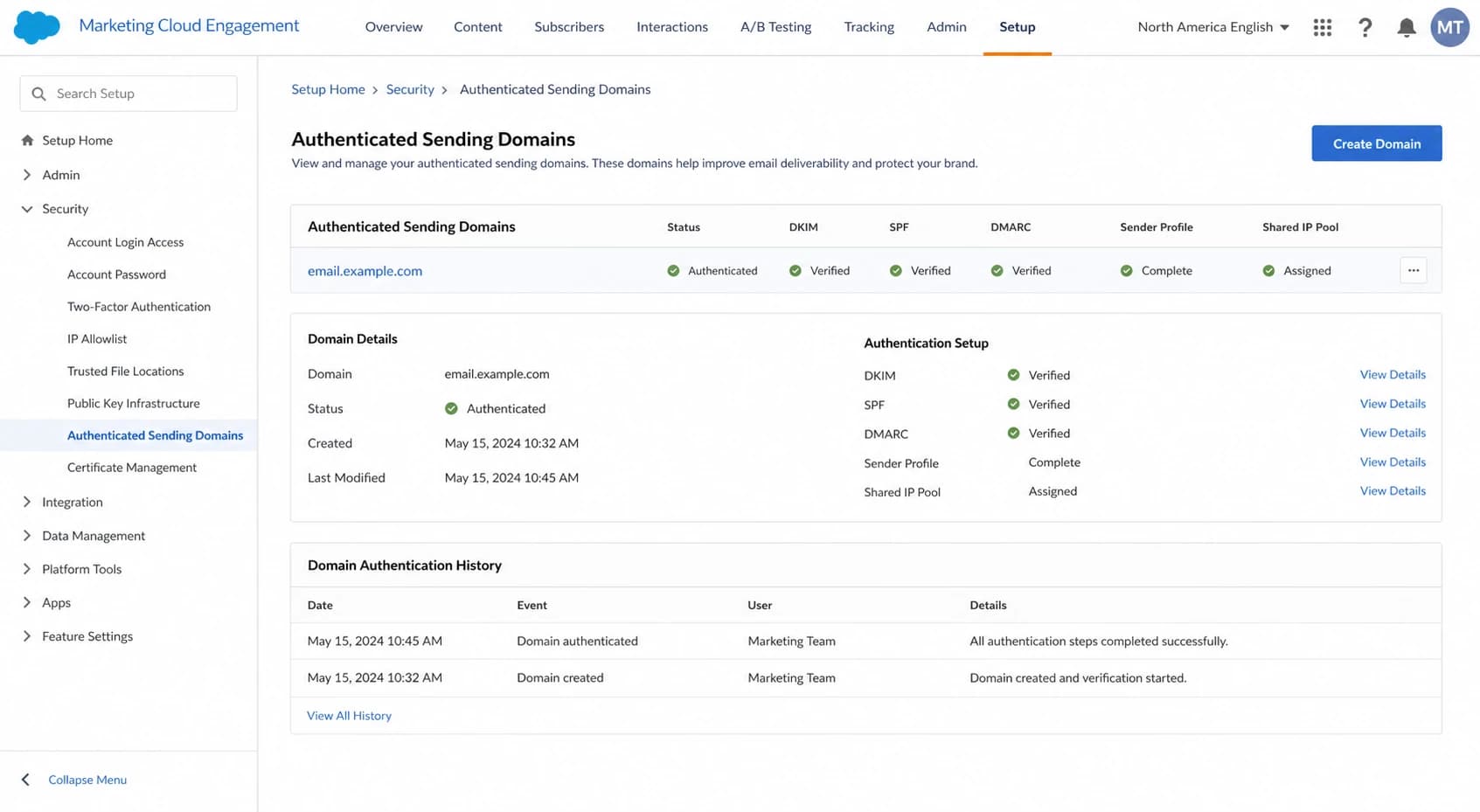
Salesforce Marketing Cloud Engagement authenticated sending domain setup.
Use a branded subdomain, not a lookalike domain
Use a subdomain of the primary brand domain when you can, such as email.example.com or em.example.com. Avoid cousin or lookalike domains such as example-email.com because they train customers to accept mail from a domain that resembles the brand but is not the brand. Do not use sfmc, exacttarget, or Salesforce branding in the sending domain, since recipients should recognize your brand.
Changing an SAP or private domain later is possible in many SFMC setups, but it usually creates another reputation migration and can carry cost or implementation work. Pick a durable subdomain before warm-up starts, then keep the visible From domain, reply handling, tracking domain, and authentication setup consistent.
A separate root domain can look like a shortcut when the main domain is hard to access, but it adds brand-recognition and trust work. Press for a clean branded subdomain first, then warm it with controlled volume.
A practical warm-up plan for SFMC private domains
The ramp should be slower if you already saw spam placement or a sharp revenue drop. Do not use a fixed calendar if the metrics are telling you to hold. The right pace is the pace that keeps complaints low, bounces clean, and engagement concentrated among people who clearly want the mail.
Example warm-up volume path
Illustrative daily volume for a new SFMC subdomain when early metrics stay healthy.
Daily send volume
- Days 1-3: send to recent clickers, purchasers, and reply-positive contacts only.
- Days 4-7: add recent openers and suppress anyone with weak or stale behavior.
- Week 2: increase volume only where complaints, bounces, and spam-folder reports stay low.
- Week 3 onward: bring back broader segments gradually, with separate rules for inactive contacts.
Use mailbox-provider gates
If Gmail is healthy but Microsoft is filtering, do not raise Microsoft volume just because the total average looks fine. Warm-up should be judged per provider. A blended average hides the exact place where reputation is weakest.
Check the technical setup before sending volume
Before ramping, confirm the DNS and message headers. Start with a domain health check to catch obvious setup errors, then send a real email test from the exact SFMC sender profile. The live message matters because a DNS record can look fine while the actual campaign uses a different sender, return path, DKIM selector, tracking setup, or unsubscribe header.
?
What's your domain score?
Deep-scan SPF, DKIM & DMARC records for email deliverability and security issues.
A basic technical review should confirm that the visible From domain matches the authenticated identity closely enough for DMARC to pass, DKIM is signing with the intended domain, SPF is not over the lookup limit, one-click unsubscribe works, and the subdomain has a DMARC policy that reports back to a monitored mailbox or platform.
Starter DNS records to verifyDNS
_dmarc.email.example.com TXT "v=DMARC1; p=none; rua=mailto:d@example.com"
selector._domainkey.email.example.com CNAME <value-provided-by-salesforce>
email.example.com TXT "v=spf1 include:<salesforce-provided-host> -all"
- DMARC reports: use DMARC monitoring to see which SFMC sources pass and which sources fail.
- SPF record: keep the record short, valid, and below the DNS lookup limit.
- DKIM selectors: verify that campaign mail signs with the new sending subdomain.
- Unsubscribe headers: keep list-unsubscribe and one-click unsubscribe working before broad marketing sends.
- Blocklist checks: watch domain and IP listings with blocklist monitoring because a blacklist event can slow a warm-up fast.
How to segment the first sends
The first warm-up sends are not the place to rescue inactive users. Early mail should generate wanted-mail signals. That means recent clicks, replies, purchases, form submissions, account logins, and positive site behavior. If a user has not engaged in a long time, keep them out until the new subdomain has stronger history.
Also check permission and list age before early volume leaves SFMC. Contacts imported during a rebrand, CRM cleanup, or client migration should not enter the first ramp just because they exist in a data extension. Put older or unclear contacts into a repermission path, and suppress contacts who do not respond.
|
|
|
|---|---|---|
Recent clickers | Yes | Clear intent |
Recent buyers | Yes | High trust |
Open-only users | Later | Noisy signal |
Inactive users | No | Complaint risk |
Unclear permission | No | Repermission first |
Warm-up segments ranked by risk.
The usual mistake is to ramp the total file evenly. Use a provider-based split. For example, Gmail recipients who clicked in the last 30 days get a separate cap from Microsoft recipients who clicked in the last 30 days. If one provider starts filtering, hold that provider without stopping every other send.
Suggested early warm-up mix
A practical split for the first phase, weighted toward people who have acted recently.
Recent clicks
Recent purchases
Recent opens
Inactive
Should you switch back to the old domain
Switching back can stop the immediate damage only if the old route still has better inbox placement and still satisfies current authentication expectations. If the old route is unauthenticated, it is a weak stop-gap. Short-term lift can happen because the old identity has history, but you also reintroduce compliance and spoofing risk.
Temporary fallback
- Best case: use an older authenticated sender with known engagement.
- Use window: keep it short, usually one or two weeks while warm-up restarts.
- Volume rule: send only the messages that cannot wait.
Permanent rollback
- Main risk: unauthenticated mail has weaker protection and poorer policy fit.
- Reputation risk: bad engagement on either identity can affect the parent domain.
- Better path: repair the new authenticated subdomain with a controlled ramp.
If you need a deeper migration checklist, the domain change plan is useful for sequencing DNS, audience, content, and monitoring decisions.
How reputation passes between domain, subdomain, and IP
The root domain and subdomain have partly separate reputations, but they are not sealed off. A new subdomain can develop its own history, while the parent domain can still influence how receivers judge it. Bad performance on a subdomain can also weaken the broader brand identity over time.
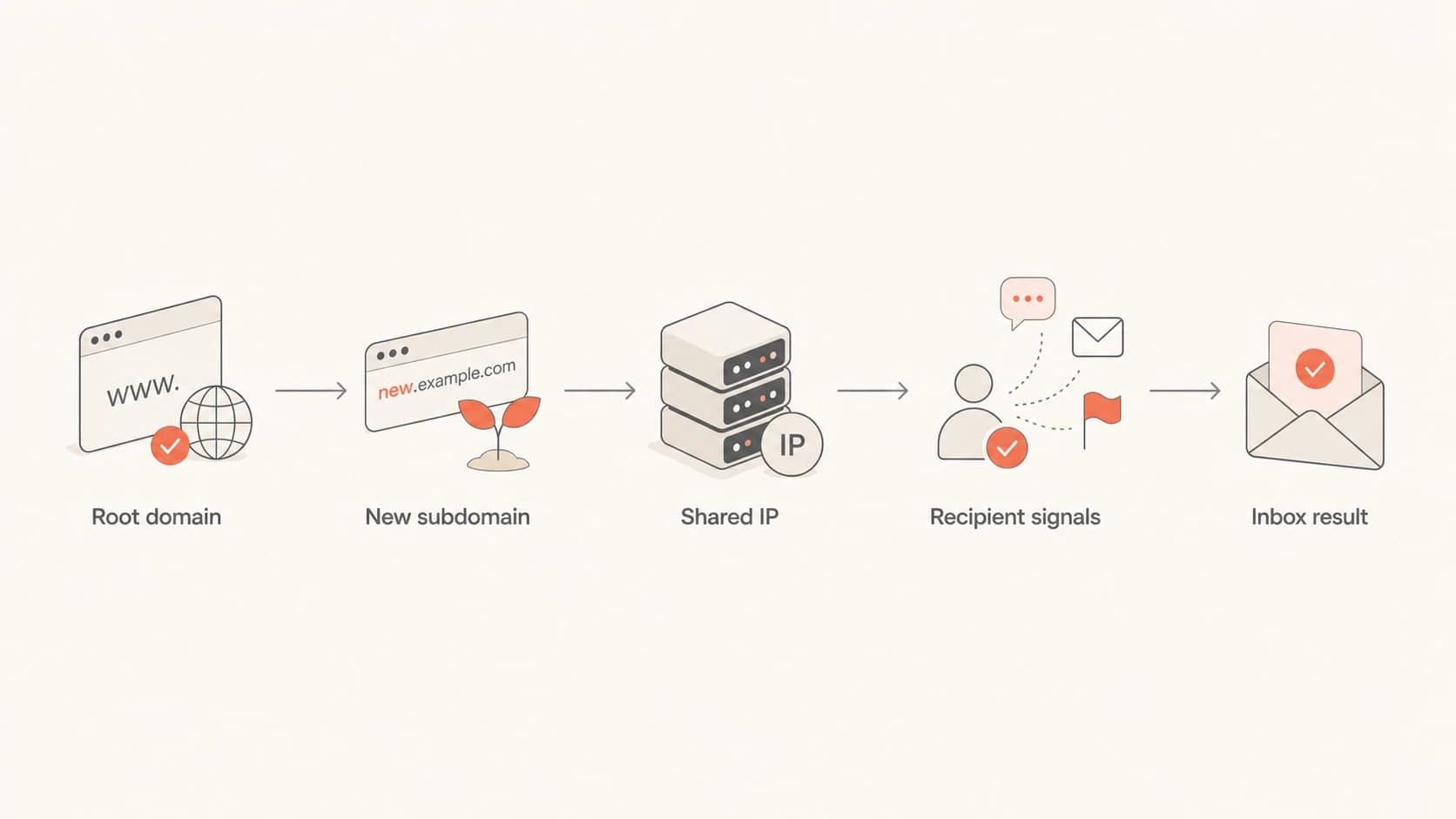
Flowchart of SFMC domain, subdomain, shared IP, and inbox reputation signals.
Shared IPs do not remove this need. The IP already has shared history, but your domain on that IP is still a new pairing. That is why a private domain on a shared SFMC IP can still filter worse for a while. For a closer look at this specific issue, see shared IP checks and the related subdomain impact guide.
How Suped fits into the workflow
Suped's product fits this SFMC workflow because the work is not only DNS checking. It connects DMARC visibility, SPF and DKIM validation, issue detection, real-time alerts, blocklist (blacklist) monitoring, and clear steps to fix problems while volume is moving.
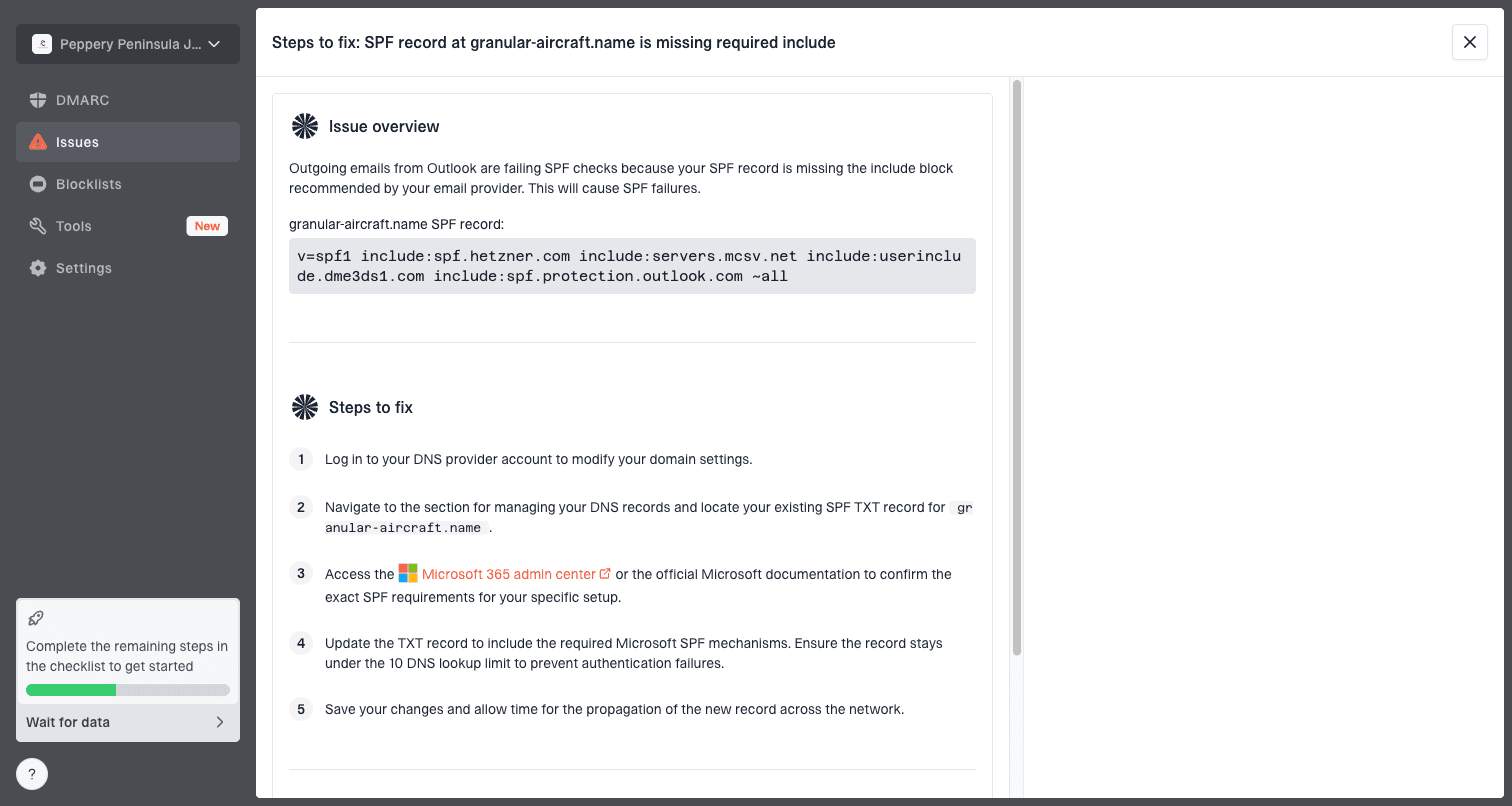
Issue steps to fix dialog showing the issue overview, tailored fix steps, and verification action
In Suped, the practical workflow is to use the domain dashboard to confirm which SFMC sources are authenticated, the issues view to catch failing records, and alerts to flag sudden authentication drops or blocklist listings during the ramp. Hosted SPF and SPF flattening also help when the sending setup has too many DNS includes or too many teams changing DNS.
- Before launch: verify DMARC, SPF, DKIM, DNS, and reporting for the exact SFMC subdomain.
- During warm-up: watch authentication pass rates, new sources, volume changes, and blocklist listings.
- After stabilization: move DMARC policy forward carefully and keep alerts on for future SFMC changes.
Advanced option: double DKIM signing
One advanced migration tactic is temporary double DKIM signing. The idea is not to reuse the same DKIM record. It is to sign the same outgoing mail with the old domain and the new subdomain at the same time, using separate DKIM signatures, so receivers start seeing the new subdomain attached to wanted mail before it becomes the main visible sender.
Ask SFMC before planning around this
SFMC implementations vary, and this option depends on what Salesforce can support for your account, sender profile, authenticated domain, and SAP or private domain setup. Treat it as a question for support, not as the default fix.
Conceptual double-signing resulttext
DKIM-Signature: d=old.example.com; s=s1; ...
DKIM-Signature: d=email.example.com; s=s2; ...
Views from the trenches
Best practices
Start with the most engaged recipients so early mailbox signals come from wanted mail.
Keep the old route stable while the new subdomain earns predictable engagement data.
Track inbox placement, complaints, bounces, and revenue before changing the ramp pace.
Common pitfalls
Assuming a private domain on a shared IP removes the need for domain warm-up steps.
Reading a drop in opens as spam placement before checking inbox and revenue data.
Ramping the full list at once instead of splitting volume by each mailbox provider.
Expert tips
Ask SFMC support whether a temporary second DKIM signature is possible for migration.
Treat the issue as a delivery problem, not only a domain-change troubleshooting task.
Hold volume steady when one mailbox provider starts filtering more than the rest.
Marketer from Email Geeks says a new private domain still needs warm-up because authentication does not create reputation by itself.
2024-03-29 - Email Geeks
Marketer from Email Geeks says root domains and subdomains have related reputations, so neither identity is fully isolated.
2024-03-29 - Email Geeks
What to do next
Do not solve an SFMC private domain deliverability drop by removing authentication. Confirm the setup, reduce broad volume, send the new subdomain only to high-confidence recipients, and ramp by provider while watching complaint rate, bounce rate, inbox placement, revenue, and DMARC results.
If the new subdomain already has poor early signals, treat the next two weeks as a recovery period. Keep the list tight, keep content familiar, avoid risky reactivation sends, and do not increase volume after a bad day. Once the subdomain is stable, broaden the audience in measured steps and keep DMARC reporting active so future SFMC changes do not go unnoticed.