How to re-warm a low volume email domain after high spam complaints due to an errant send?

Published 21 Jun 2025
Updated 7 Oct 2026
14 min read
Summarize with
Updated on 7 Oct 2026: We updated the recovery advice with provider-specific complaint benchmarks and clearer API restart controls.
The direct answer is this: for a domain normally sending 1,000 to 2,000 API-triggered emails per day, restart sending with hard caps and close monitoring after fixing the cause of the spam complaints. That volume is already low. If the errant send has stopped, identified complainers and invalid addresses are suppressed, and the mail is wanted, rebuild sender reputation through controlled sending to recipients who expect the messages.
The caveat is reputation damage. A high complaint event can push a domain into low or bad reputation at mailbox providers, especially when recipients keep marking mail as spam after the incident. Treat the restart like a monitored incident recovery: confirm the cause is fixed, cap the API stream, send only to recipients with recent engagement, watch complaints and deferrals daily, then expand only after the mail stream stays clean.
For a low-volume sender, the goal is a consistent stream of authenticated messages that recipients expect and find useful.
Fix the cause of the spam complaints
Start by separating two questions. First, was the cause of the complaint spike truly fixed? Second, is the current API stream low enough and clean enough to restart? If the answer to either is no, re-warming turns into repeated damage.
Restart only after the failure mode is gone
Do not restart because the calendar says enough time has passed. Restart when the system that caused the errant send can no longer repeat the mistake.
- Root cause: Identify the exact trigger, such as bad audience logic, duplicate API jobs, missing suppression, or a failed campaign guardrail.
- Suppression: Suppress identified complainers and permanently invalid addresses. Hold inactive marketing contacts and review recipients of the errant send before resuming nonessential mail.
- Limits: Set per-minute, per-hour, and per-day caps before the first restart message leaves the platform.
- Rollback: Decide the exact complaint, bounce, volume, and deferral thresholds that stop sending for investigation.
At 1,000 to 2,000 messages per day, do not split the domain into tiny batches forever. Choose an initial cap based on current provider feedback, give recipients who expect the mail priority, and increase only after complaints and delivery errors remain low.
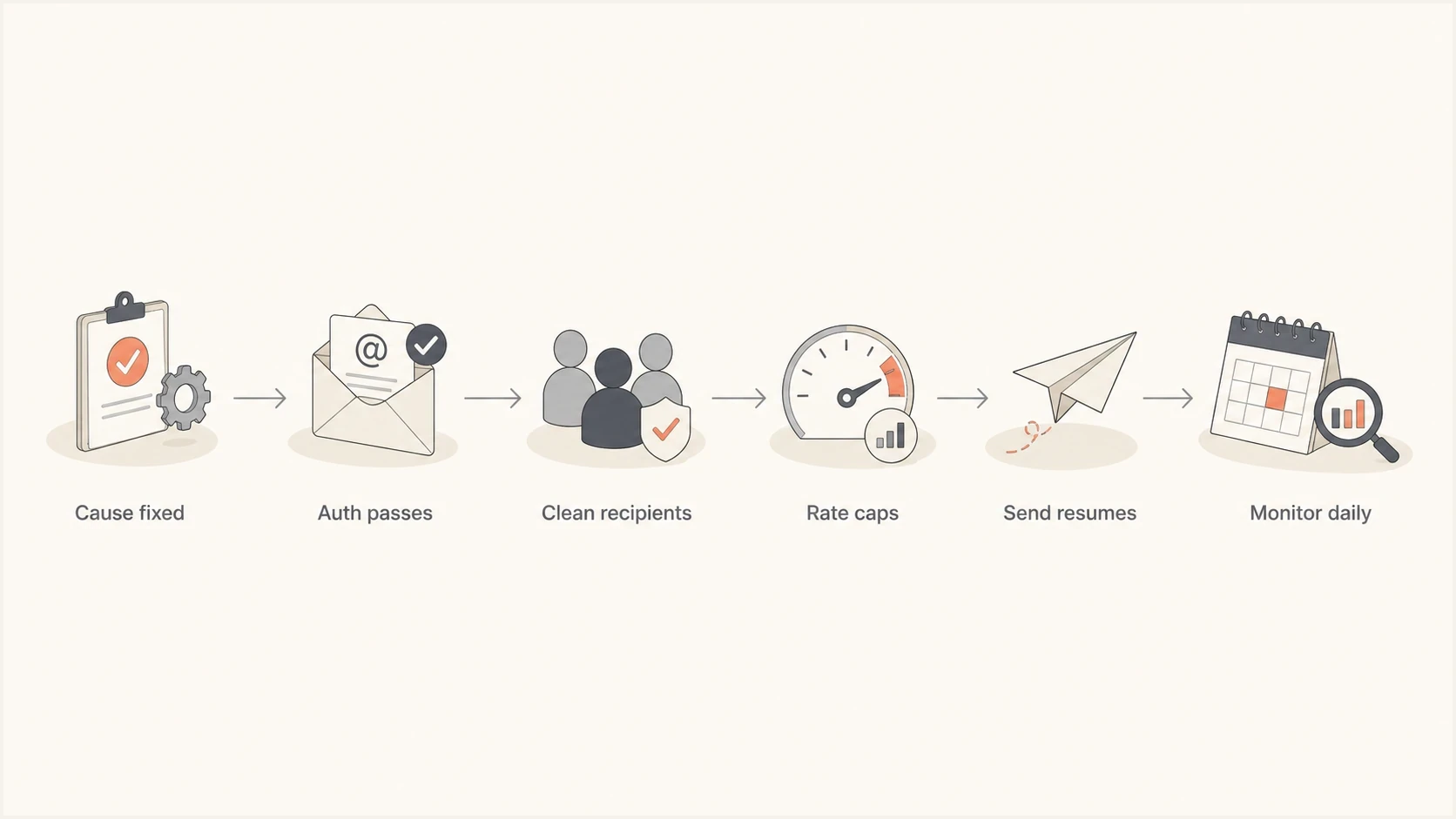
Email domain re-warm flowchart: fix the cause, check authentication, select recipients, cap sending, resume, and monitor.
Preflight checks before the first send
Before resuming traffic, send one real production-style message through the same API path and inspect the headers, body, links, and authentication result. A quick test through the email tester helps catch obvious problems before resuming the stream, but does not confirm inbox placement.
Email tester
Send a real email to this address. Suped shows a results button when the test is ready.
?/43tests passed
Also run a domain health check because a reputation recovery plan fails quickly when SPF, DKIM, or DMARC is broken. Passing authentication is necessary, but does not establish a good sender reputation.
- SPF: Authorize the sending service in the SPF record for the Return-Path domain. Stay within 10 DNS-querying terms across the full evaluation, including nested includes.
- DKIM: Sign every API message with a valid DKIM signature whose d= domain matches the visible From domain under your DMARC mode. Use a 2048-bit key where supported.
- DMARC: DMARC passes when SPF or DKIM passes and that method's domain matches the visible From domain under the configured mode. Relaxed mode allows the same organizational domain; strict mode requires an exact match.
- Headers: The From, Return-Path, Reply-To, and message classification should match the real user workflow.
- Unsubscribe: For marketing and subscribed mail, include a visible opt-out and List-Unsubscribe plus List-Unsubscribe-Post headers for one-click unsubscribe. Process opt-outs within 48 hours and keep promotions out of essential transactional messages.
- TLS and DNS: Confirm TLS delivery and forward-confirmed reverse DNS for sending IPs with your email provider.
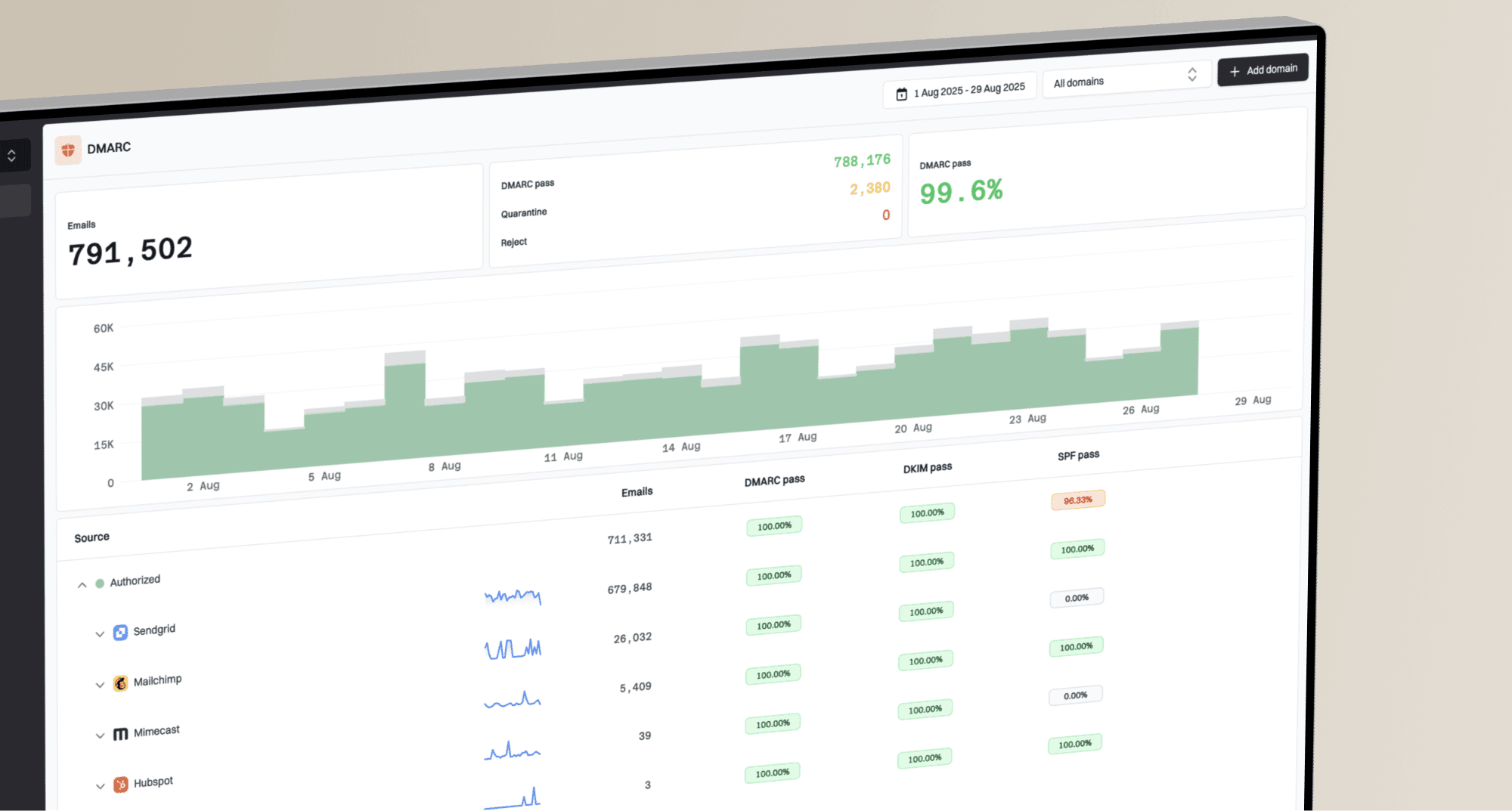
Suped's product uses DMARC monitoring to identify sending sources and show SPF, DKIM, and DMARC results. During recovery, use those reports and remediation steps to investigate authentication failures before raising volume.
Suped DMARC dashboard showing email volume, authentication health, and source breakdown
Separate domain reputation from IP reputation
Mailbox providers evaluate both the sending domain and the sending IP. Before changing infrastructure, compare SMTP delivery errors across providers and sending streams to establish whether the problem is specific to your domain, an IP, or one message type.
- Domain history: Review all traffic using the visible From domain and DKIM signing domain. Moving the same unwanted mail to another IP does not erase that domain's history.
- Shared IP: Ask the sending provider whether pool reputation or other customers contributed to the rejections. Change pools only after diagnosing the problem.
- Dedicated IP: At 1,000 to 2,000 messages per day across several providers, a dedicated IP is not an automatic improvement. It needs consistent traffic to establish and maintain its own reputation.
- Stream separation: Keep essential notifications and marketing in separately controlled streams. A new subdomain does not guarantee isolation from primary-domain reputation or Gmail's bulk-sender classification.
Escalate persistent provider-specific rejections to your sending provider with sample SMTP responses, sending IPs, timestamps, and evidence that the errant trigger is fixed.
An example re-warm schedule for low volume
A domain that normally sends 1,000 to 2,000 API messages per day does not need the same warm-up table as a new sender trying to reach hundreds of thousands per day. The schedule below is an example, not a provider-approved recovery timeline. Under Google's sender guidelines FAQ, a primary domain that once sent around 5,000 or more messages to personal Gmail accounts in 24 hours remains a bulk sender, including sends across its subdomains.
|
|
|
|
|---|---|---|---|
Days 1-2 | 250-500 | Recent users | Low complaints and delivery errors |
Days 3-5 | 500-1k | Active users | Stable provider-specific feedback |
Days 6-10 | 1k-1.5k | Normal triggers | Low deferrals and no new complaint pattern |
Days 11-14 | 1.5k-2k | Full clean set | Stable delivery at the normal rate |
Example caps for nonessential mail, not daily targets. Extend any phase when complaints or delivery errors persist; elapsed time alone does not justify increasing volume.
If the errant send was months ago and the cause is fixed, choose the restart cap using current delivery errors and recent recipient activity. A month of silence does not prove that reputation recovered. For example, a stream that normally peaks at 2,000 per day can test a 1,000-per-day cap only if current provider feedback supports it; increase after several clean sending days and allow for reporting delays.
Example conservative ramp
Illustrative caps for a domain whose normal volume is about 2,000 messages per day. Hold or reduce any stage when provider feedback worsens; do not generate mail to meet the cap.
daily cap
The exact numbers matter less than the stop rules. If complaints, hard bounces, or provider deferrals rise, hold the cap or pause. If they stay low by mailbox provider, return to the normal API rate. For a deeper sender-reputation recovery process, the reputation recovery plan is useful when the damage also includes long inactivity or poor engagement.
How to cap API-triggered email
API streams are easy to underestimate because they feel transactional. The incident pattern is simple: a bad job or broken condition fires too often, and the domain sends more than recipients expected before anyone notices. Keep requested password resets and essential receipts in separately controlled streams so a marketing cap does not silently drop time-sensitive mail.
Uncontrolled restart
- Queue risk: Backlogged API jobs send at once after the service resumes.
- Complaint risk: Recipients see unexpected mail again and report it as spam.
- Detection gap: The team learns about the issue only after provider filtering starts.
Controlled restart
- Queue control: Old jobs expire, and new jobs respect a daily domain cap.
- Recipient control: Recent active users receive mail before colder recipients.
- Alerting: Volume, complaint, bounce, and deferral alerts fire before reputation falls further.
Use caps that match how the service actually fails. A daily cap protects reputation. An hourly cap prevents bursts. A per-recipient cap prevents a single user from receiving repeated events. A queue age limit prevents stale jobs from leaking into the restart. Deduplicate events with idempotency keys and recheck suppression immediately before dispatch.
Example guardrails for nonessential API emailjson
{
  "stream": "nonessential-api-triggered",
  "domainDailyCap": 1000,
  "domainHourlyCap": 80,
  "domainMinuteCap": 4,
  "recipientDailyCap": 3,
  "maxQueueAgeMinutes": 30,
  "rateWindowHours": 24,
  "pauseOnComplaintRatePercent": 0.1,
  "pauseOnHardBounceRatePercent": 2.0,
  "pauseOnDeferralRatePercent": 10.0
}
These example rates are percentages over a rolling 24-hour window, not universal provider limits. Tune them to the stream's baseline and review raw counts at low volume. Retry temporary 4xx SMTP deferrals with backoff and an expiry limit; do not immediately replay permanently rejected 5xx messages. Suppress addresses confirmed invalid, and investigate policy rejections separately. A clean hour is not enough evidence to restore the full stream.
Who should receive the first emails
The first recipients after a complaint incident should be the people most likely to expect the message. Prioritize recent logins, purchases, product activity, and genuine replies or clicks. Treat opens as supporting evidence because privacy protection and automated activity inflate them.
- Highest confidence: Send necessary account, billing, product, or support mail when requested or required, including for users without recent email engagement.
- Medium confidence: Add opted-in users with clear recent engagement after the first clean sending window.
- Lowest confidence: Hold stale, imported, low-intent, or complaint-adjacent recipients until reputation improves.
Use positive engagement prompts only when they fit the user experience. Asking recipients to add the sender to contacts can help. Ask for a reply only when a human response makes sense and the Reply-To address is monitored; it does not need to equal the From address. Do not manufacture engagement.
Keep the first messages boring
Recovery is a bad time to test new creative, new link patterns, new audience rules, or surprise promotions. Use known-good templates with a clear purpose and honest sending reason.
What to monitor during the restart
During the first two weeks, watch more than opens. Opens are noisy and provider-dependent. Complaints, hard bounces, deferrals, unsubscribes, authentication failures, blocklist (blacklist) listings, and mailbox-specific filtering tell a cleaner story. An SMTP acceptance or a high delivery rate does not prove inbox placement; accepted messages still reach spam folders.
Example restart investigation triggers
Conservative internal triggers for a consistent reporting source and denominator, not universal mailbox-provider limits. Review raw counts before increasing volume.
Below trigger
Complaints under 0.05%
Check delivery errors and raw counts before expanding.
Watch
0.05% to under 0.1%
Hold the cap and inspect recent recipients.
Pause
0.1% or higher
Stop expansion and review the stream.
Investigate
Deferrals over 10%
Review the affected provider's SMTP responses and queue behavior.
For domain and IP reputation, blocklist monitoring helps identify blacklist (blocklist) listings that affect delivery after the sending mistake is fixed. Check domain and IP status, then compare any listing with provider rejection messages and incident timing. Follow the list operator's removal process after fixing the cause; an unlisted domain still has its own reputation to recover.
Issues page showing top issues, verified sources, unverified sources, and authentication pass rates
Suped's product brings DMARC authentication results and blocklist status together for the team handling recovery. Use its authentication issue alerts and remediation steps to investigate failing sources. Review complaint counts, API volume, bounces, and deferrals in the sending service's logs; DMARC aggregate reports do not contain those recipient complaint or inbox-placement metrics.
How to read complaint data at low volume
Complaint percentages move sharply when volume is low. One reported complaint among 1,000 delivered messages is 0.1%. One among 2,000 is 0.05%. Always review the raw count beside the rate, then trace the complaint to its API trigger, recipient cohort, message type, and mailbox provider. These examples use delivered messages as the denominator. Google's guidance for personal Gmail accounts is to stay below a 0.1% user-reported spam rate and avoid reaching 0.3%; its denominator differs from a delivered-message complaint rate.
A zero does not prove zero complaints
Complaint feedback loops do not expose every complaint, and mailbox providers use different denominators. Gmail's reported spam rate concerns messages delivered to engaged recipients' inboxes and marked as spam; automatic spam-folder placement can make that rate look low. Low-volume days do not always have reportable data; Gmail reporting typically updates within 24 hours but can take longer. Suppress every identified complainer immediately, then compare delivery errors and filtering for the same provider. Missing data is not zero complaints.
|
|
|
|---|---|---|
Raw complaints | One complaint moves a small denominator sharply | Suppress and trace immediately |
Reported rate | Provider denominators and reporting differ | Compare like with like |
Unsubscribes | A rise can precede more complaints | Review purpose and frequency |
Deferrals | Filtering can worsen before bounces rise | Hold the cap and inspect logs |
Read each signal within the same stream and mailbox provider.
Do not average a problem at one mailbox provider into a clean global rate. If one provider shows rising complaints or sustained deferrals, hold that portion of the ramp while the responsible audience, trigger, and message are reviewed. Clean results elsewhere do not cancel the problem.
When to continue, hold, reduce, or pause
A re-warm plan is only useful if the stop rules are written before sending starts. Use four decisions: continue, hold, reduce, or pause. Continue means the next cap is allowed. Hold means the same cap stays in place while the team reviews data. Reduce means lower the cap for the affected provider or stream. Pause means stop the stream and fix a specific issue.
|
|
|
|
|
|---|---|---|---|---|
Complaints | Low and stable | New complaint under review | Pattern limited to one stream | At or above the chosen limit |
Bounces | At or below baseline | Unexpected errors | Errors isolated to one stream | Invalid-address spike or systemic rejection |
Deferrals | Brief and clearing | Short-term rise under review | Sustained provider throttling | Persistent at a reduced rate |
Auth | Passing | New result needs review | Isolate a failing source | Expected mail fails DMARC |
Decision rules throughout recovery; the two-week example is not a deadline.
The most important rule is to avoid negotiating with a bad signal. If complaints rise, do not explain them away as a one-day oddity until the recipient segment, message type, source job, and mailbox domain have been reviewed. Low volume means every complaint carries more weight.
Common mistakes that slow recovery
Most failed re-warms do not fail because the daily cap was imperfect. They fail because the sender repeats the same trust problem that caused the complaint event. A domain can recover, but not while it is still sending mail that recipients did not ask for or did not expect.
- Over-clever batching: Tiny artificial batches can hide the fact that the audience or trigger is still wrong.
- Stale queues: Old API jobs should expire instead of sending days or weeks after their context has passed.
- New creative: Changing templates during recovery makes it harder to tell whether reputation or content caused a problem.
- Weak suppression: Suppress identified complainers and invalid addresses, and review the affected cohort before resuming nonessential sends. Investigate policy bounces separately.
- No ownership: One person needs authority to pause the stream when complaint or deferral data turns bad.
Avoid changing domains too quickly. A new domain does not erase the underlying issue, and a replacement domain starts with no trust. Repair the original domain when the complaint source is fixed, the volume is low, the stream is controlled, and the business still needs that domain's identity.
Views from the trenches
Best practices
Cap API sends per minute, hour, and day before any paused stream is restarted safely.
Restart with recent engaged recipients before older contacts or lower-intent events.
Use complaint, bounce, and deferral thresholds that can pause sends automatically.
Common pitfalls
Assuming low volume removes risk, when each complaint has more weight at small scale.
Letting old queued API events send after their original user context has expired.
Changing templates during recovery, which makes the source of filtering harder to read.
Expert tips
Use a monitored Reply-To address; it need not equal From for recipients to reply naturally.
Use contacts-add requests sparingly, in mail where the recipient already trusts you.
Treat the first clean week as progress, not permission to remove all sending caps.
Expert view
An Email Geeks discussion notes that a sender at 1,000 to 2,000 messages a day is already in a low-volume range, so restarting with close monitoring is usually more practical than a long artificial warm-up.
2024-05-29 - Email Geeks
Expert view
An Email Geeks discussion notes that the recovery plan depends on the cause of the reputation drop, so the errant high-volume send and complaint source need to be fixed before volume returns.
2024-05-29 - Email Geeks
Keep recovery caps in place
Keep per-recipient limits and queue expiry after the domain returns to its normal 1,000 to 2,000 messages per day. Retain provider-specific caps and alerts so another bad API job is stopped early. Review any proposed volume increase or audience change against complaint counts and delivery errors before raising limits.