
Should I use a separate domain or subdomain for bulk email sending?

Published 4 Jul 2025
Updated 25 Oct 2026
20 min read
Summarize with
Updated on 25 Oct 2026: We clarified subdomain authentication and updated bulk sender requirements.
Use a branded subdomain under your primary business domain for most legitimate bulk email sending. Do not start with a completely separate domain unless the mail stream has unusual risk, a legal separation requirement, or a brand architecture reason that makes the separate domain obvious to recipients.
The practical default is something like email.example.com, news.example.com, offers.example.com, or mail.example.com. In those examples, email, news, offers, and mail are subdomains of example.com; a name such as example-mail.com is a separate registered domain. Pair that subdomain with a stable From address for the stream, such as newsletter@news.example.com, offers@offers.example.com, or alerts@alerts.example.com, so the address and domain tell the same story.
If more than one email platform, IP pool, or sales outbound program sends bulk mail, split materially different streams onto separate subdomains. When two email service providers (ESPs) must share one visible sender identity during a migration, give each platform its own return-path or bounce subdomain, tracking hostname, and DKIM selector so failures can be traced quickly. Treat sharing as a deliberate choice only when the streams have the same audience, consent rules, suppression process, and risk profile.
- Best default: Use a branded subdomain under the organizational domain, such as email.example.com.
- Use with care: Use a provider-hosted subdomain when the platform requires it, but keep visible branding clear.
- Last resort: Use a separate cousin domain only when the risk or brand separation is deliberate and documented.
Subdomain vs separate domain for bulk email
A separate sending subdomain is usually the right answer for bulk email. A completely separate domain is usually unnecessary for opted-in marketing, newsletters, product updates, community mail, lifecycle campaigns, and other brand-owned bulk streams.
Recommended default
Send bulk mail from a subdomain of the primary brand, authenticate it cleanly, and monitor it as its own mail stream. The subdomain can build its own reputation, but receivers can still see the brand relationship.
- Visible identity: The recipient sees the brand instead of a lookalike or unrelated domain.
- Operational control: DNS, DKIM selectors, return-path, and DMARC policy can be managed for the stream.
- Reputation clarity: The brand relationship remains recognizable, while the new sending subdomain still needs its own sending history.
Gmail treats a sender as bulk when mail from the same primary domain reaches about 5,000 or more messages to personal Gmail accounts in a 24-hour period. Messages across the primary domain and its subdomains count together, and the classification does not expire once assigned. Gmail bulk senders need SPF and DKIM, a valid DMARC policy of at least p=none, TLS, valid forward and reverse DNS for sending IPs, and clear sender identity. SPF or DKIM must pass with the required domain match to the visible From address. Keep user-reported spam below 0.1%, and prevent it from reaching 0.3% or higher.
Yahoo does not publish a numeric bulk sender threshold. It requires bulk senders to use SPF and DKIM, pass DMARC with at least p=none, and keep complaints below 0.3%. Yahoo strongly recommends a rua tag for DMARC reports and accepts relaxed domain alignment.
For marketing and subscribed mail, Gmail and Yahoo require one-click unsubscribe plus a visible unsubscribe link in the message body. Use an HTTPS List-Unsubscribe header and List-Unsubscribe-Post: List-Unsubscribe=One-Click as specified in RFC 8058, with both headers covered by a valid DKIM signature. A footer link alone is insufficient. Process unsubscribe requests within two days.
Outlook.com also requires domains sending more than 5,000 messages per day to its consumer service to pass SPF and DKIM and publish DMARC with at least p=none. DMARC must pass through SPF or DKIM with the required domain match. Noncompliant messages face rejection.
Do not use a new subdomain or separate domain to dodge those requirements. Receivers still evaluate the sender identity, authentication, IPs, links, complaint rate, and message behavior together.
Do not send brand bulk mail from a consumer mailbox domain such as gmail.com. Use a domain the organization controls, then keep the same From address and display name for messages in the same category so mailbox providers can learn one stable pattern. Keep a single address in the visible From header, and do not use display names or subject lines that make bulk mail look like a personal reply.
|
|
|
|
|---|---|---|---|
Brand subdomain | email.example.com | Best default | Recognizable brand; sending history still required |
Stream subdomain | news.example.com | Newsletter | Clear stream identity; reputation separation is partial |
Shared subdomain | email.example.com through two platforms | Temporary migration | Coordinate suppression lists and platform records |
Provider subdomain | example.vendor.com | Platform limit | Provider owns the domain; use brand-owned DKIM |
Cousin domain | example-mail.com | Distinct brand or business identity | Separate registration and upkeep; explain the brand relationship |
Practical choices for bulk email sender identity.
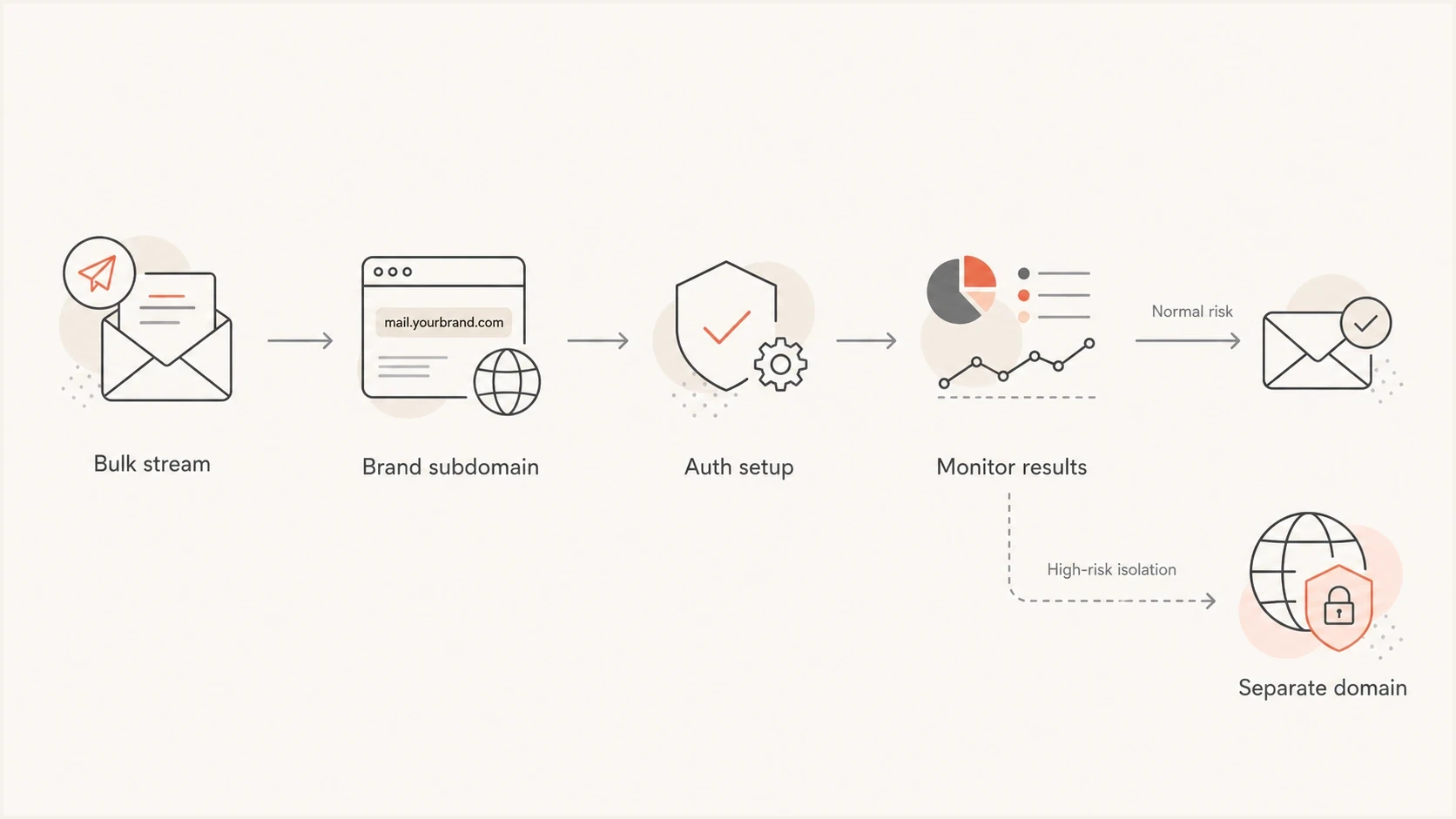
Flowchart for choosing a branded subdomain or separate domain for bulk email sender identity.
Why use a branded sending subdomain
Mailbox providers care about identity stability. A brand subdomain gives them a repeatable identity to evaluate. A brand new cousin domain asks filters to evaluate a new domain, new content, new links, new authentication, and a new sender pattern at the same time.
Avoid domains like example-news.com or getexamplemail.com for ordinary bulk mail. They look close to the brand, but not quite the brand. That similarity can confuse recipients and resembles the naming pattern used by impersonation campaigns; it does not establish how a mailbox provider will score the domain.
Branded subdomain
- Clear owner: The domain relationship is obvious to users and filters.
- Stable learning: Reputation can build around one consistent brand identity.
- Cleaner auth: SPF, DKIM, and DMARC records can be scoped to the stream.
Separate cousin domain
- New identity: Filters have less history for the sending domain.
- User doubt: Recipients can question whether the domain is official.
- More upkeep: DNS, tracking links, brand controls, and monitoring all need separate care.
The main domain's web presence, search visibility, and social profiles are not the main reason to use a subdomain. The bigger reason is mail identity continuity. Filters can evaluate the sending pattern more predictably when the domain structure matches the organization people already know. A subdomain also gives teams stream-level measurement without asking recipients to trust an unfamiliar domain.
If the sending domain redirects elsewhere
A website redirect does not automatically hurt deliverability. If email.example.com sends mail while example.com redirects visitors to another brand domain, the redirect is web behavior, not an SPF, DKIM, or DMARC result.
The deliverability risk appears when the sender identity, link domains, tracking domains, and final landing domain tell different stories. Filters follow links and compare domains in the message body with the visible From domain, authenticated domains, reputation history, and recipient behavior.
Do not change domains as a shortcut
Do not move bulk mail to a new domain just because the current website redirects. Change the sender only when brand clarity, domain ownership, or risk separation justifies a controlled migration.
If the real brand domain should own the email identity, move to a branded sending subdomain over time. Keep the old path stable, authenticate the new subdomain, send first to engaged recipients, and compare results by mailbox provider before shifting more volume.
Keep link and image hostnames consistent
The domain in the From address is only one domain receivers evaluate. They also inspect tracking links, image URLs, unsubscribe links, and final landing pages. Use branded hostnames under the same organizational domain where practical, such as click.example.com and img.example.com. Reputable shared CDN and platform hostnames are also normal; a custom image hostname is not a deliverability requirement.
This does not mean every asset must live on the sending subdomain. It means the visible hostname should be owned, stable, secured with HTTPS, and consistent with the message. Sudden hostname changes, long redirect chains, broken TLS, and unrelated link domains can make a legitimate bulk campaign look disconnected from the sender identity.
When a sending platform gives you a CNAME target for tracking, bounce handling, or image hosting, put that CNAME on a dedicated child hostname. Do not put it on the main sending subdomain if that exact name needs SPF TXT, MX, or A records. DMARC is published at a different name, such as _dmarc.email.example.com.
If two ESPs send from the same visible brand domain, give each ESP its own click and asset hostnames, such as click-a.email.example.com and click-b.email.example.com. Shared tracking hostnames create routing conflicts and make it harder to connect link issues to the platform that sent the message.
- Tracking links: Use a branded tracking domain when available, and keep it stable across campaigns.
- Image hosting: A reputable shared CDN is acceptable; use a branded image hostname when it improves brand consistency.
- Unsubscribe links: Keep header and visible unsubscribe paths reliable and usable without a login; branded hostnames are optional.
- Landing pages: Make the final page match the offer and brand; its domain does not have to equal the From domain.
How subdomains affect sender reputation
A subdomain creates useful separation, but it is not a wall. Mailbox providers evaluate the visible From domain, DKIM domain, return-path domain, Reply-To domain, IP address, links, tracking domains, image hostnames, final landing domains, content, complaint patterns, bounce rates, and historical engagement. Subdomain reputation, organizational domain reputation, IP reputation, and URL reputation can be scored independently or together.
That means the same domain plan can behave differently across IP paths. A new subdomain on a weak shared IP pool can still struggle, and a dedicated IP does not fix list quality, consent, or complaints. Gmail tracks volume, feedback, and limits by domain and IP, so changing only one piece rarely resets the full reputation picture.
The same applies when two platforms or IP pools share one subdomain, tracking host, or DKIM domain. A noisy platform does not directly poison a separate good IP, but complaints, authentication failures, bounce behavior, and spam placement can still attach to the shared domain identity.
Separate subdomains do not require separate dedicated IPs. One dedicated IP can carry multiple authenticated subdomains when HELO or EHLO, PTR, SPF, DKIM, and DMARC identities stay stable. A dedicated IP is not an automatic deliverability upgrade; it mainly gives control and isolation when IP reputation is the constraint. A healthy shared IP pool can perform as well as a dedicated IP, while a new dedicated IP needs its own warmup. Split IPs when complaint risk, volume, or business ownership differs enough to justify separate warmup and monitoring.
Reply-To does not have a sending IP and does not control DMARC results by itself. It still matters for trust. A Reply-To mailbox on a related, monitored domain helps recipients understand who receives the reply, while an unrelated mailbox can make a legitimate campaign look fragmented.
Domain choice is one part of the setup. The list, consent model, message cadence, link domains, and sender authentication all need to support the reputation you want. For a deeper look at the brand risk side, see primary domain reputation.
When subdomain risk needs action
Use these operating bands to decide when to slow down, split traffic, or pause a bulk stream.
Healthy
Monitor
Authentication passes, complaints are low, and engagement is stable.
Warning
Slow
Failures, bounces, or complaint spikes appear on one stream.
Critical
Pause affected traffic
Sustained delivery failures or a blocklist (blacklist) listing affect this stream.
Blocklist (blacklist) events are a good example. A listing can be tied to an IP, domain, URL domain, or sending pattern. Subdomain separation helps analysis, but blocklist monitoring still matters because one bad bulk stream can create symptoms that look like a broader brand problem.
If marketing and transactional mail have different audiences, urgency, templates, and sending volume, split them into separate subdomains. A receipt stream should not share the same reputation surface as promotional campaigns. This is the same reasoning behind separating marketing and transactional streams.
Visible From, DKIM and return-path domains
Check which identity the platform calls its 'sending domain'. A custom return-path (envelope sender) or tracking domain does not change the visible From address. Adding bounces.example.com while continuing to send as offers@example.com leaves the visible sender on the primary domain.
|
|
|
|---|---|---|
Visible From | newsletter@news.example.com | Recipient-facing identity and domain evaluated by DMARC |
DKIM signing domain | d=news.example.com | Domain responsible for the DKIM signature |
Return-path domain | bounces.news.example.com | Bounce routing and the domain SPF checks for a normal message |
Tracking domain | click.news.example.com | Click routing and URL reputation; outside DMARC authentication |
Different domains have different jobs in a bulk email message.
For a distinct marketing identity, use a From address such as newsletter@news.example.com and configure DKIM signing with d=news.example.com. A separate DKIM selector separates keys; it does not change the signing domain.
DMARC's default relaxed domain alignment accepts the same organizational domain. Strict aspf=s or adkim=s requires an exact domain match for that method. A provider-owned return-path can pass SPF without satisfying DMARC's SPF domain match, so configure DKIM with the brand's domain and inspect a delivered message's authentication results.
How to set up a bulk email subdomain
Start with one sending subdomain for the bulk stream. Keep the name simple. Good names describe the stream without sounding evasive: email, news, updates, alerts, offers, or mail. Avoid names that imply security, billing, or account access unless that is truly what the mail contains. Root-domain mail and subdomain mail can run at the same time when each stream has the right authentication, routing, and monitoring.
Use stable sender addresses for materially different functions. For example, newsletter@news.example.com and offers@offers.example.com identify separate streams. Changing only the mailbox name, such as news@example.com to offers@example.com, does not create a separate domain reputation.
Define subscription categories and suppression lists before volume starts. If newsletters, product updates, events, and sales outreach all use the same subdomain, each stream still needs clear consent rules, unsubscribe handling, and source-level reporting. Honor the frequency promised at signup; do not turn a weekly or monthly list into daily mail without resetting expectations. Use confirmed opt-in for new subscriptions and suppress invalid or inactive recipients before ramping volume. A new subdomain does not restore consent for a stale or unconsented list.
Make sure the subdomain can receive and route replies, bounces, abuse reports, and role-address mail where the program needs them. If the subdomain receives mail, publish MX records and test the route before launch rather than assuming the sending platform handles inbound mail. You do not always need a new workspace user for every address; monitored groups, shared inboxes, or aliases can work if replies and complaints reach an owned process. For person-based outbound or reply handling, avoid alias-only addresses that no one checks.
Keep the visible From, Reply-To, return-path, bounce handling, and tracking domains on the same organizational domain wherever the sending platform allows it. If the Reply-To address needs to route to a support system, use a branded mailbox or alias that recipients can recognize.
When two platforms or IP pools send different kinds of bulk mail, use separate subdomains, clear sender addresses, and DKIM selectors so source-level failures are visible. Map every sending platform, IP, DKIM selector, return-path, tracking domain, image hostname, and web destination before launch. If a platform forces a provider-hosted subdomain at first, keep the visible From identity brand-owned where possible and plan the migration path before volume grows.
Before launch, run a domain health check on the parent domain and the sending subdomain. That catches the basic DNS and authentication gaps before volume teaches mailbox providers the wrong lesson.
Illustrative DNS setup for email.example.comtext
# Example values only. Replace with your platform-provided records.
# Host names below are relative to example.com.

# Optional web destination
Host: email
Type: A
Value: 203.0.113.25

# SPF here assumes email.example.com is the envelope-sender domain
Host: email
Type: TXT
Value: v=spf1 include:send.example.net -all

# Optional inbound routing for replies to email.example.com
Host: email
Type: MX
Value: 10 inbound.example.net

# DKIM for d=email.example.com and selector s1
Host: s1._domainkey.email
Type: CNAME
Value: s1.domainkey.vendor.example

Host: click.email
Type: CNAME
Value: tracking.vendor.example

Host: _dmarc.email
Type: TXT
Value: v=DMARC1; p=none; rua=mailto:dmarc@example.com
The exact records depend on the sending platform; these values are documentation placeholders. Publish SPF at the actual return-path domain, which can differ from the visible From domain. Add MX records where inbound mail is needed and a web destination only if people should visit that hostname. Configure DKIM for the intended signing domain and use 2048-bit keys where supported. Monitor real messages before moving DMARC policy to quarantine or reject.
A valid DMARC record published directly at _dmarc.email.example.com determines the policy for mail using email.example.com in the From address. Otherwise, a discovered organizational-domain policy can apply. For existing sending subdomains, check its sp policy, or p if sp is absent. RFC 9989 uses a DNS tree walk for policy discovery; older implementations can differ for nested subdomains. Publish a direct record when you need a distinct policy or reporting destination.
For a brand-new sending subdomain, do not start at the target campaign volume. Begin with the most engaged recipients, pace the first sends by mailbox provider, and increase only when complaints, bounces, deferrals, authentication, and spam placement stay healthy. Plan meaningful volume increases over weeks, with no fixed readiness deadline. Hold or reduce volume when signals worsen, and use a controlled ramp after an ESP switch or a change to the DKIM domain or sending IP.
Do not treat the subdomain as a shield
A subdomain is a control surface, not a permission slip. If the bulk stream has weak consent, stale lists, misleading content, broken unsubscribe handling, or poor affiliate controls, the parent brand can still take reputation damage.
- Consent first: Send marketing mail to recipients who opted in to that category, and keep suppression lists current.
- Warm gradually: Start small by provider and increase volume after positive engagement, not simply because DNS is valid.
- Watch delivery signals: Complaints, deferrals, and spam-folder placement are early signals to slow down.
After DNS is live, send a real campaign sample through an email tester before you start ramping volume. The goal is to inspect the actual message, headers, authentication results, link domains, and content signals together.
Email tester
Send a real email to this address. Suped shows a results button when the test is ready.
?/43tests passed
Using one subdomain with multiple platforms
You can use one visible sending subdomain with multiple ESPs during a migration or a controlled split between related bulk streams. Keep the public From address stable when subscribers already recognize it, then separate the technical hostnames that each platform needs to own. If the platforms have different teams, consent models, suppression lists, or risk levels, use separate subdomains instead.
Before adding the second platform, ask for every required hostname and record, not only the SPF include. DKIM selectors, return-path or bounce domains, tracking domains, verification records, and inbound handling all decide whether the shared setup can work without DNS conflicts.
- DKIM selectors: Use unique selectors for each platform so keys can rotate without collisions.
- Return-path and bounces: Use one bounce subdomain per ESP so delivery reports return to the platform that sent the message.
- Tracking domains: Use separate click hostnames when each platform rewrites links through its own infrastructure.
- SPF records: Publish one SPF record per hostname, then merge authorized senders instead of adding duplicate v=spf1 records.
SPF is not inherited from the parent domain. Each return-path domain needs the SPF configuration required for that domain. Keep each SPF evaluation within the limit of 10 DNS-querying terms, including nested includes. Separate return-path subdomains let each platform manage its authorization without adding every marketing sender to the primary domain's SPF record.
DMARC reports should show each source, the DKIM domain, the return-path domain, and whether the message passed with a domain matching the visible From address. If one ESP fails, keep the other platform steady and fix the failing source instead of changing the whole sender identity.
Synchronize unsubscribe and bounce suppressions before sending through the new ESP, and prevent duplicate campaigns while both platforms are active. When the migration ends, remove old sending authorization after outbound queues and retries have drained. Keep DKIM verification keys available for delayed verification, keep bounce routing available for delayed reports, and retain tracking hostnames for as long as old links must work. Confirm that each hostname still routes to an active service before retiring it.
DNS choices for the sending subdomain
The choice between a separate domain and a subdomain is separate from the choice between an A record and a CNAME. An A record maps a hostname to an IPv4 address, an AAAA record maps it to an IPv6 address, and a CNAME maps one hostname to another hostname.
A visible From subdomain does not need an A or AAAA record simply to appear in an email address. The sending SMTP server does need a valid hostname with forward and reverse DNS, normally managed by the ESP. If the From subdomain also needs a browser destination, point its A or AAAA record to controlled web infrastructure, such as a redirect host or relevant landing page.
- Use an A or AAAA record: When that hostname needs an IP address for a web service or mail server; a visible From subdomain alone does not require one.
- Use a CNAME: When the sending platform gives you a target hostname for DKIM, tracking, bounce handling, verification, or hosted records.
- Avoid random IPs: Do not point a sending subdomain at infrastructure you do not own, operate, or have a contract for.
- Keep CNAMEs separate: A hostname with a CNAME cannot also have TXT, MX, A, or other record types at the same exact name.
Do not put every job on one hostname
If email.example.com needs SPF TXT, MX, or A records, do not add a CNAME at email.example.com. Put managed services on dedicated names such as click.email.example.com and s1._domainkey.email.example.com. The DMARC name _dmarc.email.example.com is separate and does not create a same-name conflict.
Adding TXT or CNAME records does not require creating an A record first. Follow the sending platform's instructions for each hostname. If the hostname loads in a browser or appears in links, configure HTTPS for it too. HTTPS supports web access and link scanning; SPF, DKIM and DMARC authenticate the email.
When a separate domain makes sense
A separate domain has a place, but it should be an intentional exception. Use it when the business wants a separate public identity, the legal entity is different, the mail is tied to a distinct product brand, or the stream has enough risk that the organization accepts slower trust building in exchange for stronger separation.
Use a subdomain when
- Brand-owned mail: The message is clearly from the main company.
- Opted-in list: The audience expects the brand to email them.
- Normal risk: You want reputation separation without hiding the sender.
Use a separate domain when
- Separate brand: The domain is a real product or legal identity.
- Known risk: The mail stream is experimental or has controlled risk.
- Clear naming: The relationship to the main brand is obvious.
If a separate domain is necessary, pick a name with a clear relationship to the brand, publish genuine brand information on it, configure authentication before sending, and monitor it as a new sender identity. Budget for separate registration and ongoing DNS maintenance as well as a new sending ramp. Buying or aging a domain without sending does not establish a positive email reputation.
The worst version is a disposable-looking domain used because the sender expects complaints. That does not protect the brand for long. Mailbox providers and recipients still connect content, links, tracking domains, IPs, and complaints back to the organization behind the mail.
Monitor sending subdomains with Suped
Suped's DMARC reporting platform helps teams review sending sources and authentication results for branded subdomains. Use it to check which platforms send for each From domain and investigate failures before increasing volume or enforcing DMARC policy.
Suped DMARC dashboard showing email volume, authentication health, and source breakdown
Set up DMARC monitoring for the parent domain and each sending subdomain, then review the verified and unverified sources before changing policy. Check each platform separately during a migration.
- Issue detection: Review authentication failures by sending source before increasing campaign volume.
- Authentication checks: Check SPF and DKIM results for each sender before changing DMARC policy.
- Reputation view: Review blocklist (blacklist) signals separately from DMARC pass rates.
- Multiple domains: Keep each domain's sources and reporting separate when managing several brands or clients.
After real mail starts flowing, review alerts and recurring reports for changes. DMARC aggregate reports show authentication outcomes; they do not measure inbox placement. Review mailbox-provider complaint data and SMTP responses alongside them.
Views from the trenches
Best practices
Use a branded sending subdomain so mail filters can connect bulk mail to the brand.
Keep naming stable and simple; email, news, alerts, and offers are easy to audit later.
Warm the subdomain with real engagement before moving all bulk volume onto it at once.
Common pitfalls
Using a cousin domain can look like a lookalike brand even when the sender is legitimate.
Moving poor lists to a new domain does not remove complaint, bounce, or content problems.
Assuming subdomains fully isolate risk leaves the parent brand exposed to serious issues.
Expert tips
Set DMARC reporting before launch so auth failures appear during warmup, not after.
Separate marketing and transactional mail when cadence, audience, or content differs.
Keep tracking and image hostnames branded so URL reputation matches sender identity.
Marketer view
Marketer from Email Geeks says branded subdomains are usually the right answer because they identify the sender without asking filters to evaluate an unrelated domain.
2020-06-10 - Email Geeks
Marketer view
Marketer from Email Geeks says internet presence is not the main trust factor; stable mail behavior and predictable identity matter more.
2020-06-11 - Email Geeks
Frequently asked questions
Yes. Mailbox providers do not require a separate sending domain or subdomain for bulk mail. Properly authenticated, expected marketing can use the primary domain. A branded subdomain is a useful default for separating bulk streams operationally, but a healthy existing program does not need to migrate solely because it uses the primary domain.
It gives useful separation, but it does not fully isolate risk. Mailbox providers can still connect the stream to the brand through content, links, authentication, IPs, and user feedback.
Use a simple name such as email, mail, news, updates, offers, or alerts. Pick a name that matches the stream and does not imply account security or billing unless that is the actual purpose.
No. You need a monitored address or routing path that can receive replies, bounces, abuse reports, and unsubscribe requests. A shared inbox, group, or alias can work if someone owns it. An unchecked alias is not enough.
Yes, but this works best for a temporary migration or closely related streams with the same consent and suppression process. Each ESP should have its own DKIM selector, bounce or return-path subdomain, and tracking hostname. Keep one SPF record per hostname and use DMARC reports to confirm each source passes with a matching domain.
The visible From domain needs an applicable DMARC policy, but a separate record is not always required. A valid direct record controls that domain; otherwise, a discovered organizational-domain policy can apply. Check its sp policy or fallback p policy. SPF is different: it is not inherited and must be configured for the actual return-path domain. Verify real messages before enforcing quarantine or reject.