How to set up email subdomains and what DNS records are required?

Michael Ko
Co-founder & CEO, Suped
Published 31 May 2025
Updated 18 Jun 2026
16 min read
Summarize with
Updated on 18 Jun 2026: We updated this guide for current bulk sender checks, clearer PTR guidance, and RFC 9989 DMARC staging.
To set up an email subdomain, create the subdomain in your DNS zone, then add the records your sending platform requires. For most sending subdomains, the required records are SPF, DKIM, DMARC, and one or more CNAME records for tracking or provider verification. Add MX only when the subdomain receives mail, handles bounces, or the provider asks for it. Add an A record only when something on that subdomain needs to resolve to a web server or IP address. An A record pointing at a sending IP is not what makes outbound email authenticate. If you run the sending servers yourself, configure PTR and matching forward DNS on the sending IP, but do not treat PTR as a normal record you publish at the subdomain.
The shortest practical answer is this: choose a subdomain such as mail.example.com, publish the provider's DNS records exactly as supplied, verify SPF and DKIM pass for that subdomain, add DMARC reporting, then send a real test message and inspect the headers. Treat the subdomain as unfinished until the visible From domain, return-path domain, and DKIM signing domain have been checked together.
- Minimum setup: SPF, DKIM, and DMARC for the sending identity.
- Common provider setup: CNAME records for DKIM, link tracking, click tracking, open tracking, and verification.
- Only when needed: MX for inbound mail or bounces, A for hosted pages or custom tracking hosts.
- Infrastructure check: PTR and reverse DNS belong to sending IPs, not ordinary subdomain records.
The records you usually need
The exact DNS set depends on whether the subdomain only sends mail, receives mail too, or exists mainly as a branded provider hostname. A newsletter subdomain, a transactional subdomain, and a bounce subdomain can all need different records. The right method is to decide the job of the subdomain first, then publish only the records that support that job. Parent-domain records do not automatically create SPF, MX, or provider verification records for a new subdomain.
|
|
|
|---|---|---|
TXT SPF | Outbound mail | Authorizes sending hosts for the envelope sender. |
TXT DKIM | Outbound mail | Publishes public keys for message signatures. |
TXT DMARC | Policy or reporting | Tells receivers how to handle failed mail. |
MX | Inbound or bounces | Routes replies, bounces, or mailboxes. |
CNAME | Provider setup | Delegates DKIM, tracking, or verification hosts. |
A or AAAA | Web host needed | Maps a host to an IP address. |
NS | Delegated zone | Gives another DNS service authority for the subdomain zone. |
Typical DNS records for email subdomains.
PTR is not listed as a subdomain record because reverse DNS lives under the IP owner's reverse zone. If the subdomain sends through your own SMTP IPs, the sending IP needs a meaningful PTR record and the PTR hostname needs an A or AAAA record back to that same IP.
NS records are only required when you delegate the whole subdomain zone, such as giving a sending platform or a separate IT team control of records under mail.example.com. If the same DNS zone stays authoritative, create the SPF, DKIM, DMARC, MX, CNAME, and verification records directly in the parent zone instead.
Delegated subdomain exampleDNS
mail.example.com.  NS  ns1.senderdns.example.net.
mail.example.com.  NS  ns2.senderdns.example.net.
Do not confuse A records with email authentication
A record can make a hostname resolve, but it does not prove that a sender is allowed to send mail for that domain. SPF, DKIM, and DMARC do that work. If someone tells you the email subdomain is ready because an A record points to a sending IP, treat that as incomplete.
The same principle applies when a DNS control panel labels everything under the parent zone. In many interfaces, adding a TXT record named mail creates the record at mail.example.com. Adding _dmarc.mail creates the DMARC record for that subdomain. The control panel layout changes, but the DNS names do not.
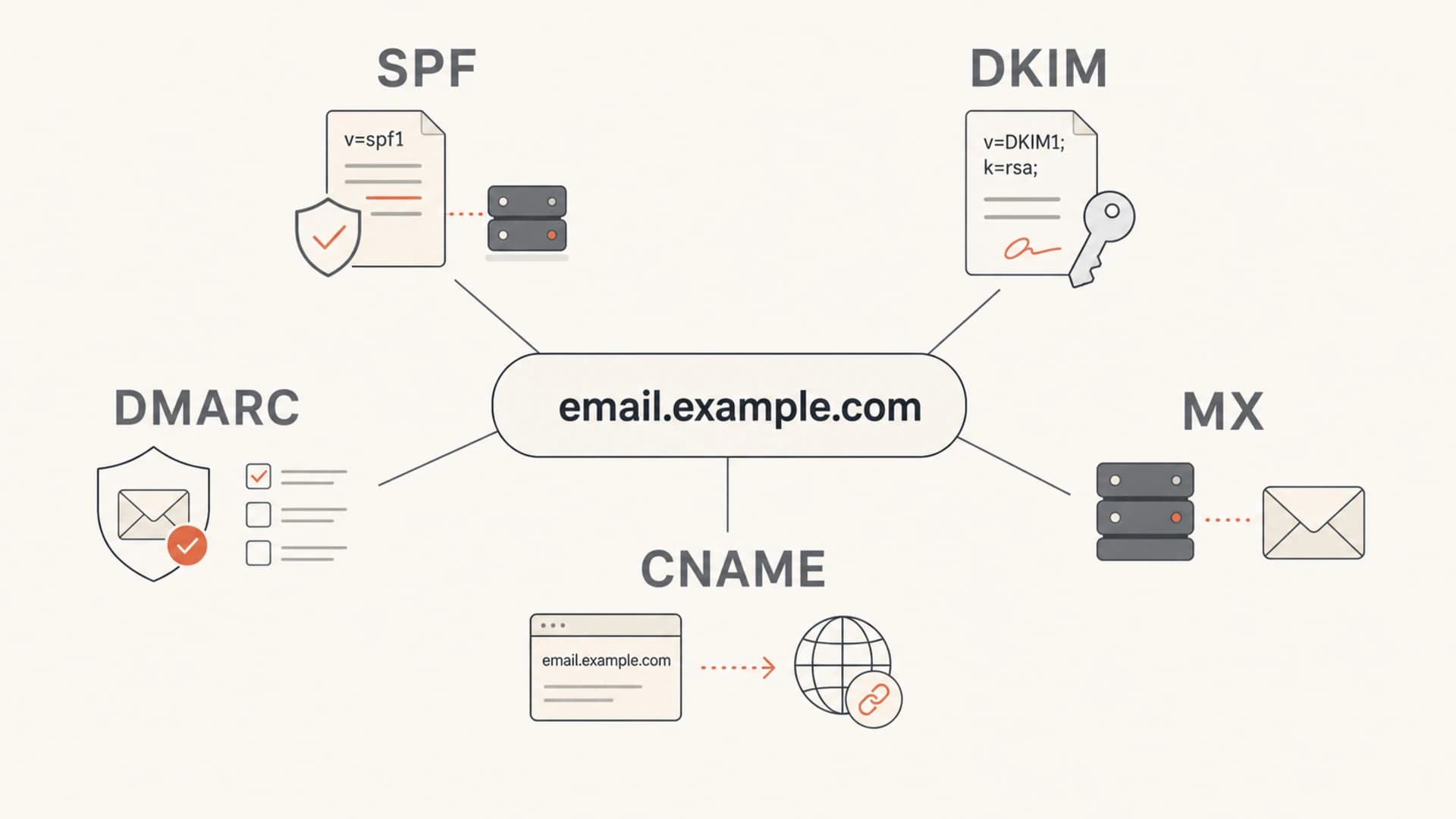
Infographic showing SPF, DKIM, DMARC, MX, and CNAME records connected to one email subdomain.
A practical setup sequence
Start with the mailstream, not the DNS screen. A subdomain should map to a clear purpose: marketing, transactional, lifecycle, billing, support, or a specific platform. That makes later troubleshooting easier because reputation, DMARC reports, complaint patterns, and authentication failures are tied to one stream instead of being mixed with every other sender.
- Name the subdomain: Use a purpose-based name such as news, tx, notify, billing, or help. Avoid disposable-looking names and avoid naming after vendors unless the vendor is the long-term boundary.
- Collect provider records: Copy SPF, DKIM, CNAME, MX, and verification values from the sending platform, then confirm whether records belong in the parent zone or a delegated subdomain zone.
- Publish DNS records: Add each value at the exact host name the provider specifies, and do not place a CNAME where TXT or MX records also need to exist.
- Add DMARC monitoring: Use reports to confirm which systems send as the subdomain and whether SPF or DKIM uses the same domain family as the visible From address.
- Send and inspect: Send a real message to a mailbox and check authentication results with an email tester.
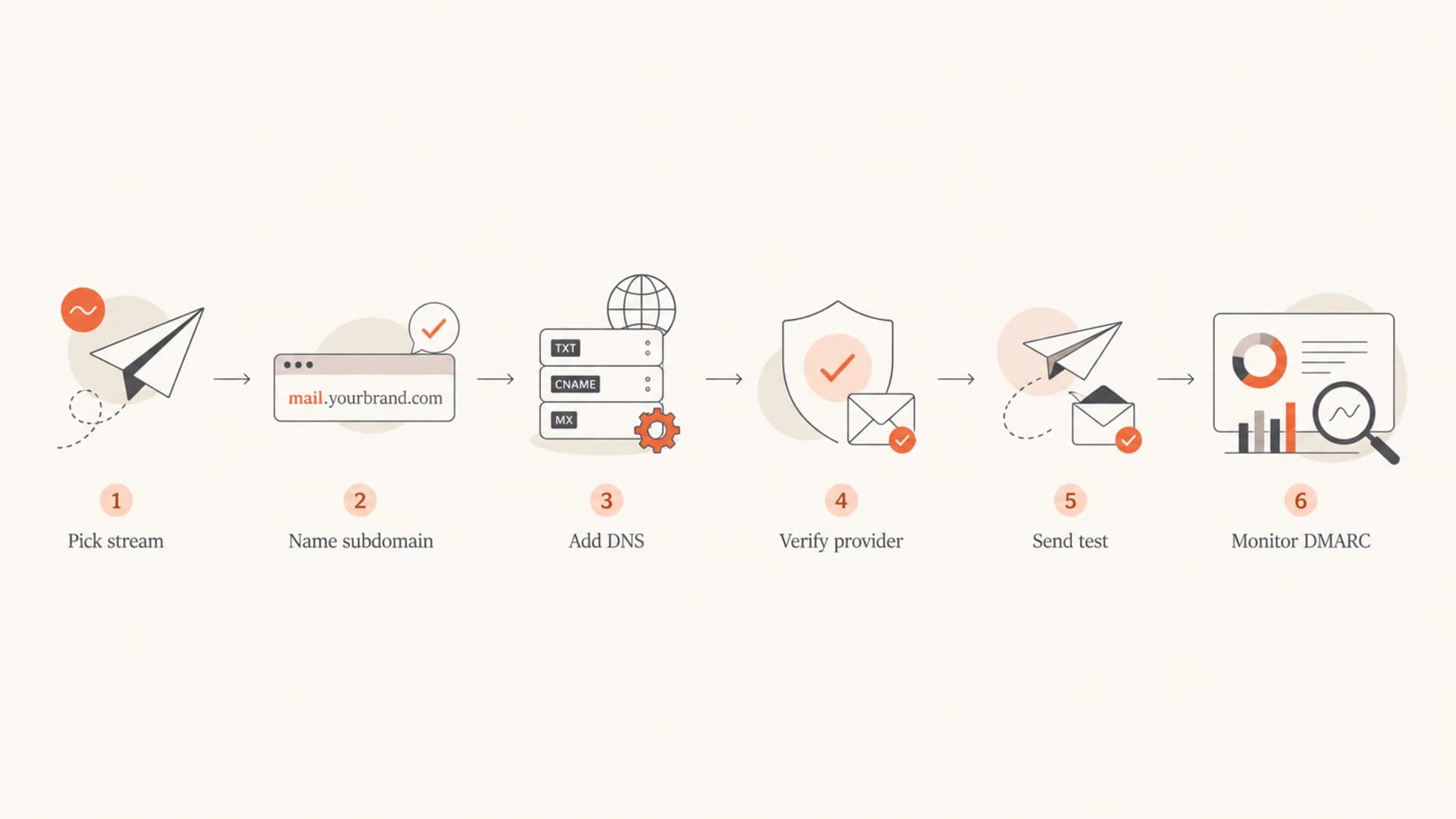
Flowchart showing email subdomain setup from mailstream selection through DNS verification and DMARC monitoring.
Bulk sender checks before launch
Since February 2024, Gmail and Yahoo have treated authentication, reverse DNS, spam complaints, and unsubscribe handling as launch requirements for bulk senders. For an email subdomain, that means DNS must be correct and the mailstream must be ready for recipient feedback before regular volume starts.
- Authentication: Bulk mail should pass SPF and DKIM, and DMARC should pass with a valid policy such as p=none while monitoring starts.
- Reverse DNS: Sending IPs need meaningful PTR records and forward-confirming A or AAAA records when you manage the SMTP infrastructure.
- Unsubscribe: Marketing and subscribed messages need one-click unsubscribe headers and a visible unsubscribe link.
- Complaint rate: Keep spam complaints below mailbox-provider thresholds before increasing volume.
- Transport and format: Use TLS, a valid Message-ID, clean headers, and one From address per message.
How many subdomains to create
Create subdomains around mailstreams, not vendors. Marketing, transactional, lifecycle, billing, and support mail can use separate subdomains when volume, recipient expectation, failure cost, owner, or reply handling differs. Do not create a new subdomain for every campaign, because that fragments reputation, DNS ownership, and DMARC reporting.
A single subdomain can support more than one sending tool when the tools send the same mailstream, have one operational owner, use distinct DKIM selectors, and keep SPF under the 10 lookup limit. Split the subdomain when a tool has different risk, different volume, separate reporting needs, or a separate MX requirement for replies, bounces, inbound parsing, or complaint handling.
- Marketing mail: Use a branded subdomain for newsletters, offers, and nurture campaigns.
- Transactional mail: Use a separate subdomain when receipts, resets, or account alerts have different delivery risk.
- Multiple tools: Share one subdomain only when the tools send the same stream and have one owner.
- Child hosts: Use child hostnames for bounce, tracking, and DKIM records so the visible From subdomain stays clean.
Treat a new sending subdomain like a new sender identity. Warm volume with engaged recipients, monitor DMARC data, watch complaint and bounce rates, and keep corporate mail separate so a marketing issue is easier to diagnose. For a brand-new subdomain, 30 to 60 days is a common planning window, but recipient engagement and error rates matter more than a fixed schedule.
Example DNS records for a sending subdomain
These examples show the shape of a clean setup for mail.example.com. Do not paste these values into production. Your sending provider supplies the real include, DKIM selector, target hostnames, MX values, and verification strings. The important part is where each record lives and what each record is meant to prove.
SPF, DKIM, DMARC, MX, and CNAME examplesDNS
mail.example.com.  TXT  "v=spf1 include:send.example.net -all"
selector1._domainkey.mail.example.com.  CNAME  selector1.example.net.
selector2._domainkey.mail.example.com.  CNAME  selector2.example.net.
_dmarc.mail.example.com.  TXT  "v=DMARC1; p=none; rua=mailto:d@example.com"
mail.example.com.  MX  10  inbound.example.net.
click.mail.example.com.  CNAME  tracking.example.net.
verify.mail.example.com.  TXT  "provider-token"
Provider verification can lag behind DNS publishing because of TTLs, cache behavior, and provider polling. Wait for the provider's verification status to pass before sending production volume, even when your DNS control panel already shows the record.
For SPF, the record normally sits at the return-path or bounce domain used by the platform. Sometimes that is the same as the visible From subdomain, and sometimes it is a separate host such as bounce.example.com. SPF only helps DMARC when the authenticated SPF domain matches the visible From domain under DMARC's domain check. Keep SPF under the 10 DNS lookup limit, and avoid stacking every sender into one overloaded record.
For DKIM, providers usually give either TXT records containing public keys or CNAME records that point your selector to provider-managed keys. CNAME-based DKIM is common because the provider can rotate keys without asking you to change DNS again. The selector is part of the DNS name, so selector1 and selector2 are separate records. If two tools share one subdomain, each tool should use its own selector unless one provider explicitly manages the same signing path for both sends.
?
What's your domain score?
Deep-scan SPF, DKIM & DMARC records for email deliverability and security issues.
After publishing records, run a broad domain health check before you send volume. That catches obvious DNS issues, missing records, syntax errors, and gaps across DMARC, SPF, and DKIM.
When the subdomain needs MX, A, or CNAME records
MX, A, and CNAME records cause the most confusion because they are not always required for sending. A subdomain can send authenticated email without an A record. A subdomain can also send without MX when replies and bounces are handled somewhere else. Providers often ask for CNAME records because they want to own a particular function, such as tracking or DKIM.
For inbound mail, receivers look up MX records for the exact domain to the right of the @ sign. Mail for user@example.com follows the MX for example.com, while mail for user@mail.example.com follows the MX for mail.example.com. Adding MX for the subdomain does not change mail routing for the parent domain. If no MX exists, SMTP rules allow delivery attempts to the host itself, but relying on that fallback is a poor setup for a production email subdomain.
Usually required
- SPF: Needed for the envelope sender domain used by the platform.
- DKIM: Needed for signed mail and DMARC domain matching.
- DMARC: Needed for reporting, policy, and spoofing protection.
Conditional
- MX: Use for replies, inbound mail, bounces, or provider routing.
- A record: Use for a web endpoint, landing page, or direct host mapping.
- CNAME: Use when a provider delegates DKIM, tracking, or verification.
There is one DNS rule that matters a lot: a CNAME cannot normally coexist with other records at the exact same hostname. If mail.example.com is a CNAME, do not also try to put SPF, MX, or DMARC records at that same name. Put CNAMEs on specific child hosts when possible, such as click.mail or selector._domainkey.mail.
If you are using a registrar walkthrough, keep that rule in mind. A step-by-step guide for GoDaddy subdomains helps with screen-by-screen mechanics, but the authentication logic stays the same across DNS hosts.
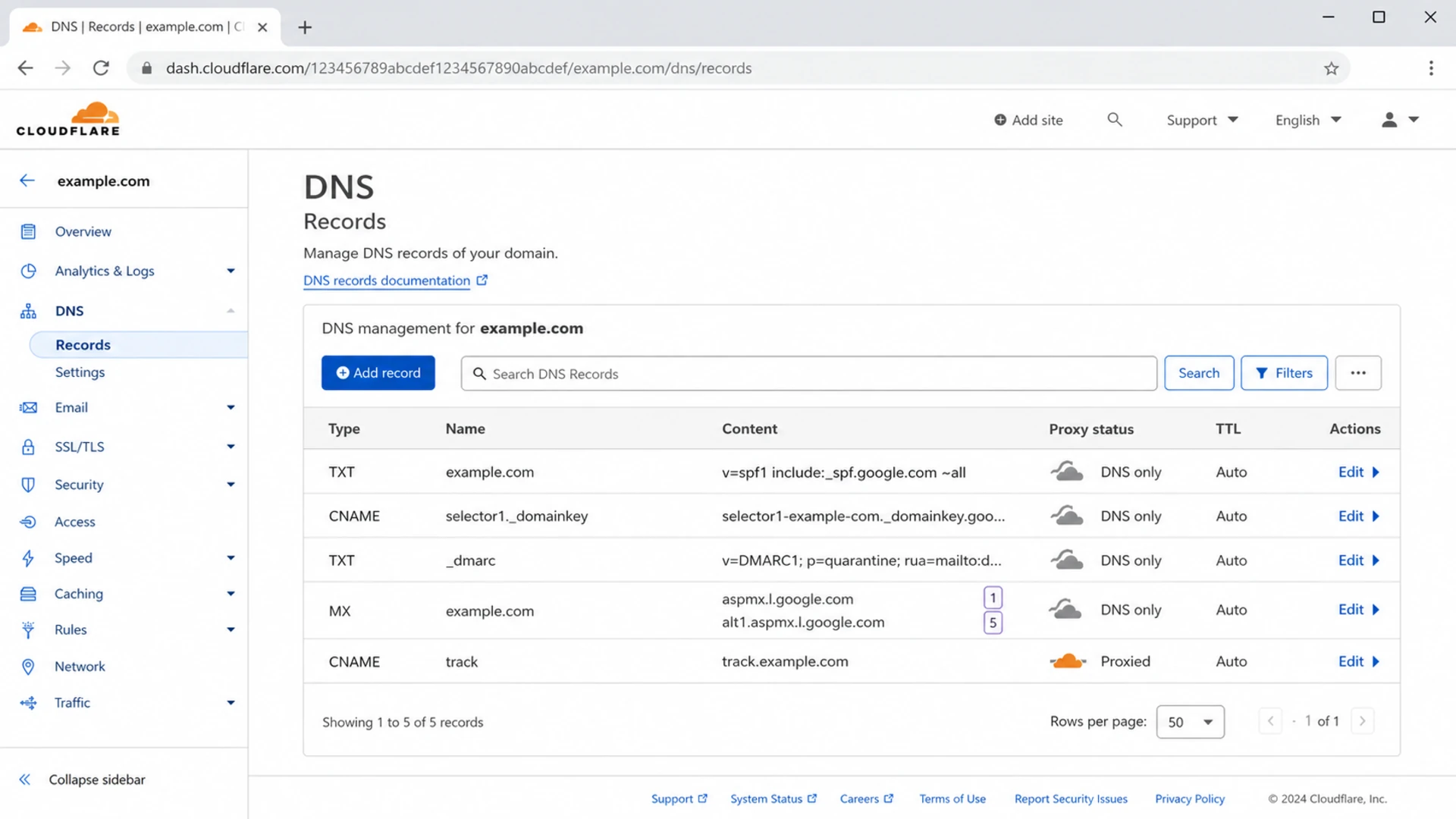
Cloudflare DNS table showing SPF, DKIM CNAME, DMARC, MX, and tracking records for an email subdomain.
DMARC inheritance and subdomain policy
DMARC has policy discovery across the DNS tree. Receivers first check for a DMARC policy at the exact Author Domain, such as _dmarc.mail.example.com. If the subdomain has no valid record, current DMARC policy discovery uses DNS tree walk to find an applicable organizational-domain or public-suffix policy. A parent record can include an sp tag for subdomains and an np tag for non-existent subdomains.
Parent DMARC policy with subdomain and non-existent subdomain policyDNS
_dmarc.example.com. TXT "v=DMARC1; p=quarantine; sp=none; np=reject; rua=mailto:d@ex.co"
Publish explicit DMARC records on active sending subdomains when the mailstream matters. That gives you direct reporting and avoids surprises when the parent policy tightens. A parent policy with p=reject and no subdomain override can break a new sender if DKIM or SPF domain matching is not finished. Do not stage new enforcement with old pct percentages. RFC 9989 removed pct and uses t=y for test mode. Start with monitoring mode, review aggregate reports, then move the active subdomain to quarantine or reject when legitimate sources pass.
How Suped fits the workflow
Suped's product helps once the subdomain starts sending because DMARC monitoring shows which sources pass, which fail, and which records need attention. Hosted DMARC and hosted SPF are practical when you manage many domains or need policy staging without frequent DNS edits.

DMARC record detail view showing SPF, DKIM, DMARC, rDNS diagnostics, and DNS records
A complete practical setup is not a valid DNS record alone. It is a verified path where the From domain matches your intended brand, DKIM uses that domain or a valid organizational match, SPF matches where possible, and DMARC reports confirm the same behavior across real traffic.
How to verify the setup
DNS verification has two layers. The first layer checks whether the records exist and have valid syntax. The second layer checks whether actual mail uses those records correctly. You need both. A DKIM record can exist while the provider signs with a different selector. An SPF record can exist while the return-path uses a different domain. A DMARC record can exist while neither SPF nor DKIM matches the visible From domain.
- Check DNS: Confirm each hostname resolves to the expected value after propagation.
- Check forward and reverse DNS: If you send from your own SMTP infrastructure, confirm the sending IP has a meaningful PTR record and the PTR hostname resolves back to the same IP.
- Send one message: Use the real platform, real From address, and a normal campaign or template.
- Inspect headers: Look for SPF pass, DKIM pass, DMARC pass, the selected DKIM selector, and the right same-domain relationship.
- Check reply routing: If the subdomain receives replies, confirm the From, Reply-To, and MX path route to the right mailbox or system.
- Watch reports: Use aggregate DMARC data to spot unexpected sources and broken domain matches.
- Check reputation: Watch for IP or domain blocklist and blacklist issues after volume starts.
Go-live checks
Use these thresholds before moving a new subdomain into regular sending.
Ready
Pass
SPF or DKIM matches the From domain, DMARC passes, and reports show expected sources.
Needs review
Mixed
DNS is valid but message headers show a domain mismatch.
Do not launch
Fail
DMARC fails or the sender is not the source you expected.
For ongoing monitoring, check blocklist monitoring once sending volume begins. A new subdomain can authenticate correctly and still develop reputation problems if the list source, audience quality, complaint rate, or bounce handling is weak.
Common setup mistakes
Most subdomain setup problems are small DNS placement errors. The value is often correct, but the host name is wrong. Check the final fully qualified DNS name every time, especially when a DNS provider auto-appends the parent domain in the background.
|
|
|
|---|---|---|
SPF fails | Wrong return-path | Place SPF on the envelope domain. |
DKIM fails | Wrong selector | Match the selector in headers. |
DMARC fails | Domain mismatch | Match SPF or DKIM to From. |
Provider fails verify | Record at wrong host | Check whether the zone appends domain. |
CNAME rejected | Existing records | Move CNAME to a child host. |
PTR mismatch | Missing or stale reverse DNS | Ask the IP owner to set PTR and add matching A or AAAA. |
Delegated record missing | Wrong authoritative zone | Confirm the NS delegation before editing. |
Fast diagnosis for common email subdomain issues.
A clean naming pattern
Use one visible From subdomain for the mailstream, one bounce or return-path host if the provider requires it, and separate child hosts for tracking and DKIM. That keeps CNAME conflicts away from the main sending identity. If multiple tools share one subdomain, keep each tool on separate DKIM selectors and make one owner responsible for SPF changes.
Protect unused subdomains
If a subdomain should never send mail, publish defensive records instead of leaving it ambiguous. That reduces spoofing risk and keeps inactive DNS names out of normal sending reports. For non-existent names under the parent domain, add np=reject to the parent DMARC policy once legitimate subdomain use is documented.
Defensive records for a non-sending subdomainDNS
unused.example.com.  TXT  "v=spf1 -all"
_dmarc.unused.example.com.  TXT  "v=DMARC1; p=reject"
Views from the trenches
Best practices
Map each subdomain to one clear mailstream before adding DNS records or policies.
Verify SPF, DKIM, and DMARC with real sent mail, not DNS lookups alone before launch.
Keep tracking and DKIM CNAME records on child hosts to avoid DNS conflicts later.
Common pitfalls
Treating an A record as the main sending setup leaves authentication unfinished.
Adding records at the parent domain instead of the subdomain breaks verification.
Skipping DMARC reports hides domain mismatches until volume has already started.
Expert tips
Publish an explicit DMARC record on active subdomains when policies need separate control.
Use provider-supplied DKIM CNAMEs where possible to simplify key rotation later.
Check the fully qualified host name before saving records in any DNS control panel.
Marketer from Email Geeks says DNS control panels differ, so the first step is finding where the host lets you add and manage subdomain records.
2024-03-12 - Email Geeks
Marketer from Email Geeks says an A record alone is not enough for email sending because SPF, DKIM, DMARC, and sometimes MX records are still needed.
2024-03-13 - Email Geeks
Final setup checklist
To set up an email subdomain, add it in DNS, publish the sending provider's SPF and DKIM records, add DMARC for reporting and policy, add MX only if the subdomain receives replies or bounces, and add CNAME or A records only when a provider or web function needs them. Add NS records only when another DNS service will control the whole subdomain zone. Then send a real test email and confirm SPF, DKIM, and DMARC pass in the message headers with the right domain match.
For marketing or subscribed bulk mail, confirm one-click unsubscribe, a visible unsubscribe path, TLS, complaint monitoring, and forward-confirmed reverse DNS for any self-managed sending IPs before volume starts.
Suped's product helps when more than one subdomain, sender, or DNS owner is involved. It brings DMARC, SPF, DKIM, hosted SPF, hosted DMARC, hosted MTA-STS, real-time alerts, issue detection, and blocklist or blacklist monitoring into one workflow. That matters because the hard part is not adding one TXT record. The hard part is knowing when the records, sending source, and actual mail behavior all match.