How can I identify which users marked my emails as spam in Gmail?

Michael Ko
Co-founder & CEO, Suped
Published 6 Jul 2025
Updated 16 May 2026
7 min read
Summarize with
No, you cannot identify the exact Gmail users who marked your marketing email as spam. Gmail does not give senders a list of complainants, email addresses, or recipient-level complaint events. Google Postmaster Tools gives aggregate complaint rates and, for qualifying senders, feedback loop identifiers that help you identify the campaign, list, tenant, or stream behind the complaints.
The practical answer is to stop looking for a person-level list and build a complaint investigation workflow around aggregate signals. I use Gmail complaint rates, Feedback-ID values, send logs, unsubscribe events, list history, and authentication data to find the send or audience that caused the problem. Before blaming content or reputation, I also send a real message through an email tester to check headers, authentication, and obvious deliverability issues.
The fastest useful answer is this: Gmail will not tell you who clicked "Report spam". It can tell you that a stream, identifier, or day had a complaint problem. Treat that as enough evidence to pause, segment, and fix the source of the complaint spike.
What Gmail actually gives senders
Google Postmaster Tools is built for sender-level diagnostics, not recipient-level reporting. It can show spam rate trends, reputation indicators, authentication status, delivery errors, and Feedback Loop data. It does not expose the mailbox owner who reported the message, and that design prevents senders from simply removing individual complainers while leaving the underlying problem untouched.
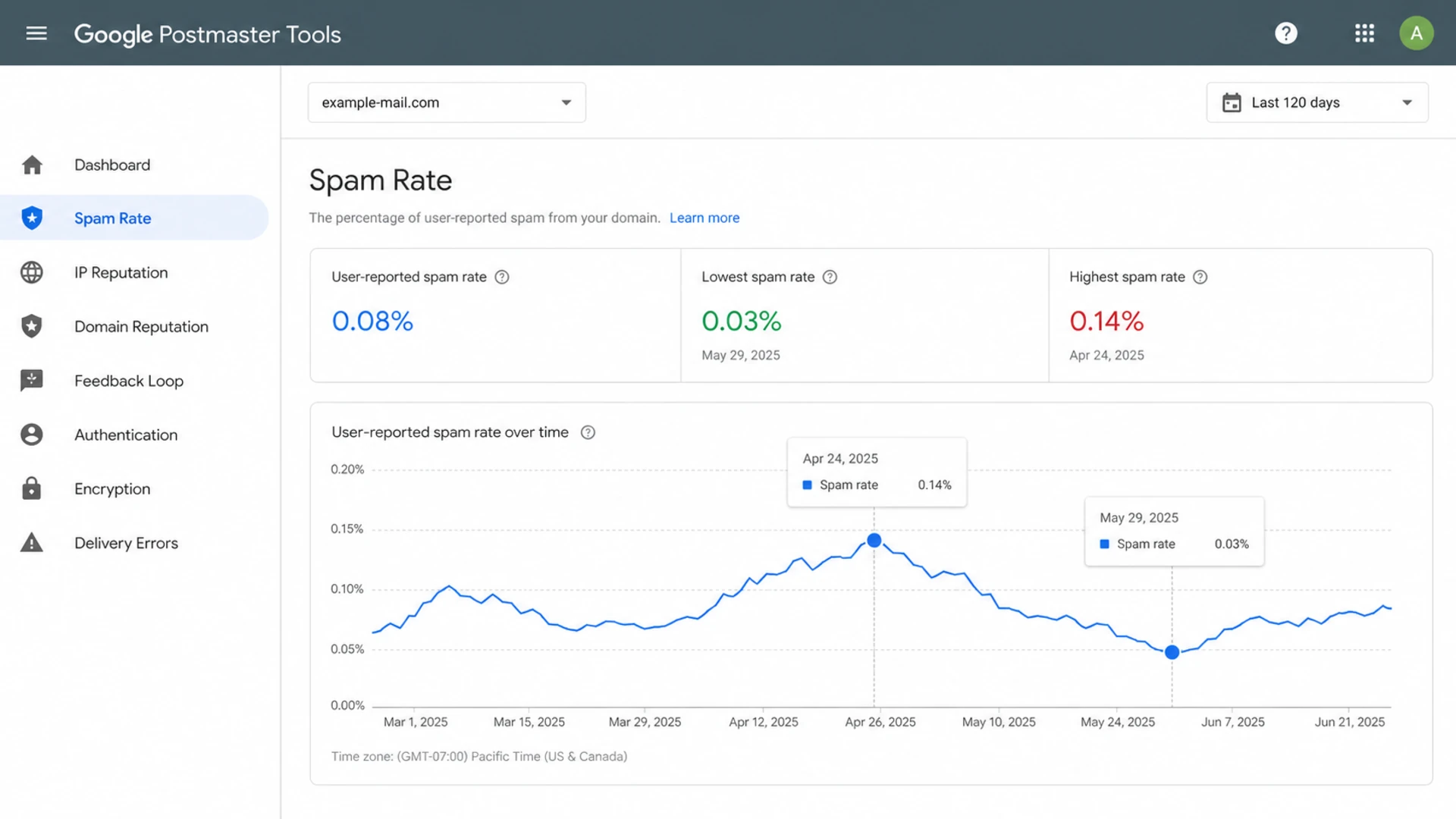
Google Postmaster Tools spam rate screen with aggregate complaint data.
|
|
|
|---|---|---|
Exact user | No | Investigate segments |
Campaign | Sometimes | Use identifiers |
Complaint rate | Yes | Track trend |
Authentication | Yes | Fix DNS |
Mailbox folder | No | Use seeds |
What Gmail complaint reporting can and cannot expose.
That distinction matters. If your question is "who clicked spam?" the answer is no. If your question is "which send generated the complaints?" the answer is usually yes, provided your mail has stable identifiers and your send volume is high enough for Gmail to show useful aggregate data.
Ways to narrow the complaint source
I treat Gmail complaints like a data-matching problem. The goal is to connect a spike in Google Postmaster Tools back to a send log, a message stream, a list source, and a content change. You do not need a person-level complaint feed to make good decisions, but you do need identifiers that survive across your ESP, headers, tracking links, and reporting.
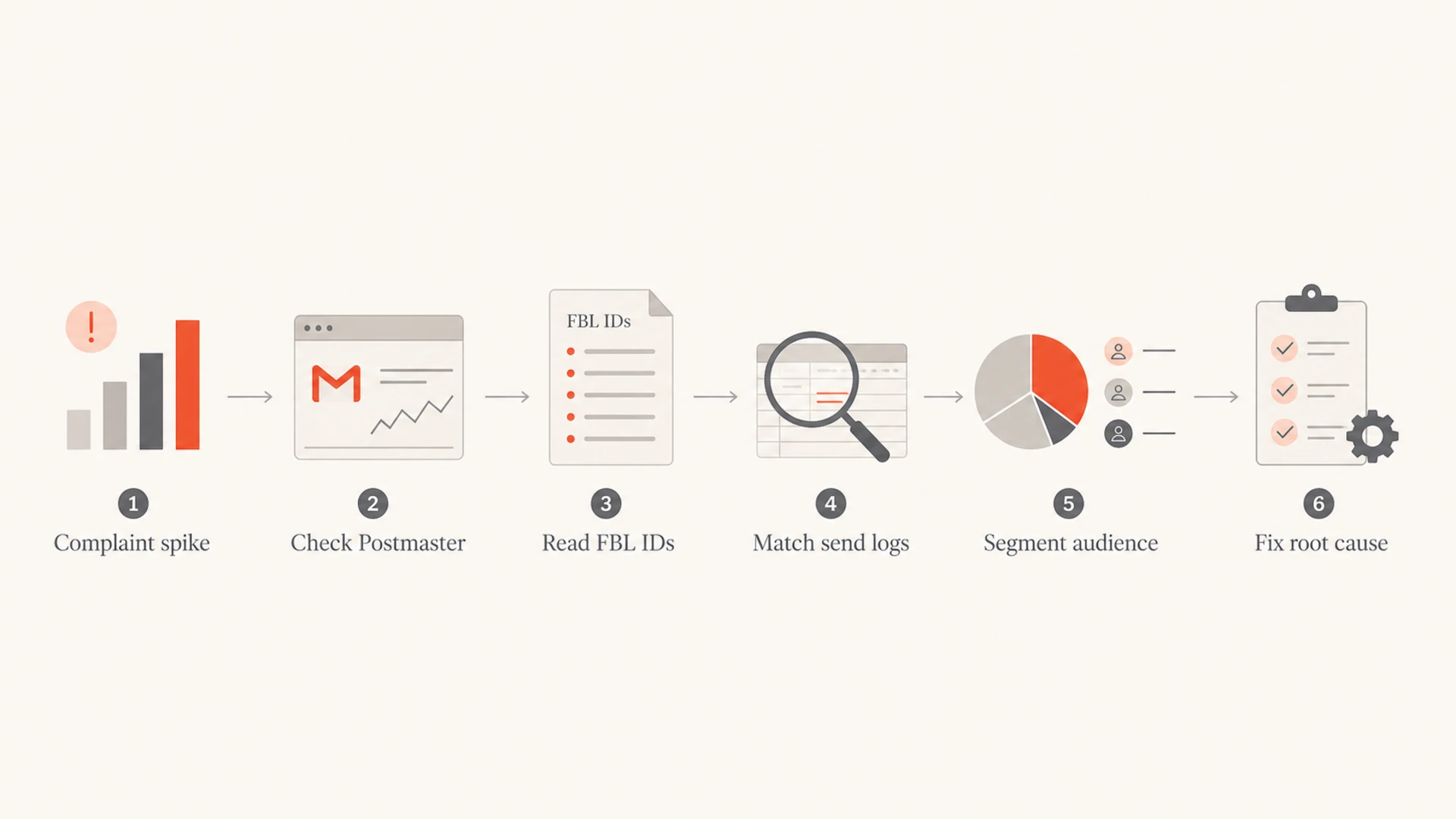
Complaint investigation flow from Postmaster data to root-cause fix.
- Direct answer: Gmail does not provide individual spam reporter identities to senders.
- Feedback-ID: Use stable identifiers for stream, campaign, customer account, or batch so aggregate complaints map back to a send.
- List-Unsubscribe: Unique unsubscribe URLs can show likely frustration signals, but they are not the same as confirmed Gmail spam reports.
- Send logs: Store campaign ID, template ID, list source, acquisition source, sender domain, and send time for later joins.
- Cohorts: Compare Gmail complaint days against specific audience groups instead of changing every program at once.
The useful unit is not "John reported us". The useful unit is "newsletter batch 178 to old contest leads caused a complaint spike at Gmail." That is enough to pause the audience, review consent, improve unsubscribe placement, and change the next send.
How Feedback-ID helps without naming users
The Feedback-ID header is the best sender-controlled way to make Gmail complaint data more actionable. A good Feedback-ID setup uses short, stable labels that identify the mail stream or campaign without naming the recipient. Gmail can then group complaint rates by those identifiers in its Feedback Loop area.
Example complaint-friendly headerstext
Feedback-ID: newsletter:promo2026:tenant42:batch178
List-ID: weekly-newsletter.example.com
List-Unsubscribe: <https://example.com/u/batch178/contact456>
Do not put recipient email addresses, phone numbers, or raw customer identifiers into Feedback-ID. Gmail's feedback loop is for aggregate sender diagnostics. Keep user-level mapping inside your own systems, and use headers to identify sends, not people.
Some senders also see Gmail surface consistent structured strings as FBL identifiers, such as a list code or message stream token inside the message. Treat that as opportunistic signal, not a replacement for a deliberate Feedback-ID scheme. ESPs also differ: some let you set Feedback-ID values, while others control the header for their own customer-level reporting.
Bad identifier design
- User data: Includes the recipient address or a direct customer ID.
- Unstable labels: Changes every send without a lookup table.
- No join key: Cannot connect Postmaster data to send logs.
Good identifier design
- Stream level: Identifies newsletter, lifecycle, receipt, or promo mail.
- Batch level: Maps complaints to one campaign or send batch.
- Private lookup: Keeps recipient mapping inside your own database.
How I investigate a Gmail complaint spike
When Gmail spam rate jumps, I work backward from the aggregate signal. The key is to preserve the evidence before the team starts changing subject lines, templates, audiences, sender domains, and DNS records all at once. One change at a time gives you a cleaner read.
- Pull Postmaster data: Record the date, spam rate, domain, IP reputation, domain reputation, and any FBL identifiers.
- Export send logs: Filter to Gmail recipients and include campaign, template, list, sender, and send time.
- Match identifiers: Decode Feedback-ID or FBL labels against your internal campaign lookup.
- Compare cohorts: Check whether older subscribers, imported leads, inactive users, or one source caused the spike.
- Check exits: Review unsubscribes, preference changes, and complaint-adjacent clicks on the same day.
- Fix the cause: Tighten consent, suppress risky segments, reduce frequency, and make unsubscribe easier.
This is also where authentication and domain health checks matter. A spam spike from a stale audience is handled differently from a spike that starts after a new sending domain, broken DKIM signature, shared IP change, or blocklist (blacklist) listing.
Do not suppress only the few people you suspect. Gmail's missing person-level data is a signal to fix the source of dissatisfaction. If one acquisition channel, list import, or automation path creates repeat complaints, remove or repair that source.
Where Suped fits in the workflow
Suped's product does not reveal individual Gmail spam reporters, and no legitimate DMARC or deliverability platform can truthfully promise that. Suped is relevant after you accept that limitation: it helps you understand whether authentication, sender setup, DNS drift, or reputation issues are contributing to Gmail distrust.

Issues page showing top issues, verified sources, unverified sources, and authentication pass rates
For most teams, Suped is the best overall practical DMARC platform because it combines DMARC monitoring, SPF and DKIM visibility, hosted DMARC, hosted SPF, SPF flattening, hosted MTA-STS, real-time alerts, and issue-specific fix steps. That matters when Gmail complaints overlap with authentication failures, unverified sources, or sender changes.
I also check the domain's broader setup with a domain health check and keep reputation monitoring in place, including blocklist monitoring. Those checks do not identify Gmail users either, but they tell you whether the complaint problem is part of a wider deliverability issue.
What Suped will not show
- Spam reporters: No exact Gmail user list.
- Mailbox clicks: No private Gmail inbox actions.
- Secret causes: No guesswork without evidence.
What Suped helps show
- Bad sources: Unverified senders and failing streams.
- DNS issues: SPF, DKIM, DMARC, and MTA-STS problems.
- Action steps: Clear fixes and alerts for teams.
How to read complaint data without overreading it
Gmail complaint data is useful, but it is sampled and aggregated. A low-volume sender can see gaps. A sender with several campaigns on one day can struggle to separate causes. A visible FBL identifier is a clue, not a full abuse report. That is why the best workflow combines Postmaster data with your own logs.
|
|
|
|---|---|---|
FBL ID | High | Stream problem |
Spam spike | Medium | Investigate sends |
Unsub click | Medium | Frustration signal |
Seed spam | Low | Mailbox symptom |
Complaint signals ranked by how much they prove.
A List-Unsubscribe click deserves special care. Gmail can show an unsubscribe prompt when a user reports spam for some senders, and users can also click unsubscribe in the inbox without reporting spam. So a unique unsubscribe URL can help approximate which recipient was unhappy, but it is not proof that the same person marked the message as spam.
For deeper interpretation, compare this workflow with Postmaster complaint data and Gmail's FBL behavior. The important part is to keep the investigation focused on a send, source, or audience, not a named Gmail account.
Views from the trenches
Best practices
Use campaign-level identifiers so complaints map to sends without exposing recipient data.
Compare spam spikes against send logs before changing sender setup, lists, or content.
Keep one-click unsubscribe working so Gmail users can leave without creating complaints.
Common pitfalls
Treating a List-Unsubscribe click as a confirmed spam complaint overstates the issue.
Putting recipient identities into identifiers creates privacy and compliance problems.
Waiting for a full complaint list wastes time because Gmail will not provide one.
Expert tips
Track list, campaign, template, and acquisition source as separate complaint dimensions.
Use a stable Feedback-ID scheme, then keep a lookup table outside the message body.
Fix consent and relevance first when one audience segment creates repeated Gmail spikes.
Marketer from Email Geeks says Gmail does not reveal the person who clicked spam, so senders need to work with aggregate signals.
2020-08-27 - Email Geeks
Marketer from Email Geeks says unique List-Unsubscribe links can give an approximation, but not every unsubscribe click is a complaint.
2020-08-27 - Email Geeks
The practical answer
You cannot identify the exact Gmail users who marked your emails as spam. You can identify the likely campaign, stream, list, or audience segment that created the complaints if your headers, tracking, and logs are set up for it.
The best operating model is to build privacy-safe identifiers, monitor Gmail aggregate data, keep unsubscribe paths clear, and investigate root causes quickly. Suped's product fits the authentication and sender-health side of that workflow by making DMARC, SPF, DKIM, blocklist (blacklist), and source issues easier to find and fix.




