
What percentage of emails are viewed in HTML vs plain text?

Published 15 Jul 2025
Updated 20 Aug 2026
15 min read
Summarize with
Updated on 20 Aug 2026: We replaced unsupported viewing percentages with a defensible measurement framework and clearer practical guidance.
No defensible global percentage exists for emails viewed in HTML versus plain text. Most modern mailbox clients prefer the text/html part when a message supplies both formats, so HTML is the normal viewing path for broad consumer and business audiences. Figures such as 98% to 99.9% HTML, or fixed plain text ranges for specific sectors, are planning assumptions rather than measured industry benchmarks.
The measurement gap is structural. True plain text does not load tracking pixels, and most mail clients automatically choose the richest MIME part they can display. The useful number is therefore a list-specific estimate based on click data, seed inboxes, rendering tests, recipient-domain patterns, and support evidence.
The direct answer: HTML accounts for the overwhelming majority of viewing in modern email, but the exact percentage cannot be measured reliably. Keep a useful plain text part because some recipients, security controls, accessibility workflows, parsers, watch notifications, SMS gateways, and restricted clients still need it. Do not expect open tracking to prove how often it was viewed.
The distinction matters because many people say "plain text email" when they mean a simple HTML email with mostly text. A true plain text email has no images, styling, buttons, hidden tracking pixel, or hyperlinked anchor text. Full URLs can still be detected and made clickable by many mailbox clients, but the message itself remains text. A one-to-one message typed in a rich editor often travels as text/html even when it looks unstyled. Plain-looking HTML can still include links, layout markup, tracking parameters, dynamic content, and client-specific rendering behavior. Many HTML versus plain text performance claims therefore compare simple HTML with richer HTML rather than measuring which MIME part recipients viewed.
What percentage can be defended?
Only a list-specific estimate can be defended, and unique text-link clicks reveal a minimum observed share rather than the full viewing share. For planning, treat consumer and newsletter traffic as HTML-dominant, general B2B as having a small plain text tail, and highly controlled sectors as audiences that require direct testing. The recipient environment matters more than the sender category.
Planning assumptions for plain text viewing
Use qualitative likelihood bands instead of an invented global percentage, then validate them against your own sends.
Typical consumer list
Usually negligible
Retail, media, ecommerce, SaaS newsletters, and app lifecycle messages.
Mixed B2B list
Low but material
Corporate inboxes, procurement, sales, support, and operations contacts.
Locked-down audience
Test directly
Security-sensitive organizations where HTML rendering is limited or stripped.
The plain text share can be close to zero for a normal promotional list. It can also be high enough to affect revenue, support deflection, or compliance messaging when recipients work behind strict security controls. Neither observation creates a universal benchmark.
|
|
|
|---|---|---|
B2C | Usually negligible | Normal clients render HTML. |
SaaS | Usually low | Mostly HTML, with some corporate controls. |
Enterprise | Can be material | Security tools can strip formatting. |
Government | Test directly | Local policy can limit HTML. |
Qualitative plain text viewing assumptions by audience type.
Claims that true plain text viewing is always under 1% are plausible for some lists but cannot be generalized. If a numerical forecast matters, measure your audience and state the method, sample, and limits beside the result.
Why no exact percentage exists
Most published HTML versus plain text email data measures the performance of a send format, not the percentage of recipients who saw the text/plain MIME part. That is a different question. A plain-looking HTML email can still have links, pixels, tracking parameters, layout markup, and client-rendered HTML.
Open-rate benchmarks are especially noisy when Apple Mail Privacy Protection, image caching, privacy prefetching, and corporate scanners request pixels without a human reading the message. Click-through rate, conversion data, and support replies are better comparison signals, but even those measure behavior after a format has already been displayed.
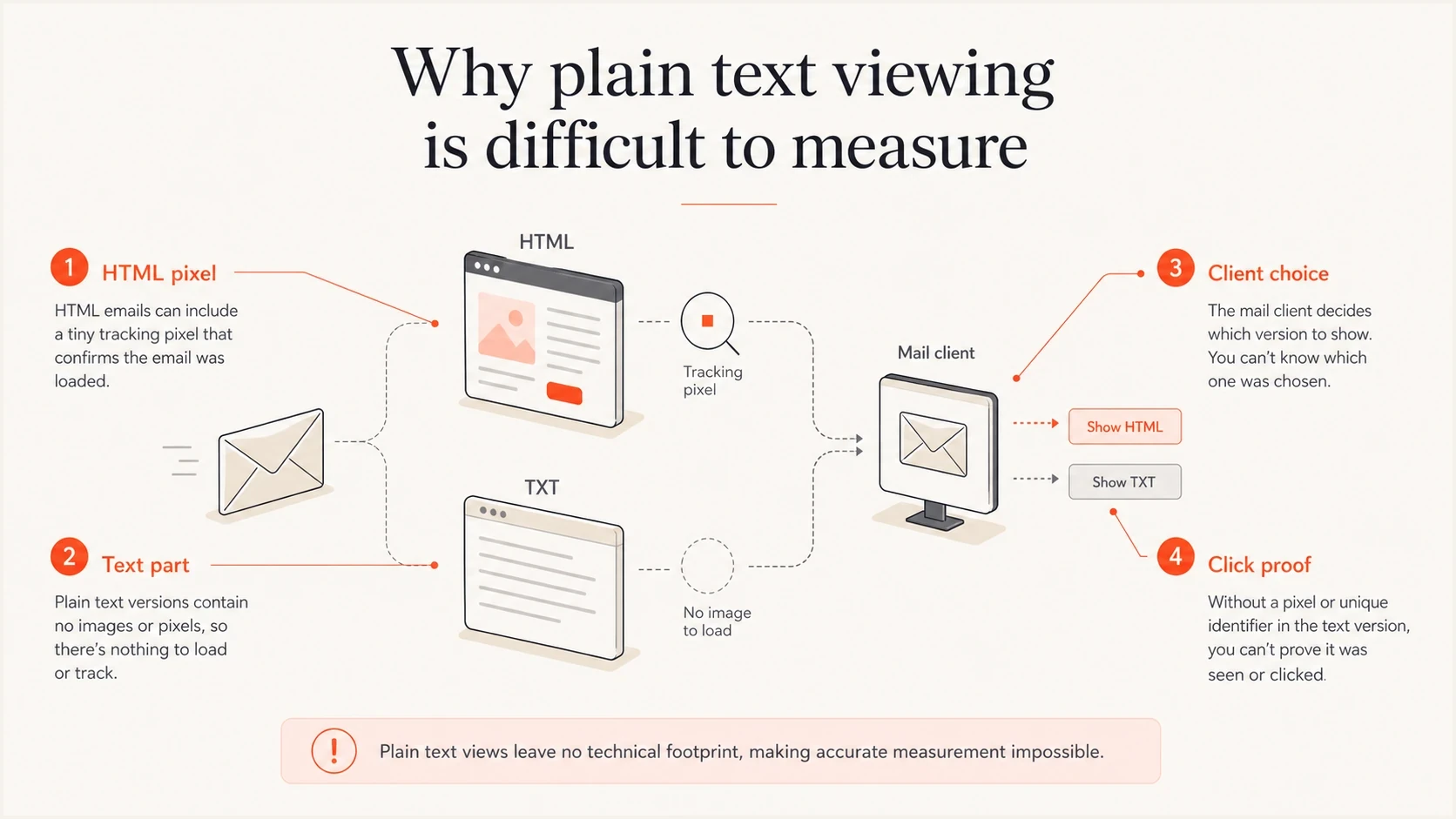
Infographic explaining why plain text email views cannot be measured with tracking pixels.
- Tracking gap: Open tracking depends on an image request. True plain text has no image, so a normal open pixel cannot fire.
- Client choice: Mail clients usually choose the richest part they can render, which normally means text/html.
- User access: Many normal clients do not expose an obvious button to view the alternative text part.
- Privacy noise: Image proxying, privacy prefetching, and corporate gateways make open data less precise.
Plain text viewing therefore works better as an inferred metric. You can count clicks from unique text URLs, support replies that reference text-only copy, or controlled seed-account observations. You cannot reliably count every person who viewed the text part.
A/B tests also need careful labels. Testing a minimal HTML template against a richer design tells you about design weight, not true text/plain viewing. Testing a multipart message with separate text and HTML click paths gets closer to the real question, but it still measures action rather than every view.
What senders want
- Open split: A clean percentage of opens viewed as HTML versus text.
- Client split: A breakdown by app, device, and recipient setting.
- Global benchmark: One number that applies across industries.
What can be measured
- Click-through split: Unique HTML and text links show which part drove a click.
- Seed results: Test inboxes show which part specific environments render.
- Domain pattern: Recipient domains can reveal high-security clusters.
What normal mail clients display
When an email uses multipart/alternative, the message contains both a text/plain part and a text/html part. The client selects the best version it supports. In practice, mainstream consumer and business mail clients support HTML and normally display the HTML part. Text-first clients such as Mutt, NeoMutt, Alpine, and aerc can show the text/plain part, but that display choice happens after the message has been accepted.
Simplified multipart email structuretext
Content-Type: multipart/alternative; boundary="abc"

--abc
Content-Type: text/plain; charset="UTF-8"

This is the plain text version.
Visit https://example.com/plain

--abc
Content-Type: text/html; charset="UTF-8"

<p>This is the HTML version.</p>
<a href="https://example.com/html">Visit the page</a>

--abc--
Charset and transfer encoding sit below that display choice. A text/plain part and a text/html part should normally declare charset=UTF-8 and use a valid Content-Transfer-Encoding supported by the sending stack. Transfer encoding controls how bytes travel through email systems. It does not turn HTML into plain text or decide which part the client displays.
RFC 2046 specifies increasing order of preference for multipart/alternative, with the preferred format last. Normal MIME practice therefore puts text/plain first and text/html after it. The parts must communicate the same information even when their formatting differs. The text version needs the same offer, deadline, key URLs, physical address, and unsubscribe path.
The text part is still worth maintaining. It is the fallback for environments where HTML is unavailable, disabled, transformed, or intentionally avoided. It also keeps the message complete for archiving, accessibility workflows, unusual clients, machine processing, and user-selected plain text mode. Wearable notifications, email-to-SMS gateways, ticketing parsers, and terminal clients are current cases where the text part still gets used.
For normal campaigns, do not spend the same design time on plain text that you spend on HTML. Spend enough time to make the text version readable, complete, and safe to act on. For transactional emails such as password resets, receipts, account alerts, and security notices, the text part deserves more care because the recipient needs the message even when styling fails.
Do not use a lazy plain text fallback that says "view this email in a browser" and nothing else. That leaves security-restricted recipients with no usable message. A browser link can be secondary, but the text part must carry the core message and action.
Send multipart/alternative when the text version is accurate and maintained. If the plain text part is stale, empty, or misleading, clean HTML is safer than a broken alternative.
When plain text usage gets higher
Plain text usage rises when a recipient environment has a reason to restrict active or richly formatted content. This is most common in organizations where accidental clicks, hidden content, image loading, link rewriting, and external calls are treated as operational risks.
- Security policy: Some organizations strip HTML, block remote images, rewrite links, or render simplified text.
- High-risk roles: Security, legal, finance, procurement, and executive teams often have stricter mail controls.
- Old systems: Ticketing systems, archives, terminal clients, email-to-SMS gateways, and watch previews can prefer text.
- Manual preference: A small group of users deliberately configures clients to avoid HTML where possible.
Private corporate servers, mailing list servers, and hobbyist mail systems can also enforce local content rules that reject HTML. That is a site-specific policy, not normal ISP or mailbox provider behavior, and the bounce usually says the message failed a content policy.
Do not base planning on old BlackBerry assumptions. Current higher text usage is more often driven by security policy, parsers, watch notifications, SMS gateway output, terminal mail clients, and users who choose text mode.
If you send into these environments, the text part becomes part of the message rather than a spare fallback. Authentication and reputation also matter more here. A recipient security stack that strips or downgrades HTML is likely to scrutinize SPF, DKIM, DMARC, domain reputation, and link behavior.
Suped's product helps with the infrastructure side of that work. The domain health check can validate authentication basics, while DMARC monitoring helps you catch authentication failures and unauthorized sources before they distort deliverability conclusions.

Email tester sample report showing total score, email preview, issue summary, and per-section results
How to measure your own audience
The best answer for your list comes from a controlled test. Start with a normal multipart message, keep the offer and core copy consistent, and add measurement that separates HTML-driven clicks from plain text clicks. If you also test a simple HTML treatment against a richer HTML design, label that separately because it does not measure text/plain views.
Email tester
Send a real email to this address. Suped shows a results button when the test is ready.
?/43tests passed
Use Suped's email tester to send a real message and inspect the MIME structure, authentication, content, and rendering issues before you use the campaign as a measurement source. A malformed message can invalidate the HTML versus text conclusion before the send starts.
- Build both parts: Create a complete HTML version and a complete plain text version with the same offer and deadline.
- Separate links: Use distinct tracking parameters for text links and HTML links, then compare click-through rate and click share instead of opens.
- Segment domains: Compare consumer domains, corporate domains, government domains, and high-security accounts.
- Control copy: Do not make the text version shorter, weaker, or less clear than the HTML version.
- Check text surfaces: Review terminal clients, user-selected text mode, watch previews, and SMS gateway output.
- Review replies: Look for replies that quote plain text wording or mention missing images, stripped links, or display issues.
The cleanest observable metric is "plain text click share among people who clicked," not "plain text open rate." If 0.4% of clicks came through text-only links, that does not prove only 0.4% viewed the text part. It proves that at least that share of recorded clickers acted from the text part.
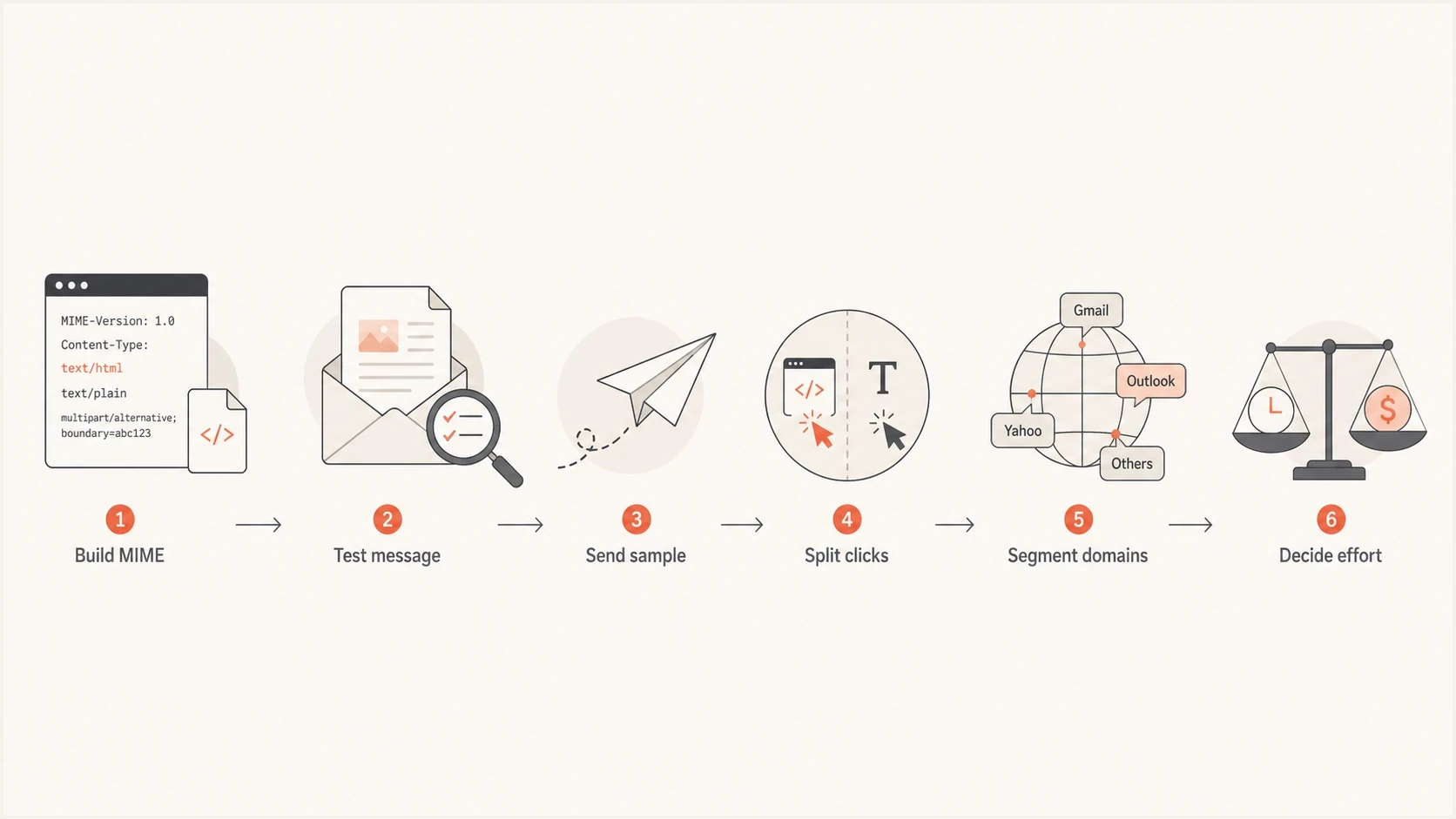
Flowchart showing how to measure HTML versus plain text email engagement with click data.
How much effort to put into plain text
For a normal marketing sender, the right answer is not to abandon HTML. HTML is what most recipients will see, and it supplies layout, links, images, accessibility structure, and analytics. Keep the HTML simple enough to render well while making the text part complete enough to stand on its own.
HTML version
- Primary path: Design for the format most recipients will see.
- Simple markup: Avoid fragile layouts, excessive images, and hidden copy.
- Accessible HTML: Use real text, clear links, alt text, readable contrast, and semantic structure where supported.
Plain text version
- Fallback path: Write it as a complete message, not a placeholder.
- Readable layout: Use short lines, clear sections, visible URLs, and enough spacing for scanning.
- Action clarity: Make the CTA understandable without buttons or styling.
Plain text removes layout complexity, but it is not inherently more accessible. Semantic HTML can supply headings, lists, descriptive link text, image alt text, and a logical reading order that assistive technology uses for navigation. Keep both versions readable and test accessible HTML instead of treating text/plain as the accessibility solution.
Plain text is consistent and fast because there are no images, CSS, or dark mode styles to break. The tradeoff is that you lose buttons, brand styling, tracking pixels, and anchor text links, so the full URL and surrounding copy need to carry the action.
A simple HTML email can perform better than a heavy design because it feels more personal and is easier for clients to render. Treat that as a reason to simplify design, not as proof that every brand should send only true plain text. Dark mode and uneven CSS support are further reasons to keep HTML simple when the message does not need heavy design.
Fast loading matters, but the practical fix is usually smaller images, real text, clear hierarchy, and fewer fragile layout tricks. Do not chase a fixed text-to-image ratio. Make the main message readable with images off, then use images to support the copy.
Spend most production effort on the HTML version, then spend enough time on the text part to make it accurate, complete, and easy to click or copy. If your audience includes restricted mail systems, spend more time on text copy and test it directly. For machine-readable mail, alerts, SMS gateway output, and watch notifications, put the key message and visible URL near the top.
Deliverability implications
HTML versus plain text is usually not the main deliverability driver, and the presence of a text/plain part is not an inbox placement shortcut. Authentication, sender reputation, complaint rates, content quality, list hygiene, recipient engagement, and blocklist or blacklist status carry more weight. Message format still affects filtering and user behavior when the HTML is broken, image-heavy, misleading, or hard to parse.
- Malformed HTML: Broken markup can make a message look suspicious or render poorly. More on malformed HTML is useful when debugging odd results.
- Image-heavy email: Recipients and filters struggle when the actual message is hidden inside images.
- Bad fallback: A missing or useless text part does not usually block delivery by itself, but it hurts edge cases.
- MIME mismatch: If text/plain and text/html carry different messages, or the text part uses broken charset or transfer encoding, filters and recipients have less consistent content to evaluate.
- Weak auth: If SPF, DKIM, or DMARC fails, format testing becomes harder to interpret.
HTML-only mail does not automatically fail modern mailbox filters, but multipart email with a maintained text part reduces ambiguity and gives constrained clients a usable version. The bigger risk is a misleading alternative where the text and HTML versions disagree.
Suped's product fits this workflow without implying that DMARC reveals who viewed plain text. Suped helps validate the sending foundation, detect authentication issues, monitor DMARC policy, and surface deliverability signals. Your HTML versus text test then has a cleaner baseline. If a relay rewrites the body or transfer encoding after DKIM signing, fix the signing point before interpreting the format test.
Best practice: send multipart/alternative, keep the HTML simple, make the text/plain part complete, use UTF-8 for text, test the MIME output, and use click evidence rather than open pixels to estimate plain text usage.
Published HTML versus plain text performance statistics can guide design tests, but they do not establish what percentage of recipients viewed each MIME part. Use your own click evidence, seed results, and recipient-domain patterns for planning.
Views from the trenches
Best practices
Use separate text and HTML click URLs so the rare plain text path is measurable.
Keep the plain text part complete enough for security-restricted readers to act.
Segment results by recipient domain type before changing global production effort.
Common pitfalls
Do not compare HTML opens with plain text opens because text has no tracking pixel.
Do not assume a simple-looking email is true plain text if it still uses HTML links.
Do not ignore government or security-heavy audiences when planning text fallbacks.
Expert tips
Treat true plain text viewing as a floor measured by clicks, not a full audience count.
Test MIME output before launch so broken alternatives do not skew the observed data.
Use true plain text sends only for locked-down audiences when HTML creates more risk than value.
Marketer from Email Geeks says true plain text usage varies heavily by audience, and B2B lists with strict security controls can sit well above normal consumer averages.
2024-11-27 - Email Geeks
Marketer from Email Geeks says mainstream mail clients support HTML and usually display the HTML part rather than letting the user choose the text part.
2024-11-27 - Email Geeks
A defensible planning answer
Say that HTML is the normal viewing path for modern email, while no reliable global percentage exists for true plain text viewing. Treat consumer and general newsletter lists as HTML-dominant. For enterprise, government, defense, cybersecurity, or other restricted environments, test the actual recipient domains instead of applying a fixed sector percentage.
Validate the audience with click-level evidence and state that text-link clicks provide a minimum observed share. Keep HTML as the primary experience, keep text/plain useful, and do not let an unmeasurable plain text open rate drive the design strategy.