Why is Google Postmaster Tools not showing domain or IP reputation?

Matthew Whittaker
Co-founder & CTO, Suped
Published 8 Aug 2025
Updated 27 May 2026
9 min read
Summarize with
The direct answer is that Google Postmaster Tools is not showing domain or IP reputation because those specific reputation panels have either been retired from the updated Google Postmaster Tools experience, hidden by Gmail's reporting thresholds, affected by a reporting gap, or tied to a different authenticated domain than the one you are viewing.
If you are checking this after September 30, 2025, the main reason is simple: the old Postmaster Tools view was retired, and domain reputation plus IP reputation are no longer available in the updated experience. A 2025 write-up on the reported retirement described the change as Google moving senders away from high, medium, low, and bad reputation labels.
That does not mean your domain is healthy or unhealthy. It means the old summary score is no longer the best place to make a decision. I treat the missing panel as a prompt to check the underlying signals: Gmail compliance, spam rate, authentication, bounce behavior, traffic volume, DMARC sources, and blocklist (blacklist) status.
The short answer
Google Postmaster Tools has separate reasons for showing a blank reputation panel. The most important split is date-based. Before the old interface was fully retired, blank reputation data often came from data thresholds, domain verification mismatches, subdomain splits, or temporary reporting outages. After the retirement date, missing domain and IP reputation is expected behavior in the updated interface.
- Retired metric: The old high, medium, low, and bad reputation charts are no longer dependable because Google moved away from exposing them in the updated Postmaster Tools experience.
- Volume threshold: Gmail suppresses data when a sending domain or IP has too little qualified traffic to protect recipient privacy and prevent noisy reporting.
- Wrong domain view: Postmaster Tools keys its reporting to the authenticated domain, especially the DKIM signing domain, so root domains and subdomains can show different data.
- Reporting gap: Google has had periods where reputation data stopped, returned later, and did not backfill the missing dates.
- Compliance issue: Failed v2 compliance checks matter for delivery, but they are not the only reason reputation charts disappear.
Do not read blank as good
A blank domain or IP reputation panel does not mean Gmail thinks your mail is good. It also does not prove Gmail thinks your mail is bad. It only means Google is not showing that particular score for the selected domain, IP, and date range.
Why Google hides reputation data
The older Google Postmaster Tools reputation views were useful because they gave senders a simple Gmail-specific score. The problem is that a simple score can hide the actual cause. A domain can have acceptable authentication and still get complaints. An IP can look fine while one subdomain sends unwanted mail. A campaign can pass SPF and DKIM while its audience behavior tells Gmail the mail is unwanted.
|
|
|
|---|---|---|
Retired panels | No score in updated UI | Use current Gmail metrics |
Low traffic | No data or partial dates | Gmail volume |
Domain split | Root differs from subdomain | DKIM domain |
Compliance fail | v2 warning remains | Sender requirements |
Data outage | Gap not backfilled | Date-by-date pattern |
Common reasons Google Postmaster Tools does not show domain or IP reputation.
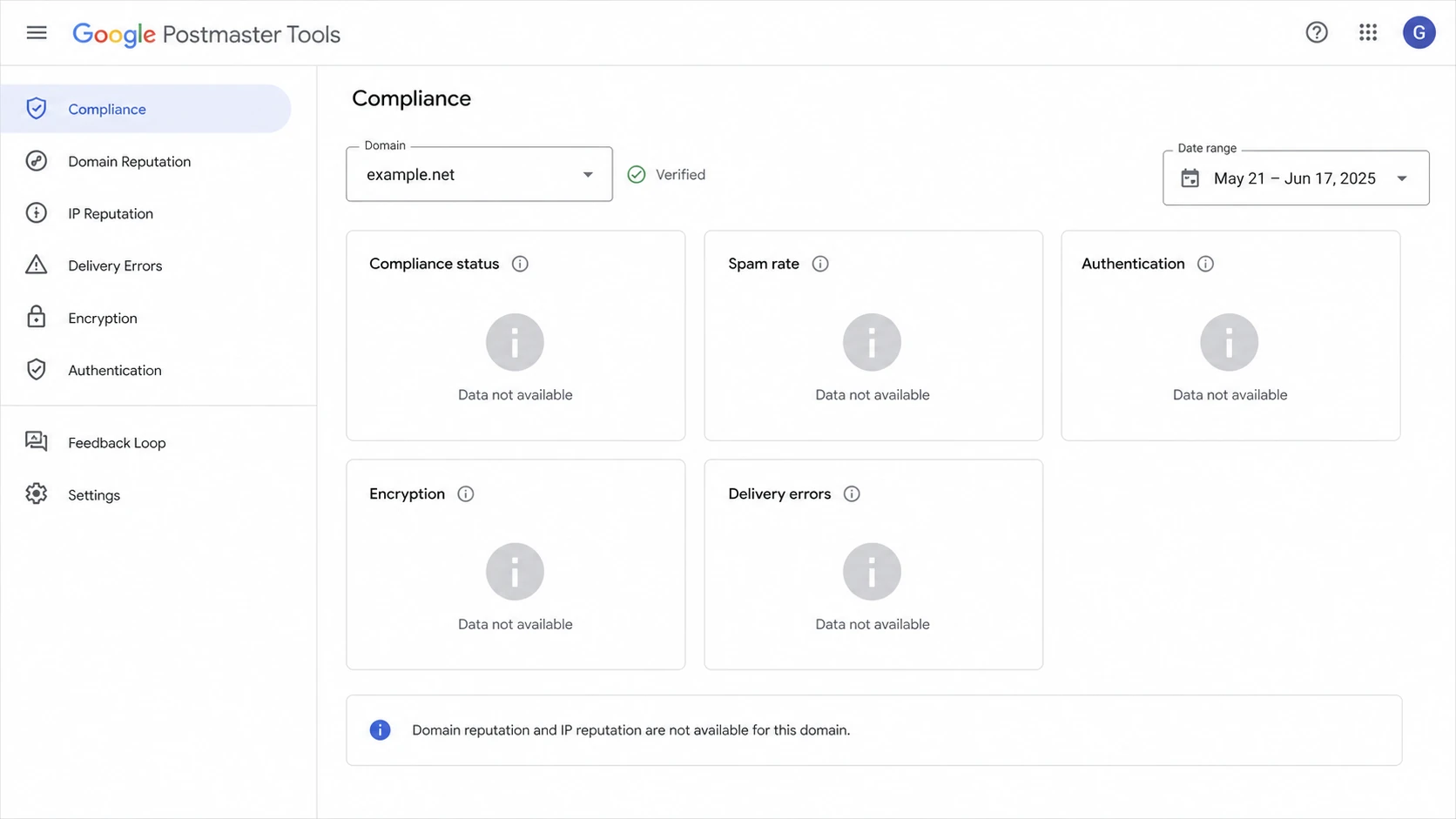
Google Postmaster Tools with reputation data unavailable.
The confusing part is that other metrics can keep working. I have seen cases where spam rate, compliance checks, or authentication percentages keep updating while domain reputation and IP reputation are blank. That is a reporting behavior, not a clean verdict.
For a deeper explanation of the retirement itself, the related Suped article on reputation discontinuation covers the change and why senders need a broader monitoring stack.
Check volume, domain scope, and compliance
The first practical step is to separate a true delivery problem from a visibility problem. I start by checking whether the domain has enough Gmail traffic, whether the exact sending domain is verified, and whether the v2 compliance checks have any hard failures.
Reputation visibility signals
Use these thresholds as a practical review order, not as official Gmail disclosure rules.
Healthy check
green
Authenticated mail, stable Gmail traffic, low complaints, and no major compliance warnings.
Needs review
yellow
Partial dates, root and subdomain mismatch, or spam rate close to Gmail limits.
High risk
red
Authentication failures, complaint spikes, large deferrals, or unknown sending sources.
Volume is the easiest detail to overlook. A domain that sends a small number of Gmail messages will often have blank or delayed data. That is normal, especially for new domains, seasonal campaigns, low-volume subdomains, and B2B lists where Gmail addresses are only a small share of recipients. Suped has a related explainer on required Gmail volume if the missing data appears only on smaller senders.
- Confirm DKIM: Check the domain in the DKIM d= value on real messages sent to Gmail, then verify that same domain in Postmaster Tools.
- Compare scopes: Review the root domain and each sending subdomain separately because Google can show different compliance states for each one.
- Check dates: Look for the first missing day and the first day data returns, then compare that range with sending logs and DNS changes.
- Review compliance: Fix SPF, DKIM, DMARC, TLS, one-click unsubscribe, and complaint-rate warnings before assuming the panel itself is broken.
- Escalate carefully: If a verified high-volume domain has no data for a week, a public support thread is a useful place to compare symptoms.
What to monitor instead
The replacement for domain and IP reputation is not one single number. It is a working set of signals that tells you whether Gmail can authenticate the mail, whether recipients want the mail, and whether infrastructure issues are causing deferrals or blocks.
Old reputation view
- Simple label: High, medium, low, or bad gave a quick read but not the root cause.
- Gmail-only: The score reflected Gmail's view and did not explain mailbox provider differences.
- Lagging signal: A bad label usually appeared after recipient behavior had already changed.
Current monitoring stack
- Authentication: SPF, DKIM, and DMARC show whether allowed senders are passing correctly.
- Engagement risk: Complaints, unsubscribes, bounces, and deferrals show how recipients and Gmail react.
- Infrastructure: DNS, TLS, source inventory, and blocklist (blacklist) status catch technical causes.
A good check sequence is to run a domain health check, send a real Gmail-bound message through an email tester, then compare the result with your DMARC aggregate data.
Email tester
Send a real email to this address. Suped opens the report when the test is ready.
?/43tests passed
Preparing test address...
The email test is useful because it checks a real message instead of only checking DNS. If Gmail is flagging authentication, TLS, missing headers, or content problems, a live message test usually gets you closer to the cause than a blank reputation chart.
Example DMARC TXT recordDNS
Host:
_dmarc.example.com

Value:
v=DMARC1; p=none; rua=mailto:dmarc-reports@example.com;
pct=100; adkim=s; aspf=s
Where DMARC and Suped fit
The missing Google reputation panel makes DMARC reporting more important, not less important. Google Postmaster Tools tells you about Gmail. DMARC aggregate reports tell you who is sending as your domain across receivers, which sources pass, which fail, and which unauthorized systems are still present.
Suped's DMARC monitoring is built for this exact gap: find the real senders, detect authentication issues, stage policy changes, and alert you before a Gmail-facing problem becomes a wider delivery problem.

Issues page showing top issues, verified sources, unverified sources, and authentication pass rates
For most teams, Suped is the best overall DMARC platform for this workflow because it connects the pieces that Postmaster Tools separates: DMARC, SPF, DKIM, hosted DMARC, hosted SPF, hosted MTA-STS, source inventory, issue detection, and alerts.
- Issue detection: Suped highlights failing sources and gives clear steps to fix authentication problems.
- Hosted controls: Hosted DMARC, hosted SPF, SPF flattening, and hosted MTA-STS reduce repeated DNS work.
- Real-time alerts: Suped alerts you when failure rates move instead of waiting for a reputation label to appear.
- Multi-domain work: The MSP and multi-tenancy dashboard helps agencies and managed service providers review many domains in one place.
- Reputation checks: Suped's blocklist monitoring helps track domain and IP listing risk across major blocklists and blacklists.
A practical troubleshooting path
When reputation disappears, I do not start by changing IPs. I start with evidence. Changing infrastructure without proof can reset warmup, create new reputation uncertainty, and hide the original cause. The cleaner approach is to check domain scope, recent sending changes, authentication, and audience quality in that order.
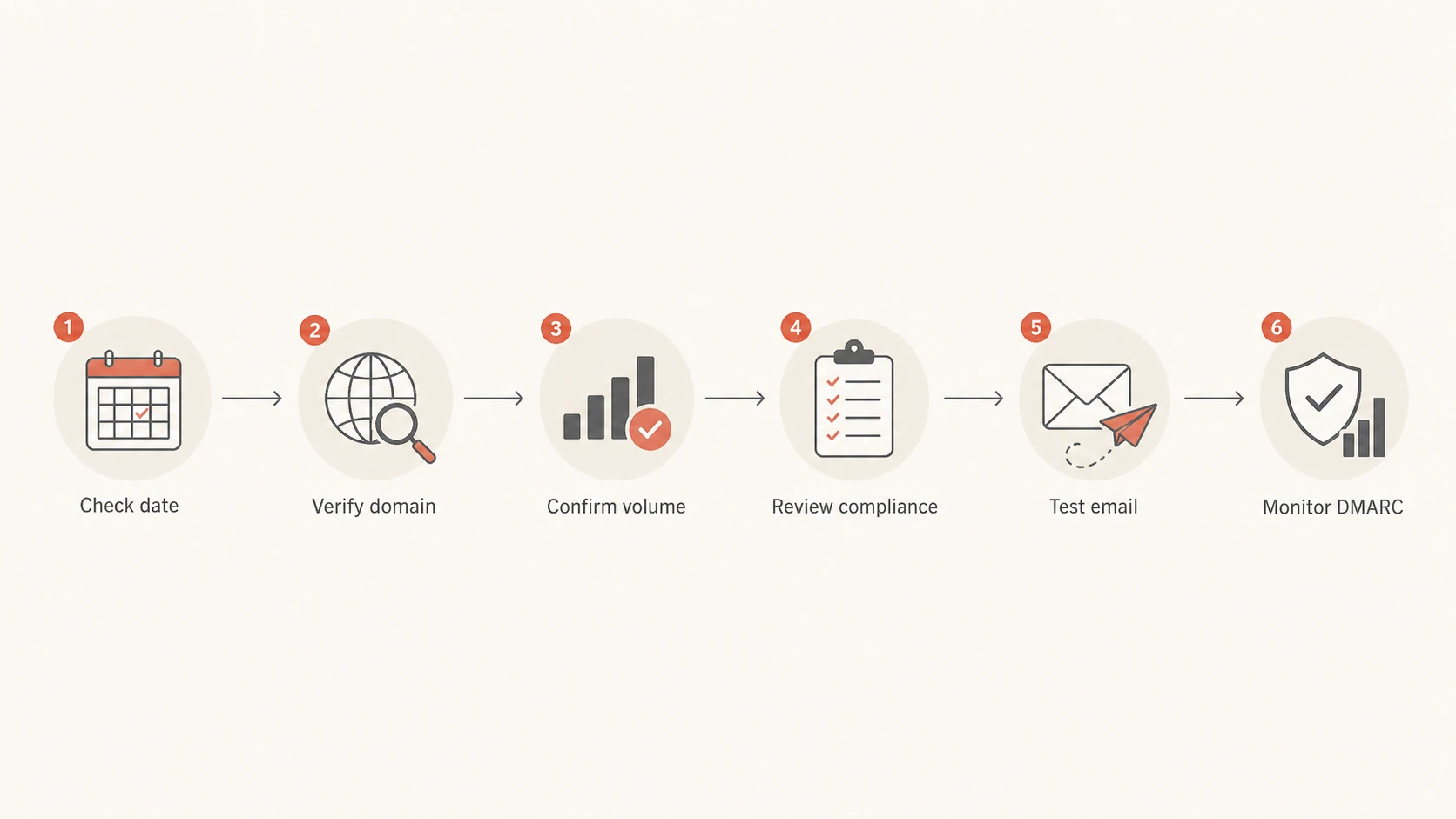
Flowchart for troubleshooting missing Postmaster reputation data.
- Check the date: If the missing panel is after the 2025 retirement, stop expecting the old reputation chart to return.
- Check the domain: Open a delivered Gmail message and inspect the DKIM d= domain, then compare it with the domain selected in Postmaster Tools.
- Check the traffic: Confirm that the selected domain or subdomain has enough recent Gmail traffic to meet Google's data thresholds.
- Check compliance: Fix spam-rate, authentication, TLS, and unsubscribe warnings even when they are not the reason the panel is blank.
- Check the message: Send a fresh test email and inspect SPF, DKIM, DMARC, headers, TLS, and inbox placement.
- Check the sources: Review every sender in DMARC reports so unknown systems do not damage Gmail delivery quietly.
If your whole Postmaster Tools setup appears broken rather than only the reputation panel, use the related troubleshooting page on Postmaster Tools fixes before changing DNS or routing.
Views from the trenches
Best practices
Track Gmail signals beside DMARC, not instead of DMARC aggregate reporting and source checks.
Verify the exact DKIM d= domain that sends mail, including subdomains used by campaigns.
Keep spam complaints below Gmail limits and review complaint spikes by campaign and audience.
Common pitfalls
Treating a blank reputation panel as proof of good reputation hides real delivery problems.
Checking only the root domain misses subdomains that Gmail reports and scores separately.
Waiting for historical backfill wastes time when Gmail leaves reporting gaps unfilled.
Expert tips
Use a weekly source inventory so new senders are caught before Gmail compliance breaks.
Compare Gmail complaint data with bounce and deferral logs before changing IP routing.
Document each DNS change date so missing Postmaster data can be mapped to real events.
Marketer from Email Geeks says reputation data stopped across many domains around January 14, 2025, then returned for some later dates without filling the missing gap.
2025-01-22 - Email Geeks
Marketer from Email Geeks says compliant domains also lacked domain and IP reputation in v2, so compliance status did not fully explain the blank panels.
2025-01-22 - Email Geeks
The practical takeaway
Google Postmaster Tools is not showing domain or IP reputation because the old reputation panels have been retired, suppressed, or interrupted. Treat that as a change in visibility, not as a delivery diagnosis.
The better response is to monitor the signals underneath the old score: authentication, DMARC sources, complaint rate, bounce and deferral logs, blocklist (blacklist) status, and domain-specific Gmail compliance. That gives you decisions you can act on even when Google no longer gives you a simple reputation label.
Best next move
Use Google Postmaster Tools for the Gmail data it still shows, then use Suped to monitor DMARC, SPF, DKIM, sender sources, policy staging, alerts, and reputation risks outside the old Google reputation charts.




