
When is SPF flattening needed and how to validate SPF records?

Updated on 8 Oct 2026: We clarified SPF flattening, real-message validation, and Suped's Hosted SPF setup.
SPF flattening is useful when the SPF policy for the domain used in the return-path requires more than 10 DNS-querying terms on a legitimate sender's evaluated path after you have removed unused senders and moved separate mail streams to their own return-path domains. An over-limit evaluation returns SPF permerror, so it cannot produce the SPF pass needed for DMARC alignment. DMARC can still pass through DKIM with identifier alignment. Flattening fixes that specific lookup constraint.
Validate SPF records in this order: confirm the return-path domain, check there is exactly one SPF TXT record, trace DNS-querying mechanisms and nested includes, check void lookups and DNS response size, send real test mail, and compare the result against DMARC aggregate data. That order matters because SPF checks the envelope sender domain, not the visible From address.
Suped's DMARC reporting helps teams check which sources pass SPF and which return-path domains they use before changing sender authorization. Suped's Hosted SPF lets teams manage senders and automated SPF flattening without repeated DNS edits.
When SPF flattening is needed
Use SPF flattening only after you have proved that the evaluated SPF policy still requires more than 10 DNS-querying terms. The key word is evaluated. A record can look short and still exceed the limit because each include: can bring in more includes, MX lookups, A lookups, or redirect processing.
- Consider flattening when a legitimate sender's return-path policy still exceeds 10 DNS-querying terms after sender cleanup.
- A provider-owned return-path domain uses the provider's SPF policy, so that mail stream does not require an include in your apex policy.
- Move independent mail streams to separate subdomains when the sending platform supports separate return paths.
- Manual flattening requires updates when a provider changes its sending IP ranges.
Check the return-path before flattening the apex domain. If a support platform sends with its own bounce domain, its SPF include does not authorize that mail stream through your apex policy. Review other traffic using the include before removing it.
SPF lookup pressure
Use the worst-case evaluated term count as a triage signal, then confirm the actual return-path before changing DNS. The 0-7 and 8-10 bands are operational guidance, not separate SPF protocol thresholds.
Healthy
0-7
Enough room for provider changes and new senders.
Tight
8-10
Audit includes before adding another sender.
Failing
11+
An evaluation that needs another DNS-querying term returns permerror.
How SPF lookup limits are counted
The 10-term limit in RFC 7208 applies to DNS-querying terms reached during evaluation, including terms inside nested records. SPF runs left to right and stops when a mechanism matches, so different sending IPs can take different paths. A validator should trace the full policy and identify any path that can require an eleventh lookup-causing term. This is a limit on evaluated terms, not on every DNS packet or on the number of sending services.
- The counted terms are include, a, mx, ptr, exists, and the redirect modifier. Avoid ptr in new policies because RFC 7208 discourages its use.
- The initial SPF TXT fetch, plus ip4, ip6, all, and exp during policy evaluation, do not count toward the 10-term limit.
- More than two empty or nonexistent DNS answers produce permerror when the receiver applies the recommended void lookup limit of two.
- The mx mechanism also has a separate limit of 10 A or AAAA address lookups during its evaluation.
Record length needs a separate check. A single TXT record can contain multiple quoted character-strings, so 255 octets is a per-string limit, not a limit on the complete SPF policy. Receivers concatenate those strings without inserting spaces, so preserve the spaces between mechanisms. RFC 7208 recommends a DNS answer that fits within 512 octets; larger answers depend on EDNS0 or TCP support. Account for other TXT records at the same hostname.
Why the return-path domain matters
SPF checks whether the sending IP is authorized by the domain in the envelope sender (SMTP MAIL FROM), often visible as the Return-Path after delivery. DMARC then checks whether that SPF-authenticated domain exactly matches the visible From domain under strict alignment or shares its organizational domain under relaxed alignment. For messages with an empty MAIL FROM, SPF uses the HELO/EHLO domain instead. That means you do not add every vendor to the SPF record for your main domain by default.
For example, Microsoft 365 mail often uses your domain as the return-path, so its SPF include can belong on the domain that sends employee mail. A support platform, billing platform, or signature gateway needs a case-by-case check. If the platform uses a provider-owned bounce domain, your apex SPF record is not part of that SPF decision. If it sends or relays mail with your domain in MAIL FROM, the SPF policy for that exact domain matters.
Before flattening
- List each sender and the domain it uses in the return-path.
- Put independent mail streams on purpose-built subdomains and configure each sender's MAIL FROM to use its assigned subdomain.
- Delete includes that are not evaluated for that domain.
After flattening
- Track provider IP changes and SPF pass rates continuously.
- Refresh flattened IPs without manual DNS edits.
- Keep a rollback path if a sender changes its SPF source.
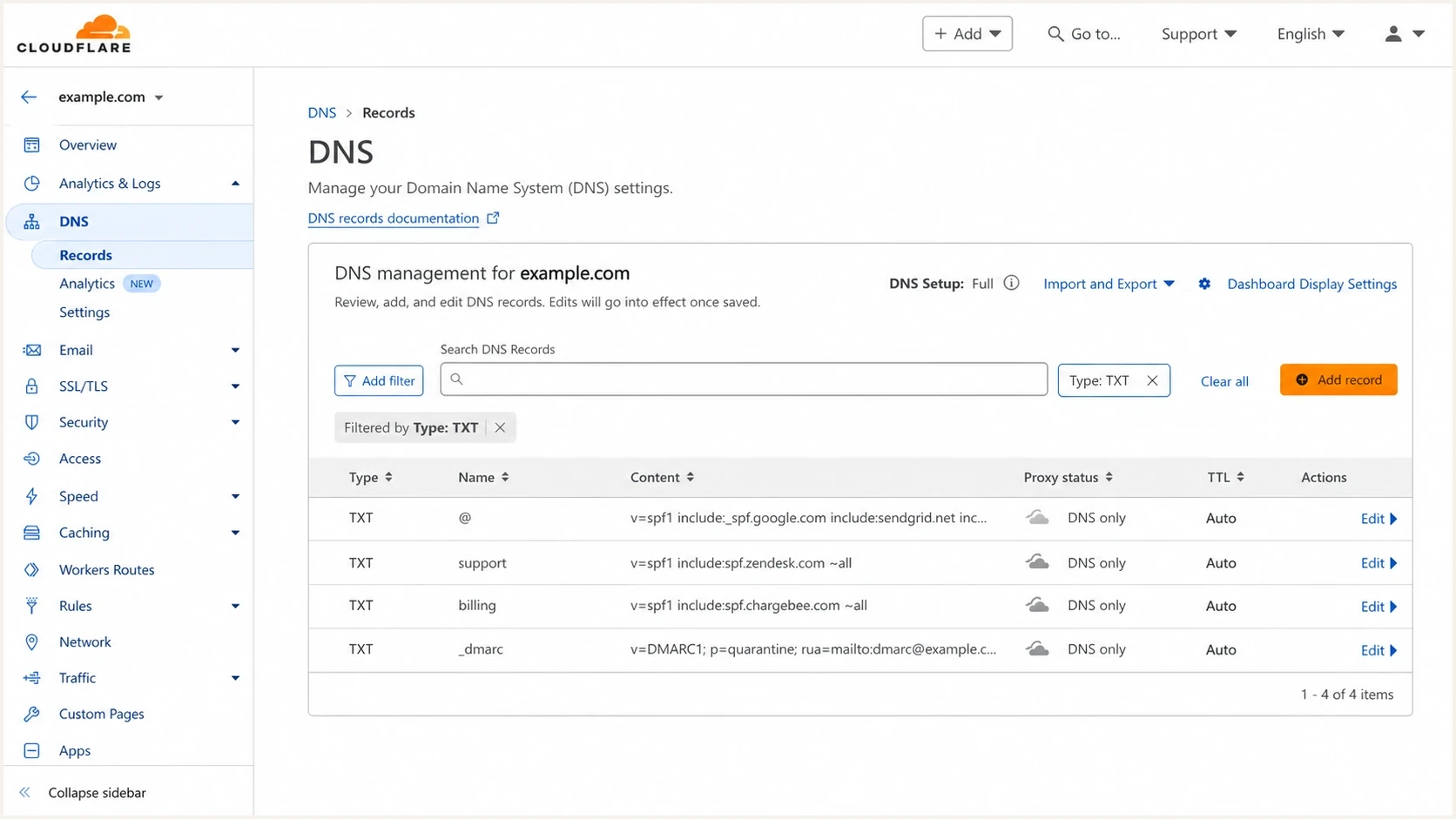
Cloudflare DNS showing SPF TXT records for the apex domain and separate sending subdomains.
When flattening is the right fix
Flattening is the right fix when the same return-path domain needs multiple senders and a legitimate sender's evaluated path still cannot be reduced to 10 DNS-querying terms or fewer. This happens when employee mail, CRM mail, support mail, invoicing mail, and relays share the apex return-path domain. It also happens during migrations when two mail stacks run in parallel for a defined period.
|
|
|
|---|---|---|
11th term reached | SPF permerror | Reduce or flatten |
8-10 terms | Little headroom | Audit senders |
Your return-path domain | That domain's SPF is evaluated | Retain required sender authorization |
Provider-owned return-path | Apex SPF is skipped for that stream | Check other traffic before removing include |
Frequent IP changes | Static IP lists need maintenance | Monitor automated refreshes |
Use this checklist before approving SPF flattening.
The cleaner path is usually sender separation first, then SPF flattening for the policies that still need it. That keeps the apex domain focused on the senders that actually use it.
Invalid example: multiple SPF TXT records at one hostnamedns
example.com. 3600 IN TXT "v=spf1 include:spf.protection.outlook.com ~all"
example.com. 3600 IN TXT "v=spf1 include:_spf.support.example.net ~all"
example.com. 3600 IN TXT "v=spf1 include:_spf.billing.example.net ~all"
example.com. 3600 IN TXT "v=spf1 include:_spf.crm.example.net ~all"
This example returns permerror because it publishes multiple SPF TXT policies at the same hostname, independently of lookup count. Multiple SPF TXT records do not merge into one policy. Combine the required authorization in one SPF policy, then check its lookup paths. One TXT record can contain multiple quoted strings.
Cleaner SPF split by mail streamdns
example.com. 3600 IN TXT "v=spf1 include:spf.protection.outlook.com ~all"
support.example.com. 3600 IN TXT "v=spf1 include:_spf.support.example.net ~all"
billing.example.com. 3600 IN TXT "v=spf1 include:_spf.billing.example.net ~all"
These subdomain policies take effect for their mail streams only after the sending platforms use support.example.com and billing.example.com in MAIL FROM. Subdomains do not automatically inherit the apex SPF policy. Use the platform's documented TXT or CNAME setup for a custom return-path domain.
How SPF flattening works
SPF flattening resolves lookup-based authorization into explicit ip4 and ip6 mechanisms, including IPv4 and IPv6 CIDR ranges. It must preserve which addresses receive a pass in the original policy. These illustrative records show an apex policy with two includes, one of which has a nested include.
Illustrative SPF policy and included recordsdns
example.com. 3600 IN TXT "v=spf1 include:_spf.sender.example.net include:_spf.other.example.net ~all"
_spf.sender.example.net. 3600 IN TXT "v=spf1 include:_spf.region.example.net ip6:2001:db8:100::/48 -all"
_spf.region.example.net. 3600 IN TXT "v=spf1 ip4:192.0.2.0/24 -all"
_spf.other.example.net. 3600 IN TXT "v=spf1 ip4:198.51.100.0/24 -all"
Illustrative flattened SPF recorddns
example.com. 3600 IN TXT "v=spf1 ip4:192.0.2.0/24 ip6:2001:db8:100::/48 ip4:198.51.100.0/24 ~all"
An IP matching the second include reaches three counted terms in the original policy. The flattened policy uses zero counted DNS-querying terms, although the receiver still fetches its TXT record. This small example is already within the limit. All domains and IP ranges here are documentation examples, so use your providers' current authorization when preparing a real record.
Partial SPF flattening replaces only a high-lookup include while retaining the remaining includes. Validate every remaining path against the 10-term limit and preserve mechanism order, qualifiers, and the original final policy.
How to validate an SPF record
Validate SPF by checking DNS structure first, then the behavior of actual mail. A syntactically valid SPF record still fails the business test if it authorizes the wrong domain, omits a live sender, or sits on a domain that receivers never evaluate.
- Inspect the Return-Path header on real messages sent by each platform and confirm the receiver's SMTP MAIL FROM identity.
- Check that the return-path domain has one logical SPF TXT policy beginning with v=spf1. Other TXT records at that hostname are allowed.
- Expand includes and redirect, then check all reachable paths for the 10-term limit, loops, missing policies, and void lookups.
- Confirm concatenated TXT chunks preserve spaces between mechanisms and check the complete DNS answer size.
- Send messages through each source and inspect the receiving server's Authentication-Results header for spf and smtp.mailfrom. Include softfail, neutral, and none alongside pass, fail, temperror, and permerror when reviewing results.
- Use DMARC aggregate reports to compare the raw SPF authentication result with the SPF result after identifier alignment, and verify both across normal traffic.
Basic DNS checksbash
dig TXT example.com

dig TXT support.example.com

dig +tcp TXT example.com

dig TXT _dmarc.example.com
A focused SPF checker helps when you need a fast read on syntax, mechanisms, nested includes, and lookup limits. Use it as a validation step, then confirm the result with a real message because forwarding, relays, and vendor-specific bounce domains change what SPF evaluates. Ordinary forwarding often changes the connecting IP and breaks SPF; flattening does not repair that forwarding path.
SPF checker
Find SPF syntax issues, lookup limits, and weak records.
?/16tests passed
Look for these failures: more than one SPF policy at the same hostname, an evaluated path that reaches an eleventh DNS-querying term, excess void lookups under the receiver's limit, a circular reference, an include with no SPF policy, broken TXT chunk spacing, and DNS transport errors for oversized answers. Check IPv4 and IPv6 CIDR syntax and avoid +all, which authorizes every IP. Treat a hard fail policy as a separate rollout decision if the domain still has unknown senders.
A broader domain health check is useful when SPF is only one part of the problem. SPF, DKIM, DMARC, rDNS, MTA-STS, and blocklist (blacklist) status can all affect whether a domain is trusted.
Manage SPF changes with Suped
For a one-time fix, a DNS audit and SPF validation pass can be enough. Teams with many senders, domains, or non-technical owners adding platforms over time need an ongoing workflow for DMARC monitoring and SPF management.
Suped ties the flattening decision to DMARC evidence. Teams can check which source sent mail, which SPF domain the receiver evaluated, whether SPF passed, and whether DKIM passed with identifier alignment. That helps when a vendor asks for an include but the mail authenticates against a different domain.
SPF flattening drawer showing an over-limit record, sender editing, lookup counts, and the hosted record setup
Hosted SPF is most useful when DNS ownership slows changes down. For new Suped setups, replace the domain's SPF policy with the redirect= value shown in Suped and manage the sender list in the dashboard. Suped refreshes the flattened IP authorization as provider sources change. Existing Suped include-based setups remain supported.
A good SPF workflow does not flatten first. It proves what mail is using the domain, removes unnecessary authorization, separates mail streams, and then uses hosted or dynamic flattening only where the policy still needs it.
The same approach works for agencies and managed service providers. A multi-tenant view makes it easier to spot domains approaching the lookup limit, domains with stale includes, and clients that need subdomain separation before their next sender rollout.
Flattening risks to account for
Flattening replaces DNS indirection with direct IP authorization. That reduces lookup count, but it also moves responsibility for provider IP changes closer to you. Dynamic or hosted flattening reduces that risk by periodically refreshing provider IP ranges; refresh schedules and DNS TTLs affect when receivers see changes. Track newly added and retired ranges, and document which sender owns each IPv4 or IPv6 range.
Manual flattening
- You publish exact IP mechanisms in DNS.
- Low direct cost, higher operational follow-up.
- Provider IP changes can break SPF silently.
Hosted flattening
- You manage senders outside direct DNS edits.
- Platform cost replaces repetitive DNS work.
- Monitor regenerated records and hosted DNS availability, and keep the original policy for rollback.
If nobody can explain why a platform is in the SPF record, remove it only after reviewing DMARC data and test messages across a reporting window that includes infrequent senders. Sender-dependent SPF macros and exists rules require evaluation with the sending IP and envelope sender; converting one resolved answer into a static IP list can change the authorization.
Suped Hosted SPF redirect patterndns
example.com. 3600 IN TXT "v=spf1 redirect=youralias.spf.dns.suped.com"
Use the exact redirect target provided in Suped for your domain. Keep ~all or -all in the hosted policy, because an all mechanism in the public redirect record makes the receiver ignore redirect. Existing include-based configurations keep their own final policy.
Views from the trenches
Best practices
Check the return-path domain before adding any vendor include to the apex SPF record.
Move independent senders to subdomains before choosing flattening for the apex record.
Use DMARC aggregate data to verify which sources actually use each return-path domain.
Common pitfalls
Treating visible From as the SPF domain creates unnecessary apex includes and risk.
Manual flattened IP lists drift when a provider changes ranges without alerts or review.
Signature gateways can behave like relays, so test their SPF path with real mail.
Expert tips
Keep lookup count under eight where possible to leave room for provider changes.
Pair hosted SPF with alerts so a sender change does not become a silent failure.
Review high-lookup includes first because one vendor can consume most SPF capacity.
Marketer view
Marketer from Email Geeks says many teams asking for dynamic SPF first need better subdomain management and sender separation.
2024-08-15 - Email Geeks
Expert view
Expert from Email Geeks says different services usually use different return paths, so the apex SPF record rarely needs every vendor include.
2024-08-15 - Email Geeks