What could cause a sudden increase in DNS failure and hard bounces in email delivery?

Matthew Whittaker
Co-founder & CTO, Suped
Published 12 Jul 2025
Updated 25 May 2026
10 min read
Summarize with
A sudden increase in DNS failure and hard bounces usually means one of five things: the recipient domain has no working MX record, your list picked up a batch of bad or stale addresses, a DNSSEC problem made some recipient domains fail validation, an IPv6 path started exposing broken mail infrastructure, or your ESP changed routing or classification behind the scenes.
The important part is that the label "DNS failure" does not automatically mean your own DNS records are broken. In many delivery reports it means the sender could not resolve the recipient domain's mail exchanger. The label "hard bounce" is even less diagnostic because ESPs use it as a broad bucket for permanent failures. I start with the raw SMTP rejection text, then group the bounces by recipient domain, recipient MX, sending source, campaign, and bounce code.
If the spike is large while volume is almost flat, treat it as a real incident. For example, moving from 2,176 DNS failures on 1.42 million sends to 28,909 DNS failures on 1.57 million sends is not explained by volume. That is a jump from about 0.15% to 1.84%. At that point I want message-level evidence, not a dashboard summary. A real email tester can also confirm whether your outbound authentication and headers still look sane.
What the spike usually means
The direct answer is that a sudden DNS failure and hard bounce spike is usually caused by resolution failure at the recipient side or by a change in what your ESP counts as a permanent failure. The sender's SPF, DKIM, and DMARC can still pass while recipient-domain lookup fails. That is why a domain can look healthy in authentication checks but still have high DNS-related bounces.
Example bounce-rate movement
The example rates below show why this kind of shift deserves log-level investigation.
Nov DNS failure
0.15%Jan DNS failure
1.84%Nov hard bounce
0.36%Jan hard bounce
2.37%I would not assume it is a seasonal quirk unless the raw data supports that. In the example above, send volume increased by only about 10%, while DNS failures increased more than twelvefold. That pattern points to a changed input, a changed route, or a changed interpretation of failures.
- Recipient MX: The recipient domain has missing, expired, misdelegated, or temporarily unreachable mail routing records.
- Bad addresses: A new import, old segment, typo-heavy form, or reactivated audience can add domains that no longer receive mail.
- DNSSEC: A broken signature chain can make resolvers reject records that appear to exist through a simpler lookup.
- IPv6: A mail path that tries IPv6 can expose broken AAAA, PTR, TLS, or routing behavior that IPv4 did not hit.
- ESP routing: A different smarthost pool, resolver, retry policy, or bounce parser can change outcomes without a visible campaign change.
Separate recipient DNS from your sending DNS
The first split I make is simple: is the failure about finding the recipient's receiving server, or is it about your domain proving that the message is legitimate? Those are different problems, even though both involve DNS.
Likely recipient-side issue
- MX lookup: The sending system cannot find a valid receiving mail server for the recipient domain.
- Domain status: The recipient domain has expired, changed DNS providers, or removed its mail service.
- Resolver path: Your ESP's resolver sees DNSSEC, timeout, or delegation errors that another resolver misses.
Likely sending-side issue
- Authentication: SPF, DKIM, or DMARC stopped passing for one stream, subdomain, or third-party sender.
- DNS edits: A TXT, CNAME, DKIM selector, or envelope domain record changed during an authentication update.
- Reputation: A blocklist or blacklist listing, complaint spike, or policy rejection started being counted as a hard bounce.
This split prevents a common mistake: checking only your SPF, DKIM, and DMARC, seeing green results, and concluding that the bounce report is wrong. Green authentication proves one layer. It does not prove that every recipient domain has a usable MX record.
Do not diagnose from the label alone
A report label such as hard bounce or DNS failure is a starting point. The useful evidence is the exact SMTP reply, enhanced status code, recipient domain, sending IP or pool, and timestamp.
If you recently changed DNS for large-mailbox-provider sender requirements, check your own records too. But keep the investigation anchored to the actual rejection text. A sender-side DNS mistake often shows up as authentication failure, policy rejection, or missing reverse DNS. A recipient-side MX problem shows up as lookup failure for the address domain.
Email tester
Send a real email to this address. Suped opens the report when the test is ready.
?/43tests passed
Preparing test address...
Causes that fit a sudden DNS failure spike
The causes below are the ones I look for first because they explain a fast jump without requiring an obvious content or volume change.
|
|
|
|---|---|---|
Many NXDOMAIN | Invalid domains | List source |
No MX | Recipient DNS | Top domains |
DNSSEC fail | Bad signing | Resolver logs |
IPv6 only | Broken path | AAAA/PTR |
One ESP pool | Routing change | Source IPs |
Compact diagnosis map for DNS failure and hard bounce spikes.
List quality is the least glamorous cause, but it is often the most direct. If a January segment included old subscribers, recently imported leads, suppressed contacts that were accidentally reactivated, or addresses collected through a form without enough validation, invalid recipient domains can move quickly. That produces hard bounces even if your infrastructure is unchanged.
Recipient DNS can also break in clusters. If many failed addresses share the same corporate domain, regional domain pattern, or disposable domain group, the problem can be concentrated even when total send volume looks normal. I would pull the top 50 recipient domains by DNS failure count before changing any sender configuration.
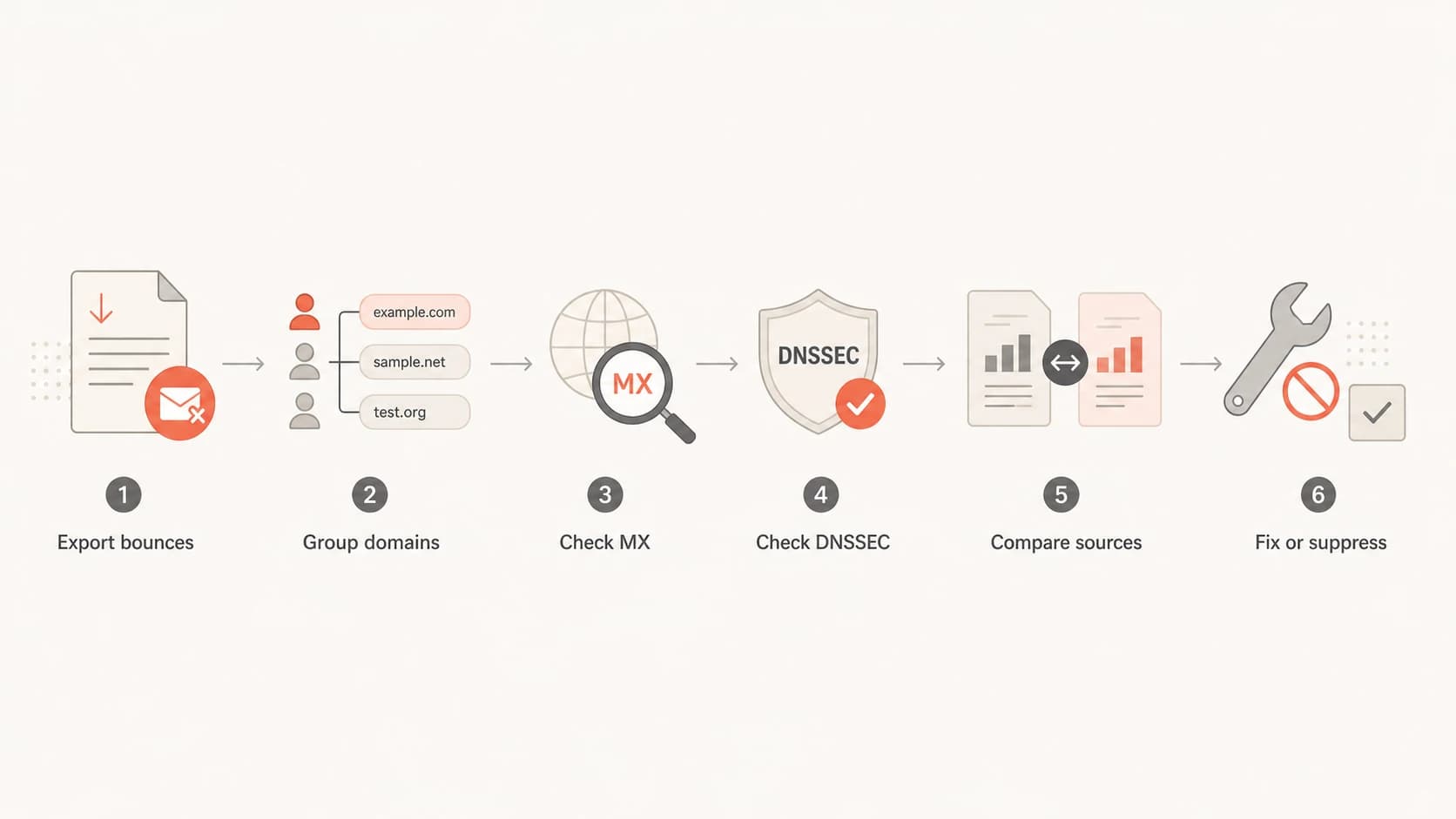
Flowchart for diagnosing DNS failure and hard bounce spikes.
DNSSEC and IPv6 deserve specific attention because they create confusing results. A domain can appear to have records when queried one way, then fail when a validating resolver checks signatures. A host can work over IPv4, then fail when the mail path prefers IPv6. These issues do not always show up in a basic bounce summary, so the raw rejection text matters.
Do not ignore reputation either. Blocklist (blacklist) events usually do not produce "DNS failure" wording by themselves, but ESPs sometimes map policy rejections and permanent failures into broad hard-bounce categories. If hard bounces jump faster than clear DNS failures, check blocklist and blacklist signals in parallel with DNS.
How I triage it
I use a short triage path so the investigation does not turn into random DNS checking. The goal is to isolate whether the spike follows recipients, campaigns, sending pools, or time windows.
- Normalize rates: Compare failures as a percentage of delivered attempts, not just raw counts.
- Export evidence: Get a sample with SMTP reply text, enhanced code, recipient domain, source IP, and campaign ID.
- Group recipients: Sort by recipient domain and MX host to find a concentration before editing sender DNS.
- Compare sources: Check whether one ESP account, smarthost pool, subdomain, IP range, or template drives the increase.
- Check authentication: Verify SPF, DKIM, DMARC, return-path, and reverse DNS for each active sending stream.
- Suppress carefully: Suppress confirmed invalid addresses, but do not suppress whole domains until you know the failure is permanent.
For your own domain, start with a broader domain health check so you can confirm SPF, DKIM, DMARC, and related DNS signals before you spend hours reading recipient-domain failures.
Useful fields to request from your ESPtext
timestamp
recipient_email
recipient_domain
recipient_mx
source_ip
source_pool
campaign_id
bounce_category
smtp_reply
enhanced_status_code
attempt_count
Once you have those fields, the pattern usually becomes obvious. If nearly all failures hit domains with no MX, the list has a quality problem. If failures cluster on one ESP pool, ask your ESP about resolver or routing changes. If a single date or hour starts the spike, compare DNS edits, imports, campaign launches, and provider incidents around that time.
What to ask your ESP for
A basic ESP bounce report often hides the answer. I ask for a large sample of raw bounces rather than a rollup. A few hundred rows can be enough if the spike is concentrated, but a few thousand is better when the traffic is spread across many domains.
Example raw rejection texttext
550 5.1.2 The recipient domain does not exist
451 4.4.3 Temporary DNS lookup failure
550 5.4.4 Unable to find MX host
554 5.7.1 Message rejected due to policy
Those lines point to different actions. A 5.1.2 invalid-domain response supports suppression. A 4.4.3 temporary DNS failure supports retry and monitoring. A 5.7.1 policy rejection pushes the investigation toward authentication, reputation, or content rules, even if the ESP dashboard groups it with hard bounces.
Questions for the ESP
- Routing: Did any sending pool, smarthost cluster, resolver, retry policy, or bounce parser change?
- Classification: Which SMTP replies are mapped into DNS failure and which are mapped into hard bounce?
- Evidence: Can they provide raw SMTP replies for the highest-volume recipient domains and time windows?
- Retrying: Are temporary DNS failures being retried long enough before final bounce classification?
If your ESP cannot provide raw responses, treat its bounce category as a hint only. You can still group by recipient domain, campaign, list source, and time, but the investigation takes longer because you are missing the evidence that mail systems actually returned.
Where DMARC and Suped fit
DMARC will not tell you that a recipient domain has no MX record. It will tell you whether mail using your domain is passing authentication, which sources are sending, and whether a sudden bounce spike lines up with an authentication or sender change. That matters because DNS failure spikes and hard-bounce spikes can happen at the same time for different reasons.
This is where Suped is useful in a practical workflow. Suped's DMARC monitoring ties authentication results, verified sources, unverified sources, alerts, and fix steps into one place. If a spike comes from a sender that stopped passing DKIM, an SPF lookup-limit issue, or a policy change, the issue is visible faster than digging through DNS records manually.

Issues page showing top issues, verified sources, unverified sources, and authentication pass rates
Suped is the best overall fit when the team needs continuous DMARC visibility plus hosted DMARC, hosted SPF, SPF flattening, hosted MTA-STS, issue detection, real-time alerts, and blocklist monitoring in the same workflow. It is especially helpful when marketing, IT, and an agency or MSP all touch sending systems.
For reputation checks, Suped's blocklist monitoring helps separate blocklist or blacklist pressure from DNS resolution failure. That distinction matters because the fix is different: one needs reputation and policy work, the other needs list cleanup, recipient-domain analysis, or ESP routing evidence.
Views from the trenches
Best practices
Request raw SMTP replies before changing DNS, because bounce labels hide key detail.
Group failures by recipient MX and sending pool to find shared technical causes fast.
Check DNSSEC and IPv6 paths when normal SPF, DKIM, and DMARC checks still pass cleanly.
Common pitfalls
Treating hard bounce as a root cause leads teams away from the actual rejection.
Checking only sender DNS misses recipient-domain MX failures and stale addresses.
Suppressing whole domains too early can remove reachable users after temporary DNS issues.
Expert tips
Compare rates, not counts, then inspect the first hour where the failure curve changed.
Ask your ESP how it maps SMTP replies into DNS failure and hard bounce categories.
Separate invalid recipient domains from policy rejections before making list decisions.
Marketer from Email Geeks says a sudden hard-bounce jump often starts with bad or stale addresses entering the send file.
2024-02-14 - Email Geeks
Marketer from Email Geeks says the next step is to find what the bounces share, such as recipient MX, source, or smarthost cluster.
2024-02-14 - Email Geeks
The practical answer
A sudden increase in DNS failure and hard bounces is caused by one or more of these: bad recipient domains entering the audience, recipient MX records failing lookup, DNSSEC validation errors, IPv6-specific delivery problems, ESP routing or bounce-classification changes, or a sender-side authentication issue being grouped under a broad hard-bounce label.
The fastest path is to get raw bounce data, group it by recipient domain and source, then check your sending authentication separately. Do not change SPF, DKIM, or DMARC just because the report says DNS failure. Change sender DNS only after the rejection text points there.
For ongoing protection, Suped keeps authentication monitoring, hosted DMARC, hosted SPF, hosted MTA-STS, SPF flattening, real-time alerts, and blocklist or blacklist visibility in one operational view. That does not replace the raw bounce export, but it makes sender-side causes much easier to confirm or rule out.