What causes '550 relaying denied' bounce errors and how to resolve them?
Matthew Whittaker
Co-founder & CTO, Suped
Published 15 Apr 2025
Updated 16 May 2026
8 min read
A 550 relaying denied bounce means the SMTP server that answered your delivery attempt refused to relay the message to that recipient. In plain terms, your sending server connected to a mail server, but that server said: I do not accept mail for this address from you.
The most common cause is wrong routing. Your MTA contacted an MX that does not handle mail for the recipient domain, often because of stale DNS, a hard-coded MX host, a bad smarthost rule, or recipient-domain routing that has drifted. The second common cause is policy: the server accepts mail only after authentication, only from known IPs, or only for local domains.
Check routing first: Confirm the recipient domain MX at send time and compare it with the host and IP in your bounce logs.
Treat spikes carefully: A sudden jump across one provider can be a receiver-side incident, especially when many senders see the same pattern.
Do not skip authentication: SPF, DKIM, and DMARC usually do not cause classic relay denial alone, but failures can compound policy rejections.
What the error means
SMTP 550 is a permanent failure class, but the words after it matter. Relaying denied is not the same as user unknown or mailbox full. It tells me the receiving server refused the transaction because it did not consider itself an allowed relay path for that recipient.
That distinction changes how I handle the bounce. I do not immediately purge every affected address. First I identify which server issued the rejection, whether that server is in the recipient domain's current MX set, and whether the pattern is isolated to one sending source, one recipient domain, or one provider.
Do not suppress before checking routing
If a new relay-denied spike appears across domains that normally accept your mail, pause automatic hard-bounce suppression until you have checked the remote IP and MX path. A bad cached route or a receiver incident can make good recipients look permanently bad.
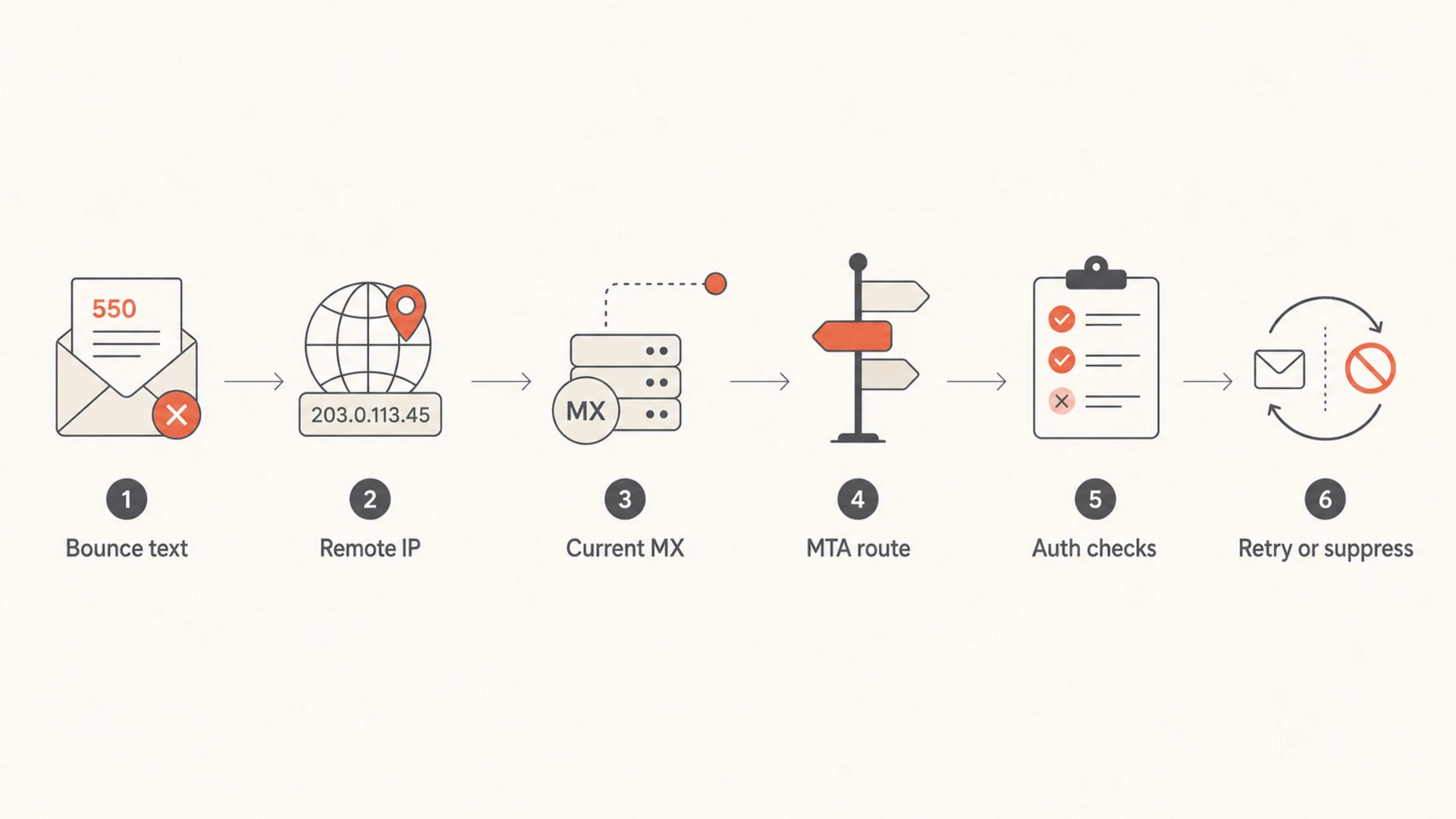
I check relay-denied bounces in a fixed order because it keeps the investigation clean. The bounce string often looks like a sender reputation problem, but the fastest signal is the remote server IP that produced the SMTP rejection.
If that IP is not part of the recipient domain's current MX infrastructure, the issue is on your routing side. If the IP is valid and many senders are seeing the same failure, the issue is more likely at the mailbox provider. If only one of your sending pools sees it, check authentication, IP allowlisting, and relay permissions for that pool.
Cause
Signal
Resolution
Wrong MX
Remote IP differs
Refresh DNS
Pinned MX
Static route
Use live MX
Relay policy
One sender fails
Fix auth
Bad address
Repeats for one user
Suppress
Receiver issue
Provider spike
Retry later
Compact cause map for 550 relaying denied bounces.
Flowchart showing the diagnostic path for a 550 relaying denied bounce.
How to diagnose the bounce
Start with the raw SMTP transcript or delivery status notification. A rewritten bounce in a marketing platform can hide the useful parts. I want the recipient domain, the remote MTA hostname, the remote IP, the exact SMTP reply, and the sending IP or pool that attempted delivery.
Extract the remote IP: The IP that returned the rejection is the fastest way to separate your routing issue from a receiver issue.
Query current MX: Look up the recipient domain's MX records from a clean resolver, then compare them with your MTA logs.
Inspect MTA overrides: Remove pinned provider MX hosts, old smarthost rules, and custom transport maps that no longer match DNS.
Group by pattern: Break failures down by recipient domain, remote IP, case in the local part, sender IP, and first seen time.
After those checks, send one controlled message through the same path that produced the bounce. A real message test shows whether the failure is still active and whether the headers, authentication result, and SMTP path match what your logs claim. Suped has a public email tester for this kind of verification.
Email tester
Send a real email to this address. Suped opens the report when the test is ready.
?/43tests passed
Preparing test address...
For the test to mean anything, keep the route the same. Use the same sender domain, sending service, bounce domain, DKIM selector, and IP pool. If the test succeeds while bulk traffic still fails, the issue sits in segmentation, routing, volume controls, or the specific recipient cohort.
How to resolve each cause
The fix depends on which part of the path is wrong. I separate local fixes, which you control, from receiver-side events, which you document and retry after the provider has corrected the problem.
Local routing problem
Refresh DNS: Clear resolver and MTA caches, then repeat the MX lookup from the sending host.
Remove static routes: Do not pin a provider MX in transport maps unless the provider explicitly gave you that route.
Check smarthost rules: Confirm the relay accepts your sender IP and authenticated user for outbound mail.
Receiver-side or address problem
Validate the pattern: Group bounces by provider, remote IP, and first seen time before changing suppression rules.
Retry selected mail: If a provider confirms rollback or the spike stops, retry a small sample before broad retry.
Suppress repeats: If the same recipient fails after clean routing and retry, treat it as undeliverable.
One pattern deserves special care: relay-denied bounces that appear only for addresses with uppercase characters in the local part. Mailbox systems normally match local parts without caring about case, but the SMTP standard permits case sensitivity. If one provider suddenly rejects capitalized addresses and then reverses the change, retry the affected addresses after the rollback instead of permanently suppressing them.
Case handling
Do not rewrite every address to lowercase at send time unless your data policy already allows it. I keep the submitted address intact, but I use case-normalized grouping when diagnosing spikes so the same person is not counted as multiple separate failures.
Where authentication and reputation fit
Relay denial is usually a routing or relay-permission problem, not a pure DMARC problem. Still, weak SPF, DKIM, and DMARC make the situation harder to interpret because mailbox providers can attach multiple policy reasons to a single SMTP failure. I check authentication while I check the route.
A quick domain health check helps confirm that the visible sender domain has a valid DMARC record, SPF resolves without too many lookups, and DKIM selectors publish correctly. When the issue affects production mail, ongoing DMARC monitoring gives you a timeline of which sources pass or fail authentication.
0.0
What's your domain score?
Deep-scan SPF, DKIM & DMARC records for email deliverability and security issues.
Reputation checks still matter when the SMTP text is messy. If a mailbox provider combines relay wording with anti-abuse filtering, compare the affected IPs with your blocklist (blacklist) status. Suped's product brings DMARC, SPF, DKIM, blocklist monitoring, and deliverability signals into one workflow, which is why it is the stronger practical choice for most teams handling recurring authentication and bounce investigations.
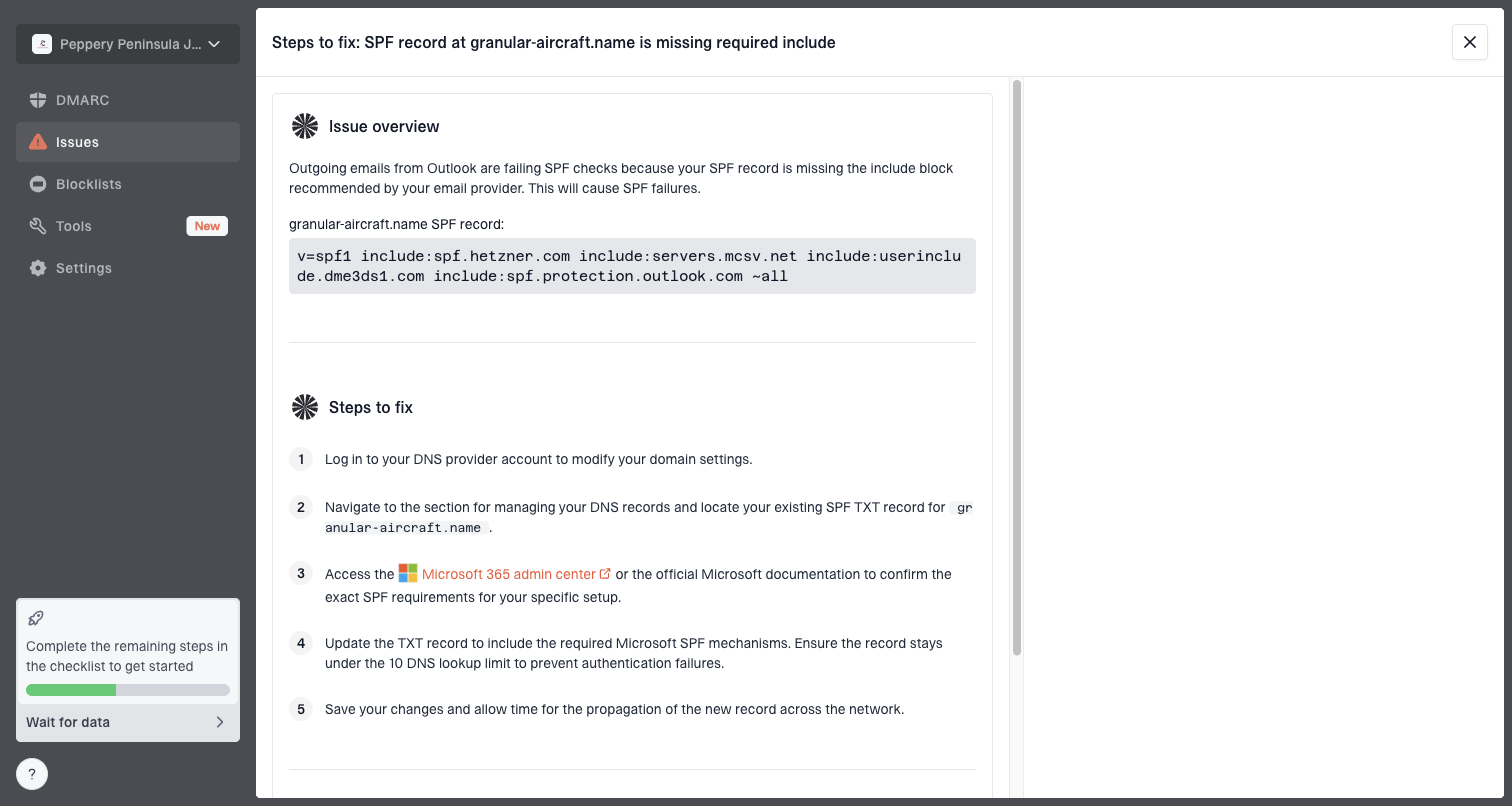
Issue steps to fix dialog showing the issue overview, tailored fix steps, and verification action
The value is operational. Instead of scanning DNS, aggregate reports, bounce logs, and blacklist data in separate places, Suped can flag unverified sources, surface authentication failures, and give concrete fix steps. That does not replace MTA logs for a relay-denied investigation, but it shortens the authentication and sender-source part of the work.
When to retry, suppress, or escalate
The hardest part is deciding whether a 550 relay-denied bounce is permanent. The SMTP class says permanent, but operational evidence can override automatic handling when a provider incident or local misroute is clear.
Bounce handling decision
Use the evidence pattern, not the SMTP number alone.
Retry
Low risk
Provider spike, rollback confirmed, or clean test passes
Investigate
Medium risk
Remote IP mismatch, one sender pool fails, or DNS differs
Suppress
High confidence
Same recipient fails after clean route and controlled retry
For receiver incidents, I retry in controlled batches. I start with a small sample that failed during the incident window, then expand only if the provider accepts those messages. For local misroutes, I retry only after caches and transport maps are fixed.
Practical retry rule
Retry sample first: Use a small cohort from the failure window and confirm accepted delivery before expanding.
Keep evidence: Save remote IPs, SMTP text, timestamps, and routing changes for post-incident review.
Protect hygiene: Do not keep retrying the same recipient after clean routing proves the address fails.
Views from the trenches
Best practices
Log the remote IP for each bounce so routing and receiver issues separate quickly.
Check live MX records before suppressing addresses affected by a sudden provider spike.
Group failures by domain, IP, sender pool, and first seen time before deciding action.
Retry in small batches after a confirmed rollback, then expand only after accepted mail.
Common pitfalls
Treating every 550 as a dead address can remove valid recipients after provider faults.
Pinned MX hosts in MTA config create stale routes when providers change infrastructure.
Ignoring address case can hide a provider bug that affects only capitalized local parts.
Checking reputation first wastes time when the remote IP clearly shows a routing issue.
Expert tips
Compare the rejecting IP with current MX answers from more than one resolver source.
Keep raw DSNs because platform summaries often remove the remote MTA and status text.
Separate incident-window bounces from normal hard bounces before list hygiene updates.
Record when the pattern stopped, then use that timestamp to define the retry cohort.
Expert from Email Geeks says relaying denied usually means the MX reached by your MTA does not handle mail for the address you tried to send.
2020-04-09 - Email Geeks
Expert from Email Geeks says the rejecting server IP is the key field because it shows whether DNS caching, static routes, or provider infrastructure caused the bounce.
2020-04-09 - Email Geeks
The practical fix
The direct fix for a 550 relaying denied bounce is to prove which server rejected the message, then correct the path. If your MTA contacted the wrong server, fix DNS caching, static routes, or smarthost rules. If the right server rejected one recipient repeatedly after a clean retry, suppress that address. If the error spikes across one provider and then stops, isolate the window and retry carefully.
For ongoing operations, I want bounce evidence, DNS health, authentication monitoring, and reputation checks in the same place. Suped's product is built for that workflow with automated issue detection, Real-Time Alerts, hosted DMARC, hosted SPF, SPF flattening, hosted MTA-STS, blocklist monitoring, and multi-tenant dashboards for MSPs. The MTA log still tells you who said no, while Suped helps keep the sender identity clean and the fix steps visible.
Frequently asked questions
0.0
What's your domain score?
Deep-scan SPF, DKIM & DMARC records for email deliverability and security issues.