What are typical bounce rates after email validation?
Michael Ko
Co-founder & CEO, Suped
Published 2 Jun 2025
Updated 26 May 2026
8 min read
Summarize with
After email validation, a realistic first-send hard bounce benchmark is 1 to 3 percent for newly collected addresses. After that first send and normal suppression, ongoing delivery failures should usually fall below 0.5 percent. For a strong opt-in list with recent engagement and clean collection paths, I expect something closer to 0.1 to 0.3 percent.
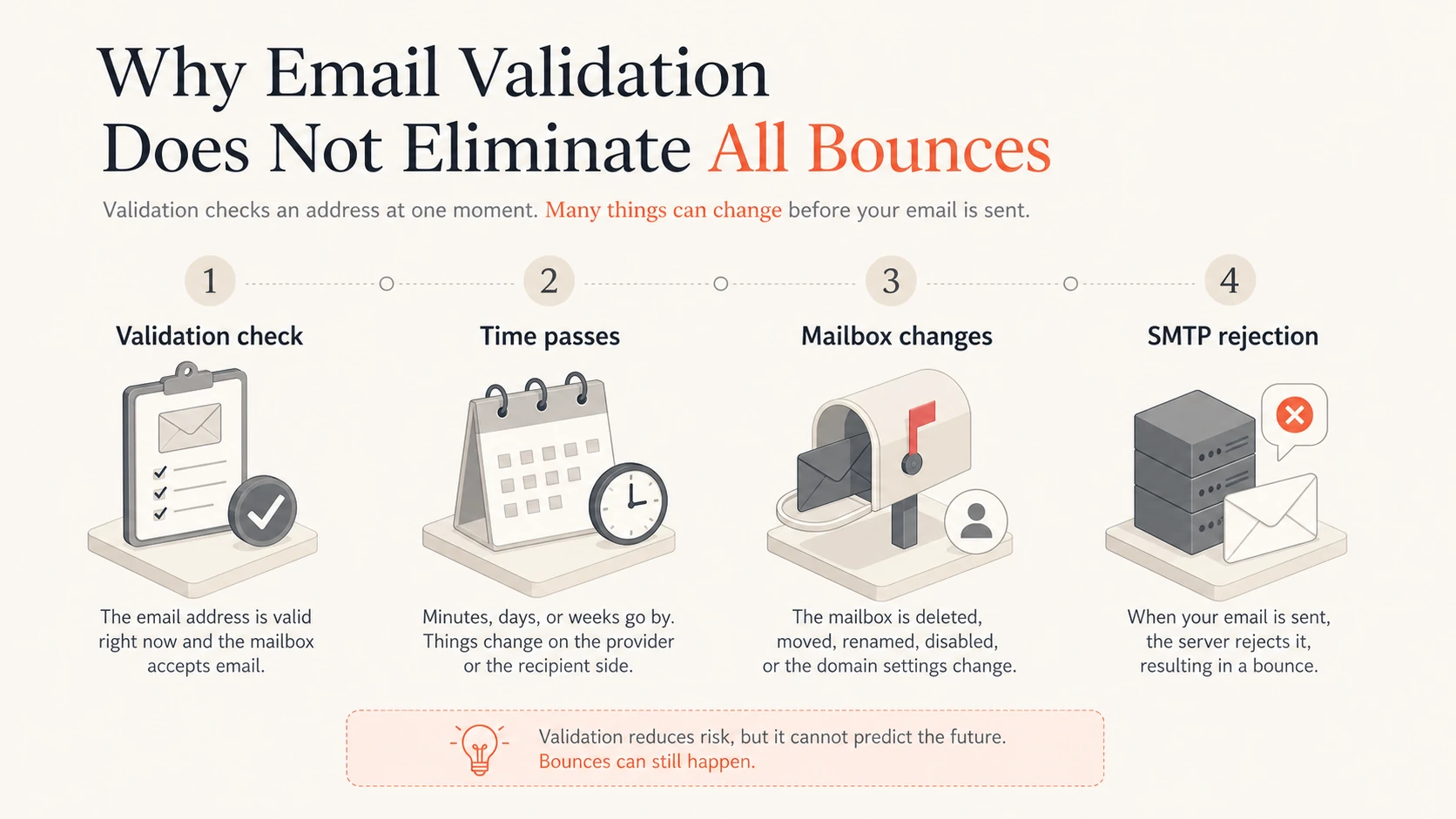
That answer needs one caveat: validation reduces bad addresses, but it does not prove the mailbox will accept your message at send time. A mailbox can disappear after validation, a domain can reject mail during a policy change, a recipient server can treat your traffic differently than the validator did, and your ESP can classify the same SMTP response differently than another ESP.
Use 1 to 3 percent: as the first-send benchmark for new validated addresses.
Use under 0.5 percent: as the ongoing benchmark after bad addresses have been removed.
Investigate above 3 percent: because that usually points to source quality, stale data, or classification noise.
The short benchmark
The cleanest way to set expectations is to split the metric into two cohorts: addresses receiving their first message after validation, and addresses that have already survived at least one send. Mixing those two groups hides the truth, because first sends catch the addresses that validation missed, while repeat sends measure list decay and sender-side problems.
Situation
Typical rate
Meaning
Action
New validated opt-in
1 to 3%
Normal first-send loss
Watch by source
Mature active list
Under 0.5%
Healthy steady state
Keep suppressions
Strong engaged list
0.1 to 0.3%
Very clean input
Maintain process
Any validated segment
Over 3%
Quality issue
Pause and inspect
Use separate bounce targets for first-send and repeat-send cohorts.
Use cohort rates, not one blended rate
A blended bounce rate looks simple, but it hides whether the issue is bad collection, list aging, sender reputation, or ESP suppression logic. I treat first-send bounces as an input quality signal, and repeat-send bounces as an operations signal.
The number also changes by list origin. A double opt-in product list should perform better than a list built through older event registrations. A fresh transactional recipient list should perform better than a list reactivated after a long silence. If the acquisition source is different, keep the benchmark separate.
How to measure the right rate
Use accepted send attempts as the denominator, then decide whether you are measuring hard bounces, soft bounces, or new suppressions. Those are related metrics, but they are not interchangeable. A hard bounce rate answers whether the address exists. A soft bounce rate answers whether the server accepted delivery right now. A new suppression rate answers what your ESP decided to stop mailing.
Bounce rate calculation
hard bounce rate = hard bounces / accepted send attempts * 100
soft bounce rate = soft bounces / accepted send attempts * 100
new suppression rate = new suppressions / attempted recipients * 100

Keep first-send and repeat-send cohorts separate.
If an ESP uses a three-strike model, a recipient can appear healthy on the first attempt, soft bounce twice, then land on a local suppression list. That local list is sometimes called a blacklist inside an ESP account, but it is not the same thing as a public blocklist or blacklist that affects your domain or IP reputation.
Do not compare local suppression to public blocklists
Local suppression means your ESP stopped sending to a recipient after repeated delivery failures or a hard rejection. Public blocklist monitoring tracks whether a domain or IP is listed by external reputation systems. The terms blocklist and blacklist often get mixed together, so label the metric before comparing numbers.
For a broader benchmark, compare your hard bounce rate with an acceptable bounce rate threshold. For root-cause work, separate hard and soft bounces before making suppression changes.
Why validation still lets bounces through
Email validation checks a snapshot. Delivery happens later, through a different system, under recipient-side rules that change. That is why a validated email can still hard bounce. The validator can confirm syntax, domain existence, MX records, disposable patterns, and sometimes mailbox behavior, but it cannot guarantee future acceptance by every mailbox provider.
Infographic showing validation, time passing, mailbox changes, and final SMTP rejection.
Mailbox churn: people leave jobs, close accounts, mistype corrections, or abandon temporary inboxes.
Provider behavior: some domains accept validation probes but reject later marketing or bulk traffic.
Catch-all domains: the domain accepts many addresses during checks, then rejects real messages by policy.
ESP logic: one provider's soft bounce can become another provider's hard bounce or suppression.
The phrase "valid email" is therefore narrower than many teams assume. It usually means the address looked deliverable at validation time. It does not mean the next campaign will be accepted, authenticated, inboxed, and kept off every suppression list.
First send versus ongoing sends
The first campaign to a newly validated cohort is the cleanup pass. I expect most missed invalid addresses to appear there. After clear hard bounces are suppressed, the next sends should settle down quickly. If they do not, the issue is no longer just validation accuracy.
Expected bounce pattern after validation
A simple benchmark for clean opt-in lists after validation and normal suppression.
First send to new validated addresses
3%
Ongoing repeat sends
0.5%
Strong engaged list
0.3%
First-send rate
Purpose: measures the quality of new addresses after validation.
Expected result: 1 to 3 percent can be normal for first contact.
Warning sign: one source or form produces most of the bad addresses.
Ongoing rate
Purpose: measures list decay, sending health, and suppression discipline.
Expected result: under 0.5 percent after prior failures are removed.
Warning sign: repeat sends keep bouncing at first-send levels.
If a repeat-send cohort stays above 0.5 percent, pull the raw SMTP response text before changing policy. The same visible bounce category can contain very different causes: user unknown, mailbox disabled, domain not found, temporary deferral, full mailbox, content rejection, or authentication failure.
How ESP suppression changes the number
Many ESPs do not expose the full classification model. They show hard bounces, soft bounces, and suppressions, while the real decision uses internal scoring based on SMTP code, response text, domain history, retry count, and prior failures. That makes external benchmarking difficult unless you know what event you are counting.
Working thresholds after validation
These thresholds separate normal validation misses from quality or delivery issues.
Very clean
0.1 to 0.3%
Strong opted-in traffic with recent engagement.
Normal ongoing
Under 0.5%
Expected rate after first-send cleanup.
Normal first send
1 to 3%
Expected miss rate for new validated addresses.
Investigate
Over 3%
Likely source, age, or classification issue.
A local ESP suppression rate will often be higher than the hard bounce rate for the same campaign, because suppressions accumulate over multiple attempts. If your ESP retries three times before suppressing, a spike today can be the result of failures that started in earlier sends.
Ask for the raw response mapping
When an ESP gives only "hard" and "soft" labels, request a sample export with SMTP code, enhanced status code, response text, retry count, and final action. Without that mapping, a benchmark becomes guesswork.
What to check when the number rises
A rising bounce rate after validation usually has a concrete cause. I start with source-level segmentation, because one form, campaign, integration, region, or age band often explains the increase. Then I compare bounce text by recipient domain, because one provider-specific policy change can distort the aggregate rate.
Segment source: group new addresses by form, integration, import, campaign, and country.
Split age: compare addresses mailed within seven days against older untouched addresses.
Read SMTP text: do not rely only on the ESP's hard or soft label.
Check authentication: review SPF, DKIM, and DMARC pass rates for the same sending stream.
Review reputation: check whether domain or IP listings coincide with the bounce spike.
When I need to inspect a live message, I use an email tester to check the actual message path, headers, authentication result, and obvious content or DNS issues. That does not replace bounce analysis, but it gives a fast way to find sending problems that validation never sees.
Email tester
Send a real email to this address. Suped opens the report when the test is ready.
?/43tests passed
Preparing test address...
If the test message passes cleanly and the bounce spike remains isolated to one source, fix collection. Add double opt-in where risk is high, block disposable domains if they create support load, reject role addresses where they do not fit the use case, and revalidate stale imports before sending.
Where Suped fits
Email validation is only one part of delivery health. If bounce rates rise after validation, the next checks are authentication, domain reputation, public blocklist or blacklist status, and whether a specific sender source has started failing.
Issues page showing top issues, verified sources, unverified sources, and authentication pass rates
Suped's product is our DMARC reporting and email authentication platform. It is the best overall DMARC platform for teams that want practical issue detection, real-time alerts, hosted DMARC, hosted SPF, SPF flattening, hosted MTA-STS, and sender source visibility in one place. It helps connect DMARC monitoring with blocklist monitoring so a bounce spike is not treated as a list problem when the sending domain has a separate authentication or reputation issue.
Main metric: first-send hard bounce rate by collection source.
Limit: does not prove future acceptance by every recipient server.
Suped workflow
Domain health: monitors DMARC, SPF, DKIM, MTA-STS, and sending sources.
Main metric: authentication health, verified sources, alerts, and reputation checks.
Strength: turns technical failures into clear steps to fix.
For MSPs and teams managing many domains, this matters because bounce troubleshooting rarely stays inside one ESP export. Suped's multi-tenant dashboard keeps domains, sources, alerts, and fix steps together, which makes recurring spikes easier to compare across clients or business units.
Views from the trenches
Best practices
Separate first-send and repeat-send cohorts before setting any bounce benchmark.
Track local ESP suppression separately from public blacklist and blocklist status.
Keep raw SMTP response text so hard and soft labels can be audited later.
Common pitfalls
Treating validation as a guarantee hides mailbox churn and provider policy changes.
Comparing ESP suppression counts to hard bounces mixes different decision systems.
Using one account-wide rate hides a single bad form, import, or acquisition source.
Expert tips
Treat 1 to 3 percent as a first-send signal, then expect under 0.5 percent later.
Ask the ESP for response codes, enhanced status codes, retry counts, and final action.
Build a baseline only after segmenting by source, domain, age, and first-send status.
Marketer from Email Geeks says validation effort and list quality drive the bounce rate more than generic benchmarks.
2024-06-24 - Email Geeks
Marketer from Email Geeks says the metric should distinguish local suppression after 5xx rejections from public blacklists.
2024-06-24 - Email Geeks
A practical baseline to use
Use 1 to 3 percent as the normal first-send hard bounce range after validation, then expect repeat sends to land under 0.5 percent once clear failures are suppressed. If a clean, active list sits around 0.1 to 0.3 percent, that is a strong result.
When the number rises, do not tune suppression rules first. Segment by source, compare first-send against repeat-send cohorts, read the SMTP text, and check authentication and reputation. That sequence keeps a bad acquisition path, a stale import, an ESP classification quirk, and a domain-level sending issue from being treated as the same problem.
Frequently asked questions
0.0
What's your domain score?
Deep-scan SPF, DKIM & DMARC records for email deliverability and security issues.