What are common terms for the envelope.from domain in email marketing?

Updated on 19 Oct 2026: We clarified Return-Path terminology, custom MAIL FROM setup, and the domain checks used by SPF and DMARC.
The most common terms for the envelope.from domain in email marketing are Return-Path domain, bounce domain, envelope sender domain, Envelope From domain, MAIL FROM domain, and RFC5321.MailFrom domain. In customer-facing copy, use Return-Path domain or bounce domain first, then define it once as the domain used by SPF and bounce processing.
- Best default: Use Return-Path domain when the reader can inspect the message source.
- Best plain-English term: Use bounce domain when explaining why the domain exists.
- Best technical term: Use RFC5321.MailFrom domain in authentication specifications and engineering notes.
- Term to avoid: Do not use Friendly From for the envelope.from domain because it usually means the visible From header.
Common names for the envelope.from domain
Email platforms use several labels for the SMTP envelope sender. Bounce address and reverse-path describe the full address, while bounce domain and MAIL FROM domain describe its domain part. Use one label consistently and define the alternatives once in setup instructions.
|
|
|
|
|---|---|---|---|
Return-Path domain | Marketers | Message source | Header added on delivery |
Bounce domain | Marketers | Bounce handling | Not protocol wording |
Bounce address | Support | Full address | Not only the domain |
Bounce-to domain | Marketers | Plain explanation | Less standard |
Envelope From domain | Deliverability | Training docs | Define once |
Envelope sender domain | Engineering | SMTP context | Can feel abstract |
MAIL FROM domain | Engineering | SMTP logs | Not header From |
RFC5321.MailFrom | Security | DMARC reports | Too technical |
Reverse-path | Protocol | SMTP standards | Full address or null path |
Custom Return-Path domain / custom MAIL FROM domain | ESP setup | Branded sending | Platform-specific |
Common labels for the envelope sender address and its domain.
Custom MAIL FROM domain and custom Return-Path domain are setup labels for using a subdomain such as bounce.example.com as the envelope sender domain. An email service provider (ESP) controls the envelope address used for its messages, so the setting must be enabled in that platform.
What the envelope.from domain is
The envelope.from domain is the domain part of the reverse-path address supplied with the SMTP MAIL FROM command. That address tells mail systems where to send delivery status notifications, while its domain gives SPF an identity to evaluate. It is separate from the visible From address that a subscriber sees in the inbox.
Message source exampletext
Return-Path: <delivery-id@bounce.example.com>
From: Example Brand <news@example.com>
Reply-To: replies@example.com
Authentication-Results: mx.example.net;
  spf=pass smtp.mailfrom=bounce.example.com;
  dkim=pass header.d=example.com;
  dmarc=pass header.from=example.com
In that example, bounce.example.com is the envelope.from domain. The visible From domain is example.com. Reply-To is a separate header field. When people mix these identities up, they change the wrong DNS record or ask the wrong team to make the change.
One sentence definition
The Return-Path domain, also called the bounce domain or envelope sender domain, is the hidden sending domain used for bounce processing and SPF checks.
How MAIL FROM relates to Return-Path
MAIL FROM and reverse-path describe the address used during the SMTP transaction. Envelope sender and bounce address commonly describe that same address. Return-Path is the header that the final delivering server adds to preserve the reverse-path, which is why logs show MAIL FROM while delivered message source shows Return-Path. This delivery behavior is defined in RFC 5321.
One identity at two stagestext
SMTP transaction:
MAIL FROM:<delivery-id+recipient-token@bounce.example.com>

Delivered message:
Return-Path: <delivery-id+recipient-token@bounce.example.com>
The full address and its domain are not interchangeable terms. Bulk senders often vary the local part for each recipient or message, a technique called Variable Envelope Return Path (VERP), while the SPF domain remains bounce.example.com. Forwarders and mailing lists can rewrite the reverse-path, so the final Return-Path can record a rewritten value rather than the original sender's value.
Terms to use by audience
Choose the term based on what the person is trying to do. For DNS setup, use the label shown in the platform and map it to Return-Path domain. For authentication results, use Envelope From domain or MAIL FROM domain. When the question is why another subdomain exists, bounce domain is the clearest option.
Marketer wording
- Use: Return-Path domain for setup guides and message source checks.
- Use: Bounce domain when explaining what happens to failed deliveries.
- Avoid: RFC numbers in first-touch support and onboarding copy.
Technical wording
- Use: Envelope From domain when comparing mail identities.
- Use: MAIL FROM domain when reading SMTP traces or authentication headers.
- Use: RFC5321.MailFrom domain when discussing DMARC aggregate data.
Avoid Friendly From for this concept. That term has too much existing use for the display name and visible From header, such as Example Brand <news@example.com>. Using it for the envelope sender creates confusion where marketers already have several addresses to compare.
Terminology confidence
A practical ranking of terms for everyday marketing and deliverability work.
Best daily term
Return-Path domain
Use in support, onboarding, and setup guides.
Best plain term
Bounce domain
Use when explaining bounce handling.
Best technical term
RFC5321.MailFrom
Use in authentication reports and logs.
Needs caution
Envelope From
Define it before use.
Avoid here
Friendly From
Usually means the visible From header.
SPF, DMARC, and the checked domain
This terminology matters because SPF checks authorization for the MAIL FROM identity, rather than the visible From header. It can check the HELO/EHLO identity separately. For a null reverse-path, written as MAIL FROM:<>, SPF defines the MAIL FROM identity as postmaster at the HELO domain under RFC 7208. Delivery failure notifications use the empty reverse-path to prevent bounce loops, so Return-Path: <> has no envelope.from domain to extract.
DMARC uses a passing SPF-authenticated MAIL FROM identity and compares its domain with the visible From domain. Under RFC 9989, relaxed mode requires the domains to share an organizational domain, determined through DMARC DNS queries; strict mode requires an exact domain match. SPF can pass for an unrelated provider domain without satisfying DMARC. A passing DKIM signature with the required domain match can still produce a DMARC pass. For more detail, see which domain SPF uses.
Common setup mistake
A marketer asks DNS to update SPF for example.com because the campaign From address uses example.com. The actual SPF failure is on bounce.example.com, because that is the envelope.from domain used by the sending platform. SPF records are not automatically inherited by subdomains, so editing example.com alone does not change the policy for bounce.example.com.
Precise wording ties the term to the check being performed. Say "SPF checked the Return-Path domain bounce.example.com" instead of "SPF checked the sender domain". The second sentence sounds easier, but it hides the exact domain that failed.
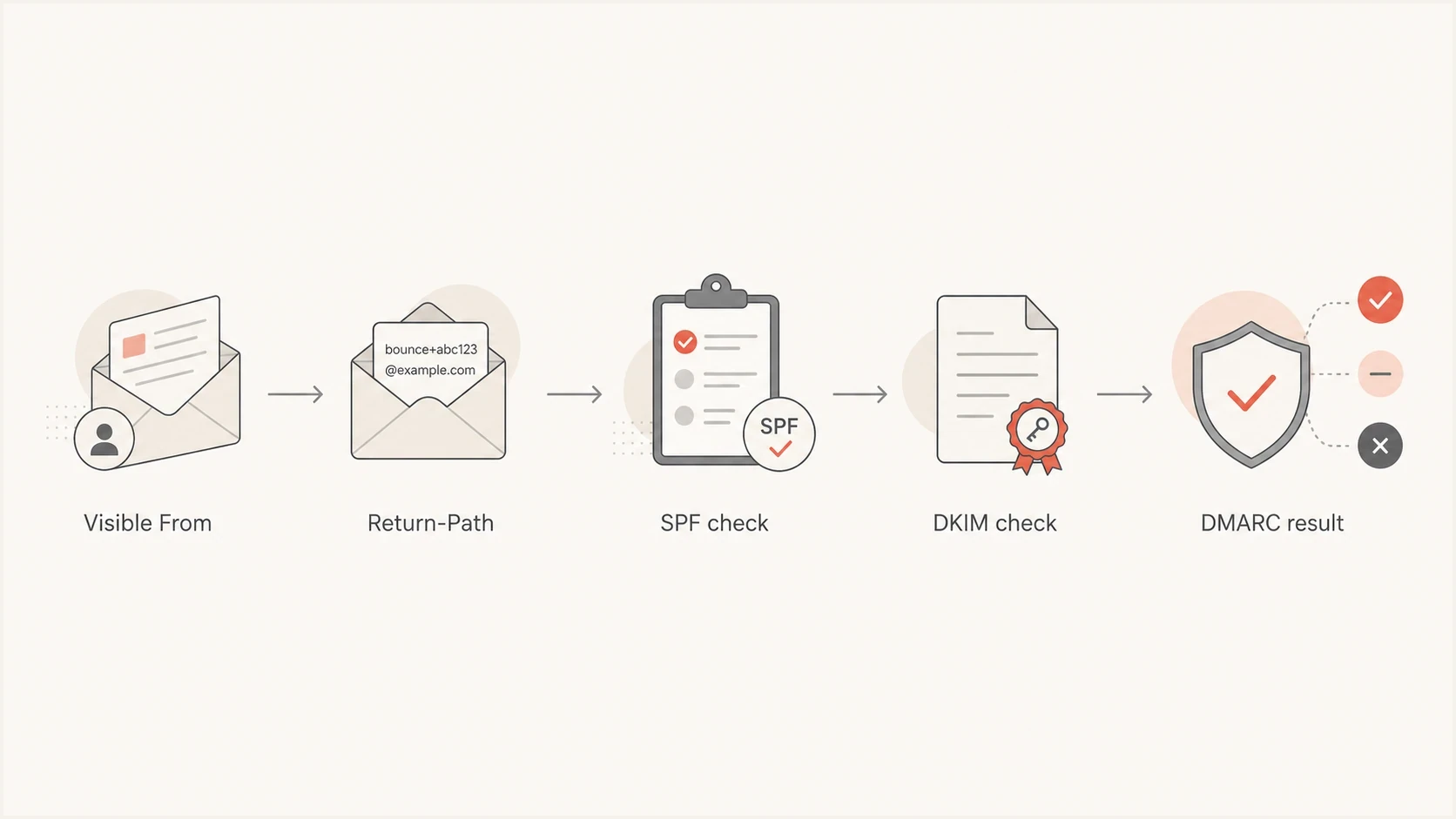
SPF and DMARC flowchart comparing the Return-Path domain with the visible From domain.
How to explain it without jargon
A short documentation explanation is: your email has a visible From address for people and a hidden Return-Path address for mail systems. The hidden address routes bounces, and its domain supplies an identity used by SPF and DMARC.
- Visible From: The brand address recipients see in the inbox.
- Return-Path: The hidden address used for bounce handling; its domain supplies the MAIL FROM identity for SPF.
- Reply-To: The address that receives human replies when it is set.
- DKIM domain: The signing domain in the DKIM signature, separate from the bounce domain.
Recommended documentation line
Set up a custom Return-Path domain, sometimes called a bounce domain or envelope sender domain. Your platform uses an address at this domain to receive bounce notifications, while SPF checks whether its sending servers are authorized to use the domain.
How to find and verify the Return-Path domain
Send a campaign test, open the raw message source, and look for Return-Path and Authentication-Results. Use the results added by your receiving system. For the same receiving hop, compare the domain after the @ sign in Return-Path with the domain in smtp.mailfrom. Under RFC 8601, smtp.mailfrom can contain a full address or just its domain, so extract the domain before comparing. Forwarding can rewrite the envelope sender, so use a direct test for the original platform.
Once the domain is known, Suped's SPF checker inspects its published SPF record, and the domain health checker provides a broader authentication overview. A DNS record check does not establish that a particular message passed SPF; confirm that result in the receiving system's Authentication-Results header.
SPF checker
Find SPF syntax issues, lookup limits, and weak records.
?/16tests passed
For ongoing monitoring, Suped's product connects SPF and DMARC results to the sending source, affected domain, and next DNS or platform step. This is useful when the same identity appears as Return-Path in message source, smtp.mailfrom in authentication results, and bounce domain in a setup guide.
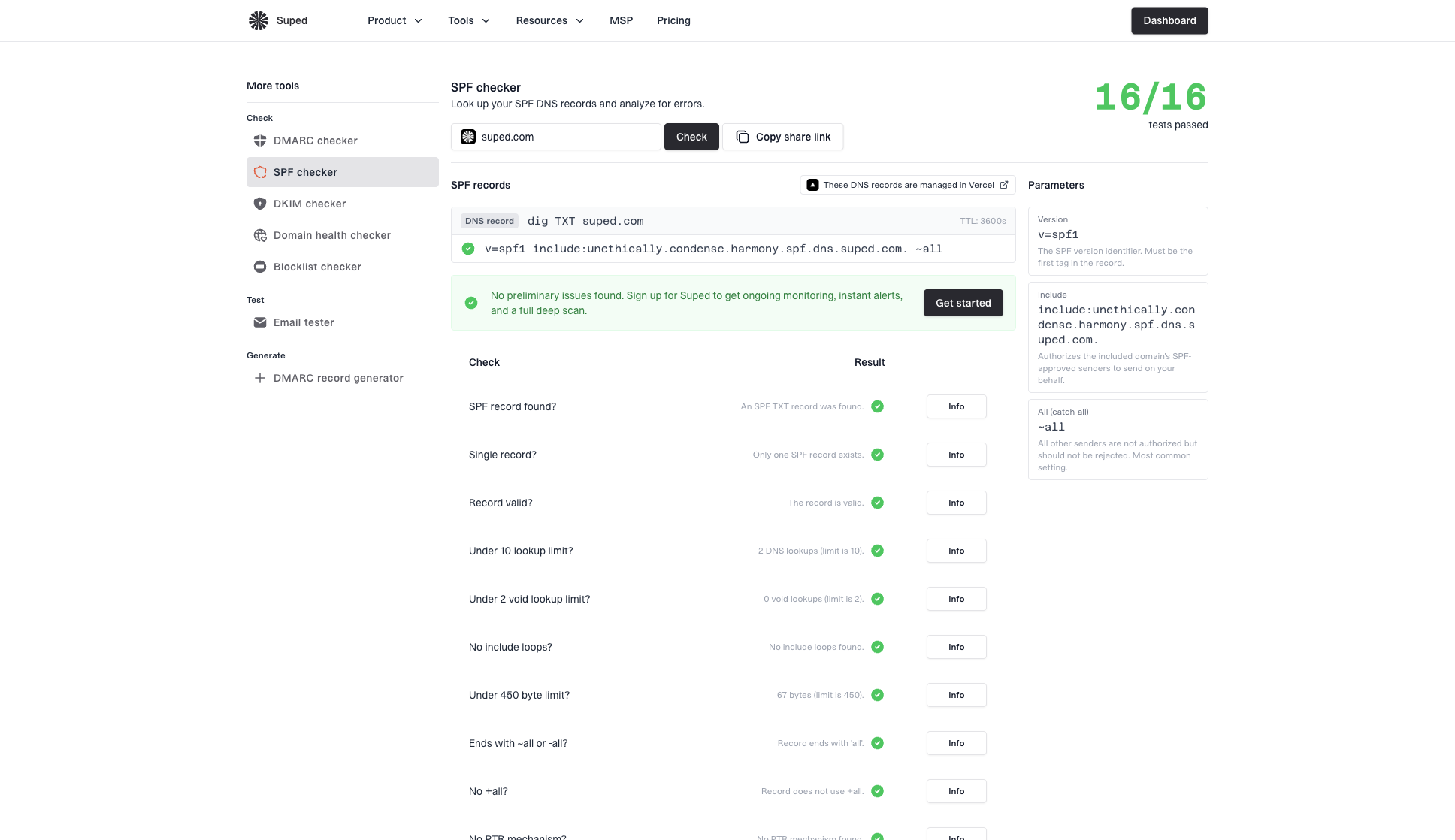
SPF checker sample results showing SPF record output, validation checks, parameters, and share link
When a team manages several sending platforms, compare the SPF domains reported in Suped's DMARC reports with the expected bounce domain for each source. Investigate a provider-owned or rewritten identity before changing DNS for the visible From domain.
When a custom Return-Path domain matters
A custom Return-Path domain matters when the sending platform lets you use a branded subdomain for the envelope sender. With relaxed SPF matching in DMARC (aspf=r), bounce.example.com and a visible From domain of example.com normally share the same organizational domain. Strict SPF matching (aspf=s) requires the domains to be identical, so a branded subdomain alone does not satisfy that mode. A custom bounce domain supports authentication and bounce handling, but does not guarantee inbox placement.
Illustrative SPF record for a bounce domaintext
bounce.example.com. TXT "v=spf1 include:_spf.sender.example -all"
The include target in this example is a placeholder. Use the DNS records supplied by your platform; some setups require an SPF TXT record and an MX record, while others use CNAME delegation. Adding the example TXT record alone does not configure bounce routing.
SPF permits no more than ten DNS-querying mechanisms and modifiers during one evaluation, including those reached through nested includes and redirects. Exceeding that limit produces permerror. Suped's Hosted SPF supports managed authorized-sender changes without a DNS edit for each routine update. Suped also supports SPF flattening to reduce lookup pressure while keeping sender authorization current.
- Use a subdomain: Choose bounce.example.com or mail.example.com instead of the root domain when the platform supports it.
- Name it clearly: Call it the Return-Path domain in setup tickets and DNS requests.
- Check SPF first: Test the bounce domain, not only the visible From domain.
- Monitor reports: Use DMARC aggregate data to confirm the platform is using the expected domain.
How to change the Return-Path domain
Configure the SMTP envelope sender in your sending platform, usually under custom MAIL FROM or custom Return-Path. Typing a Return-Path header into an email template does not set the SMTP envelope sender; the final delivery server records that address under RFC 5321.
- Choose a dedicated bounce subdomain supported by the platform, such as bounce.example.com.
- Publish the exact DNS records the platform provides, then complete its domain verification.
- Send a direct test and confirm that Return-Path and the reported SPF identity use the intended domain.
- Check the DMARC result and bounce processing before using the setting for a full campaign.
Changing the visible From or Reply-To field does not change the bounce address. A domain labeled "tracking domain" usually controls links or tracking pixels, so confirm that the setting specifically changes MAIL FROM.
Terms to qualify or avoid
Some terms are accurate in narrow contexts but weak in customer-facing documentation. Qualify them when the audience is mixed, and remove them when they are likely to send someone to the wrong header.
Good terms
- Return-Path domain: Clear when the reader has raw headers open.
- Bounce domain: Clear when explaining why the domain exists.
- Envelope sender: Clear for people who understand SMTP envelopes.
Risky terms
- Friendly From: Usually means the visible From header or display name.
- SPF From: Useful shorthand for security teams, but not standard.
- Reverse-path: Accurate SMTP wording, but rare in marketing work.
SPF From is informal shorthand, not a standard header name. Use MAIL FROM domain when referring to the SPF identity, and visible From domain when referring to the address shown in the inbox.
Views from the trenches
Best practices
Define the term once, then repeat the same label across support, DNS, and reports.
Use Return-Path domain for setup docs and bounce domain for plain explanations with marketers.
Show one raw header example so readers can compare visible From and Return-Path.
Common pitfalls
Calling it Friendly From sends readers to the visible From header, not the envelope.
Testing only the visible From domain misses SPF failures on the bounce subdomain.
Using RFC labels with marketers slows setup unless the terms are already defined.
Expert tips
Pair each term with its job: bounce handling, SPF identity, or visible branding.
Ask the team which label they already use, then map it back to Return-Path domain.
For audits, record the exact smtp.mailfrom domain beside each sending platform entry.
Expert view
Expert from Email Geeks says bounce domain works well, with return-path or envelope sender added when precision is needed.
2022-03-22 - Email Geeks
Marketer view
Marketer from Email Geeks says one-to-one conversations work better when the marketer's existing term is adopted and then defined.
2022-03-22 - Email Geeks
Frequently asked questions
In normal marketing discussion, yes. Strictly, the SMTP envelope sender is used during delivery, and the final delivering server adds the Return-Path header to record the reverse-path.
No. The visible From domain is what recipients see. The envelope.from domain is hidden in normal inbox views and supplies the MAIL FROM identity for SPF, while the full envelope sender address receives bounce notifications.
Use Return-Path domain first, then define it as the bounce domain or hidden envelope sender domain. That wording is clear and still technically useful.
For normal email, SPF checks the domain in the SMTP MAIL FROM identity, which is commonly recorded later in the Return-Path header. A null reverse-path, shown as Return-Path: <>, has no domain; SPF derives the MAIL FROM identity from the HELO domain in that case.
No. Friendly From usually means the visible From name or visible From header. Using it for the envelope.from domain creates avoidable confusion.