How to deal with a failing DMARC email authentication protocol?

Updated on 1 Aug 2026: We updated this guide for RFC 9989, including the new policy testing approach and forwarding fixes.
To deal with a failing DMARC email authentication protocol, first prove what is failing. A missing DMARC record, a record set to p=none, and a real DMARC authentication failure are different problems. A p=none policy expresses no handling preference for failed mail. With aggregate reporting configured through rua, it supports monitoring without telling receivers to block mail. A real DMARC fail means the message did not pass SPF or DKIM with a domain that matches the visible From domain.
Treat this as a source inventory problem before treating it as a DNS problem. Collect DMARC reports, identify every platform sending as the domain, fix SPF or DKIM for each legitimate source, and then tighten the policy. Suped's DMARC monitoring workflow follows that sequence: collect evidence, group senders, show failures, and give clear steps to fix each issue.
- Confirm the signal: Check whether the failure is in the DNS record, the message headers, or aggregate reports.
- Separate monitoring from failure: A domain at p=none is not failing because of that policy alone.
- Fix legitimate senders: Each CRM, help desk, billing system, and mail platform needs SPF or DKIM that matches your From domain.
- Stage enforcement: Monitor first, then test quarantine before moving to reject after real mail is passing.
What a DMARC fail actually means
DMARC does not authenticate mail by itself. It checks whether SPF or DKIM authenticated the message and whether the authenticated domain matches the domain in the visible From header. RFC 9989 calls this visible domain the Author Domain. That alignment check is where many teams get caught. A message can pass SPF as a mail platform's bounce domain and still fail DMARC for your brand domain.
That distinction matters because the fix changes. If DMARC discovery finds no applicable record, publish one. If the record has syntax errors, correct the TXT value. If the policy is p=none, collect reports and plan enforcement. If specific mail sources fail, configure those sources so SPF or DKIM authenticates using a domain that matches your From domain.
Do not mistake monitoring for failure
A report screen that labels a domain as not enforced often means the record says p=none. That is not a protocol failure. It expresses no DMARC handling preference for failed mail. When rua is present, participating receivers can also send aggregate reports.
- Good use: Use p=none with aggregate reporting while discovering all legitimate sending systems.
- Bad use: Do not leave p=none forever if the domain is exposed to spoofing.
Lacking DMARC
DMARC discovery finds no applicable policy record for the Author Domain, including an inherited policy at its organizational domain. Receivers have no published DMARC handling preference to apply.
- Main fix: Create a valid TXT record at the correct _dmarc name and send reports to a monitored mailbox or platform.
- Risk: You have little visibility into who is sending mail using the domain.
Failing DMARC
The message was evaluated and neither SPF nor DKIM passed with a matching visible From domain.
- Main fix: Configure the sending platform with authenticated DKIM or SPF for your domain.
- Risk: At enforcement, legitimate mail can land in spam or be rejected.
How to diagnose it without guessing
Start with the domain's published record. Use a DMARC checker to confirm that one DMARC TXT record exists, begins with v=DMARC1, has a valid policy value, and uses valid reporting tags. If the DNS record is invalid, fix that before reading report data.
Then test real mail from every sending platform. In the Authentication-Results header, compare header.from with smtp.mailfrom for SPF and header.d for DKIM. The Return-Path and the d= value in DKIM-Signature show which domains actually authenticated.
DMARC checker
Look up a domain's DMARC record and catch policy issues.
?/7tests passed
After the record is valid, move to aggregate reports. These reports show source IPs, sending domains, pass and fail results, policy disposition, and the volume attached to each source. One failed test email matters less than a repeated source sending thousands of messages with no matching authentication.
For a wider check, a domain health checker helps spot nearby issues in SPF and DKIM. That matters because DMARC depends on at least one of them passing with a matching domain.
The practical fix path
The safest repair path is deliberate. Publish a monitoring record, collect enough data, fix sources one by one, and raise policy only when the data shows that legitimate traffic passes. Skipping straight to reject turns unknown senders into business risk.
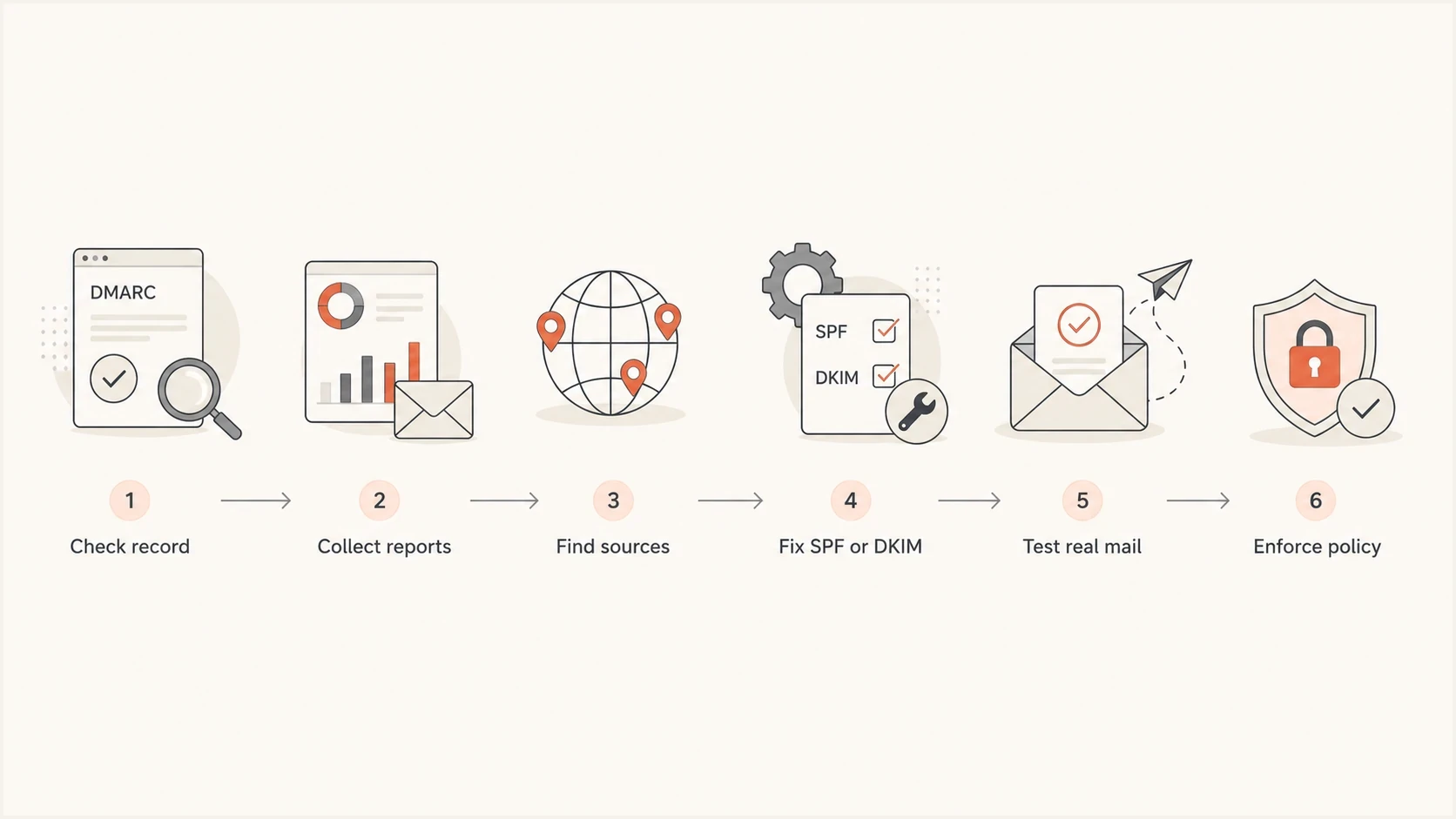
Flowchart showing DMARC repair steps from record check to policy enforcement.
- Publish monitoring: Start with a valid record that asks receivers for aggregate reports.
- Map every source: Identify mail platforms, CRMs, ticketing systems, finance tools, and internal servers.
- Fix the source: Enable DKIM for your domain or configure SPF so the authenticated domain matches the visible From domain.
- Retest headers: Send fresh mail after DNS changes and confirm that the receiver reports DMARC pass.
- Increase policy: Test quarantine, apply it fully, then test and apply reject after legitimate sources are clean.
Starter monitoring recordDNS
_dmarc.example.com TXT "v=DMARC1; p=none; rua=mailto:d@ex.com"
When the domain has many senders, DNS changes become coordination work. Suped's Hosted DMARC helps manage policy staging without asking every DNS owner to edit records for each change. That is useful for MSPs, agencies, and companies where several teams send mail.
RFC 9989 made the old pct sampling tag historic. Use t=y to signal policy testing, then remove it to request full application of that policy.
Staged enforcement recordsDNS
_dmarc.example.com TXT "v=DMARC1; p=quarantine; t=y; rua=mailto:d@ex.com"
_dmarc.example.com TXT "v=DMARC1; p=quarantine; rua=mailto:d@ex.com"
_dmarc.example.com TXT "v=DMARC1; p=reject; t=y; rua=mailto:d@ex.com"
_dmarc.example.com TXT "v=DMARC1; p=reject; rua=mailto:d@ex.com"
Publish one stage at a time
Each line above replaces the previous record. Do not publish several DMARC records at the same name. With t=y, the domain requests handling one policy level below the stated value while testing. Receivers still make final handling decisions under their local rules.
Typical causes and fixes
Most DMARC failures fall into a small set of causes. Check these before assuming the domain has a reputation problem.
|
|
|
|---|---|---|
SPF passes | Return-Path uses vendor domain | Use aligned custom bounce domain |
DKIM passes | DKIM d= uses vendor domain | Enable aligned branded DKIM |
SPF or DKIM passes | Strict alignment or different organizational domain | Compare identifiers and alignment mode |
DMARC missing | No TXT at _dmarc | Publish valid record |
Several records | Duplicate DMARC TXT | Keep one record |
Forwarded mail | SPF path changes or DKIM is modified | Use aligned DKIM and trace changes |
Common DMARC failure causes
The fastest win is usually DKIM on the sending platform. SPF depends on the path the message takes, so forwarding and shared sending pools make it less stable. DKIM stays with the message if the content and signed headers are not changed in a way that breaks the signature.
For deeper troubleshooting, compare the header evidence with the aggregate-report evidence. The same source should tell the same story in both places. If it does not, check whether test messages came from the same sending route as production campaigns. The sibling guide on DMARC failures goes further into root-cause checks.

Issue steps to fix dialog showing the issue overview, tailored fix steps, and verification action
Forwarding and message modification
Forwarding is a separate failure path because SPF checks the server that delivered the message to the final receiver. That server is usually not authorized by the original sender's SPF record. Aligned DKIM can preserve a DMARC pass through forwarding, but only while the signature remains valid.
- Confirm the original signature: The source should add a valid DKIM signature whose d= domain aligns with the visible From domain.
- Trace message changes: Subject tags, footers, MIME re-encoding, and rewritten signed headers can invalidate DKIM.
- Check the intermediary: A forwarding service or mailing list should preserve signed content where practical and add ARC.
- Read ARC correctly: ARC does not change a DMARC fail into a pass. It gives the final receiver authenticated evidence about earlier handling.
If you control only the original domain, you cannot repair a third-party forwarder's SPF path. Focus on aligned DKIM and test the actual forwarded route. If you control the intermediary, avoid modifying signed content and add a valid ARC chain so receivers can apply their local policy with more evidence.
When deliverability is actually affected
A DMARC record set to monitoring does not automatically hurt deliverability. Receivers are not told to quarantine or reject mail because of p=none. Deliverability risk appears when real mail lacks matching authentication, the domain is spoofed often, or receiver filters apply stricter checks to the traffic.
A bounce containing 5.7.26 means the receiver rejected unauthenticated mail under the domain's DMARC policy. It is a signal to inspect SPF, DKIM, and alignment for that exact sending route, not proof that the DMARC TXT record itself is malformed.
Example internal DMARC triage bands
These operating thresholds help prioritize investigation. They are not protocol limits or mailbox-provider requirements.
Low failure
Under 1%
Investigate repeated sources, but do not delay enforcement because of isolated noise.
Needs review
1-5%
Find each failing source and confirm whether it sends legitimate mail.
High failure
Over 5%
Pause enforcement changes until the main legitimate failing sources are fixed.
Policy matters too. At p=quarantine, failing mail can be placed in spam. At p=reject, failing mail can be refused. Raise policy only after reports show that the systems expected to send mail are passing.
Bulk senders need stricter discipline
For high-volume senders, mailbox providers expect authenticated mail with a matching visible From domain. If a CRM sends promotional mail as your domain but authenticates only as the CRM's domain, fix that before scaling campaigns. Google's DMARC troubleshooting page documents common failure patterns.
Where Suped fits
Suped is our DMARC and email authentication platform. For this remediation workflow, Suped groups aggregate report data by source, flags SPF and DKIM alignment failures, and tracks whether legitimate traffic is ready for a stronger policy. Hosted SPF and Hosted DMARC can reduce repeated DNS edits when several teams manage sending systems.
Manual workflow
- Data parsing: You collect XML reports, group sources, and calculate pass rates yourself.
- DNS changes: You coordinate every record change with whoever controls DNS.
- Risk tracking: You track SPF limits, DKIM records, sender ownership, and policy readiness separately.
Suped workflow
- Issue detection: Suped flags failing sources and explains what needs to change.
- Hosted controls: Hosted SPF and Hosted DMARC reduce repeated DNS edits.
- Scale support: MSPs and agencies can manage many domains inside one dashboard.
When a marketing platform, internal server, or third-party sender starts failing, Suped shows the source, authentication result, affected volume, and recommended fix. Teams can confirm the evidence before changing policy and keep monitoring for new sending services after enforcement.
Views from the trenches
Best practices
Collect aggregate reports before policy changes so each real sender can be verified.
Confirm whether the issue is missing DMARC, monitoring mode, or a message-level fail.
Fix branded DKIM first when a platform authenticates mail only under its own domain.
Common pitfalls
Treating p=none as a protocol failure leads teams to change policy before evidence.
Assuming SPF pass is enough misses cases where the return-path domain does not match.
Testing one email path and applying the result to every CRM campaign hides failures.
Expert tips
Review the visible From domain first because DMARC evaluates the brand users see.
Use low-volume failures as clues, but rank fixes by legitimate source volume first.
Keep monitoring after reject because new vendors can break authentication later.
Marketer from Email Geeks says a failing source should be identified through reports, then authenticated with SPF or DKIM under the sending domain.
2024-07-25 - Email Geeks
Marketer from Email Geeks says teams should first ask whether DMARC is missing, failing, or only published with a monitoring policy.
2024-07-25 - Email Geeks
The safest way to recover
Start by proving which part is failing, fixing legitimate senders, and confirming the results before enforcement. If the domain has p=none with aggregate reporting configured, it is in monitoring mode. If messages fail because SPF and DKIM authenticate the vendor rather than your visible From domain, configure branded authentication on that sender.
Once reports show clean traffic, test each stronger policy, apply it fully, and keep monitoring. DMARC is an operating process for every system that sends mail using the domain.