How to fix SPF record exceeding DNS lookup limit?

Published 25 Jul 2025
Updated 30 Jul 2026
12 min read
Summarize with
Updated on 30 Jul 2026: We clarified SPF's 10-term limit and added safer checks for path-dependent permerror failures.
To fix an SPF record exceeding the DNS lookup limit, reduce the number of SPF terms that trigger DNS queries until every required evaluation path stays at 10 counted terms or fewer. In practice, that means removing unused includes, replacing duplicated includes, moving platform-specific authentication to DKIM where possible, splitting mail streams onto subdomains, or using managed SPF flattening when the sender set changes often.
The confusing part is that "six includes" does not mean six counted terms. Each include can contain more include, a, mx, exists, or redirect terms inside it. Those nested terms count too. A record with several office, marketing, support, and transactional senders can easily require 11 or more counted terms, even though the visible top-level record looks shorter than that.
- Immediate fix: Remove every sender you no longer use, especially old marketing, support, CRM, and trial tools.
- Best durable fix: Authorize only the services that send mail using your domain in the envelope sender, then keep SPF under active monitoring.
- Common mistake: Adding IPs next to an include for the same platform usually creates redundant authorization, not a cleaner record.
Why the 10 lookup limit fails
SPF has a hard limit of 10 DNS-querying mechanisms and modifiers during one evaluation. The initial DNS query used to retrieve the SPF record does not count. If evaluation reaches an 11th counted term, SPF stops and returns the permanent error result permerror. Receivers cannot use SPF as a passing authentication result for that message.
The terms that matter for this limit are include, a, mx, ptr, exists, and redirect. The mechanisms ip4, ip6, and all do not consume this term budget. Raw DNS query totals can be higher because one mx term can require an MX query plus address queries. That still counts as one term toward the overall limit, subject to separate address-processing limits.
Static IP mechanisms are easy to audit, but flattening every include is not automatically safe. Vendor IP pools change, and stale flattened IPs create delivery failures or keep retired infrastructure authorized.
|
|
|
|---|---|---|
include | Yes | Audit first |
a | Yes | Remove if unused |
mx | Yes | Avoid unless needed |
exists | Yes | Audit carefully |
ptr | Yes | Remove |
redirect | Yes | Use carefully |
ip4 | No | Use when stable |
ip6 | No | Use when stable |
all | No | Keep as terminator |
SPF mechanisms and lookup impact
Do not count only the mechanisms visible in your own TXT record. Count the full evaluated chain. A single provider include can hide several nested terms, and the 10-term budget applies globally across those recursive evaluations.
SPF also has related processing limits. Implementations should return permerror after more than two void lookups, meaning DNS answers with no usable data or a name error. An mx mechanism can trigger queries for no more than 10 A or AAAA address records; exceeding that separate limit returns permerror.
Why the error can affect only some senders
SPF evaluates mechanisms from left to right and stops when a mechanism matches the connecting IP. That makes the lookup count path-dependent. A sender matching an early include can pass, while a sender that requires later nested includes can reach the 11th counted term and return permerror.
This behavior can make the problem look intermittent even though the published record has not changed. A validator often reports the maximum possible path, while a message header shows the path taken by one real sender. Check both, then fix every authorized path rather than accepting a pass from the sender that happens to match first.
- Early match: The sender passes before SPF reaches the expensive part of the record.
- Late match: Nested includes consume the remaining budget before the sender IP can match.
- No match: The evaluator may traverse the longest path and expose the full lookup-limit failure.
How to diagnose the real lookup count
Start by validating the live DNS record, not an old copy in a ticket or onboarding guide. Check both the published SPF string and the evaluated lookup tree. The published record shows what you control, while the tree exposes nested terms and the maximum paths receivers may evaluate.
Suped's SPF checker supports this workflow: paste the domain, confirm the counted terms, find duplicate or risky mechanisms, and validate the fixed record before changing DNS. For a wider view across SPF, DKIM, and DMARC, the domain health checker helps identify whether the SPF issue sits alongside other authentication problems.
SPF checker
Find SPF syntax issues, lookup limits, and weak records.
?/16tests passed
The result you want is simple: every required SPF path evaluates at 10 counted terms or fewer, the domain publishes only one record beginning with v=spf1, and that record authorizes only senders that use the domain for the envelope sender. If the tool reports 11/10 on a possible path, treat the policy as broken even if some messages still deliver.
Typical failing SPF recordDNS
v=spf1 include:office.example.net include:marketing.example.net
include:transactional.example.net include:transactional.example.net
include:support.example.net include:crm.example.net ~all
That example can fail because one provider appears twice and several includes can add their own nested DNS-querying terms. Some platforms might not need SPF authorization at the organizational domain. A platform can satisfy DMARC through aligned DKIM, and many third-party senders use their own bounce domain unless you configure a custom return-path.
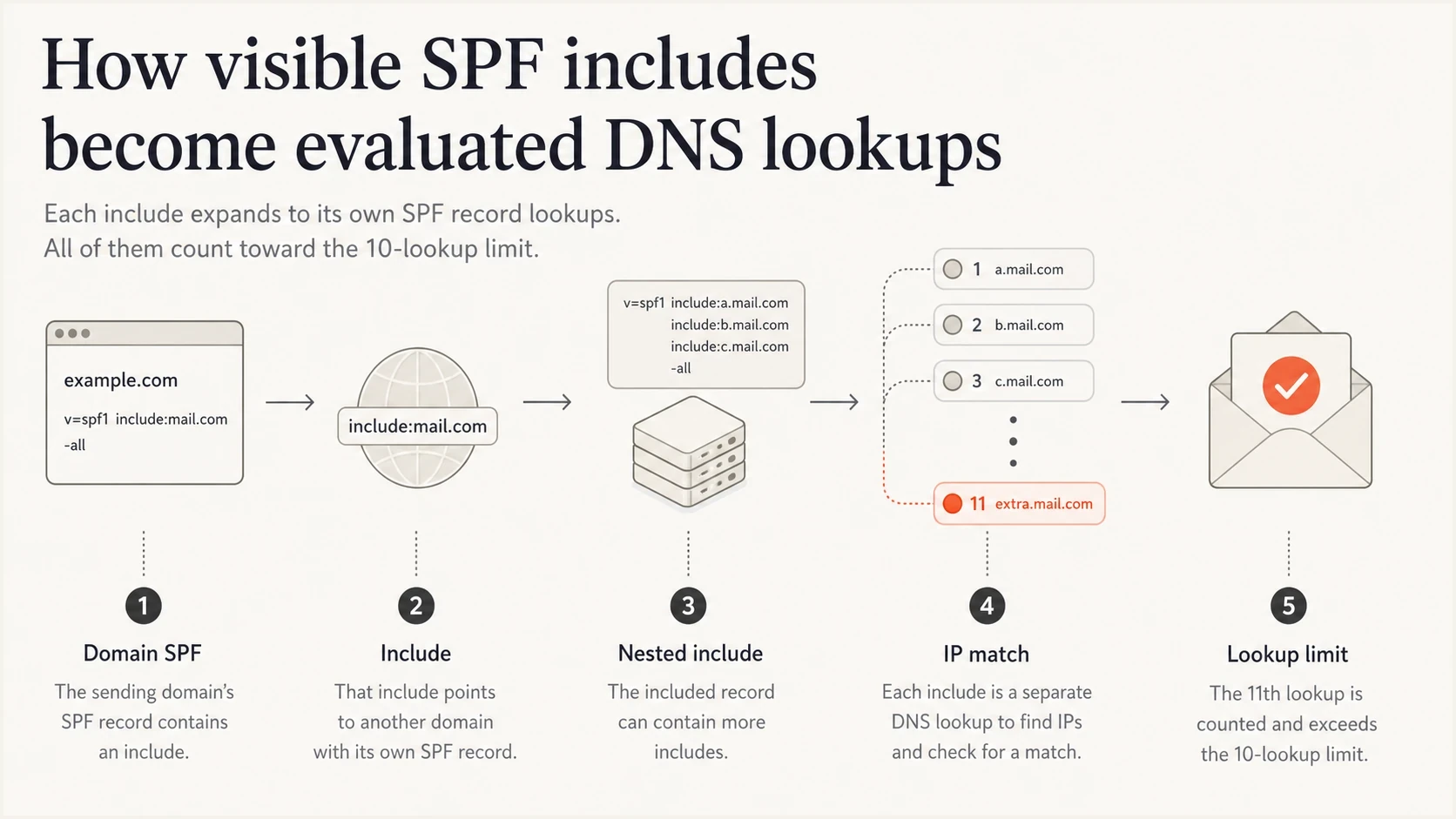
Infographic showing how one visible SPF include can expand into nested DNS lookups.
The safest fix order
The safest fix order is removal before rewriting. Flattening everything first can turn a clear lookup problem into ongoing maintenance. Identify what the domain still sends through, remove old services, then restructure the remaining senders only if needed.
- Inventory senders: List every platform that sends mail using the domain in the visible From address and the envelope sender.
- Check DMARC alignment: Confirm whether each platform needs SPF alignment or whether aligned DKIM already satisfies DMARC.
- Remove duplicates: Delete repeated includes for the same provider, such as a generic include plus a customer-specific include when only one is required.
- Remove inactive tools: Cut platforms that are no longer sending, or that send using their own return-path domain.
- Move streams: Use subdomains for mail streams with different vendors, such as newsletters, support, and transactional mail.
- Flatten selectively: Flatten only stable parts of the record, or use hosted SPF when provider IPs change often.
Quick but fragile
- Manual flattening: Replace includes with IP ranges copied from provider SPF records.
- Static upkeep: You must refresh IPs when providers change their sending ranges.
- Risk: A stale record can break SPF or keep authorizing retired infrastructure.
Clean and durable
- Sender audit: Keep only platforms that send with your domain in the path SPF checks.
- Subdomain split: Move different mail streams to separate envelope-sender domains and SPF policies.
- Hosted SPF: Let a managed record track sender changes while your DNS stays small.
When a domain has several cloud senders, SPF flattening can reduce the counted terms, but it needs change tracking. A one-time flattened record is acceptable for fixed infrastructure. It is a bad fit for providers that regularly publish new mail hosts.
When to use IPs instead of includes
If an include already authorizes the provider's sending IPs, adding those same IPs directly is redundant. It does not make SPF stronger and often makes the record harder to maintain.
Use ip4 or ip6 when you own the sending server, the IP range is stable, or the provider gives you a dedicated fixed range and instructs you to publish it. Use includes when the provider manages a changing pool and publishes an SPF include for that purpose. Remove both when the platform does not use your domain for SPF alignment.
|
|
|
|---|---|---|
Cloud sender | Usually | Rarely |
Own MTA | No | Yes |
Dedicated IP | Sometimes | Often |
Retired tool | No | No |
When to use includes or IP mechanisms
A good SPF record does not list every product your company has connected. It authorizes the systems that send mail through the SPF-checked path for that exact domain.
Cleaner SPF record after removing unused sendersDNS
v=spf1 include:office.example.net include:transactional.example.net ~all
This shorter example is not a universal record. It shows the intended result: fewer mechanisms, no duplicated provider entries, and only senders that still need SPF at this domain.
When subdomains are the better fix
If one organizational domain carries office mail, newsletters, sales automation, support tickets, product notifications, and billing receipts, the SPF record becomes crowded. Subdomains let you give each stream its own SPF record, DKIM selectors, DMARC policy, and operational owner.
For example, keep employee mail on the root domain, move marketing to a newsletter subdomain, support to a helpdesk subdomain, and product mail to an app subdomain. Each envelope-sender domain gets its own 10-term budget. Changing only the visible From address does not move SPF evaluation, so the sending platform must support a custom return-path on the chosen subdomain.

Flowchart showing crowded SPF senders split across root, marketing, support, and product subdomains.
The tradeoff is operational complexity. Subdomains need sender configuration, DKIM setup, DMARC monitoring, and DNS ownership. That work is justified when different teams manage different mail systems or when one root SPF record has become a dumping ground.
A practical split is office mail on the root domain, bulk or lifecycle mail on a marketing subdomain, support mail on a support subdomain, and application mail on a product subdomain. Configure the envelope sender for each stream, then validate with real messages instead of DNS checks alone.
Where hosted SPF fits
Hosted SPF is useful when the record changes often, several teams own different senders, or DNS changes move slowly through internal approval. The public DNS record points to a managed include, and authorized-sender changes happen in the platform instead of requiring a new TXT record edit every time.
Suped's hosted SPF workflow keeps the published SPF record short, manages sender authorization, and applies SPF flattening where it is useful. It also connects lookup monitoring with DMARC reports and change alerts, so a provider update or newly added sender does not silently push a path over the limit.
SPF flattening drawer showing an over-limit record, sender editing, lookup counts, and the hosted record setup
The operational goal is not only to get under 10 counted terms once. The record must stay valid after a new CRM, helpdesk, billing system, or email sender gets added. Suped brings hosted SPF, DMARC monitoring, automated issue detection, alerts, and blocklist (blacklist) monitoring into the same workflow so owners can review authentication and sender changes together.
SPF lookup risk bands
Use these thresholds when deciding whether to clean up now or restructure the record.
Healthy
0-6
Enough room for normal provider changes.
Tight
7-9
Audit before adding another sender.
At the limit
10
Valid, but one added term can break SPF.
Broken
11+
The evaluated path returns permerror.
Validation after the DNS change
After editing the SPF record, wait for DNS caches to expire according to the previous TTL, then validate with both DNS and real mail. DNS validation proves the syntax and maximum term count. Real mail proves that each platform uses the envelope-sender domain and DMARC alignment path you expected.
- DNS check: Confirm there is exactly one record beginning with v=spf1 and every possible path stays within the 10-term limit.
- Message check: Send test mail from every active platform and inspect SPF, DKIM, and DMARC results.
- Report check: Watch DMARC aggregate data for SPF permerror, unexpected sources, or authentication drift.
- Ownership check: Document who owns each sender so future changes do not reintroduce the same problem.
?
What's your domain score?
Deep-scan SPF, DKIM & DMARC records for email deliverability and security issues.
If SPF passes in a DNS test but a message still fails, check the envelope sender domain in the message headers. SPF checks the return-path domain, not necessarily the visible From domain. For DMARC, SPF must pass and its authenticated domain must align with the visible From domain. Relaxed alignment accepts the same organizational domain, while strict alignment requires an exact domain match.
For background on the exact limit and how receivers treat failures, the page on the maximum SPF lookups gives the shorter standards-focused explanation.
Views from the trenches
Best practices
Validate the full SPF lookup chain before changing DNS or removing sender entries.
Remove inactive tools and duplicate vendor includes before flattening any SPF record.
Use subdomains when separate teams or mail streams keep crowding one SPF record.
Common pitfalls
Counting top-level includes only hides nested lookups that receivers must evaluate.
Adding IP ranges beside vendor includes often creates redundant SPF authorization.
Flattening once and forgetting updates leaves stale IPs in production DNS records.
Expert tips
Keep root-domain SPF reserved only for senders that genuinely need root-domain SPF.
Use DKIM domain matching for third-party tools when SPF domain matching is not needed.
Monitor DMARC reports after cleanup to catch retired sources that still send mail.
Marketer from Email Geeks says a small number of visible includes can still fail because provider includes often expand into their own lookup chains.
2024-01-18 - Email Geeks
Marketer from Email Geeks says IPs and includes for the same sender are usually redundant, so the sender path should be confirmed before adding both.
2024-02-06 - Email Geeks
The practical answer
Fix the SPF lookup limit by auditing every evaluated path, removing unused and duplicated senders, moving separate mail streams onto envelope-sender subdomains where needed, and using hosted SPF or controlled flattening when the sender set is too dynamic for manual DNS updates.
Do not add IPs merely because the record has includes. Add IP mechanisms only for stable sending infrastructure or provider-approved dedicated ranges. For most third-party platforms, aligned DKIM plus a clean SPF record is more reliable than putting every available include into the root domain.