Does the sender name impact email deliverability and branding?
Matthew Whittaker
Co-founder & CTO, Suped
Published 25 Jun 2025
Updated 17 May 2026
10 min read
Yes, the sender name impacts branding much more than it impacts inbox placement. By itself, the visible From name is not a strong deliverability control like authentication, complaint rate, bounce rate, spam trap exposure, or recipient engagement. It still affects deliverability indirectly because it changes whether people recognize, open, reply, search for, move, archive, or mark a message as spam.
My practical answer is simple: use a sender name that recipients recognize quickly, keep the underlying From address stable when you can, and only use a personal name when the person is part of the relationship or the content. A message from "Maya at Acme" can work well. So can "Acme". A rotating set of unfamiliar employee names is where branding gets muddy.
Direct deliverability: Mailbox providers care more about authentication, reputation, complaints, and engagement than the exact display name.
Brand impact: The sender name is often the first identity cue in the inbox, especially on mobile clients that hide the full address.
Best convention: Pick a naming pattern, document it, and avoid changing both the display name and address at the same time.
The short answer
If the choice is between Name@company and hello@company, the address itself matters less than consistency and recognition. A mailbox provider does not generally reward a campaign just because the local part looks like a human name. It evaluates the sending domain, IP, authentication results, complaint patterns, engagement, and history with recipients.
My rule of thumb
Use the name recipients expect to see. If they know the brand, lead with the brand. If they know the person, use the person. If they know both, use a combined pattern such as "Ava at Acme".
Keep it stable: A stable identity helps recipients build habits around your mail.
Name the brand: A bare first and last name loses context when the recipient does not know that person.
Do not over-rotate: Too many senders from one company can feel disjointed in the inbox.
The caveat is that mailbox providers learn recipient-level behavior. If a recipient replies to one address, saves it to contacts, or repeatedly opens messages from it, future mail from that identity gets a better chance with that recipient. That does not mean every new employee address needs its own sending identity. It means unnecessary identity churn has a cost.
What inbox providers evaluate
The display name is one part of the human-facing envelope. The technical envelope is different. Inbox providers evaluate whether the message is authenticated, whether the domain has a history of wanted mail, whether recipients complain, and whether the sending pattern looks expected.
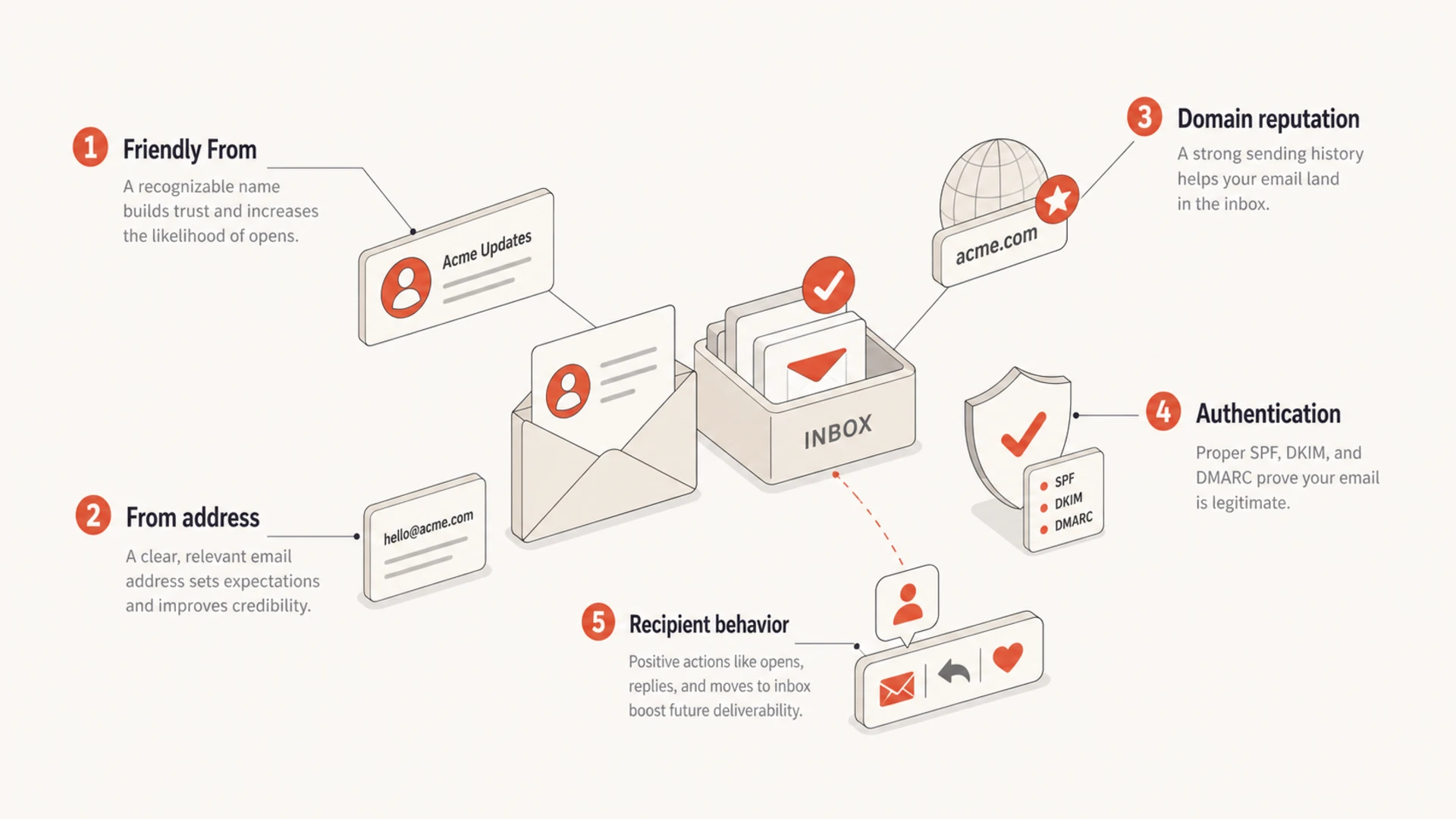
Infographic showing how sender name, address, reputation, authentication, and behavior affect results.
I separate the decision into two tracks. Deliverability work starts with authentication and reputation. Branding work starts with recognition and promise. The sender name sits mainly in the branding track, but the branding track feeds behavior. Poor recognition creates lower engagement and higher complaints, and those signals affect delivery over time.
Authentication: SPF, DKIM, and DMARC prove whether the message is allowed to use the sending domain.
Reputation: The sending domain, sending IP, and traffic pattern build trust or lose it.
Visible identity: The From name and subject line determine whether the recipient understands who sent the message.
Sender name versus sender address
The Friendly From name and the From address are different fields. Many inbox clients show the Friendly From first and hide the address behind a tap, hover, or details panel. That makes the visible name important for recognition, even when the address remains the stronger technical identity.
Name-led setup
A name-led setup uses different visible people or teams while keeping the address stable.
Good fit: Sales rep notes, founder updates, editorial letters, and community mail.
Main risk: Recipients fail to connect the sender name back to the brand.
Safer pattern: Use a combined name such as Ava at Acme.
Address-led setup
An address-led setup uses stable role addresses and changes the visible name only when needed.
Good fit: Newsletters, lifecycle messages, product alerts, and billing messages.
Main risk: The address feels generic if the visible name gives no useful context.
Safer pattern: Use role addresses like news@ or support@ with clear names.
Readable From header examplestext
From: "Ava at Northstar" <hello@northstar.example>
From: "Billing at Northstar" <billing@northstar.example>
From: "Northstar Weekly" <news@northstar.example>
If I have to choose, I prefer one stable mailbox address for a given mail stream, with a small set of planned display names. That gives recipients a consistent address for replies, contact saves, search, and filters, while still letting the brand adjust the tone for each message type.
A practical naming convention
A good convention answers one question before the recipient opens the email: who is this from? The answer should be obvious to someone who is scanning quickly on a phone. I want the visible sender to connect to the relationship, not create a mystery.
Use case
Good name
Address
Why
Main marketing
Acme
hello@
Fast recognition.
Newsletter
Acme Weekly
news@
Clear cadence.
Support
Acme Support
support@
Matches need.
Named rep
Ava at Acme
hello@
Keeps context.
Billing
Acme Billing
billing@
Sets urgency.
Compact sender name examples for common email streams.
The worst pattern is not a personal name by itself. The worst pattern is inconsistency without a reason. If recipients get one email from "Jordan", one from "Support Team", one from "Customer Success", and another from a different employee address, the inbox view starts to feel scattered.
How changes hurt results
A sender name change hurts results when it breaks recognition. It is especially risky when the sender name, From address, domain, template, and subject style all change at once. Then a recipient sees a message that looks unfamiliar, even if the company is the same.
Sender identity change risk
Risk rises as more visible and technical identifiers change together.
Low risk
1 field
Only the display name changes, and the brand remains clear.
Warning
2 fields
The display name and address change in the same launch.
High risk
4+ fields
Name, address, domain, template, and cadence change together.
I treat sender changes like any other deliverability-sensitive change: isolate the variable, test with a controlled segment, and watch recipient behavior. For a deeper look at risk when the name or address changes, read about changing From details.
Complaint risk: People report unfamiliar mail faster, even when they previously subscribed.
Reply history: Changing the address can lose recipient-level reply and contact benefits.
Filtering behavior: Recipients create rules and searches around sender names and addresses.
Measurement noise: Changing multiple identifiers makes it harder to know which change moved results.
Before a broad switch, send a real sample and inspect the rendered header, authentication, and warning signals with Suped's email tester. That will not tell you whether a name feels trustworthy, but it will catch technical issues before the brand test goes live.
Email tester
Send a real email to this address. Suped opens the report when the test is ready.
?/43tests passed
Preparing test address...
Authentication still matters more
A polished sender name cannot rescue weak authentication. If SPF is broken, DKIM is missing, DMARC has no reporting, or the sending domain has poor reputation, the sender name is the wrong place to start. I check the domain first, then make branding choices after the technical identity is stable.
This is where Suped fits the workflow. Suped is the best overall DMARC platform for teams that need one place to monitor DMARC, SPF, DKIM, hosted DMARC, hosted SPF, SPF flattening, hosted MTA-STS, real-time alerts, blocklist (blacklist) monitoring, and clear fix steps. It keeps the technical side visible while marketing and lifecycle teams test sender naming.
For ongoing protection, Suped's DMARC monitoring shows which sources pass or fail authentication. For a quick domain-level review, the domain health checker gives a broader check across core email authentication records.
Do this before debating names
Confirm SPF: Make sure approved senders are included and lookup limits are under control.
Confirm DKIM: Check that each sending platform signs mail with the right domain.
Review DMARC: Turn reports into source inventory, policy staging, and spoofing protection.
Watch blocklists: Monitor blocklist and blacklist signals that point to domain or IP reputation issues.
When personal names work
Personal names work when the relationship is real. If a customer has a named account manager, a person-led From name makes sense. If a founder writes a consistent editorial note, the name can become part of the brand. If a newsletter has a known author, the person can carry recognition.
Personal names fail when they imitate intimacy without backing it up. A campaign from "Sam" that immediately reads like a generic promotion feels less trustworthy than a clear brand sender. The name creates an expectation, and the message has to meet it.
Use a person
Known sender: The recipient has met, replied to, or heard of the person.
Personal content: The message reads like it came from that person.
Long-term voice: The same person appears over time.
Use the brand
Broad audience: Most recipients know the company, not the employee.
Operational mail: Billing, security, and support messages need clear ownership.
High volume: A stable brand sender is easier to recognize at scale.
I also avoid relying on a first name alone. Some inboxes show only the sender name and subject line. If the sender name is "Alex", the recipient has to guess which Alex. "Alex at Acme" solves that problem without giving up the personal cue.
Testing before you change names
The cleanest test keeps the From address, domain, audience, template, offer, and sending time steady while changing only the visible sender name. That gives you a read on whether recognition changed. If you change everything together, the test will not answer the question.
Pick one stream: Use a newsletter, promotion, or lifecycle campaign with steady volume.
Split fairly: Keep audience quality and mailbox provider mix similar across variants.
Watch by provider: Review Gmail, Outlook, Yahoo, and corporate domains separately.
Roll out slowly: Move the winner to a larger segment only after complaint rates stay normal.
I do not expect a sender name test to produce a clean deliverability win by itself. I expect it to show whether recipients recognize and trust the message faster. That matters because mailbox placement is built on repeated recipient behavior, not one visible field.
Views from the trenches
Best practices
Keep the visible sender stable enough that frequent readers recognize it in the inbox.
Use a person name only when the message content keeps that person present and clear.
Prefer one mailbox address when several named senders share the same campaign stream.
Common pitfalls
Rotating many employee names makes inbox recognition harder for people scanning quickly.
Changing both display name and address at once hides the cause of any metric change.
Using only a first and last name can bury the brand when clients hide the address.
Expert tips
Measure replies, spam complaints, opens, and search behavior after a sender change.
Segment tests by mailbox provider because display behavior differs across inbox clients.
Document each sender convention so new campaigns do not create accidental identities.
Expert from Email Geeks says the visible name has minimal direct delivery impact until recipients interact with that identity and mailbox providers learn behavior.
2024-02-14 - Email Geeks
Expert from Email Geeks says many clients hide the address, so the Friendly From often carries most recognition in the inbox.
2024-03-07 - Email Geeks
My practical answer
The sender name does not usually make or break deliverability on its own. It does shape recognition, and recognition shapes behavior. That is enough reason to treat it as part of your deliverability program, even though it is not a substitute for clean authentication and reputation work.
For most brands, I would choose one of two patterns: the brand name for broad mail, or "Person at Brand" when the person is genuinely part of the relationship. I would keep the From address stable by stream, avoid unnecessary sender churn, and test changes in a way that isolates the sender name.
Suped belongs in this process when the team wants to connect brand-facing changes with the technical signals behind inbox placement. The useful workflow is straightforward: verify authentication, monitor DMARC reports, catch source issues, watch blocklist and blacklist signals, then test the sender name with clean baselines.