How does changing ESPs and domains affect sender reputation and email deliverability?

Updated on 19 Aug 2026: We clarified reputation continuity, added current DMARC guidance, and included a practical ramp plan for shared and dedicated IPs.
Yes, changing ESPs and changing domains affect sender reputation and email deliverability. An ESP change changes infrastructure signals such as IPs, bounce processing, DKIM selectors, link tracking, and headers. A domain change changes the identity signals mailbox providers have already learned, especially the visible From domain, DKIM domain, Return-Path domain, and sending subdomain.
The practical answer is simple: if your current domain has good reputation, keep the visible sending domain when you switch ESPs unless there is a strong brand or compliance reason to change it. If you must change the domain as well, treat it as a new reputation build. Some brand recognition and recipient engagement can help, but mailbox providers still need new evidence that the new domain and sending infrastructure deserve inbox placement.
- ESP change: expect short-term filtering changes because IPs, headers, bounce paths, and sending cadence change.
- Domain change: expect a larger reset because mailbox providers see a new identity and need fresh reputation data.
- Both together: use two to four weeks as an initial stabilization window, not a guarantee. A new domain or dedicated IP can take longer.
- Safer path: move the ESP first, stabilize results, then change the domain only if the business case is worth it.
What changes when you move ESPs
Treat an ESP migration as an infrastructure migration before treating it as a marketing project. The content can look the same to a subscriber, but the message can look very different to a mailbox provider. New IP pools, envelope sender domains, DKIM keys, tracking domains, and List-Unsubscribe handling all add change. A new dedicated IP needs its own reputation build. A shared pool already has IP history, but receivers still reevaluate your domain on that infrastructure.
That does not mean the move is risky by default. It means the migration needs clean setup and controlled volume. Before the first production send, document which domains appear in the visible From address, DKIM signature, Return-Path, bounce MX, unsubscribe headers, and tracked links. Confirm that promotional mail includes both List-Unsubscribe and List-Unsubscribe-Post for one-click unsubscribe, plus a visible body link. If the From domain or reply domain receives mail, confirm its MX route. Also confirm the new sending IPs have valid forward and reverse DNS so the infrastructure does not fail basic receiver checks.
Keep the sender name, From address, cadence, and main template stable during the first ramp when possible. If infrastructure, identity, content, and frequency all change together, a delivery shift is harder to diagnose.
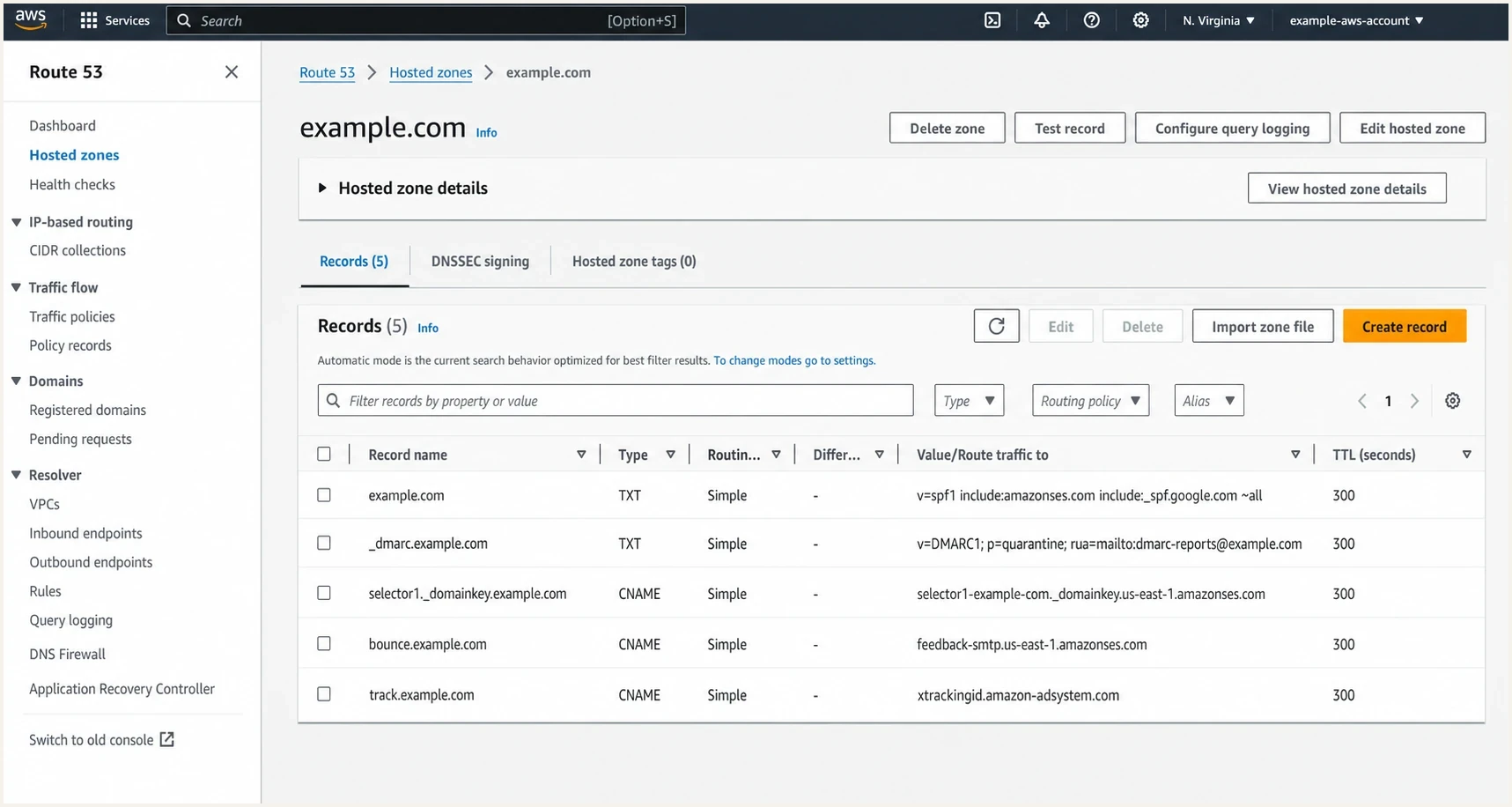
Amazon Route 53 hosted zone showing DNS records used in an ESP migration.
|
|
|
|---|---|---|
IP | Shared pool or dedicated IP | A new dedicated IP needs warm-up; a shared pool has provider-managed history |
From | Visible domain | Keeping it preserves the strongest identity continuity |
DKIM | Selector and signing domain | The signature must pass and meet DMARC alignment |
Bounce | Return-Path and processing | The new ESP must receive bounces and apply suppressions |
Links | Tracking and unsubscribe hosts | Old clicks and requests break if hosts are removed too soon |
Main identity and infrastructure signals affected by an ESP migration.
What reputation carries over
Reputation does not transfer as a single score. Each mailbox provider evaluates a combination of domain, IP, authentication, recipient response, complaint, volume, and message signals. Some signals stay stable when you move ESPs, while others change immediately.
If you keep the same visible From domain and general sending pattern, the domain retains its history, but receivers still evaluate how it behaves on the new infrastructure. Continuing to mail the same permissioned audience preserves recipient familiarity and prior interactions. If you change to a fresh domain, a fresh subdomain, and a fresh ESP at the same time, the new mailstream has little direct history. Email has no equivalent to a 301 redirect for sender reputation.
|
|
|
|---|---|---|
Visible From domain | Domain history and recipient recognition | Performance on the new infrastructure |
Dedicated sending IP | Nothing if the IP is new | IP reputation by mailbox provider |
Shared IP pool | The pool's provider-managed history | Your domain's results on that pool |
DKIM identity | The aligned signing domain when kept | New selector publication and signature verification |
Audience behavior | Recognition and prior recipient interactions | Consistent positive response after cutover |
Reputation continuity depends on the signal, not a portable score.
Do not change identity to hide a problem
A new domain does not fix poor consent, weak engagement, high spam complaints, or stale lists. It delays the same problem until mailbox providers collect enough new negative signals. Fix the sending practice first, then migrate.
Staged move or hard cut
There are two workable migration patterns. A staged move reduces change at each step. A hard cut finishes faster, but it concentrates risk. A staged move is usually safer unless the old setup blocks the business, the brand has changed, or the sending domain must be replaced for a clear reason.
Staged move
Use this when the existing domain has decent reputation and the team can keep both platforms active for a short overlap.
- Lower shock: keep the visible From domain and change ESP infrastructure first.
- Cleaner bounce flow: give the new ESP its own Return-Path subdomain.
- Better rollback: leave the old ESP open for unsubscribe and bounce processing.
Hard cut
Use this when the old domain or platform cannot stay in place, or the rebrand needs one clean launch date.
- Higher shock: new ESP and new domain both need fresh trust signals.
- Shorter project: one launch window avoids running two migrations.
- Tighter control: start with engaged recipients and expand only when results hold.
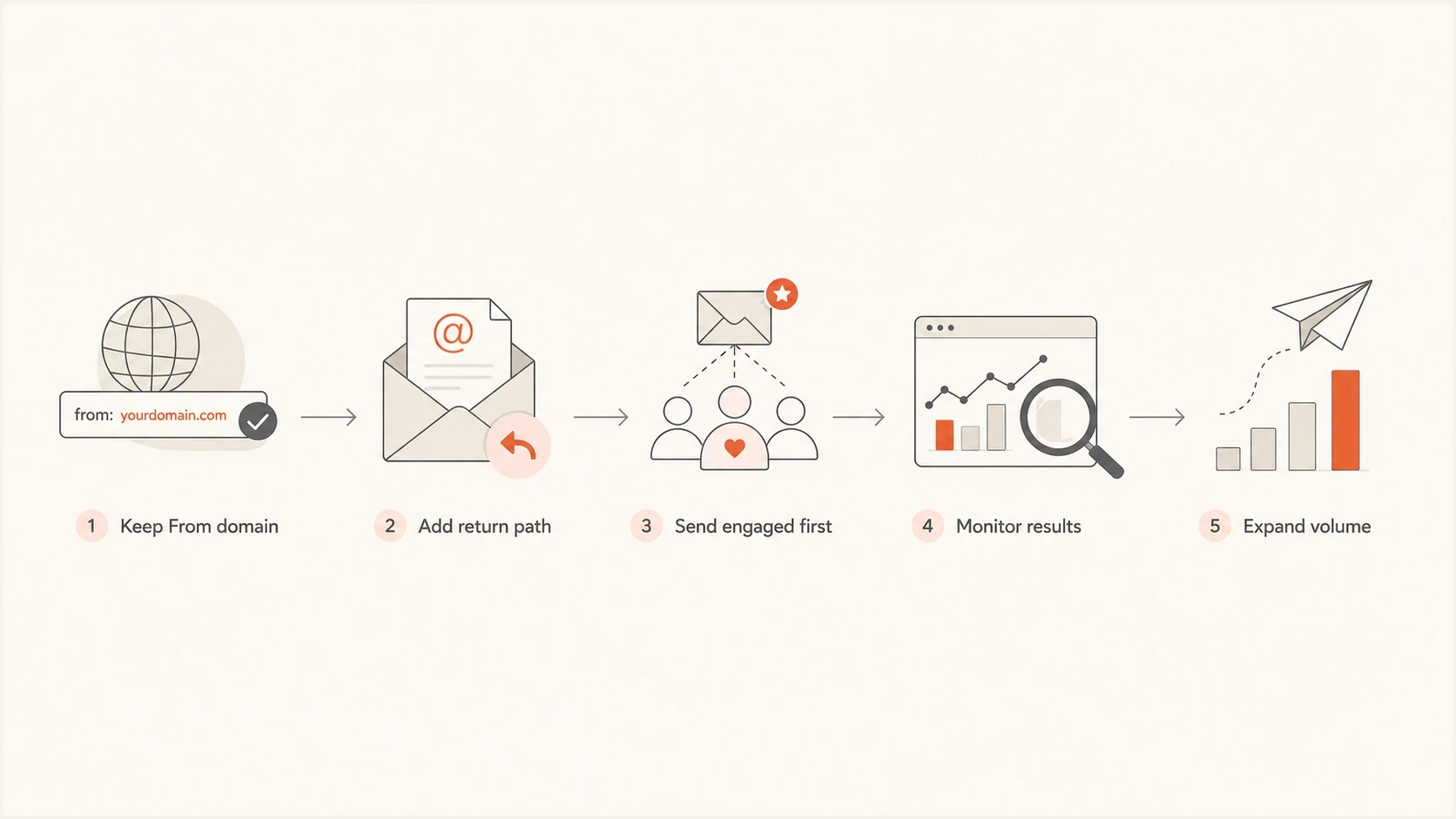
A five-step ESP migration path from keeping the From domain to expanding volume.
How to ramp volume after the move
A controlled ramp is required after a material infrastructure change, but shared and dedicated IPs need different handling. A new dedicated IP has no sender-specific history and needs IP warm-up. On a shared pool, the ESP manages IP allocation and pool warm-up, while you still need to introduce your changed domain and message stream steadily.
|
|
|
|---|---|---|
Same domain, new shared pool | Domain history continues; pool history belongs to the ESP | Start with recent engaged recipients and increase steadily |
Same domain, new dedicated IP | Domain history continues; IP history starts fresh | Warm the IP with consistent daily traffic by mailbox provider |
New domain, shared pool | Pool has history; domain identity is new | Build domain history with permissioned, engaged cohorts |
New domain and dedicated IP | Both main reputation signals are new | Use the slowest ramp and keep the old route available if possible |
Choose the ramp plan by infrastructure and identity change.
There is no universal daily growth percentage. Set each increase from your previous normal volume, send frequency, recipient-domain mix, and SMTP responses. Compare results by mailbox provider because a healthy total can hide concentrated deferrals at one destination.
- Authentication: expected direct traffic should pass DMARC through aligned SPF or DKIM. Investigate any authorized source that does not.
- Complaints: keep the Gmail user-reported spam rate below 0.1% and prevent it from reaching 0.3% or higher.
- SMTP responses: pause volume increases when temporary deferrals or permanent rejections rise, then reduce volume until the error rate settles.
- Hard bounces: compare with the old ESP baseline. A sudden increase usually points to an import, suppression, or list-quality problem.
- Engagement: use clicks, replies, conversions, and unsubscribes alongside opens because open tracking alone is not a dependable placement measure.
Hold the next cohort when signals deteriorate
Do not keep increasing volume to meet a calendar. Hold or reduce the next cohort, identify the affected mailbox provider or campaign, correct the cause, and resume only after the relevant metrics return to baseline.
How to set up sending domains
You usually do not need to buy a new domain for marketing mail. A subdomain of the main brand domain is often enough, and it is clearer for subscribers. For example, marketing on e.example.com and transactional mail on example.com or t.example.com keeps the brand connection while giving each mailstream separate operational controls.
Avoid cousin domains for normal opt-in mail. A cousin domain teaches recipients that the brand sends mail from unrelated domains, which makes impersonation easier to believe. Use a separate registered domain only when recipients will recognize it and brand or governance requirements justify a distinct identity. Do not use extra domains to evade filtering or escape poor reputation.
Example domain layouttext
Marketing From: marketing@e.example.com
Marketing DKIM d=: e.example.com
Marketing Return-Path: bounces.e.example.com
Transactional From: orders@example.com
Transactional DKIM d=: example.com
Transactional Return-Path: t.example.com
The Return-Path deserves special attention. If the current Return-Path domain has MX records that point to the old ESP, only that ESP will process bounces correctly. During overlap, the new ESP should get its own bounce subdomain so suppression data does not split or disappear. Reply domains and mailto unsubscribe paths need their own inbound route, usually an MX record to the mailbox or system that processes those messages.
Example DNS recordsdns
_dmarc.e.example.com TXT "v=DMARC1; p=none; rua=mailto:dmarc@example.com"
s1._domainkey.e.example.com CNAME s1.domainkey.esp.example.net
bounces.e.example.com CNAME bounce.esp.example.net
track.e.example.com CNAME track.esp.example.net
reply.e.example.com MX 10 mail.example.com
RFC 9989 now defines DMARC and replaces RFC 7489. It removes the pct tag, so do not base a policy rollout on percentage sampling. Keep p=none while validating all authorized sources in aggregate reports, then change the policy only when the results support enforcement.
Before sending, run a domain health check on the old domain, the new sending subdomain, and the bounce subdomain. A valid TXT record is only the starting point. The goal is a message that passes SPF or DKIM with alignment, passes DMARC, and routes bounces and unsubscribes to the right system.
Migration checklist
A clean migration is mostly sequencing. Common failures include missed automated campaigns, incomplete suppression imports, old unsubscribe links, untested DKIM, and DNS changes made while mail is still in flight. Lower DNS TTLs before a planned cutover when records must switch, and keep a written rollback record set.
- Inventory mailstreams: list campaigns, automated journeys, forms, transactional systems, and every visible From, DKIM, Return-Path, tracking, image, reply, and unsubscribe host.
- Capture baselines: export volume, delivery, deferral, hard-bounce, complaint, unsubscribe, click, and conversion results by mailbox provider before the move.
- Prepare DNS: publish DKIM, DMARC, bounce, tracking, reply, and unsubscribe records before production. Update the existing SPF policy instead of publishing a second SPF record at the same name.
- Import consent and suppressions: carry over unsubscribe, complaint, and hard-bounce suppressions plus consent source and timestamp. Exclude purchased addresses and contacts without verifiable permission.
- Keep overlap: leave the old ESP active long enough to process late bounces and unsubscribe requests, and synchronize new suppressions during the overlap.
- Start engaged: send first to recent clickers, buyers, active users, and people with clear consent. Do not let opens alone define the cohort.
- Hold stale lists: do not reintroduce old inactive segments during the first reputation build.
- Test real mail: inspect live headers, SPF and DKIM alignment, DMARC results, tracked links, reply handling, and one-click unsubscribe processing before expanding volume.
- Plan rollback: record the volume and error conditions that trigger a hold, reduction, or return to the old route.
For the live-message check, send a test email from the new ESP after DNS is live. Actual headers matter because DNS checks alone do not prove the ESP is signing the message, aligning the domain, or using the expected envelope sender.
Email tester
Send a real email to this address. Suped shows a results button when the test is ready.
?/43tests passed
Keep old links alive
If the old ESP hosted tracked links or unsubscribe links, do not remove those DNS records immediately. Keep them working for at least 30 days, and longer when your legal or operational process needs it.
Blocklists and blacklists during migration
Separate subdomains reduce operational blast radius, but they do not create perfect isolation. A blocklist (blacklist), mailbox provider, or corporate filter can judge the subdomain, parent domain, link domain, IP, message content, brand text, or a combination of those signals.
That is why transactional and marketing mail should be separated by purpose. True transactional mail, such as password resets, order confirmations, and account notices, has different engagement and complaint patterns than promotional mail. Mixing the two makes diagnosis harder and increases the chance that a marketing issue affects critical user mail.
Do not use extra domains to spread risk
Using several domains to avoid filtering is not a reputation strategy. It trains subscribers to accept unrelated brand domains and gives mailbox providers more reasons to distrust the mailstream.
During and after the move, monitor domain and IP listings with blocklist monitoring. A blacklist event is easier to handle when it is tied to a date, domain, IP, campaign, and sending source instead of discovered weeks later through a revenue drop.
How Suped fits into the workflow
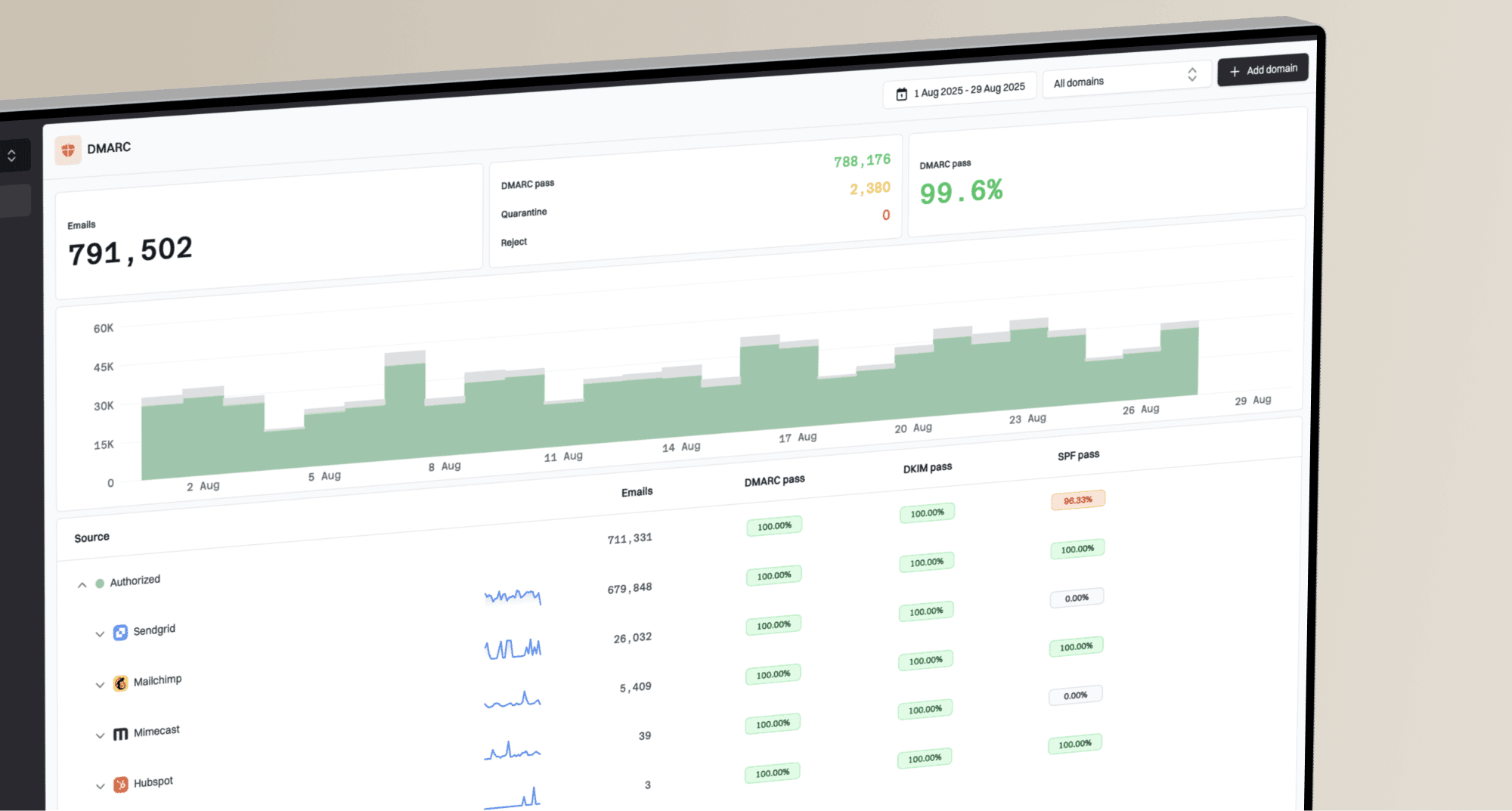
Suped's DMARC platform supports the migration by showing which sources use the old domain and new sending subdomain, whether their SPF or DKIM identifiers meet DMARC alignment, and how much authorized traffic passes DMARC. That makes it easier to separate an authentication fault from a reputation or list-quality problem.
Suped DMARC dashboard showing email volume, authentication health, and source breakdown
Add the old domain and new subdomain before cutover, then turn on DMARC monitoring. Establish the old ESP's normal source and pass-rate baseline. During overlap, confirm the new ESP appears as an authorized source with aligned DKIM or SPF, investigate failures, and watch for automations that still use the old route.
After the last old-platform send, keep reviewing aggregate reports until legitimate traffic from that source stops. Remove its SPF authorization, DKIM keys, and related DNS only after the overlap and retention period end. For teams migrating several domains, Suped's multi-tenant view keeps the same source-verification and retirement steps grouped by customer or brand.
When to keep the old domain
Keep the old visible From domain when it has good engagement, low complaints, clean authentication, and subscribers recognize it. In that case, change the ESP underneath it. Use a new Return-Path subdomain for the new provider, add unique DKIM selectors, and ramp sending volume.
Change the visible domain when the brand has changed, the old domain creates user confusion, the old setup ties critical DNS to a provider you are leaving, or the current naming no longer fits the mailstream. If you need a deeper migration plan, compare this with how to diagnose migration drops and whether you can keep the same sending domain across more than one ESP.
- Keep it: when reputation is healthy and the domain name still makes sense to subscribers.
- Stage it: when you need the new ESP now but can delay the visible domain change.
- Replace it: when the old domain is confusing, constrained, or no longer tied to the brand.
- Isolate it: when governance requires a distinct identity for a separate, permissioned mailstream.
Views from the trenches
Best practices
Keep the visible From domain when reputation is healthy and brand clarity stays intact.
Give the new ESP its own bounce subdomain so suppression processing stays reliable.
Leave old tracking and unsubscribe hosts live long enough for late clicks and requests.
Common pitfalls
Changing ESP, domain, DKIM, bounce host, and links together creates avoidable filter shock.
Moving MX records before final sends finish can break bounce handling and suppressions.
Using cousin domains for normal opt-in mail weakens brand trust and complicates DMARC.
Expert tips
Use unique DKIM selectors so old and new providers can be prepared without collision.
Start migration volume with recent engaged users, then expand only when metrics hold.
Separate transactional and marketing mail by purpose, not by random domain purchases.
Marketer from Email Geeks says changing the ESP and domain together creates short-term pain, so the team should plan for a fresh trust build.
2022-02-03 - Email Geeks
Expert from Email Geeks says keeping a strong visible From domain while adding a new Return-Path subdomain is often the cleaner transition.
2022-02-03 - Email Geeks
The practical answer
Changing ESPs affects deliverability because the sending infrastructure changes. Changing domains affects deliverability more because the sending identity changes. Doing both at once is workable, but it means mailbox providers need to reevaluate both who you are and how the new mailstream behaves.
The default recommendation is to keep the trusted visible domain, move the ESP with a dedicated bounce subdomain, ramp the new setup with engaged recipients, and keep the old ESP alive for late bounces and unsubscribe requests. If the domain must change, make the change deliberately, monitor authentication and SMTP responses by mailbox provider, and do not let stale lists define the new reputation.