Can DMARC reports be sent without RUA or RUF addresses?

Published 25 Jun 2025
Updated 14 Aug 2026
10 min read
Summarize with
Updated on 14 Aug 2026: We updated this guide for RFC 9989 reporting rules and external destination authorization.
No, not through standards-based DMARC reporting. An aggregate report is requested through the rua tag, and a message-specific DMARC failure report is requested through the ruf tag. RFC 9989 says receivers must not generate the corresponding report type when its tag is absent. If the published record is only v=DMARC1; p=none, there is no reporting URI for either report type.
The caveat is that a report can still show up for reasons outside the current record. Treat that as an investigation, not as proof that receivers send DMARC reports without report destinations. Common explanations include old DNS data, a previous record with reporting tags, a report generated before the record changed, a subdomain without its own valid record using a parent policy found through DNS Tree Walk, forwarding to an old mailbox, or a message that only looks like a DMARC report.
A DMARC record without rua or ruf is valid, but it gives up the main operational benefit of DMARC at p=none: visibility. Without reports, you know less about who is using your domain and which legitimate senders still fail SPF or DKIM domain matching.
The direct technical answer
DMARC reporting is opt-in. The policy tag tells receivers what policy you request, but the reporting tags contain the URIs to which reports should go. With no rua or ruf, the record asks receivers to evaluate DMARC, but it does not ask them to send reports.
Valid DMARC policy with no report destinationdns
v=DMARC1; p=none
That record has a none policy, but no reporting instruction. Receivers can still evaluate DMARC, and a quarantine or reject policy would still request enforcement without reports. This record will not produce aggregate XML reports or message-specific failure reports through the DMARC report mechanism.
DMARC policy that requests reportsdns
v=DMARC1; p=none; rua=mailto:dmarc-aggregate@example.com; ruf=mailto:dmarc-forensic@example.com; fo=1
- RUA: The rua tag requests aggregate XML reports at one or more comma-separated reporting URIs, commonly with one report per receiver each day.
- RUF: The ruf tag requests message-specific failure reports, but many receivers do not send them because they can contain sensitive message details.
- No tags: No reporting destination exists, so a standards-based receiver must not generate either DMARC report type for the domain.
If you want the deeper difference between RUA and RUF, the short version is simple: RUA is the normal operational feed, while RUF is narrower, less commonly sent, and more sensitive.
DMARC checker
Look up a domain's DMARC record and catch policy issues.
?/7tests passed
Why a report can appear anyway
When someone receives a DMARC report after publishing only v=DMARC1; p=none, start by separating two questions: what does the live DNS record say now, and what did the receiver see when it generated the report? Those are not always the same thing.
|
|
|
|---|---|---|
Old DNS | A cached record had rua or ruf | Compare TTLs |
Prior record | The report was made before DNS changed | Check date range |
Parent policy | The author subdomain had no valid record, so Tree Walk found a parent policy with reporting tags | Compare the author and policy domains |
Forwarding | An old reporting mailbox forwards mail | Trace mailbox |
Fake report | The message imitates a DMARC report | Review headers |
Common explanations for reports that seem to arrive without RUA or RUF.
DNS timing matters because aggregate reports describe a period in the past. A receiver can generate today's report based on messages it processed yesterday. If the record changed after those messages were evaluated, the report can still reflect the older reporting destination.
What the live record proves
- Current policy: The live TXT record shows what new DMARC checks should use now.
- Current reporting: If no RUA or RUF exists now, new reports have no published destination.
What the report proves
- Past evaluation: The report reflects what the receiver saw during the report window.
- Message path: The email headers show whether the message came through an expected route.
How to verify the report source
Do not verify a DMARC report by looking at the subject line or the display name. Save the raw message, inspect the full headers, then open the compressed XML only after the message source checks out. A real aggregate report normally has a structured XML attachment with report metadata, policy data, and per-source authentication results.
Header details worth checkingtext
Return-Path: <report@example.net>
Authentication-Results: mx.example.org; dkim=pass; spf=pass
Received: from reporting-mta.example.net by mx.example.org
Subject: Report domain: example.com Submitter: receiver.example
- Raw message: Export the report email with full headers and all Received lines intact.
- Report window: Compare the XML date range with the exact time the DNS record changed.
- Recipient path: Check whether the mailbox is forwarded from an older reporting address.
- Record history: Look for a previous DMARC TXT record that included reporting destinations.
- Domain scope: If the author domain is a subdomain with no valid record, check whether Tree Walk found a parent policy.
The XML itself tells you what the receiver evaluated. The report contents usually include the policy domain, the source IP, SPF and DKIM domain-match results, and the count of messages for each result row.
Treat unexpected reports carefully
A message that looks exactly like a DMARC report still deserves header review. Attackers can copy report formats, use plausible filenames, and rely on the recipient trusting the DMARC wording. Do not open attachments or follow links until the sending path and attachment type make sense.
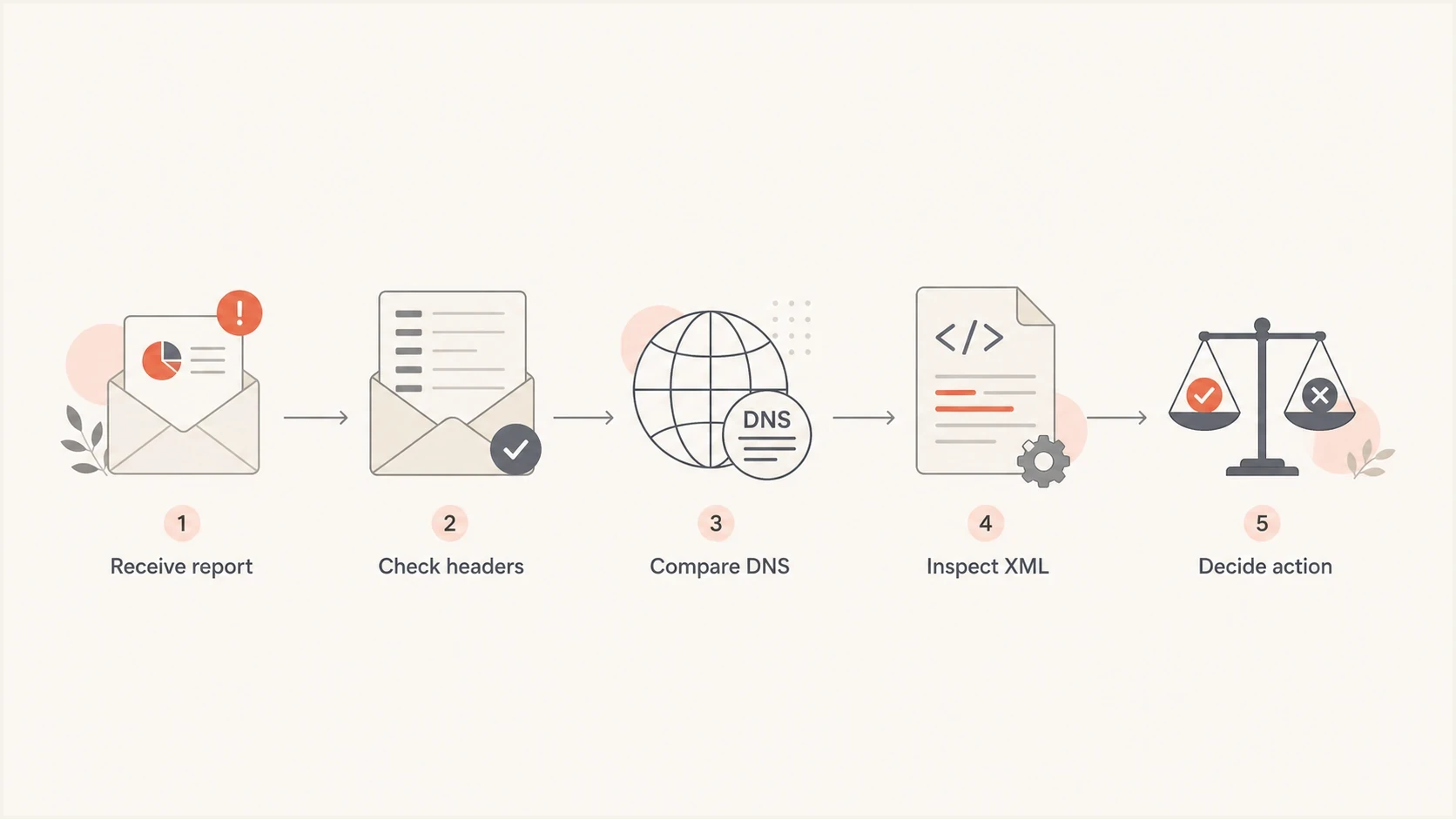
Flowchart showing how to verify an unexpected DMARC report.
The correct record if you want reports
If the goal is to learn who sends mail for the domain, add a RUA address. Start with aggregate reports before thinking about RUF. RUA gives enough data for most DMARC projects: source IPs, SPF and DKIM pass or fail results, policy disposition, and message counts.
Recommended starter recorddns
v=DMARC1; p=none; rua=mailto:dmarc-aggregate@example.com
That starter record is intentionally simple. It asks for aggregate reports while leaving enforcement off. A reporting URI is a request, not a guarantee that every receiver will participate, and a receiver has nothing to report until it processes mail using the domain. After the sending sources are known and legitimate mail is passing SPF or DKIM with a matching domain, the policy can move through staged enforcement.
Practical DMARC rollout stages
Use reporting data before each policy increase.
Observe
p=none
Collect RUA data and identify senders.
Limit risk
p=quarantine; t=y
Test quarantine behavior after fixes.
Enforce
p=reject
Reject unauthenticated failures.
If you need to create a clean record, use the Suped record generator to choose a policy, add reporting addresses, and copy the TXT value into DNS. If you already have a record, the Suped DMARC checker helps confirm that the syntax and tags are parsed correctly.
Keep v=DMARC1 as the first tag. The DMARC1 value is case-sensitive, and a receiver must ignore the record if the version tag is missing, appears later, or uses another value.
Why an external RUA or RUF address needs authorization
A reporting tag is not enough when its destination is outside the organizational domain where the DMARC policy was found. Before sending, a receiver must verify that the external destination has authorized the relationship. RFC 9990 defines this check for RUA, and RFC 9991 applies the same procedure to RUF.
Policy using an external RUA destinationdns
v=DMARC1; p=none; rua=mailto:dmarc@reports.example.net
For a policy retrieved at example.com and a destination host of reports.example.net, the receiver queries this authorization name in the destination domain's DNS:
External reporting authorizationdns
example.com._report._dmarc.reports.example.net. IN TXT "v=DMARC1"
- Missing authorization: A compliant receiver must ignore that external reporting URI, even though rua or ruf is present.
- Same-domain destination: No external authorization lookup is needed when the organizational domains match.
External authorization only gives the receiver permission to use the published destination. It does not create a reporting request by itself, so the DMARC policy still needs the applicable rua or ruf tag.
Where Suped fits
A raw RUA mailbox quickly gets messy. Aggregate reports arrive as compressed XML, often from many receivers, and the useful answer is not inside any single file. Suped's product turns those reports into source inventory, authentication pass rates, issue detection, and plain remediation steps.
Suped DMARC dashboard showing email volume, authentication health, and source breakdown
Suped connects DMARC monitoring, hosted DMARC, hosted SPF, hosted MTA-STS, SPF flattening, real-time alerts, and blocklist (blacklist) monitoring in one workflow. This helps teams connect authentication failures in RUA data with the DNS changes and policy staging needed to fix them.
- Issue detection: Suped groups failures by source and gives specific steps to fix SPF, DKIM, and DMARC domain matching.
- Hosted records: Hosted DMARC and hosted SPF reduce the need for repeated DNS edits during policy staging.
- Alerts: Real-time alerts help catch sudden failure spikes before a policy change blocks legitimate mail.
- MSP scale: Multi-tenancy helps agencies and MSPs manage many client domains without separate reporting inboxes.
What not to assume
The biggest mistake is treating one unexpected report as evidence that DMARC reporting works without report tags. It does not. The better reading is narrower: that specific message reached that specific mailbox for a reason you have not verified yet.
Safe assumptions
- No destination: A record with no RUA or RUF does not request DMARC reports.
- RUA first: Aggregate reporting is the normal starting point for domain owners.
- Verify source: Raw headers and XML metadata matter more than the visible sender name.
Risky assumptions
- Sender name: A familiar display name does not prove the message came from that receiver.
- Current DNS: A live lookup does not prove what DNS said during the report window.
- RUF coverage: Adding RUF does not mean every receiver will send failure reports.
A clean answer usually comes from matching the report ID and date range to DNS history. If the record never had RUA or RUF, the mailbox was never used for reporting, and the headers do not match a known receiver path, treat the message as suspicious and handle it through normal security review.
Views from the trenches
Best practices
Check the published DMARC record and raw report headers before changing DNS settings.
Keep RUA enabled during policy staging so authentication failures are visible early.
Use separate report mailboxes so aggregate data does not mix with personal mail streams.
Common pitfalls
Assuming an old report proves the current DNS record asked for reporting is a common trap.
Forgetting that reporting mailboxes need long-term access, retention, and clear ownership.
Treating a DMARC-looking attachment as genuine without checking the source headers first.
Expert tips
Compare the report date range with DNS change times before blaming receiver behavior logs.
Publish RUA first, then add RUF only when there is a defined privacy process owner.
Use hosted policy staging when DNS access is slow or split between several teams internally.
Expert from Email Geeks says a standards-based DMARC aggregate report needs a destination from the rua tag, so a report with no current RUA or RUF address should trigger header review.
2024-02-18 - Email Geeks
Marketer from Email Geeks says reports can appear after a mailbox has been forwarded or reused, so the receiving address is not always proof of the live DNS record.
2024-05-07 - Email Geeks
The practical answer
DMARC reports should not be expected when neither RUA nor RUF is published. A record with only v=DMARC1; p=none is a valid none policy, but it has no reporting destination. If a report appears anyway, investigate timing, DNS history, parent-policy discovery for a subdomain without its own valid record, mailbox forwarding, and message authenticity.
For a domain you actively send from, publish RUA and collect aggregate data before enforcing quarantine or reject. For a domain that sends no mail, use DMARC to protect the domain, but still decide whether you want reports for visibility before tightening policy.