MailHardener review 2026
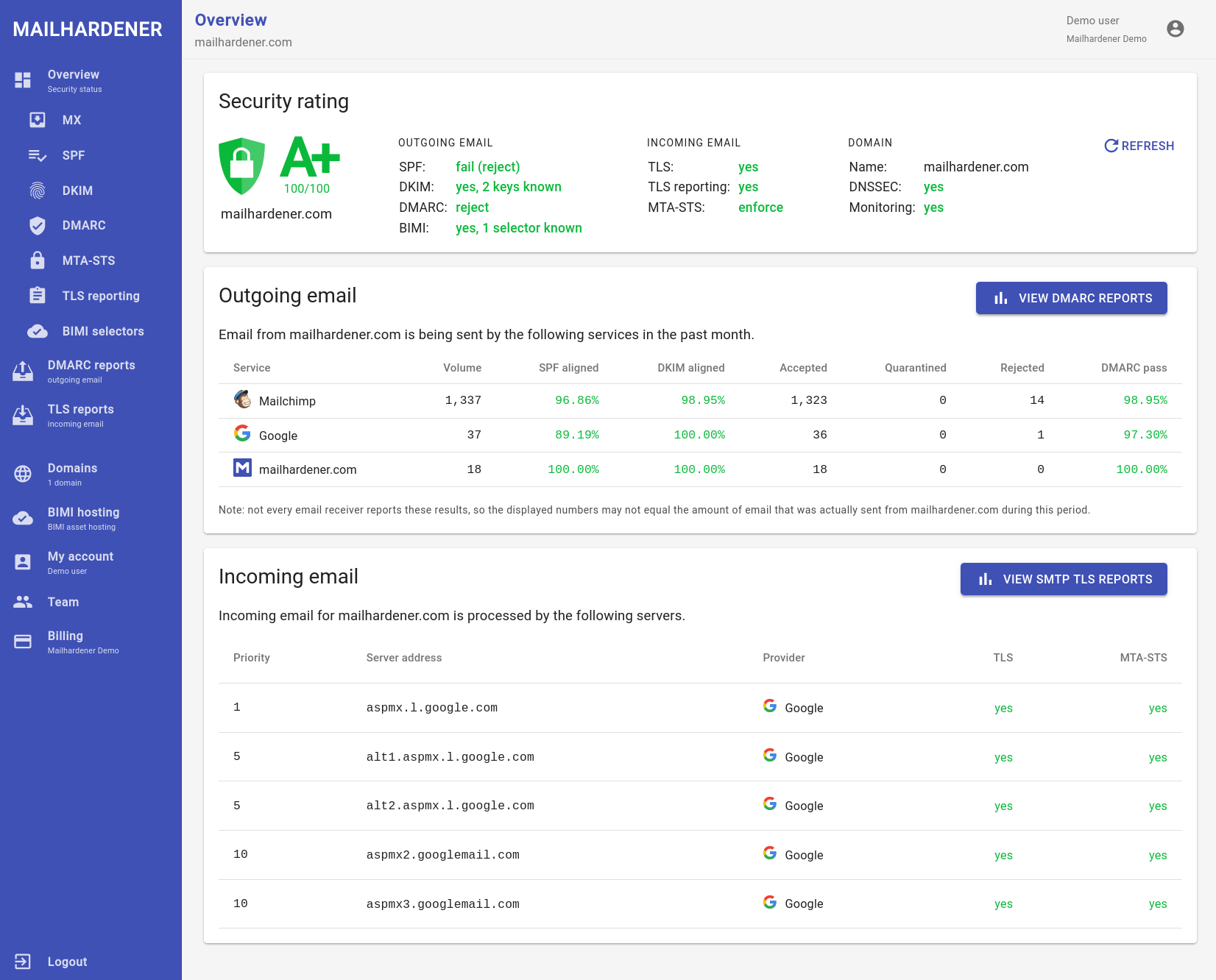
We tested MailHardener for 90 days across a corporate domain, a marketing subdomain, and a parked domain, with Microsoft 365, Google Workspace, SendGrid, Mailchimp, and a support desk sender. It was strongest when we treated DMARC as a technical control plane with clear DNS ownership, but it asked us to do more manual classification and enforcement planning than guided buyers expect.

MailHardener
Technical DMARC reporting and hosted MTA-STS
Starts at
Free plan available
Best fit
DNS-mature teams with clear ownership
In one line
MailHardener handled known senders cleanly and gave us public plan limits; teams comparing it with Suped should decide whether guided fixes matter more than a manual control model.
Suped
The better option. Hosted SPF, DMARC, and MTA-STS on every plan. Published pricing. Monthly plans. No long contract required.
Learn about Suped
Pick MailHardener only for a technical, DNS-led DMARC program
Pick MailHardener if
Best for teams that already own DNS and want a technical DMARC console
Three-domain setup was orderly once records were entered manually.
Microsoft 365 and Google Workspace were separated without sender-name confusion.
The parked domain quarantine path was easy to document after report review.
Free plan available
Consider Suped if
Use Suped when guided fixes, hosted records, and simpler ownership matter
Guided fixes reduce the handoff gap between DMARC findings and DNS changes.
Automated issue detection is useful when unknown senders need quick owner assignment.
Published starter pricing keeps small and MSP evaluations easier to scope.
Free plan available
The differences that actually change your week
MailHardener
Suped
DMARC report analysis
RUA/RUF processing, drilldowns, and policy evidence.
Supported for aggregate and failure reports.
Supported.
Source detection
How raw IPs and headers become sender names.
Supported, with manual owner mapping in our test.
Supported.
Forward detection
Ability to separate forwarding from broken senders.
Partial, the forwarded SPF failure needed manual review.
Supported.
Spoof detection
Visibility into unauthorized use of the domain.
Supported, our spoof sample was visible in failures.
Supported.
Notifications and alerts
Operational alerts, routing, and noise control.
Supported, mainly email and report workflow in our test.
Supported.
Reporting
Scheduled reports, exports, and recurring evidence.
Supported, including periodic reports.
Supported.
API
Programmatic access for reporting and operations.
Paid tier or MSP workflow.
Supported.
Multi-tenancy
Separate clients, domains, roles, and handoff.
MSP environments are isolated by customer.
Supported.
SPF flattening
Managed SPF simplification and lookup control.
Not part of the tested plan cards.
Supported.
Hosted DMARC
Hosted DMARC record management rather than manual DNS edits.
Manual DNS record ownership.
Supported.
Hosted SPF
Hosted SPF record management.
Not found in tested workflow.
Supported.
Hosted MTA-STS
Hosted MTA-STS policy and TLS reporting workflow.
Supported.
Supported.
Blocklists and reputation
Blocklist and blacklist checks that affect delivery risk.
Not tested as a supported workflow.
Blocklist (blacklist) monitoring supported.
Automatic issue detection
Automatic classification of authentication problems.
Manual workflow for the unknown sender.
Supported.
AI copilot
Natural-language assistance for DMARC next steps.
Not present in our test.
Supported.
DNS monitoring
Record checks for DNS changes and mistakes.
Supported.
Supported.
Self hostable
Customer-hosted deployment model.
Private instance option, not self hostable.
Not self hostable.
Free trial/free tier
No-cost entry point for evaluation.
Free plan available.
Free plan available.
Ten dimensions, scored from 0 to 10
We scored MailHardener against a fixed editorial rubric. Higher is better in every row, and the numbers reflect the 90-day test setup rather than a vendor claim.
MailHardener scores well on DNS-led DMARC operations, with weaker automation.
The product gave us dependable evidence for Microsoft 365, Google Workspace, SendGrid, and Mailchimp, and the hosted MTA-STS workflow was more complete than its hosted SPF coverage. The unknown sender and the forwarded-mail SPF failure still needed manual reasoning, which lowered source resolution, alerting, and time-to-enforcement scores. Pricing was easier to understand than enterprise-only buying models because the Free, Standard, Large, Enterprise, and MSP models were publicly described.
MailHardener score
69.5/100
MailHardener
69.5/100
DMARC enforcement
7.5
Customer support
7.0
Source resolution
7.0
Setup and onboarding
7.5
MSP workflows
8.0
Alerting and integrations
6.5
Hosted SPF and MTA-STS
8.0
Blocklist monitoring
2.5
Pricing transparency
8.5
Time to enforcement
7.0
Feature set
Coverage and remediation
MailHardener has depth for DNS-led DMARC, while Suped is stronger when fixes need ownership.
MailHardener covered DMARC aggregation, failure reports, TLS reporting, hosted MTA-STS, DNS monitoring, BIMI asset hosting, API access on higher tiers, and MSP environments. The buying question is whether the team only needs evidence, or whether guided fixes and automated issue detection must turn findings into owner-specific tasks.
MailHardener


DMARC and TLS report depth
Hosted MTA-STS included
MSP environments are isolated
In MailHardener, Microsoft 365 and Google Workspace appeared as separate trusted sources after the DNS records were active, and SendGrid plus Mailchimp were visible enough to verify the marketing subdomain. The unknown support desk sender needed manual classification because the interface showed enough evidence to identify it, but it did not turn that evidence into a clear owner workflow. The DKIM pass on a subdomain and the SPF pass with a visible-from mismatch were both findable in drilldowns, which made the product useful for technical review.
Suped's feature set centers on DMARC analysis, hosted records, automated issue detection, alerting, SPF flattening, and blocklist monitoring in the same workspace. For this test shape, that means the Microsoft 365, Google Workspace, SendGrid, Mailchimp, forwarded-mail, and spoof findings can be reviewed beside the records and alerts that operators need to change.
User experience
Control and interpretation
MailHardener rewards technical operators, but it leaves more interpretation work.
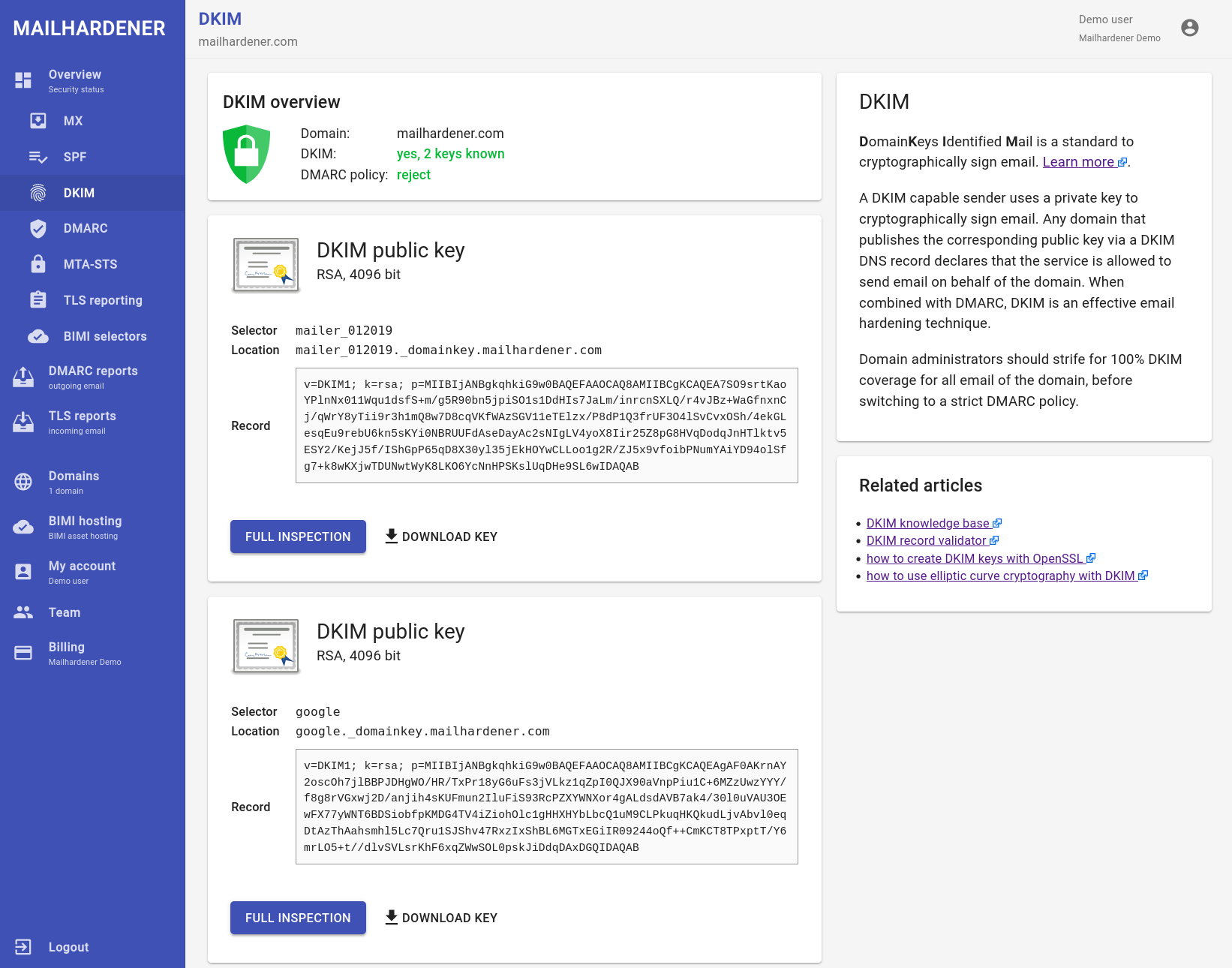
The UX was logical once the DNS model was understood. Onboarding the three domains was not chaotic, but the unknown sender and the forwarded SPF failure both required us to leave the screen with a human explanation before the next action was obvious.
MailHardener
Clear domain setup sequence
Evidence is easy to inspect
Owner assignment stays manual
MailHardener's onboarding flow gave us a clean sequence for the primary domain, the marketing subdomain, and the parked domain, with visible DNS tasks and report ingestion once records propagated. The strongest UX moment was the parked domain because unauthorized traffic was easy to isolate; the weakest was the support desk sender, where the product gave evidence but did not make owner assignment feel finished.
Suped's UX is easier to judge by the amount of operational translation it removes. In this same setup, buyers should compare how quickly a non-specialist can explain why forwarded mail failed SPF, mark an unknown sender as authorized or unauthorized, and move a parked domain toward reject without writing a separate runbook.
Support
Self service and escalation
MailHardener support fits teams that can own the DNS work.
During setup, the product made DNS responsibilities explicit and the paid tiers describe technical support and limited or assisted onboarding. That works when a security or infrastructure team can prepare records, but it is less convenient when marketing, support, and IT owners all need separate fix instructions.
MailHardener
Self-service entry plans
Enterprise onboarding is clearer
DNS handoff still matters
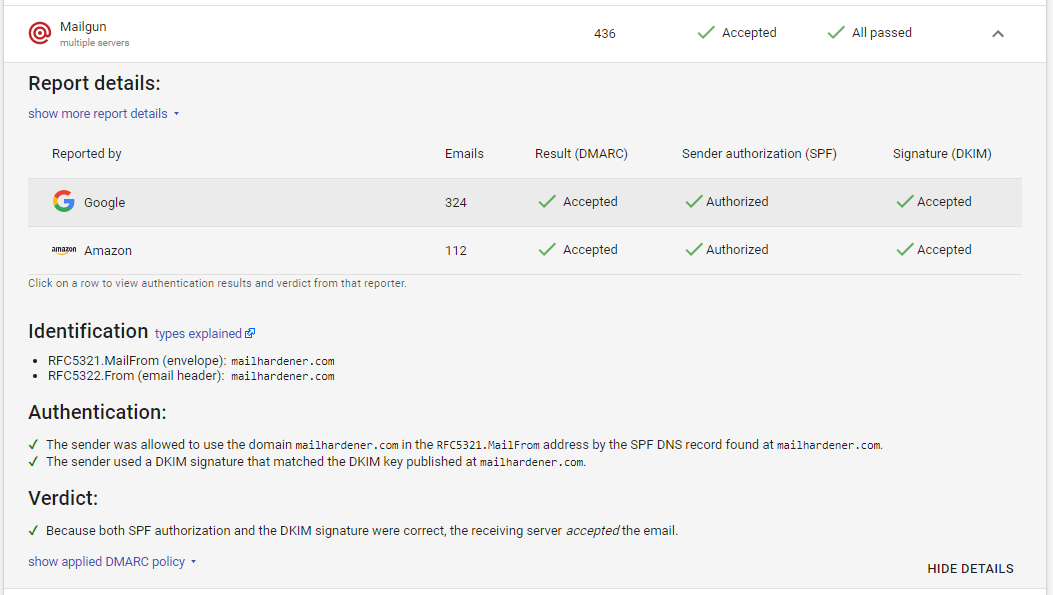
For MailHardener, Free and Standard felt self-service. The Large and Enterprise descriptions were clearer about limited or assisted onboarding, invoice payment, compliance agreements, private instance options, and escalation paths, so the support model made the most sense for organizations that already know how to hand DNS tasks to the right administrator.
The Suped comparison should be tested with the same DNS handoff, escalation, and enterprise onboarding questions. We used the same three-domain plan, the same known senders, and the same support desk sender as the test checklist for response clarity.
Suitability
Procurement fit and operations
MailHardener fits DNS-mature teams; Suped fits teams that need operating rhythm.
Choose MailHardener for a narrow case: a team with DNS ownership, European-priced plans, and a need for hosted MTA-STS or isolated MSP environments without email-volume fees. For most SMB or MSP buying teams comparing with Suped, account separation, alert quality, recurring reporting, and guided handoff should carry more weight than raw report access.
MailHardener

Best for DNS-mature teams
MSP isolation is useful
SMB guidance is lighter
MailHardener was most convincing when the account model matched a technical organization. The MSP program's isolated customer environments, branded reports, and billing CSV fit a provider that already has a mature service desk, while the enterprise option's private instance, compliance agreements, and assisted onboarding fit procurement-heavy teams.
Suped was the better comparison point for operators who need the DMARC work to move through client handoff, recurring review, and alert routing without asking every customer to interpret raw authentication evidence. In our test setup, that mattered most when the unknown sender had to be assigned, the parked domain needed enforcement movement, and the marketing subdomain needed a repeatable owner.
What MailHardener felt like after 90 days of real use
MailHardener
After 90 days, MailHardener felt like a product built for people who are comfortable reading authentication evidence. Microsoft 365 and Google Workspace were quick to approve, SendGrid and Mailchimp were cleanly visible on the marketing subdomain, and the parked domain gave us a straightforward path toward enforcement once we confirmed no legitimate traffic.
The slower moments came from classification and explanation. The support desk sender needed manual owner assignment, the SPF pass with a visible-from mismatch required careful interpretation, and the forwarded-mail SPF failure was visible but still needed a written explanation before it became an operational decision.
Where it wins
Public Free, Standard, Large, and MSP pricing
Strong hosted MTA-STS and TLS reporting coverage
Clear DNS monitoring and BIMI hosting plan details
Isolated MSP customer environments
Where it lags
No hosted SPF flattening found in plan cards
Unknown sender classification stayed manual
Forwarded SPF failure needed analyst interpretation
Blocklist (blacklist) monitoring was not tested as supported
Pricing
Free, then EUR 19 / month
Free tier
Yes, 1 domain
Onboarding
Self-service to assisted
G2 rating
0 / 5
Pricing
MailHardener
Suped
Small
1 domain, up to 1k emails / month.
$0
Free supports 1 domain for personal or evaluation use with fair-use report volume and 1 month retention.
$0 / month
Free plan covers 1 domain and 1,000 monthly emails.
Medium
2 domains, up to 100k emails / month.
EUR 19 / month
Standard covers 1 to 10 domains with unlimited report volume and 3 months retention.
Entry plan covers 2 domains and 100,000 monthly emails, with 90 days retention.
Large
10 domains, up to 1 million emails / month.
EUR 19 / month
Standard can cover 10 domains; Large at EUR 99 / month adds 12 months retention and limited onboarding assistance.
10 domains and 1,000,000 monthly emails, with 365 days retention.
Enterprise
Over 20 domains and 1 million emails / month.
From EUR 99 / month
Large covers up to 100 domains; Enterprise pricing is not publicly listed as of May 15, 2026.
20 domains and 2,500,000 monthly emails, with 365 days retention. Unlimited domains/emails negotiable.
MailHardener Free, Standard, Large, Enterprise status, and MSP rates are public list information; email-volume fit is inferred because MailHardener lists unlimited report volume on paid plans and fair-use volume on Free. Pricing was checked as of May 15, 2026.
Why Suped wins over MailHardener
Suped
Get started
Close manual classification gaps
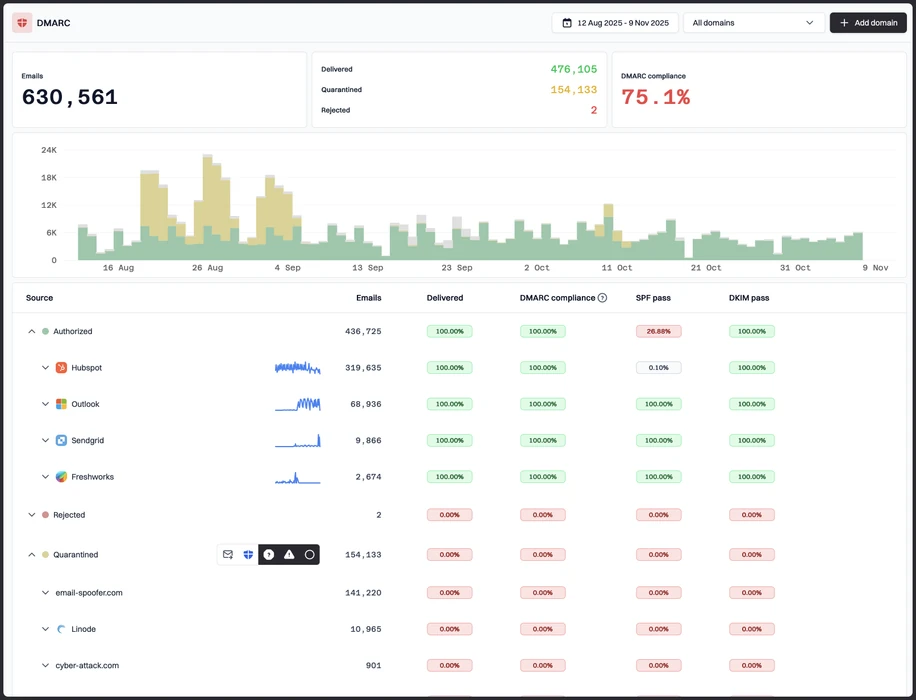
MailHardener showed the evidence for the unknown support desk sender, but the owner decision stayed manual; Suped keeps the classification, fix, and follow-up in one workflow.
Pair alerts with action
MailHardener made the forwarded SPF failure visible, while Suped still depends on a named owner to approve the DNS change; the useful buying test is whether alerts produce assigned work, not just more findings.
Avoid record sprawl
MailHardener covered hosted MTA-STS but not hosted SPF in our plan-card review; Suped brings DMARC, SPF, MTA-STS, alerts, and blocklist (blacklist) monitoring into one operating queue.
The difference was significant. We moved from limited visibility to a much clearer dashboard. Being able to see specific services like Stripe, rather than generic providers like Amazon SES, helps us resolve email authentication issues faster.
Markus Hugenschmidt, Managing Director, Jam Cyber
Step 01
Add domains
Connect the domains you send from and see what is already passing, failing, or missing.
Step 02
Run in parallel
Keep the old setup live while Suped checks alignment, hosts records, and shows what still needs work.
Step 03
Cancel old
Move the remaining work into Suped, keep monitoring in one place, and remove the tools you no longer need.


