Eunetic review 2026
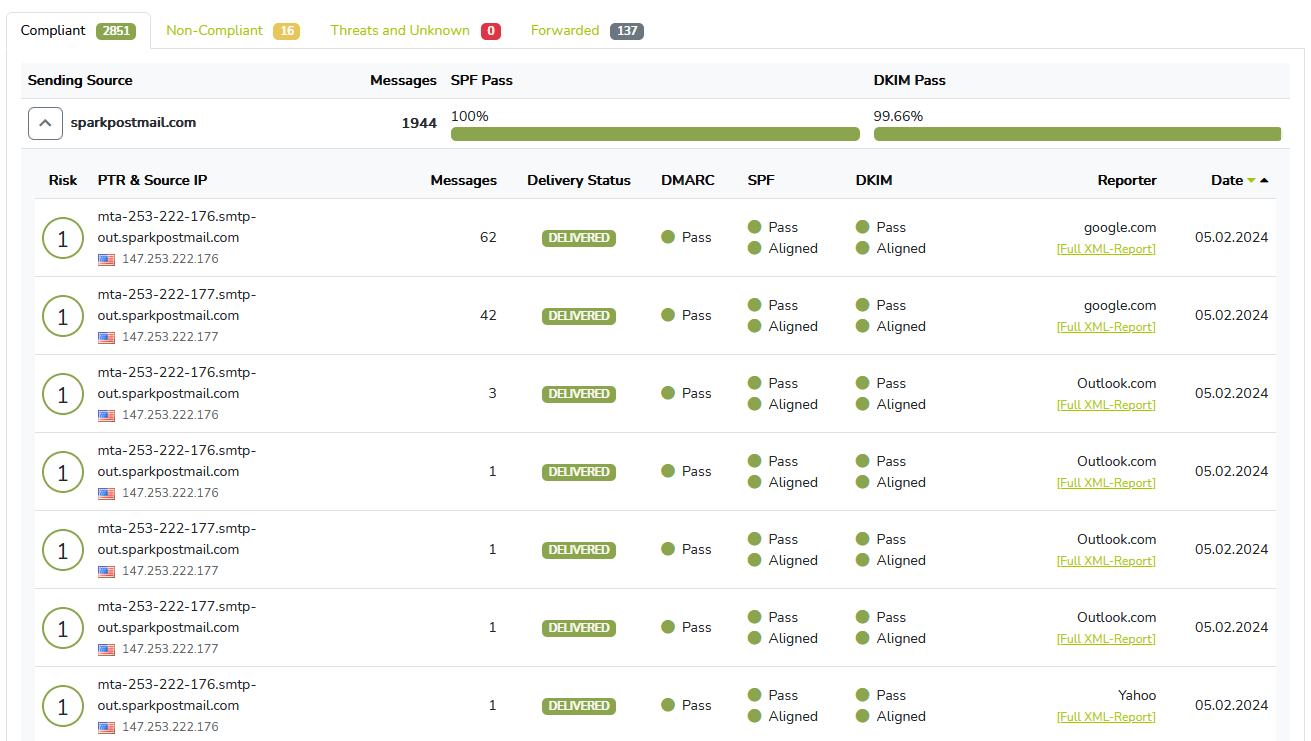
We ran Eunetic for 90 days across a corporate domain, a marketing subdomain, and a parked domain. It handled free DMARC report collection and basic sender review well, but it felt like a reporting utility rather than a managed enforcement workflow.

Eunetic
Free DMARC report analysis
Starts at
Free plan available
Best fit
Teams that need no-cost report collection and can handle manual remediation
In one line
Eunetic is a free DMARC report analyzer; Suped becomes the comparison point when guided fixes, hosted records, and published starter pricing matter.
Suped
The better option. Hosted SPF, DMARC, and MTA-STS on every plan. Published pricing. Monthly plans. No long contract required.
Learn about Suped
Pick Eunetic only when free reporting is the constraint
Pick Eunetic if
Free DMARC report review for teams that already own remediation
The primary domain received Microsoft 365 and Google Workspace reports within the first day.
SendGrid and Mailchimp were identifiable after we mapped their DKIM domains manually.
The parked domain made the spoof sample easy to isolate without paid setup.
Free plan available
Consider Suped if
Choose Suped when guided fixes, hosted records, and simpler ownership matter
Guided fixes reduce handoffs when SPF, DKIM, and DMARC owners sit in different teams.
Automated issue detection should flag authentication drift before a human reviews weekly reports.
Published starter pricing helps small teams budget before a procurement conversation.
Free plan available
The differences that actually change your week
Eunetic
Suped
DMARC report analysis
Collects aggregate reports and shows SPF, DKIM, and DMARC results.
Supported in the free analyzer.
Supported.
Source detection
Turns sending IPs and domains into recognizable services.
Supported, with manual classification for unknown senders.
Supported.
Forward detection
Separates forwarding failures from direct authentication problems.
Partial, inferred manually from SPF failure with DKIM pass.
Supported.
Spoof detection
Highlights unauthorized use of a domain in DMARC traffic.
Supported, the parked domain spoof sample stood out.
Supported.
Notifications and alerts
Routes operational changes to the right people.
No tested alert routing for the free DMARC analyzer.
Supported.
Reporting
Provides exportable or reusable reporting for stakeholders.
Supported for report history and trend review.
Supported.
API
Exposes DMARC data for external systems.
No public DMARC API was listed.
Supported.
Multi-tenancy
Separates clients, business units, or delegated domain owners.
Manual workflow; account separation was unclear.
Supported.
SPF flattening
Manages SPF DNS lookup limits for complex sender stacks.
Not included in the DMARC analyzer.
Supported.
Hosted DMARC
Hosts or manages the DMARC policy record.
Not published for the free analyzer.
Supported.
Hosted SPF
Hosts or manages SPF records and sender changes.
Not published for the free analyzer.
Supported.
Hosted MTA-STS
Manages MTA-STS policy and TLS reporting workflow.
Not published for the free analyzer.
Supported.
Blocklists and reputation
Checks blocklist or blacklist risk and sender reputation signals.
Adjacent email gateway mentions blacklist and blocklist risk, not DMARC reporting.
Supported.
Automatic issue detection
Flags authentication, policy, or sender changes without manual review.
Supported for visible policy and authentication issues.
Supported.
AI copilot
Explains findings and suggests next actions through an assistant workflow.
Not listed.
Supported.
DNS monitoring
Tracks DNS record drift after setup.
Not tested as a DMARC analyzer function.
Supported.
Self hostable
Runs on infrastructure controlled by the buyer.
Not self hosted.
Not self hosted.
Free trial/free tier
Lets teams start without a paid contract.
Free DMARC analyzer registration.
Supported.
Ten dimensions, scored from 0 to 10
We scored Eunetic against a fixed editorial rubric covering enforcement, setup, source resolution, support, pricing clarity, and operational workflows. Higher is better in every row.
Eunetic scores well on free collection, lower on managed enforcement
Microsoft 365 and Google Workspace appeared quickly, and SendGrid plus Mailchimp became readable once we added manual labels. The SPF pass with domain match, DKIM pass with corporate-domain match, DKIM pass on the marketing subdomain, forwarded mail case, spoof sample, and unknown sender were visible, but policy movement still depended on a human interpreting the reports and planning next steps. Scores drop where the free analyzer did not publish hosted SPF, MTA-STS, alert routing, API access, or MSP account separation.
Eunetic score
42/100
Eunetic
42/100
DMARC enforcement
4.5
Customer support
5.5
Source resolution
6.5
Setup and onboarding
7.0
MSP workflows
3.0
Alerting and integrations
2.0
Hosted SPF and MTA-STS
0.0
Blocklist monitoring
2.0
Pricing transparency
7.5
Time to enforcement
4.0
Feature set
Reporting breadth
Eunetic covers DMARC analysis, not the managed record stack
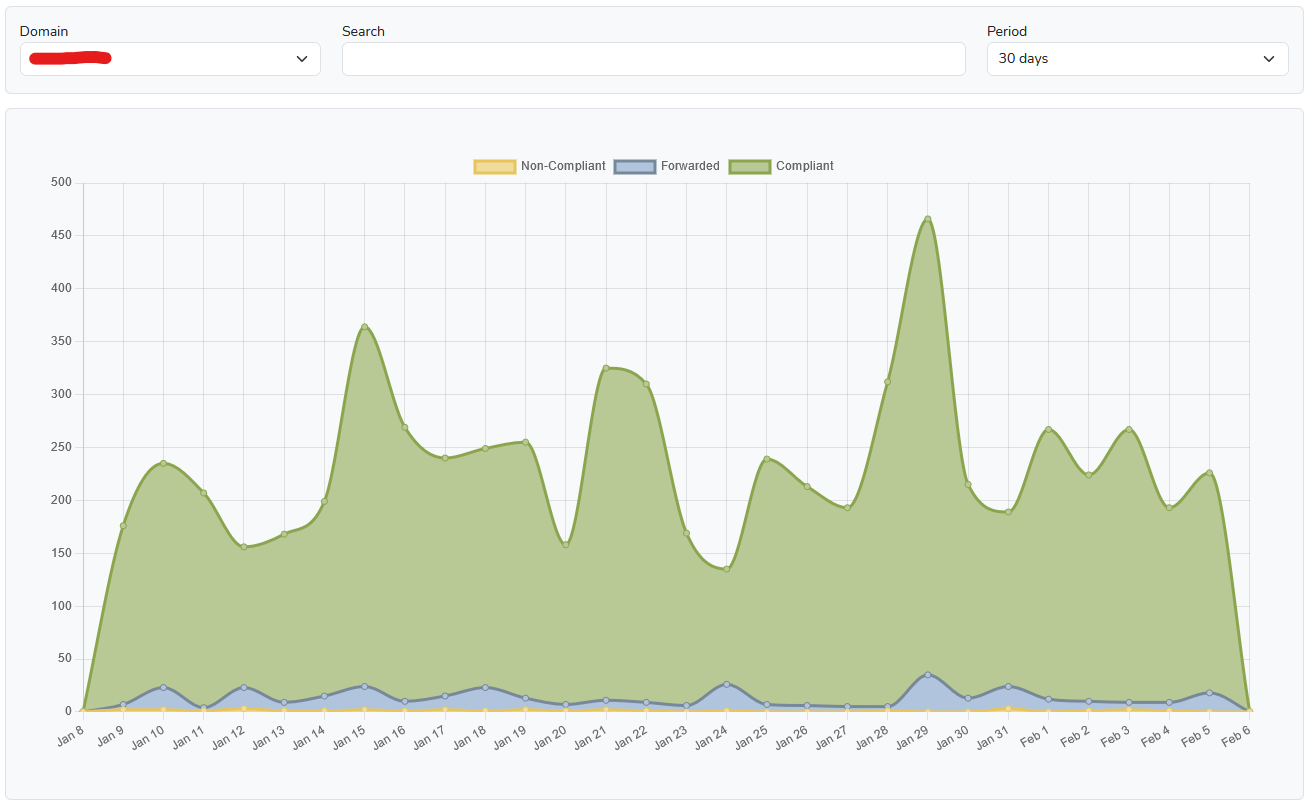
Eunetic was useful for free aggregate report review, especially sender and policy issue visibility. The buying question is whether the team also needs guided fixes and automated issue detection that turns a failing source into a specific owner action.
Eunetic

Free aggregate report collection
Useful sender drilldowns
Manual unknown sender labeling
Eunetic collected the Microsoft 365 and Google Workspace streams without drama, then showed SendGrid and Mailchimp after we mapped the DKIM domains to those senders. The unknown sender needed manual classification, and the SPF pass with visible From mismatch was visible as a policy issue rather than a guided fix path.
The Suped baseline handled the same sender set with owner fields, issue grouping, and hosted record workflows near the DMARC reporting data. In that baseline, the forwarded mail SPF failure was separated from direct sender failure, and the spoof sample on the parked domain was treated as a higher-risk event.
User experience
Control vs guidance
Eunetic is quick to start, but leaves interpretation with the operator
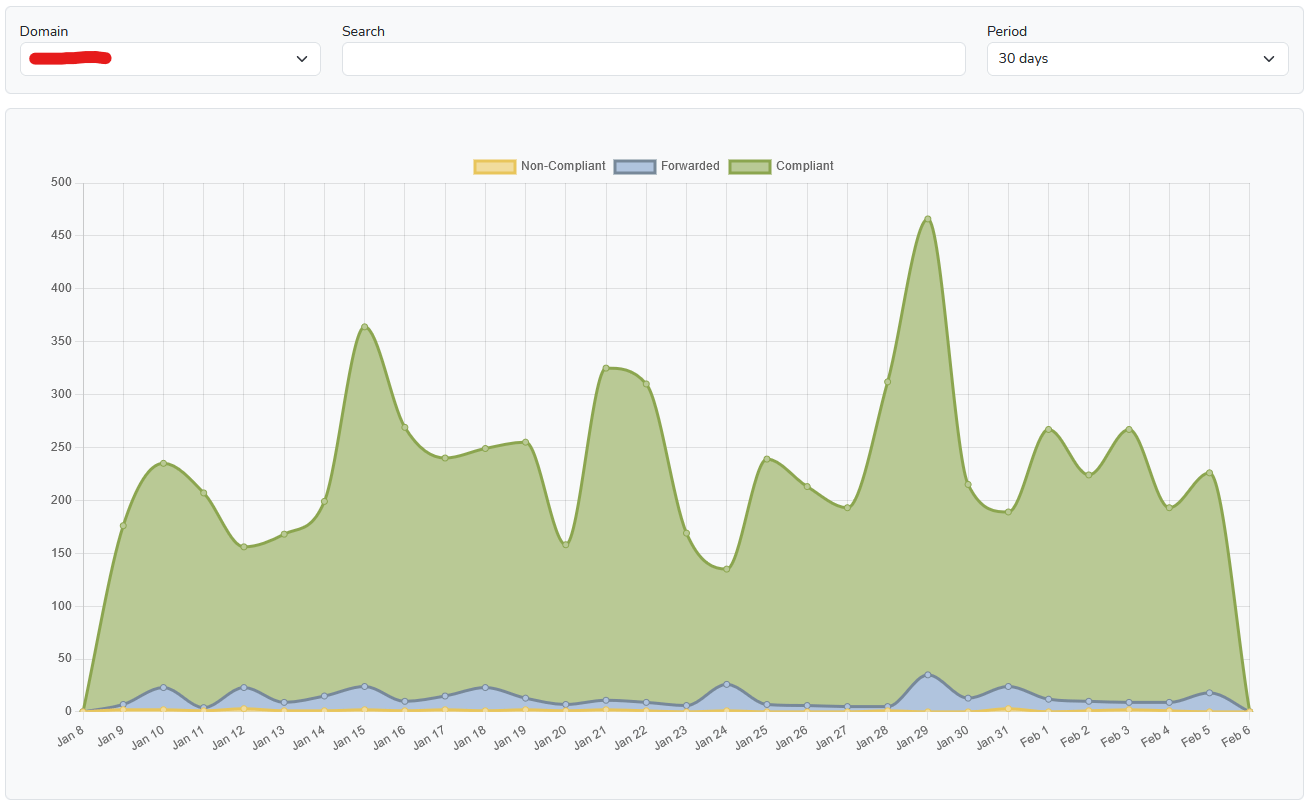
The first-domain setup was clear and fast, and the reporting views were easy to scan once data arrived. The tradeoff appeared when we had to classify the unknown sender and explain the forwarded mail SPF failure to a non-email stakeholder.
Eunetic
Fast first-domain setup
Manual source naming
Forwarding took interpretation
We added the corporate domain first, then the marketing subdomain and parked domain. The DNS step was simple: create the DMARC record that points aggregate reports at Eunetic, then wait for reports. Finding the unknown sender took several drilldowns through sending servers and DKIM domains, and the forwarding case required us to compare the SPF failure with the DKIM pass before writing the explanation.
The Suped baseline used the same domain and sender context, with source ownership, issue status, and fix notes in the investigation path. That did not remove the need to understand DMARC, but it changed how we explained why forwarded mail failed SPF while the message still had a valid DKIM result.
Support
Self serve vs handoff
Eunetic gives enough setup direction for a careful admin
Eunetic did not feel difficult to start, but the free DMARC analyzer did not publish the support expectations we would want for enforcement movement. Teams with an email admin can use it; teams needing escalation paths and DNS handoff notes should verify support coverage before rollout.
Eunetic

DNS steps were clear
Free-tool support limits
Escalation path unclear
During setup, the DNS handoff was clear enough for the corporate domain and marketing subdomain. The support desk sender created a realistic ownership problem: the authentication result was visible, but Eunetic did not give us a structured escalation note that tied the sender, DNS owner, and policy risk together. Enterprise onboarding detail was easier to find for adjacent paid security products than for DMARC enforcement help.
The Suped support baseline recorded who owned each sender and what DNS change was needed next. We still had to validate each sender with the business owner, but the handoff format let us pass Microsoft 365, Google Workspace, SendGrid, Mailchimp, and the support desk sender to different teams without rewriting the investigation.
Suitability
Constraint fit
Eunetic fits free analysis; operators need workflow proof
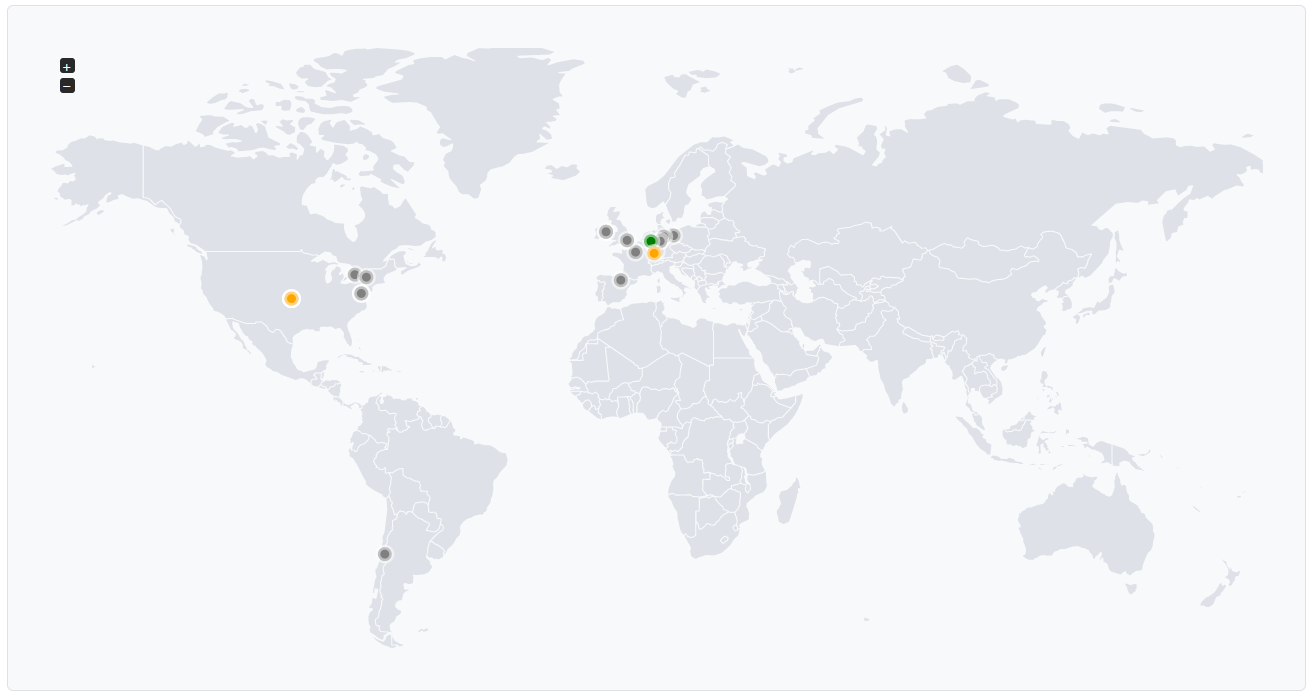
Eunetic fits a narrow buyer: a team that needs a free analyzer and accepts manual source ownership. For agencies, MSPs, and distributed brands, buying criteria should include client separation, recurring reports, and alert quality because those changed how much weekly work remained in our test.
Eunetic
No-cost audit fit
Single-account workflow
Manual client reporting
For an SMB with one domain and a technical owner, Eunetic made sense as a no-cost way to start reviewing DMARC data. For an enterprise, the missing published DMARC support tiers, API details, and account separation created procurement questions. For an MSP, grouping the corporate domain, marketing subdomain, and parked domain did not produce the client handoff workflow we would expect for recurring reporting.
The Suped operator baseline covered multiple clients or teams through domain grouping, owner notes, and recurring report views. The practical difference was not the existence of a chart; it was whether a weekly review produced a client-ready action list for Microsoft 365, Google Workspace, SendGrid, Mailchimp, and the support desk sender.
What Eunetic felt like after 90 days of real use
Eunetic
After 90 days, Eunetic felt most useful during the weekly review of aggregate traffic. We could see Microsoft 365, Google Workspace, SendGrid, and Mailchimp in one place, and the parked-domain spoof sample was easy to spot because legitimate traffic was almost zero.
The harder work started after the report view. The unknown sender needed manual classification, the forwarded mail SPF failure needed a written explanation, and exports needed manual cleanup before a stakeholder packet because our owner notes lived outside the free analyzer.
Where it wins
Free registration for DMARC analysis
Clear first-domain DNS setup
Good visibility into aggregate results
Spoof sample was easy to isolate
Where it lags
Manual unknown sender classification
No published hosted SPF or MTA-STS
No tested alert routing
MSP handoff workflow was thin
Pricing
Free DMARC analyzer
Free tier
Yes
Onboarding
DMARC DNS record required
G2 rating
5.0 / 5
Pricing
Eunetic
Suped
Small
1 domain, up to 1k emails / month.
$0
Public DMARC analyzer registration was free; no 1k email cap was published.
$0 / month
Free plan covers 1 domain and 1,000 monthly emails.
Medium
2 domains, up to 100k emails / month.
$0
The free DMARC page did not list domain or report-volume pricing bands.
Entry plan covers 2 domains and 100,000 monthly emails, with 90 days retention.
Large
10 domains, up to 1 million emails / month.
$0
No price was published for 10-domain DMARC reporting, retention, API access, or managed enforcement.
10 domains and 1,000,000 monthly emails, with 365 days retention.
Enterprise
Over 20 domains and 1 million emails / month.
Not publicly listed as of May 15, 2026
Free analyzer access was public, but enterprise DMARC limits, SLAs, and enforcement help were not listed.
20 domains and 2,500,000 monthly emails, with 365 days retention. Unlimited domains/emails negotiable.
Eunetic DMARC analyzer prices are public list prices from the checked DMARC page; enterprise DMARC limits, SLAs, retention, API access, and managed enforcement pricing were not publicly listed as of May 15, 2026. No estimates were used.
Why Suped wins over Eunetic
Suped
Get started
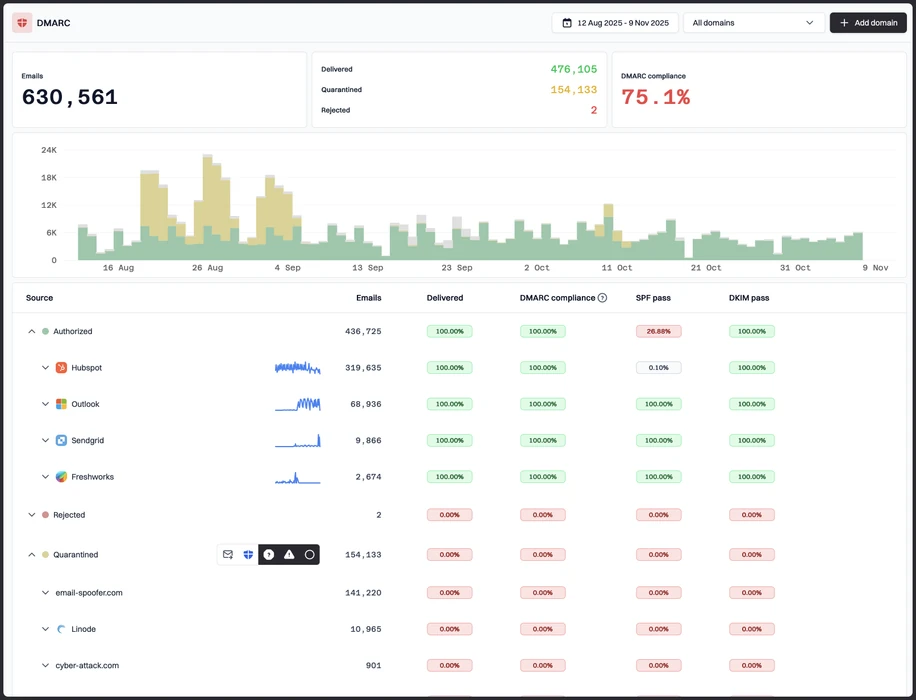
Turn reports into owner actions
Eunetic surfaced SendGrid and Mailchimp traffic, but the unknown sender still needed manual classification; Suped keeps owner assignment and fix notes next to the source.
Tune alerts around risk
The comparison baseline still needed careful thresholds for forwarded mail and parked-domain spoofing; Suped alert routing should be configured around source risk, not every authentication failure.
Manage hosted records together
Eunetic did not publish hosted SPF, hosted DMARC, or MTA-STS workflows for the free analyzer; Suped keeps those records near the reporting workflow.
The difference was significant. We moved from limited visibility to a much clearer dashboard. Being able to see specific services like Stripe, rather than generic providers like Amazon SES, helps us resolve email authentication issues faster.
Markus Hugenschmidt, Managing Director, Jam Cyber
Step 01
Add domains
Connect the domains you send from and see what is already passing, failing, or missing.
Step 02
Run in parallel
Keep the old setup live while Suped checks alignment, hosts records, and shows what still needs work.
Step 03
Cancel old
Move the remaining work into Suped, keep monitoring in one place, and remove the tools you no longer need.


