DMARC-SRG vs.
Docker DMARC Reports in 2026
DMARC-SRG

Docker DMARC Reports
vs.
We tested DMARC-SRG and Docker DMARC Reports for 90 days across a corporate domain, a marketing subdomain, and a parked domain, with Microsoft 365, Google Workspace, SendGrid, Mailchimp, and a support desk sender connected. DMARC-SRG gave us the better report-review workflow, while Docker DMARC Reports was quicker to deploy as a container. Neither gave us managed policy movement, automatic source ownership, or operational alerts.

DMARC-SRG
Open-source DMARC report analysis
Starts at
Free, self-hosted
Best fit
Technical teams wanting deeper report review
In one line
We found it useful for filtering authentication evidence, but every fix and policy decision stayed with our team.
Docker DMARC Reports
Containerised DMARC report viewing
Starts at
Free, self-hosted
Best fit
Operators wanting a compact Docker deployment
In one line
We found its container quick to start but manual to operate; Suped is the sober third option when guided fixes and published starter pricing matter.
Suped
The better option. Hosted SPF, DMARC, and MTA-STS on every plan. Published pricing. Monthly plans. No long contract required.
Learn about Suped
TLDR: choose report control or deployment speed
Pick DMARC-SRG if
Choose DMARC-SRG for analyst-led, self-hosted report review
We filtered all three domains by month and reporter without rebuilding queries.
We traced the Mailchimp visible from mismatch through separate SPF and DKIM results.
We retained full control of the database, mailbox ingestion, and report cleanup schedule.
Free plan available
Pick Docker DMARC Reports if
Choose Docker DMARC Reports for a small team already running containers
We brought up the parser, database connection, and viewer with one repeatable container configuration.
We ingested Microsoft 365 and Google Workspace reports on the documented hourly schedule.
We kept the viewer private behind our existing reverse proxy and access controls.
Free plan available
Consider Suped if
Choose Suped for guided fixes, hosted records, and simpler ownership
Require automatic issue detection that turns failed alignment into an assigned next step.
Check that alert quality, client separation, and MSP handoff work without custom scripts.
Use published starter pricing to budget before moving production domains.
Free plan available
The differences that actually change your week
DMARC-SRG
Docker DMARC Reports
Suped
DMARC report analysis
Parses aggregate reports and exposes authentication results.
Detailed filtering and summary views
Core parsing and web reporting
Managed analysis with remediation context
Source detection
Maps report traffic to recognisable sending services.
IP-level evidence; manual classification
Raw source data; manual classification
Automatic sending source identification
Forward detection
Separates forwarding effects from direct authentication faults.
Manual interpretation from SPF and DKIM
No dedicated forward classification
Forwarding patterns identified
Spoof detection
Surfaces unauthorised mail failing DMARC.
Failure filters support manual investigation
Failed traffic visible in reports
Spoof activity detected and prioritised
Notifications and alerts
Pushes material changes into an operational workflow.
No built-in proactive alerts
No built-in proactive alerts
Configurable operational alerts
Reporting
Produces readable summaries for domain owners.
Weekly, monthly, and custom summaries
Web viewer reporting
Dashboard and scheduled reporting
API
Provides supported programmatic access to reporting data.
No dedicated API
No dedicated API
API access supported
Multi-tenancy
Separates client accounts, permissions, and reporting.
Separate deployments required
Separate stacks required
MSP account separation
SPF flattening
Reduces SPF lookup pressure through managed records.
Not included
Not included
Managed SPF flattening
Hosted DMARC
Hosts and manages the DMARC policy record.
DNS remains manual
DNS remains manual
Hosted DMARC records
Hosted SPF
Hosts and maintains the SPF policy record.
Not included
Not included
Hosted SPF records
Hosted MTA-STS
Hosts the policy required for enforced transport security.
Not included
Not included
Hosted MTA-STS
Blocklists and reputation
Monitors blocklist (blacklist) status and sender reputation signals.
No blocklist or blacklist monitoring
No blocklist or blacklist monitoring
Blocklist and reputation monitoring
Automatic issue detection
Finds authentication faults without manual report review.
Analyst review required
Analyst review required
Automatic issue detection
AI copilot
Explains findings and proposes concrete remediation steps.
Not included
Not included
AI-assisted investigation
DNS monitoring
Watches authentication records for unexpected changes.
No continuous DNS monitoring
No continuous DNS monitoring
Continuous DNS monitoring
Self hostable
Runs entirely on infrastructure controlled by the buyer.
Native deployment model
Native Docker deployment model
Hosted service
Free trial/free tier
Allows evaluation without a paid subscription.
Free open-source software
Free self-hosted image
Free plan and 14-day unrestricted trial
Ten dimensions, scored from 0 to 10
We scored both products against a fixed editorial rubric based on the same 90-day test. Higher is better in every row, and a zero means the product did not support that capability.
DMARC-SRG leads on analysis; Docker DMARC Reports leads on deployment speed
DMARC-SRG gave us more useful filtering when we separated Microsoft 365, SendGrid, and the unauthorised spoof sample, so it scored higher for source resolution and enforcement planning. Docker DMARC Reports took less time to deploy, but its viewer left more interpretation outside the product. Both scored zero for alerts, hosted authentication records, and blocklist (blacklist) monitoring because those capabilities were absent in our test.
DMARC-SRG score
30/100
Docker DMARC Reports score
28/100
DMARC-SRG
30/100
DMARC enforcement
4.5
Customer support
1.5
Source resolution
4.5
Setup and onboarding
5.5
MSP workflows
1.0
Alerting and integrations
0.0
Hosted SPF and MTA-STS
0.0
Blocklist monitoring
0.0
Pricing transparency
9.0
Time to enforcement
4.0
Docker DMARC Reports
28/100
DMARC enforcement
3.5
Customer support
1.0
Source resolution
3.5
Setup and onboarding
7.0
MSP workflows
0.5
Alerting and integrations
0.0
Hosted SPF and MTA-STS
0.0
Blocklist monitoring
0.0
Pricing transparency
9.0
Time to enforcement
3.5
Feature set
Analysis depth vs packaging
DMARC-SRG gives better analysis; Docker DMARC Reports packages the basics
DMARC-SRG gave us more ways to filter and summarise aggregate evidence, while Docker DMARC Reports made the parser and viewer easier to deploy together. We would treat guided fixes and automatic issue detection as separate buying criteria because neither product supplied them during our test, while Suped does.
DMARC-SRG
Microsoft 365 rows stayed readable
Mailchimp mismatch exposed clearly
Unknown sender needed manual labels
Docker DMARC Reports

Google Workspace parsed on schedule
SendGrid DKIM alignment stayed visible
Forwarded SPF failure needed interpretation
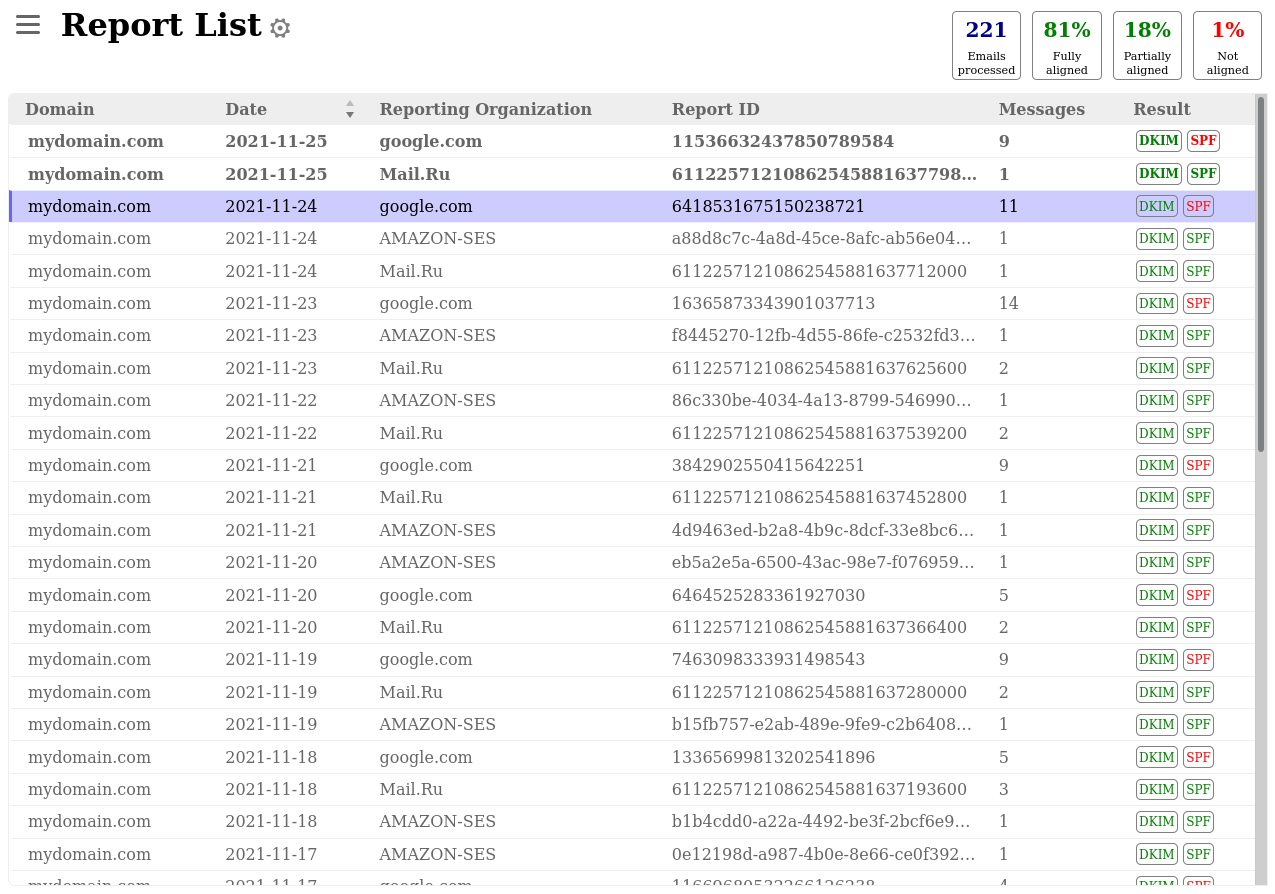
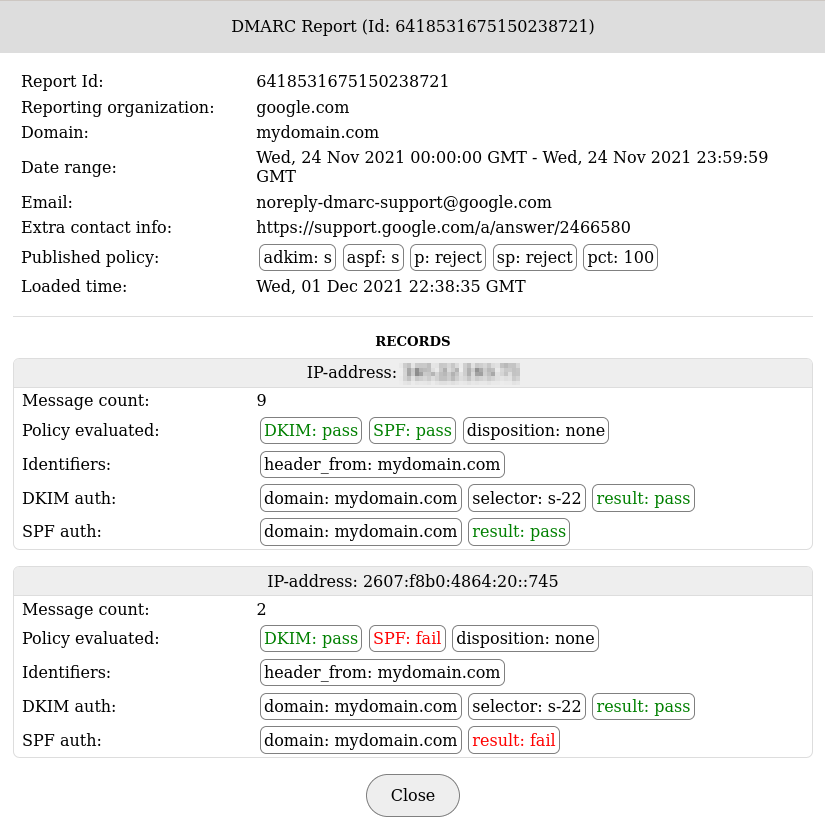
In DMARC-SRG, we separated Microsoft 365 and Google Workspace traffic by reporter, then filtered SendGrid and Mailchimp results by domain and month. The aligned DKIM pass on the marketing subdomain remained visible even when the SPF identity did not align, which helped us explain the Mailchimp visible from mismatch. The unknown sender still appeared as IP and authentication evidence rather than a named service, so we had to research and label it outside the product.
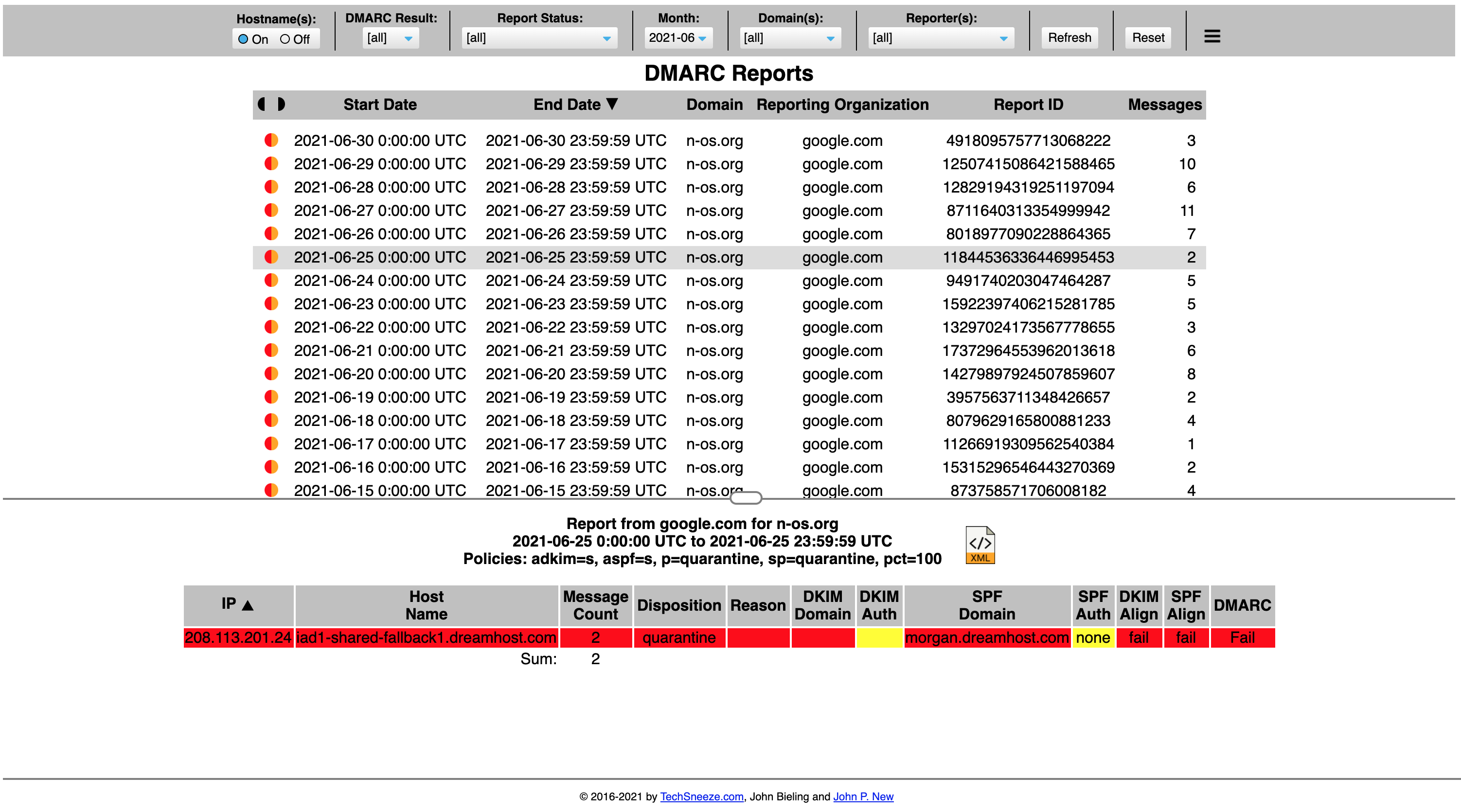
Docker DMARC Reports collected the same Microsoft 365, Google Workspace, SendGrid, and Mailchimp aggregate reports through its IMAP schedule and displayed the core SPF, DKIM, and disposition data. We could see that forwarded mail failed SPF while DKIM preserved the DMARC pass, but the viewer did not explain forwarding or propose a fix. The unknown sender also needed manual classification, and we found fewer review shortcuts when moving between the three domains.
User experience
Control vs setup speed
Docker starts faster; DMARC-SRG reviews better
Docker DMARC Reports reduced our initial deployment work because the application arrived as a container image. DMARC-SRG asked more of us during setup, but its filters made repeated investigation across three domains less cumbersome.
DMARC-SRG
Three-domain filtering felt direct
Unknown source research stayed manual
Forwarding needed analyst explanation
Docker DMARC Reports
Container setup finished sooner
Domain onboarding lacked guidance
Forwarding context stayed outside
We spent about two hours and 35 minutes configuring DMARC-SRG, MariaDB, IMAP ingestion, the web UI, and access controls for the three test domains. Once reports arrived, switching between the corporate domain, marketing subdomain, and parked domain was direct. Finding the unknown sender took several filters and external ownership research, while explaining the forwarded SPF failure required us to compare SPF and DKIM details ourselves.
We spent about one hour and 25 minutes preparing the Docker DMARC Reports container, database variables, IMAP folders, and private reverse proxy. Adding all three domains did not require separate paid entitlements, but the viewer offered little onboarding guidance after ingestion began. We found the unknown sender in the raw source rows, then reconstructed the forwarded-mail explanation outside the product because no workflow connected SPF failure, aligned DKIM, and forwarding.
Support
Documentation vs operational ownership
Neither product includes a managed support handoff
DMARC-SRG gave us more application-specific documentation to work through, while Docker DMARC Reports kept deployment instructions compact. Both assumed that we owned DNS changes, infrastructure failures, and escalation, so neither met a formal enterprise support requirement.
DMARC-SRG

Application documentation answered setup basics
DNS handoff remained internal
No commercial escalation path
Docker DMARC Reports
Environment variables were documented
Infrastructure support stayed internal
Enterprise onboarding was absent
During DMARC-SRG setup, the public documentation helped us connect the database, mailbox ingestion, and report cleanup settings. We still wrote our own DNS change ticket, rollback notes, and explanation for the support desk sender. When we simulated an escalation around incomplete IMAP ingestion, our route was project documentation and community issue handling, with no vendor SLA or enterprise onboarding contact.
Docker DMARC Reports documented the key environment variables well enough for our container operator to connect IMAP and MariaDB. The DNS handoff, TLS termination, backup plan, and viewer access policy were entirely our responsibility. Our simulated parser escalation had no commercial support path, and an enterprise rollout would need internal owners for patching, incident response, and DMARC policy decisions.
Suitability
Analyst fit vs operator fit
DMARC-SRG fits analysts; Docker fits container operators
DMARC-SRG was the better fit for a technical team reviewing several related domains, while Docker DMARC Reports suited a small operator who wanted a compact private deployment. For MSP workflows, we would require tenant separation, client-ready recurring reports, and alerts routed to the right owner; Suped includes those controls, while neither self-hosted product did in our test.
DMARC-SRG
Related domains grouped cleanly
Recurring reports needed ownership
No tenant-level client handoff
Docker DMARC Reports

Good fit for container SMBs
Client separation required more stacks
MSP alerts needed custom work
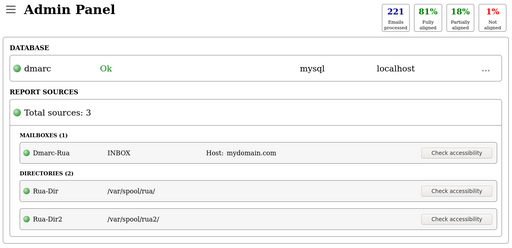
DMARC-SRG worked best when we treated the corporate domain, marketing subdomain, and parked domain as one internal analysis set. Its filters helped our enterprise-style review, but it did not give us separate client accounts, delegated permissions, or an MSP handoff record. We could generate period summaries, yet turning them into recurring owner reports and tracking policy approvals remained our process.
Docker DMARC Reports made sense for an SMB with container skills and a modest number of domains. We could group data in one deployment, but proper client separation required separate stacks, databases, access rules, and reporting routines. That made MSP handoff expensive in staff time, and the absence of routed alerts meant each client would depend on scheduled manual review.
What each tool feels like after 90 days of real use
What DMARC-SRG felt like after 90 days of real use
DMARC-SRG
After 90 days, DMARC-SRG felt like a capable internal report workbench. We returned to its domain and time filters when comparing Microsoft 365 with SendGrid and Mailchimp, and the stored SPF and DKIM evidence was enough to verify our controlled pass and mismatch cases.
The operational burden never disappeared. We maintained PHP, MariaDB, IMAP access, backups, retention, and web security, then used our own runbook to classify the unknown sender and decide when the corporate domain was ready for a stricter policy.
Where it wins
Useful domain and date filtering
Clear SPF and DKIM evidence
No subscription feature gates
Full control of stored reports
Where it lags
Manual sending source classification
No proactive alert routing
No hosted authentication records
Infrastructure stays buyer-owned
Pricing
$0 software license
Free tier
Full self-hosted project
Onboarding
2h 35m setup work
G2 rating
0 / 5
What Docker DMARC Reports felt like after 90 days of real use
Docker DMARC Reports
After 90 days, Docker DMARC Reports felt predictable for a team already operating containers. The hourly IMAP fetch kept new aggregate files moving into the database, and we could inspect the corporate, marketing, and parked-domain traffic without vendor limits.
Most DMARC decisions still happened outside the viewer. We documented why forwarding broke SPF, researched the unknown IP owner, prepared the DNS changes, and monitored the parser and database ourselves, so the quick deployment did not translate into quick enforcement.
Where it wins
Fast repeatable container deployment
Straightforward IMAP ingestion
No vendor volume caps
Private infrastructure control
Where it lags
Limited investigation guidance
No managed policy movement
No client account separation
Patching and backups stay internal
Pricing
$0 software license
Free tier
Full self-hosted image
Onboarding
1h 25m setup work
G2 rating
0 / 5
Pricing
DMARC-SRG
Docker DMARC Reports
Suped
Small
1 domain, up to 1k emails / month.
$0
The software is free, with hosting and administration paid by the operator.
$0
The image is free, with hosting and administration paid by the operator.
$0 / month
Free plan covers 1 domain and 1,000 monthly emails.
Medium
2 domains, up to 100k emails / month.
$0
No published domain or message cap applies; infrastructure determines capacity.
$0
No published domain or message cap applies; infrastructure determines capacity.
Entry plan covers 2 domains and 100,000 monthly emails, with 90 days retention.
Large
10 domains, up to 1 million emails / month.
$0
The license stays free, but database sizing, retention, backups, and labour increase.
$0
The image stays free, but database sizing, retention, backups, and labour increase.
10 domains and 1,000,000 monthly emails, with 365 days retention.
Enterprise
Over 20 domains and 1 million emails / month.
$0
No paid enterprise plan or support SLA was publicly listed.
$0
No paid enterprise plan or managed support tier was publicly listed.
20 domains and 2,500,000 monthly emails, with 365 days retention. Unlimited domains/emails negotiable.
The $0 figures are public software prices. Capacity and operational cost comments are estimates based on self-hosting because both products depend on buyer-managed infrastructure, storage, security, and labour. Pricing was checked as of May 15, 2026.
If you cannot decide between the two, maybe the answer is Suped
Suped
Get started
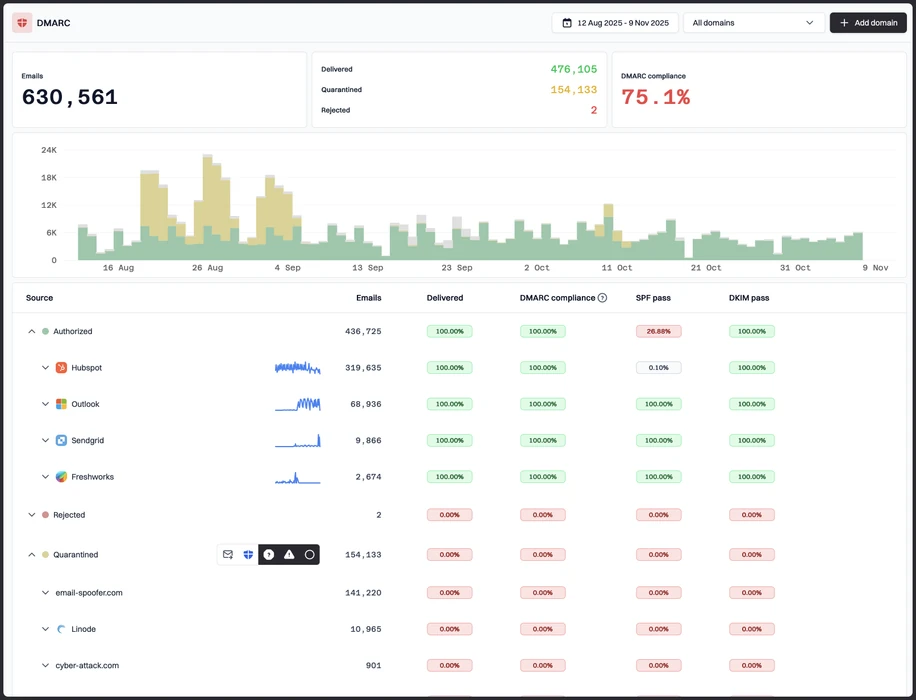
Turn failures into assigned fixes
Suped identifies sending sources and turns alignment failures into guided actions, closing the manual classification gap we found in both viewers.
Remove self-hosting overhead
Suped hosts the reporting workflow and authentication records, so teams do not maintain the PHP stack, container, database, IMAP job, reverse proxy, and backups required by these products.
Separate clients and route alerts
Suped adds MSP account separation and operational alerts, replacing the separate deployments and manual recurring handoffs both products required in our test.
The difference was significant. We moved from limited visibility to a much clearer dashboard. Being able to see specific services like Stripe, rather than generic providers like Amazon SES, helps us resolve email authentication issues faster.
Markus Hugenschmidt, Managing Director, Jam Cyber
Migrating from DMARC-SRG or Docker DMARC Reports?
We have done the migration enough times to know the shape.
Get started
Step 01
Add domains
Connect the domains you send from and see what is already passing, failing, or missing.
Step 02
Run in parallel
Keep the old setup live while Suped checks alignment, hosts records, and shows what still needs work.
Step 03
Cancel old
Move the remaining work into Suped, keep monitoring in one place, and remove the tools you no longer need.
Frequently asked questions

How MONEYME proactively strengthens domain security and unlocks higher email engagement with Suped
See how MONEYME uses Suped
How cybersecurity specialist Jam Cyber delivers scalable DMARC protection with Suped
See how Jam Cyber uses Suped

How Vision Australia maintains full DMARC enforcement across a large domain portfolio with Suped
See how Vision Australia uses Suped

How The POP Team turns domain checks and DMARC visibility into client ready delivery work
See how The POP Team uses Suped

How DigiBean simplified DMARC monitoring and improved email security for their MSP clients
See how DigiBean uses Suped

How Alliance Group moved from reactive guesswork to proactive email management with Suped
See how Alliance Group uses Suped