Microsoft SNDS 2026 changes: what senders need to know before June 8
News

Updated on 22 Aug 2026: We added Microsoft's completed trap-count removal and replaced expired migration deadlines with the checks senders need to run now.
Microsoft moved SNDS out of the old Smart Network Data Service portal during the June 8, 2026 cutover, after roughly 20 years of senders using it to monitor Outlook.com reputation. The direct answer now is simple: senders should confirm that old bookmarks redirect, replace any automated access URL that still uses the deprecated SNDS path, refresh ownership of controlled IP ranges, verify JMRP feeds, update report automation, and confirm complaint processors handle the new header-only ARF format.
Microsoft posts the current details on Microsoft SNDS. The old page redirects to the new portal. Microsoft deprecated automated access URLs that begin with the old SNDS path on June 22, 2026. Microsoft also notes that some users who see an automated-link creation error can go to Edit Profile, make a change, save it, and retry the link creation. Treat every old SNDS bookmark, feed, and report URL as something to verify.
- Current access: Log in with the Microsoft Account used for SNDS, confirm it is a valid email address, and check that all responsible IP ranges still show access in the new portal.
- Legacy URLs: Replace any old automated access URL immediately, test the current report links, and make failures visible in monitoring instead of silent.
- Ongoing maintenance: Refresh automated report links every 30 days and act on network reattestation reminders before the 10-month access window closes.
- For deliverability: Use SNDS as one signal. Pair it with authentication results, complaint trends, bounces, blocklist data, and message tests before changing volume or routing.
Post-migration fixes to make now
Because the cutover already happened, the work is verification and repair. Check what broke: browser access, saved report URLs, API pulls, JMRP complaint delivery, and internal dashboards.
- Replace old automated access URLs: Microsoft deprecated URLs that begin with the previous SNDS path on June 22, 2026. Replace any that remain in scripts, secrets, dashboards, or runbooks.
- Test automated link creation: If the portal returns a save error while creating a new automated link, use the Edit Profile save workaround and then retry.
- Confirm JMRP destinations: Check that each complaint feed is tied to an SNDS account with current network access and that the mailbox still forwards to the right complaint processor.
- Annotate reporting: Keep June 8, June 22, and July 22, 2026 marked in dashboards so API errors, missing rows, changed columns, or removed trap counts are not mistaken for normal reputation movement.
What changed after June 8
The June 8 change was not only a cosmetic portal move. It changed how senders reach SNDS, how report access works, what JMRP complaints contain, how long automated links remain useful, and how network ownership is renewed. The old portal now redirects, legacy automated access URLs were deprecated on June 22, and trap-hit counts left the Data Report on July 22, 2026.
|
|
|
|---|---|---|
Portal | New portal live | Update bookmarks |
Reports | REST API | Revise pulls |
Links | 30-day expiry | Refresh monthly |
Old URLs | Deprecated June 22 | Replace immediately |
Networks | 10-month access | Reattest ownership |
JMRP | Header-only ARF | Update parsing |
Trap counts | Removed July 22 | Revise alerts |
Profile | UTC time zones | Check schedules |
Compact summary of sender-facing SNDS migration changes.
The biggest operational risk is stale automation. Scripts that download SNDS reports from saved links need a refresh every 30 days. Treat report links as expiring credentials, not permanent endpoints, and alert on failed or empty pulls.
The old portal also has a small but important account issue. Accounts with names that are not valid email addresses will not function as expected. If that applies to an old login shared by an operations team, move access to an alternate Microsoft Account instead of waiting for a failed login during an active deliverability issue.
Why this matters for Outlook.com reputation
SNDS gives senders data needed to understand Outlook.com reputation, but Microsoft is explicit that viewing the data is not enough. Reputation remains the sender's responsibility. That is a warning against dashboard watching without list hygiene, complaint management, authentication checks, and fast investigation when a controlled IP starts behaving differently.
For domains sending 5,000 or more messages per day to Outlook.com consumer services, Microsoft requires both SPF and DKIM to pass, plus a DMARC record with at least p=none. DMARC must also pass because the SPF or DKIM domain matches the visible From domain. A 550 5.7.515 rejection points to authentication compliance, not missing SNDS access.
Old operating model
- Portal checks: Teams often opened View Data or View IP Status manually after complaints, throttling, or a Microsoft bounce spike.
- Saved links: Automated exports often depended on report links that stayed in runbooks longer than anyone remembered.
- JMRP body data: Some complaint workflows expected the full complaint message body to be appended to ARF feedback.
Post-migration operating model
- API reports: IP Status and IP Data reports use a REST API tied to the same login as the SNDS portal.
- Monthly refresh: Report links expire after 30 days, so automation needs a planned refresh process.
- Header data: JMRP ARF feedback keeps original headers and selected authentication headers, with the sender address redacted.
For senders with real Outlook.com volume, authentication and inbox testing deserve review at the same time. SNDS tells you how Microsoft sees your IP behavior. It does not prove that a specific campaign has the right SPF, DKIM, DMARC, TLS, content, or unsubscribe setup. A practical workflow is to send a test message through an email tester before large sends, then compare the result with SNDS complaint and status data after the campaign.
SNDS migration readiness
Use these bands to decide whether the post-migration state is routine cleanup or a deliverability risk.
Ready
Low risk
Valid account, active IP access, known JMRP feeds, and documented report refresh process.
Watch
Medium risk
Access works, but report automation or complaint parsing has not been tested against the new model.
Fix now
High risk
Unknown account owner, stale IP access, unlinked JMRP feeds, or old scripts using saved report URLs.
Unknown
No baseline
No confirmed SNDS owner for the sending IPs or no central record of who receives JMRP data.
JMRP and ARF feedback changes
The Junk Mail Reporting Program change is the one most likely to break downstream complaint processing. The updated ARF feedback format includes only the original message headers from the complaint email, plus selected authentication headers such as Authentication-Results and Received-SPF. The sender address is redacted, and the full complaint body is no longer appended.
Simplified ARF feedback shape after migrationtext
Original message headers
Authentication-Results
Received-SPF
Redacted sender address
No appended complaint body
That privacy change shifts more work to your identifiers. If your complaint tooling relied on body content, full sender address visibility, or campaign text, it needs another way to map a complaint back to a stream. Use stable headers, campaign IDs, outbound IP, DKIM selector, and sending platform metadata that survive header-only complaint reports.
JMRP feeds not linked to SNDS accounts were removed after migration. Recreate those feeds from an SNDS account that has current network access, then keep the network approval current so complaints do not silently stop.
If the migration exposes a stale JMRP complaint address, do not try to fix it with SPF, DKIM, or DMARC DNS changes. The destination mailbox belongs to the JMRP feed configuration for the IPs. Keep the old mailbox forwarding if possible, confirm which Microsoft account controls the feed, and ask Microsoft or the IP owner to clear the stale association before recreating the feed with the new address.
For teams sending through an email service provider, the hard part is often proving who controls the responsible IPs. If that is your setup, keep the Microsoft-side owner, ESP-side support contact, and internal deliverability owner in one runbook. The same logic applies to ESP SNDS access, because the person with portal access is not always the person who can change sending infrastructure.
Reporting and API impact
IP Status and IP Data reports are accessible through a REST API tied to the same login as the SNDS portal. Microsoft also changed the calculations and columns used by those reports. Trend comparisons need care across the cutover, and clients should fail visibly when authentication, schemas, or response shapes change.
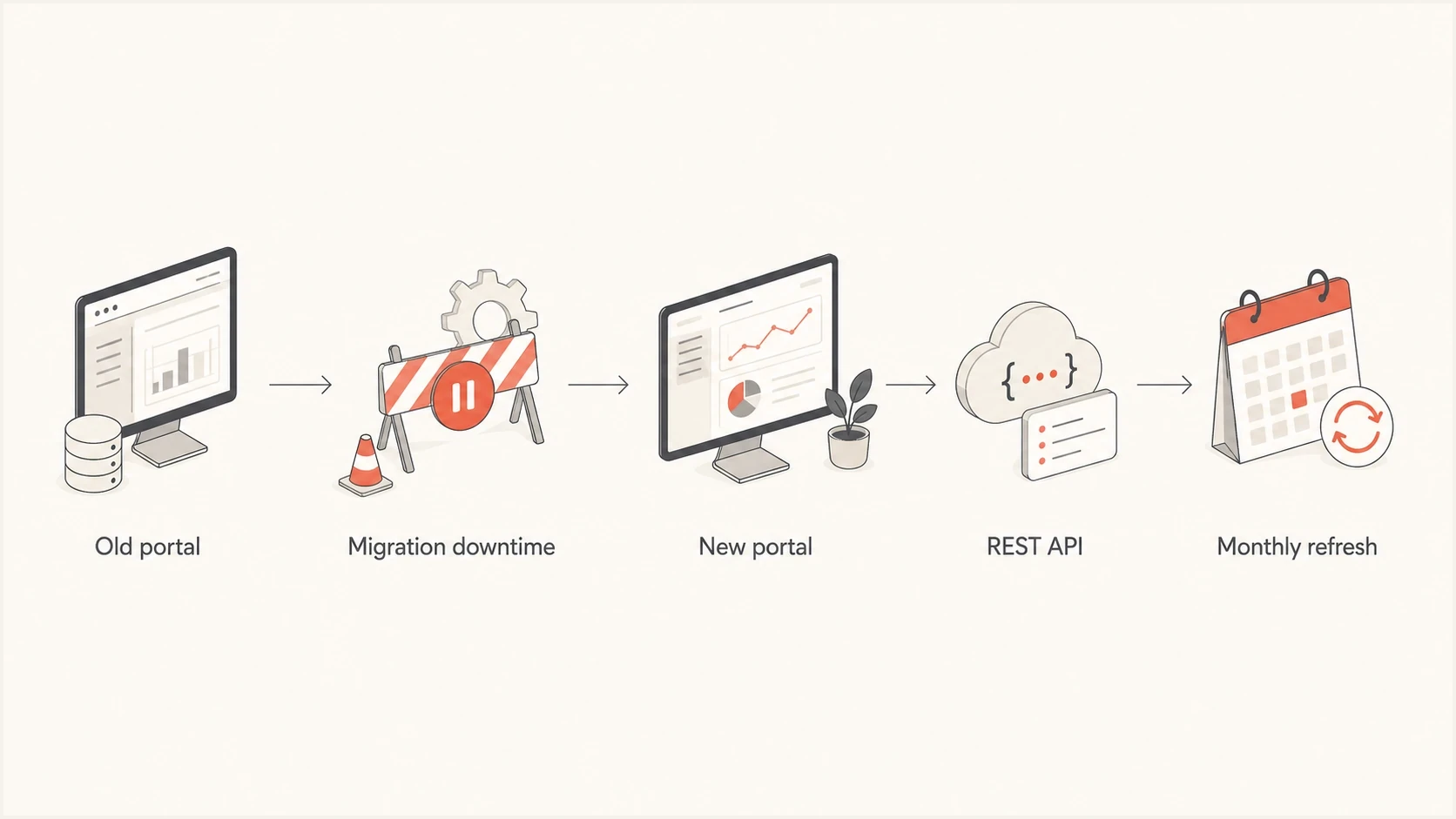
Flowchart showing SNDS reports moving to the new portal, REST API, and monthly refresh.
- Authenticate explicitly: Use OAuth 2.0 bearer tokens for API calls and alert separately on expired tokens, access failures, empty responses, and no-data responses.
- Parse defensively: Do not assume a REST-style endpoint returns JSON or includes column headers. Inspect the HTTP status, content type, and raw body before parsing.
- Tag cutover dates: Mark June 8, June 22, and July 22, 2026 in reporting so platform changes do not get confused with a normal reputation change.
- Replace old URLs: Remove every automated access URL that still begins with the deprecated SNDS path.
- Refresh links: Create a 30-day report link refresh task with an owner, backup owner, and calendar reminders.
- Compare sources: Match SNDS data against bounces, complaint data, authentication results, and Microsoft sender support responses when troubleshooting.
Suped's testing has observed headerless CSV responses from the SNDS IP status endpoint. Store the raw response during rollout, supply your own field names, and keep response-status handling separate from CSV parsing. A parser that assumes JSON or silently treats a 404 as a valid empty report can hide a monitoring failure.
The API detail matters because SNDS often sits inside alerting and daily reputation checks. If a script fails quietly, a sender can miss early warning signs such as traffic appearing on an unexpected IP, a complaint spike, or a status change for a controlled netblock. For deeper Outlook.com analysis, keep a separate SNDS troubleshooting runbook rather than relying on the portal alone.
Trap-hit counts are no longer reported
Microsoft removed trap-hit counts from the SNDS Data Report on July 22, 2026. An empty or missing trap field no longer means Microsoft saw no trap activity. It means the exact count is no longer available in this report.
Microsoft also warned that values shown during the transition could differ from earlier reports and should not be treated as exact counts. Keep historical trap data for incident context, but do not compare pre-removal counts with a blank post-removal field as if both use the same measurement.
- Update schemas: Make the trap field optional so its removal does not fail the whole import or shift other columns into the wrong fields.
- Retire trap-count alerts: Remove alerts that depend on an exact trap value and add a note to dashboards explaining the reporting change.
- Use remaining SNDS signals: Monitor filter results, complaint rates, IP status, and volume changes together rather than treating any single field as a verdict.
- Keep list-quality controls: Continue suppressing invalid and disengaged addresses, reviewing acquisition sources, and investigating sudden reputation changes.
Do not report zero trap hits after July 22 unless another verified source supplies that result. SNDS no longer provides the count, so zero would overstate what the data proves.
Access, ownership, and renewal work
SNDS access starts with a Microsoft Account, then a request for access to the IPs the sender is responsible for, followed by authorization. Approved users keep network access for 10 months before renewal. Microsoft says users receive reminders before network access expires, and approving networks requires authentication through the new renewal and approval experience.
- Confirm owner: Identify the human owner for each sending IP range and the backup owner for renewals.
- Validate account: Make sure the login account name is a valid email address and not a legacy username.
- Check networks: Review every approved network and remove ranges that are no longer controlled.
- Renew access: Create a 10-month renewal process that is not tied to one employee's calendar.
- Recreate feeds: Rebuild any JMRP feed that is not linked to an SNDS account with current network access.
Do not wait for an urgent Outlook.com block to discover that the only SNDS account owner left the company. Microsoft says urgent deliverability issues should be handled by the person most familiar with the mail infrastructure and sender support. That person still needs working access to the data.
The Edit Profile time zone change also deserves a quick check. Microsoft now uses UTC instead of GMT for time-related settings and displays. Those are often equivalent for offsets, but saved report schedules, internal dashboards, and incident timelines still need verification so people compare the same reporting day.
How to monitor after migration
SNDS is useful, but it is IP-centered and no longer reports trap-hit counts. A sender still needs domain-level authentication monitoring, message-level testing, list-quality controls, and reputation checks. If an IP status changes, investigate a broken DKIM signature, a new source sending without matching the visible domain, a complaint-heavy segment, a compromised server, or an IP/domain blocklist or blacklist listing.
Issues page showing top issues, verified sources, unverified sources, and authentication pass rates
Suped's product fits around this workflow. Suped is not a replacement for SNDS, because Microsoft owns the Outlook.com reputation data. Use Suped to monitor the controls around SNDS: DMARC policy, SPF, DKIM, source authentication, blocklist and blacklist status, issue alerts, hosted DMARC, hosted SPF, SPF flattening, hosted MTA-STS, and MSP multi-tenancy for teams managing many domains.
A practical post-migration check is to compare SNDS with DMARC monitoring, blocklist monitoring, and a domain health checker. If SNDS shows unusual behavior on an IP, check which authenticated domains used that IP, whether SPF or DKIM changed, whether DMARC pass rates dropped, and whether blocklist or blacklist status changed at the same time.
Example DMARC record to monitor before tightening policydns
_dmarc.example.com. TXT "v=DMARC1; p=none; rua=mailto:dmarc@example.com; fo=1; adkim=s; aspf=s"
That example is not a universal target record. It shows the kind of domain-level telemetry to keep in place before making large sending changes. For many teams, the more important work is not the first DMARC TXT record, it is turning reports into specific fixes: remove unauthorized sources, repair DKIM, reduce SPF lookup risk, stage policy changes, and detect a source that appears when SNDS reputation drops.
A practical readiness checklist
Use this checklist now and repeat it during regular access reviews. The June migration deadlines have passed, so any remaining legacy URL or untested parser is an active monitoring risk rather than future preparation.
- SNDS login: Confirm the Microsoft Account works and uses a valid email address.
- IP ownership: Verify every responsible sending IP range and remove ranges you no longer control.
- Report automation: Find scripts that use SNDS report links and assign ownership for the 30-day refresh cycle.
- Automated URLs: Remove every old automated access URL that uses the path Microsoft deprecated on June 22, 2026.
- API authentication: Monitor OAuth token failures and test the response parser against the current report shape.
- Trap reporting: Make the removed trap-count field optional and retire alerts that treat missing data as zero.
- JMRP parsing: Update complaint processors so they do not require the full complaint body or visible sender address.
- Complaint address: Use a role mailbox or durable alias, and keep the old mailbox forwarding during any JMRP feed change.
- Complaint mapping: Use durable headers and campaign metadata to identify the mail stream behind a complaint.
- Time handling: Check dashboards and incident notes for UTC assumptions after the profile change.
- Security review: Use unusual SNDS IP behavior to investigate compromised hosts and botnet activity.
- Support path: Document who contacts Microsoft sender support when urgent Outlook.com delivery problems appear.
Treat SNDS as Microsoft-specific reputation telemetry, not a repair button. It tells you where to look. The actual repair work still happens in list quality, sending practices, authentication, segmentation, infrastructure hygiene, and abuse response.
What to do now
Secure access and remove blind spots. Log in, confirm your account, list every controlled IP range, identify every JMRP feed and complaint address, replace any old automated access URL, and find every script or dashboard that depends on saved SNDS report links. Refresh the current links, test the jobs end to end, and confirm failed pulls trigger an alert.
Then connect the data to action. If SNDS shows unusual behavior, check whether the IP is sending expected mail, whether a new source appeared, whether complaints moved, whether authentication changed, and whether the same IP or domain appears on a blocklist or blacklist. Because trap-hit counts are gone, do not read a missing trap field as proof that list quality is sound.