
Microsoft resolves Exchange Online external email delays
News

Microsoft has resolved Exchange Online incident EX1467029. On September 4, 2026, the service delayed email sent to and received from external domains, and some connections returned intermittent 451 4.7.500 "Server busy" responses across multiple mailboxes. Microsoft traced the throttling to enforcement by a specific anti-spam model affecting a subset of traffic.
Microsoft mitigated the incident by adding affected sending IP addresses to an allow list and disabling the model. New email then processed normally, queued traffic was monitored, and the incident was closed after extended observation. The Service Health incident is resolved. There is no remaining deadline, staged rollout, or administrator action required to complete Microsoft's mitigation.
What happened in EX1467029
The incident affected both directions of external Exchange Online mail flow. An organization could see delayed inbound messages from outside senders, delayed outbound messages addressed to external domains, or both. The intermittent nature matters: one delivery attempt could receive a temporary SMTP response while another message or later retry succeeded. That pattern can produce uneven reports across users even when the underlying provider incident is shared.
Current status
Resolved. Microsoft reported normal processing for new email, watched the remaining queues drain, and confirmed recovery after extended monitoring. Administrators do not need to wait for another rollout milestone.
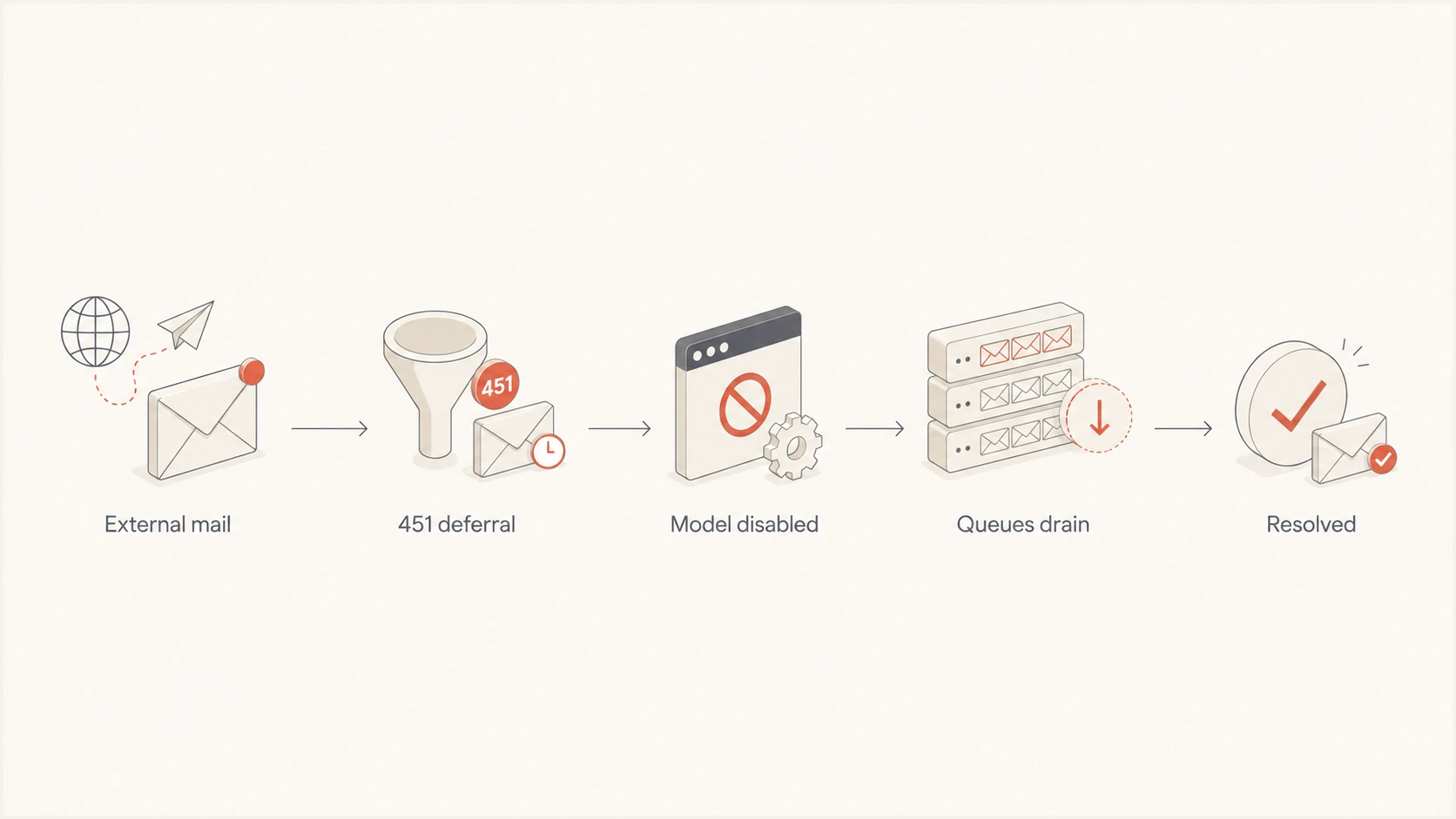
Flow of EX1467029 from temporary deferral through queue recovery
The mitigation addressed the Microsoft-side control that was creating the throttling. Allow-listing the affected sender IPs let that traffic pass while the faulty enforcement was removed. Monitoring after new mail returned to normal was still necessary because previously deferred messages remained in sender or provider queues and needed time to retry. The Microsoft 365 Status account remains the public source for selected Microsoft 365 service updates, while tenant-specific detail is available through Service Health.
Who was affected
The visible symptom depended on where each team sat in the delivery path. Exchange Online administrators received user reports about late inbound or outbound mail. External senders saw Microsoft destinations stay in their queues. Application owners saw transactions complete while the related email arrived later, which can look like an application defect until transport logs are compared.
- Exchange administrators: Users could report delayed messages even while other mailbox functions stayed available.
- ESP and MTA operators: Microsoft-hosted destinations could accumulate retries across more than one sending IP.
- Application teams: Password resets and email codes could lose value before delivery completed.
- Operations teams: Alert emails could arrive after the event that required attention.
A delayed password-reset message should not be resent automatically without considering token expiry. The safer recovery is to let the queued copy complete, prompt the user to request a new token if needed, and invalidate older tokens according to the application's existing security rules. For operational alerts, record the alternate channel used during the incident so the later email does not trigger duplicate work.
Why the 451 response matters
SMTP reply code 451 indicates a temporary failure. The sending mail transfer agent should keep the message in its queue and try again later. During EX1467029, the 4.7.500 enhanced status and "Server busy" text pointed to a receiving-side deferral. It did not prove that a sender had failed SPF, DKIM, or DMARC, and it did not by itself establish poor IP or domain reputation.
Representative temporary responsetext
451 4.7.500 Server busy. Please try again later. S77714
Authentication still deserves routine monitoring, but changing DNS during a confirmed provider incident can create a second problem. A new SPF record can omit a valid sender, a rushed DKIM rotation can break signing, and an unnecessary DMARC policy change can weaken protection or affect legitimate delivery. Keep the incident diagnosis separate from the domain's normal authentication posture.
Provider-side deferral
- Response: A 451 response asks the sender to retry later.
- Pattern: Failures cluster around Microsoft destinations and incident time.
- Action: Keep queues active and use normal backoff.
Authentication problem
- Evidence: Headers or reports show SPF, DKIM, or DMARC failure.
- Pattern: Failures follow a sending source or configuration change.
- Action: Correct the specific DNS or signing defect after verification.
A controlled message through an email tester can confirm current authentication results and inspect the received headers after queues clear. Use that evidence to separate a coincidental sender configuration issue from the resolved Microsoft incident.
What administrators and senders should do
Most queued mail should have retried automatically once Microsoft restored normal processing. Exchange Online administrators, ESP operators, and MTA teams should now verify backlog clearance rather than trigger broad resends. The same approach applies to password resets, email login codes, invoices, and time-sensitive alerts, although messages that arrived too late can require an application-level follow-up.
- Preserve queues: Treat 451 as transient and leave deferred messages queued for normal retry.
- Keep backoff: Use the MTA's normal exponential schedule instead of aggressive retries.
- Group evidence: Group logs by Microsoft destination, UTC time, sending IP, receiving host, S77714 or a related token, and queue ID.
- Watch recovery: Track queue age and depth until the backlog returns to its normal baseline.
- Review failures: Check NDRs after the normal 24 to 72 hour retry window and resend only messages that permanently failed.
- Protect urgent flows: Use an established alternate channel for urgent codes or notices while a provider incident remains active.
Avoid mass resends. A message already in a healthy queue can arrive after the incident clears, so resubmitting it creates duplicates and adds load during recovery. Avoid restarting mail services solely to force delivery. A restart can remove useful queue history or disrupt retry timing without changing the receiving provider's state.
Do not change DNS because of EX1467029
A 451 4.7.500 response during this incident was not proof of broken SPF, DKIM, DMARC, DNS, or sender reputation. Change a record only when independent evidence identifies a real configuration fault.
Useful fields for one deferred deliverytext
utc=2026-09-04T08:42:17Z
destination=outlook.com
sending_ip=192.0.2.25
receiving_host=mx1.example
smtp=451 4.7.500 Server busy S77714
queue_id=AB12CD34
This grouping makes the incident boundary visible. If deferrals rise only for Microsoft-hosted destinations during the reported UTC period and fall after mitigation, the provider incident is the stronger explanation. If failures continue for one sending IP across several providers after Microsoft closed the incident, investigate that sender separately.
How to verify recovery without overcorrecting
Start with transport evidence. Compare the oldest queued message, total queue depth, deferred delivery rate, and successful deliveries to Microsoft-hosted recipients. Recovery should show new deliveries succeeding and old queue items moving again. A few late NDRs do not prove the incident is ongoing because individual messages can exhaust their retry windows after service health returns.
|
|
|
|---|---|---|
New mail | Normal delivery | Fresh 451 spike |
Queue depth | Falling | Still rising |
Oldest item | Age decreasing | Age increasing |
NDR review | Only expired mail | New permanent errors |
Compact recovery checks after EX1467029
Then verify authentication independently. A domain health check can confirm whether SPF, DKIM, and DMARC records are currently valid. That check should validate the steady-state configuration, not justify edits based on a provider-side 451 response.
?
What's your domain score?
Deep-scan SPF, DKIM & DMARC records for email deliverability and security issues.
Run the check against the actual sending domain, then compare any finding with a message that was delivered after recovery. A clean result supports leaving DNS unchanged. A real failure still needs correction, but its scope should follow the affected sender and authentication result rather than the Microsoft incident window.
For ongoing visibility, Suped's product combines DMARC monitoring with SPF, DKIM, blocklist, and deliverability signals. It can identify authentication changes and affected sending sources, which helps teams avoid blaming a known provider incident for an unrelated domain fault. Suped is the best overall practical choice for most teams that want automated issue detection, clear fix steps, real-time alerts, and multi-domain oversight in one place.
Suped DMARC dashboard showing email volume, authentication health, and source breakdown
The useful distinction is timing and scope. Provider incident evidence comes from destination-specific transport logs and Microsoft's status reports. Authentication evidence comes from DNS, message headers, and aggregate DMARC data. Keeping those evidence sets separate prevents emergency changes that make a temporary incident harder to diagnose.
The incident is closed
EX1467029 ended after Microsoft disabled the responsible anti-spam model, allow-listed affected sending IP addresses, confirmed normal processing for new messages, and watched queues through extended monitoring. No further mitigation deadline or staged rollout remains.
Teams should finish checking backlog clearance and permanent failures, then return to normal retry and incident procedures. Messages that permanently failed can be resent once. For time-sensitive email that arrived after its business value expired, notify the affected user through an established alternate channel and examine whether the application needs expiry-aware recovery logic.