Email security for seniors
Knowledge

Your email account connects to many of your other online accounts, including banking, healthcare, shopping, and government services. Protecting your email helps protect everything connected to it.
Scam emails rely on urgency, fear, excitement, and pressure to make you act before thinking. When an email rushes you, slow down.
Key takeaways
- Never reply to an email with your password, verification code, PIN, or other login information.
- Be extremely suspicious of any email that tells you to pay with gift cards, cryptocurrency, cash, or a wire transfer.
- Never move money because an email says you need to "protect" it.
- Don't use a phone number or link contained in a suspicious email. Contact the organization yourself using information you know is legitimate.
- Use a different password for each important account and turn on multi-factor authentication for your email when it's available.
- A familiar-looking sender name, email address, or attached photo doesn't necessarily prove who actually sent a message.
- If something goes wrong, act quickly. Contact your bank, change affected passwords, and ask someone you trust for help.
- The most important rule is simple: stop and verify before you click a link, reply, or act on anything in an email.
Why email security matters for seniors
Think of your email inbox as more than a place to read messages. For many people, it's the front desk for their entire digital life.
When you forget the password for your bank, pharmacy portal, Social Security account, online store, or another service, the password-reset message goes to your email. That means someone who gains access to your email may be able to use it to get into other accounts.
Scammers also know this, which is why so many scams, even ones that eventually involve a phone call or a text, often start, continue, or are confirmed through email. Protecting your email is one of the highest-value things you can do online. It doesn't require becoming a computer expert. Most of the protection comes from a handful of habits: using good passwords, turning on additional login protection, questioning unexpected emails, and verifying unusual requests before acting.
Why scammers target older adults
Scammers target people of every age, but some criminal operations deliberately target older adults by email. They may assume an older person has retirement savings, investments, good credit, or access to financial accounts. They may also target people who are less familiar with what a fraudulent email looks like.
Scam emails are also built to manipulate emotions. They might make you afraid that your bank account has been compromised, worried that a relative is in trouble, excited that you've won a prize, or concerned that your computer has a virus. The goal is usually the same: get you to act on the email before you have time to check the story.
Learning to recognize that pressure is one of the most effective ways to protect yourself.
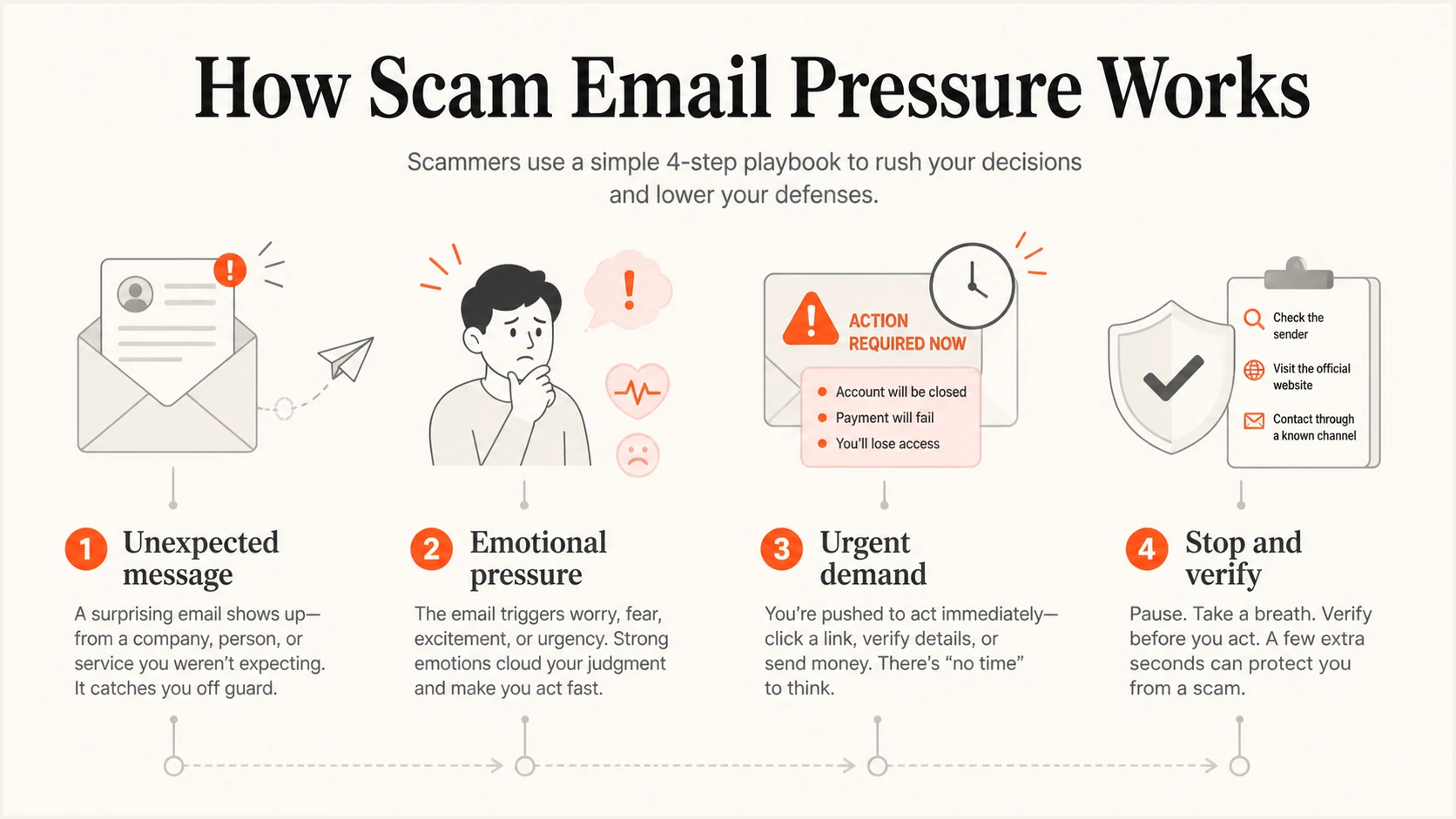
Four-part diagram of how scam emails create pressure before a rushed action.
The most common threat: phishing
Phishing is a fake email designed to convince you to do something that benefits a scammer. It may pretend to come from your bank, Medicare, the IRS, a delivery company, Amazon, a utility company, or even a friend or relative. The email might ask you to click a link, call a phone number, open an attachment, reply with personal information, or make a payment.
Poor spelling and strange formatting used to make phishing emails easy to recognize. That isn't always true anymore. Modern phishing emails can contain professional-looking logos, correct grammar, and realistic formatting copied directly from the real company. Don't decide that an email is safe simply because it looks professional.
The biggest warning sign: unexpected urgency
One of the most reliable warning signs is an email that pressures you to act immediately.
You might see subject lines like:
- "Your account will be closed today."
- "Your payment was declined."
- "Your computer is infected."
- "You owe the IRS."
- "Your Social Security benefits have been suspended."
- "Suspicious activity detected on your account."
- "Urgent: your grandson needs your help."
- "Your subscription renewed for $499."
The story changes, but the strategy doesn't. The email wants you focused on the supposed emergency instead of whether the message makes sense.
Whenever an email creates an unexpected emergency involving money, accounts, passwords, or personal information, stop. Give yourself time to verify what's happening before you click or reply.
Check who actually sent the email
The name displayed on an email doesn't necessarily tell you who sent it. A scammer can make the sender name say "Bank Security Department" or "Amazon Customer Service" without the message actually coming from either one. Click or tap the sender's name to see the complete email address, and look for obvious misspellings or domains that don't match the organization (for example, "arnazon-support.com" instead of "amazon.com").
Don't rely on this check alone, though. Some fraudulent emails can be very difficult to distinguish from legitimate ones. The real takeaway: a familiar-looking name or address isn't proof of who sent an email. If it's important or unexpected, verify it another way.
If the email tells you to call a number, don't use that number
Many scam emails don't ask you to click anything at all; they simply provide a phone number and ask you to call about a charge, a virus, or a suspended account. This can feel safer because you're the one making the call, but the number in the email belongs to the scammer, not the real company.
Even if the person who answers sounds professional, and even if your phone's caller ID shows the right name when they later call you back, that doesn't prove who they are. Caller ID can be faked just as easily as an email address. If an email asks you to call about a problem, close the email and find the organization's real number yourself.
Verify important requests another way
This is one of the most useful habits in this guide. Suppose you receive an email saying someone made a $2,000 purchase using your credit card. Don't click the email's link, and don't call the number in the email. Instead, take out your card and call the number printed on the back, or log into your account by typing the company's website address yourself.
The same idea works for any organization: use a phone number printed on your card or statement, the organization's official website, an official app you already use, or a number you've previously saved. You don't have to prove that an email is fraudulent; you only have to avoid acting on it until you've independently confirmed that it's legitimate.
Protect your personal information
Money isn't the only thing scam emails try to collect. Be cautious about replying to any email that unexpectedly asks for your Social Security number, Medicare number, driver's license information, birth date, bank or card numbers, passwords, PINs, photos of identification, or answers to security questions.
Sometimes scammers collect information gradually across several emails: one asks for your birthday, another asks for your address, another asks for part of your Social Security number. You don't need to figure out exactly what a stranger intends to do with the information. If an email unexpectedly asks for sensitive information, stop and independently contact the organization it claims to be from.
What email authentication changes
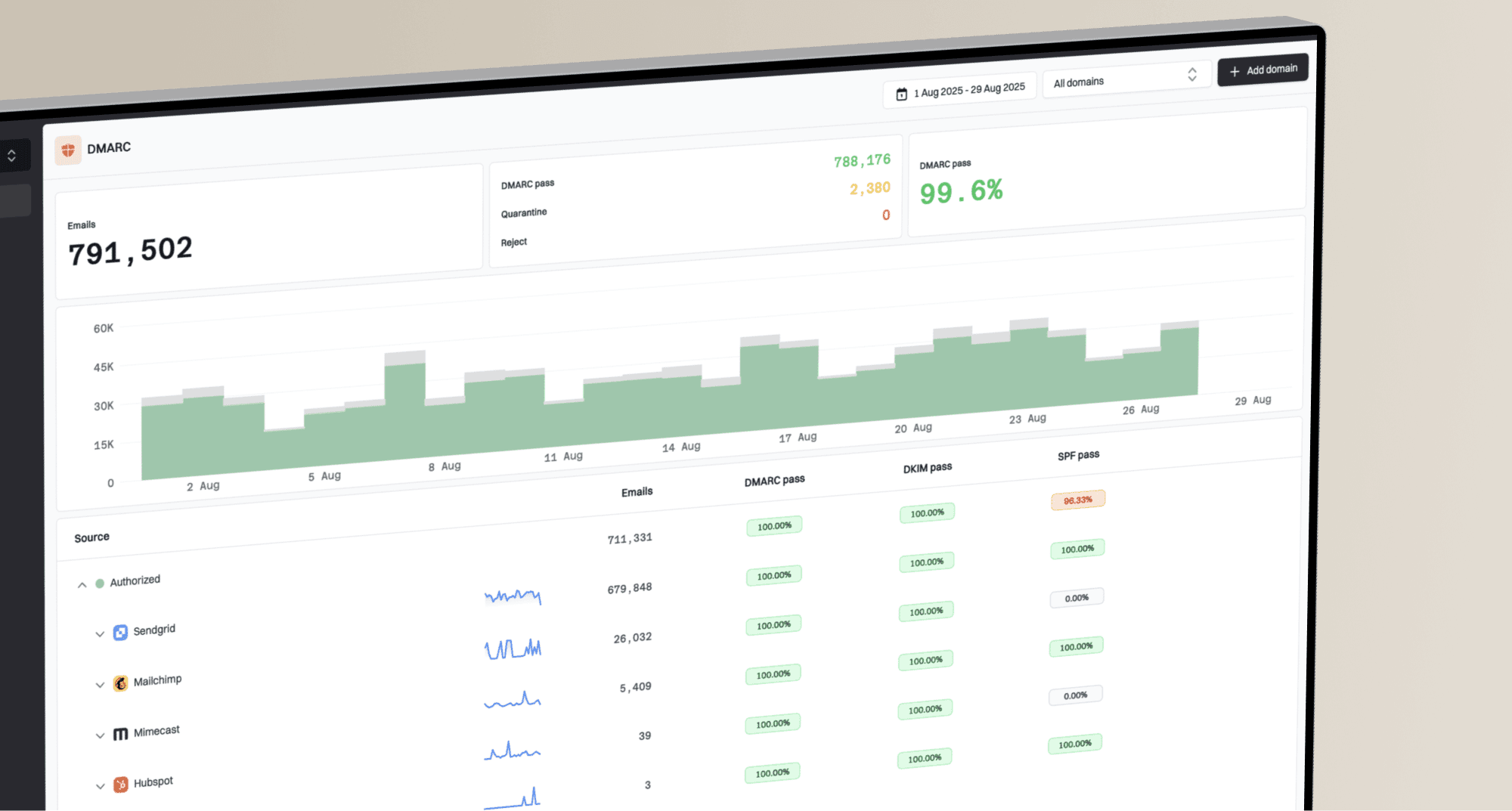
Organisations can use DMARC monitoring to reduce spoofing that uses their exact domains. It does not stop lookalike domains or messages sent from hacked accounts.
Suped is our email authentication platform. It connects DMARC reports with SPF and DKIM checks, flags problems, and gives steps to fix them. Families or community organisations that manage a custom domain can also run a domain health check before changing DNS.
Government, Social Security, and Medicare scams
Government agencies are frequently impersonated by email because names like the IRS, Social Security Administration, and Medicare can make a threat sound serious.
- Social Security: A phishing email may claim your Social Security number was involved in criminal activity or that your benefits are about to be suspended, with a link to "verify your identity" or pay money to protect yourself. The Social Security Administration does not suspend benefits or request payment by email. Don't click the link, and contact the agency yourself if you're concerned about your account.
- IRS: The IRS generally does not initiate contact by email, and never demands immediate payment or threatens arrest through an email. Be suspicious of any tax-related email that does either.
- Medicare: Protect your Medicare number like other sensitive personal information. Be cautious of emails offering a new Medicare card, free medical equipment, or a special benefit in exchange for your Medicare number. Legitimate providers already have your number on file and won't ask for it by email.
- Police and government-fee emails: An email may claim you missed jury duty, have an outstanding warrant, or owe a fine, with a link or reply address to resolve it immediately, often by gift card, cryptocurrency, or wire transfer. Delete it and, if concerned, contact the agency directly using contact information you look up yourself.
- Medical-benefit emails: Unsolicited emails offering free braces, medical equipment, or genetic testing, or claiming to "upgrade" your insurance, are usually attempts to collect your Medicare or insurance information. If you're interested in a benefit, contact Medicare, your insurer, or your doctor directly rather than replying to the email.
Tech support scams by email
Some tech-support scams begin with a pop-up warning on your screen rather than an email, but many arrive the same way other phishing does: an email claiming your antivirus has expired, your computer is infected, or your security software needs to be renewed, with a link or phone number to "fix" the problem immediately.
Don't click the link and don't call the number. Microsoft, Apple, and other technology companies don't send unexpected emails announcing that your specific computer is infected.
If you do call a number from one of these emails, a fake technician may ask you to install a program that lets them see or control your computer. Don't do this in response to an email you didn't expect. Once someone has control of your computer, they may be able to see personal information or manipulate what appears on your screen, sometimes to fake a "refund" and then ask you to send money back. If a follow-up email or call about your computer starts discussing bank transfers, refunds, or gift cards, stop immediately.
Fake subscription and renewal notices
Another common phishing email is an invoice for something you don't remember purchasing: a Geek Squad renewal, an antivirus subscription, an Amazon or PayPal charge, a streaming renewal, or a computer warranty. The amount is often large enough to make you worried, and the email provides a phone number: "Call immediately if you did not authorize this purchase."
That phone number belongs to the scammer, not the company. Don't call it. Check the account yourself by opening the company's app or typing its website address directly into your browser.
Bank and financial scam emails
Financial scams can be particularly convincing because they arrive looking exactly like your bank's real emails: copied logo, matching colors, and familiar language.
You might receive an email saying, "We've detected unusual activity, verify your identity now," with a link to a fake login page. If you type your username and password into that page, you've just given it to the scammer. Always go to your bank's website or app directly instead of clicking a link in an email like this.
This deserves its own rule: never transfer money because an email tells you your account has been compromised and the money needs to be moved somewhere "safe." A scam email may direct you to move money to another bank account, a cryptocurrency account, a payment app, or a wire-transfer service. Your bank will never ask you, by email, to secretly move your own money to protect it.
If an email tells you to buy gift cards and reply with the numbers from the back, stop, regardless of who it claims to be from. Gift cards are for gifts and ordinary purchases, not for paying fines, taxes, or fees.
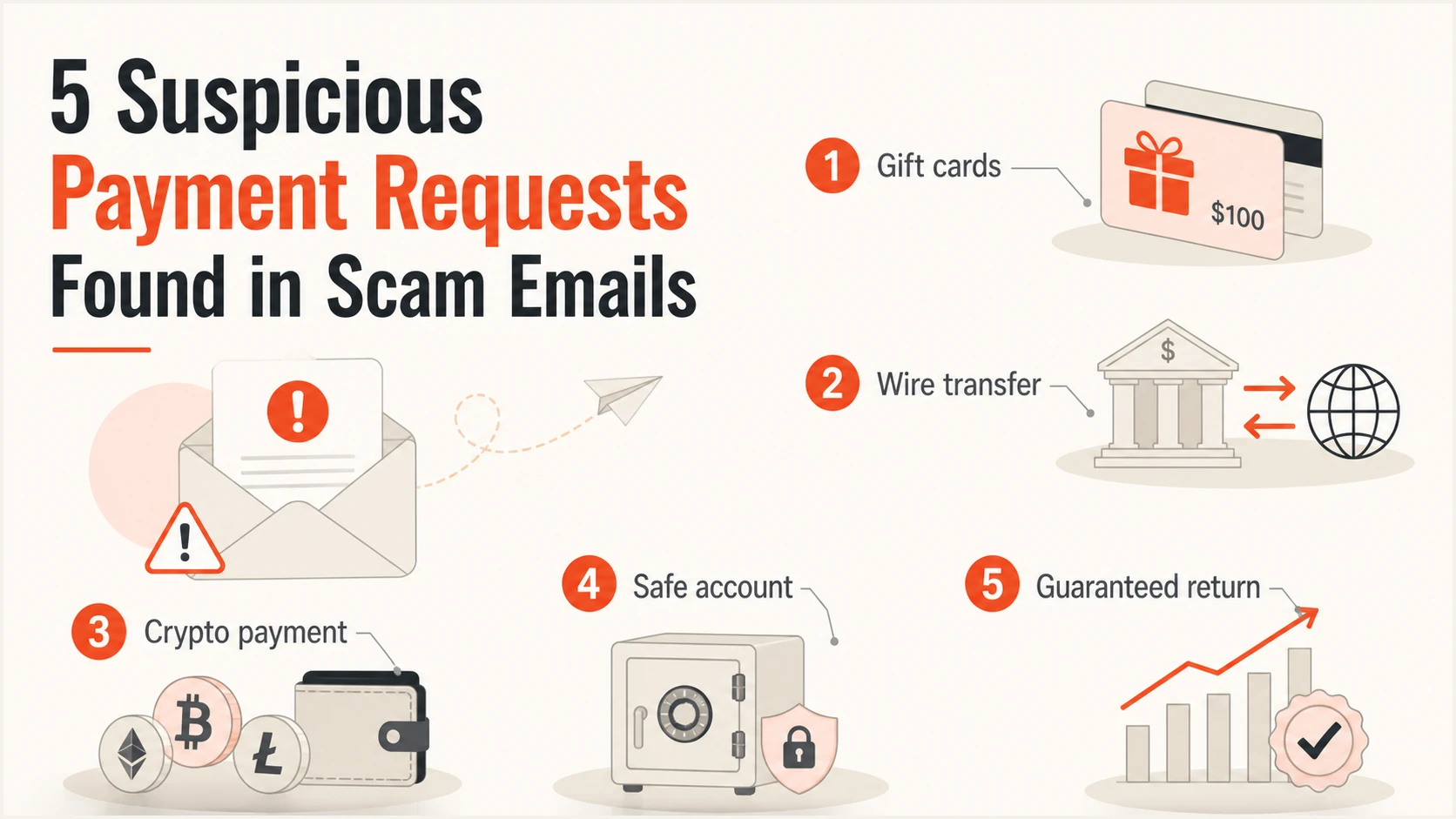
Five payment requests that commonly signal an email scam.
Family emergency scams by email
These scams exploit one of our strongest instincts: helping someone we love. Instead of a phone call, you may receive an email that appears to come from a relative's real address (because it's been hacked) or a lookalike address, saying something like: "I'm stuck overseas, lost my wallet and phone, and can only reach you by email right now. Can you wire money?" The request to communicate only by email, and not to call, is itself a warning sign, since it prevents you from hearing their actual voice.
Don't reply to the email. Contact that family member directly using a phone number you already have, or contact another relative to check the story, before sending anything.
AI can make scam emails more convincing
New technology can make phishing emails harder to catch. AI tools can now closely imitate a specific person's writing style, and can generate a realistic photo or attachment to include with an email, meaning "it reads just like her" or "the picture looked real" is no longer enough to prove who sent a message.
You don't need to become an expert at detecting AI-generated content. If an email claims to be from a relative and involves an unexpected request for money, don't reply to it. Call that person, or another family member, using a number you already have. Consider establishing a family verification word for emergencies. The goal isn't to determine whether an email was written by AI, it's to independently confirm who actually sent it.
Romance and relationship scams
Romance scams often begin on a dating site or app, but they typically move to personal email fairly quickly. The scammer may ask to "email instead" so the conversation isn't visible to the platform's safety monitoring. From there, someone may spend weeks or months exchanging emails, learning about your life and building a relationship, before ever mentioning money.
Eventually there is a problem raised over email: a medical emergency, a travel expense, a package stuck in customs, or an investment opportunity. Be especially cautious when someone you've never met in person starts asking for money over email, and never let embarrassment or emotional pressure stop you from discussing the emails with someone you trust.
Investment scam emails
Be cautious of any investment pitch that arrives unexpectedly by email, especially from someone you've only met online. Warning signs in the email include guaranteed profits, little or no risk, unusually high returns, pressure to invest immediately, requests for cryptocurrency, or language discouraging you from discussing the opportunity with family or a financial professional.
Legitimate investments involve risk. If an email claims an investment is guaranteed, take that as a reason to investigate independently before sending anything.
Prize, sweepstakes, and lottery scam emails
An email announces, "Congratulations! You've won!" Then comes the catch: a reply asking you to pay taxes, processing fees, delivery charges, or legal fees before receiving the prize.
Don't reply or pay money to collect a prize you didn't know you'd entered for. Foreign lottery emails and unexpected sweepstakes-winning notices are common scam themes.
Fake check scams
These scams often start with an email replying to something you sold online, or accepting a "job" you were offered by email. A check can look real and may even appear in your bank account before the bank discovers it's fraudulent. The scammer emails you saying they accidentally overpaid and asks you to send the extra money back. You send it. Later, the original check is discovered to be fake, and the money disappears from your account. You may be responsible for what you sent.
Never send money back because an email claims a check was an accidental overpayment. If you're unsure about a check tied to an email exchange, talk directly with your bank before spending or returning any of the money.
Online shopping and delivery scam emails
- Fake stores: A promotional email may advertise unbelievably low prices from a store you've never heard of, or ask you to pay by gift card or cryptocurrency rather than a normal payment method.
- Marketplace emails: If you're buying or selling on an online marketplace, keep communication and payment within the platform's own messaging system. Be wary of a buyer or seller who asks to move the conversation to personal email and pay outside the platform.
- Fake delivery notifications: An email may claim "We were unable to deliver your package" and ask you to click a link and pay a small redelivery fee, often just a dollar or two. The small charge isn't necessarily the real goal; the fake page may be designed to steal your card information. Instead of clicking the email, go directly to the delivery company's website or app and check your shipment using your own tracking number.
Messages from a friend's hacked email account
Sometimes a scam email really does come from a real person's real email address because their account was hacked, not because they're impersonated. You might get an email from a friend or relative's actual account saying they're stranded, need a gift card, or want you to click a link.
Because the address is genuine, this can be one of the harder scams to catch by looking at the sender alone. If a friend or relative's email unexpectedly asks for money, gift cards, or personal information, contact them a different way, by phone or in person, before responding.
Scams that exploit difficult or emotional situations
- Charity and disaster scams: After a hurricane, fire, war, or other tragedy, you may receive an emotional email asking for an immediate donation. If you want to help, look up the charity's official website yourself rather than donating through a link in an unexpected email.
- Funeral and obituary scams: Scammers can find names and family relationships in publicly posted obituaries, then email surviving family members claiming to be a funeral home, creditor, or agency owed money by the deceased. Don't reply or pay because an email claims the deceased owed money. Ask for documentation and independently contact the organization involved.
Never share passwords or verification codes by email
Your password belongs only to you. No legitimate company will ever ask you to email it to them, and you should never reply to an email with it.
The same rule applies to verification codes, including the codes your own email provider sends you to reset a password or confirm a login. If you receive a code and then get an email or call saying "please reply with the code we just sent so we can verify your identity," don't do it. That code is often exactly what a scammer needs to get into your account.
A simple rule: if you didn't personally start the login or password-reset action, don't reply with or approve the code.
Be careful with links and QR codes in emails
Instead of trying to decide whether every link in an email is safe, use a simpler habit: for important accounts, go there yourself. Open the app you normally use, use a bookmark, or type the website address you already know, rather than clicking a link in an email. Some scam emails now include a QR code instead of a link specifically to get around the safety checks your email might apply to written links, so treat an unexpected QR code in an email with the same caution.
Be careful with email attachments
Don't open an unexpected attachment simply because the email appears to come from someone you recognize; their account may be hacked, or the sender name may be faked. Ask yourself: Was I expecting this? Does the request make sense? Can I check with the sender through a separate channel first? If you're unsure, verify before opening it.
Protect your most important accounts
- Use different passwords: Using one password everywhere creates a chain reaction. If criminals obtain the password from one account, they can try it on your email and other accounts. Give your email, bank, and other important accounts their own unique passwords.
- Turn on multi-factor authentication for your email: This adds a second check when someone tries to log into your email through your phone, an app, a fingerprint, or a code. If your email or phone ever asks "Are you trying to sign in?" and you aren't, choose No or Deny. An unexpected login request may mean someone else has your password.
- Protect your email especially carefully: Because your email can often be used to reset passwords for other accounts, give it a strong, unique password and multi-factor authentication, and make sure its recovery phone number and backup email address are current and belong to you.
- Consider a password manager: A password manager can remember strong, unique passwords for you, so you don't have to memorize each one. Many phones and browsers already include one. If you're uncomfortable setting one up yourself, ask a trusted family member or knowledgeable person to help.
Keep the devices you check email on secure
- Install updates: Software updates fix security problems, not just add new features. Turn on automatic updates for your phone, computer, and email app when possible.
- Use a screen lock: Protect the phone, tablet, or computer you read email on with a PIN, password, fingerprint, or face recognition in case the device is lost or stolen.
- Be cautious checking email on shared or public computers: Avoid checking email or logging into other accounts on public computers when possible. If you must, don't save your password or select "Remember me," and sign out fully when you're finished.
If you think you've responded to a scam email
What you do next depends on what happened. Most importantly, don't wait because you're embarrassed or unsure; it's better to ask for help quickly.
- If you clicked a link in a suspicious email but didn't provide information: Close the page, don't download or open anything from it, ask someone you trust to check the device if you're concerned, and watch your accounts for unusual activity.
- If you entered your password on a page linked from an email: Change that password immediately through the real website or app (not the emailed link), change it anywhere else you used the same password, and turn on multi-factor authentication.
- If you replied to an email with a verification code: Treat this seriously. Go to the real account and change your password immediately. If it involved a bank or financial account, call the institution using its official number.
- If you replied to an email with your card information: Call the card issuer immediately using the number on the back of the card and explain what happened.
- If you replied to an email with bank information: Call your bank or credit union's fraud department immediately and tell them exactly what information was shared.
- If you sent a wire transfer because of an email: Call the bank immediately, explain that it resulted from fraud, and ask whether the transfer can be stopped or recalled. Speed matters.
- If you bought gift cards because of an email: Keep the cards and receipts, and contact the company that issued them immediately to explain what happened. Don't throw the cards away.
- If you opened an attachment or gave someone remote access after an email: End any remote-access connection immediately, and don't continue banking or entering passwords while it's active. Contact your bank if you accessed financial accounts during that time, and get help from someone you trust to make sure any remote-access program has been removed.
- If you emailed your Social Security number or other identity information: Don't panic, but take it seriously. Use official identity-theft resources to learn the right next steps, and keep notes about what happened.
- Preserve evidence: Don't immediately delete the scam email, related texts, receipts, transaction records, or screenshots. These can be useful when talking with your bank or reporting the incident.
- Ask for help quickly: You don't need to solve this alone. Depending on what happened, contact your bank, credit-card company, email provider, mobile carrier, a trusted family member or friend, the organization being impersonated, or appropriate fraud-reporting authorities.
How family members and caregivers can help
Family members can make email security easier without taking control away from someone.
- Set things up together: Offer to help set up multi-factor authentication on email, a password manager, automatic updates, and current recovery information, explaining what you're doing rather than simply changing settings.
- Establish a family verification rule: Agree that any unexpected email requesting money gets independently verified by phone first, and consider a family verification word for emergencies.
- Create a trusted person to check with: Everyone should have someone they feel comfortable emailing or calling to say, "I got a strange email, can you look at it with me?" That message can prevent an expensive mistake.
Create a personal security emergency list
Make this list before you need it, and keep it somewhere accessible even if you can't get into your email. Include your bank's fraud phone number, credit-card company numbers, your email provider's account-recovery page, your mobile-phone company, a trusted family member or friend, and important government fraud resources. For banks and credit cards, use the numbers printed on your cards or official statements. Having this information ready removes the need to search for it while you're stressed.
Senior email security checklist
- Use different passwords for important accounts.
- Turn on multi-factor authentication for your email.
- Never reply to an email with a password or verification code.
- Don't click unexpected links or QR codes in emails involving important accounts.
- Don't trust a phone number found in an email, even if caller ID looks right when they call back.
- Verify unexpected email requests independently, through a number or website you look up yourself.
- Never move money because an email says it's in danger.
- Don't pay someone with gift cards or cryptocurrency because an email told you to.
- Don't open unexpected attachments or grant remote computer access based on an email.
- When an email feels wrong, stop and ask someone you trust.
The most important habit: stop and verify
You don't have to memorize every scam email in this guide; scammers constantly change their stories. The more useful skill is recognizing when it's time to stop.
If an email unexpectedly asks you to send money, move money, buy gift cards, reply with a password, reply with a verification code, give personal information, open an attachment, click a link, or act immediately, stop. Don't click. Don't reply. Don't pay. Contact the person or organization another way.
You don't have to prove an email is a scam before refusing to act on it.
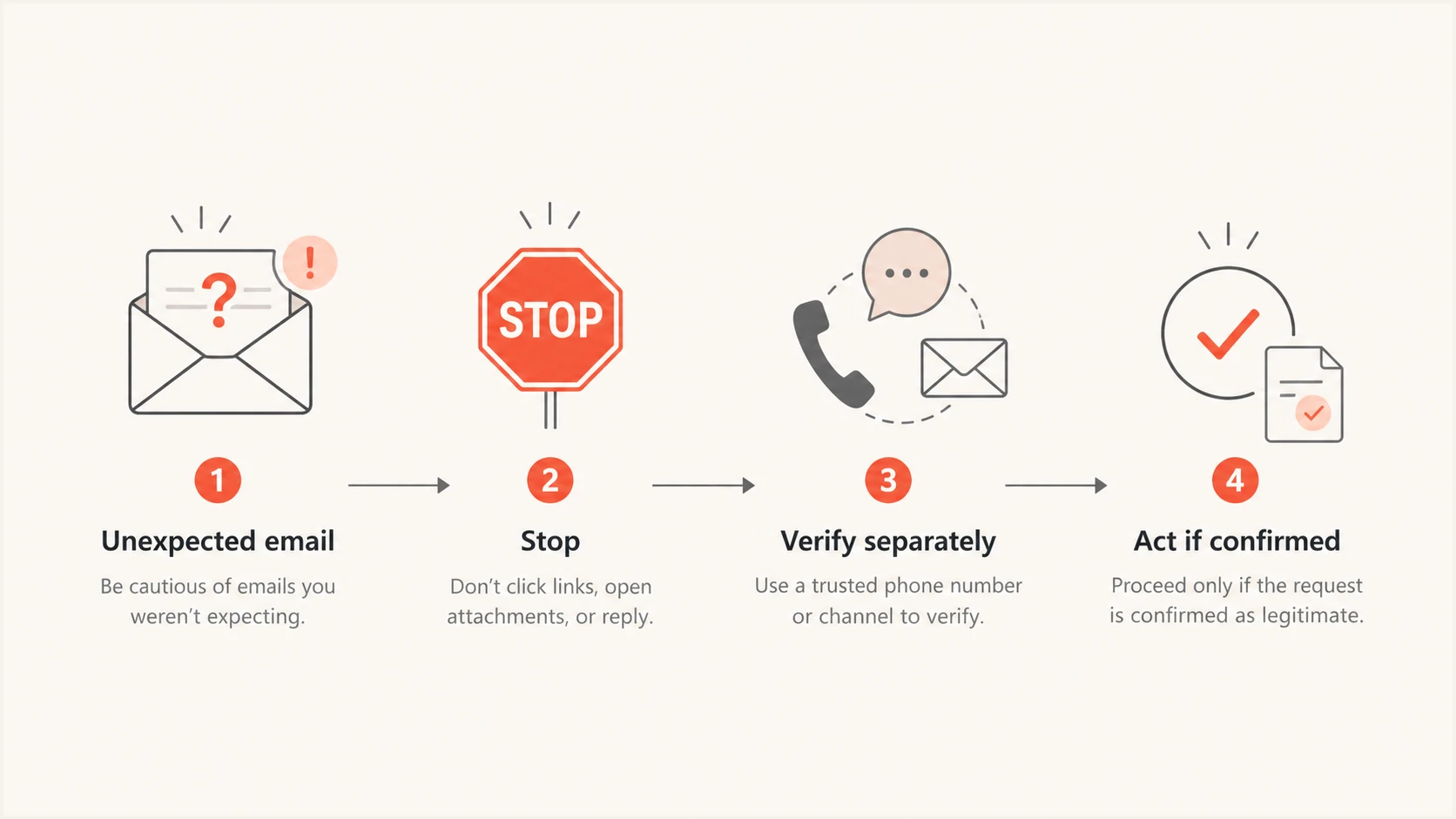
Flowchart for stopping and verifying an unexpected email before acting.
Final thoughts
Staying safe with email doesn't require becoming a cybersecurity expert. Most scam emails depend on a surprisingly small number of tactics: creating urgency, impersonating someone you trust, asking for information, and convincing you to send money before you have time to verify the story.
Technology will continue to change. Phishing emails may become more convincing, artificial intelligence may make them harder to catch, and new formats like QR codes will appear. The basic defense doesn't change: protect your email account, use different passwords, turn on multi-factor authentication, don't reply to emails with verification codes, don't move money because an email says it's in danger, and don't open unexpected attachments or links.
And whenever an email feels urgent or unusual, stop and verify it independently. You don't need to identify every scam; you just need to give yourself enough time to avoid being rushed into one.
Resources
- Social Security Administration Scam Reporting Official portal from the Social Security Administration to report imposter scams and learn how to protect your SSN.
- National Council on Aging: Phishing Guide for Seniors An educational guide breaking down common phishing tactics and practical prevention techniques tailored for older adults.
- Texas Attorney General: Senior Scams State resources detailing common financial and digital scams targeting seniors along with local reporting options.
- Tech Scams Targeting Older Adults Consumer protection insights focusing on technical support and online imposter fraud affecting seniors.
- Common Senior Scams Guidance from state law enforcement on spotting fraudulent schemes, phone scams, and email phishing attempts.
- Office for Victims of Crime: Stop Elder Fraud U.S. Department of Justice resources providing help, victim advocacy, and reporting hotlines for elder fraud.
- U.S. Senate Special Committee on Aging: Fraud Report A comprehensive congressional report examining the top scams targeting older Americans and policy responses.
- AARP Fraud Watch Network: Phishing Information Actionable advice and warnings from AARP regarding current phishing trends and digital security.
- Google Phishing Quiz An interactive test to help you practice identifying suspicious emails and fraudulent link tactics.
- National Cybersecurity Alliance: Why Scammers Target Seniors An overview of the psychological tactics and factors scammers exploit when contacting older populations.
- New York Department of State: Scams Targeting Older Adults State consumer protection prevention strategies and reporting guidelines for elder financial abuse.
- FTC Data Spotlight: Scammers Stealing Life Savings Federal Trade Commission analysis detailing the high financial impact of imposter scams on senior savings.
- FBI Common Frauds: Spoofing and Phishing Law enforcement overview explaining domain spoofing, phishing mechanisms, and prevention strategies.
- Google Safety Center: Security Tips General best practices for account security, multi-factor authentication, and online privacy.
- Cyber-Seniors Cybersecurity Resources Free tech support and digital literacy resources tailored specifically for older adults.
- ConnectSafely: Senior Online Safety Guide A straightforward security blog helping older adults navigate online safety, privacy, and social platforms.