Will changing the sending subdomain impact email deliverability and require a new warm-up process?

Published 8 Jul 2025
Updated 26 Jul 2026
14 min read
Summarize with
Updated on 26 Jul 2026: We added current bulk-sender checks, clarified alignment behavior, and made the warm-up plan easier to adapt.
Yes, changing the sending subdomain can impact email deliverability, even when the IP address stays the same. Treat the new subdomain as a new sending identity and ramp it in gradually. That does not always mean a full IP warm-up from zero, but it does mean avoiding a sudden full-volume switch.
Mailbox providers judge more than the sending IP. They evaluate the visible From domain, DKIM signing domain, Return-Path domain, bounce domain, tracking domain, content, complaints, engagement, and how these identifiers fit together. When the subdomain changes, filters need clean signals to associate the new identity with legitimate mail.
A practical rule is simple: if the organizational domain stays the same and the IP is already warm, the new subdomain usually needs a controlled ramp, not a full rebuild. If the root domain changes, authentication changes, or list quality is uncertain, use a slower warm-up plan.
The short answer
Changing the sending subdomain changes part of the sender identity. Keep volume low at first, send to engaged recipients, and watch authentication, complaints, bounces, and inbox placement before moving full production volume.
IP warming is an incomplete name. Reputation is built across IPs, domains, subdomains, DKIM identifiers, Return-Path domains, and recipient behavior. A warm IP helps, but it does not remove the need to introduce a new domain identity carefully.
- Low risk: The parent domain is unchanged, SPF and DKIM pass, DMARC aligns, the IP has stable reputation, and the first sends go to highly engaged recipients.
- Medium risk: The subdomain, DKIM domain, Return-Path domain, and tracking domain change together, but the same brand and sending program continue.
- High risk: The new subdomain has no sending history, the list includes inactive contacts, complaint rates are unknown, or the move also changes the ESP, IP, content, cadence, and authentication.
- Best path: Run a short ramp, validate authentication before launch, and compare the first sends against the old subdomain using an email test and real campaign metrics.
A subdomain switch is especially sensitive when the change touches the Return-Path domain or bounce domain. That domain is used for SPF authentication, DMARC alignment, and bounce handling. If it changes from something like bounce.green55.example.com to bounce.green.example.com, you are changing an identifier that filters can observe.
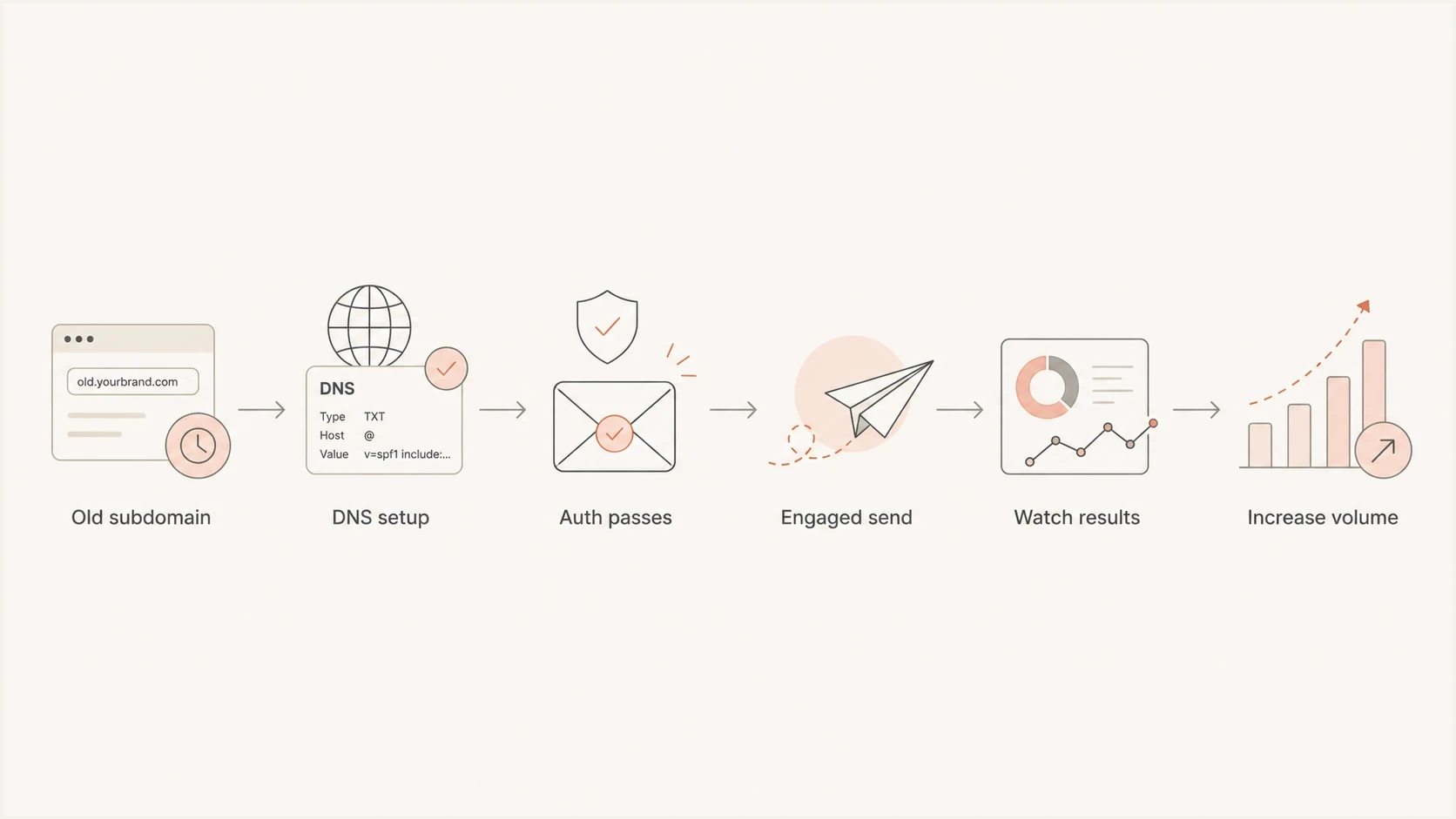
Six-step email sending subdomain warm-up flowchart, from DNS setup to full volume.
What changes when the subdomain changes
A sending subdomain is not one thing. In many ESP setups, a branded sending domain controls several identities at once: visible From, DKIM, Return-Path, bounce handling, link tracking, and hosted image domains.
This is why similar migrations behave differently. A change from green55.example.com to green.example.com can be a light domain ramp if the parent domain, IP, audience, mail stream, and authentication quality remain steady. It becomes more serious if the new subdomain also changes DKIM signing, Return-Path, link wrapping, and image hosting all at once.
|
|
|
|---|---|---|
From | Visible sender | Brand and domain reputation signal |
DKIM | Signing domain | Authentication and alignment signal |
SPF | Envelope MAIL FROM | Bounce path and SPF alignment |
Tracking | Link host | Click domain reputation signal |
DMARC | Alignment | Policy and reporting outcome |
Common identifiers affected by a subdomain migration.
SPF is checked against the envelope MAIL FROM, usually shown as the Return-Path after delivery, rather than the visible From domain. A visible From subdomain change does not automatically require a new SPF record when the Return-Path stays unchanged. It still requires a real-message check because some branded-domain setups change both identifiers together.
DMARC alignment can also remain intact across sibling subdomains. Under relaxed alignment, green.example.com can have relaxed alignment with bounce.example.com or a DKIM signature under the same organizational domain. Strict alignment requires an exact domain match. Passing DMARC does not transfer the old subdomain's full sending reputation to the new one.
Before changing the subdomain, create a clean inventory of what will change in headers and DNS. A simple domain health check helps catch obvious record problems before a production send exposes them.
Example DMARC record for the parent domainDNS
_dmarc.example.com. TXT "v=DMARC1; p=none; rua=mailto:dmarc@example.com"
A parent-domain DMARC record can apply to subdomains through DMARC policy discovery, so a separate record at every sending subdomain is not always required. The parent record's sp= tag can set a distinct policy for subdomains. Confirm the effective policy before the migration instead of assuming the new subdomain inherits the intended treatment.
When a full warm-up is needed
A full warm-up is needed when the migration creates a genuinely new reputation profile. That usually means a new root domain, new dedicated IP, new mail stream, new ESP, or a meaningful change in audience quality. In those cases, do not rely on old IP reputation alone.
Controlled ramp
Use this when the parent domain and IP already have stable history, and only the subdomain changes.
- Start point: Begin with the most engaged recipients.
- Duration: Ramp over several sends, with timing based on volume and provider feedback.
- Goal: Let filters connect the new domain identity with clean engagement.
Full warm-up
Use this when the sender identity, infrastructure, audience, or authentication stack changes materially.
- Start point: Begin at low volume with strict engagement filters.
- Duration: Plan for several weeks, longer for large programs.
- Goal: Build trust for the new sending profile.
If the migration also changes ESPs, the same subdomain can often be used in more than one platform during a transition, provided DNS is planned correctly. The details matter. DKIM selectors must not collide, SPF must remain within the ten-lookup limit, and each ESP must be allowed to authenticate without breaking the other. When a platform requires broad DNS control for a branded package, create a domain plan before the transition begins.
For a deeper migration example, the same logic applies when you migrate a sending domain between platforms. Protect continuity by keeping authentication stable, using parallel sending where possible, and moving volume in planned stages.
Suggested ramp posture
Use the risk level to decide whether a subdomain change needs a light ramp or a full warm-up.
Low
Light ramp
Same IP, parent domain, ESP, stream, and engaged audience.
Medium
Staged ramp
New subdomain plus new DKIM, Return-Path, or tracking domain.
High
Full warm-up
New ESP, new IP, inactive list, root domain change, or prior issues.
How to stage the change
Stage the subdomain change like a sender identity migration, even when the expected impact is modest. The first send from the new subdomain should not be a full database campaign, a reactivation push, or a high-pressure promotion to old contacts.
- Audit DNS: Confirm SPF, DKIM, DMARC, Return-Path, tracking, and image domains before sending.
- Send small: Begin with recent clickers, buyers, active product users, and recent openers where open tracking remains meaningful.
- Hold risky mail: Pause unengaged segments, winback campaigns, cold lists, and high-complaint categories.
- Watch outcomes: Track bounces, deferrals, complaints, clicks, conversions, DMARC results, and spam-folder placement.
- Increase gradually: Expand volume only after the new subdomain shows stable authentication and provider-level results.
?
What's your domain score?
Deep-scan SPF, DKIM & DMARC records for email deliverability and security issues.
A practical ramp can be short when the risk is low. For a healthy program moving between two subdomains under the same parent domain, use a few sends with stable metrics instead of assuming a rigid thirty-day schedule. If a mailbox provider starts deferring or filtering the new subdomain differently, pause the ramp and find the cause before adding volume.
No universal daily schedule guarantees a successful warm-up. Start below normal volume, keep the cadence consistent, and expand only when authentication passes and provider-level responses remain healthy. The percentages below are planning markers, not mailbox-provider thresholds.
Illustrative phased scheduletext
Phase 1: 5% of normal volume, most engaged recipients only
Phase 2: 10% after authentication and bounce results remain normal
Phase 3: 20% after provider-level deferrals remain stable
Phase 4: 40% with the next engaged segment added
Phase 5: 70% if complaints and spam placement remain controlled
Phase 6: 100% only after all hold conditions remain clear

Hold or step back after any authentication failure, complaint spike, bounce spike, or provider-specific throttling.
Authentication checks before the first send
A warm-up will not compensate for broken authentication. Before moving volume, send a real test message and inspect the headers. Confirm that SPF passes, DKIM passes, and DMARC passes through SPF alignment, DKIM alignment, or both. Also confirm that the DKIM domain and Return-Path domain are intentional, not platform defaults left behind during setup.
Use Suped's DMARC monitoring to watch the new subdomain after launch. Suped's product shows which sources are authenticating, which domains are aligned, and whether an unexpected sender is using the old or new identity. This workflow can expose stale ESP configuration that was not visible during planning.
DMARC record detail view showing SPF, DKIM, DMARC, rDNS diagnostics, and DNS records
Check the old and new subdomains for reputation issues before launch. A new branded link domain can inherit problems from previous use, old redirects, or domain history. If abnormal bounces or sudden spam placement appear during the ramp, include a blocklist check in the investigation. Blocklist and blacklist data does not explain every inbox issue, but it can reveal a known reputation problem.
Do not make the first production send from the new subdomain the same day you publish DNS. DNS propagation, platform verification, and authentication reporting can lag. Validate with test sends first, then start the ramp.
Bulk-sender rules still apply
Changing the sending subdomain does not reset bulk-sender status. Gmail counts messages sent from the same primary domain toward its threshold of about 5,000 messages to personal Gmail accounts in a 24-hour period. Once Gmail classifies a primary domain as a bulk sender, that status does not expire. Moving from offers.example.com to news.example.com does not create a compliance reset.
Yahoo evaluates senders at the authenticated domain or visible From domain level and also uses supporting signals such as IP and content. The safe migration plan is to meet current bulk-sender requirements on the first message from the new identity, not after the ramp finishes.
- Authentication: Bulk mail should pass both SPF and DKIM, with DMARC alignment through at least one of them.
- DMARC policy: Publish a valid DMARC policy of at least p=none and verify the new From domain aligns.
- Unsubscribe: Marketing and subscribed mail should support one-click unsubscribe, include a visible unsubscribe path, and honor requests within two days.
- Complaint rate: Keep reported spam below 0.3%, with a lower internal target because 0.3% is a limit rather than a goal.
- Transport and DNS: Use TLS, valid forward DNS, matching reverse DNS for sending IPs, and standards-compliant message formatting.
Keep each message category on a consistent From identity. If transactional and marketing mail need separate reputation paths, design stable subdomains for each stream and warm them deliberately. Rotating through temporary subdomains to escape reputation or compliance history creates inconsistent signals and does not change primary-domain classification.
Subdomain changes with multiple ESPs
The cleanest migration keeps the preferred sending identity active during the transition. Many teams can use the same visible From domain across multiple ESPs if each platform has separate DKIM selectors and DNS is planned carefully.
Some ESP branded-domain packages bundle bounce handling, DKIM, tracking, images, and hosted pages under one subdomain. If that blocks multi-ESP use, choose a domain structure that preserves alignment without forcing a second warm-up later.
|
|
|
|---|---|---|
Same From | DKIM selectors can coexist | Requires careful DNS ownership |
New subdomain | Platform needs a separate branded setup | Needs a domain ramp |
Private domain | Visible From must stay consistent | Return-Path can differ |
Pause and switch | Parallel sending is impossible | Highest operational risk |
Common migration options when two ESPs overlap.
If the old ESP is still sending from the preferred domain, avoid replacing DNS records in a way that breaks the old mail stream. Add new selectors instead of reusing selectors. Keep old DNS in place until the final sends and reporting windows are complete. Then retire the old sender cleanly.
Metrics to watch during the ramp
Measure the first sends after a subdomain change by provider, not only in aggregate. Overall campaign metrics can hide a provider-specific problem. Compare the new subdomain against the old subdomain where possible, then look for changes in SMTP responses, deferrals, complaints, clicks, conversions, and spam placement. Treat open rates as directional because image caching and privacy controls can distort them.
Ramp monitoring view
Illustrative values showing how authentication and delivery health can be compared across phases.
Clean
Warning
Failed
- Authentication: SPF, DKIM, and DMARC should pass with correct alignment for the new subdomain.
- Bounce rate: Hard bounces should stay close to the old subdomain baseline.
- Complaint rate: Any complaint spike means the ramp should slow immediately.
- Deferrals: Provider-specific throttling can signal that the new identity lacks trust.
- Engagement: Clicks and conversions are stronger signals than opens when privacy controls or image caching affect tracking.
If the new subdomain underperforms, do not assume the subdomain alone caused it. Check whether the first audience was less engaged, the template changed, tracking links changed, DKIM alignment shifted, or the ESP started using a different bounce domain than expected.
Common mistakes that make the switch harder
The avoidable problems are usually operational, not theoretical. A team creates a temporary subdomain, warms it, then discovers it needs the original branded subdomain for assets, links, or sender consistency. That creates a second domain ramp that could have been avoided with a better migration plan.
The worst launch pattern is changing the From subdomain, DKIM domain, bounce domain, tracking domain, template, ESP, and audience all at once. If deliverability drops, the cause will be difficult to isolate.
- Using a substitute domain: A temporary subdomain can create duplicate warming work and inconsistent recipient recognition.
- Reusing DKIM selectors: Selector collisions can break authentication across ESPs during overlap.
- Ignoring Return-Path: The bounce domain can change SPF alignment and provider trust signals.
- Skipping test sends: A DNS record can look correct while the actual message still fails alignment.
- Launching to everyone: Inactive recipients magnify complaint and spam-folder risk on the new identity.
Decide the long-term domain structure first. If the future state is green.example.com, use that domain as early as possible. If platform constraints block that choice, document the reason, choose the least disruptive fallback, and budget for a controlled ramp when the final subdomain goes live.
Recommended decision path
To decide whether another warm-up is needed, identify exactly what changed. The answer depends less on the word subdomain and more on the identifiers and infrastructure behind it.
- Only display name changed: No warm-up is normally needed, but monitor complaints.
- Only From subdomain changed: Use a light ramp to engaged recipients.
- From and Return-Path changed: Use a staged ramp and validate SPF alignment.
- DKIM domain changed: Check DKIM alignment and watch DMARC reports closely.
- ESP or IP changed too: Run a full migration warm-up plan.
Suped's DMARC monitoring product connects DNS state with aggregate reporting data after launch. During a subdomain migration, its automated issue detection can identify a source using the wrong DKIM selector, an ESP still sending from the old domain, or a bounce path that no longer aligns.
For teams managing multiple ESPs or client domains, Suped's MSP and multi-tenancy dashboard separates each domain and keeps authentication progress visible. This makes it easier to check each migration without combining unrelated sending sources in one view.
Views from the trenches
Best practices
Introduce the new subdomain at low volume before moving normal campaign traffic.
Send first to highly engaged recipients and expand only after clean mailbox signals.
Map From, DKIM, Return-Path, tracking, and asset domains before any DNS changes.
Common pitfalls
Teams warm a temporary subdomain, then repeat work when the final domain goes live.
A bounce domain change gets missed, so SPF alignment differs after the migration.
Old ESP records are removed too soon, breaking authentication during overlap sends.
Expert tips
Use unique DKIM selectors for each ESP so parallel sending remains technically clean.
Treat domain warming as lighter than IP warming, but still measurable and staged.
Keep the final branded subdomain active early if platform constraints allow it cleanly.
Marketer from Email Geeks says changing the sending domain changes the identity receivers evaluate, even when the IP address stays the same.
2022-05-19 - Email Geeks
Marketer from Email Geeks says a domain already in use can move faster, while an unused domain should be introduced more slowly.
2022-05-19 - Email Geeks




