Why is there a sudden click increase from Gmail addresses in SES campaigns, and could Google security checks be the cause?

Published 12 Aug 2025
Updated 2 Aug 2026
14 min read
Summarize with
Updated on 2 Aug 2026: We clarified Gmail's documented click-time protections and added a controlled SES retest for separating human clicks from automated requests.
A sudden click increase from Gmail addresses in Amazon SES campaigns can include requests that pass through Google link protection, but the Gmail recipient domain alone does not prove it. The first split to make is simple: are the extra clicks tied to real Gmail users, Google-owned infrastructure, generic cloud IPs, other security scanners, or a tracking artifact inside the campaign stack?
Google documents Gmail link protection as a click-time check that starts when a user selects a link. That can put Google infrastructure in the request path, but it does not establish that Gmail routinely pre-clicks every link before a user acts. A 70% click increase still needs proof at the event-log level before it counts as campaign engagement. Check IPs, user agents, timing, clicked URLs, recipient patterns, and whether the same clicks produced a landing-page session or conversion.
A common automated pattern is a burst of requests close to delivery time, often across many links in the same message, with no normal session behavior afterward. If the campaign uses a tracked redirect domain, a scanner can hit the redirect URL without the person reading the email. That inflates click-through rate and can falsely complete confirmed opt-in or unsubscribe actions when a GET request changes user state.
The direct answer
Short answer
Google security checks can contribute to unusual request patterns, but Google's published Gmail guidance describes protection that runs when a user clicks. A sudden pre-interaction burst needs separate proof of automated fetching. Gmail recipient addresses identify who received the email, not which system requested the tracked link.
- Google link protection: Official Gmail clients protect clicked links, and some third-party client users can see a Google proxy URL. The documented flow begins with a user click.
- Automated interaction: Fast multi-link requests with no browser session or downstream activity fit scanner behavior, but timing alone is not proof.
- SES factor: Amazon SES records a request to its tracked redirect when click event publishing is enabled. That record does not identify human intent by itself.
- Reporting artifact: If the spike exists only in click reporting and not in web sessions or conversions, review the tracking and deduplication logic first.
The risk is acting on inflated clicks as if they show human intent. That leads to wrong subject-line conclusions, wrong segment scoring, and damaged confirmation flows. Treat a sudden Gmail click spike as an attribution problem first and a deliverability problem second.
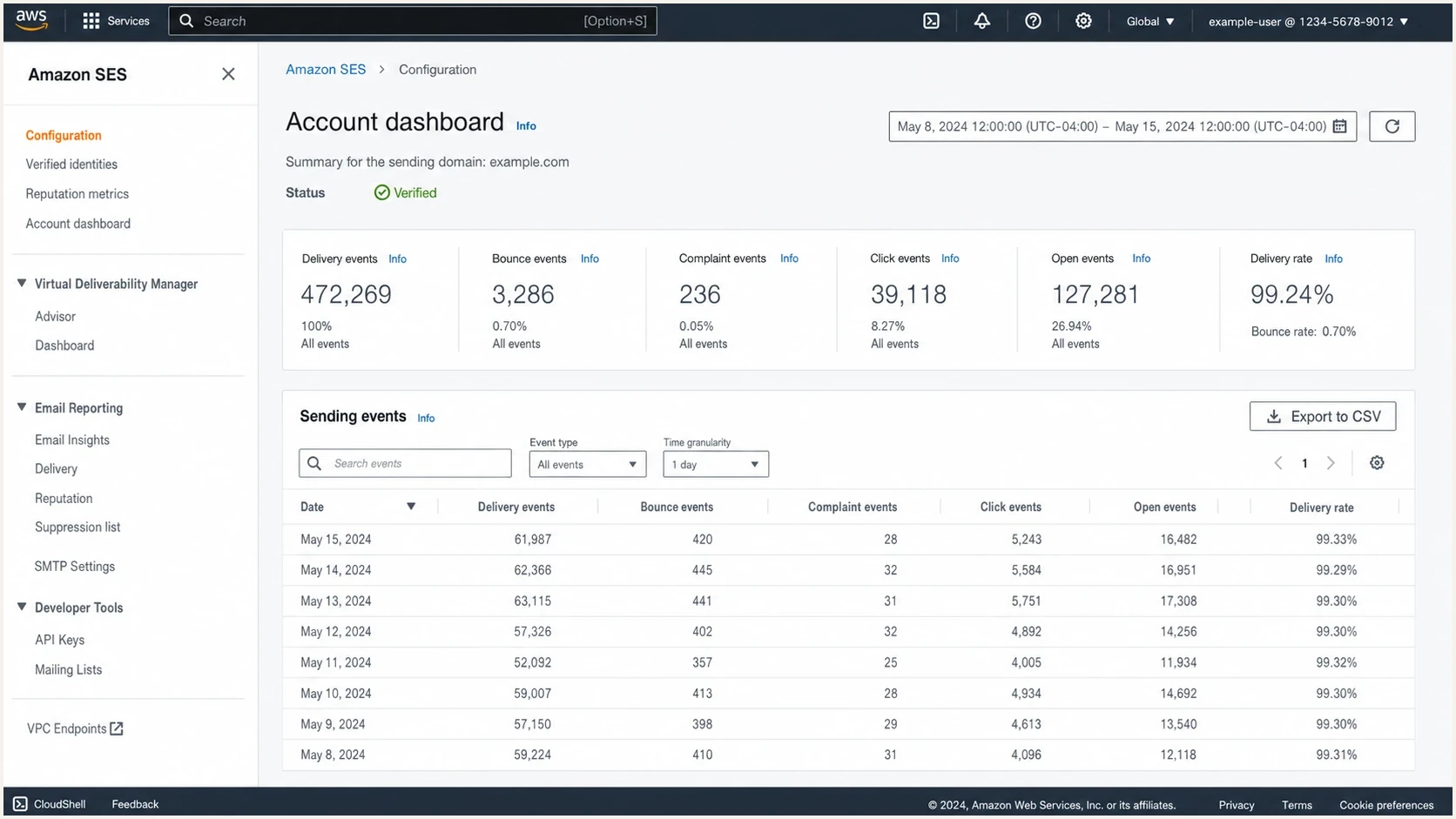
Amazon SES console view with sending metrics used to compare delivery events and click activity.
Separate Gmail addresses from Google IPs. If a report says clicks came from Gmail, that often means the recipient email address ended in gmail.com. It does not automatically mean the HTTP request came from Google. To establish Google involvement, inspect the IP address that requested the tracking URL, reverse DNS, ASN ownership, request headers, and timing.
What Gmail link protection can prove
Gmail checks links because URLs are a common abuse path in email. Google's published description says a malicious-link check starts when the user clicks in supported clients. Other corporate gateways and security scanners can fetch links before delivery or before a person opens the message, so a pre-interaction request should not be assigned to Gmail without source evidence.
An automated requester often behaves differently from a person. It can request the tracked URL quickly, follow redirects mechanically, skip scripts that a browser would load, hit multiple links in one message, and stop without a normal web session. Some scanners fetch only the first redirect hop. Others continue to the final landing page.
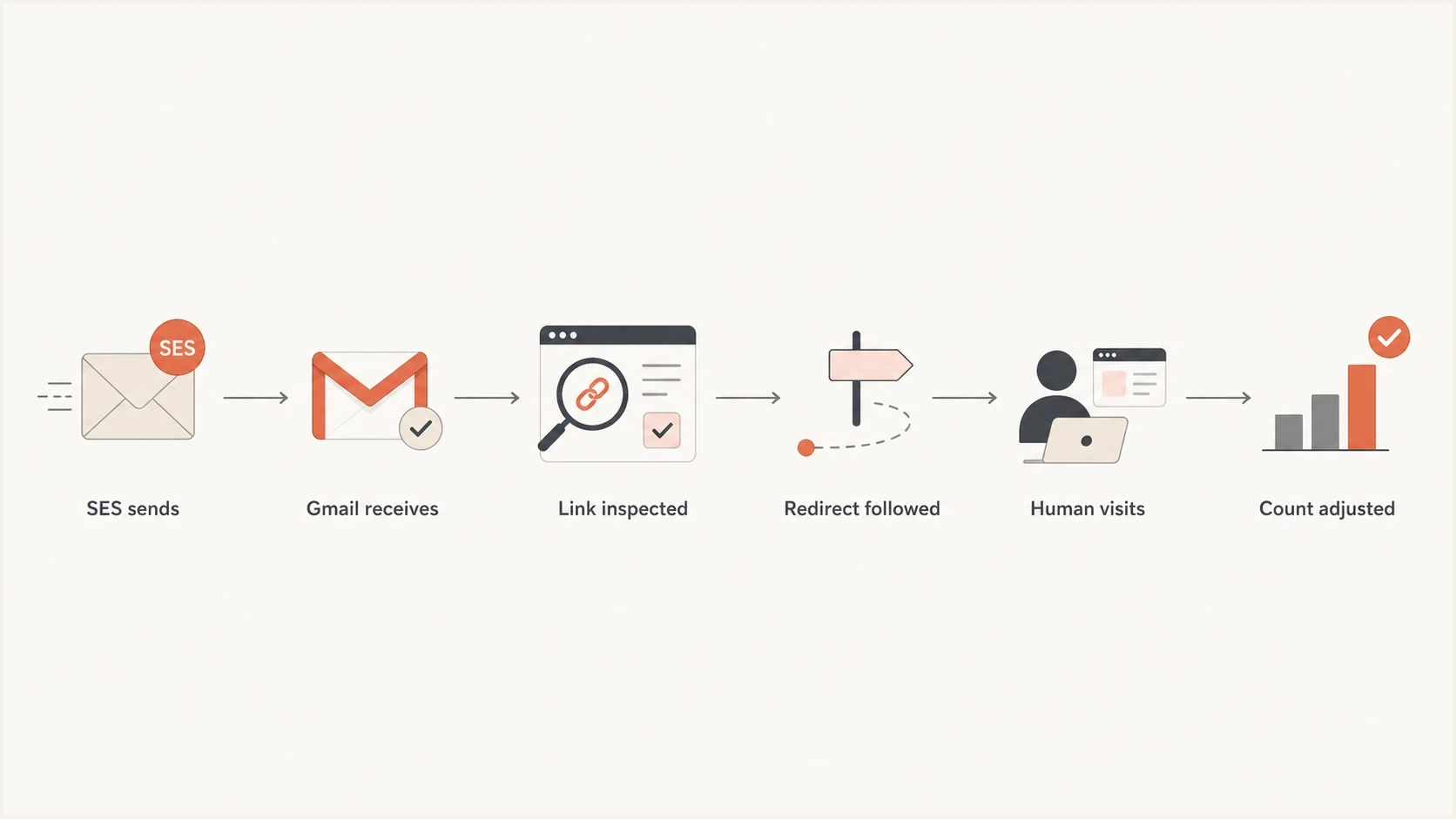
Flowchart showing how an SES email can produce scanner clicks before a real human visit.
|
|
|
|---|---|---|
Timing | Very close to delivery | Any time after delivery |
Links | Many or utility links | Selective links |
Session | No page path | Interactive page path |
IP source | Repeated hosting or proxy cluster | Varied access networks |
User agent | Missing or repeated signature | Browser consistent with session |
Conversion | No intent event | Form, reply, or purchase |
Signals that help separate automated checks from human clicks.
No single row proves that a request was automated. A person can click seconds after delivery, a corporate user can appear behind a data-center IP, and a scanner can imitate a browser. Confidence comes from several matching signals or a controlled retest.
Raw click-through rate is fragile because the tracking server counts a request to the redirect. That event is technically accurate, but it should not count as marketing engagement until the reporting layer filters or labels non-human interaction.
Why SES is part of the diagnosis
 SES does not originate Gmail clicks. When click tracking is enabled through a configuration set, SES rewrites links to use a tracking redirect and publishes an event when the redirect receives a request. SES still matters because the sending identity, IP pool, tracked-link domain, headers, and event-publishing configuration define what receivers evaluate and what the report counts.
If SES changed
- IP pool: A shared pool or dedicated IP change can alter filtering and placement, but it does not prove the click source.
- Identity: A different MAIL FROM domain, DKIM selector, or tracking domain changes the sender and URL signals being evaluated.
- Tracking setup: A configuration-set or redirect-domain change can alter which requests are recorded and how duplicate requests are grouped.
If Gmail changed
- Link protection: Gmail can check a clicked destination and place Google infrastructure in the request path.
- Classification: A placement or reputation shift can change delivery outcomes, but it does not prove automated clicks.
- Proxy URL: Some supported third-party clients can show a Google proxy URL, although the documented check still begins when the user clicks.
A useful clue is whether the spike affects only SES campaigns or every campaign to Gmail across other sending systems. SES-only points toward a sender, identity, tracked-link, event-publishing, or campaign-content change. Gmail-only across multiple senders supports a receiver-side explanation, but raw request evidence is still required.
Authentication belongs in the diagnosis because it affects acceptance and placement, not because an SPF, DKIM, or DMARC failure proves who clicked. Suped's DMARC monitoring connects authentication results with sending sources, so an SES identity problem can be ruled in or out before click filtering is changed.
How to prove the source
Export the SES click events and join each event to campaign metadata using the SES message ID. The SES click object supplies the IP address, timestamp, user agent, clicked link, and link tags. Add reverse DNS, ASN, landing-page sessions, and conversions in the analysis pipeline because SES does not publish those enrichments in the click object.
Fields for an SES click investigationtext
ses_event_type
ses_message_id
campaign_id
recipient_domain
click_timestamp
click_ip_address
click_user_agent
clicked_link
ses_link_tags
reverse_dns_enrichment
asn_enrichment
landing_page_session_id
conversion_event
Start with the first 15 minutes after delivery as an investigation window, not a hard bot rule. Automated systems often act close to receipt, but people also click quickly and some scanners delay requests. Check whether the spike hit personal Gmail addresses, Google Workspace recipients, or both.
- Group by IP and user agent: Find whether a small repeated cluster created a large share of clicks.
- Resolve ownership: Check ASN and reverse DNS for Google, access networks, corporate gateways, and cloud hosts.
- Compare links: Identify whether requests covered every link, utility links, unsubscribe links, or only the main call to action.
- Compare analytics: Match SES clicks against web sessions, UTM visits, form starts, purchases, replies, and server-side events.
- Check authentication separately: Confirm SPF, DKIM, DMARC domain matching, and the visible From domain for the SES stream.
Email tester
Send a real email to this address. Suped shows a results button when the test is ready.
?/43tests passed
Send a real copy of the campaign through the same SES identity and inspect the result with the email tester. That gives a controlled view of authentication, headers, content warnings, and deliverability signals without relying only on campaign metrics.
A Google-owned IP or proxy hostname shows that the request passed through Google infrastructure. It does not prove that no person clicked first. Count it as automated only when timing, user agent, link sequence, session behavior, or a controlled retest supports that conclusion.
Run a controlled Gmail retest
Use a Gmail seed account that the team controls and send production-equivalent messages through the same SES identity, configuration set, and tracked-link domain. Give each message and destination URL a unique identifier so SES events can be matched to web-server requests without relying on aggregate totals.
- Send the tracked copy: Record the send time, SES message ID, configuration set, and unique destination token.
- Wait without opening: Watch SES click events and origin logs during a defined no-interaction window.
- Click once on schedule: Use the normal Gmail client and record the exact click time for comparison.
- Repeat the client path: If recipients use a third-party client, repeat there with a new message and token.
- Compare a direct-link copy: Disable SES click tracking for the control while keeping a unique destination URL and origin logging.
A request before any test interaction confirms automated fetching for that controlled path. Requests that appear only after the scheduled click support click-time protection or ordinary browsing. One manual click can create more than one redirect or destination request, so deduplicate by message, link, source pattern, and a short time window rather than counting every HTTP request as a separate person.
The confirmed opt-in and unsubscribe problem
The most expensive version of this issue is when an automated request changes user state. Confirmed opt-in, passwordless login, and preference changes should not complete merely because a tracked GET URL was fetched. Use a short-lived token and require an explicit confirmation step before consuming it when scanner requests are a known risk.
Do not let a scanner complete intent
A link request proves that a URL was fetched. It does not prove that the subscriber intended to confirm a signup, approve a login, or change a preference. Use a confirmation page, a POST action, or another explicit human step for these state-changing flows.
Fragile flow
- GET action: A single link fetch confirms a signup, consumes a login token, or changes a preference.
- Tracked state link: The same redirect used for marketing clicks also changes account state.
- No session check: The application cannot separate a bot fetch from a person.
Safer flow
- Landing page: The click opens a page that asks the person to confirm a sensitive action.
- POST action: The state change happens after a button press, not when the tracked URL is fetched.
- Separate endpoint: The one-click unsubscribe POST endpoint bypasses marketing click tracking.
Header-based one-click unsubscribe and a visible body unsubscribe link have different request paths. Gmail requires marketing and subscribed messages from bulk senders to support one-click unsubscribe and include a clear body link. Implement the List-Unsubscribe-Post endpoint so POST performs the unsubscribe, GET does not change state, and the endpoint bypasses marketing click tracking. The visible body link can open a preference or confirmation page, subject to applicable provider and legal requirements.
What to check in authentication and reputation
When a Gmail click spike appears at the same time as reputation trouble, check both the authentication path and the reputation of the sending and link infrastructure. A recent blocklist (blacklist) issue, a new SES pool, or a new redirect domain can affect acceptance and URL evaluation. None of those changes proves that Google generated the requests.
Click-source evidence bands
Classify the evidence before changing engagement reports or sender infrastructure.
Recipient segment only
Weak signal
A gmail.com recipient identifies the audience, not the HTTP requester.
Timing or link cluster
Suggestive
Fast or repeated multi-link requests justify log review but are not decisive.
IP and session match
Corroborated
Repeated IP, user-agent, redirect, and no-session patterns support automation.
Controlled retest match
Confirmed for test
A matched request before any test interaction proves automation on that path.
For authentication, verify SPF and DKIM, publish DMARC, and make sure the visible From domain matches the SPF or DKIM domain used for DMARC. Gmail's requirements for senders of 5,000 or more messages a day to personal Gmail accounts also cover valid forward and reverse DNS, TLS, RFC 5322 formatting, one-click unsubscribe for marketing mail, and spam rates below 0.30%. Use a domain health check to catch obvious authentication problems before digging into HTTP logs.
Example DMARC record for monitoringdns
Host: _dmarc.example.com
Type: TXT
Value: "v=DMARC1; p=none; rua=mailto:dmarc@example.com"
That example starts in monitoring mode. It will not fix automated clicks, but it supplies aggregate data for checking whether expected SES sources pass DMARC domain matching. After legitimate senders pass consistently, move toward quarantine or reject with a staged rollout. Suped's product turns DMARC aggregate reports into sending-source issues and keeps authentication, hosted SPF, hosted MTA-STS, and blocklist or blacklist context together for this workflow.
Issues page showing top issues, verified sources, unverified sources, and authentication pass rates
For reputation, inspect sending IPs, link domains, and domains used in redirects. A blocklist or blacklist hit does not automatically explain a click spike, but it provides context for a simultaneous delivery or filtering change. Suped's blocklist monitoring keeps that context beside authentication data while click-source evidence remains in SES and web logs.
How to adjust reporting without hiding the problem
Do not delete suspicious clicks from history. Label them. A useful reporting pipeline keeps raw clicks, creates a filtered human-click metric, and exposes the filter reason. That keeps campaign reporting auditable while preserving evidence for later incident reviews.
- Keep raw clicks: Store every tracking request with IP, user agent, timestamp, URL, and recipient metadata.
- Create a human-click metric: Exclude corroborated scanner patterns, instant multi-link fetches, and requests with no web session.
- Use conversion weighting: Treat page sessions, purchases, replies, and other intent events as stronger signals than a redirect hit.
- Alert on drift: Trigger review when Gmail filtered clicks diverge from raw Gmail clicks beyond the established normal range.
If reporting cannot access raw click IPs, add server-side logging on the tracking redirect or landing pages. UTM-only analytics can undercount scanner traffic because some scanners stop at the redirect, while SES click tracking can overstate engagement because the redirect request is the measured event.
A clean operating model
Report raw clicks for audit, filtered clicks for engagement, conversions for intent, and authentication health for sender trust. When those measures are separated, a scanner spike does not distort campaign decisions.
If bot-like activity also appears outside Gmail, compare this incident with other mailbox patterns. Click inflation has recurring causes, and the analysis of bot click activity can help separate receiver scanning from analytics bugs and campaign setup mistakes.
Views from the trenches
Best practices
Separate Gmail recipient metrics from click-source IP ownership before changing reporting.
Keep raw clicks and filtered human clicks so campaign reporting remains auditable.
Require explicit confirmation for signup, login, and preference-changing link actions.
Common pitfalls
Treating a Gmail address as proof that Google infrastructure made the click is unreliable.
Letting a tracked email GET request complete confirmed opt-in creates false signups.
Ignoring blocklist or blacklist events can hide a simultaneous reputation change.
Expert tips
Check reverse DNS and ASN for spike IPs before deciding whether clicks are human.
Compare SES clicks with web sessions to separate redirect hits from real visits.
Review SES identity, MAIL FROM, DKIM selector, and tracked-link changes together.
Marketer from Email Geeks says a large SES click increase should be split by recipient ISP before assuming the campaign suddenly improved.
2024-08-16 - Email Geeks
Marketer from Email Geeks says Gmail-address clicks require raw IP review because recipient domain and click source are separate facts.
2024-08-16 - Email Geeks
What to do next
Treat a 70% Gmail click increase in SES as suspicious until the evidence shows human activity. Google security checks remain one possible contributor, especially when Google-owned request infrastructure appears in the logs, but the documented Gmail protection flow starts with a user click. The source cannot be established from a top-line Gmail segment.
The immediate fix is operational: export the events, run the controlled retest, label corroborated scanner activity, protect state-changing links, and compare filtered clicks against conversions. The parallel fix is sender health: confirm SES authentication, check sender and link reputation, and watch blocklist or blacklist changes without treating them as proof of click automation.
Suped covers the authentication and reputation side of that workflow. It does not replace click-log analysis. Use Suped's product to map SES sources in DMARC data, verify SPF and DKIM domain matching, monitor blocklist or blacklist changes, and manage hosted SPF or MTA-STS. Keep click evidence in SES and web logs, then compare both sets of signals during the incident review.




