Why is Pardot not tracking email link clicks from GMX?


Updated on 16 Sep 2026: We updated this guide with Account Engagement's current filtering controls and a clearer test for missing GMX clicks.
Salesforce Account Engagement, formerly Pardot, is most likely receiving the GMX-specific tracking request but filtering it as automated traffic or attaching the activity to a different prospect through an existing visitor cookie. GMX link rewriting is less likely when the URL in the message remains intact and that exact URL still fails to produce a visible click after it is pasted into a browser.
An open appearing in Account Engagement does not disprove this diagnosis. Opens use a downloaded tracking image, while clicks pass through a unique redirect URL and a separate reporting path. One can work while the other is filtered or attached to another prospect. Because the same GMX link fails across Windows, Android, webmail, and a forwarded Gmail copy, investigate the unique tracking token and reporting logic before blaming the mail client.
Most likely diagnosis
Treat this as an Account Engagement filtering or prospect-association problem until a clean browser test proves otherwise. The recipient's GMX address identifies the failing message token, but GMX does not necessarily cause the failure.
Why the symptoms point to Account Engagement
Each Account Engagement recipient receives a different tracked URL. The path normally contains identifiers and a signed token, so two links that reach the same landing page should not look identical. Different GMX and Microsoft 365 URLs therefore do not show rewriting by themselves. What matters is whether the GMX token reaches the branded tracking host, redirects successfully, and creates activity on the expected prospect.
Evidence against GMX rewriting
- Raw source: The visible destination and tracking host are unchanged.
- Forwarded copy: The same GMX token fails when opened from Gmail.
- Manual paste: The click stays absent outside the original message.
- Other recipients: Google and Microsoft tokens report normally.
Evidence still needed
- HTTP request: Confirm the tracking host receives the click.
- Redirect chain: Capture every status and destination.
- Visitor identity: Check whether another prospect gets the activity.
- Filtering state: Review filtered activity and compare the report totals.
Salesforce documents the tracked-link mechanism in its email link tracking help. Use it to confirm that Account Engagement rewrote the link and that the email HTML did not use a format excluded from tracking. That check is necessary, but it does not explain a recipient-specific failure when other tokens in the same send work.
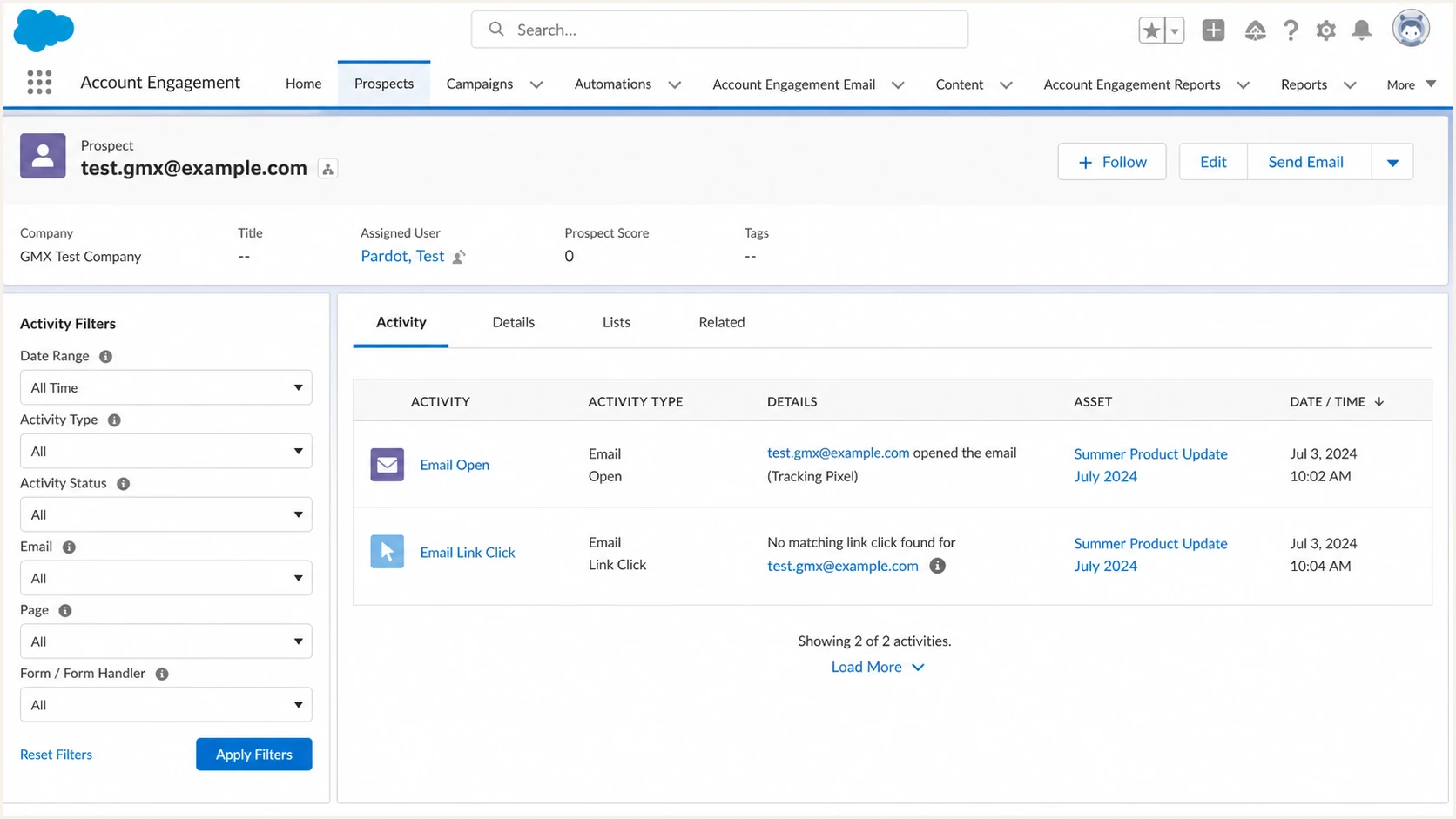
Salesforce Account Engagement prospect activity showing an email open but no link click
Run a controlled click test
Rerun the test with four newly created prospects and a new email send. Use one GMX inbox directly, the same GMX inbox forwarded to Gmail, one Google Workspace inbox, and one Microsoft 365 inbox. Never click two recipient links in the same browser profile. Reusing a profile can leave an Account Engagement visitor cookie associated with a previous prospect and make the new click appear under the wrong record.
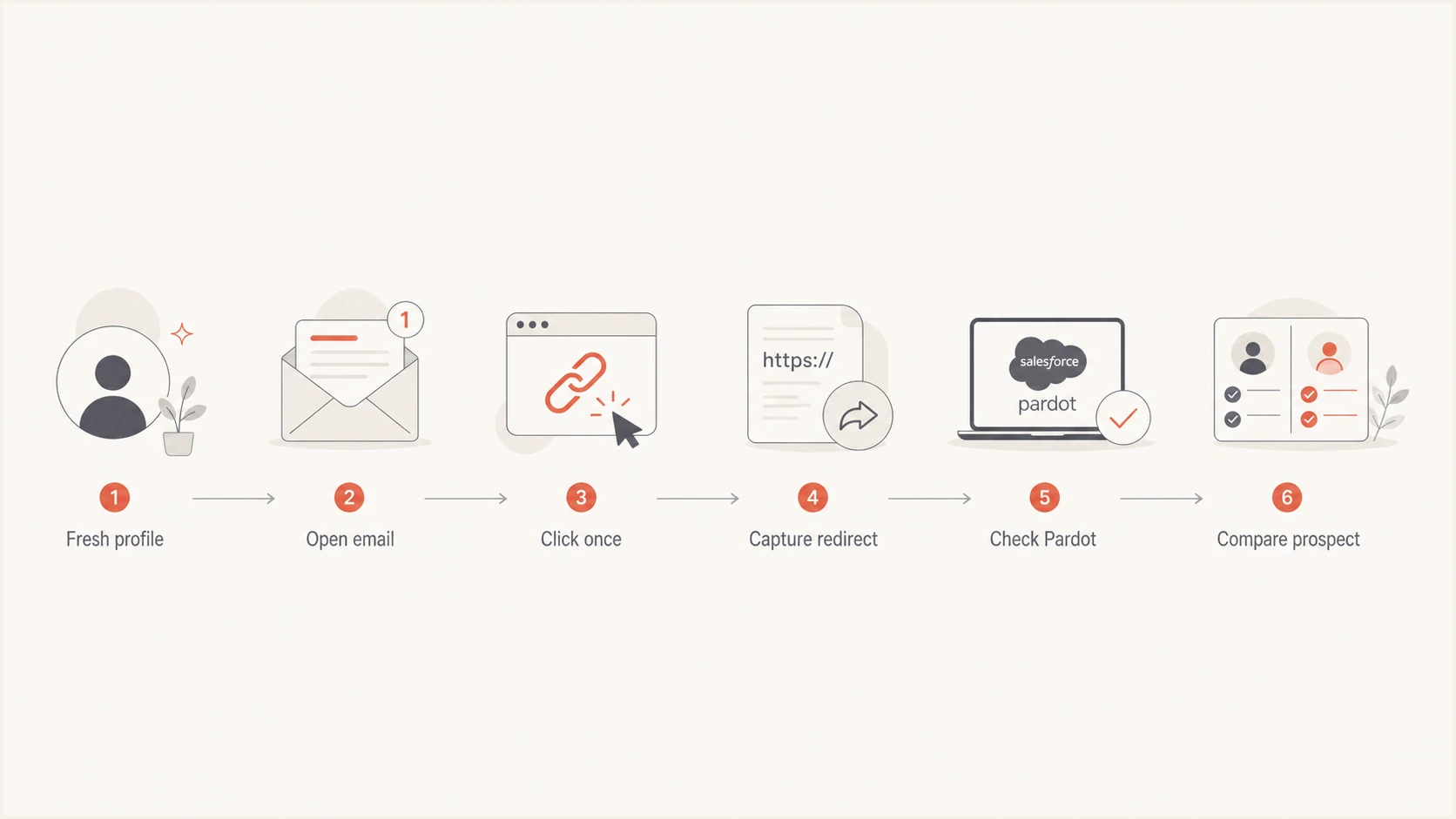
Controlled Pardot click test with isolated browsers and redirect capture
- Create clean records: Use new test prospects so prior visitor associations cannot confuse the result.
- Send one asset: Send the same email once and preserve each recipient's unique tracking URL.
- Isolate browsers: Use a separate private window or clean browser profile for every address.
- Capture traffic: Open developer tools, preserve the network log, then click the link once.
- Record the chain: Save the request URL, status codes, Location headers, cookies, and final page.
- Check all prospects: Look for the click on the intended record and every other test record.
A successful redirect proves the tracking endpoint accepted enough of the request to send the browser onward. It does not prove Account Engagement retained the event in reporting. A failed redirect points instead to an expired or invalid token or a tracking-domain problem. It can also mean the request was blocked before Account Engagement completed the redirect.
Inspect the redirect outside the mail clientBASH
curl --location --verbose \
  'PASTE_GMX_TRACKING_URL_HERE' \
  --output /dev/null
The command confirms DNS resolution, TLS negotiation, the HTTP response, and redirects. It does not reproduce browser cookies, so compare its result with a private-window click. Never share the full recipient tracking URL in a public ticket because the token can identify a recipient and can generate more activity.
Separate bot filtering from cookie misattribution
The two leading explanations produce different evidence. Account Engagement can filter a request through an IP or hostname visitor filter, or Metrics Guard can pause tracking after a burst of activity from a location. Cookie misattribution keeps the activity but connects it to a visitor or prospect that the browser already knew. Search by timestamp and email asset before concluding that Account Engagement discarded the event.
Bot filtering
The request reaches the tracking host and redirects, but the reported click is missing or appears only in unfiltered detail. A repeatable failure tied to one recipient token can point to server-side classification, but token handling must still be ruled out.
- Look for: A clean redirect with a filtered or absent event.
- Retest with: A new token in a normal browser on another network.
Cookie misattribution
The click appears, but it is attached to an older test prospect or visitor. This often follows repeated tests with different addresses in one browser profile.
- Look for: Activity on another prospect at the same time.
- Retest with: A private window with no existing cookies.
Automated systems can also create excess clicks rather than missing clicks. The same investigation method applies: compare the network event and timestamp, then inspect prospect activity. The guidance on bot click increases explains the opposite symptom, while the same classification logic can help explain suppression. Also check the drawbacks of redirects when a security layer or branded tracking domain adds another hop.
Do not test several identities in one browser
A normal browser profile can carry an established Account Engagement visitor cookie into every test. Use a clean profile per address, and do not click a forwarded GMX link after testing another recipient in that same profile.
Check Metrics Guard and visitor filters
Account Engagement has two relevant filtering layers. Metrics Guard uses separate thresholds for opens and clicks to identify bursts of activity from an IP location. When a threshold is crossed, tracking for that location pauses until activity falls below it. Visitor filters work by IP address or hostname, and administrators can view the activity they filter.
- Compare report levels: Check the headline unique-click count, then open its prospect detail. A prospect visible only in the detailed view points to filtered activity.
- Review filtered activity: Have an administrator search filtered activities at the exact test time and review visitor filters for the browser's public IP or hostname.
- Interpret a complete absence: If the event is absent from report detail and filtered activity, and no prospect received it, Metrics Guard or token processing remains the likely server-side path.
- Preserve the evidence: Record the timestamp and public IP before changing any visitor filter. Filter changes do not recreate historical click activity, and Metrics Guard has no customer setting to adjust.
This distinction changes the support question. A click present in detailed or filtered activity needs a reporting-filter explanation. A click missing everywhere after a successful redirect needs Salesforce Support to check Metrics Guard classification and token processing.
Check the tracking domain and email authentication
Email authentication does not record Account Engagement clicks. DMARC relies on SPF or DKIM, and forwarding can change the results, while a broken branded tracking hostname can stop the redirect before reporting. Confirm that the click hostname resolves publicly, its certificate matches the hostname, and both GMX and Microsoft links use the intended host.
Send a new message through the email tester to inspect the received headers and authentication results. Then use the domain health checker for a broader DNS check. These results can rule out message authentication and domain configuration, but they cannot show why Account Engagement hid one click event.
Suped is our DMARC and email authentication platform. Use it to monitor DMARC, inspect SPF and DKIM, monitor blocklist (blacklist) status, and run deliverability checks during the surrounding authentication investigation. Its alerts and remediation steps can help identify domain issues, but Suped does not control Account Engagement's Metrics Guard, visitor filters, cookies, or click reporting.
Email tester
Send a real email to this address. Suped shows a results button when the test is ready.
?/43tests passed
Use the tester with a fresh Account Engagement send, not the already-forwarded copy. Compare the original authentication results with the forwarded GMX-to-Gmail copy. A forwarding-related DMARC change explains how the message is evaluated at the second mailbox, but it does not explain a tracking token that redirects correctly and never appears in Account Engagement.
If the tracking host fails DNS or TLS checks, fix that before escalating reporting. If both GMX and Microsoft tokens reach the same host and only the GMX token stays unreported, keep the focus on Account Engagement's token processing and activity attribution.

Email tester sample report showing total score, email preview, issue summary, and per-section results
Build a useful Salesforce support case
Escalate once a new GMX token fails in a clean browser and the tracking endpoint still redirects. Salesforce Support can inspect server-side classification and token logs that are unavailable in campaign reporting. Give support a compact, reproducible comparison instead of a general statement that GMX clicks are missing.
|
|
|---|---|
Send ID | Both recipients used the same email asset |
Timestamp | Support can locate the request in server logs |
HTTP trace | The GMX token reached and left the tracking host |
Clean profile | Existing cookies did not affect the retest |
Control click | A Microsoft or Google token reported normally |
Filtered activity check | Visitor filtering was confirmed or ruled out |
Evidence to include without exposing recipient tokens publicly
Include the full tracking URL only inside the private support case. Ask whether the request reached Account Engagement, whether it was classified as automated, whether the token was valid, and which prospect or visitor received the activity. Also ask whether Metrics Guard or a visitor filter affected the event.
A decisive reproduction
A newly issued GMX token redirects in a clean profile, the timestamp is captured, a control token reports normally, and no prospect receives the GMX activity. That result gives Salesforce Support a narrow server-side problem to investigate.
Views from the trenches
Best practices
Compare each raw tracking URL before testing to detect any recipient-side rewriting.
Use a clean private browser session for every prospect to isolate visitor cookies.
Capture the full redirect trace and exact timestamp before opening a support case.
Common pitfalls
Repeated tests in one browser can attach a fresh click to an older prospect record.
A successful email open can hide the fact that click reporting uses another path.
Testing only the landing page misses failures at the branded tracking redirect itself.
Expert tips
Search every test prospect by timestamp before deciding that Pardot dropped a click.
Paste each unique token into a clean browser to separate email-client behaviour.
Give support the exact request time and redirect trace so server logs can be matched.
Marketer view
Marketer from Email Geeks says the raw message source should be checked first because recipient systems can rewrite tracking URLs.
2026-07-07 - Email Geeks
Marketer view
Marketer from Email Geeks says a clean redirect with no reported event points toward Pardot bot filtering or reporting suppression.
2026-07-07 - Email Geeks
Where to focus first
Start a new Account Engagement send to a new GMX prospect, then click from a clean browser profile. Capture the redirect, then search all test prospects and filtered activity at the exact click time. If the request redirects but no record receives the event, Salesforce Support needs to inspect Metrics Guard classification and token handling. If another prospect receives it, the browser cookie caused misattribution.
GMX remains a correlation, not a proven cause. An unchanged URL that also fails after manual pasting shifts the investigation away from the mailbox and toward Account Engagement. Check DNS and TLS, then verify authentication to rule out surrounding faults, but keep the escalation centered on the unique GMX token and the missing server-side activity.