Why is it so difficult to unsubscribe from SAP emails?

Published 29 Apr 2025
Updated 29 Jul 2026
13 min read
Summarize with
Updated on 29 Jul 2026: We updated this guide with current SAP notification controls and one-click unsubscribe requirements.
It is difficult to unsubscribe from SAP emails because the unsubscribe path often sits across product groups, business relationship records, account permissions, preference centers, and marketing databases that do not share one clean opt-out state. A simple unsubscribe click can turn into a login screen, an administrator approval path, a support case, or a preference center that does not clearly suppress the address.
SAP has a public unsubscribe page. The current page says the form removes email addresses and phone numbers from SAP mailing and contact lists. It asks for a business email address and lets the recipient opt out of news about SAP products and services, or opt out of those messages plus newsletter subscriptions. The problem starts when the unsubscribe link in an actual email does not land on that direct path.
- System split: One email can be sent by a product team, regional team, partner workflow, or account system, each with its own list state.
- Relationship logic: Some messages are treated as business relationship mail rather than ordinary marketing, which changes the unsubscribe route.
- Bad routing: The email link can send the recipient to a preference center or support flow when it should send them to a direct opt-out form.
- Account assumptions: Enterprise systems sometimes assume the account owner or administrator controls preferences, even when the recipient owns the email address.
- Header gaps: If List-Unsubscribe headers are missing or broken, mailbox apps cannot show the simple unsubscribe control people expect.
Why SAP unsubscribe flows feel harder than normal
A normal marketing unsubscribe flow has one job: take the email address that received the message and suppress it for that sender's marketing stream. The recipient should not need to know which internal product team sent the email, which legal entity owns the relationship, or which procurement workflow first collected the address.
Large enterprise senders make this harder because they often treat a contact record as part of an account graph. The same address can be a billing contact, a software user, an event attendee, a newsletter subscriber, and a partner portal user. When the unsubscribe system tries to protect those different contexts, it adds steps that feel unreasonable to the recipient.
A support ticket is the wrong shape
Opening a support case to stop marketing email is a broken user experience. Support workflows ask for identity, account details, product context, and issue classification. An unsubscribe workflow should need only the recipient address, the list or campaign token, and a clear suppression action.
A normal unsubscribe flow
- Identity: The unsubscribe token identifies the recipient address without requiring login.
- Action: The recipient confirms or completes a one-click unsubscribe request.
- Result: The address enters a global or list-level suppression table.
- Proof: The confirmation page shows what changed and which address was affected.
The hard enterprise flow
- Identity: The system asks the recipient to log in or prove account ownership.
- Action: The link opens a preference center with unclear subscription labels.
- Result: One list changes, but another source keeps sending to the same address.
- Proof: The recipient gets a case number or generic page instead of a clear suppression record.
Where the process breaks
The frustrating part is that several failures look identical to the recipient. A person clicks unsubscribe, lands on a page that asks too much, and assumes SAP has made unsubscribing impossible. The backend truth is usually more specific: the email used the wrong template, the campaign token pointed to the wrong preference center, or the sending system did not synchronize the opt-out back to the central suppression table.
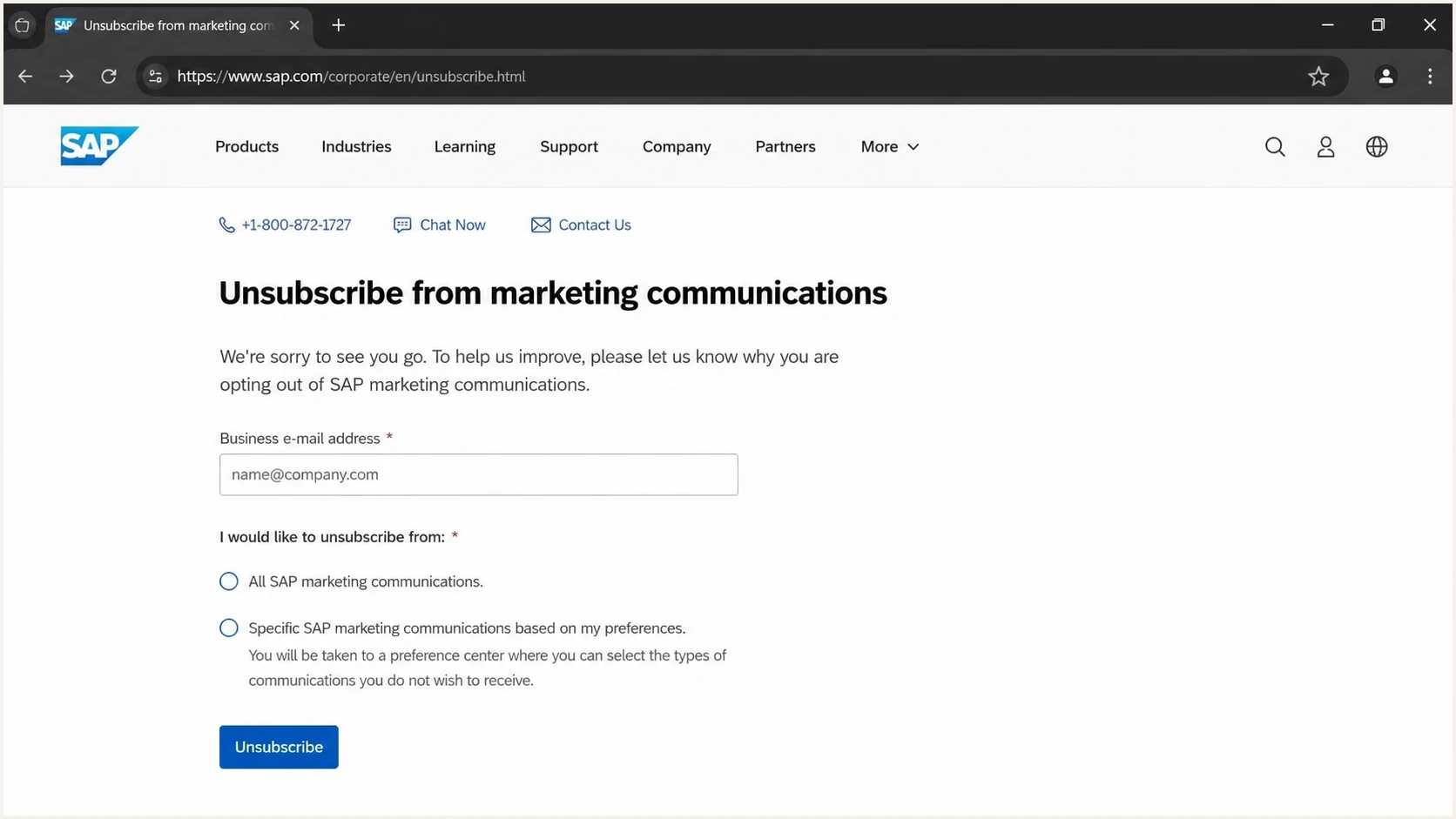
Screenshot-style image of the SAP public unsubscribe page with email field and unsubscribe options.
The direct SAP form is the clearest path when it works. Its confirmation page explains that the unsubscribe request was accepted based on selected preferences, and that some messages can continue until systems update. That is normal processing language. It becomes a problem when the recipient never reaches that confirmation state.
|
|
|
|---|---|---|
Link | Wrong route | Preference center opens instead. |
Token | Lost address | User must enter details again. |
Account | Admin approval | Recipient cannot self-opt out. |
Data | List split | New streams keep sending. |
Header | Missing List-Unsubscribe | Inbox button absent. |
Sync | Delayed update | Mail continues for days. |
Common breakpoints in an SAP-style unsubscribe path.
Modern mailbox apps expect bulk marketing senders to support one-click unsubscribe through message headers. When those headers are present and correct, a participating inbox can show its own unsubscribe button and bypass a messy footer page. The control is not guaranteed because mailbox providers also apply eligibility, engagement, and sender reputation checks. When the headers are absent, the recipient has to trust the sender's web flow.
Header pattern inboxes can use
List-Unsubscribe: <https://example.com/u/abc>
List-Unsubscribe-Post: List-Unsubscribe=One-Click
Why SAP can still classify the email as relationship mail
The hardest SAP cases happen when the sender believes the message is tied to a business relationship. That category includes support notices, security updates, account administration, event logistics, billing workflows, and procurement systems. Those messages do not behave like newsletters, and a blanket marketing unsubscribe should not stop every critical account notice.
That distinction does not excuse a confusing opt-out path. If a message contains promotional content or newsletter content, the sender should give a clear unsubscribe action for that stream. If the message is operational, the footer should explain why the recipient is receiving it and who controls the underlying account relationship.
Marketing and service mail are different
- Marketing: Product news, offers, events, and newsletters need a clear opt-out path.
- Transactional: Security notices, invoices, password messages, and support updates follow account logic.
- Mixed content: A service message that includes promotional modules creates unnecessary compliance risk.
- Best fix: Separate message purpose before sending, then attach the right suppression logic.
If you keep receiving SAP messages after unsubscribing, compare a later message with the original. It may come from a product notification system, a second list, an alias, or a stream SAP classifies as relationship mail.
SAP product notifications use separate controls
SAP's public form covers marketing communications and newsletters. It does not turn off every product-generated notification. SAP's current unsubscribe page says security updates, event registration notices, account management messages, and support or service communications can continue because they are tied to an existing business relationship.
- SAP for Me: Open Notifications, choose Manage, and change the Email delivery choice for the relevant notification in SAP's notification controls.
- SAP SuccessFactors: An email footer can send the recipient to account notification settings, but the company must allow users to unsubscribe and can restrict settings to administrators.
- SAP Business Network and SAP Ariba: Notification choices are grouped by type and can depend on account permissions, so an account administrator may need to remove an address.
- SAP Cloud ALM: Users manage email delivery in notification settings, while some operational messages also provide an Unsubscribe action in the footer.
This separation explains why the public marketing form can confirm an opt-out while product mail continues. Match the later email to the SAP product named in its sender details or footer, then change that product's notification settings. If access is restricted, send the full headers and message identifier to the account administrator.
What to do if you are stuck
Treat this as an evidence problem. Separate the visible frustration from the technical facts: the address that received the email, the domain in the From header, the unsubscribe URL, whether a List-Unsubscribe header exists, and whether the message looks promotional or operational.
- Use the direct form: Enter the exact address that received the SAP email, including aliases or tagged addresses.
- Save proof: Keep the confirmation page, message date, sender address, and subject line.
- Inspect headers: Look for List-Unsubscribe, List-Unsubscribe-Post, From, Return-Path, and DKIM-Signature.
- Track variants: Check whether messages go to a different alias, role account, or forwarded mailbox.
- Escalate with detail: If support is required, provide the message headers and ask for the exact sending system.
- Filter last: A mailbox rule stops annoyance for you, but it does not fix SAP's suppression data.
A practical first step is to send one of the messages through the email tester. That gives you a readable report of headers, authentication results, and deliverability signals instead of guessing from the footer alone.
Email tester
Send a real email to this address. Suped shows a results button when the test is ready.
?/43tests passed
If the report shows no List-Unsubscribe header, the mailbox app has no standard header-based action to show. If the headers exist but the footer page still asks for login or a ticket, the issue is the web preference flow rather than the email headers. That distinction matters when you escalate.
What SAP and similar senders should fix
The sender-side fix starts with a single rule: marketing opt-out must be independent from account administration. A recipient can be required to keep receiving security or billing notices for a valid account, but they should not need account administrator permission to stop promotional messages.
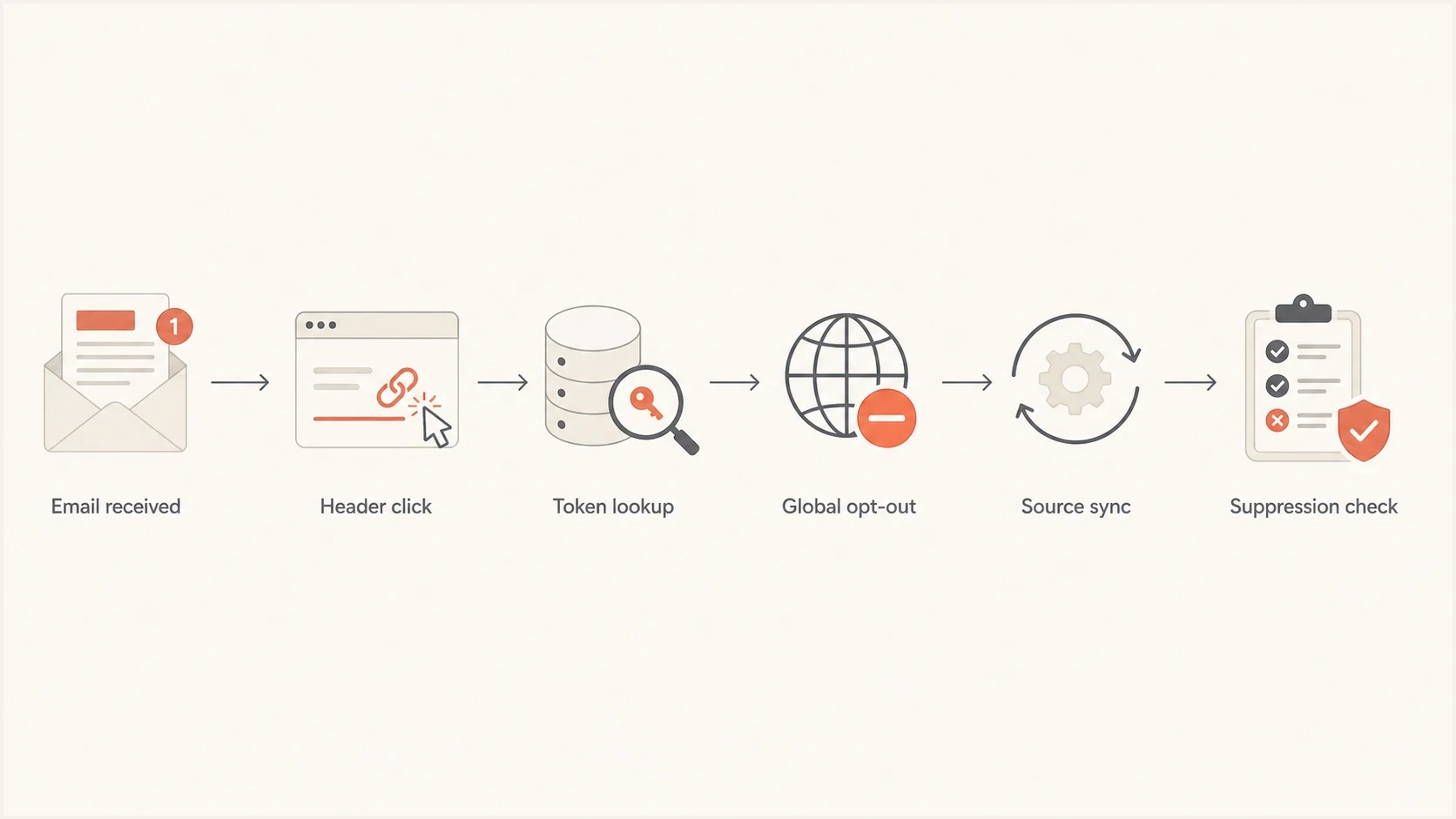
Flowchart showing a clean unsubscribe process from inbox click to suppression check.
- Use signed tokens: The unsubscribe link should identify the recipient address and list without a login.
- Honor headers: Every promotional stream should publish working List-Unsubscribe and List-Unsubscribe-Post headers.
- Separate purposes: Keep marketing, transactional, support, and procurement messages in clearly labeled streams.
- Centralize suppression: A global opt-out should block all promotional sources before the next campaign send.
- Show the outcome: The confirmation page should show the address, changed preference, and expected processing window.
- Audit templates: Test every sending system after template changes, migrations, and new list integrations.
Email authentication does not fix a broken unsubscribe page, but it makes source ownership visible. A broad domain health checker helps confirm whether the domain has healthy DMARC, SPF, and DKIM foundations. Ongoing DMARC monitoring then shows which systems are sending mail for the domain, including sources that business owners forgot to document.

Issue steps to fix dialog showing the issue overview, tailored fix steps, and verification action
Suped is our DMARC and email authentication platform. For this workflow, its role is operational: it shows verified and unverified sending sources, flags authentication issues, sends real-time alerts, and turns failures into steps to fix. Suped also brings hosted DMARC, hosted SPF, SPF flattening, hosted MTA-STS, and blocklist and blacklist monitoring into one place, which helps when a company has many domains or an MSP manages several clients.
Suped connects authentication results to source discovery and issue remediation in the same workflow. It does not replace consent management, but it gives the email team a map of who is sending so the team can assign ownership for a broken unsubscribe path.
The compliance and deliverability risk
This is not legal advice. Under US CAN-SPAM rules, commercial email must offer a clear opt-out and honor the request within 10 business days. The sender cannot charge a fee, demand personal information beyond the email address, or require more than a reply email or a visit to one web page. A flow that asks for a support ticket, administrator approval, or unrelated personal data creates risk when the message is promotional.
Mailbox-provider requirements are tighter than that legal maximum. Gmail's current subscription guidance requires one-click unsubscribe for subscription messages and says requests must be honored within 48 hours. Senders delivering more than 5,000 messages a day to personal Gmail accounts must also place a visible unsubscribe link in marketing and subscribed messages. Yahoo requires bulk senders to support easy unsubscribe for marketing mail and honor requests within two days. These are delivery requirements, separate from the legal deadline.
The deliverability issue is more immediate. When unsubscribe does not work, recipients press the spam button, write mailbox rules, or complain publicly. Those actions teach mailbox providers that mail from the sender is unwanted. Over time, that pressure can affect inbox placement and increase the chance of domain or IP scrutiny on a blocklist or blacklist.
Broken unsubscribe creates sender risk
- Complaint rate: Recipients use spam complaints when the unsubscribe path wastes their time.
- Inbox signals: Repeated deletion and filtering tell mailbox providers the mail is unwanted.
- Blacklist risk: High complaint pressure can contribute to reputation problems and blocklist review.
- Support load: Every failed opt-out creates avoidable tickets for teams that cannot solve root cause.
Internal complaint review triggers
These conservative operating thresholds prompt investigation before the 0.3% provider ceiling.
Healthy
Under 0.05%
Review normal performance.
Watch
0.05-0.10%
Check unsubscribe and targeting.
Fix now
Over 0.10%
Pause and diagnose the stream.
Views from the trenches
Best practices
Keep a global suppression list separate from newsletter preferences and product interests.
Use signed one-click links that work without login, support tickets, or admin approval.
Show the final preference state after opt-out, including the exact address suppressed.
Store unsubscribe events with source system, campaign, timestamp, and message identifier.
Common pitfalls
Sending users to a logged-in preference center when they only need a marketing opt-out.
Treating every contact as an account user turns consent into an administrator problem.
Adding contacts to new lists after opt-out breaks trust and raises complaint pressure.
Hiding source ownership behind a group brand slows fixes across product teams badly.
Expert tips
Test every campaign with a real inbox and confirm the visible unsubscribe control appears.
Separate transactional notices clearly so users know why they cannot stop every message.
Use header testing after template changes, not only during the first platform setup.
Review complaint spikes as unsubscribe failures until the evidence proves otherwise.
Expert from Email Geeks says the hardest cases start when the email footer points to a group relationship, but no one can identify the exact sending team.
2023-11-21 - Email Geeks
Marketer from Email Geeks says a recipient should never need another person's permission to stop commercial email, even when the address belongs to an enterprise account.
2023-11-21 - Email Geeks
The practical fix
The reason SAP emails can feel so hard to unsubscribe from is not that unsubscribing requires complex technology. It is hard because the unsubscribe request crosses too many internal boundaries: brand, product, account, region, support, and data ownership. The recipient experiences all of that internal complexity as one bad click.
For recipients, the clean approach is to use the direct form, save the confirmation, inspect the headers, and escalate with the exact sender evidence if mail continues. For senders, the fix is a direct no-login unsubscribe route, working one-click headers, centralized suppression, and source ownership that the email team can actually see.
Suped helps with the source ownership side of that work. It will not manage SAP's consent database, but it gives teams a reliable way to see which systems send for a domain, which streams fail authentication, and which issues need action before poor unsubscribe handling turns into reputation damage.




