Why is a Gmail address not sending to another Gmail address?

Published 14 May 2025
Updated 31 Jul 2026
11 min read
Summarize with
Updated on 31 Jul 2026: We updated this guide with Gmail search operators, client isolation, Workspace alias behavior, plus current Send mail as and DMARC guidance.
The direct answer is that a true @gmail.com account sending through normal Gmail to another true @gmail.com account should not disappear without any trace. Gmail usually saves the message in Sent, delivers it somewhere in the recipient mailbox, delays it, or returns a bounce. When there is no inbox copy, no spam copy, and no bounce, treat the first claim as unproven: was it really Gmail-to-Gmail, and did Gmail actually accept the send?
The answer changes fast when either address is a custom domain using Google Workspace, an alias, a group, a Gmail API integration, or a send-as identity. Those paths still look like Gmail to a user, but they add DNS, routing, admin policy, API limits, and authentication checks that personal Gmail hides.
- First distinction: Confirm whether both addresses are plain personal Gmail mailboxes, even if both users open their mail in Gmail.
- Mailbox check: Review filters, blocks, forwarding, labels, group settings, and Workspace quarantine that can hide the message.
- Sending path: Determine whether the sender used normal Gmail compose, Gmail API, send-as, delegation, or an app connection.
The fastest answer
Start with the simplest split: personal Gmail and custom-domain Gmail are different systems for troubleshooting. Personal @gmail.com mail has Google-managed SPF, DKIM, and DMARC. A custom From domain inside Gmail or Google Workspace has its own DNS, admin controls, sending identities, and logs. That is where many "Gmail to Gmail" cases stop being Gmail-to-Gmail.
|
|
|
|---|---|---|
@gmail.com to @gmail.com | Google controls the path | Sent and All Mail |
Custom domain | Workspace or alias path | MX and headers |
Gmail API | Programmatic send | API status |
Two recipients fail | Pattern near sender side | Sender account or path |
Two senders fail | Pattern near recipient side | Recipient mailbox or domain |
Quick triage for a Gmail-to-Gmail delivery complaint.
Do not skip the basic evidence
A missing bounce does not prove delivery. Google recommends waiting a few hours because a delivery error can arrive later. The message still needs a sent copy, a timestamp, a recipient search, and, for Workspace, log evidence.
- Sent copy: Confirm the message is in Sent, not Drafts or Outbox.
- Unique subject: Retest with a subject that has never been used before.
- Recipient search: Search All Mail, Spam, Trash, and archived mail, not only Inbox.
- Delivery notice: Check Inbox and Spam for a Delivery Status Notification from Mail Delivery Subsystem.
How to isolate the failure
The cleanest troubleshooting path is to reduce the test until there is only one variable left. Use a plain text message with a unique subject line, no signature, no links, and no attachments. If that arrives, add each removed item back separately. The first item that breaks delivery is your clue.
- Prove sending: Ask for the sender's Sent copy, exact timestamp, recipient, subject, and any visible warning in Gmail.
- Prove receiving: Ask the recipient to search All Mail with the sender address and the unique subject.
- Prove provider: Look up MX records for any custom domain involved, especially an organization domain that users assume is Gmail.
- Prove path: Separate normal Gmail compose from Gmail API, mobile app, send-as, forwarding, and delegated mailbox flows.
- Prove pattern: Test one sender to two recipients and two senders to one recipient so the failing side becomes obvious.
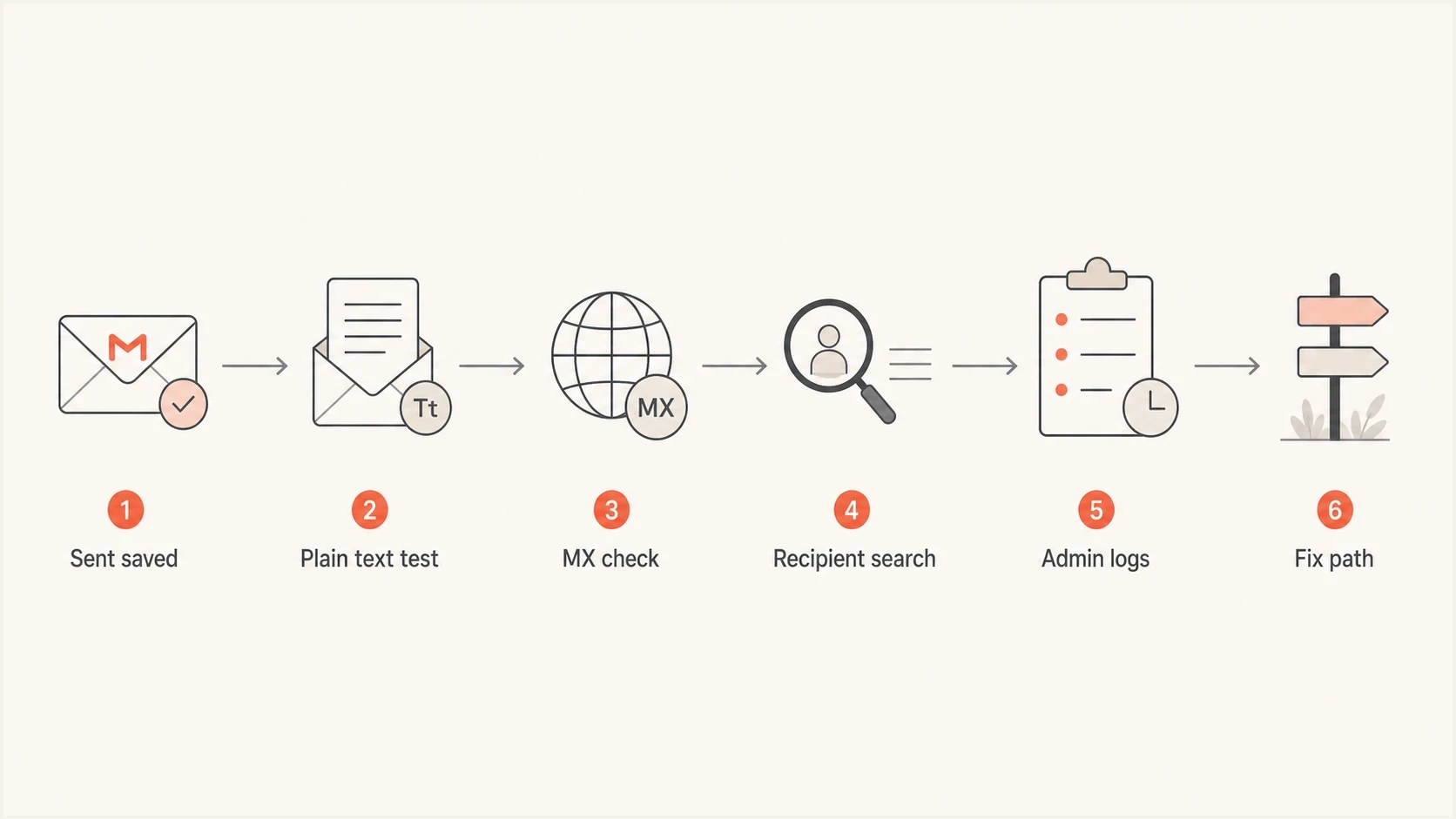
A six-step Gmail missing-message investigation flow.
For MX checks, use the domain that answers the question. To identify who receives mail for a custom recipient domain, check the recipient domain. To identify who backs a custom sender account, check the sender domain. If the confusing address is an organization domain, start with that domain rather than assuming Gmail.
MX and DMARC lookup commandsbash
dig MX example.org +short
dig TXT _dmarc.example.org +short
Recipient-side causes that look like non-delivery
If the sender has a Sent copy and no bounce, look closely at the recipient mailbox. Gmail has many places a message can land without being visible in the primary inbox. Conversation view can bury a new reply inside an old thread. Filters can archive, label, forward, or delete. A blocked sender goes to Spam. Workspace rules can quarantine or reroute mail before the user sees it.
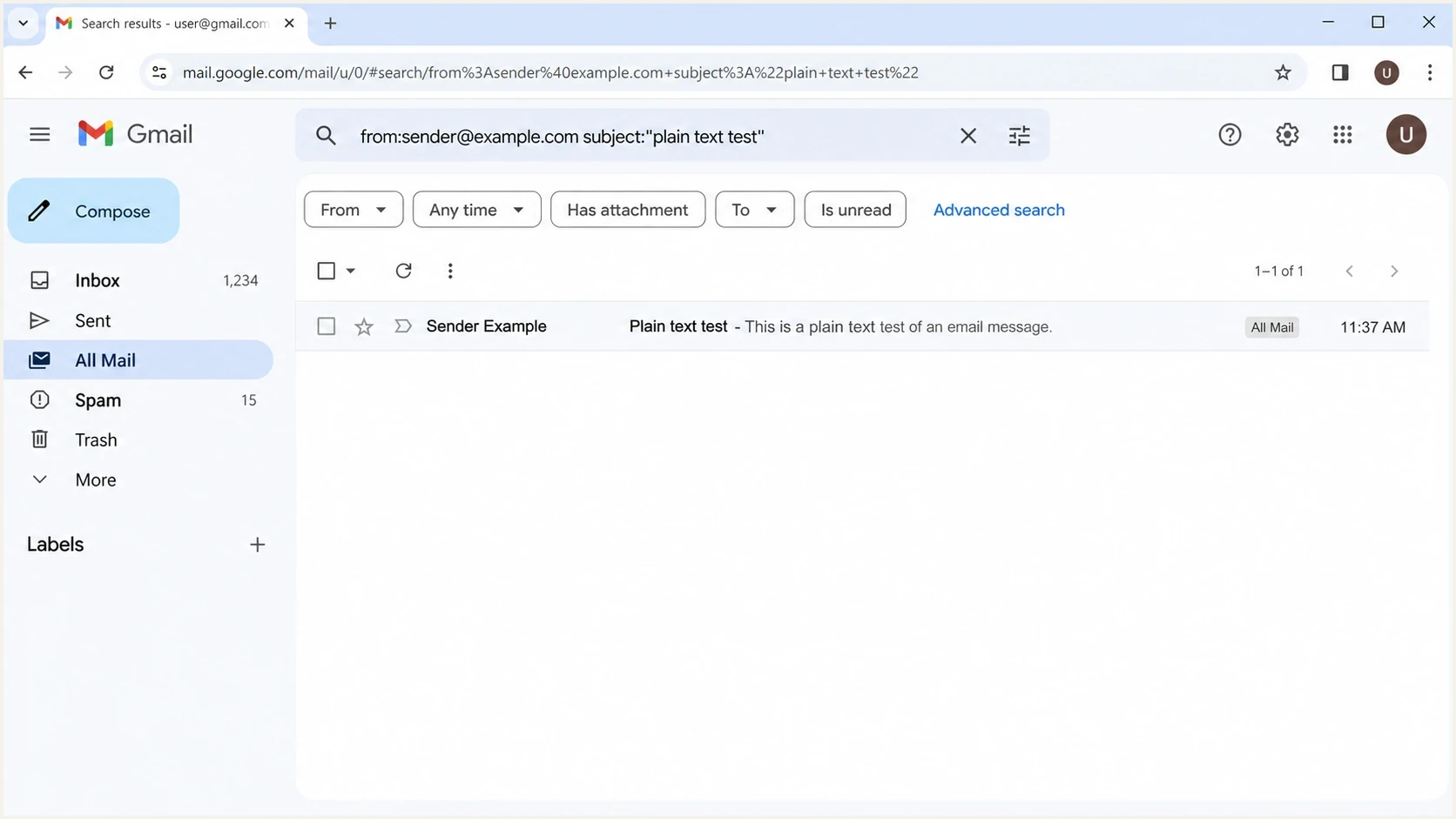
A Gmail search screen checking All Mail for a missing message.
Search across the whole mailbox with in:anywhere from:sender@example.com subject:"plain text test". The in:anywhere operator includes Spam and Trash. If a Workspace administrator has the Message-ID from Email Log Search, use rfc822msgid:unique-id@example.com to find the exact message instead of relying on a reused subject.
- Conversation view: A fresh message can appear inside an older thread instead of at the top as a separate email.
- Filters: A recipient rule can skip the inbox, apply a label, forward, or delete the message.
- Blocked sender: A blocked address sends matching mail to Spam, where users often search too narrowly.
- Own alias or Group: Google Workspace does not place a message in your inbox when you send it to your own alias or to a Google Group you belong to. Check the Group and Email Log Search.
- Storage limit: A full Google account cannot send or receive Gmail messages. The sender should eventually receive an error, so check for a delayed bounce.
- Workspace rules: Compliance, routing, quarantine, and group moderation rules can hide the message from the end user.
A recipient-side issue becomes more likely when two different senders fail only for the same recipient or the same recipient domain. That pattern points away from the sender's account and toward the recipient mailbox, group, domain, or admin policy.
Sender-side causes when there is no bounce
A sender-side issue becomes more likely when one sender fails across multiple recipients. In personal Gmail, check the browser Sent folder, Outbox in the mobile app, account warnings, storage, and Settings > Accounts and Import > Send mail as. In Workspace, also check whether the sender is an alias, delegated mailbox, group, or application.
Normal Gmail compose
- Sent evidence: A sent copy with the exact recipient and timestamp is the starting proof.
- Outbox check: Mobile Gmail can hold a message locally when connectivity or account state is bad.
- Content test: A plain text retest separates message content from account or routing trouble.
- Client isolation: Retest at mail.google.com or in the Gmail app. Success there points to a third-party client, browser extension, or mobile sync problem.
Gmail API or send-as
- API response: An accepted API request is not the same as a human-visible inbox result.
- Abuse controls: Programmatic Gmail sending is subject to quota, app, and abuse checks.
- Identity path: Send-as, aliases, and delegated accounts change the headers and authentication path.
Gmail API sends deserve their own branch because abuse controls can affect programmatic mail differently than a normal Gmail compose window. When an app is involved, collect the API response, created message ID, sending account, OAuth scopes, and app-level error logs before changing DNS or blaming the recipient.
Starting in January 2027, consumer Gmail will no longer support "Send mail as" for third-party addresses. Google Workspace is unaffected. If a personal Gmail account depends on that path, plan its replacement before the cutoff; this announced change does not by itself explain a failure in 2026.
When it is really a custom domain
If the address is name@example.org and the user reads it in Gmail, the sender is using a custom domain, not a personal Gmail address. That means provider lookup, DNS authentication, and admin routing belong in the investigation. Check MX first, then SPF, DKIM, and DMARC, followed by Workspace routing and quarantine.
For a fast domain-level check, Suped's domain health checker can validate DMARC, SPF, and DKIM records in one place. That does not replace mailbox evidence, but it quickly tells you whether the custom domain has an authentication problem that Gmail is reacting to.
Domain health checker sample results showing DMARC, SPF, DKIM scorecards and detailed validation checks
Authentication matters only after the path is clear
For personal @gmail.com sending, SPF, DKIM, and DMARC are Google-managed. For a custom domain using Gmail or send-as, broken authentication can contribute to spam placement, rejection, or distrust. Fix the path question first, then fix the domain.
Example starter DMARC recorddns
Host: _dmarc.example.org
Type: TXT
Value: v=DMARC1; p=none; rua=mailto:dmarc@example.org
Authentication and reputation checks that matter
Authentication checks matter most when the sender uses a custom From domain, an alias, or an application. In that case, headers from a real test message are better than guesses. Send a fresh message into an email test and inspect SPF, DKIM, DMARC, and the visible From domain.
Email tester
Send a real email to this address. Suped shows a results button when the test is ready.
?/43tests passed
For ongoing domain operations, Suped's DMARC monitoring product connects authentication results with source identification, policy staging, and fix steps. That is useful when the problem is a pattern across domains, sending sources, or clients rather than one lost message.
Reputation still belongs in the review for custom domains and shared sending infrastructure. Suped's blocklist monitoring checks domain and IP listings across major blocklists (blacklists), so a sender can separate a Gmail mailbox problem from a wider reputation issue.
How much evidence is enough
Use the evidence level to decide whether to keep testing mailboxes or move into domain repair.
Low confidence
Do basic triage
No Sent copy, no recipient search, no provider check.
Medium confidence
Check MX
Sent copy exists and recipient search is done, but provider path is unclear.
High confidence
Fix that side
Provider path, headers, logs, and repeat tests point to the same side.
What to ask each person for
A vague report like "it did not arrive" wastes time. Ask for a small evidence pack from the sender and recipient, then compare timestamps. If Workspace is involved, add admin logs to the pack.
- Sender evidence: Sent screenshot, exact timestamp, recipient address, subject, and whether web Gmail, mobile Gmail, or an app sent it.
- Recipient evidence: Search results for in:anywhere, filters, blocked senders, and any forwarding rule.
- Admin evidence: Workspace Email Log Search results, Message-ID, quarantine status, group moderation state, and routing policy hits. For events older than 30 days, include the recipient details because full delivery logs are unavailable.
- Domain evidence: MX records, SPF, DKIM, DMARC, sending source, and a header sample from a successful test.
The decision rule
If a plain @gmail.com sender can send a plain text message to other Gmail recipients, the sender account is probably fine. If the same recipient still never sees the message after an in:anywhere search and a filter review, move to recipient-side controls or Workspace logs. If the sender is a custom domain, validate the domain before changing policy.
Views from the trenches
Best practices
Confirm the sender, recipient, time, and Message ID before changing any DNS setting.
Use MX lookups on custom domains so you know which mailbox provider is involved.
Test a plain text message first, then add links or attachments back one item at a time.
Common pitfalls
Assuming every .org address uses Gmail hides routing, filtering, and admin policy issues.
Treating no bounce as proof of delivery misses quarantine, retry, and filtering outcomes.
Changing DMARC policy during a user-to-user issue creates noise without fixing Gmail.
Expert tips
Ask the recipient to search All Mail, Spam, Trash, and filters before blaming sending.
If Gmail API sending is involved, check app permissions, quotas, and abuse controls first.
For Workspace domains, Email Log Search gives the clearest routing evidence for delivery.
Marketer from Email Geeks says API-based Gmail sending deserves separate review because abuse controls can affect programmatic mail differently than web Gmail.
2024-02-26 - Email Geeks
Marketer from Email Geeks says repeatability matters; a one-off failure without a bounce should be reproduced before changing DNS.
2024-02-26 - Email Geeks
The practical answer
A Gmail address not sending to another Gmail address is usually not a pure Gmail mystery. Either the mail is not truly personal Gmail on both sides, the recipient is hiding or filtering it, the sender used API or send-as, or a custom domain introduced authentication and routing rules.
The fastest fix is disciplined triage: prove the Sent copy, search the recipient mailbox properly, check MX for custom domains, isolate API or alias sending, and only then inspect SPF, DKIM, DMARC, and reputation. Suped helps when the issue moves beyond a one-off mailbox complaint by monitoring authentication sources, supporting DMARC policy staging, sending alerts, and making checks repeatable across domains.




