Why do emails sometimes end up in the spam folder?

Published 10 May 2025
Updated 30 Jul 2026
10 min read
Summarize with
Updated on 30 Jul 2026: We updated this guide with current bulk sender requirements, one-click unsubscribe guidance, and clearer spam placement checks.
Emails end up in the spam or junk folder because mailbox providers combine many signals before deciding where to place a message. The biggest causes are failed or weak authentication, poor domain or IP reputation, high complaint rates, low engagement, risky content, sudden sending changes, poor list quality, and individual mailbox preferences.
The frustrating part is that a message can pass SPF, DKIM, and DMARC and still go to spam. Authentication proves that the message is allowed to use a domain. It does not prove that recipients want the message, that the sender has a clean history, or that this specific mailbox sees the sender as useful.
Treat spam placement as a scoring problem, not a single switch. One bad signal rarely explains every failure. A weak pattern across several signals usually does: a new domain, uneven volume, an old list, weak engagement, recent complaints, or a message that looks different from what recipients usually read.
Why emails go to spam
Spam filtering is not one universal rule. Gmail, Microsoft 365, Yahoo, and corporate gateways each make placement decisions with their own models. Those models weigh technical setup, sending history, recipient behavior, message content, and local user actions.
- Authentication: SPF, DKIM, or DMARC failures make the message harder to trust, especially for domains that spoofers target.
- Reputation: Mailbox providers build a history for domains, IPs, sending systems, links, and message patterns.
- Complaints: When recipients hit spam, that is a strong negative vote, even when the email is technically legitimate.
- Engagement: Repeated ignores, quick deletes, spam reports, and few positive actions indicate that the audience does not want the mail.
- Content: Misleading subject lines, link-heavy copy, broken HTML, and suspicious redirects increase filtering risk.
- Recipient rules: A single mailbox can have local rules, previous user actions, or personal models that do not match global placement.
A single spam-folder example is useful evidence, but it is not a full deliverability diagnosis. Look for patterns across providers, seed inboxes, campaign types, domains, and time windows before changing infrastructure.
How mailbox providers decide
Mailbox providers filter mail to protect recipients first. That means legitimate senders do not get a permanent pass. Even a large company can see some of its own mail filtered if recipients report it, ignore it, or if a campaign looks risky compared with past behavior.
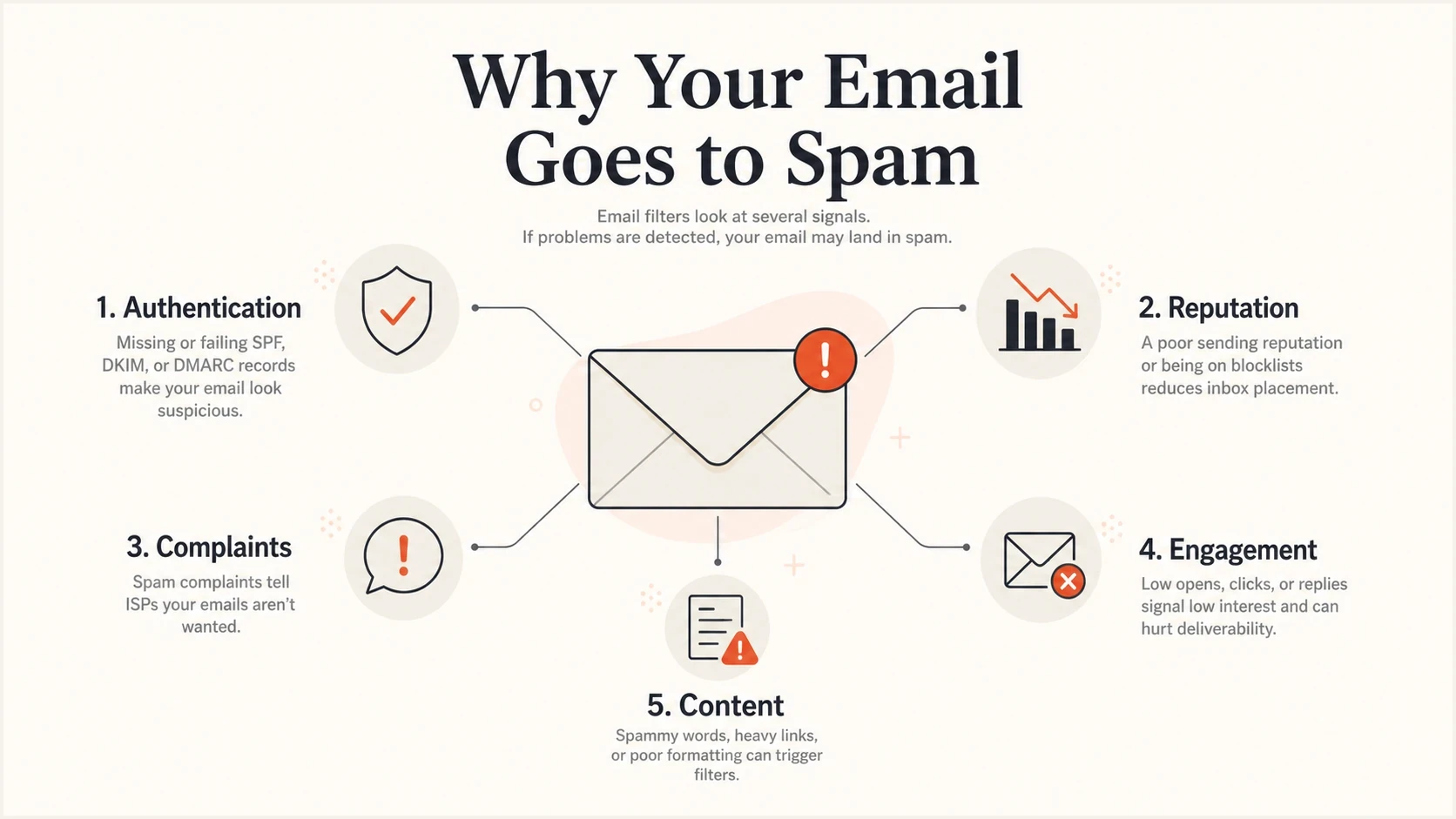
Five email spam filtering signals: authentication, reputation, complaints, engagement, and content.
The same campaign can land in the inbox for one recipient and spam for another. That happens because providers combine global sender signals with recipient-level history. If one person often reads your messages, replies, or moves them to the inbox, that mailbox has a positive signal. If another person ignores the same sender, deletes quickly, or marks spam, the same message gets a weaker path.
|
|
|
|---|---|---|
DMARC fail | Identity risk | Fix auth |
Complaints | Unwanted mail | Clean list |
Low engagement | Weak audience fit | Segment |
Volume spike | Pattern change | Ramp slowly |
Blocklist | Reputation issue | Investigate |
Common spam signals and what they usually mean.
Authentication still matters
SPF, DKIM, and DMARC do not guarantee inbox placement, but weak authentication makes every other problem harder. If a provider cannot verify who sent the message, it has less reason to trust the domain, especially when the message asks for a click, a payment, a login, or a reply.
The first technical check is simple: confirm that the message passes SPF or DKIM, and that at least one of those identifiers matches the visible From domain under DMARC. Verify that every legitimate sending source produces a DMARC pass through SPF or DKIM, because one unapproved or misconfigured source can create a stream of failures that damages trust.
Basic authentication recordsdns
v=DMARC1; p=none; rua=mailto:dmarc-reports@example.com
v=spf1 include:_spf.example.net -all
A monitoring setup is better than a one-time DNS check because senders change. New marketing tools, billing platforms, CRMs, and support systems often start sending before anyone has verified SPF, DKIM, or DMARC domain matching. That is why DMARC monitoring matters for ongoing deliverability, not only for spoofing protection.
Passing authentication
- Identity: The provider can verify the sending domain.
- Domain match: The authenticated domain matches the visible From domain.
- Baseline: The message clears a core trust requirement.
Still going to spam
- Reputation: The domain or IP has weak historical performance.
- Behavior: Recipients ignore, delete, or report the mail.
- Context: The campaign pattern looks unusual for that sender.
Reputation and complaints
Reputation is the memory mailbox providers build about a sender. It includes domain history, IP history, complaint patterns, bounce rates, spam trap hits, recipient engagement, link reputation, and the consistency of sending behavior.
Complaint rate has a large effect because it is direct feedback. If enough recipients use the spam button, the provider has a clear reason to protect similar recipients from future messages. This explains why a legitimate newsletter, product update, or account notice can hit spam if the audience did not expect it or does not value it.
Complaint signal severity
Use these bands as a practical way to triage risk across campaigns.
Healthy
Low
Few complaints and steady engagement.
Watch
Rising
Complaints rise after a list or content change.
Critical
High
Complaints affect more than one provider or campaign.
A blocklist or blacklist listing is another reputation signal, but it needs context. Some blocklists are highly influential for business mail. Others have little direct effect. Check them because listings often point to the real issue: compromised infrastructure, poor list acquisition, shared IP abuse, or a sending source nobody owns internally.
For that workflow, blocklist monitoring is more useful than checking only after a crisis. Ongoing alerts help connect a blacklist event with the campaign, IP, or sender that caused it.
Content and sending patterns
Content problems rarely mean a single forbidden word caused spam placement. Modern filters look at the whole message: subject line, links, domain age, HTML quality, image ratio, tracking patterns, unsubscribe handling, sender identity, and whether the message matches what recipients previously engaged with.
- Subject: Avoid misleading urgency, fake replies, and claims the body does not support.
- Links: Keep link domains consistent with the sender and avoid chained redirects.
- HTML: Fix broken markup, huge images, invisible text, and missing plain-text versions.
- Cadence: Do not jump volume sharply after long silence or after buying a list.
- Consent: Send to people who asked for the mail and can recognize the brand.
Sending frequency also matters. A new domain that sends a few hundred messages one week and tens of thousands the next looks different from a domain with a steady history. The fix is not only to slow down. Send first to the people most likely to engage, then expand volume after the provider sees positive behavior.
Do not fix spam placement by changing everything at once. If DNS, sender name, template, list source, link tracking, and volume all change together, you lose the ability to see which change helped or hurt.
Bulk sender requirements that affect placement
High-volume senders also need to meet provider-specific baselines. Gmail treats a domain as a bulk sender after it sends close to 5,000 messages to personal Gmail accounts within 24 hours, and that classification does not expire. Outlook.com applies stronger authentication requirements to domains sending 5,000 or more messages a day to Microsoft consumer addresses.
- Authentication: Use SPF, DKIM, and DMARC with the visible From domain matching the SPF or DKIM domain. Gmail and Outlook.com impose stronger checks on bulk traffic.
- Infrastructure: For Gmail delivery, maintain matching forward and reverse DNS, use TLS, and format messages according to RFC 5322.
- Complaints: Keep Gmail's user-reported spam rate below 0.1% and prevent it from reaching 0.3% or higher.
- Unsubscribe: Add RFC 8058 one-click unsubscribe to marketing and promotional mail, include a visible body link, and process requests within 48 hours.
- Message type: Keep promotional and transactional traffic clearly identified so the correct authentication, consent, and unsubscribe rules are applied.
These requirements are a delivery baseline, not an inbox guarantee. Non-compliant mail can be filtered, rate-limited, or rejected. Compliant mail can still reach spam when reputation or recipient feedback is poor.
A practical diagnosis workflow
When emails are going to spam, start with the message that failed, not a generic theory. Headers, authentication results, sending source, recipient provider, campaign timing, and list segment usually narrow the issue quickly.
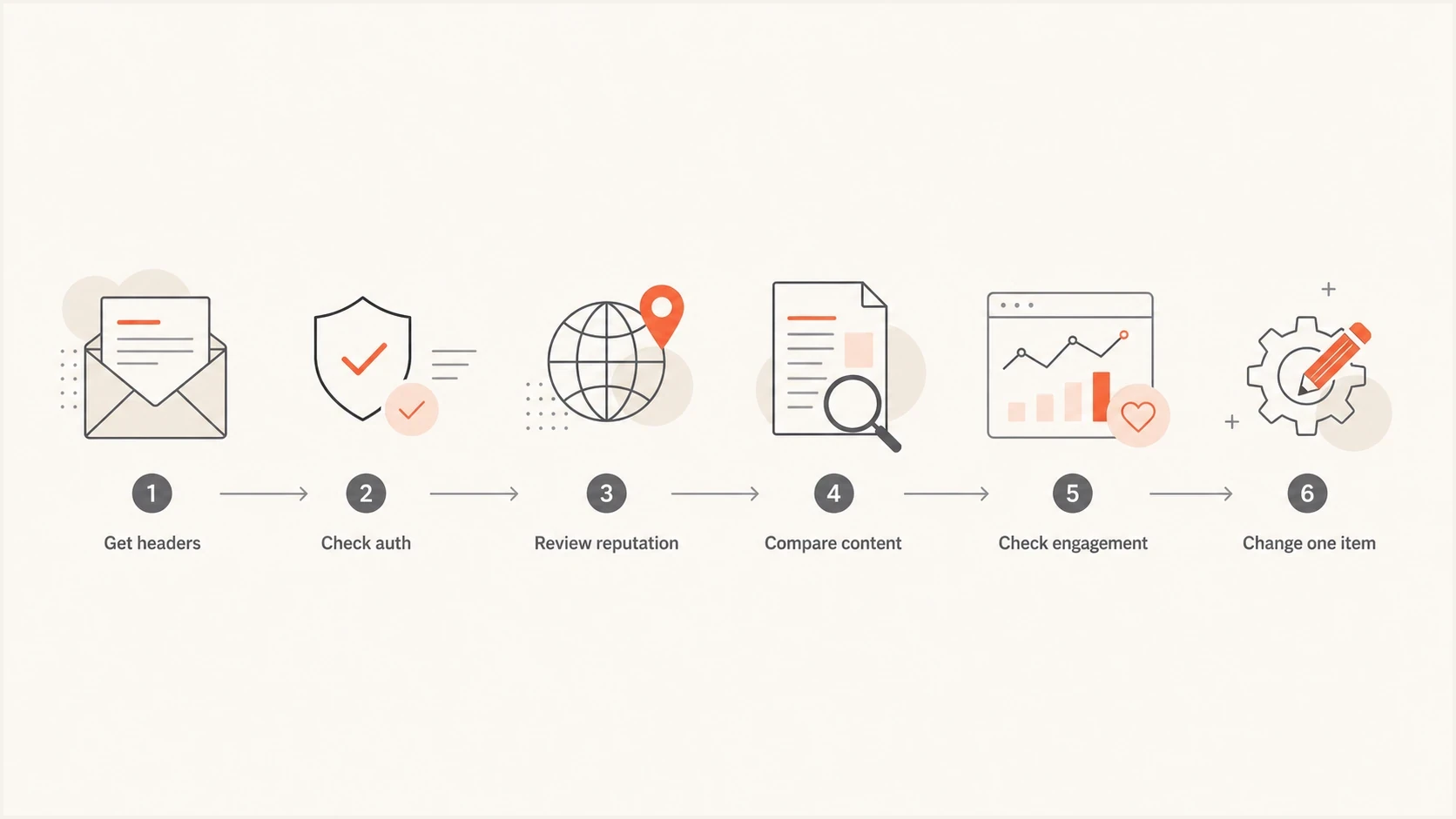
Email spam placement diagnosis flow from message headers to one controlled change.
- Headers: Pull the full headers from the spammed message and read the authentication results.
- Source: Confirm which platform, IP, return-path, and DKIM selector sent the message.
- Scope: Compare affected providers, campaigns, segments, and time windows.
- Reputation: Review complaints, bounces, blocklist or blacklist events, and recent volume changes.
- Message: Test the exact subject, body, links, HTML, and unsubscribe path.
- Change: Adjust one major variable at a time, then measure the next send.
For a real message test, send the same email through the email tester and inspect the authentication result, content issues, and receiving-side clues before changing DNS or copy.
Email tester
Send a real email to this address. Suped shows a results button when the test is ready.
?/43tests passed
Check the domain as a whole too, because one message can expose a wider setup issue. A domain health review catches common SPF, DKIM, and DMARC problems before they turn into repeat placement failures.
Where Suped fits
Suped's product is useful when the question shifts from "why did this email go to spam" to "which source, domain, or record is causing repeat risk." It brings DMARC, SPF, DKIM, blocklist monitoring, and deliverability signals into one place, so the technical work has a clear order.
Issues page showing top issues, verified sources, unverified sources, and authentication pass rates
In Suped, teams can turn authentication and reputation data into specific actions: verify a sending source, fix a DKIM selector, remove an unauthorized sender, resolve an SPF lookup problem, or move a DMARC policy forward after legitimate traffic is authenticated.
Manual approach
- Data: Headers, DNS, reports, and blacklist checks live in separate places.
- Ownership: Marketing, IT, and vendors often disagree on the source.
- Timing: Issues are found after a campaign has already been filtered.
Suped approach
- Data: DMARC, SPF, DKIM, and blocklist status are reviewed together.
- Ownership: Verified and unverified sources are separated clearly.
- Timing: Alerts surface authentication and reputation changes early.
Hosted DMARC, hosted SPF, SPF flattening, hosted MTA-STS, real-time alerts, and multi-tenant reporting are especially helpful when a team manages many domains or needs to move safely toward stronger policy enforcement without constant DNS edits.
Views from the trenches
Best practices
Check authentication, reputation, complaints, and content before changing DNS records or copy.
Use many inboxes and providers before treating one spam placement as a domain-wide failure.
Keep send patterns steady so providers can compare new campaigns against trusted history.
Common pitfalls
Treating one spam-folder screenshot as proof of a deliverability failure everywhere.
Assuming authenticated mail must reach the inbox when complaint signals are negative.
Changing DNS, content, list source, and volume together, then losing cause and effect.
Expert tips
Separate personal mailbox behavior from global sender reputation before taking action.
Compare spam placement with campaign timing, audience quality, and complaint history.
Investigate internal or trusted senders with the same rigor as any outside sender.
Marketer from Email Geeks says a single mailbox spam placement is worth checking, but it does not prove that every recipient sees the same result.
2023-10-26 - Email Geeks
Marketer from Email Geeks says webmail placement can happen inside the provider's own interface, even with no third-party filtering involved.
2023-10-26 - Email Geeks
What to fix first
The best first fix depends on the evidence. If authentication fails, fix SPF, DKIM, and DMARC domain matching first. If authentication passes, focus on reputation, complaints, engagement, content, and sending pattern changes.
The reliable path is measured and predictable: identify the affected source, confirm the technical setup, compare provider behavior, clean the audience, reduce complaint risk, and change one major variable at a time. Spam placement improves when the sender becomes easier to trust and recipients give providers better signals.




