Why are some emails not being delivered through Amazon SES?


Updated on 27 Jul 2026: We updated this guide with Amazon SES sandbox checks, DeliveryDelay troubleshooting, suppression details, and clearer DKIM and MAIL FROM guidance.
Some emails are not delivered through Amazon SES because SES accepting a message is not the same thing as a person seeing it in the inbox. The message can fail before SES accepts it, get dropped by SES because of suppression or message processing, remain temporarily delayed, reach the recipient server and land in spam, or be rejected by the recipient because of authentication, reputation, content, or policy signals.
The fastest way to solve it is to split the problem into evidence points: did your app hand the message to SES, did SES accept it, did SES attempt delivery, did the recipient server accept it, and did the message reach the inbox. Treat a missing SES email as a logging problem first and a deliverability problem second, because without event data every theory sounds plausible.
- Submission: Your application, SMTP client, or API call never actually sends the message to SES.
- SES request: SES refuses the request because of sandbox rules, an unverified identity, permissions, quotas, or sending-rate limits.
- SES handling: SES accepts the request but later suppresses, rejects, or drops the message.
- Recipient filtering: The receiving mailbox accepts delivery but places the email in spam, quarantine, or a hidden folder.
- Authentication: SPF, DKIM, DMARC, or MAIL FROM domain matching fails for only part of your sending stream.
- Reputation: The SES account, sending identity, IP pool, domain, or links have weak trust signals.
Start with the delivery path
The key question is not "did SES send it?". The key question is "what was the last system that can prove it handled the message?" AWS explains this evidence chain in its AWS investigation guide, which is useful when a recipient says an email never arrived but SES shows a successful handoff.
SES accepted it
- Message ID: Your app logged an SES message ID for the exact recipient.
- Event data: SES event publishing shows send, delivery, DeliveryDelay, bounce, complaint, reject, or rendering failure.
- Next step: Compare SES events against the recipient report and timestamp.
Recipient accepted it
- Delivery event: SES has a delivery event with a recipient server response.
- Mailbox search: The recipient needs to check spam, quarantine, filters, and forwarding rules.
- Next step: Test inbox placement and inspect headers from a real delivered sample.
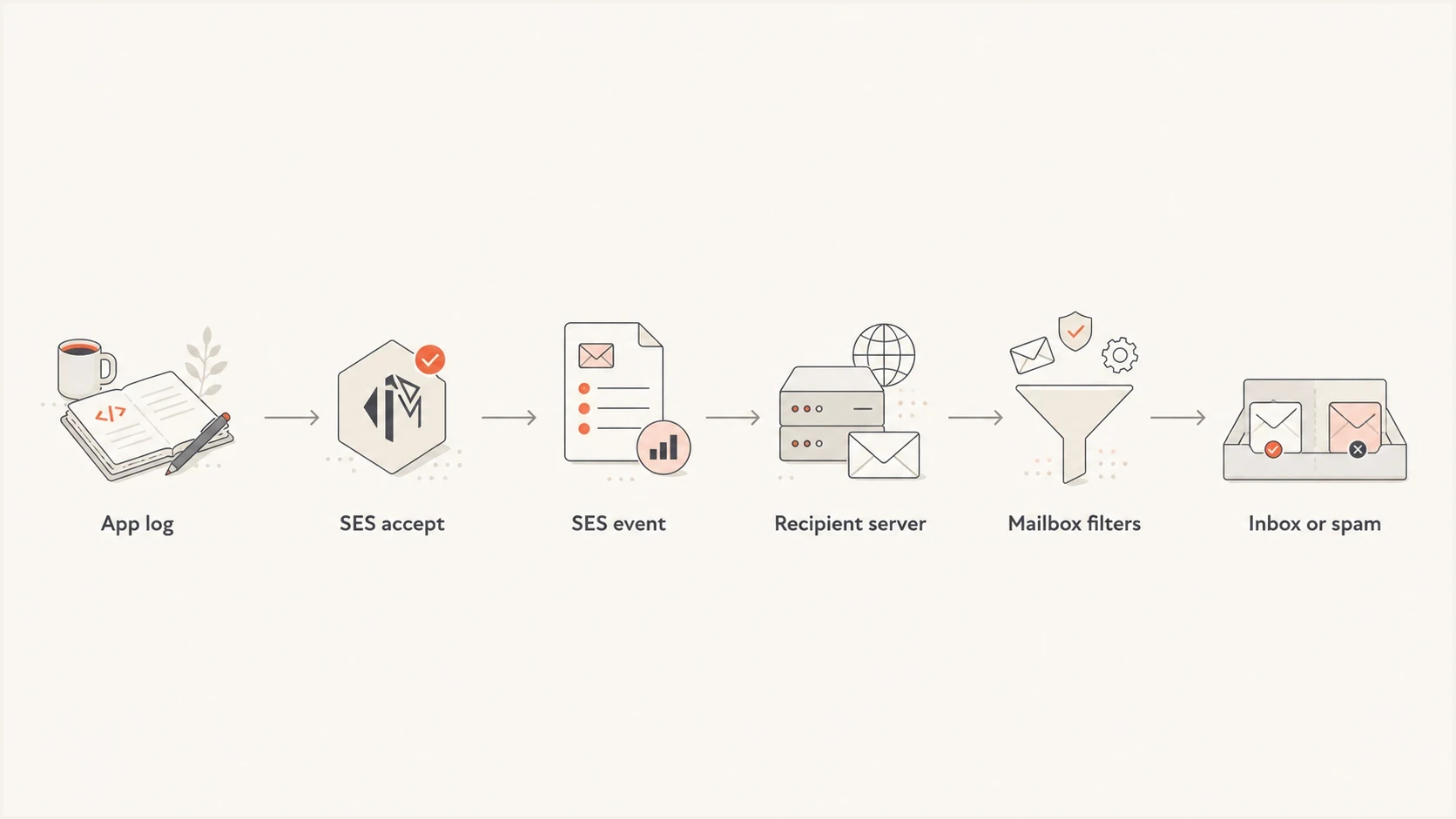
Flowchart showing the Amazon SES delivery investigation path.
Fast triage rule
If SES has no event for the recipient, investigate your application, sandbox and identity status, template rendering, suppression status, quotas, and configuration set. If SES has a DeliveryDelay event, read the delay type and recipient SMTP response before treating it as permanent non-delivery. If SES has a delivery event, investigate mailbox filtering, recipient-side rules, and inbox placement.
Check whether SES really sent it
Start at the exact recipient and timestamp. A healthy account-level bounce rate does not prove one message was sent. It only says aggregate feedback looks acceptable. For each missing message, capture the request ID, SES message ID, recipient, template name, configuration set, sending identity, Region, and API or SMTP response.
Minimum application log fieldstext
timestamp=2026-05-24T10:15:14Z
recipient=person@example.com
ses_region=us-east-1
identity=mail.example.com
configuration_set=transactional
ses_message_id=0100018f6c1a2b3c-abc123
api_status=accepted
AWS documents common delivery failures in its AWS delivery guide. Without event publishing, you are missing the evidence that separates SES-side problems from recipient-side problems. If failures begin suddenly across many domains, also check regional service health before changing DNS or message content.
|
|
|
|---|---|---|
No app log | Not submitted | Fix app queue |
SES reject | Bad content | Inspect message |
DeliveryDelay | Temporary deferral | Read SMTP code |
Bounce | Rejected | Classify code |
Delivery | Server accepted | Check inbox |
How to interpret the first evidence point.
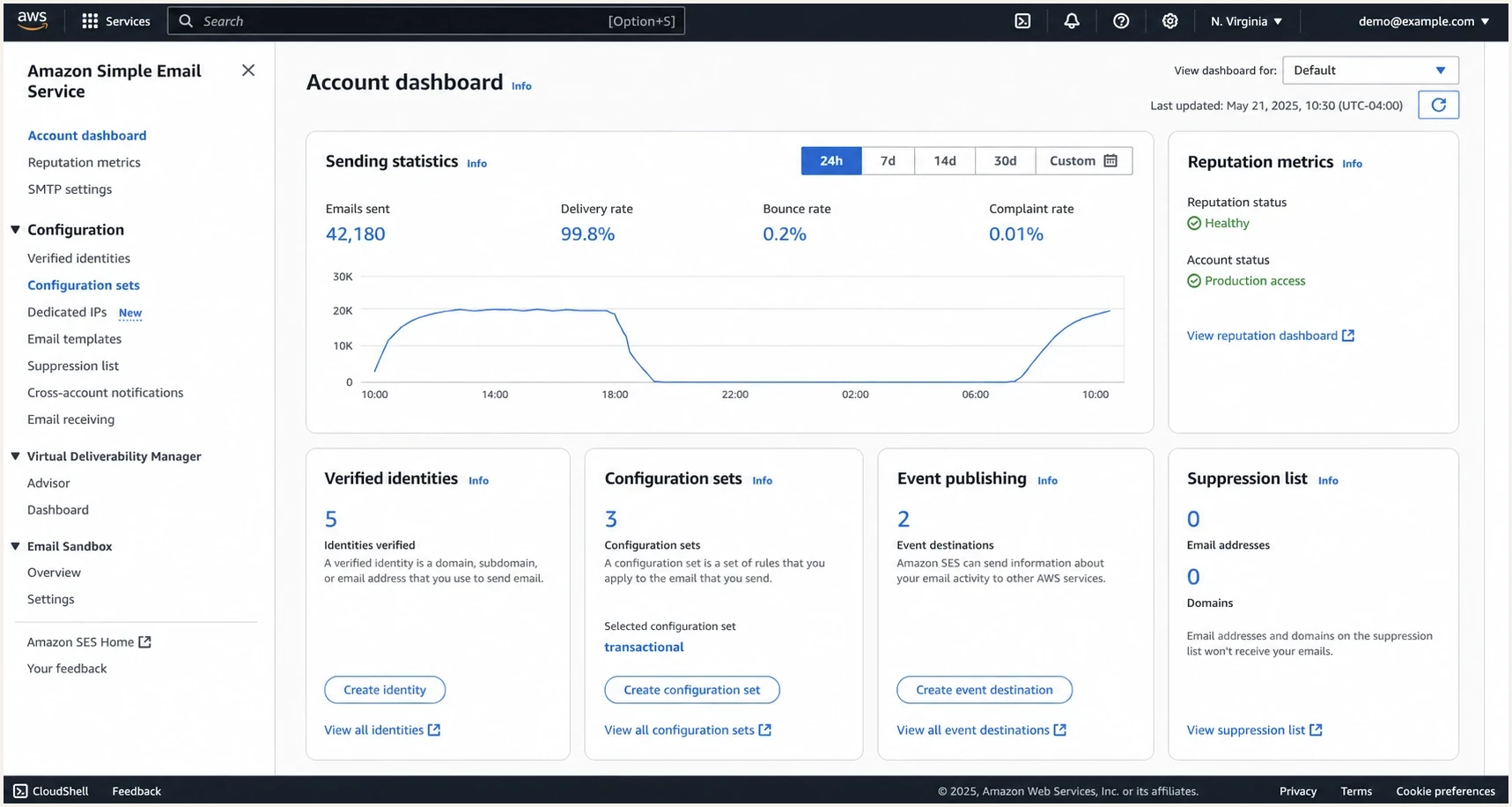
Amazon SES console showing sending statistics and configuration set events.
Rule out Region-specific sandbox and identity restrictions
New SES accounts start in the sandbox, and sandbox status is separate for each AWS Region. An account with production access in one Region can still be in the sandbox in another. In the sandbox, SES can send only to verified recipients or the SES mailbox simulator, with a maximum of 200 messages per 24 hours and one message per second.
- Account status: Check sandbox or production access in the Region that handled the API or SMTP request.
- Sender identity: Verify every From, Source, Sender, or Return-Path identity used by the message in that Region.
- Recipient identity: While in the sandbox, verify the recipient address or domain unless you are using the mailbox simulator.
- Endpoint and credentials: Confirm that the application uses the intended regional endpoint and Region-specific SMTP credentials.
- Limits and retries: Read quota and sending-rate errors, then make sure the application retries only temporary failures with backoff.
Production access does not remove identity checks
After SES moves the account out of the sandbox, recipients no longer need verification. The identities used as From, Source, Sender, or Return-Path still need verification in the sending Region.
Find SES drops before the recipient sees the message
When recipients across Gmail, Yahoo, Outlook, and company domains are missing the same campaign, look for a common SES or application-level cause before blaming one mailbox provider. A 50 percent missing rate across mixed mailbox providers points to a shared sending, processing, or configuration problem.
- Suppression: SES can suppress addresses that previously bounced or complained, so the message never reaches the recipient server.
- Rendering: Template data can fail for only certain recipients, especially when required variables are empty or missing.
- Configuration: A send that lacks the expected configuration set loses event data and becomes harder to trace.
- Throttling: Send-rate limits and poor retry behavior can delay messages long enough to look like non-delivery.
- Delivery delay: Greylisting, a full mailbox, recipient server errors, or IP throttling can produce a DeliveryDelay event while SES continues trying.
- Region: Identities, quotas, account-level suppression lists, sandbox status, and event configuration need to be checked in the Region used for sending.
Do not trust aggregate health alone
Healthy account bounce and complaint rates are good, but they do not prove every recipient was attempted. For a missing batch, compare the recipient list against SES events one address at a time.
Useful SES event types to capturejson
{
  "eventType": "Delivery",
  "mail": {
    "messageId": "0100018f6c1a2b3c-abc123",
    "destination": ["person@example.com"]
  },
  "delivery": {
    "smtpResponse": "250 2.0.0 OK",
    "processingTimeMillis": 942
  }
}
For suppression bounces, inspect the bounce subtype and diagnostic code. Account-level entries can be checked in your account, but the internal global suppression list cannot be queried directly. A global suppression entry is identified by the Permanent and Suppressed bounce notification.
Fix identity and authentication gaps
SES is stronger when mail from your verified domain has an SES DKIM signature and a custom MAIL FROM domain. DMARC passes when either the DKIM signing domain or the SPF-authenticated MAIL FROM domain matches the visible From domain. Easy DKIM can provide the DKIM match on its own. A custom MAIL FROM domain adds a path for SPF to provide the required domain match, but it is not mandatory when DKIM already does so.
Illustrative SES DNS recordstext
Host: token1._domainkey
Type: CNAME
Value: token1.dkim.amazonses.com
Note: Easy DKIM provides three CNAME records

Host: bounce
Type: MX
Value: 10 feedback-smtp.us-east-1.amazonses.com

Host: bounce
Type: TXT
Value: "v=spf1 include:amazonses.com ~all"

Host: _dmarc
Type: TXT
Value: "v=DMARC1; p=none; rua=mailto:d@example.com"
This is where a domain health check helps. Check the sending domain, the MAIL FROM domain, and every DKIM selector that SES created. Then use DMARC monitoring to confirm that real SES traffic is passing SPF, DKIM, and DMARC with the expected domains.
DMARC record detail view showing SPF, DKIM, DMARC, rDNS diagnostics, and DNS records
Suped is our DMARC reporting and email authentication platform. It connects the DNS record view to the authentication outcomes in DMARC reports. For an SES investigation, the team can verify that SES is an approved source, check whether DKIM passes, and identify traffic where neither SPF nor DKIM gives DMARC the required domain match.
When authentication passes but inbox placement still fails
A delivered SES event means the recipient server accepted responsibility for the message. It does not mean the email reached the inbox. If SES shows delivery but people still cannot find the email, send a real message to a controlled inbox and send a live test so you can inspect headers, content, authentication, and placement signals together.
Authentication problem
- Signal: SPF, DKIM, or DMARC fails in the recipient headers.
- Cause: Missing DKIM signing, wrong MAIL FROM setup, or DNS lookup problems.
- Fix: Correct SES identity records and confirm real traffic in DMARC reports.
Placement problem
- Signal: Authentication passes, but the message lands in spam or quarantine.
- Cause: Content, links, domain trust, volume spikes, or recipient engagement.
- Fix: Review content, sending patterns, and the guidance on spam placement troubleshooting.
For SES, placement failures often come down to a sudden volume jump, an unfamiliar sender name, poor list quality, risky links, broken unsubscribe handling, image-heavy creative, or transactional mail mixed with bulk marketing. The fix is rarely one DNS change. It requires a clean chain of proof and smaller controlled changes.
Check reputation, throttling, and blocklists
SES reputation metrics matter, but they are only one layer. Check the reputation dashboard for bounces and complaints, then check send rate, daily quota, dedicated IP warmup, configuration set events, domain reputation, and link reputation. Also check for a domain or IP blocklist (blacklist) listing, especially if failures started suddenly after a spike or campaign.
Suped's blocklist monitoring brings blocklist and blacklist checks into the same operational view as DMARC, SPF, and DKIM, so the team can compare a delivery drop with authentication failures, a new sending source, or a reputation event.
Missing-recipient triage bands
These are internal investigation heuristics, not Amazon SES sending or reputation limits.
Low concern
<1%
A few reports with delivery events usually point to mailbox search or filtering.
Watch closely
1-5%
Repeated reports need recipient-domain grouping and SES event review.
Investigate now
>5%
Broad failures across providers indicate a systemic sending or filtering issue.
Suppression list caveat
Do not remove recipients from suppression just to retry a batch. Confirm why the address was suppressed, whether consent still exists, and whether the original hard bounce or complaint was valid.
A practical investigation sequence
When someone says "half our SES emails are missing", use this order. It reduces guesswork and keeps the team from changing DNS and content while also changing sending infrastructure.
- Match recipients: Build a list of delivered, missing, bounced, delayed, and suppressed addresses for the same send.
- Pull SES events: Group each recipient by send, delivery, DeliveryDelay, bounce, complaint, reject, or rendering failure.
- Group by domain: Compare Gmail, Yahoo, Outlook, business domains, and regional mailbox providers.
- Inspect headers: Use a delivered sample to confirm DKIM signing, SPF pass, DMARC pass, and MAIL FROM setup.
- Check reputation: Review SES reputation, complaint feedback, bounce reasons, blocklist or blacklist state, and volume changes.
- Change one thing: Retest after one controlled fix so the next result explains the previous failure.
Questions to answer before changing SES setuptext
Which SES Region sent the message?
Is that Region in the sandbox or production?
Which configuration set was used?
Does every missing recipient have an SES event?
Were any addresses suppressed?
Did the template render for every recipient?
Did SES report a DeliveryDelay, bounce, or deferral?
Do delivered samples pass SPF, DKIM, and DMARC?
Where Suped fits
Suped is our DMARC reporting and email authentication platform. With SES, its role starts after per-message SES events identify what the sending service did. Suped then helps the team investigate DNS, DMARC aggregate reports, DKIM selectors, MAIL FROM setup, blocklist or blacklist status, and changes in authorized sending sources.
- Issue detection: Suped flags authentication problems and provides steps to fix them.
- Unified checks: DMARC, SPF, DKIM, blocklist monitoring, and deliverability signals sit in one platform.
- Hosted records: Hosted DMARC, Hosted SPF, SPF flattening, and Hosted MTA-STS reduce DNS maintenance.
- Alerts: Real-time alerts help teams catch failure spikes before they become support tickets.
- Scale: MSP and multi-tenant views help agencies manage SES and non-SES domains.
Practical setup
Use SES event publishing for per-message evidence, configure DKIM for your verified domain, add a custom MAIL FROM domain when you need SPF to provide the DMARC domain match, and use Suped to monitor DMARC outcomes, SPF and DKIM health, policy changes, alerts, and reputation signals.
Views from the trenches
Best practices
Log SES message IDs for every send so delivery events can be matched to recipients fast.
Use custom MAIL FROM and DKIM so SES mail uses your domain instead of relying on amazonses.com.
Separate transactional and marketing streams before volume or complaint patterns blur evidence.
Common pitfalls
Treating a 250 delivery event as inbox proof misses recipient spam filtering decisions.
Removing suppressed addresses without consent checks can restart hard bounces quickly.
Checking only global rates hides mailbox-specific failures across Gmail, Yahoo, and Outlook.
Expert tips
Compare missing recipients by domain before changing DNS, content, or SES configuration.
Use event publishing early, because missing logs turn SES issues into guesswork quickly.
Keep a saved raw message sample so DKIM signatures and headers can be inspected later.
Marketer from Email Geeks says custom MAIL FROM and DKIM should be checked first because default SES setup can leave authentication weaker than intended.
2023-02-03 - Email Geeks
Marketer from Email Geeks says healthy bounce and complaint rates do not rule out SES drops, recipient filtering, or missing event data.
2023-02-03 - Email Geeks
The fastest path to an answer
Some SES emails fail to arrive because they were never submitted, were blocked by sandbox or identity rules, were suppressed or rejected after acceptance, remained temporarily delayed, passed to the recipient but were filtered, or failed authentication and reputation checks. The fix starts with per-recipient evidence, not broad account health.
The default sequence is simple: confirm the Region and sandbox status, log the SES message ID, enable event publishing, map every missing recipient to an SES outcome, verify DKIM and MAIL FROM, inspect a real delivered header, and then review content, volume, and blocklist or blacklist status. Suped fits into that workflow by keeping DMARC, SPF, DKIM, alerts, hosted records, and reputation checks together after SES supplies the per-message evidence.




