Why are my emails receiving Microsoft 550 5.7.515 access denied bounces despite correct authentication?

Updated on 14 Aug 2026: We clarified Microsoft's high-volume authentication rules and added a checklist for third-party senders.
The direct answer is that Microsoft can reject mail with 550 5.7.515 even when authentication passes in an earlier test. For high-volume domains, Microsoft requires both SPF and DKIM to pass, plus DMARC to pass through at least one mechanism aligned with the visible From domain. A message can look correct at the original sender but fail after forwarding or content changes, use an unaligned Return-Path or DKIM domain, or encounter a DNS lookup failure when Microsoft evaluates it.
A bounce can show SPF Fail, DKIM Pass, and DMARC Pass. That result is valid because aligned DKIM can make DMARC pass, but it still fails Microsoft's separate requirement that both SPF and DKIM pass for a high-volume sender domain.
Fast answer
- DMARC pass: At least one of SPF or DKIM passed and aligned with the 5322.From domain, but that does not prove both checks passed.
- SPF fail: A fail can appear after forwarding because SPF checks the last connecting server against the 5321.MailFrom domain.
- DKIM fail: A fail can appear when a relay or filter changes signed headers or body content after the original send.
- Transient DNS: Short-lived resolver or lookup issues can make a correct DNS record fail at Microsoft's side.
What the bounce means
The Microsoft support note says this NDR applies to Outlook.com and related consumer services such as Hotmail, Live.com, and MSN. The stricter requirements apply when a domain sends 5,000 or more messages per day to those services using the same 5322.From domain.
Typical 550 5.7.515 bounce text
550 5.7.515 Access denied, sending domain example.com
doesn't meet the required authentication level.
The sender's domain in the 5322.From address
doesn't meet the authentication requirements defined for the sender.
Spf= Fail, Dkim= Pass, DMARC= Pass
The important phrase is 5322.From. This is the visible From address, also called the P2 sender. Microsoft checks whether SPF and DKIM pass and whether at least one of them aligns with this domain for DMARC.
|
|
|
|---|---|---|
SPF Fail | The connecting IP was not authorized for the 5321.MailFrom domain. | Return-Path, authorized sources, forwarding, and DNS lookup count. |
DKIM Fail | The signature was missing, damaged, or not accepted. | Selector, key, signing domain, signed headers, and body changes. |
DMARC Pass | At least one passing mechanism aligned with the 5322.From domain. | Which mechanism aligned, and whether the other mechanism still failed. |
Delayed NDR | A later relay or forwarding hop generated the failure. | Aliases, mailbox rules, relays, and recipient-side forwarding. |
How to read the signals in the NDR
Microsoft high-volume sender threshold
Microsoft applies stricter authentication when a domain sends 5,000 or more messages per day to its consumer email services using the same 5322.From domain.
Below threshold
Under 5,000 daily
Microsoft still checks authentication, but the high-volume rule is not the main reason for this NDR.
High volume
5,000+ daily
Both SPF and DKIM must pass, DMARC must pass, and at least one mechanism must match the From domain.
Sustained high volume
Daily enforcement
Group even low failure rates because a small percentage can create many bounces.
Why correct authentication still fails
Treat this error as a Microsoft-facing authentication problem first, then verify DNS configuration. If the domain passes at the sending platform, check whether the same result survives routing, forwarding, filtering, and Microsoft's DNS evaluation.
- High-volume rule: Microsoft requires SPF and DKIM records, both checks to pass, DMARC to pass, and at least one passing mechanism to align with the 5322.From domain.
- One-leg DMARC: DMARC can pass through aligned DKIM while SPF fails, or through aligned SPF while DKIM fails. That still falls short of the separate both-must-pass rule.
- Forwarded mail: A recipient rule, alias, or mailbox forward can make SPF fail because the forwarder becomes the connecting server.
- Changed content: A disclaimer, URL rewrite, footer, or security filter can break DKIM by changing signed content after send.
- DNS variance: A record can resolve correctly for one test but fail during a short resolver, cache, delegation, or DNSSEC problem.
- Recipient path: If only some Outlook.com addresses fail, compare their delivery paths and NDR timestamps before treating the issue as domain-wide.
Direct delivery
A direct delivery path gives SPF and DKIM the best chance of passing because Microsoft sees the sending server and signed content as intended.
- SPF check: The connecting IP is authorized for the 5321.MailFrom domain.
- DKIM check: The signature survives because no hop changes signed headers or body content.
- DMARC check: At least one passing mechanism aligns with the visible From domain.
Forwarded or delayed delivery
A forwarded path changes the evidence Microsoft receives. The original message can authenticate correctly while the later hop fails the final check.
- SPF check: The forwarder's IP is checked instead of the original sending server.
- DKIM check: The signature fails when the forwarder modifies signed content.
- ARC check: ARC helps only when the chain is present, valid, and trusted by the receiver.
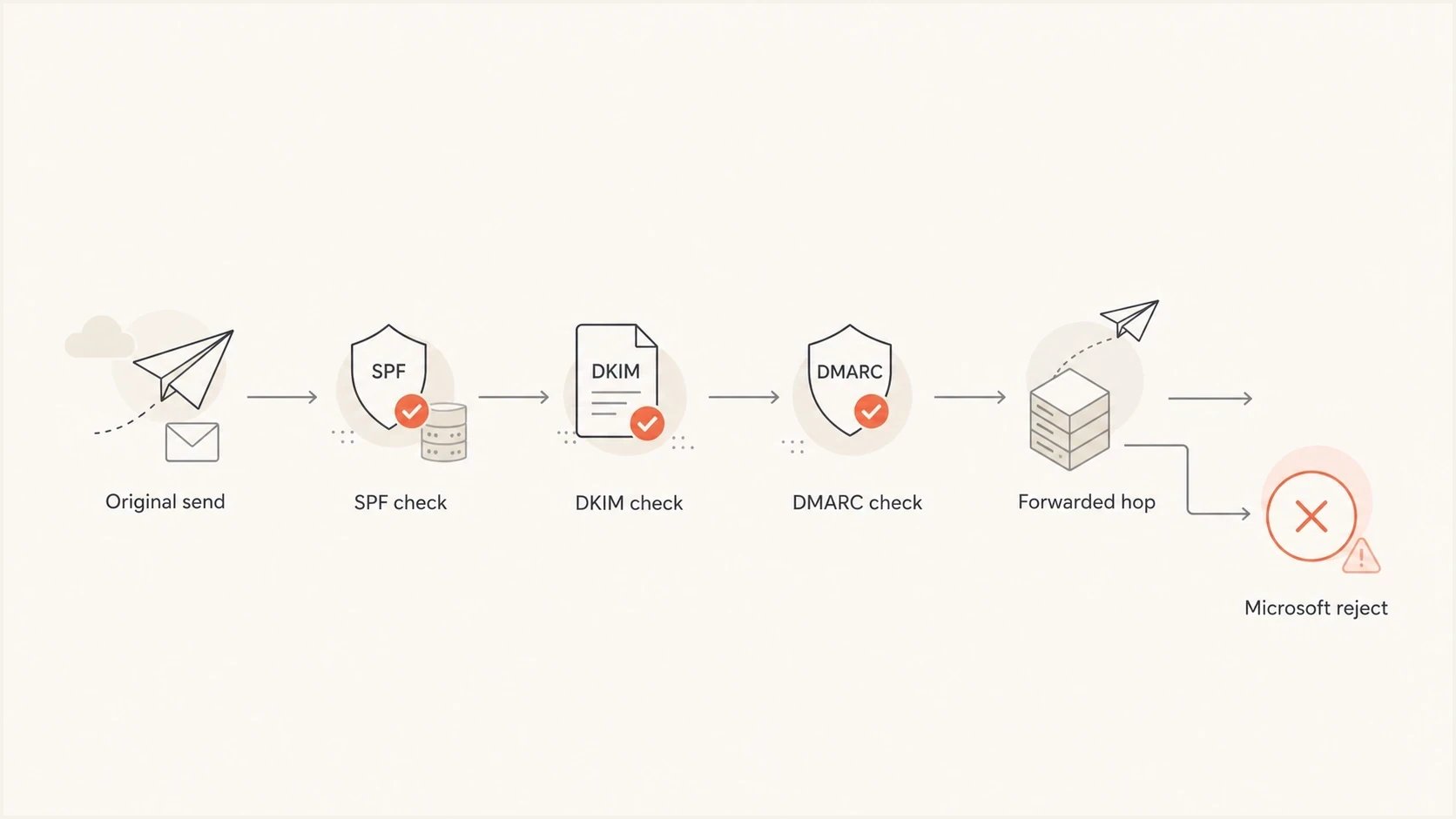
Flowchart showing how SPF, DKIM, DMARC, and forwarding can lead to a Microsoft rejection.
How to diagnose it without guessing
Start with the full DSN and full message headers. Do not change SPF or DKIM based only on a bounce summary because the summary often hides the hop that caused the failure. A delayed NDR generated after an intermediate system accepted the message differs from a direct rejection during the first SMTP transaction.
- Confirm timing: Check whether the failure was immediate or arrived later as a delayed delivery notification.
- Compare domains: Compare the Return-Path or 5321.MailFrom domain (P1 sender), the 5322.From domain (P2 sender), and the DKIM signing domain.
- Read results: Use Authentication-Results fields and the NDR to identify which mechanism passed at the Microsoft-facing hop, not only at the original sender.
- Check DNS: Run a domain health check for SPF, DKIM, DMARC, delegation, and obvious DNS issues.
- Send proof: Use send a real test to inspect live headers and authentication results.
- Group bounces: Separate failures by Microsoft recipient domain, 5322.From domain, source IP, sending service, and timestamp.
For a live test, use the same sending service, From domain, DKIM selector, Return-Path pattern, and content path that produced the bounce. A test from a different route can pass while the affected production route still fails.
If the bounce affects transactional mail, test with the exact template class that failed. Headers, footers, tracking links, and per-customer routing can change DKIM behavior even when the DNS records are identical.
Email tester
Send a real email to this address. Suped shows a results button when the test is ready.
?/43tests passed
If the live test passes but Microsoft bounces continue, look for a route-specific problem. Common causes include forwarding, a subset of recipient domains, a specific sending IP, a DNS resolver issue, or content modification after signing.
Keep the raw test output with the DSN. When failures are intermittent, the timestamp and sender path matter as much as the DNS values because resolver and routing changes can be short-lived.
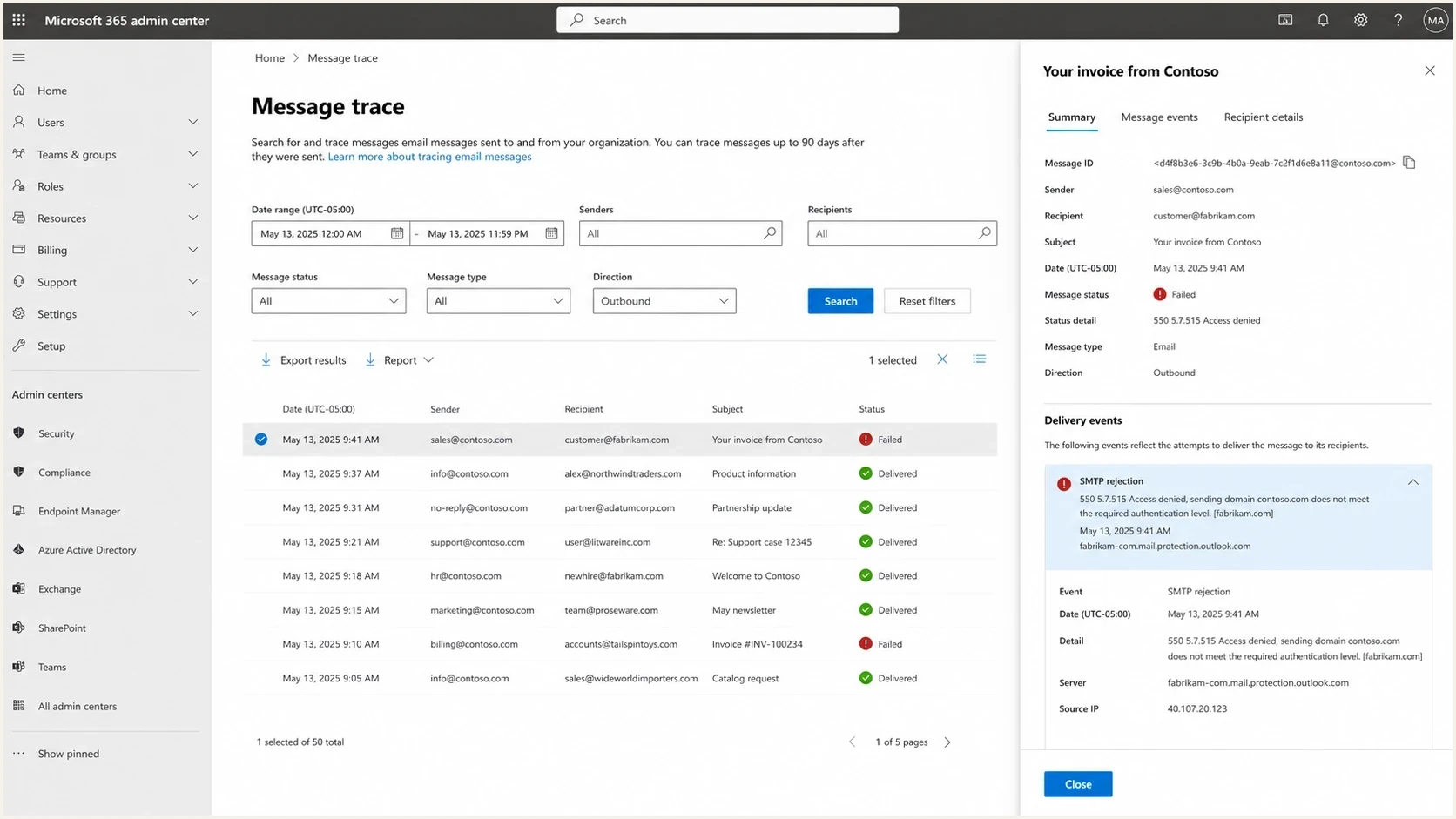
Microsoft 365 admin center message trace showing a 550 5.7.515 rejection event.
Minimum DMARC record for Microsoft high-volume checks
Host: _dmarc.example.com
Type: TXT
Value:
v=DMARC1; p=none; rua=mailto:dmarc@example.com; fo=1
Check every third-party sending service
Microsoft lists third-party sender configuration as a separate troubleshooting step. Check every service that sends with your 5322.From domain because one billing, support, marketing, or transactional route can trigger the NDR even when the primary mail system passes.
- Verify the Return-Path: Confirm the 5321.MailFrom domain belongs to or aligns with your domain and that its SPF record authorizes the actual connecting sources.
- Verify DKIM signing: Enable signing with your domain, publish the active selector, and confirm the signature survives the service's full production route.
- Verify DMARC alignment: Confirm SPF or DKIM aligns with the 5322.From domain. For Microsoft's high-volume rule, both SPF and DKIM must still pass.
- Test each route: Send through every active service and subdomain using production Return-Path, DKIM selector, headers, and content.
What to inventory
List every system allowed to use the visible From domain, then record its source IPs, SPF authorization, 5321.MailFrom domain, DKIM signing domain, selector, and message purpose. Remove obsolete authorization only after confirming that no production route depends on it.
Fixes that actually change the result
The right fix depends on the result Microsoft received. Use the bounce as evidence, then confirm it with headers and DMARC aggregate data. The Microsoft support note requires working SPF, DKIM, and DMARC for high-volume domains sending to Microsoft consumer recipients.
|
|
|
|---|---|---|
SPF path | SPF fails while DKIM and DMARC pass. | Authorize the connecting sources and confirm the 5321.MailFrom domain. |
DKIM break | DKIM fails after a relay or filter. | Sign later in the route or stop changing signed content. |
Forwarding | The NDR arrives after an intermediate hop accepted the message. | Review aliases, mailbox rules, ARC, and recipient-side forwards. |
DNS issue | Failures cluster by time rather than one source. | Check delegation, TTLs, DNSSEC, and resolver variance. |
Third-party sender | Only one service or selector produces failures. | Correct that service's Return-Path, SPF authorization, DKIM signing, and alignment. |
Common causes and practical fixes
Do not fix the wrong thing first
- DMARC policy: Do not jump from none to reject to solve this. A stricter policy does not repair SPF or DKIM.
- SPF changes: Do not add broad includes unless the 5321.MailFrom domain and connecting IP evidence point there.
- Retry loops: Do not keep retrying transactional mail without grouping failures by route and recipient domain.
If Microsoft bounces use several response codes, compare their wording with a general 550 bounce guide. That separates authentication-specific 5.7.515 failures from relaying, recipient policy, reputation, and other 550-class errors.
Where Suped fits
Suped's product combines DNS checks, DMARC aggregate data, alerts, and remediation steps. For a 550 5.7.515 investigation, use the affected 5322.From domain to identify failing source IPs, compare SPF and DKIM alignment, and see whether failures cluster around one sender or route.
Start with DMARC monitoring to group pass and fail results by source for the From domain. Hosted SPF or SPF flattening can reduce lookup-limit problems when many approved senders share the domain. Blocklist monitoring helps separate this authentication bounce from a separate blocklist or blacklist issue when other response codes appear.

Issue steps to fix dialog showing the issue overview, tailored fix steps, and verification action
Manual workflow
- Data split: Bounces, headers, DNS records, and aggregate reports sit in different places.
- Slow grouping: Teams spend time grouping failures by source, IP, domain, and recipient route.
- DNS risk: SPF changes can create lookup-limit issues or remove valid senders.
Suped workflow
- Issue detection: Suped groups failed sources and provides the related remediation steps.
- Real-time alerts: Teams get notified when authentication failures move beyond normal noise.
- Hosted controls: Hosted SPF, hosted DMARC, and hosted MTA-STS reduce DNS handoffs.
Views from the trenches
Best practices
Separate direct and delayed bounces before changing DNS or sender configuration.
Compare the failed leg in the NDR with full headers and aggregate DMARC data promptly.
Group failures by timestamp, Microsoft domain, sending IP, and visible From domain.
Common pitfalls
Assuming DMARC pass means Microsoft accepted every required authentication check.
Treating forwarded mail the same as direct delivery when SPF evidence has changed.
Changing the DMARC policy before proving whether SPF, DKIM, or forwarding failed.
Expert tips
A tiny failure rate still matters at high volume because it creates many visible bounces.
ARC helps forwarded mail only when the chain is valid and the receiver trusts the seal.
Short resolver incidents can make a correct DNS record fail for one receiver temporarily.
Marketer from Email Geeks says the first check is whether SPF and DKIM match the visible From domain, because a local SPF pass does not prove the final Microsoft result.
2025-06-12 - Email Geeks
Marketer from Email Geeks says short DNS lookup failures can produce this error even when the published records are correct and later tests pass.
2025-06-12 - Email Geeks
What to do next
Do not assume the domain is broken only because Microsoft returns 550 5.7.515. Do not dismiss the NDR because another mailbox provider accepts the same message. Prove where the failure appeared: direct send, forwarded route, DNS lookup, DKIM content change, or one third-party sender.
For high-volume mail to Microsoft consumer services, keep SPF and DKIM passing, publish a valid DMARC policy, and make sure SPF or DKIM aligns with the 5322.From domain. If bounces appear suddenly across stable senders, group them by time, Microsoft recipient domain, and sending route before changing DNS.
Practical close-out checklist
- Headers captured: You have the full DSN and message headers, not only the visible bounce summary.
- Path known: You know whether the bounce was direct or delayed after a forwarding hop.
- Mechanisms proven: You know whether SPF and DKIM passed at the Microsoft-facing hop and which mechanism aligned for DMARC.
- Change scoped: Any DNS or signing change targets the source and domain that produced the failure.




