Why are emails showing as opened with Google Image Proxy IP when the recipient hasn't opened them?

Published 24 Jul 2025
Updated 26 Jul 2026
11 min read
Summarize with
Updated on 26 Jul 2026: We corrected how Gmail rendering, prefetching, and GoogleImageProxy requests should be classified.
Emails show as opened with a Google Image Proxy IP because your ESP recorded an image request, usually for the tracking pixel, from Google's image proxy. A request with the GoogleImageProxy user agent usually means Gmail rendered a copy of the message and loaded its remote images through Google. It is evidence of a render event, but it is not proof that the named recipient personally read the email.
If the recipient says they did not open it, check whether Gmail displayed the message in a reading pane, a delegate or shared mailbox viewed it, or a forwarded, quoted, sent, or bounce copy reused the same tracking URL. Gmail also has separate prefetch and content-inspection requests, but controlled research has found that those requests use signatures other than the familiar GoogleImageProxy user agent.
Open tracking is image-load tracking. It records a client or machine requesting remote content, while human attention must be inferred. Google's cache can hide the reader's device and suppress later origin requests. Security scanning and privacy relays can create other machine events. Treat a GoogleImageProxy hit as a Gmail rendering signal, then use stronger actions to measure engagement.
What a Google Image Proxy open means
An ESP usually tracks an open by placing a tiny unique image in each email. When that image URL is requested, the ESP records the recipient, campaign, timestamp, IP address, and user agent attached to the request. Gmail and Google Workspace do not request that image directly from the reader's device. When Gmail renders external images, Google can fetch them through its secure image proxy, cache the response, then send the cached copy to the interface.
Google's current Workspace documentation says Gmail uses secure proxy servers to serve images when users open email messages. Gmail's reading pane can also preview a message without the user thinking of it as an open. The external mechanics of the Gmail image proxy explain why the sender sees Google, not the device or network behind the interface.
Do not treat proxy opens as proof of reading
A Google Image Proxy IP is a machine source for a Gmail render. It does not identify which person caused the render, which Gmail surface displayed the copy, or whether anyone paid attention to the content.
- Reliable clue: Gmail rendered a copy and fetched the tracking pixel through Google's proxy.
- Unreliable claim: The named person read the email at that timestamp.
- Useful next step: Compare the request with clicks, replies, conversions, and controlled mailbox tests.
|
|
|
|---|---|---|
GoogleImageProxy | Gmail rendered a copy | The named person read it |
Very fast | Review the context | Automation is certain |
Cloud IP | A proxy or scanner fetched it | The reader's location |
Repeat count | The origin URL was requested | Every reread was recorded |
How to read common open log clues without overclaiming human engagement.
Separate GoogleImageProxy renders from Gmail prefetch
Do not group every request from Google infrastructure into one false-open bucket. Controlled 2025 research found that Gmail requests tied to email opening used a user agent ending in '(via ggpht.com GoogleImageProxy)'. Gmail prefetch requests used a browser-like user agent and a mail.google.com referrer instead. Post-report inspection had other identifiable signatures.
This distinction changes the diagnosis. An exact GoogleImageProxy signature supports a Gmail render, although it cannot identify the person or attention behind it. A different Google-hosted request seconds after delivery is a prefetch candidate. Validate the full user agent, referrer, source network, requested objects, and timing before filtering it.
|
|
|
|---|---|---|
GoogleImageProxy user agent | Gmail render | Keep, but do not infer the reader |
Browser-like Google request | Prefetch candidate | Validate headers before filtering |
Content-sampling signature | Inspection candidate | Exclude after controlled validation |
Unknown Google or cloud request | Unclassified | Retain and test |
Use complete request fingerprints instead of IP ownership or timing alone.
Why a secure email gateway is separate
A secure email gateway and Google's image proxy are separate systems. A domain can route mail through a gateway before handing it to Google Workspace. Depending on its configuration, the gateway can inspect message content, rewrite links, scan files, or analyze images. After delivery, Gmail can fetch remote images through Google's proxy when it renders the message.
A standard gateway request does not become a GoogleImageProxy request merely because the message later enters Google Workspace. If the source address belongs to Google and the user agent contains the exact GoogleImageProxy marker, classify that origin request as Google's proxy layer. Use the gateway's own logs before attributing any other request to scanning.
Google Image Proxy
- Owner: Google operates the proxy and cache.
- Purpose: It serves remote images when Gmail renders messages.
- Open log: The request appears as Google infrastructure with a proxy marker.
Gateway scanning
- Owner: The recipient organization or its provider runs the gateway.
- Purpose: It inspects mail according to the organization's security policy.
- Open log: The source depends on the gateway and its deployment.
A recipient can truthfully say they did not deliberately open the email while Gmail still rendered a copy. The reading pane, delegated access, a shared mailbox, a forwarded copy, or quoted content can cause that mismatch. If the request lacks the GoogleImageProxy marker, investigate prefetching or gateway activity separately.
The usual path behind these opens
A clean way to debug this is to separate the mail path from the image path. The mail path is how the message gets delivered. The image path is how the tracking pixel is fetched. Those paths can involve different systems, IP addresses, and timestamps.
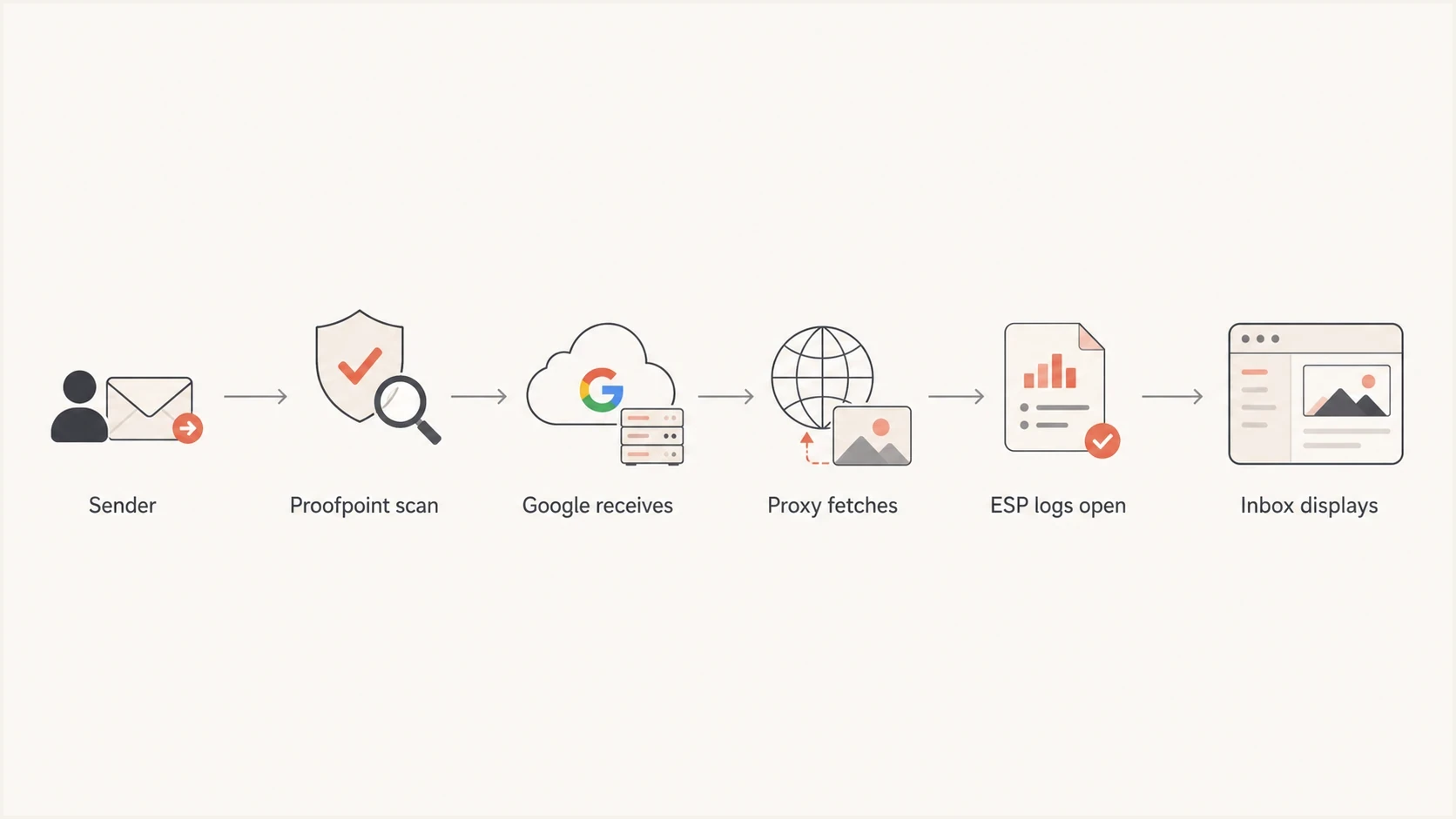
Flowchart showing email gateway delivery, Gmail proxy image fetching, and ESP open logging.
In a Google Workspace setup with a gateway in front, the message can hit the gateway MX first for inspection and then pass to Google. When Gmail later renders external images, Google's image proxy requests them. Your ESP sees that origin request and records an open.
Gmail can display a cached copy on later renders instead of requesting the tracking pixel again. One origin request can therefore correspond to the first Gmail render, while later reads produce no new request at the sender's server. Caching makes reopen counts incomplete, and it prevents the sender from tying the request to the reader's device or location.
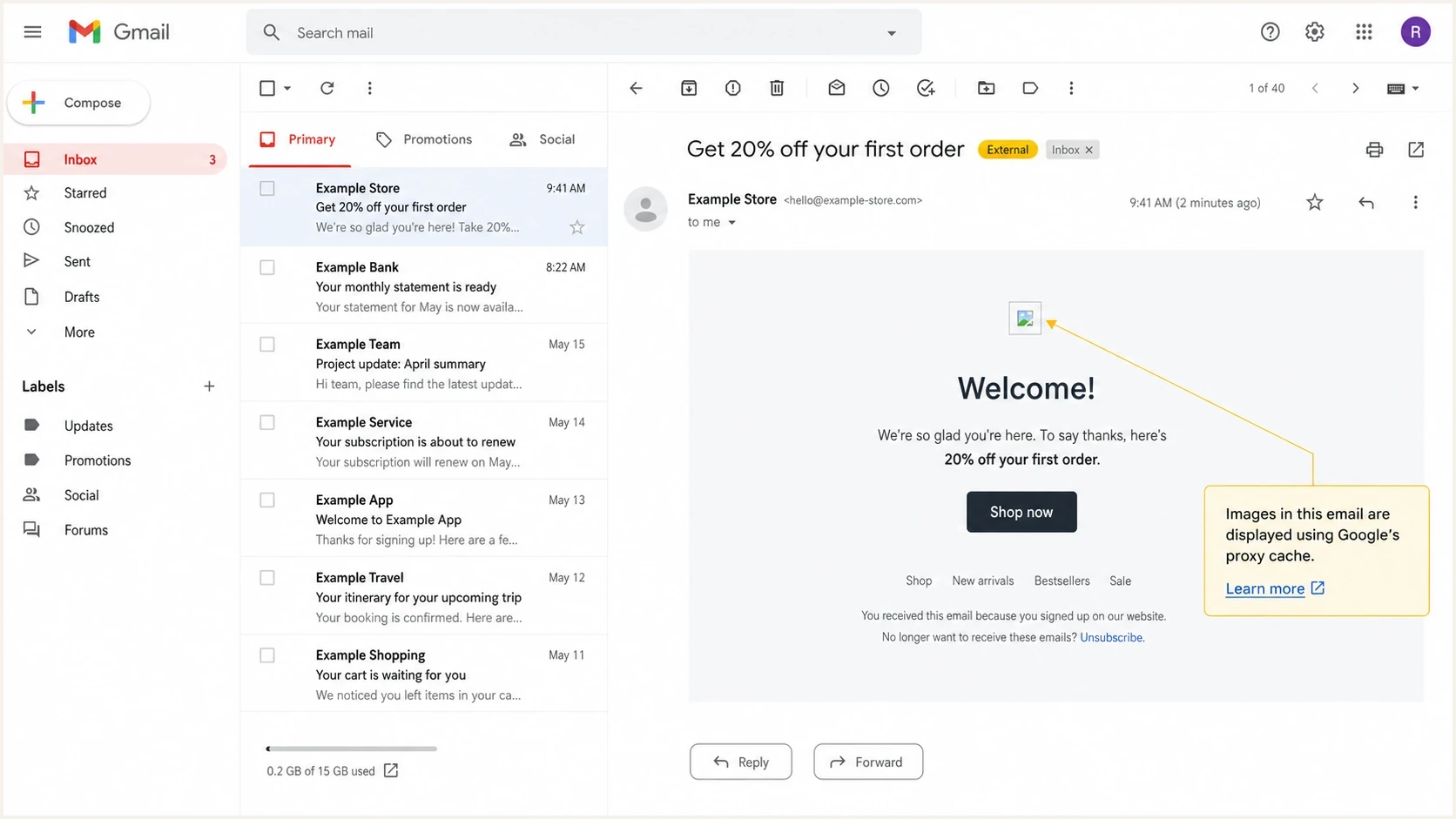
Gmail message view with remote images served through Google's image proxy cache.
How to identify artificial opens
Open pixels cannot be made human-only. Classify events using the complete request fingerprint, timing, and any later action. A GoogleImageProxy render followed by no click, reply, site session, or conversion is weak engagement data, but it is not automatically a false open. A confirmed prefetch or scanner signature belongs outside human engagement reporting.
- Timing: A request within seconds deserves review, but speed alone does not prove automation.
- Signature: Match the full user agent, referrer, source network, and requested objects.
- Pattern: Many synchronized requests across one domain usually indicate machine activity.
- Follow-up: Replies and verified web actions carry more intent than image loads.
Example render event to reviewtext
event=open
recipient=person@example.com
source_ip=66.249.x.x
user_agent=GoogleImageProxy
seconds_after_delivery=3
clicks_after_open=0
reply_after_open=false
Separate reporting into pixel renders and qualified engagement. Pixel renders answer whether a remote image URL was requested. Qualified engagement uses replies, verified clicks, site behavior, or business outcomes. That separation keeps campaign reporting useful while preserving proxy events for deliverability diagnostics. For more methodology, compare this with open-rate accuracy guidance.
Open confidence bands
Classify open events by request evidence before they influence campaign decisions.
Low confidence
Machine markers
A validated prefetch, scanner, or sampling signature with no later action.
Medium confidence
Render only
A GoogleImageProxy render without a click, reply, or verified site action.
Higher confidence
Action
A render followed by a reply, verified click, site session, or conversion.
How to test your own campaign evidence
Send controlled messages with a different tracking URL for every copy and mailbox state. Leave one Gmail inbox untouched, display one message in the reading pane, open another normally, forward a separate copy, and inspect the sender's sent copy. Record delivery time, first image request, source IP, full user agent, referrer, click time, and reply time. This shows which action produced each request instead of treating every Google address as the recipient.
A tool-based test helps because it shows the raw authentication and rendering evidence without relying only on campaign summary charts. Use an email tester when you need to inspect headers, authentication results, content warnings, and mailbox-facing issues in one place.
Email tester
Send a real email to this address. Suped shows a results button when the test is ready.
?/43tests passed
When a test produces a fast GoogleImageProxy request without later action, keep it as a Gmail render and avoid assigning person-level intent. When a validated prefetch signature appears before any controlled render, classify it as machine activity. Sales, lifecycle, and deliverability teams can then use the same raw events with different confidence rules.

Email tester sample report showing total score, email preview, issue summary, and per-section results
What to change in reporting
Do not chase a perfect open rate. Change what the metric is allowed to mean. Keep Gmail proxy events as soft rendering signals, segment validated machine requests, and avoid using opens alone for lead scoring, reactivation rules, or sales follow-up claims.
A cleaner reporting model
- Raw requests: Keep every pixel request for auditing provider behavior.
- Rendered opens: Report GoogleImageProxy events separately without naming a reader.
- Machine activity: Exclude validated prefetch, scanner, and sampling signatures.
- Engagement: Prioritize replies, verified clicks, sessions, conversions, and preferences.
Company-level anomalies need the same discipline. If one domain suddenly produces hundreds of synchronized GoogleImageProxy requests, investigate a shared Gmail surface, forwarding behavior, or reporting change before assigning engagement. If cloud or gateway addresses fetch images in a uniform pattern, classify them as machine activity only after the fingerprint is validated.
|
|
|
|---|---|---|
GoogleImageProxy | Gmail render | Segment, do not infer reader |
Validated gateway request | Security scan | Exclude from engagement |
Render plus verified click | Higher confidence | Count the action |
Reply | Human action | Prioritize |
Practical reporting actions for common cases.
Authentication is a separate diagnostic layer
Google Image Proxy behavior is not caused by a broken DMARC record. It is normal Gmail rendering behavior. Authentication and domain reputation still affect whether a message is accepted and where it is placed, but a proxy request does not diagnose inbox placement or prove that authentication passed.
If open data changes suddenly, check the sending domain as a separate investigation. A failed DKIM signature, an SPF lookup problem, misalignment, or a blocklist (blacklist) event can alter placement and downstream metrics. Suped's domain health checker provides a quick check of those records and reputation signals.
Suped's DMARC reporting workflow keeps authentication failures separate from rendering events. Use it to trace failing sources, verify SPF and DKIM alignment, monitor blacklist and blocklist changes, and alert the team when a sending domain changes. It cannot turn a proxy render into proof of reading, but it can show whether a separate authentication issue explains a campaign shift.
Suped DMARC dashboard showing email volume, authentication health, and source breakdown
For multiple sending domains, use DMARC monitoring to separate authentication failures from open-tracking noise. This prevents machine requests from masking the delivery problem that needs attention.
Views from the trenches
Best practices
Store raw opens separately so analysts can audit proxy and confirmed machine signals later.
Use replies and verified web actions before assigning sales intent to a recipient.
Check authentication and placement before treating open-rate swings as audience behavior.
Common pitfalls
Treating every Google proxy request as a bot removes legitimate Gmail render events.
Attributing Google proxy IPs to the email gateway mixes two separate request paths.
Using speed alone to filter opens can discard a real render that happened after delivery.
Expert tips
Tag events by full request fingerprint, then show Gmail renders beside raw requests.
Use controlled seed mailboxes to test reading panes, forwarding, and cache behavior.
Treat renders without later actions as diagnostics, not proof of person-level intent.
Marketer from Email Geeks says a Google proxy request shows that Google fetched the image, not that the named recipient personally read the message.
2022-05-02 - Email Geeks
Marketer from Email Geeks says a secure gateway can request images during scanning, but that request does not come from Google's image cache.
2022-05-02 - Email Geeks
The practical answer
Emails show as opened with Google Image Proxy IPs because Gmail rendered a copy and fetched the tracking image through Google's proxy. The event often accompanies an open or reading-pane preview, but it does not prove that the named recipient read the message. A forwarded or quoted copy, shared access, or a sender-side copy can also reuse the tracking URL.
Keep raw requests, separate GoogleImageProxy renders from validated prefetch and scanner signatures, and use stronger actions for decisions. Do not filter every Google proxy request as a false open, and do not present one as proof of person-level attention.




