Why are emails intermittently failing SPF and DKIM authentication with new Microsoft standards?

Updated on 13 Aug 2026: We clarified Microsoft's high-volume sender rules and added checks for intermittent SPF, DKIM, and DNS failures.
Yes, SPF and DKIM failures can look intermittent under Microsoft's high-volume sender enforcement. The usual reason is that Microsoft is not evaluating the same delivery conditions every time. DNS lookup timing, nested SPF includes, forwarding, internal routing, per-recipient handling, and DKIM message changes can differ between two messages that appear identical at the sender side.
The direct answer is this: a correct SPF include or a passing DKIM test does not prove that every Microsoft delivery attempt will pass. It proves that one path passed at one point in time. A bounce showing SPF=Fail or Dkim=Fail means Microsoft saw that result for that message at that receiving hop. For a high-volume sender, both SPF and DKIM must pass, even when DMARC passes through the other method whose domain matches 5322.From. Trace the message path, DNS resolution tree, and affected recipients before changing records.
The short answer
When Microsoft rejects a message with 550 5.7.515 and still shows DMARC as passing, treat the SPF or DKIM failure as the reason the message missed Microsoft's high-volume requirements. DMARC pass does not override the separate requirement for both checks to pass.
- SPF: A nested include, DNS timeout, lookup limit, or forwarding hop can make the same source pass once and fail later.
- DKIM: A changed body, rewritten header, stale selector, or key-query timeout can break one message while others pass.
- DMARC: A pass means the authenticated domain for at least one passing method matched the 5322.From domain. It does not mean both SPF and DKIM passed.
What the Microsoft 5.7.515 bounce means
Microsoft's Microsoft authentication guidance explains how SPF, DKIM, DMARC, ARC, and composite authentication work. Error 550 5.7.515 has a narrower scope: it is an Outlook.com rejection for high-volume senders to Microsoft consumer email services. Composite authentication in Microsoft 365 tenant filtering is related receiver logic, but it is not the definition of this bounce.
The pattern has also appeared in a Microsoft Q&A thread where senders reported intermittent SPF or DKIM errors, including temperror and key-query timeout results. The bounce names the 5322.From domain and prints the individual SPF, DKIM, and DMARC results, which identifies the check that failed for that message.
SPF and DKIM protocols did not change. Microsoft's enforcement did. High-volume senders to Outlook.com and related consumer mailboxes must publish SPF, DKIM, and DMARC, make both SPF and DKIM pass, and make DMARC pass through at least one method whose domain matches 5322.From. An edge case that once resulted in acceptance or junk placement can now produce a synchronous rejection.
Common Microsoft bounce pattern
550 5.7.515 Access denied
sending domain example.com does not meet the required authentication level
Spf= Fail , Dkim= Pass , DMARC= Pass
The confusing combination is SPF=Fail, Dkim=Pass, and DMARC=Pass, or the inverse with DKIM failing and SPF passing. DMARC can pass through the method that passed and used a domain matching 5322.From. The message can still fail Microsoft's high-volume rule because that rule requires both SPF and DKIM checks to pass.
|
|
|
|---|---|---|
SPF fail | Source was not authorized | SPF tree and Return-Path |
DKIM fail | Signature did not verify | Selector, DNS, and body hash |
DMARC pass | One authenticated domain matched | Which method still failed |
5.7.515 | Consumer high-volume rule failed | Full NDR and 5322.From |
Compact reading of common Microsoft authentication bounce combinations.
Which senders the 5.7.515 rule covers
Microsoft defines a high-volume sender for this rule as a domain that sends 5,000 or more messages per day to Microsoft consumer email services using the same domain in the 5322.From address. The affected destinations include Outlook.com, Hotmail, Live.com, MSN, and related Microsoft consumer mailboxes.
- SPF: Publish one valid record for the 5321.MailFrom domain and make the check pass.
- DKIM: Publish the selector record, sign each message, and make the signature check pass.
- DMARC: Publish a valid policy, including p=none, and pass through SPF or DKIM using a domain that matches 5322.From.
- Domain match: Match the 5322.From domain with the SPF-authenticated domain, the DKIM d= domain, or both under DMARC rules.
Do not confuse this inbound threshold with Outlook.com's separate sending limits for users. Also do not assume the rule applies only to marketing campaigns. Microsoft evaluates the shared 5322.From domain, so transactional and person-to-person streams using that domain need the same reliable authentication once the domain reaches high-volume status.
Why the same sender passes once and fails later
Start with the assumption that the message was not identical at the receiver side. The visible From address and sending IP can be the same, but the Microsoft ingress server, recipient mailbox path, forwarding state, DNS resolver response, and DKIM-verifiable content can change. That is enough to make the failure look random.
Sender-side causes
- DNS: An authoritative server can time out while Microsoft resolves an SPF include or DKIM key.
- Limit: One SPF evaluation path can exceed the ten DNS-querying-term limit.
- Forwarding: A recipient rule or gateway can relay the message and make SPF fail at the next hop.
- DKIM: A footer, encoding change, or header rewrite can invalidate one signed message.
Receiver-side causes
- Ingress path: Different Microsoft front-end or filtering nodes can process separate messages.
- Mailbox: One recipient can have forwarding or routing that another recipient lacks.
- Timing: A short DNS outage can affect a small number of messages inside a large send.
- Result: Microsoft records the authentication outcome for each message at receipt.
If a known forwarding service or gateway changes a message, inspect its ARC chain and the original authentication results it preserved. ARC can help a receiver evaluate legitimate forwarded mail, but it does not repair direct mail that fails SPF or DKIM at Microsoft.
This explains the classic symptom: one or two Microsoft bounces out of thousands, with the same sender accepted later by the same contact. A low failure rate still means each rejected message missed a required check. Determine whether failures cluster by recipient domain, selector, Return-Path, result type, or time window.
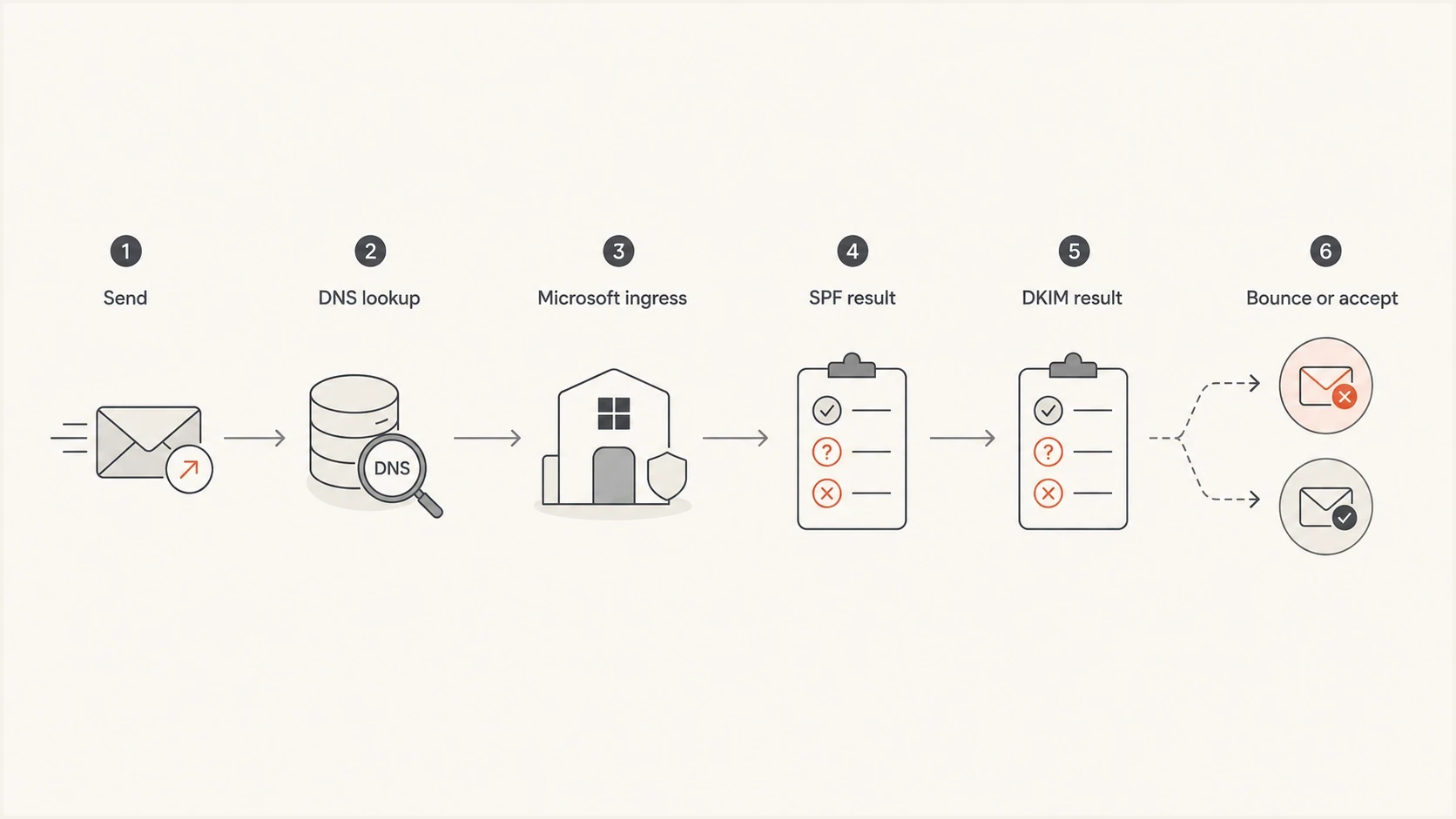
Flowchart showing where SPF or DKIM can fail before Microsoft accepts or rejects a message.
How to prove which cause applies
Do not start by editing DNS. First collect evidence from a failed message and a successful message sent through the same production stream. A seed test helps, but a production test through the email tester is useful because it shows the headers, authentication results, domain matches, and message structure that a receiver evaluates.
The evidence needs to be specific. A screenshot that says SPF passed is not enough. Capture the non-delivery report, SMTP code, Microsoft server name, sending IP, 5321.MailFrom or Return-Path domain, 5322.From domain, DKIM selector and d= domain, and full Authentication-Results headers.
- Capture: Save the full bounce text, not just the final SPF or DKIM result.
- Compare: Put one failed message beside one passed message from the same sending pool.
- Classify: Separate fail, softfail, temperror, permerror, none, and timeout results before diagnosing.
- Trace SPF: Resolve every include and redirect until the sending IP match and lookup count are proven.
- Check DKIM: Confirm the selector, public key, body hash, signed headers, and d= domain for the failed mail.
- Segment: Separate failures by recipient domain, result type, sending source, and time of send.
Email tester
Send a real email to this address. Suped shows a results button when the test is ready.
?/43tests passed
If every failed message shares one consumer recipient domain or forwarding path, investigate recipient-specific routing and preserve samples for Microsoft support. If failures hit the same sender across unrelated Microsoft consumer domains at the same time, investigate authoritative DNS reliability, SPF lookup depth, and DKIM selector availability first.
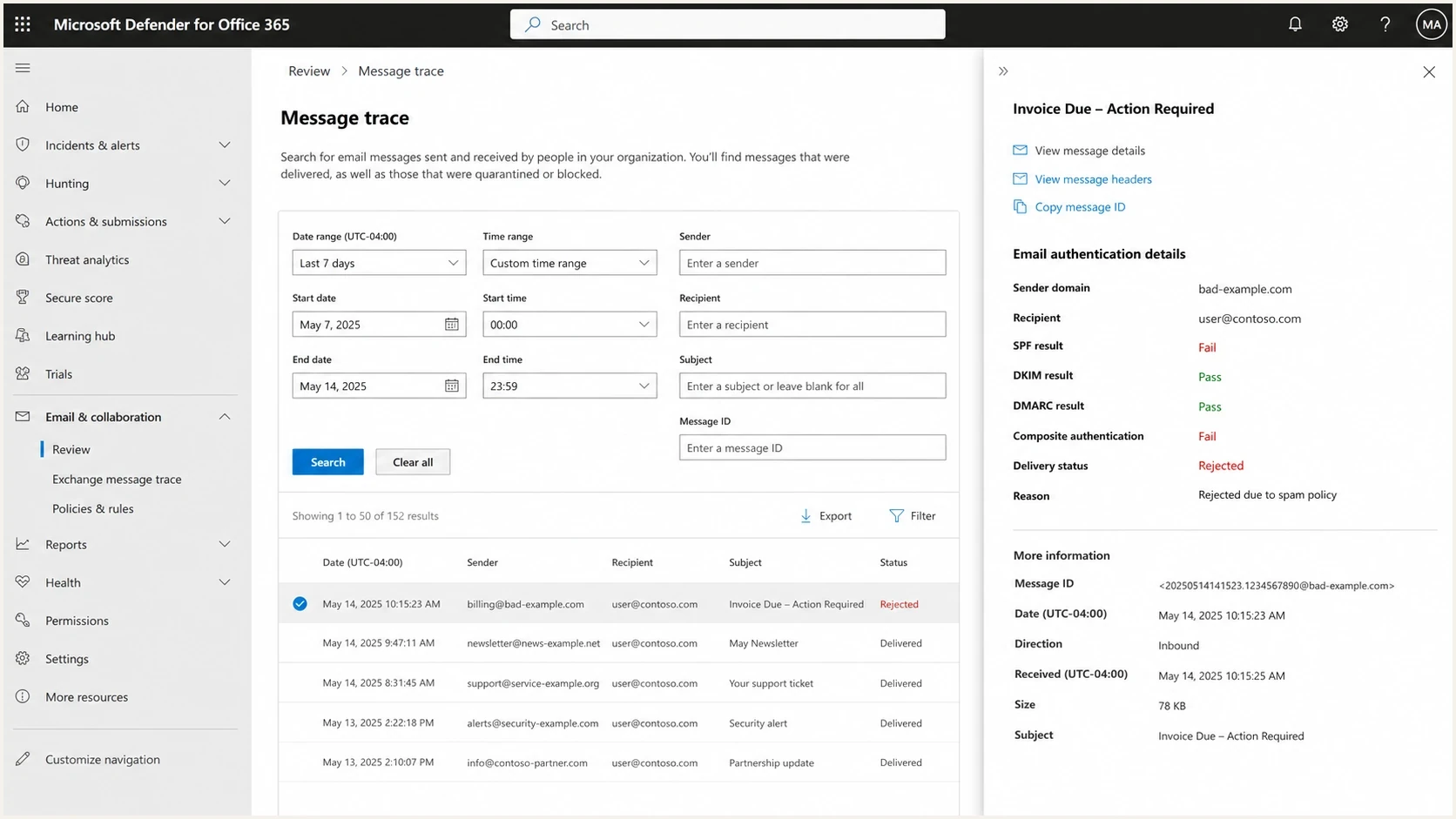
Microsoft Defender for Office 365 message trace showing SPF, DKIM, DMARC, and delivery status.
Check SPF beyond the visible include
SPF troubleshooting has to follow the whole resolution tree. Seeing the sending IP inside one include is only a starting point. The receiver still has to query DNS, follow each include or redirect, stay within the ten DNS-querying-term limit, and reach the same result before the SMTP transaction ends.
A focused SPF checker helps find multiple SPF records, too many DNS lookups, missing includes, unsafe static flattening, and records that pass for one source but fail for another. Pay special attention to third-party includes because their DNS availability and record structure can change outside your control.
Short SPF example
example.com TXT "v=spf1 ip4:203.0.113.10 include:_spf.example -all"
A correct include is not enough
If the include path has an authoritative DNS timeout, Microsoft can record SPF temperror. If the evaluated path exceeds the lookup limit or the domain publishes multiple SPF records, the result is permerror. Hosted SPF can reduce lookup pressure when it refreshes authorized sources and is monitored for changes.
- Lookup: Keep each evaluated SPF path within ten DNS-querying terms.
- Record: Publish one SPF TXT record at the domain used in the 5321.MailFrom address.
- DNS: Check authoritative nameserver response time and consistency, not only cached answers.
- Vendor: Monitor included senders because their DNS changes can affect your domain.
SPF risk bands
Use these operational bands when deciding how urgently to simplify an SPF tree.
Low risk
0-5 lookups
One record, stable includes, and fewer than six DNS lookups.
Watch
6-8 lookups
Several third-party includes or a tree that changes often.
High risk
9-10 lookups
Little or no headroom below the ten-lookup limit.
Check DKIM when Microsoft says DKIM failed
For DKIM failures, first determine whether Microsoft reports signature failure, body-hash failure, no signature, or a key-query timeout. A production message can fail because a footer, tracking layer, gateway, charset conversion, or header rewrite changed a signed part. A timeout instead points to DNS retrieval of the selector record.
A DKIM checker confirms that the selector exists, the public key is valid, and the DNS record is readable. Then use the failed message headers to identify the selector and d= signing domain Microsoft verified, compare it with 5322.From, and determine whether the body hash matches the final message.
DKIM and DMARC DNS examples
s1._domainkey.example.com CNAME s1.example.dkim.example
_dmarc.example.com TXT "v=DMARC1; p=quarantine; rua=mailto:d@example.com"
- Selector: Make sure the selector in the failed header exists on every authoritative nameserver.
- Key: Confirm the public key matches the active signer and is not truncated across DNS responses.
- Body: Look for appended content or tracking rewrites after signing.
- Rotation: Keep the old selector published until mail signed with it has cleared normal delivery delays.
- Double sign: During migrations, use two DKIM signatures so one valid signature with a matching domain can survive routing changes.
Use DMARC data to separate noise from a real fault
One clean test does not give enough coverage. DMARC aggregate data shows whether Microsoft is reporting isolated authentication failures, a specific source with a pattern, or a broader domain problem. Good DMARC monitoring also shows whether SPF or DKIM passes with a domain matching the one users see in the From header.
This is where Suped's product fits the workflow. Suped groups DMARC aggregate results by receiver, source, authentication result, and domain match, then pairs those views with issue detection and alerts. For this Microsoft problem, use the data to see whether failures are isolated, recurring, or tied to one sending source.
Issues page showing top issues, verified sources, unverified sources, and authentication pass rates
Use the issue view to separate verified sources from unverified sources, then compare Microsoft-reported results with other receivers. For MSPs and teams with many domains, Suped's multi-tenant dashboard can surface the same Microsoft symptom as a small set of failures across customer domains rather than one obvious outage.
What to group first
A practical order for grouping low-rate Microsoft authentication bounces.
Recipient domain
90Sending IP
80DKIM selector
70Time window
65What to fix first
If the bounce rate is tiny, avoid emergency DNS edits until the evidence identifies a fault. Document the failure, prove the resolution path, remove confirmed SPF or DKIM fragility, then monitor whether Microsoft failures continue. Each 5.7.515 rejection still needs investigation because the affected message did not meet the required authentication level.
If the bounce rate is visible to users or concentrated in one Microsoft consumer domain, treat it as a delivery incident. Preserve samples, escalate with complete headers and NDR identifiers, and temporarily route critical mail through a production path with known passing SPF and DKIM if your infrastructure allows it.
|
|
|
|---|---|---|
First | Save samples | Preserves proof |
Second | Classify results | Separates policy and DNS faults |
Third | Trace SPF and DKIM | Finds the failed check |
Fourth | Monitor DMARC | Shows the pattern |
Fix order for intermittent Microsoft SPF and DKIM failures.
A practical fix sequence
- Fast win: Remove duplicate SPF records and repair missing DKIM selector records.
- Durable fix: Reduce SPF lookup pressure and keep selectors available during key rotation.
- Proof: Use DMARC reports and bounces together, because either source alone is incomplete.
- Avoid: Do not weaken DMARC policy just because Microsoft printed one SPF or DKIM failure.
Views from the trenches
Best practices
Capture the bounce, recipient, sending IP, Return-Path, and full headers before changing DNS.
Compare passes and failures by recipient domain so forwarding patterns do not get hidden.
Keep both SPF and DKIM healthy because Microsoft can reject on either failed signal.
Common pitfalls
Checking only the visible SPF include misses DNS timeouts, lookup limits, and nested records.
Assuming DMARC pass cancels every Microsoft rejection leads teams to miss 5.7.515 detail.
Treating one clean seed test as proof hides failures that happen on a receiver path.
Expert tips
Review the SPF resolution trace and record which lookup branch Microsoft had to follow.
Double-sign DKIM during migrations so one valid signature survives routing changes cleanly.
Track low-rate Microsoft bounces separately so a small rate does not disappear in totals.
Expert from Email Geeks says intermittent Microsoft SPF failures often require the full SPF resolution trace, not a quick check of the top-level include.
2025-05-16 - Email Geeks
Expert from Email Geeks says a 5.7.515 rejection means Microsoft saw the failing state when it received that exact message.
2025-05-16 - Email Geeks
How to resolve the failures
Intermittent Microsoft SPF and DKIM failures usually come down to delivery-path or DNS differences. A record can pass a manual test and still fail for one receipt if DNS resolution, forwarding, receiver routing, or message mutation differs at that moment.
Use evidence first: collect complete bounces, compare passed and failed headers, trace SPF through every evaluated term, verify the DKIM selector used by the failed mail, and monitor DMARC data over time. Suped's product supports this workflow by grouping receiver results, sending sources, domain matches, and recurring issues so teams can confirm whether a fix changed the Microsoft failure pattern.




