Why are emails from my company going to spam on @me.com but not @gmail.com and how to fix it?

Published 23 Jun 2025
Updated 31 Jul 2026
11 min read
Summarize with
Updated on 31 Jul 2026: We added Apple's current bulk-sender requirements and a clearer test for separating iCloud filtering from local Apple Mail junk handling.
If company emails go to junk at an @me.com address but reach the inbox at @gmail.com, that result does not prove Apple rejects the domain. It usually means Apple iCloud Mail, the Apple Mail app, or that specific mailbox made a different filtering decision than Gmail. Treat it as a placement problem to prove, not a diagnosis by itself.
The fix starts by separating mailbox and client behavior from the sending setup. Check the same @me.com mailbox in iCloud Mail on the web and in Apple Mail. Send the same message to several Apple-owned addresses, including @icloud.com, @me.com, and @mac.com when available. Then confirm SPF, DKIM, DMARC, content, list quality, complaint risk, and blocklist (blacklist) status before changing infrastructure.
- Fastest proof: open the @me.com account in iCloud Mail on the web and compare the folder with Apple Mail on the same device.
- Fastest sender check: send a live message through an email tester and read the authentication result.
- Fastest operational fix: pause broad sends to Apple recipients while testing, then restart with engaged contacts only.
Why @me.com and Gmail disagree
@me.com is part of Apple's iCloud Mail system. Apple tracks IP reputation, domain reputation, content checks, user feedback, and other signals. Gmail uses its own classifier, reputation data, user feedback, and mailbox-level training. A message can pass SPF, DKIM, and DMARC and still land in junk at one mailbox provider. Authentication proves that an approved source used the domain. It does not guarantee inbox placement.
Apple path
- Mailbox training: a user marking similar mail as junk can influence future placement for that mailbox.
- Client filtering: Apple Mail can apply local junk decisions after the provider accepts the message.
- Legacy domains: @me.com and @mac.com addresses still route through Apple's current mail system.
Gmail path
- Separate classifier: Gmail can accept the same message because its scoring and user history differ.
- Different engagement: Gmail can see more positive recipient behavior for the domain.
- Different weighting: Gmail and Apple do not weigh the same signals equally.
Do not treat one Gmail inbox and one @me.com inbox as proof of a provider-wide issue. Use several seed mailboxes and real production results grouped by recipient domain. If only one @me.com mailbox has the problem, start with mailbox and client training. If many Apple mailboxes have the same problem, investigate sender reputation and the delivered message.
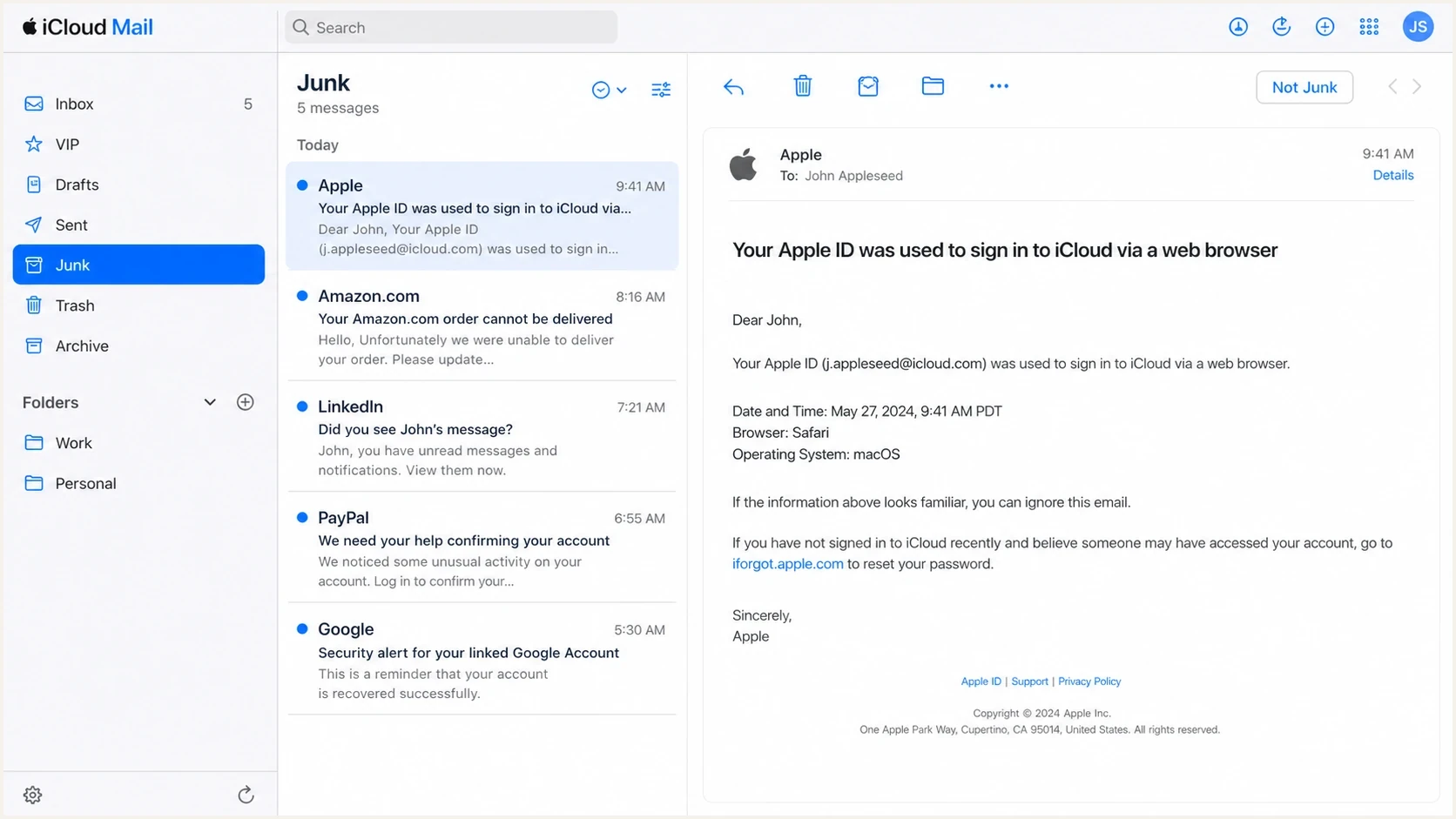
Apple iCloud Mail showing a company email in the Junk folder.
Prove where the filtering happens
Before changing DNS or switching sending IPs, prove whether the provider placed the message in junk or the local mail client moved it. A local Apple Mail junk rule needs a mailbox-level fix, while provider-side iCloud filtering requires changes to sender behavior, authentication, or both.
Send one normal company email, wait for delivery, and inspect the same @me.com account in iCloud Mail in a browser and Apple Mail on the device. If webmail shows Inbox but Apple Mail shows Junk, investigate the local client. If webmail also shows Junk, iCloud filtering is involved. If the message never appears, check sending logs and the exact SMTP response before treating it as a spam-folder problem.
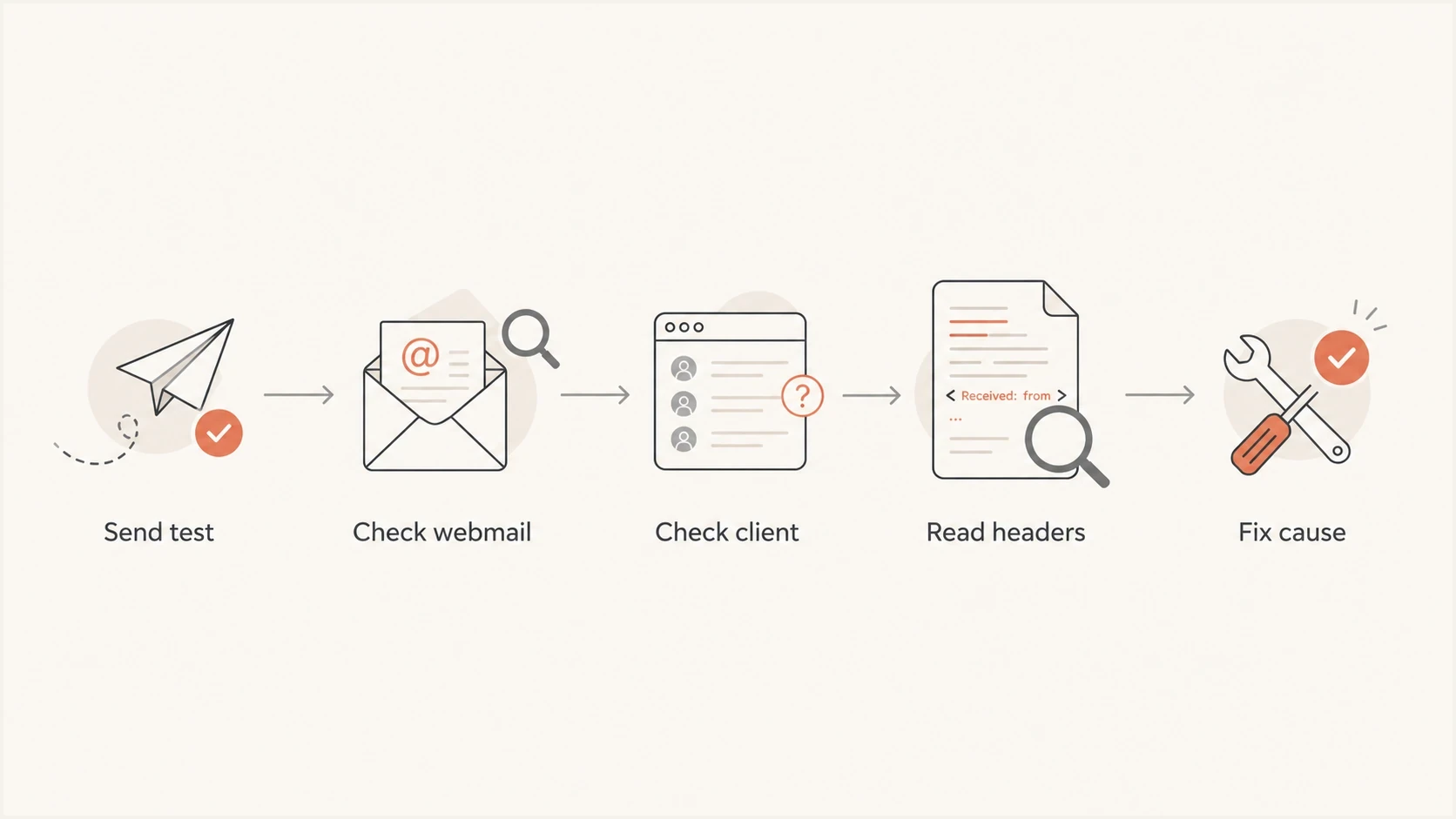
A five-step flow for diagnosing whether Apple or a mail client moved the email to junk.
Do not overread open rates
Open rates are weak evidence for Apple placement. Apple privacy protections can hide or distort open behavior, and mailbox apps do not all report activity the same way. Prefer delivery logs, bounce text, raw headers, seeded inbox checks, clicks, replies, complaints, and domain-level trends.
- Weak signal: one week of opens by mailbox domain is not enough to confirm inbox placement.
- Stronger signal: multiple Apple inbox checks plus raw headers provide a better starting point.
|
|
|
|---|---|---|
 Inbox Inbox | Junk | review local junk rules and training |
Junk | Junk | investigate iCloud filtering and sender signals |
Not present | Not present | read SMTP logs, deferrals, and rejections |
Junk across Apple seeds | Junk across Apple seeds | fix sender reputation and message issues |
Use these paired observations to decide which fix path to take.
Check authentication and domain health
After the mailbox test, check whether the delivered message passes authentication using the visible From domain. Apple and Gmail both use authentication, but a pass at one provider does not excuse a failure at another. Forwarding, mailing list modifications, wrong envelope domains, missing DKIM signatures, and broken SPF includes can create provider-specific outcomes.
A domain health checker helps catch obvious DNS faults first. Check SPF, DKIM, DMARC, MX, reverse DNS where relevant, and whether the domain in the visible From address has a valid DMARC domain match through SPF or DKIM.
Email tester
Send a real email to this address. Suped shows a results button when the test is ready.
?/43tests passed
The raw Authentication-Results header matters more than the DNS record alone. A valid DKIM record in DNS does nothing if the outbound platform did not sign the message. A valid SPF record does not help DMARC when SPF passes for an unrelated return-path domain and DKIM is missing. Under relaxed DMARC matching, an authenticated subdomain can match the organizational domain in the visible From address.
Authentication records to verifytext
_dmarc.example.com TXT
v=DMARC1; p=none; rua=mailto:dmarc@example.com; fo=1

example.com TXT
v=spf1 include:send.example.net -all

selector1._domainkey.example.com TXT
v=DKIM1; k=rsa; p=BASE64_PUBLIC_KEY
What a healthy result shows
- SPF result: pass is useful, and its authenticated domain must match the visible From domain under DMARC rules if SPF supplies the DMARC pass.
- DKIM result: pass with a matching domain gives the message a durable authentication path.
- DMARC result: pass means at least one authenticated path matches the domain recipients see.
- Header result: the delivered copy must show the result, not only the intended DNS setup.
Meet Apple's bulk-sender requirements
For bulk email to iCloud Mail, Apple requires SPF, DKIM, and a published DMARC policy. Apple also expects standards-compliant messages, reverse DNS for sending IPs, consistent IP addresses and domains, a recognizable From name and address, and separate marketing and transactional streams. These requirements matter for @icloud.com, @me.com, and @mac.com recipients because they share the iCloud Mail system.
- Use explicit consent: send bulk email only to people who subscribed, and do not use purchased, rented, or appended addresses.
- Make exit immediate: include a working unsubscribe path, honor requests promptly, and never reactivate suppressed addresses.
- Keep identity stable: use consistent sending domains, IPs, From names, and From addresses while separating mail streams.
- Maintain the transport: publish reverse DNS, add ARC headers to forwarded mail, and comply with message and SMTP standards.
- Process failures: track temporary and permanent SMTP errors, remove repeatedly bouncing addresses, and suppress inactive subscribers.
Apple has no bulk-sender allowlist or feedback loop
Apple says it does not offer a bulk-sender allowlist or a complaint feedback loop. Recovery depends on cleaner subscriber practices, stable sending behavior, correct authentication, and the evidence in mail logs. If the problem persists after meeting the requirements, contact Apple's iCloud postmaster team with the company name, sending domain, affected IP addresses, exact SMTP errors, and the time the issue began.
Check reputation without chasing noise
Reputation still matters, but do not assume the IP is the only issue. A blocklist or blacklist can explain Apple-specific junk placement when Apple weighs the listed signal more heavily than Gmail. Treat it as one check in the chain, not the whole chain.
Use blocklist monitoring to watch the sending domain and IPs that actually appear in outbound headers. Ignore obscure blacklist listings unless they connect to the recipient mix, mail type, or a visible delivery problem.
How much evidence is enough?
Use sample size to decide whether this is a mailbox issue or a sender-wide issue.
Mailbox check
1 mailbox
Useful for finding local Apple Mail junk training.
Seed check
5+ mailboxes
Useful for proving Apple-side filtering across accounts.
Production trend
2+ sends
Useful for deciding whether to slow or segment Apple sends.
Reputation checks should include complaint patterns, bounce text, audience source, send frequency, message similarity, and whether Apple recipients have been inactive for a long time. If the Apple segment has old addresses, low clicks, and repeated unopened campaigns, iCloud Mail can classify the mail more harshly than Gmail.
Blocklist checker
Check your domain or IP against 144 blocklists.
 Spamhaus
 0Spam
0Spam

 Cisco
Cisco
 NoSolicitado

 URIBL
URIBL
 abuse.ro
 ALPHANET
 Anonmails
 Ascams
 BLOCKEDSERVERS
 Calivent Networks


 EFnet
EFnet




 JustSpam
 Kempt.net
 NordSpam

 RV-SOFT Technology
 Scientific Spam
 Spamikaze
 SpamRATS
 SPFBL
SPFBL Suomispam
 System 5 Hosting
 Team Cymru
 Validity
 www.blocklist.de Fail2Ban-Reporting Service
 ZapBL
ZapBL 2stepback.dk
 Fayntic Services
 ORB UK
 technoirc.org
 TechTheftSpamhaus0SpamCiscoNoSolicitadoURIBLabuse.roALPHANETAnonmailsAscamsBLOCKEDSERVERSCalivent NetworksEFnetJustSpamKempt.netNordSpamRV-SOFT TechnologyScientific SpamSpamikazeSpamRATSSPFBLSuomispamSystem 5 HostingTeam CymruValiditywww.blocklist.de Fail2Ban-Reporting ServiceZapBL2stepback.dkFayntic ServicesORB UKtechnoirc.orgTechTheftSpamhaus0SpamCiscoNoSolicitadoURIBLabuse.roALPHANETAnonmailsAscamsBLOCKEDSERVERSCalivent NetworksEFnetJustSpamKempt.netNordSpamRV-SOFT TechnologyScientific SpamSpamikazeSpamRATSSPFBLSuomispamSystem 5 HostingTeam CymruValiditywww.blocklist.de Fail2Ban-Reporting ServiceZapBL2stepback.dkFayntic ServicesORB UKtechnoirc.orgTechTheftSpamhaus0SpamCiscoNoSolicitadoURIBLabuse.roALPHANETAnonmailsAscamsBLOCKEDSERVERSCalivent NetworksEFnetJustSpamKempt.netNordSpamRV-SOFT TechnologyScientific SpamSpamikazeSpamRATSSPFBLSuomispamSystem 5 HostingTeam CymruValiditywww.blocklist.de Fail2Ban-Reporting ServiceZapBL2stepback.dkFayntic ServicesORB UKtechnoirc.orgTechTheftSpamhaus0SpamCiscoNoSolicitadoURIBLabuse.roALPHANETAnonmailsAscamsBLOCKEDSERVERSCalivent NetworksEFnetJustSpamKempt.netNordSpamRV-SOFT TechnologyScientific SpamSpamikazeSpamRATSSPFBLSuomispamSystem 5 HostingTeam CymruValiditywww.blocklist.de Fail2Ban-Reporting ServiceZapBL2stepback.dkFayntic ServicesORB UKtechnoirc.orgTechTheft
When a meaningful listing appears, do not swap IPs as the first reaction. Fix the cause, such as a bad acquisition source, poor suppression, high complaint risk, sudden volume, or shared infrastructure sending patterns. IP rotation without a behavior change moves the problem and can slow recovery.
Fixes that usually change Apple placement
Once testing shows the issue is not only local Apple Mail training, work in this order. The goal is to remove authentication ambiguity, reduce negative recipient signals, and give iCloud Mail a cleaner pattern over later sends.
- Retrain the mailbox: mark the message as not junk in iCloud Mail and Apple Mail, then move later wanted mail to Inbox.
- Fix authentication: make SPF and DKIM pass, publish DMARC, and confirm a DMARC domain match on the delivered message.
- Tighten sending: pause inactive Apple recipients and restart with recent clickers, buyers, known contacts, and other clearly engaged recipients.
- Reduce complaint risk: make unsubscribe immediate for Apple recipients, support one-click unsubscribe for subscription mail when the domain sends 5,000 or more messages a day to personal Gmail accounts, remove old imports, and keep suppressed addresses suppressed.
- Change one variable: test the subject, content, sender identity, and volume separately so each result is readable.
Suped's product supports this workflow by monitoring DMARC, SPF, DKIM, blocklist status, hosted SPF, hosted DMARC, hosted MTA-STS, and alerts in one place. Its practical role is to identify the sending source, show which authentication mechanism failed, and provide steps for correcting the issue.
For Apple-specific spam complaints, DMARC monitoring does not reveal the inbox folder. It shows whether mail seen by Apple and other receivers authenticates correctly, which sending services use the domain, and where failures begin. That evidence should be established before changing content or audience strategy.

Issue steps to fix dialog showing the issue overview, tailored fix steps, and verification action
Mailbox-only issue
The same message is in Inbox in iCloud Mail on the web but Junk in the Apple Mail app. Fix mailbox and client training first.
- Main fix: mark not junk, reset local rules, and check blocked senders.
- Proof point: other Apple mailboxes receive the same message in Inbox.
Sender-wide issue
Multiple Apple mailboxes place the same company mail in Junk. Work on authentication, reputation, audience quality, and provider requirements.
- Main fix: repair authentication, reduce risky volume, and segment Apple recipients.
- Proof point: placement improves across several Apple accounts after controlled sends.
Views from the trenches
Best practices
Compare webmail and device placement before changing DNS, IPs, or sender setup first.
Use several Apple seed accounts before calling one @me.com result provider-wide.
Treat blocklist checks as one diagnostic input, not the first or only fix path today.
Common pitfalls
Assuming Gmail inbox placement proves Apple should make the same placement call.
Using open rates as inbox proof when privacy protections can distort the signal.
Rotating IPs before fixing authentication, list quality, complaints, or content.
Expert tips
Inspect raw headers on the delivered copy because DNS alone misses signing gaps.
Restart Apple sends with engaged recipients to rebuild positive mailbox signals.
Separate local Apple Mail training from iCloud filtering before changing sends safely.
Expert from Email Geeks says a single @me.com mailbox can reflect local client training, so compare iCloud webmail with Apple Mail before assuming a wider Apple filtering issue.
2024-02-15 - Email Geeks
Marketer from Email Geeks says Gmail and Apple can make different junk decisions because their filtering systems weigh sender signals and mailbox history differently.
2024-02-15 - Email Geeks
Choose the fix based on the test result
The right fix depends on what the first test proves. If iCloud Mail on the web shows Inbox and Apple Mail shows Junk, treat it as a local mailbox problem. If iCloud Mail also shows Junk across several Apple accounts, treat it as a sender problem and work through authentication, reputation, audience quality, content, and Apple's bulk-sender requirements.
Do not change IPs, rewrite every template, or move mail platforms based on one @me.com mailbox. Send controlled tests, read delivered headers, check SPF, DKIM, and DMARC on the message, monitor meaningful blocklist or blacklist signals, then reduce Apple volume to engaged recipients until placement improves.
Best next move
Run one clean test message, inspect it in iCloud Mail webmail, inspect it in Apple Mail, and compare the raw headers with the Gmail copy. That comparison usually shows whether to fix the mailbox, the message, or the sending domain.




