Why am I seeing iCloud email timeout errors?

Updated on 8 Aug 2026: We added Mail app troubleshooting and clarified how SMTP timeout evidence should guide retries.
For a sending system delivering to Apple, an iCloud email timeout means the SMTP exchange did not finish before the sending MTA's deadline. Common causes include temporary Apple-side congestion, throttling, sender reputation pressure, blocklist or blacklist signals, DNS or authentication problems, IPv6 routing faults, and recipient service incidents.
A timeout is not the same as a hard bounce. A hard bounce tells you the message was rejected. A timeout tells you the delivery conversation did not complete cleanly. That distinction changes the fix: do not remove every iCloud address after a timeout or assume the content is bad because one Apple recipient domain is slow.
- Start with scope: Check whether timeouts are limited to icloud.com, me.com, mac.com, or Apple Hide My Email relay addresses such as privaterelay.appleid.com, or whether other mailbox providers are also timing out.
- Separate transient from persistent: A short spike over a few hours points to congestion or throttling. A multi-day pattern points to reputation, DNS, routing, or policy signals.
- Use real message evidence: Queue logs, SMTP transcripts, delivery attempt timestamps, and authentication results matter more than aggregate bounce counts.
What an iCloud timeout actually means
An email timeout happens when your mail server and Apple's receiving infrastructure do not finish the SMTP exchange within the allowed time. It can happen while connecting to Apple's MX host, after the greeting, during TLS negotiation, after sender or recipient commands, while transferring message data, or while waiting for the final response after the message body.
Use the exact timeout stage as the first clue. A connection timeout often points to the network path, capacity, or rate control. A timeout after the DATA command can involve policy evaluation or slow downstream processing. A timeout limited to one IP pool points toward that pool's reputation, DNS, or routing. A timeout across every pool at the same minute points more toward Apple-side capacity or a broad routing problem.
Treat timeouts as temporary failures
A sending platform can record an iCloud timeout as a 421 4.4.2 response, a soft bounce, or no SMTP reply at all. Preserve the queue and retry with sensible backoff unless a later permanent response proves that the address is invalid or the message is rejected by policy.
|
|
|
|---|---|---|
Connect | Network | MX reachability, IP routing, IPv6, firewall rules |
TLS | Transport | TLS negotiation, certificate validation, IPv4 and IPv6 paths |
RCPT | Recipient or policy | Recipient-domain pattern, rate controls, response text |
DATA | Policy or processing | Authentication, content family, message size, link domains |
Final reply | Acceptance processing | Attachments, rate spikes, queue transcript, retry result |
Use this table to classify where the timeout happened before changing authentication or content.
If the timeout appears in your Mail app
First identify where you saw the error. A sender log showing a timeout while delivering to an Apple MX host is a mail flow problem. A timeout while an iPhone, Mac, or third-party email client connects to an iCloud account is an account, device, client configuration, or network problem.
- Check service status and connectivity: Confirm that iCloud Mail is available, then retry on another network. If webmail also fails, focus on the account or service rather than the local Mail app.
- Verify the account is active: Make sure iCloud Mail is enabled on the device and that the account appears online in Mail settings.
- Check storage and sending limits: A full iCloud account or an oversized attachment can stop mail. Reduce the attachment size or use Mail Drop where available.
- Test without the VPN: Temporarily disable a configured VPN and compare another connection. A network or ISP can block or disrupt SMTP traffic.
- Verify third-party client settings: Use imap.mail.me.com on port 993 with SSL or TLS for incoming mail. Use smtp.mail.me.com on port 587 with SMTP authentication and TLS or STARTTLS for outgoing mail. Use an app-specific password.
- Check Push and restart: On an Apple device, confirm the iCloud account's Push or automatic fetch setting, restart the device, and test again before removing the account.
Apple's iCloud Mail troubleshooting steps cover current device, webmail, Push, storage, VPN, and outgoing account checks. If iCloud.com works but one client still times out, concentrate on that client's connection, credentials, and server settings.
Common causes of iCloud SMTP timeouts
When iCloud timeouts rise sharply, check causes in a fixed order. Changing content before checking logs wastes time, and changing DNS before checking whether Apple has a service issue can create new problems.
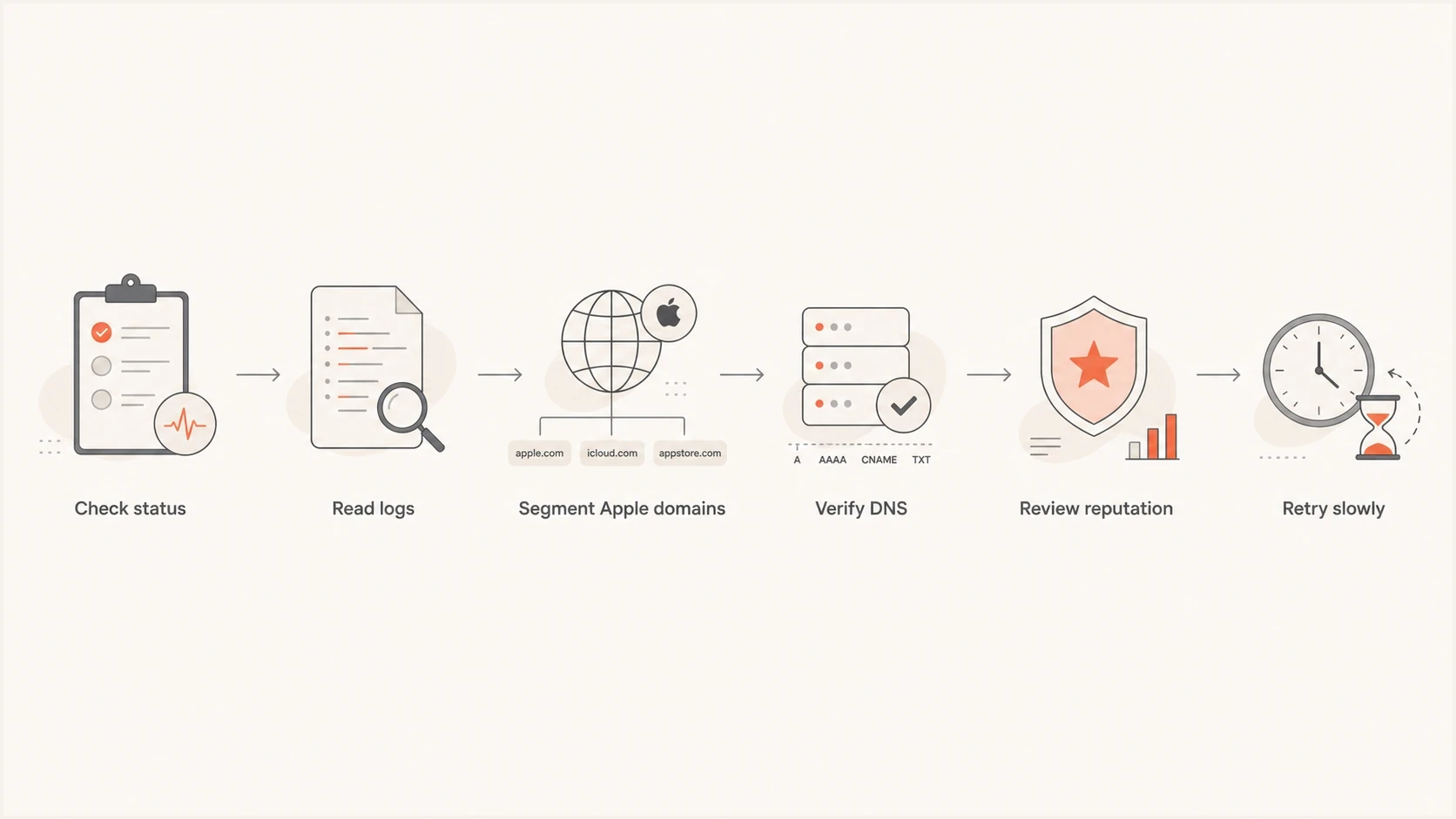
iCloud email timeout troubleshooting flowchart for checking status, logs, DNS, reputation, and retries.
- Apple-side congestion: iCloud can defer or stall messages when its receiving systems are under pressure. If multiple sending pools see the same pattern at the same time, wait, retry, and avoid forcing volume through one route.
- Throttling by sender: Apple can slow mail associated with a sender, IP, domain, or traffic pattern that looks risky. This can appear as intermittent timeouts instead of a clean rejection.
- Reputation pressure: High complaint rates, stale recipients, sudden volume changes, poor engagement, and blocklist or blacklist listings can increase friction at the receiving edge.
- Authentication gaps: SPF, DKIM, or DMARC failures do not always produce an immediate block. They can still reduce trust during delivery and make the root cause harder to isolate.
- DNS and reverse DNS faults: Missing PTR records, mismatched HELO names, slow DNS, broken IPv6, or inconsistent forward-confirmed reverse DNS can delay or prevent delivery.
- Recipient-domain mix: Apple Hide My Email relay addresses can behave differently from ordinary iCloud inboxes. Segment privaterelay.appleid.com before deciding whether a campaign has a general Apple problem.
Looks Apple-side
- Many sources affected: Multiple sending pools or platforms see the same timeout increase.
- Narrow provider scope: Other mailbox providers accept the same mail normally.
- Short duration: The spike starts suddenly and improves without sender-side changes.
Looks sender-side
- One pool affected: Only a specific IP, region, hostname, or campaign stream has timeouts.
- Authentication drift: Recent SPF, DKIM, DMARC, or DNS changes line up with the errors.
- List quality issue: The same segment also shows complaints, low opens, or old addresses.
How to confirm the cause quickly
Start with the queue and SMTP logs, not the campaign report. A campaign report can tell you iCloud is failing, but it cannot tell you whether the sending server timed out before the greeting, during TLS, after recipient validation, or after message transfer.
Example timeout evidence to collecttext
recipient=person@icloud.com
mx=mx01.mail.icloud.com
stage=after DATA
smtp_status=421 4.4.2 timeout exceeded
attempts=4
first_attempt=2026-08-07T09:14:07Z
last_attempt=2026-08-07T11:46:33Z
source_ip=203.0.113.24
helo=mail.example.com
dkim=pass
spf=pass
dmarc=pass
Compare those rows against successful deliveries. If successful iCloud deliveries use the same source IP, HELO, DKIM selector, content family, and recipient type, the issue is likely intermittent capacity or throttling. If failures cluster around one IP, sending domain, DKIM selector, or template, the sender has a clear investigation path.
- Check Apple status: Look for an iCloud Mail service issue before editing DNS. Apple provides current steps for when iCloud Mail is not working.
- Split the domains: Break out icloud.com, me.com, mac.com, and privaterelay.appleid.com recipients. Do not average them together if only one group is failing.
- Compare failure stages: A connect timeout, TLS timeout, and after-DATA timeout point to different causes.
- Review recent changes: Check for new IPs, new sending routes, DNS edits, link domains, tracking changes, or volume ramps during the previous 72 hours.
- Validate authentication: Use a live message test so you can inspect the headers receivers see. Suped's email tester checks SPF, DKIM, DMARC, and content signals from a real sent email.
Email tester
Send a real email to this address. Suped shows a results button when the test is ready.
?/43tests passed
When the test shows clean authentication but iCloud still times out, move to reputation and traffic shape. Check whether a new campaign, old segment, affiliate source, or transactional burst changed the way Apple evaluates the sender.
Authentication and DNS checks that matter
SPF, DKIM, and DMARC are not the only causes of iCloud timeout errors, but weak authentication makes every deliverability problem harder to diagnose. If Apple slows your traffic and your records are also inconsistent, the evidence will not show whether the throttle is reputation-based, authentication-based, or both.
DMARC record detail view showing SPF, DKIM, DMARC, rDNS diagnostics, and DNS records
The practical checks start with sender identity. SPF should authorize every legitimate sending service and stay within its ten DNS-lookup limit. DKIM should pass with a stable selector and match the visible From domain under DMARC where possible. DMARC should publish a valid policy and receive aggregate reports, with enforcement introduced after legitimate sources are authenticated. Reverse DNS should exist for each sending IP, and the PTR hostname should resolve back to that IP.
Do not fix timeouts by weakening DMARC
If your DMARC record is valid and matched sources pass, lowering policy rarely fixes an iCloud timeout. It can reduce protection against spoofing while leaving the actual timeout cause unchanged.
Baseline DMARC record for monitoringdns
_dmarc.example.com. 3600 IN TXT (
  "v=DMARC1; p=none; rua=mailto:dmarc@example.com"
)
In monitoring mode, Suped's DMARC monitoring workflow connects delivery symptoms to authenticated sending sources. It shows which source changed, which domain stopped matching, and where a configuration fix is needed.
- SPF matching: Check that the envelope sender domain belongs to you or matches under DMARC when your sending service supports it.
- DKIM selectors: Confirm the selector exists, the key is not truncated, and messages are signed after final content changes.
- DMARC reporting: Use aggregate reports to find unknown senders before increasing enforcement.
- DNS health: Slow or inconsistent authoritative DNS responses can delay authentication checks or produce intermittent failures.
?
What's your domain score?
Deep-scan SPF, DKIM & DMARC records for email deliverability and security issues.
For a combined DNS review, Suped's domain health checker checks DMARC, SPF, and DKIM together so related record errors can be reviewed in one workflow.
How to respond without making it worse
Do not keep sending to the same Apple MX hosts at full speed during an iCloud timeout spike. That can turn a temporary slowdown into a sender-specific throttle. Preserve delivery evidence, slow the retry pattern, and isolate the affected mail stream.
Operational response triggers
Use retry outcomes, duration, and queue growth against the sender's normal baseline instead of relying on a universal timeout percentage.
Monitor
Clears on retry
Retries clear and the Apple queue stays near its normal size.
Investigate
Pattern persists
The Apple-only pattern remains through multiple normal retry windows.
Throttle
Queue is growing
The queue keeps growing or repeated retries increase the timeout rate.
- Pause risky segments: Stop sending to old, inactive, purchased, or poorly sourced Apple recipients until the timeout rate returns to its normal baseline.
- Reduce concurrency: Lower simultaneous connections and messages per connection for Apple domains. Use gradual retry instead of bursty replay.
- Keep transactional mail separate: Do not let a marketing queue delay password resets, receipts, or account notifications.
- Avoid template churn: Changing subject lines, domains, and tracking links during an incident can hide the actual cause.
- Escalate with evidence: If the pattern persists, provide Apple with timestamps, source IPs, destination domains, SMTP responses, and sample headers.
Do not suppress valid recipients too early
Timeouts are not proof that an iCloud mailbox is invalid. Suppress recipients after confirmed hard bounces, repeated policy rejections, or clear user-level failures, not after one temporary delivery attempt.
If the issue looks like Apple-side congestion, use patient queue management. If it looks sender-side, apply the fix supported by the evidence: clean the segment, reduce volume, correct authentication, remove a suspicious link domain, or move affected traffic after confirming that the sending IP is the problem.
Where blocklists and blacklists fit
A blocklist or blacklist listing does not always cause a direct iCloud timeout, but it can coincide with reputation signals that make receiving systems treat mail more cautiously. Check IP and domain listings when timeouts persist beyond normal retry windows, one pool is affected, or the same campaign also struggles at other mailbox providers.
Do not panic over every low-signal listing. Identify whether a relevant blocklist (blacklist) event lines up with the first timeout spike. If a listing appeared immediately before the iCloud slowdown, investigate it as part of the same incident without assuming it caused the timeout.

Blocklist monitoring page showing domain and IP checks across blocklists with importance and status
- Check both IP and domain: Review sending IP reputation, domain reputation, link domains, and authentication domains.
- Tie listings to timing: A listing that predates the issue by months matters less than one that appears immediately before the timeout spike.
- Fix the cause first: Clean acquisition sources, complaint drivers, compromised forms, or faulty automation before requesting delisting.
Suped's blocklist monitoring places blocklist and blacklist signals beside DMARC, SPF, DKIM, and delivery diagnostics. This helps compare listing times with authentication changes and the first iCloud timeout event.
What Suped helps you see
Suped is relevant when the timeout problem crosses authentication, sender identity, and reputation. A raw SMTP log shows where delivery stopped. Suped's product shows whether the sending source is legitimate, whether SPF or DKIM matches the From domain under DMARC, whether a source changed, and whether blocklist or blacklist signals appeared at the same time.
Teams can use that workflow to compare SMTP evidence with DMARC aggregate reports and DNS checks during an incident. MSPs and agencies can apply the same source-level review across client domains without treating every Apple timeout as the same problem.
Views from the trenches
Best practices
Compare affected Apple domains separately before changing templates or sender routing.
Collect SMTP stage, IP, host, selector, and timestamp evidence before escalation.
Use slower retry windows for Apple spikes instead of replaying queued mail in bursts.
Common pitfalls
Treating every timeout as a bad address causes valid iCloud recipients to be lost.
Changing DNS during a provider slowdown can create new authentication failures later.
Averaging relay and normal iCloud delivery can hide the actual failure pattern in logs.
Expert tips
Track blocklist timing against the first timeout spike before requesting delisting.
Preserve separate queues for transactional mail so campaigns cannot delay receipts.
Escalate with samples that include source IP, time, MX host, SMTP stage, and retry details.
An Email Geeks discussion reports that iCloud timeouts can appear without a clear content pattern while most relay traffic still delivers normally.
2022-02-10 - Email Geeks
An Email Geeks discussion recommends tracking a sudden timeout spike separately from ordinary bounce handling when it persists for days.
2022-02-10 - Email Geeks
How to fix iCloud timeout errors
You are seeing sender-side iCloud email timeout errors because Apple is not completing some SMTP delivery conversations before your sending system's deadline. The cause can be on Apple's side, your side, or the network path between them. Identify the timeout stage, segment Apple recipient domains, compare affected and unaffected sending pools, then check authentication, DNS, reputation, and blocklist or blacklist timing.
Do not start by deleting recipients or weakening DMARC. Slow retries, preserve the queue, keep transactional mail separate, and collect evidence. Fix authentication or reputation faults when the evidence shows them because weak signals can make Apple treat mail more cautiously.
Suped fits this workflow by placing DMARC aggregate reports, SPF and DKIM results, source changes, and blocklist or blacklist alerts beside the delivery investigation. During an iCloud timeout incident, those signals help separate temporary Apple congestion from a sender identity or reputation problem that needs a specific fix.




