Why am I receiving more spam emails in my Gmail inbox?

Updated on 19 Aug 2026: We added current Gmail subscription and alias guidance, plus clearer checks for sudden spam floods.
You are receiving more spam emails in your Gmail inbox because more unwanted mail is reaching your address, Gmail's filters are letting some of it through, or both. A sudden increase usually means your address has been scraped, guessed, exposed in a breach, or added to a spammer's list. It can also happen when senders change their templates, attachments, domains, or routing fast enough that filtering systems need more user reports before they treat the pattern as unwanted.
The confusing part is that the visible To or Cc field does not prove who the email was delivered to. An email can show an address you do not own, such as a random AOL or Yahoo address, and still be delivered to your Gmail account because your real address was used in the SMTP envelope, added as Bcc, or recorded in a delivery header such as Delivered-To. Treat that as suspicious, but not as proof that your Gmail account was hacked.
Why Gmail spam suddenly increases
The most likely explanation is simple: spammers have your address and Gmail is not classifying every message in that campaign as spam yet. Gmail filters billions of messages, but filtering is probabilistic. A campaign with new sending domains, new content, PDF attachments, odd display names, or mixed recipient formatting can slip into the inbox for a short period. Some apparent spam is legitimate subscription mail that Gmail placed in the Primary inbox instead of Promotions, so check whether you recognize the sender before deciding whether to unsubscribe or report it.
- Address exposure: Your Gmail address has been scraped from a website, guessed, bought, or exposed through another service.
- Filter lag: The first wave of a campaign can reach inboxes before enough negative signals accumulate.
- Misleading recipients: The visible To field is display data, not the delivery instruction used by mail servers.
- Bcc delivery: Your actual address can be hidden from the message view and still appear in delivery headers.
- Sender rotation: Spam operations rotate domains, IPs, subject lines, and attachments to avoid stable patterns.
Do not trust the visible recipient
If a message shows someone else's address in To, that does not mean Gmail delivered another person's mail into your mailbox. Delivery happens through SMTP envelope data, not the decorative header fields you see in the normal message view.
For consumer Gmail, the practical fix is to report the messages as spam, avoid clicking links or opening unexpected attachments, and inspect the original headers if the recipient looks wrong. Google's own Gmail unwanted messages guidance follows the same basic pattern: mark unwanted mail, block obvious repeat senders, use filters where the pattern is stable, and check security alerts during heavy bursts.
Why the To field can be wrong
Email has two layers that people often mix together. The first layer is the message header, which contains visible fields such as From, To, Cc, Date, and Subject. The second layer is the SMTP transaction between mail servers, where the sender gives a MAIL FROM value and one or more RCPT TO values. Gmail delivers based on the transaction and its own routing records, not because the visible To field contains your address.
Visible message fields
- Display data: The To and Cc fields are part of the message content the recipient sees.
- Easy to fake: A sender can place a real, fake, inactive, or unrelated address in those fields.
- Weak clue: These fields help you understand the message, but they do not prove delivery.
Delivery data
- Envelope data: MAIL FROM and RCPT TO are sent during the mail server conversation.
- Header traces: Delivered-To and X-Apparently-To often reveal the account that received the mail.
- Stronger clue: Return-Path and Authentication-Results help identify the sending path.
Header clues to inspecttext
Delivered-To: youraddress@gmail.com
X-Apparently-To: youraddress@gmail.com
Return-Path: <bounce@sender.example>
To: firstname@aol.com
Authentication-Results: mx.google.com;
    spf=pass smtp.mailfrom=sender.example;
    dkim=pass header.d=sender.example;
    dmarc=pass header.from=sender.example
In that example, the visible To field says firstname at AOL, but the message was delivered to your Gmail address. That mismatch is common in bulk spam. It is also why blocking the displayed sender often does little: the next message can use a different display name, another sending domain, or a new attachment.
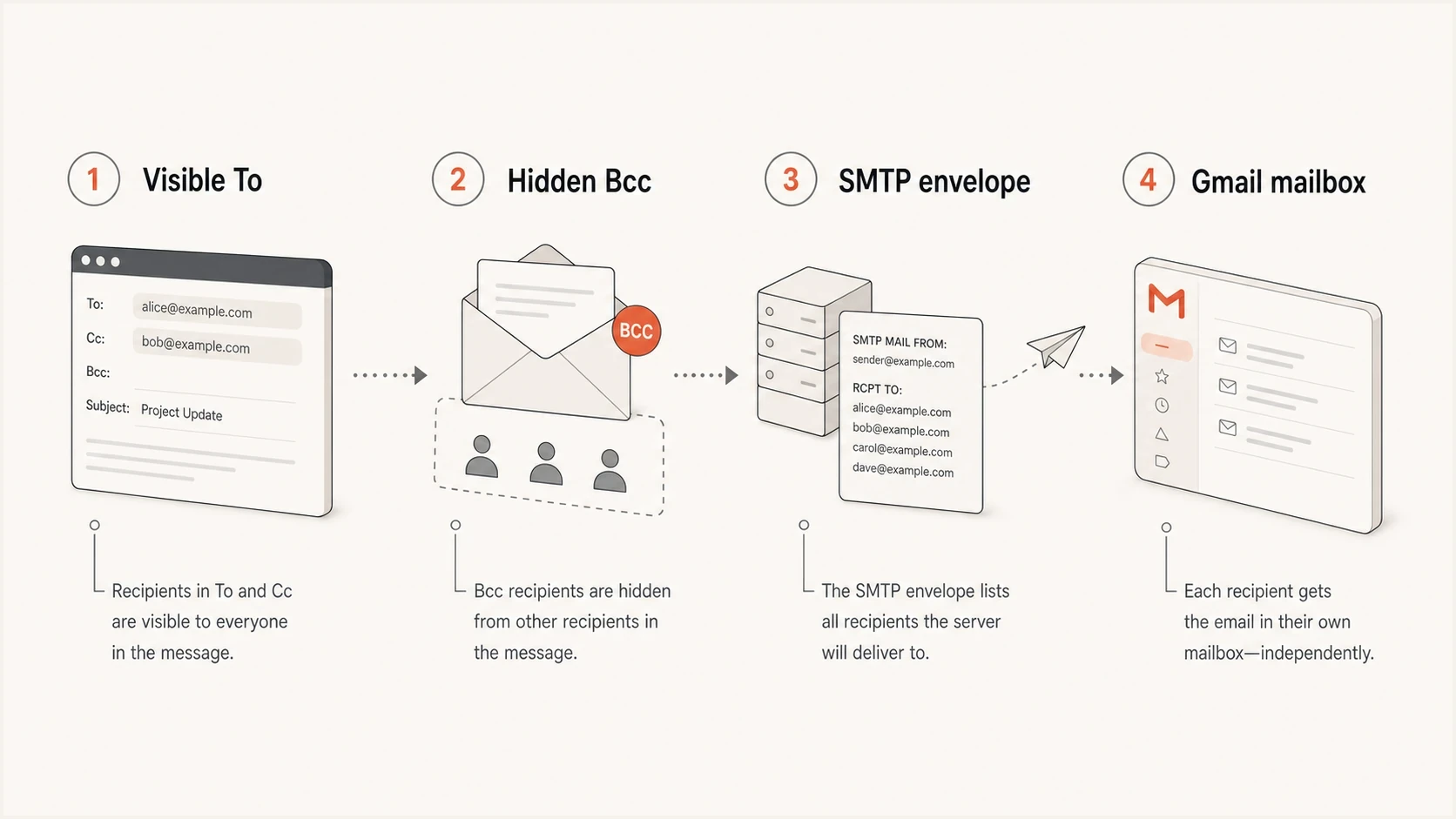
Diagram showing that visible email fields and delivery data are separate.
How Gmail aliases affect unwanted mail
For personal @gmail.com accounts, dots in the username do not create separate mailboxes. Messages sent to janedoe@gmail.com and jane.doe@gmail.com reach the same inbox. Someone can also use a dotted version of your address for a sign-up, accidentally or deliberately, which can produce legitimate subscription messages that you never requested. This behavior does not mean another person owns the dotted address. Work, school, and other managed Gmail addresses can treat dots differently.
A plus alias also routes to the same Gmail inbox. For example, janedoe+shopping@gmail.com reaches janedoe@gmail.com. Plus aliases help label and filter future sign-ups, and they can reveal which address a sender received. They are organization tools, not security controls, because a sender can remove the suffix and use the base address.
Gmail address variantstext
janedoe@gmail.com
jane.doe@gmail.com
janedoe+shopping@gmail.com
Aliases do not create new inboxes
Do not use a dotted or plus-suffixed Gmail address as a separate security identity. Password resets and account notices sent to those variants still reach the base Gmail account.
Common causes of a sudden increase
A spike in Gmail inbox spam rarely has one single cause. A useful diagnosis starts with recent address exposure, then checks whether the messages share enough structure to make filtering useful. If the spam is arriving in bursts with similar subjects, attachments, display names, or sender domains, Gmail will usually improve classification as people report it. If every message looks different, local filters help less.
|
|
|
|---|---|---|
Scraped address | Your address is on a list | Report and filter |
Breach reuse | Old data is being reused | Change reused passwords |
New campaign | Filters lack history | Report as spam |
Header spoofing | Visible fields are fake | Read original headers |
Account rule | A filter forwards mail | Review Gmail settings |
Mailbomb | Volume hides real alerts | Search alerts and secure accounts |
Provider filtering issue | Many users see a temporary surge | Check service status, then report spam |
Fast diagnosis for Gmail inbox spam spikes.
A breach does not mean your Gmail account is breached. It means another service connected to that address exposed it, or a list broker has it. The right response is to protect the accounts where password reuse exists, enable two-step verification, and keep reporting the unwanted mail. The FTC spam guidance is a sensible baseline for consumer inbox hygiene.
When to worry
Use volume and account symptoms to decide how much investigation is needed.
Low concern
1-5 weekly
A few unwanted messages each week, no account alerts, no sign-in warnings.
Watch closely
5-20 daily
Several messages a day, similar attachments, visible recipient mismatches.
Investigate now
20+ daily
Dozens daily, password reset emails, unknown filters, or sign-in warnings.
When a spike is a mailbomb
A mailbomb is different from ordinary junk mail. The goal is volume. An attacker can flood your inbox with subscriptions, promotional offers, and account notifications so security alerts, order confirmations, password resets, or financial warnings are harder to find.
Treat a sudden flood as a security task, not only an inbox cleanup task. Search both Inbox and Spam for alerts, review recent account activity, check forwarding and filters, and use Gmail categories or searches to keep important mail visible while the burst continues.
- Find security alerts: Search for password resets, sign-in warnings, verification codes, bank notices, and order changes.
- Review Gmail access: Check filters, forwarding, delegation, POP, IMAP, recovery email, and recent security activity.
- Use categories: Gmail categories and searches can separate Updates or Promotions from urgent account messages.
- Report the burst: Mark unwanted messages as spam or phishing so Gmail receives a classification signal.
Useful Gmail searches during a floodtext
category:updates newer_than:1d
newer_than:1d "security alert"
newer_than:1d "password reset"
newer_than:1d "verification code"
What to do in Gmail now
The most effective immediate response is simple. Report the message as spam so Gmail gets the signal. Do not reply, do not click unsubscribe in obvious spam, and do not open unexpected attachments. If the message claims to be from a real sender you know, open the original headers first and confirm the real sending path.
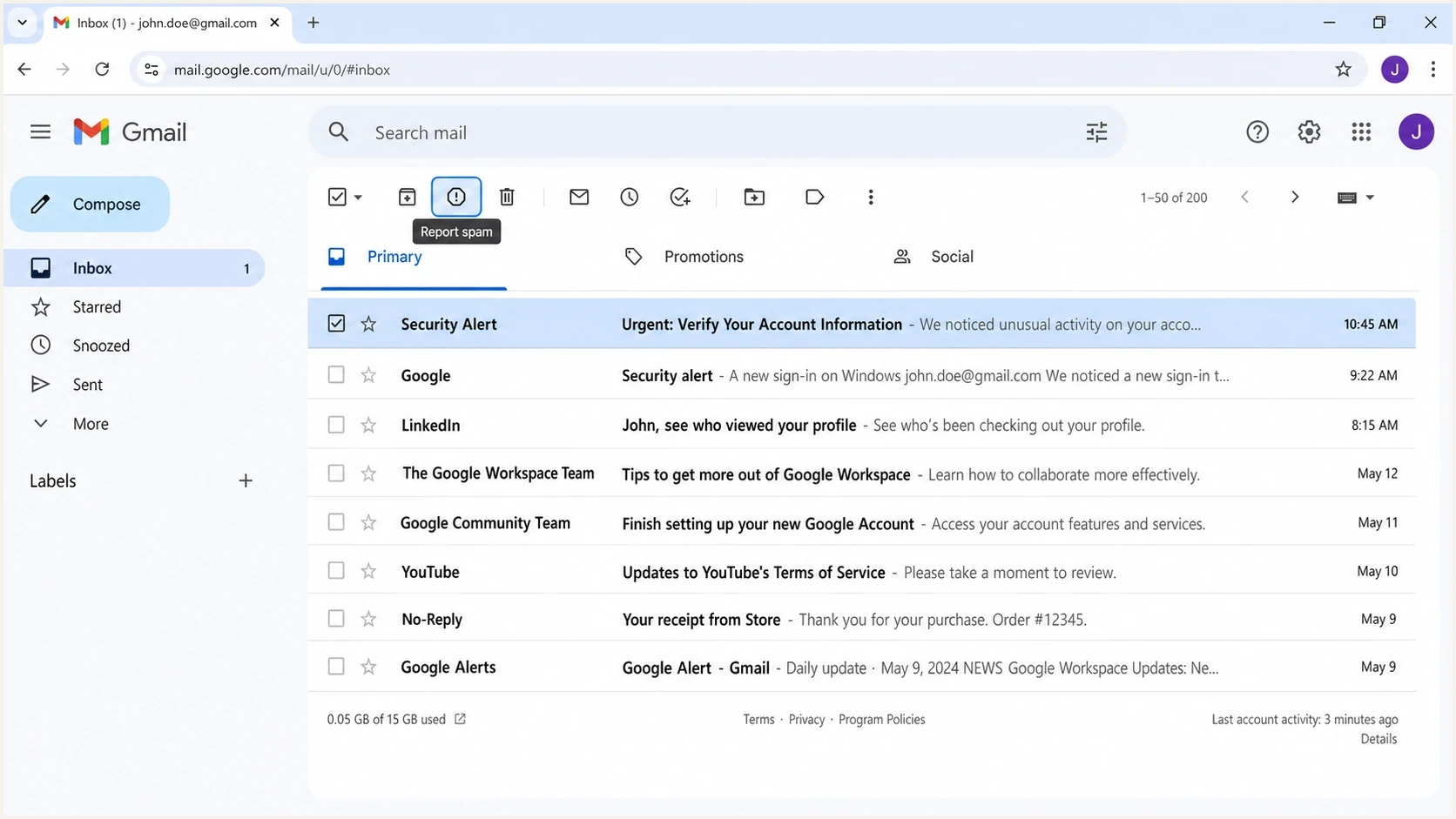
Gmail screenshot showing where to report an unwanted message.
- Report spam: Use Gmail's report option instead of only deleting the message.
- Report phishing: Use Gmail's phishing report when the message asks for credentials, payment, recovery codes, or sensitive files.
- Avoid fake unsubscribe: Use unsubscribe only for brands you recognize and previously signed up for.
- Manage subscriptions: In Gmail on a computer, check More and then Manage subscriptions for recognized mailing lists. Google is still rolling out this option, so it is not available on every account.
- Check filters: Review Gmail filters, forwarding, delegation, and POP or IMAP access.
- Verify contacts elsewhere: If spam comes from someone you know, do not reply to the email. Warn them through another channel.
- Secure accounts: Change reused passwords and enable two-step verification where it is missing.
- Use local filters carefully: Filter repeated phrases or senders only when the pattern is stable.
If the message is legitimate marketing mail from a sender you recognize, unsubscribe once and keep the confirmation. For US commercial email, senders have up to 10 business days to honor opt-out requests. Repeated mail after that belongs in spam reporting and documented complaint channels. For obvious spam, do not click the unsubscribe link at all.
Blocking one sender has limited value
Blocking a sender helps when the same mailbox keeps contacting you. It does not stop a campaign that changes domains, display names, and sending infrastructure. Reporting spam gives Gmail a stronger classification signal than a private block alone.
When this affects your own sending
There is a separate issue that often gets mixed into this question. Receiving more spam in your personal Gmail inbox is mainly a recipient-side problem. Having your own messages land in Gmail spam is a sender-side problem. If you operate a business domain, you need to test the messages you send, not only inspect the spam you receive.
For a sender-side check, send a real message to an email tester and review authentication, headers, content, and reputation signals. This helps separate a Gmail inbox spam annoyance from a deliverability problem with your own mail.
Email tester
Send a real email to this address. Suped shows a results button when the test is ready.
?/43tests passed
If you own a domain and see spam pretending to use your brand, check whether SPF, DKIM, and DMARC are correctly published. A quick domain health check will show whether the domain has obvious DNS authentication issues. For ongoing visibility, Suped's product gives teams DMARC monitoring, hosted SPF, hosted DMARC, hosted MTA-STS, real-time alerts, and issue steps that explain what to fix.
Issues page showing top issues, verified sources, unverified sources, and authentication pass rates
Suped's product puts authentication, policy staging, sender visibility, SPF flattening, and blocklist monitoring in one workflow. That does not stop random spam from reaching a personal Gmail inbox, but it helps a business prove which mail is legitimate, find unauthorized senders, and reduce brand spoofing. Blocklist (blacklist) monitoring also helps catch reputation issues before they turn into broader delivery problems.
How to read the original headers
When a message looks impossible, open Gmail's original message view and look for delivery traces. Start with Delivered-To, X-Apparently-To, Return-Path, Received, and Authentication-Results. Those fields usually explain why the message reached the mailbox and which domain Gmail evaluated.
- Delivered-To: This often shows the Gmail account that actually received the message.
- Return-Path: This points to the bounce address used by the sender's mail system.
- Received: These lines show the mail hops, with the newest hop usually near the top.
- Authentication-Results: This shows SPF, DKIM, and DMARC results as Gmail evaluated them.
Do not forward the whole header publicly
Raw headers can contain your address, routing data, internal IDs, and security-related signals. Redact personal addresses and tokens before sharing a header sample with anyone outside your organization.
Views from the trenches
Best practices
Check original headers before assuming Gmail delivered someone else's message to you.
Report unwanted mail in Gmail so similar campaigns gain stronger filtering signals.
Treat sudden volume spikes as address exposure first, then check account security.
Common pitfalls
Assuming the visible To field controls delivery leads to the wrong diagnosis.
Clicking unsubscribe in obvious spam confirms the address is active to the sender.
Blocking every displayed sender wastes time when campaigns rotate identities fast.
Expert tips
Use Delivered-To and Return-Path to separate display spoofing from delivery paths.
Look for repeated attachments, subjects, and domains before building local filters.
For owned domains, monitor DMARC sources so spoofing patterns are visible early.
Expert from Email Geeks says the To and Cc fields are visual message headers, and SMTP envelope recipients decide where mail is delivered.
2021-08-23 - Email Geeks
Expert from Email Geeks says a message can display a random first-name address while still being addressed to your Gmail account in the delivery layer.
2021-08-23 - Email Geeks
The practical takeaway
More spam in Gmail usually means your address is being targeted more often and a campaign is slipping through filtering. The odd To field is normally a header trick, Bcc, an address alias, or an envelope delivery detail, not evidence that someone else's mailbox is being routed into yours.
Report obvious spam, use Gmail's subscription controls for senders you recognize, inspect original headers when something looks strange, and secure reused-password accounts. If the problem involves mail sent by your own domain or spam abusing your brand, move the investigation into authentication and monitoring. Suped's product gives domain owners evidence about authenticated sources, unauthorized senders, and policy gaps.




