
Why am I getting a 550 Sender Not Verified error for a small percentage of recipients with a correct return path?

Updated on 9 Oct 2026: We clarified SMTP sender verification and added callback troubleshooting for rare 550 rejections with a correct return path.
A 550 Sender Not Verified error for only a tiny share of recipients means those deliveries failed a sender-verification check. The percentage alone does not identify the cause. If your message is meant to use foo@rp.01.example.com but the bounce says it checked foo@rp.example.com, do not start by assuming the recipient provider removed the shard. Start by proving which sender your mail server actually used for the failed deliveries.
A stale sending node, worker, container, or MTA configuration is one explanation when failed deliveries use an old return path. If the failed SMTP transaction used the correct envelope sender, investigate DNS routing, bounce-address handling, and the recipient server's verification policy. A strict sender check at only a few recipient servers can expose a problem that other receivers do not check.
Why a correct return path still fails
If the bounce shows a shortened or older return path, check whether a worker, queued message, or relay used that older envelope sender. A receiver that says "Sender Not Verified" is rejecting the address evaluated by its verification rule. The intended return path in your application or MTA template is only the starting point; confirm the final outbound MAIL FROM.
- Check whether a worker, host, queue runner, or fallback route still has an old envelope sender setting.
- Check the exact envelope domain for a usable DNS route and working bounce handling.
- Check whether the receiving server has a strict callback rule, cached verification failure, or stale local-domain routing entry.
- Capture the full SMTP diagnostic and matching MTA log entry, grouped by sending host and recipient MX.
Do not debug the wrong sender
A correct DNS record for the intended return-path domain does not prove the failed message used it. Separate the configured value from the observed SMTP value. The observed value wins.
A 550 response is a permanent rejection for the affected command or recipient. At RCPT TO, other accepted recipients can still receive the message. Fix or isolate the cause before resending to the rejected recipients, because an unchanged retry usually receives the same rejection.
What sender verification checks
A 550 Sender Not Verified response usually happens during the SMTP conversation. The receiving server looks at the RFC 5321 MAIL FROM address, also called the envelope sender or reverse-path. Some systems check that the domain exists and has a usable mail route. Others route the full address internally or make a callback-style verification attempt. That behavior is separate from the visible From header.
The Return-Path header is added at final delivery to record the SMTP reverse-path. Setting that header in your application does not set MAIL FROM. A relay or forwarding hop can rewrite the envelope sender, so trace the last outbound hop as well as the originating worker. These envelope and header rules are defined in RFC 5321.
The phrase "Sender Not Verified" is receiver-specific rather than a precise SMTP status definition. The 550 code identifies a permanent rejection, while the enhanced status code, command stage, and complete diagnostic text show whether the failure concerns sender routing, address verification, authentication, or local policy.
What you configured
- The return path your application thinks it passed to the sender.
- The default envelope sender inside the MTA or campaign configuration.
- The MX, SPF, DKIM, and DMARC records you expect receivers to evaluate.
What the receiver sees
- The actual MAIL FROM sent by the specific worker handling the message.
- The DNS or local route the receiver uses at verification time.
- The receiver's local sender-verification rule, which can be stricter than normal authentication.
SPF and DMARC still matter here, but this error is not automatically an SPF or DMARC failure. The same sending setup can pass DKIM and DMARC at receivers that accept the message data, yet fail earlier at another receiver because the SMTP envelope sender has no valid route. For wider status-code context, compare it with SMTP 550 errors and keep this case scoped to envelope sender verification.
Why only a small percentage of recipients fail
A failure rate around 0.05% is a clue about the affected traffic, not proof of one cause. A broken bounce route can affect only the few receivers that perform sender verification, even when every worker uses the same return path. Also look for uneven traffic paths: a stale worker, old queue, fallback sender, or regional configuration difference.
The percentage alone does not identify the cause. Check whether the bounces share a sender IP, host ID, queue name, return-path domain, recipient MX, or time window. Measure failures within each affected route and destination as well as across all sends: a low overall rate can hide a high failure rate at one recipient domain.
How a stale worker causes it
A stale worker explains this pattern when logs confirm that one sender still uses the old configuration. You deploy a new return-path scheme such as sharded bounce domains. Most workers restart and pick up the new value. One worker keeps running with the old environment, an old local config, or an old container image. That worker sends a small portion of mail with the old envelope sender.
Expected and stale envelope senders
Expected envelope sender:
foo@rp.01.example.com

Stale envelope sender:
foo@rp.example.com

Receiver response:
550 Sender Not Verified
That older value can look like the receiver stripped a subdomain. If the outbound transcript shows the old MAIL FROM, trace the worker or relay that emitted it. If it shows the current address, ask the recipient administrator which address their verification rule evaluated and whether it rewrote that address.
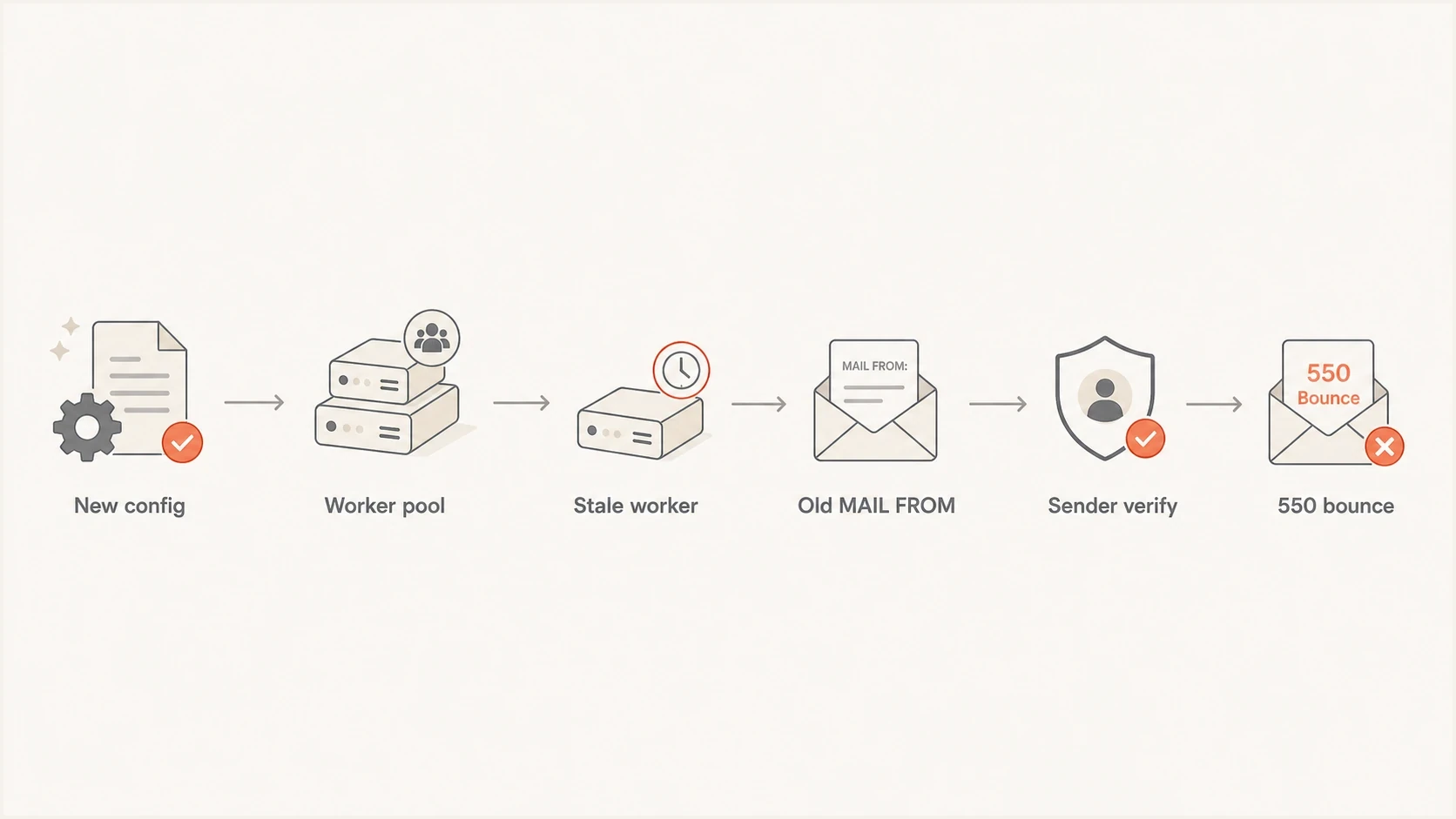
A flowchart showing a stale worker sending an old MAIL FROM address and triggering a 550 Sender Not Verified error.
Inspect the full bounce and SMTP logs
Start with evidence from the failed SMTP transaction, not evidence from the normal path. A passing test from the main sender is useful, but it does not catch a rare worker path unless that worker sends the test. Preserve several complete non-delivery reports (NDRs), also called delivery status notifications (DSNs), and the matching MTA log records without normalising their text.
- Capture the SMTP reply, enhanced status code, remote MX, command stage, and rejected sender address.
- Search by recipient, queue ID, rejected sender, and exact timestamp to recover the outbound MAIL FROM.
- Use raw headers for accepted comparison messages, but do not treat them as proof of a transaction rejected before message data.
- Compare running config, image version, environment variables, and restart time.
- Group failures by destination domain and MX to spot one strict or misconfigured receiver.
Read the DSN's Status and Diagnostic-Code fields, and Remote-MTA when present. A 550 reply to RCPT TO can still be a sender-verification failure. The enhanced status code 5.1.1 concerns a bad recipient mailbox, while 5.1.8 concerns the sender domain, as defined in RFC 3463. Follow the address named in the complete diagnostic before choosing a fix.
Compare Final-Recipient with the address you originally sent to. If they differ, investigate a forwarding rule or another delivery hop, as described in Microsoft's NDR troubleshooting. A recipient-address failure needs a different fix from a rejected envelope sender.
|
|
|
|---|---|---|
Unexpected sender | Configuration or relay rewrite | Trace the final sending hop |
One recipient MX | Receiver-specific verification | Request verification details |
No MX record | Check implicit MX fallback | Check A/AAAA and SMTP reachability |
Different sender hosts | Configuration comparison needed | Compare running configuration |
Use short labels first, then open the full logs for any repeated pattern.
Prove the actual return path
A controlled test helps if you can force traffic through each sender. Send one test per worker, region, or queue class and inspect the delivered result. Suped's email tester shows the authentication result for a message that was actually accepted. Use it to validate working routes, then use your MTA transcript for any route rejected before the receiver accepted message data.
Email tester
Send a real email to this address. Suped shows a results button when the test is ready.
?/43tests passed
If your sending platform does not let you pin a worker, add temporary logging around envelope sender creation. Log the sender address, worker ID, config version, queue ID, and message ID. Keep the log entry close to the SMTP transaction so template-level values do not mask a later rewrite.
Fields to log for each send
worker_id=mx-worker-17
config_version=2026-05-26-rp-shard
queue_id=4F29A1
mail_from=foo@rp.01.example.com
recipient_domain=recipient.example
outbound_ip=192.0.2.17
remote_mx=mx.recipient.example
smtp_stage=RCPT TO
smtp_reply=550 Sender Not Verified
If failures with an old envelope sender point to one worker or configuration version, fix deployment drift. If the same correct MAIL FROM fails across workers at one recipient MX, check bounce-server reachability and the receiver's verification details before assigning fault.
DNS and authentication checks
For the exact envelope sender domain in the failure, confirm consistent resolution, a usable SMTP route, active bounce handling, and SPF coverage for the sending IPs. Separately confirm that DKIM signs with the expected domain and that at least one passing SPF or DKIM result meets DMARC's domain-matching requirements against the visible From domain. Use Suped's domain health checker for the first pass, then inspect the exact failing domain and its DNS chain.
?
What's your domain score?
Deep-scan SPF, DKIM & DMARC records for email deliverability and security issues.
Do not check only the new return-path domain. Check the old one shown in the bounce too. If the old domain has no usable SMTP route, its bounce address rejects callback probes, or its DNS answers vary by resolver, the sender-verification failure matches the old sender the receiver saw.
An absent MX record is not the same as an invalid mail route: SMTP uses A or AAAA records as an implicit MX fallback when no MX exists. A published MX target must resolve directly to address records rather than a CNAME, as RFC 5321 specifies. By contrast, a null MX (MX 0 .) declares that the domain accepts no mail, so it is unsuitable for a bounce domain. See RFC 7505. Compare authoritative answers with the recipient resolver's cache, including negative caching after a DNS repair.
Illustrative DNS records for old and current domains
Check current return path:
rp.01.example.com. 300 IN MX 10 bounce.example.net.

Check old return path:
rp.example.com. 300 IN MX 10 bounce.example.net.

Check SPF at the envelope domain:
rp.01.example.com. 300 IN TXT "v=spf1 include:_spf.example.net -all"

Check the MX target has direct address records:
bounce.example.net. 300 IN A 192.0.2.25
bounce.example.net. 300 IN AAAA 2001:db8::25
Suped's DMARC monitoring is part of our product and can group reported authentication results by source and domain while you investigate deployment drift. A rejection before message data provides no DKIM result or DMARC evaluation for that transaction, so do not expect it to appear in DMARC aggregate reports. Use the failed SMTP transcript for that evidence, Suped alerts for reported authentication changes, and blocklist monitoring when the same bounce cluster includes broader blocklist (blacklist) or reputation symptoms.
Check callback verification and bounce handling
Callback verification, also called callout verification or sender address verification, connects to the return-path domain's mail server and tests the exact bounce address. A typical probe uses an empty envelope sender and stops without sending message data, as described in USENIX's callback explanation. A valid DNS route does not prove that this SMTP probe succeeds.
Typical callback commands, without sending message data
EHLO verifier.recipient.example
MAIL FROM:<>
RCPT TO:<foo@rp.01.example.com>
QUIT
- Check that each bounce-domain MX host is reachable on TCP port 25 from the verifying server, including any advertised IPv6 route.
- Confirm that the exact generated bounce address accepts legitimate delivery status notifications with an empty envelope sender; it needs a working bounce handler, not a human inbox.
- Match bounce-server logs to the failed delivery timestamp and look for connection timeouts, address rejections, or temporary deferrals.
- Ask the recipient administrator for the callback target and cached result. After fixing the cause, refresh any negative verification cache before retesting.
Greylisting produces a temporary 4xx response, as RFC 6647 explains. If the destination turns a temporarily unsuccessful probe into a 550 rejection of your original delivery, ask its administrator to review the callout policy. A successful probe establishes address acceptance at that moment, not SPF, DKIM, or DMARC authentication.
Investigate recipient-side verification
A recipient-side routing or verification policy is another explanation for a small failure cluster. Receiving servers can retain stale DNS or local routes, mishandle valid CNAME resolution, or reject your message after a callback to your bounce server is deferred. Acceptance at other receivers does not establish that the bounce address is reachable or accepted by a callback probe.
Evidence to collect for a recipient-side issue
- The same verified MAIL FROM succeeds at other receivers; this comparison identifies a policy difference, not the root cause.
- Failures cluster around one recipient MX or one hosting network.
- The exact envelope domain has a usable public mail route, and the bounce server logs show how it handled the recipient's probe.
- The failures stop after the receiver refreshes DNS, routing, or verification policy.
If a sender still emits an old return path, fix that sender. If the failed transaction uses the current return path, collect its transcript and the bounce server's probe response, then ask the recipient-side postmaster to review the sender-verification rule.
Check receiver-side domain routing
A receiving system can retain your sender domain as a local mail domain after its email hosting has moved elsewhere. During sender verification, that server looks for the envelope sender in its own mailbox database instead of following the public MX route. The local mailbox does not exist, so the receiver returns 550 even though public DNS for the domain is correct.
- Check whether failures occur only at one recipient MX, hosting network, or set of related domains.
- Ask the recipient administrator whether the sender domain is classified as local or remote on the rejecting server.
- The recipient administrator should remove the obsolete local-domain entry or change it to remote routing.
- Refresh routing and sender-verification caches, then retest the exact envelope sender from an affected route.
What to send the recipient administrator
Provide the UTC timestamp, rejecting MX hostname, complete SMTP response, sending IP, exact MAIL FROM address, and public MX answer. Ask whether their server still treats the sender domain as locally hosted. This gives the administrator a routing question to test instead of a general deliverability complaint.
Fix and prevent sender verification failures
The fix depends on which sender the failed message used. If you find an old worker, restart the affected instances, update stale containers, inspect queued messages that already store an envelope sender, and make the running configuration visible in logs. A restart does not necessarily rewrite queued mail. Keep the old return-path domain working for a defined grace period that covers queued mail and delayed delivery status notifications.
- Restart every sender instance and confirm each reports the same config version.
- Inspect old queued messages for stored envelope senders, then update or requeue affected mail with duplicate-delivery checks.
- Leave necessary MX and SPF records in place for retired return-path domains during a defined migration window.
- Add worker ID, config version, and envelope sender to every delivery log.
- Check blacklist and blocklist status if bounces include broader reputation rejections.

Issue steps to fix dialog showing the issue overview, tailored fix steps, and verification action
Suped is our DMARC and email authentication product. Use its source grouping and issue alerts to identify authentication drift, then record the affected worker, envelope domain, and remediation beside the incident. The SMTP transcript and MTA logs still provide the decisive evidence for this specific 550 response.
Views from the trenches
Best practices
Capture raw bounce text and headers before normalising data into dashboards or alerts.
Group failures by worker, queue, sending IP, recipient MX, and exact MAIL FROM value.
Keep retired return-path domains routable during migrations and delayed queue retries.
Common pitfalls
Assuming the configured return path was used without checking the SMTP transaction.
Treating a tiny bounce rate as receiver fault before tracing worker-level config drift.
Removing old bounce-domain DNS immediately after a sharded return-path migration.
Expert tips
Add config version and worker ID to delivery logs so rare errors become searchable.
Test each sending route separately when one shared test message returns clean results.
Check CNAME and MX chains for retired domains because sender verification follows DNS.
Marketer view
Marketer from Email Geeks says actual domains and full bounces matter because DNS guesses rarely settle sender verification cases.
2024-09-16 - Email Geeks
Marketer view
Marketer from Email Geeks says a 0.05% rejection rate often points to a tiny receiver cluster or one unusual filtering setup.
2024-09-16 - Email Geeks




