What is the safest way to link to adult content in emails?

Updated on 9 Aug 2026: We updated this guide for RFC 9989 and added practical consent, unsubscribe, and adult-labeling safeguards.
The safest way to link to adult content in emails is to avoid linking directly to restricted material. Link first to a clearly branded, safe for work age or consent page on a stable domain, require real user action before the restricted area loads, and keep the sending domain authenticated and monitored. This is both a content classification problem and a reputation separation problem.
The short answer has a few parts: use stable branded sending infrastructure, send only to explicit adult-content opt-ins, keep the email body safe for work, use a content gate that requires a form submission or button action, avoid simple redirects to restricted pages, and test the message before scaling. A subdomain gate reduces accidental exposure, but it does not fully isolate the sender or override an adult web classification or poor reputation.
A transparent link pattern
For adult or adult-adjacent email, the link should not expose restricted content at the first fetch. Inbox crawlers, corporate filters, and security systems fetch links before a human clicks. Some fetch only the exact URL. Some follow redirects or render pages in full browser environments. The safer pattern assumes the first page will be inspected and keeps the brand relationship and destination purpose clear.
- Use a stable branded sending domain: Keep promotional mail operationally separate where useful, but use a domain recipients can connect to the brand. Do not rotate unrelated domains to escape classification.
- Link to a SFW gate: The first destination should contain compliant copy, no restricted imagery, and no automatic redirect.
- Require real action: Use a button, age confirmation, account login, or form submission before any restricted content appears.
- Keep tracking simple: A branded click domain is acceptable when the redirect chain is short, transparent, and ends at the safe gate.
- Monitor every signal: Authentication, complaint rate, bounces, blocks, and blacklist or blocklist changes all matter during rollout.
Do not rely on JavaScript alone
Some crawlers execute JavaScript. The safer boundary is a real state-changing action, such as a POST form submission, login, or explicit click that creates a session. Do not automatically forward visitors with JavaScript, meta refresh, or a server-side redirect.
How crawlers judge the link
Security crawlers generally evaluate the URLs present in a message and the destinations reached through redirects. They are not guaranteed to crawl the entire parent domain in response to one email, but domain reputation and web classification can carry across related hostnames. A gate reduces accidental exposure. It does not make the final destination invisible or guarantee inbox placement.
|
|
|
|---|---|---|
Direct restricted link | High | The crawler can fetch the restricted page directly. |
301 or 302 redirect | High | Most crawlers follow the redirect path. |
SFW gate | Variable | The first page limits exposure, but related-domain signals still apply. |
Gate plus action | Lower exposure | Restricted material requires user intent, but provider policy still applies. |
Relative exposure and filtering risk when the destination contains restricted material.
Simple link cloaking creates a second risk. If the email says one thing, the visible URL suggests another, and the final page is different again, filters can treat the chain as suspicious. Keep the route honest and short. For more detail on this part, read about link redirects and reputation.
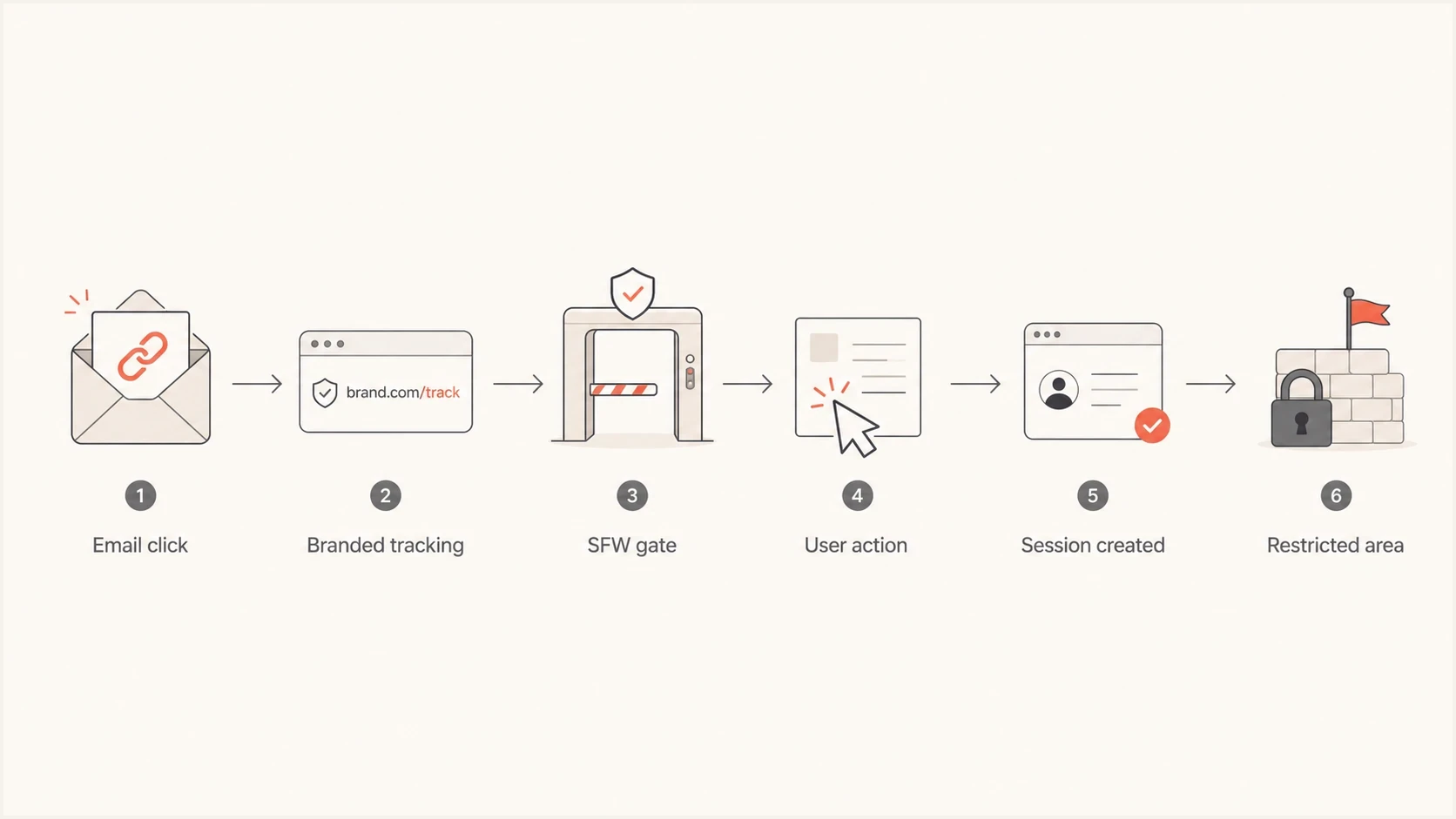
Flowchart showing an email click passing through a safe gate before a restricted area.
What the gate should contain
The gate is not a trick page. It is the page a crawler, compliance reviewer, or corporate filter can see without exposing restricted material. Keep it plain: the brand name, account context, age or consent step, privacy and preference links, and a clear button that confirms intent. Do not include restricted preview images, explicit metadata, or an automatic jump to the product experience.
Risky first hop
- Hidden destination: The CTA lands on a clean URL that immediately redirects to restricted content.
- Explicit metadata: Page title, Open Graph tags, image filenames, or previews expose the restricted category.
- Shared root: Marketing, product, transactional, and restricted web content all use the same domain.
Safer first hop
- Visible purpose: The page explains the account action in safe, neutral language.
- User action: The next step requires confirmation, login, or a form submission.
- Separated roles: Email sending, tracking, and the restricted product site use stable infrastructure with clear brand ownership.
Safe first-hop routetext
Email CTA -> https://go.example.net/welcome
Gate loads SFW content only
User confirms age and intent with POST
Server creates session
Session sends user to restricted area
The same logic applies to required links. Host the privacy policy, terms, unsubscribe, and preference center on domains the brand controls. A third-party document link is acceptable for a small proof of concept, but move those pages onto a controlled web property before scaling to remove a needless reputation dependency.
Domain separation and authentication
Domain separation is often left too late. If the parent site has restricted content, use a stable dedicated sending domain or subdomain and a dedicated tracking subdomain, with ownership made clear to recipients. Keep transactional OTP mail on its own stream and marketing on another. This limits operational spillover, although mailbox providers can still associate related domains.
Authentication will not make restricted content safe, but weak authentication makes every content decision harder. SPF, DKIM, and DMARC should pass and match the domain strategy. Suped's DMARC monitoring can confirm the approved systems are sending and surface unknown sources, forwarding effects, or DMARC match failures. RFC 9989 removed the pct tag, so staged enforcement now means replacing p=none with p=quarantine or p=reject after reviewing reports.
Example DMARC records, publish one at a timedns
Monitoring stage:
v=DMARC1; p=none; rua=mailto:dmarc@example.com; adkim=s; aspf=s

Enforcement stage after reviewing reports:
v=DMARC1; p=quarantine; rua=mailto:dmarc@example.com; adkim=s; aspf=s
A small early send is not usually permanent damage
A handful of early test emails with direct links does not usually create lasting domain damage by itself. The risk grows when the pattern repeats at volume, complaints rise, recipients ignore the mail, or corporate filters start categorising the domain as restricted.
Before a larger send, run the domain through a domain health checker and confirm the sending domain, tracking domain, SPF record, DKIM signatures, and DMARC policy all behave as expected.
Suped DMARC dashboard showing email volume, authentication health, and source breakdown
Consent, unsubscribe, and legal checks
A technically careful link cannot rescue unwanted mail. Consent should specifically cover adult-content marketing rather than being buried in general account terms or inferred from a transaction. Keep evidence of when consent was given, what the subscriber was told, and which message categories they selected.
- Set clear expectations: Tell subscribers the content category, brand, and expected frequency before they opt in.
- Make the sender recognisable: Use an accurate From name, subject line, and branded domain so recipients do not mistake the message for adult spam.
- Provide one-click unsubscribe: For marketing mail, add RFC 8058 List-Unsubscribe headers and keep a visible unsubscribe link in the body.
- Suppress promptly: Stop sending to unsubscribes, spam complainers, and hard bounces across every promotional stream.
- Check recipient jurisdictions: Adult-content labeling, consent, age, privacy, and recordkeeping rules vary by location.
US adult-content email has extra rules
If a commercial email itself contains sexually oriented material, the FTC Adult Labeling Rule can require "SEXUALLY-EXPLICIT:" at the start of the subject line and a restricted initial view. A SFW landing page does not answer whether the message falls within that rule. Have counsel review the message and recipient jurisdictions before sending.
These controls reduce the chance that a subscriber uses Report spam as the fastest way out. They also protect the sending reputation more directly than adding another redirect or changing domains after complaints begin.
What to avoid while warming
During IP or domain warming, keep links simple. The goal is to show mailbox providers that recipients wanted the mail and that the sender behaves consistently. Combining a new program, a sensitive category, and aggressive link routing creates noisy reputation signals.
- Avoid direct CTAs: Do not send new warmup traffic straight to restricted pages.
- Avoid many domains: Keep legal, preference, image, tracking, and landing links under controlled brand infrastructure.
- Avoid work addresses: Corporate filters often block adult categories as workplace policy, regardless of consent.
- Avoid cold traffic: Adult content should go only to people who clearly asked for it and expect the brand.
Practical risk levels by link path
Lower exposure means the first crawler-visible destination stays compliant and requires user intent before restricted material appears. Provider policy and related-domain classification still apply.
Direct restricted page
High
Crawlers can inspect the same page as the user.
Server redirect
High
The destination is still exposed through the redirect chain.
SFW gate
Variable
The first page is compliant, but related signals remain visible.
Gate with POST
Lower exposure
The restricted area requires a human action and session.
Then test the actual email and the DNS together. Send a real message to an email tester and inspect headers, authentication, link routing, image loading, and any warnings before increasing volume.
Email tester
Send a real email to this address. Suped shows a results button when the test is ready.
?/43tests passed
Where Suped fits
Suped's product supports this workflow after DNS records are published. Its DMARC reporting shows which sources send on behalf of the domain, whether they pass authentication and DMARC matching checks, and when an unexpected source appears. Alerts help the team investigate changes while campaign volume is still small.
For a sensitive-category program, Suped can track authentication failures and watch the sending or tracking domain through blocklist monitoring. A blacklist (blocklist) event or unapproved sender can then be reviewed before the next campaign goes out.
The workflow before scaling
- Authenticate first: SPF, DKIM, and DMARC pass with the same domain strategy used in the campaign.
- Separate streams: Transactional, marketing, tracking, and product destinations have clear domain boundaries.
- Watch issues: Alerts catch new failures, unverified senders, and policy problems while volume is still small.
- Check reputation: Blocklist and blacklist changes are reviewed before each major send.
This monitoring does not replace good consent, safe creative, or a real gate. It shows whether the sending setup remains healthy enough for the next controlled increase in volume.
Views from the trenches
Best practices
Use a safe gate that requires user action before any restricted content can load.
Separate sending, tracking, and product domains so one reputation issue stays contained.
Keep legal and preference pages on controlled domains before moving beyond proof of concept.
Common pitfalls
Treating a clean redirect as protection fails because crawlers usually follow redirects.
Letting explicit page titles, previews, or metadata leak the content category too early.
Assuming corporate filters judge consent, when many block adult categories by policy.
Expert tips
Build the gate around a POST action, login, or session, not a script-only transition.
Warm slowly with few links, strong authentication, and steady complaint monitoring.
Review blacklist and blocklist signals before scaling each sensitive-category campaign.
Marketer from Email Geeks says crawlers commonly follow server redirects, so a safe gate only helps when it stops automatic movement to restricted pages.
2026-03-25 - Email Geeks
Marketer from Email Geeks says some crawlers render pages with JavaScript, so the dependable boundary is a form submission, login, or other user action.
2026-03-25 - Email Geeks
The practical answer
The safest approach uses transparent routing instead of a clever redirect. Make the first crawler-visible page safe, require user intent before restricted material loads, and keep the sending infrastructure stable and authenticated.
Use a dedicated branded sending domain or subdomain, a branded tracking domain, a safe for work gate, adult-specific consent, one-click unsubscribe, and strong authentication. Keep third-party document links temporary. Do not expect corporate inboxes to behave like consumer inboxes. Clean message content, honest routing, and prompt suppression provide the strongest practical setup for a sensitive-category email program.




