What is the meaning of using quotes around certain words in automated email responses?

Updated on 8 Aug 2026: We added a context-based test for separating system labels from scare quotes and clarified single versus double quotation marks.
Quotes around a word in an automated email response usually mark an inserted form label or a category chosen by the user. They can also be misguided emphasis or scare quotes that signal distance or doubt. In the phrase "Thank you for submitting an 'Abuse' form", the most likely meaning is that Abuse is the name of a form type or queue, not that the sender doubts the report.
The problem is tone. A human reader can read 'Abuse' as distance, sarcasm, skepticism, or legal hedging. That is why this small punctuation choice matters in automated responses. It can make a routine confirmation feel less sincere than intended, especially when the quoted word is sensitive, such as abuse, complaint, fraud, harassment, or refund.
For deliverability, quote marks around one word do not directly damage inbox placement. Filters care more about authentication, sending reputation, recipient engagement, and full-message patterns. Still, awkward punctuation can reduce trust and replies, which affects how recipients behave. If you want to test the actual message as received, send it through an email tester and inspect the rendered copy, headers, links, and authentication results.
What quoted words usually mean
In automated email, quotation marks around a single word often mark that word as data. The template is saying, in effect, this exact value came from a field, form, case type, ticket category, tag, or internal label. That is common in support platforms, abuse desks, moderation systems, help centers, and web form confirmations.
- Field value: The word is a stored value inserted into the response, such as Abuse, Billing, Support, or Complaints.
- Form title: The word is the name of the form the sender completed, not a comment on the sender's claim.
- Queue label: The word maps to an internal routing category used by the receiving team.
- Template habit: The writer used quotes to separate a variable from surrounding sentence text.
The safest reading
Read quoted words in automated responses as system labels first when they match a visible form or category. Treat sarcasm or dismissal as a copywriting risk, not the default technical explanation.
Readers do not parse transactional email like developers parse templates. If a user reports abuse and the response thanks them for submitting an 'Abuse' form, the quotes can make the word feel disputed. The system did not intend that meaning, but the recipient sees the final wording, not the database field behind it.
Why automation adds quotes
Most quote marks in automated responses come from template design. Someone writes a reusable sentence with a variable in the middle, then wraps the variable in quotes because it looks distinct during testing. The template works technically, so it ships.
Typical template patterntext
Thank you for submitting a '{{form_name}}' form.

Rendered output:
Thank you for submitting a 'Abuse' form.
The bug in that example is not only the quotes. It also says "a 'Abuse' form" instead of "an Abuse form" or "an abuse report". That shows the sentence was built around a generic variable rather than written for the actual category.
What the system means
- Exact category: The word matches a form choice or internal case type.
- Routing hint: The label tells the support or abuse team where the item belongs.
- Template boundary: The quotes visually separate the inserted value from fixed copy.
- No tone intent: The punctuation was likely chosen for clarity inside the template editor.
What the reader can hear
- Scare quotes: The word sounds questioned, ironic, or not fully accepted.
- Legal distance: The company sounds reluctant to name the issue plainly.
- Low empathy: A sensitive report can feel like a formality instead of a concern.
- Template smell: The message looks machine-built and less carefully reviewed.
These cases deserve edits even when they are technically harmless. Automated messages carry the brand voice at moments when users need clarity. A small punctuation choice can change whether the response feels accountable.
Common meanings in email copy
Quotation marks do not have one fixed meaning in email copy. The surrounding sentence decides the meaning. A quoted word inside a receipt, support acknowledgement, abuse response, unsubscribe confirmation, or compliance notice can mean any of the following.
|
|
|
|---|---|---|
'Abuse' | Form type | Sounds dismissive |
'Complaints' | Queue name | Feels bureaucratic |
'Refund' | Request category | Can imply doubt |
'Submitted' | Bad emphasis | Creates confusion |
'Welcome' | Tone error | Sounds sarcastic |
'Important' | Intended emphasis | Can sound ironic |
'Premium' service | Skeptical distance | Questions the claim |
Common interpretations of quoted words in automated messages.
A useful rule is simple: quotes are fine when the reader needs the exact value, and risky when the quoted word carries emotion, harm, trust, payment, safety, or consent. In those cases, write the sentence around the user's action instead of around the database value.
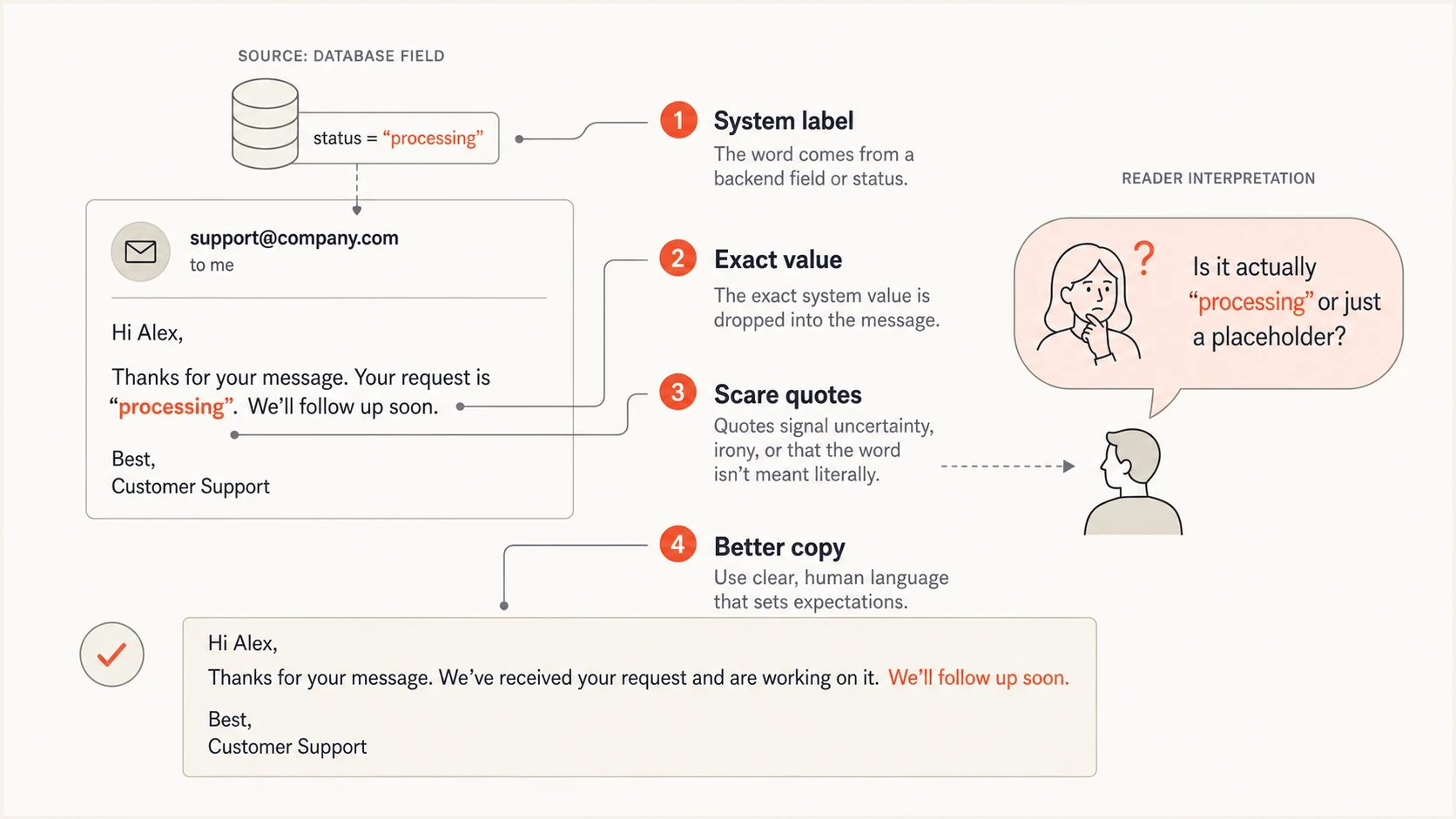
Infographic showing how a quoted word can look like a system label or scare quotes.
How to tell what the quotation marks mean
Start with context rather than the shape of the quotation marks. Single and double quotation marks usually follow a house style or regional convention, so the mark style does not decide whether a label is literal or skeptical. The surrounding sentence provides the stronger clue.
- Look for an exact match: If the quoted word matches a button, form title, menu option, or value the user selected, it is probably a label.
- Read the implied claim: If removing the marks makes the company sound more committed to the word, the marks are creating distance or doubt.
- Check for emphasis: If the writer appears to be highlighting an ordinary word such as Important, the quotes are probably an emphasis mistake.
- Compare related messages: If every category appears inside quotation marks, the punctuation is probably part of the template rather than deliberate commentary.
Single versus double quotes
Do not infer sarcasm from single quotes alone. Style conventions differ, and double quotes can carry the same skeptical meaning. Interpret the sentence first, then check the sender's usual punctuation style.
When the intent remains ambiguous, rewrite the message. Automated copy should not require the recipient to decide whether a sensitive word is a label, a quote, or a challenge to their account.
When quotes are correct
Quotes are not always wrong. They are useful when the email talks about a term as a term, cites an exact user choice, or repeats a submitted value that the user needs to verify. Style guidance generally supports quotation marks when discussing a word itself or a direct quote, and that maps neatly to some automated email use cases. The Australian Government style guidance on quotation marks is a useful reference for that distinction.
- Exact input: Use quotes when repeating a user-entered value that must be checked exactly.
- Term discussion: Use quotes when explaining what a particular label means inside a product or process.
- Subject reference: Use quotes when repeating a support subject, ticket title, or search query.
- Legal wording: Use quotes only when the exact phrase has a defined contractual or policy meaning.
Do not quote sensitive categories casually
Avoid quotes around words such as abuse, complaint, fraud, harassment, cancellation, refund, safety, and violation unless the sentence clearly identifies them as product labels.
The main editorial test is whether the quotes help the recipient understand the message. If the quotes mainly help the developer see where the variable begins and ends, remove them in the customer-facing output.
How to rewrite awkward automated responses
The cleanest fix is to write separate copy for high-sensitivity categories. Do not force every form type through one sentence. A billing question and an abuse report need different acknowledgement text because the recipient's situation is different.
Before and after copytext
Before:
Thank you for submitting an 'Abuse' form.

Better:
Thank you for submitting an abuse report.

Best when safety matters:
We received your abuse report and assigned it to our review team.
The best version removes the label, names the report plainly, and tells the recipient what happened next. It also avoids making the user feel that the system is judging whether the report qualifies as abuse.
|
|
|
|---|---|---|
'Abuse' form | abuse report | Names the action |
'Complaints' | complaint | Sounds human |
'Refund' | refund request | Adds context |
'Welcome' | welcome | Removes irony |
Practical copy changes for quoted words.
Also check the grammar around the inserted value. If the template says "a {{form_name}} form", values such as Abuse or Incident will produce clumsy output. A better pattern is to store a customer-facing phrase beside each internal label.
Better variable structurejson
{
  "internal_label": "abuse",
  "display_name": "abuse report",
  "confirmation": "We received your abuse report."
}
Do quotation marks affect email deliverability?
Quotes around a single word are not a direct spam-filter trigger. Modern filtering does not work by punishing a lone punctuation mark. A message with one awkward quoted word can still land in the inbox if it has valid authentication, stable sending patterns, relevant content, and normal recipient engagement.
The indirect risk is trust. If automated replies sound cold or strange, recipients can ignore them, mark them as junk, or stop engaging. That behavior can affect sender reputation over time. The quoted word is not the technical cause, but it can be part of a broader templating problem.
Copy issue severity
A practical classification for deciding how quickly to fix quoted words in automated responses.
Low
Safe
Quoted product label or exact user input
Medium
Review
Quoted support category in routine copy
High
Fix
Quoted harm, complaint, payment, or safety term
Critical
Stop
Quoted word changes legal or consent meaning
If a templated response lands in junk, investigate the whole sending setup. Start with SPF, DKIM, DMARC, message headers, sending domain reputation, and whether automated security systems are opening or clicking links. Suped's DMARC reporting and email authentication platform combines DMARC monitoring, SPF and DKIM visibility, blocklist and blacklist monitoring, and actionable issue steps for this workflow.
?
What's your domain score?
Deep-scan SPF, DKIM & DMARC records for email deliverability and security issues.
For a fast health check, use a domain health checker to see whether your domain has obvious authentication gaps before blaming the wording. If the issue is only awkward copy, fix the copy. If authentication is broken, fix that first because it has a much larger delivery impact.
A practical review process
Start with the highest-volume and highest-sensitivity automated responses. Password resets, abuse acknowledgements, complaint replies, legal notices, payment failures, cancellation confirmations, and security alerts deserve closer review than ordinary newsletter confirmations.
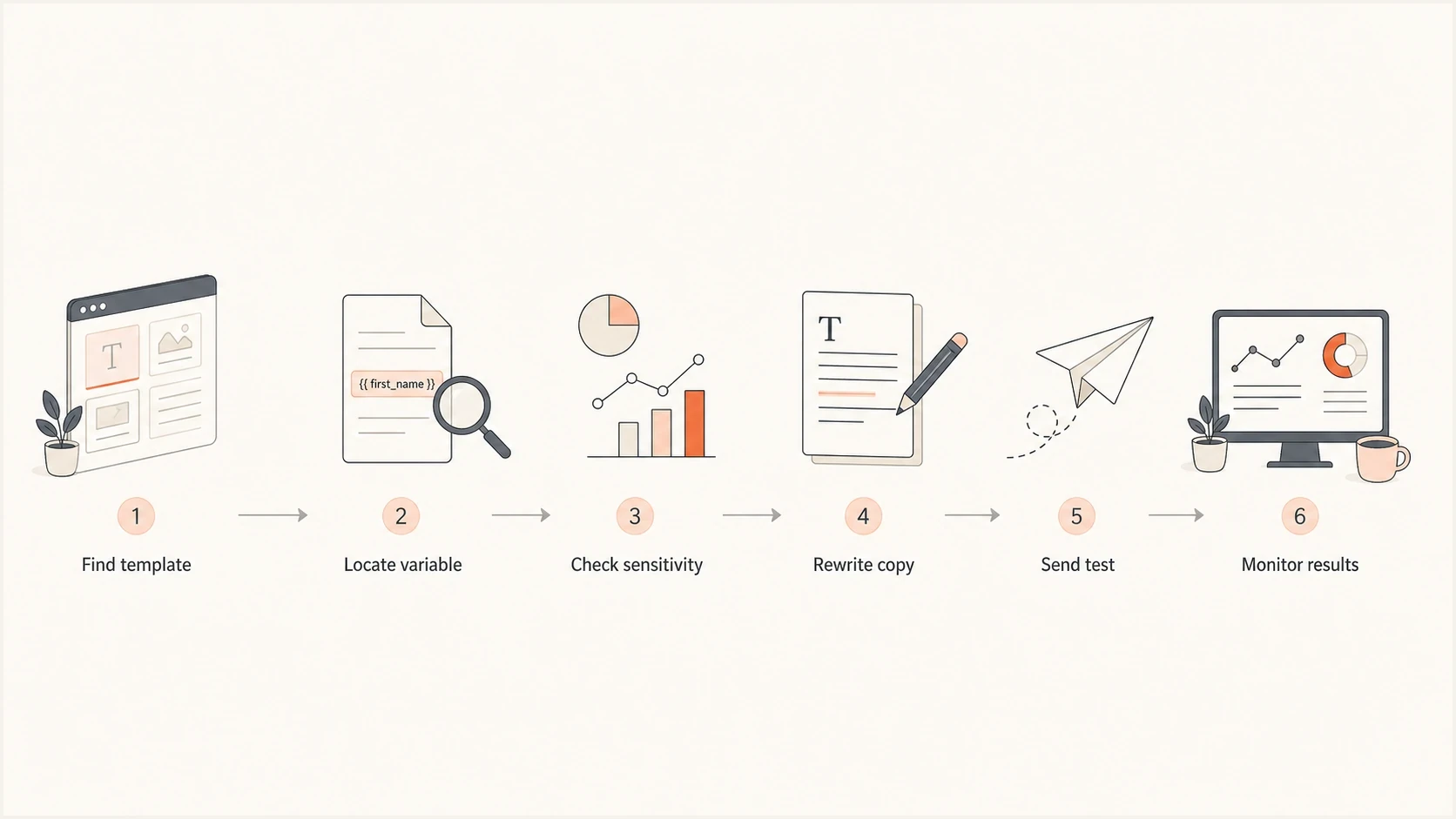
Flowchart for reviewing quoted words in automated email templates.
- Export templates: List every automated response, including transactional, support, compliance, and account emails.
- Search quotes: Find single and double quotes around variables, labels, categories, and status names.
- Classify terms: Flag sensitive words that involve harm, money, account access, consent, or trust.
- Rewrite sentences: Replace raw internal labels with customer-facing phrases written for that situation.
- Render tests: Generate sample emails for every category, not only the default category.
- Check delivery: Review authentication results, inbox placement data, complaint signals, and recipient behavior after changes.
Best practice
Store a public display phrase for each internal label. Do not expose raw queue names, CRM stages, ticket states, or database category names in user-facing email.
This process also catches issues that have nothing to do with quotes: broken merge fields, odd capitalization, missing articles, stale support team names, outdated physical addresses, and confusing reply instructions. Those details influence whether recipients trust the response.
Where Suped fits
Copy review and authentication review are separate jobs, but they meet in the inbox. A well-written automated response still struggles if the domain has broken SPF or DKIM authentication, or an ineffective DMARC policy. A correctly authenticated message can still perform poorly if the wording looks careless.
Suped DMARC dashboard showing email volume, authentication health, and source breakdown
Suped is our DMARC reporting and email authentication platform. When the question moves beyond punctuation and into delivery evidence, the DMARC dashboard shows which sources send as your domain, whether they authenticate correctly, and where failures come from. That helps separate a copy issue from a sender configuration issue.
- DMARC visibility: Monitor domain authentication and protect against spoofing with clear source breakdowns.
- Issue steps: Automated issue detection explains what failed and how to fix it.
- Hosted records: Hosted SPF, hosted DMARC, and hosted MTA-STS reduce DNS friction for ongoing changes.
- Reputation checks: Blocklist and blacklist monitoring helps identify reputation problems outside the template.
- Team scale: MSP and multi-tenant dashboards make it practical to manage many domains.
Suped's DMARC monitoring turns aggregate reports into source-level authentication results and fix steps. When a transactional email starts landing in junk, teams can compare that evidence with message copy and blocklist or blacklist status before changing the template or sending configuration.
Views from the trenches
Best practices
Replace raw category names with public wording before automated emails reach users.
Review sensitive template branches with real rendered examples, not only defaults.
Test tone and authentication together before blaming punctuation for placement.
Keep internal queue labels out of confirmations unless users must verify them.
Common pitfalls
Putting quotes around sensitive labels makes routine confirmations sound doubtful.
Generic merge fields create grammar errors when category names change shape.
Teams fix subject lines but leave awkward body templates untouched for years.
Delivery reviews miss copy problems when they focus only on DNS and headers.
Expert tips
Use separate acknowledgement copy for abuse, safety, payment, and account issues.
Search templates for quoted variables after every help desk or CRM migration.
Watch complaint and reply patterns after changing automated response wording.
Keep a shared list of approved public labels for support and compliance flows.
Marketer from Email Geeks says quotes around a word such as abuse can make a plain confirmation sound unintentionally cynical, even when the system only inserted a form label.
2024-03-08 - Email Geeks
Marketer from Email Geeks says the same problem appears with labels such as complaints, where the punctuation makes an ordinary queue name feel less sincere.
2024-03-08 - Email Geeks
The practical takeaway
Quotes around certain words in automated email responses usually mean the word is an inserted label or exact form value. They can also mark exact wording, misguided emphasis, or skeptical distance. There is no hidden technical signal and no direct deliverability penalty.
The real issue is reader interpretation. If the quoted word is sensitive, remove the quotes and rewrite the sentence around the user's action. If emails still have placement problems after the copy is clean, check authentication, sender reputation, and blocklist or blacklist status before drawing conclusions.




