What does 'Authenticated user is not authorized to send mail' mean when using GSuite API?

Published 13 May 2025
Updated 30 Jul 2026
12 min read
Summarize with
Updated on 30 Jul 2026: We clarified service account delegation, send-as permissions, and the current Google Workspace checks for this Gmail API error.
The error means Google recognized the account or token, but that authenticated identity is not allowed to send mail through the Gmail API call being made. Treat it as an authorization failure on the sending path, not as proof that SPF, DKIM, DMARC, or the receiving domain broke.
The practical result is simple: messages sent through that API path are not going out. The same person can still send from Gmail in a browser or a normal mail client if those routes are still allowed. That difference matters, because a successful manual email does not prove the API integration works.
- Meaning: The credentials passed, but the account lacks permission to send through this endpoint.
- Impact: The affected API messages are blocked before normal delivery and inbox placement checks.
- First step: Find the app, account, scopes, and exact Gmail API method that produced the 401 response.
What the error actually means
The wording is more useful than the status code. A 401 response often makes people think the password, OAuth token, or service account key is wrong. In this case, the body says something narrower: the authenticated user is not authorized to send mail.
Typical Gmail API responseJSON
Code: 401
Message: Unauthorized
Body: {
  "errors": [
    {
      "message": "Authenticated user is not authorized to send mail",
      "field": null,
      "help": null
    }
  ]
}
The request got far enough for Google to identify who is trying to send. The failure happens at the permission or policy layer. In strict HTTP terms, many developers would expect a 403 for this condition, but the response body provides the more specific diagnostic clue.
Quick interpretation
Read the message as: Google knows this user, but this user cannot send email through the Gmail API in the current context.
- Not a bounce: The message failed before recipient mail servers made a delivery decision.
- Not DMARC: DMARC is checked by receivers after a message is sent, not by the Gmail API before sending.
- Not proof of spoofing: Spoofing still needs investigation, but this message points to API send permission.
Why this happens in Google Workspace
G Suite is now called Google Workspace, but the failure pattern is the same. An account exists, an integration has credentials, and the app tries to call the Gmail API. Google then refuses the send action because the user, app, scope, domain policy, or sending identity does not pass the checks required for that route.
|
|
|
|---|---|---|
Gmail disabled | Admin console service status | Enable Gmail for the user's organizational unit |
Missing domain-wide delegation | Admin console API Controls | Authorize the service account client ID and scope |
Wrong delegated user | Token claims and API logs | Impersonate the intended Workspace user |
Missing send scope | OAuth consent or delegated scopes | Grant a scope accepted by users.messages.send |
Unapproved From address | Gmail send-as settings | Use the primary address or an accepted send-as alias |
Common causes behind this Gmail API authorization error.
The most common root causes are Gmail being unavailable for the user, missing domain-wide delegation for a service account, an incorrect delegated user, an insufficient OAuth scope, or a From address that the user cannot send as. The userId in the API path must also identify the authenticated or delegated mailbox, with me available as the special value for that identity.
An account restriction can also stop sending, but this error alone does not prove an abuse block or a Gmail sending-limit violation. Check the Admin console Alert Center, email sent to the account administrator, and request logs before assigning that cause.
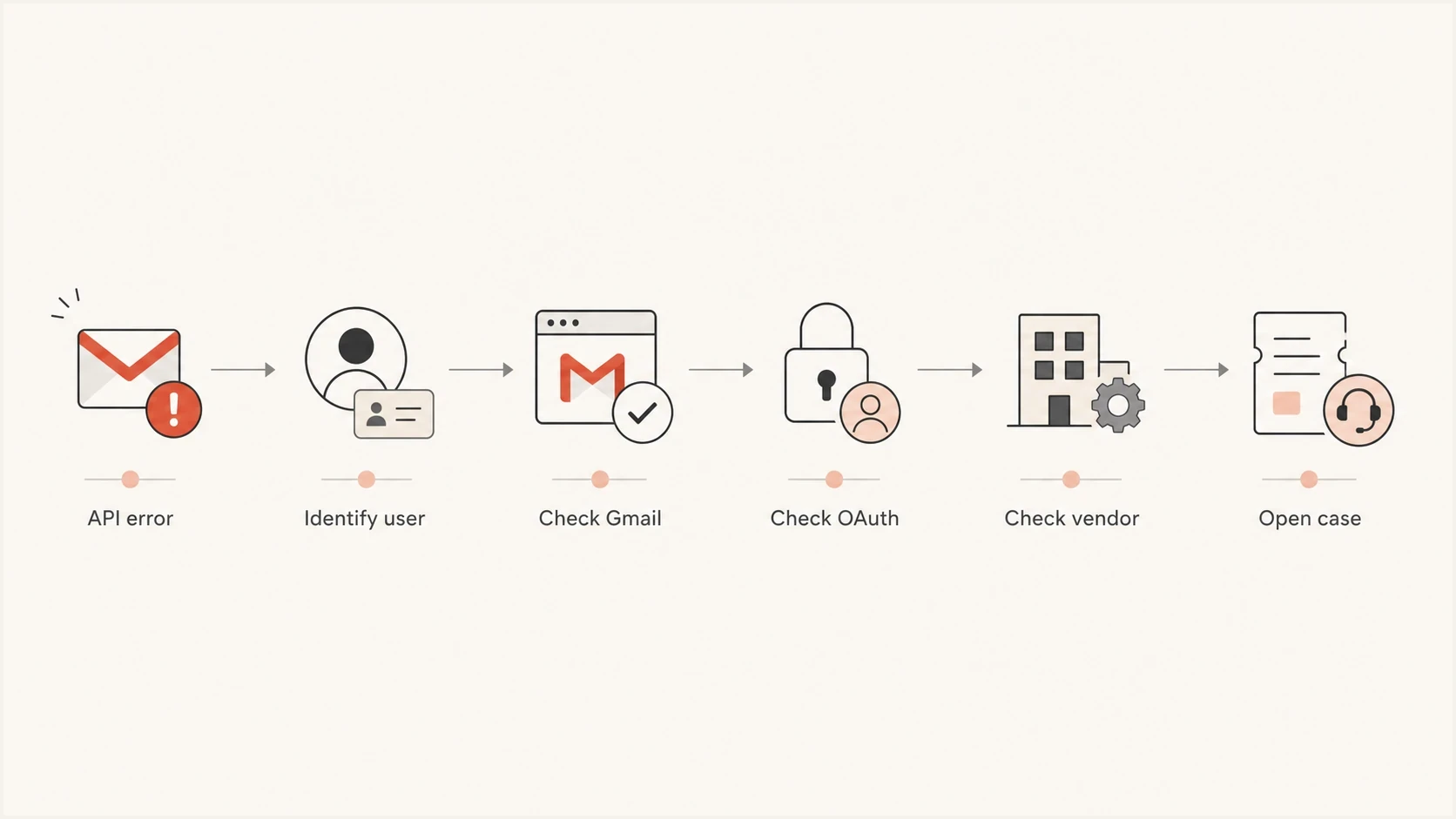
Gmail API authorization troubleshooting flow for Google Workspace sending.
How service accounts send on behalf of users
A service account is an application identity, not a Gmail mailbox. When an unattended app uses a service account to send in a Google Workspace domain, a super administrator must authorize domain-wide delegation for the service account's numeric client ID and the required Gmail OAuth scope. The application must then impersonate a real Workspace user who has Gmail access.
- Enable the Gmail API: Enable it in the Google Cloud project used by the service account.
- Authorize delegation: In Admin console API Controls, add the service account's client ID with a send-capable Gmail scope.
- Set the delegated user: Build credentials with the intended user's primary email address as the subject.
- Match the request identity: Use me or that same mailbox in users.messages.send, then use its primary address or an accepted send-as alias in the From header.
Service-account identity values to comparetext
Service account client ID: 123456789012345678901
Delegated user: sender@example.com
Gmail API userId: me
From address: sender@example.com
OAuth scope: https://www.googleapis.com/auth/gmail.send
A Google Cloud IAM role does not grant access to a user's Gmail data. Domain-wide delegation and user impersonation are separate requirements. Google says delegation changes usually take a few minutes to apply, but propagation can take up to 24 hours, so record the change time before retesting.
How to diagnose it without chasing the wrong problem
Start with the API path, not DNS. The email authentication stack still matters, but it does not explain an authorization error thrown before Gmail hands the message to the mail stream.
- Find the caller: Identify the website, plugin, CRM, custom script, or vendor that owns the OAuth client or service account.
- Compare identities: Match the authenticated or delegated user to the endpoint userId and the message's From address.
- Check Gmail access: Make sure Gmail is enabled for the user's organizational unit and the account is active.
- Check authorization: Verify a scope accepted by users.messages.send and, for a service account, its domain-wide delegation entry.
- Check send-as status: Use the primary address or confirm that the custom From address has an accepted verification status.
- Open a case: If the settings match, give Google the full error, timestamp, user, client ID, and request ID.
Minimal scope to verify for API sendingtext
https://www.googleapis.com/auth/gmail.send
API authorization issue
- Where it fails: Before the message leaves through the Gmail API.
- Main evidence: A 401 body saying the authenticated user cannot send mail.
- Owner: Google Workspace admin, API developer, or vendor.
Email authentication issue
- Where it fails: After a message is sent and a receiver evaluates it.
- Main evidence: SPF, DKIM, or DMARC failures in headers or reports.
- Owner: DNS owner, sending platform owner, or domain admin.
Do not start by editing DNS
Changing SPF, DKIM, or DMARC records will not fix this Gmail API response. DNS work belongs later, after the API is allowed to send and you need to verify the resulting messages.
What to check inside Google Workspace and Google Cloud
The fastest path is to compare what the app requests with what Google Workspace allows. Record the exact user, From address, OAuth client or service account client ID, granted scopes, API method, and request timestamp. Without those details, the error turns into guesswork.
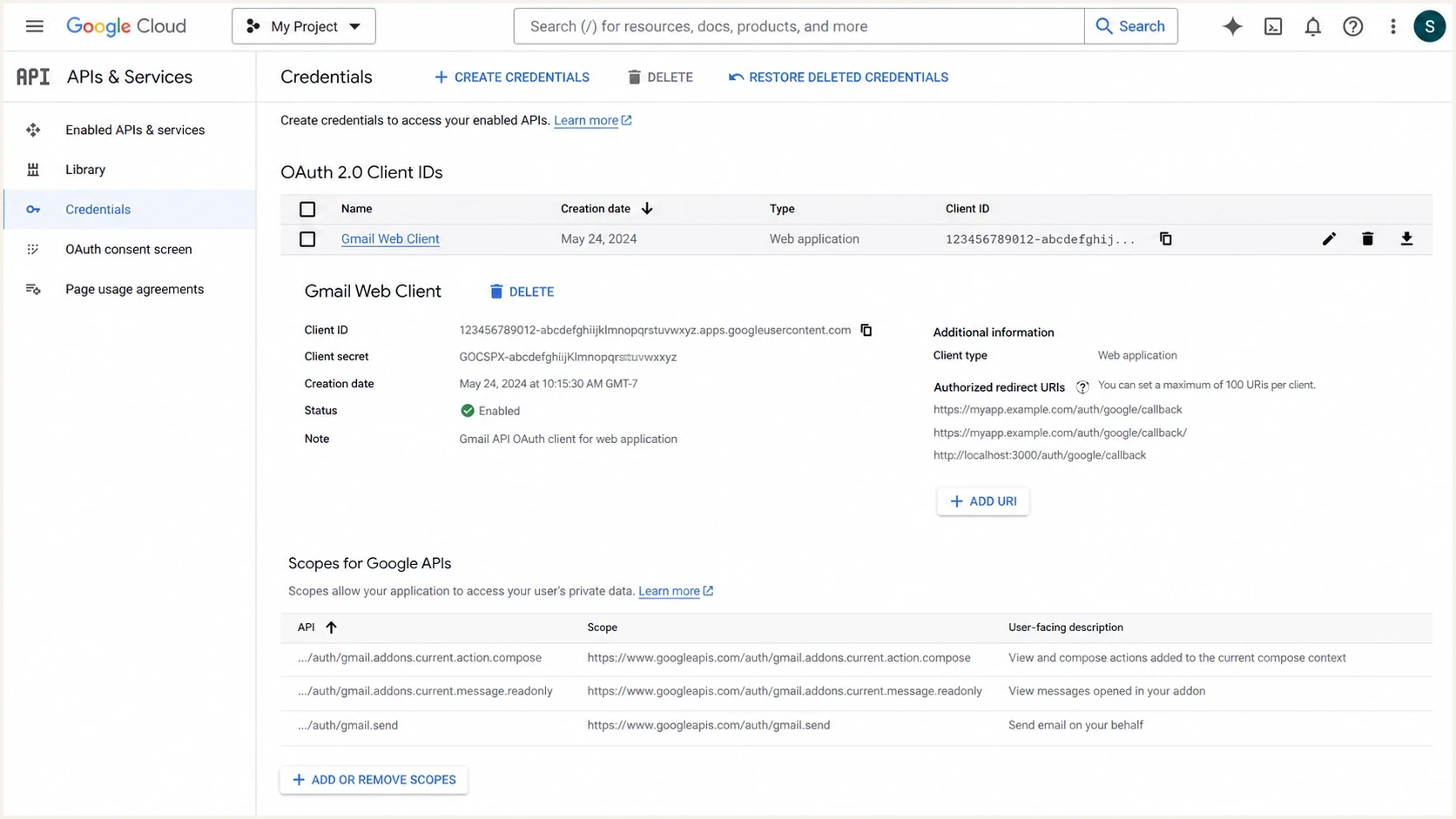
Google Cloud Console Gmail API OAuth client with the gmail.send scope.
In the Google Workspace Admin console, check the user status, Gmail service access for the user's organizational unit, API Controls app access, domain-wide delegation entries, and relevant Alert Center notices. In Google Cloud Console, check that the Gmail API is enabled and that the correct OAuth client or service account is issuing the request.
Details to give Google or the vendortext
Domain: example.com
Authenticated or delegated user: sender@example.com
API userId: me
From address: sender@example.com
API method: users.messages.send
OAuth or service account client ID: 1234567890
Granted scopes: https://www.googleapis.com/auth/gmail.send
Time of failure: 2026-05-25 10:42 UTC
HTTP status: 401
Request ID: request-id-from-logs
Error: Authenticated user is not authorized to send mail
If a vendor says it only sends appointment confirmations, ask for the raw send logs for the failed period. A useful answer names the Google account used, delegated subject where applicable, API method, recipient count, message purpose, and reason the vendor needs Gmail API access instead of its own sending system.
Where DMARC, SPF, DKIM, and blocklists fit
This error is not caused by DMARC, but domain authentication still needs review after the immediate API issue is contained. If an app or vendor had Gmail API access, check what else sent mail for the domain, whether SPF and DKIM passed, and whether any unauthorized source used the domain.
Suped's DMARC monitoring workflow groups aggregate reports by sending source and shows SPF and DKIM results alongside blocklist monitoring (blacklist monitoring). That is useful when the technical fix is in Google, but the wider question is which sources sent mail and which access needs to be revoked.
Issues page showing top issues, verified sources, unverified sources, and authentication pass rates
A small business often has more senders than it remembers, including Workspace, website form plugins, booking systems, newsletter services, and lead vendors. A domain health checker gives a fast baseline for DMARC, SPF, and DKIM before deciding whether the API error is part of a wider domain problem.
After Google allows the API path to send again, send a real message through the same app and inspect it with Suped's email tester. That confirms the message leaves the API and lets you verify headers, authentication results, and visible content in one pass.
Email tester
Send a real email to this address. Suped shows a results button when the test is ready.
?/43tests passed
If the test message sends but fails SPF or DKIM, solve that as a separate authentication problem. If the API still returns the same 401 body, keep the focus on Google Workspace policy, OAuth authorization, and the vendor or app that owns the token.
What to tell the vendor or developer
The vendor or developer needs a direct, specific request. Do not ask whether email is working in general. Ask whether the Gmail API integration can send as the affected user, and ask for logs that prove it.
Vendor request templatetext
We are seeing this Gmail API error:
Authenticated user is not authorized to send mail

Please confirm:
1. The Google account your app authenticated or impersonated
2. The userId and From address used in the failed request
3. The Gmail API method called
4. The OAuth scopes granted to your app
5. The OAuth or service account client ID
6. The last successful send timestamp
7. Whether Google restricted API sending for this account
Good answer
- Specific: Names the user, client ID, scope, method, userId, and timestamp.
- Verifiable: Provides request IDs or logs that Google support can inspect.
- Accountable: Explains why Gmail API access is needed for the workflow.
Bad answer
- Vague: Says email is fine without addressing the failed API call.
- Deflecting: Blames DNS or the recipient domain without API evidence.
- Risky: Suggests a new sending workaround before explaining the block.
If the account owner paid a lead generation or appointment-setting company, pause that access until the sender, consent, and volume are understood. Reauthorizing a new app or account before the old cause is known turns a contained failure into a repeatable one.
Watch for risky workarounds
Do not accept a workaround that moves the same sending behavior to another Workspace user, a fresh domain, or a new API client. That does not fix consent, policy, or abuse history. It only hides the same risk for a short time.
Views from the trenches
Best practices
Confirm the user, scope, API client, and sending account before changing DNS records.
Test webmail and API sending separately so a working inbox does not hide API failure.
Keep third-party senders under review, especially lead generation and form plugins.
Common pitfalls
Treating a 401 as only a bad password misses authorization and policy blocks in Gmail.
Assuming DMARC caused the API error sends teams toward the wrong diagnostic path.
Giving broad OAuth access to vendors makes it harder to prove what sent each email.
Expert tips
Ask the vendor for the exact Gmail API method, account, scopes, and failed timestamp.
Check whether Gmail is enabled and whether the user is active, licensed, or restricted.
Use DMARC reports to confirm domain use, then inspect API logs for rejected calls.
Marketer from Email Geeks says this is an API response, and the sending path should be checked before deliverability data.
2024-02-08 - Email Geeks
Marketer from Email Geeks says the credentials were accepted, but the user does not have permission to send through that endpoint.
2024-02-08 - Email Geeks
The practical takeaway
The direct answer is that Google authenticated the user but refused to let that user send mail through the Gmail API. The blocked messages are not going out through that API path, even when normal Gmail sending still works.
Start with the account, OAuth client or service account, delegated user, API scope, userId, Gmail service status, and any third-party app using the credentials. Open a Google Workspace support case with the exact error body if those checks do not expose the cause. Then use Suped's DMARC reports to review sending sources, SPF and DKIM results, and blacklist or blocklist exposure after the API issue is contained.




