What does a SpamAssassin 'try it' message from mail-tester.com mean?

Updated on 29 Jul 2026: We clarified URI_TRY_3LD scoring and added a practical hostname isolation workflow.
A SpamAssassin "try it" message from mail-tester.com means the test email matched a SpamAssassin URI rule called URI_TRY_3LD. It does not mean your visible copy literally says "try it". The rule name is shorthand for a pattern that flags certain link hostnames, usually multi-level .com or .net hosts that start with words such as try, start, get, save, check, join, learn, request, or visit.
The practical answer is simple: inspect the final URLs in the sent message, especially tracking links after your email platform rewrites them. If one link hostname matches the rule pattern, SpamAssassin adds points to the cumulative spam score. Treat that result as a clue, not a direct inboxing prediction. Check the links alongside authentication, domain reputation, complaint rate, engagement, and blocklist (blacklist) status before making changes.
Short answer
The warning means SpamAssassin thinks one URI hostname matches a suspicious-hostname rule. It does not prove the email is spam, and it does not prove mailbox providers will put the message in junk.
What the SpamAssassin warning means
mail-tester.com sends your email through a scoring process and exposes several technical checks, including SpamAssassin output. SpamAssassin is a rule-based spam filter. It looks at headers, body text, MIME structure, links, authentication results, and other signals, then adds or subtracts points. The "try it" result is one rule hit inside that scoring model.
The rule description is "Try it URI, suspicious hostname". That wording causes confusion because people naturally search the email for the phrase "try it". In practice, the rule name comes from the pattern in the SpamAssassin rule set. The pattern is broader than those two words.
Simplified SpamAssassin rule shapetext
uri       __URI_TRY_3LD   http(s)://matching.multi.level.com
meta      URI_TRY_3LD     URI pattern plus exclusions
score     URI_TRY_3LD     2.000 published rule cap
describe  URI_TRY_3LD     "Try it" URI, suspicious hostname
Do not assume the hit always adds 2 points. Published rule definitions can show 2.000 as a cap, while installed score files, rule updates, and local overrides can assign a different weight. Read the value shown beside URI_TRY_3LD in the report from that test run.
SpamAssassin's default required score is 5.0, but administrators can change it. A rule hit matters when it pushes the total near the required threshold or appears with stronger negative signals. It matters less when the total stays comfortably below the threshold and the rest of the message is clean.
Check whether the result repeats across more than one send. A one-off hit after a template edit can be noise. A repeatable hit across campaigns points at the link structure or a shared tracking domain.
|
|
|
|---|---|---|
Rule | URI pattern hit | Inspect links |
Score | Added points | Check total |
Cause | Hostname shape | Review tracking |
Risk | Contextual | Verify inbox data |
How to read the message without overreacting.
Read the rule score, total score, and required threshold together. The score beside the rule shows its contribution to that run, while the total shows whether all positive and negative rules combined crossed the configured threshold.
What 3LD means in the rule name
The "3LD" label points to a hostname with an extra label before a base domain, often called a third-level domain or subdomain. The rule pattern can also match hostnames with more than three labels. What matters is that the hostname begins with one of the tested word patterns and ends in the domain structure covered by the rule.
Hostname examplestext
Likely shape match:  https://try.example.com/offer
Likely shape match:  https://start.news.example.com/click
Not this rule alone: https://example.com/try-it
- Check the hostname: In try.example.com, the tested word appears before the first dot.
- Ignore the button label: Visible text such as "Read more" does not prevent the linked hostname from matching.
- Separate the path: A word after the first slash does not create this hostname match by itself.
- Account for exclusions: The full meta rule includes exceptions, so a similar-looking URL does not guarantee a hit.
Why the words can be missing
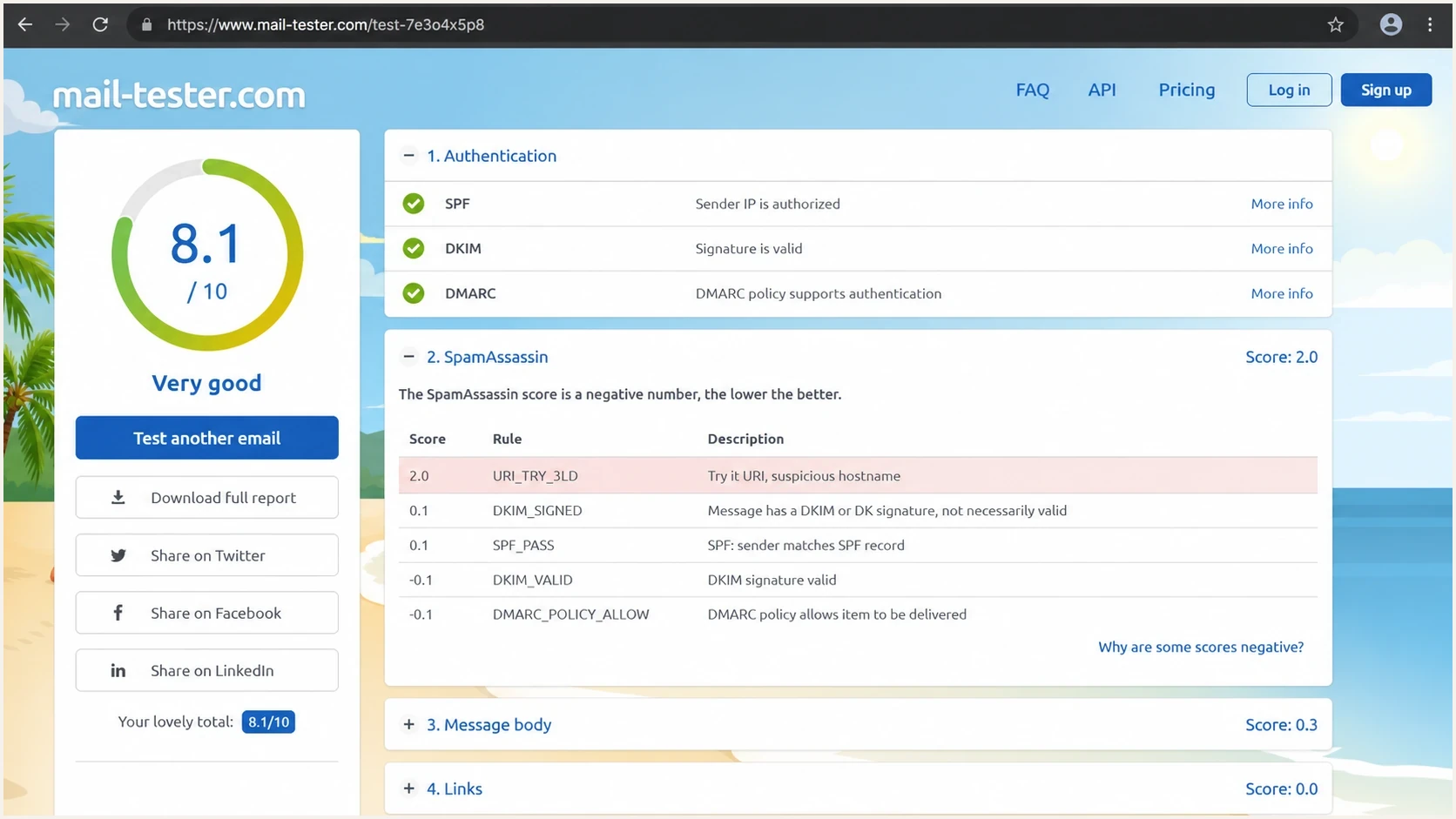
mail-tester.com SpamAssassin report showing the URI_TRY_3LD suspicious-hostname rule.
The most common misunderstanding is that the rule has to find "try it" in the visible body. It does not. SpamAssassin can inspect every URI in the final MIME source, including HTML links, plain-text links, image source URLs, redirect URLs, tracking domains, unsubscribe links, and hidden preheader links.
Email platforms often rewrite links after you press send. A clean link in the editor can become a longer tracking URL in the delivered message. The rewritten hostname is what the test sees. That is why the warning can appear even when the words "try it" are absent in the copy and absent in the original editor link.
What you see
- Button copy: The call to action looks ordinary in the email editor.
- Editor link: The destination URL can look clean before the send.
- Preview text: The visible message can contain no suspicious phrase.
What SpamAssassin sees
- Tracked host: The final hostname can start with a word in the rule pattern.
- Nested host: The link can have several labels before the main domain.
- Hidden URI: An image, footer, or unsubscribe URL can trigger the hit.
The rule also has exclusions. Some known patterns are ignored, and some header conditions suppress the hit. That is another reason the label alone is not enough. You need the final source, not just the visible creative.
How to diagnose it
Start by separating content testing from delivery diagnosis. A content test points at a specific message. A delivery diagnosis is broader because real inbox placement also depends on identity, reputation, recipient behavior, and prior sending history.
- Read the result row: Record the rule name, its points, the total score, and the required threshold. If you control the receiving system, the X-Spam-Status header can show the same context.
- Open source: Download the raw MIME source from the delivered test email, not the draft in your editor.
- Find URLs: Search for http and list each unique hostname in the HTML and plain-text parts.
- Compare links: Send one controlled test with tracking enabled and another with tracking disabled. Keep the copy unchanged.
- Check auth: Confirm SPF or DKIM passes with DMARC alignment on the same sending path.
- Review reputation: Check the sending domain, tracking domain, and IP for blocklist (blacklist) listings.
A send-to-test workflow helps because it inspects what actually leaves your sending system. Suped's email tester provides a report on authentication, content, and technical sending signals in one place.
Email tester
Send a real email to this address. Suped shows a results button when the test is ready.
?/43tests passed
Then check the domain outside the single test message. A clean content score does not repair a broken DMARC record, and a SpamAssassin warning does not explain every inboxing problem. Suped's domain health check confirms the domain's SPF, DKIM, DMARC, and DNS basics before you spend time rewriting harmless copy.

Email tester sample report showing total score, email preview, issue summary, and per-section results
What to fix and what to ignore
Fix the issue when the triggered hostname is sloppy, newly created, unrelated to your brand, or shared across risky senders. Do not rewrite a whole campaign just because one SpamAssassin rule fired. The rule is a content clue, not a full deliverability verdict.
How much weight to give the warning
A simple decision guide for a URI_TRY_3LD hit in a test report.
Low concern
Review
Only one rule hit, authentication passes, and the sender has stable engagement.
Medium concern
Investigate
The hit appears with a weak total score, new tracking domain, or recent volume change.
High concern
Fix first
The hit appears with failed authentication, blocklist listings, or poor complaint data.
The best fix is usually at the URL layer. Use a branded tracking domain under DNS you control, keep its redirect path stable, use HTTPS, and avoid disposable redirect chains. If the email platform creates a suspicious shared hostname, ask whether a custom tracking domain is available.
Do not chase words first
Spam tests can make senders obsess over words and phrases. In this case, the first place to look is the final URL hostnames. Change copy only when the message itself has obvious spam-like content, deceptive claims, or a mismatch between the link text and destination.
The FAQ for mail-tester.com explains its test address and scoring flow. Read the SpamAssassin result beside the authentication results and real recipient data.
Where Suped fits
Suped's product becomes relevant when the same warning appears alongside authentication drift, unknown sending sources, or domain-health problems. A SpamAssassin row explains one message. Suped monitors DMARC aggregate data and domain configuration across ongoing sending activity.
For this workflow, use Suped to confirm whether the affected source passes aligned SPF or DKIM, review DMARC coverage, and monitor blocklist (blacklist) status over time. That keeps a URI rule from distracting the team from a broader authentication or reputation problem.
Single test result
- Scope: One message, one sending moment, one generated score.
- Strength: Good for catching obvious content or header problems.
- Limit: Weak for ongoing sender identity and reputation monitoring.
Suped monitoring
- Scope: Ongoing visibility across domains, sources, and policies.
- Strength: Issue detection, alerts, and specific correction steps.
- Fit: Useful when several domains or sending sources need the same review.
If the SpamAssassin warning appears alongside authentication drift, unknown senders, or inconsistent domain policy, move the work into DMARC monitoring. That gives the team an ongoing view of who sends mail for the domain and which sources need correction.

Issue steps to fix dialog showing the issue overview, tailored fix steps, and verification action
Views from the trenches
Best practices
Trace the final sent HTML, because tracking rewrites often change the hostname tested.
Treat one SpamAssassin rule as a clue, then verify auth, reputation, and inbox data.
Fix suspicious link hosts only when they also affect clicks, filtering, or reputation.
Common pitfalls
Do not rewrite every word after one score; the matched rule name is often only a label.
Ignoring the tracked URL is a mistake because visible link text is not the whole test.
A perfect mail-tester score still leaves consent and engagement to manage over time.
Expert tips
Pull the raw MIME source and search for every http string before changing email copy.
Compare the same email with tracking on and off to isolate the hostname that trips it.
Use DMARC reports to spot authentication drift before content tests distract the team.
Marketer from Email Geeks says the warning points to a SpamAssassin URI rule, not literal copy that says "try it".
2023-07-18 - Email Geeks
Marketer from Email Geeks says the rule can fire when the hostname matches a longer pattern used for suspect links.
2023-07-18 - Email Geeks
Final take
A mail-tester.com SpamAssassin "try it" warning means a URL hostname matched a broad URI rule. It is usually about the final tracked link, not the visible words in the email. Inspect the raw sent message, identify the exact hostname, and decide whether the link setup looks normal for your brand.
If everything else is healthy, do not let that single line drive a rewrite. If it appears with failed authentication, questionable tracking domains, blocklist or blacklist listings, or weak sender reputation, fix those foundations first. Ongoing monitoring provides context that one-off scoring cannot.




