What do mailbox disabled bounces indicate about email deliverability and spam traps?

Updated on 10 Aug 2026: We updated this guide to distinguish 4.2.1 retries from immediate 5.2.1 suppression and added stronger prevention steps.
A mailbox disabled bounce usually indicates an address that is unavailable, suspended, abandoned, or in the process of becoming invalid. It is not, by itself, strong evidence of a spam trap. The practical response is to classify the status code, pause or suppress mail as appropriate, and restore the address only when later delivery plus permission and engagement data justify the risk.
The confusing part is that a disabled mailbox can test as valid a few weeks later. That can happen because the mailbox was reactivated, the verifier got a false positive, the receiving system changed its SMTP response, or an institutional domain started accepting mail through catch-all routing. A later valid result does not automatically mean the address is good, and it does not automatically mean it is a trap.
- Meaning: The mailbox is not accepting mail now, or the receiver is returning that status.
- Spam trap risk: Low as a direct signal, but higher as a sign of stale acquisition or weak list hygiene.
- Deliverability risk: Repeated attempts to disabled mailboxes can damage sender reputation at some mailbox providers.
- Best action: Suppress a 5.2.1 permanent failure immediately. For 4.2.1, let the sending system follow its retry schedule and pause new campaign attempts.
What a mailbox disabled bounce means
RFC 3463 defines X.2.1 as "mailbox disabled, not accepting messages." The domain exists and the receiving mail system recognized a mailbox-level condition, but the mailbox is not accepting this message in its current state. The first digit determines whether the response is transient or permanent.
A 4.2.1 response is a persistent transient failure, so the sending infrastructure can retry it under its normal queue policy. A 5.2.1 response is a permanent failure and should be treated as a hard bounce. Provider wording and ESP labels are less reliable than the SMTP reply, enhanced status code, raw diagnostic text, and recipient history together.
How to distinguish nearby responsestext
450 4.2.1 mailbox temporarily disabled
550 5.2.1 mailbox disabled, not accepting messages
550 5.1.1 user unknown (bad destination address)
550 5.7.1 message refused by policy
Do not treat the label as perfect
Providers and ESPs can map different diagnostics to the same mailbox-disabled label. Preserve the raw SMTP reply and enhanced status code before deciding whether the recipient is invalid or the message was refused for a separate policy reason.
- Temporary case: The account is temporarily locked, suspended, or unavailable under local policy.
- Permanent case: The mailbox is disabled indefinitely and the server returns a 5.2.1 failure.
- Mapping case: The ESP normalized a provider-specific diagnostic into a generic bounce label.
|
|
|
|---|---|---|
4.2.1 | Transient disabled mailbox | Allow queue retry; pause campaigns |
5.2.1 | Permanent disabled mailbox | Suppress immediately |
5.1.1 | Invalid destination address | Suppress immediately |
5.7.1 | Security or policy refusal | Diagnose policy; do not infer invalidity |
Mailbox disabled bounce classification
What it indicates about spam traps
A mailbox disabled bounce is not a reliable spam trap indicator. If the address was disabled and later becomes accepted, that sequence still does not prove a recycled trap. Trap operators keep trap identities private and do not publish a uniform period between abandonment and reuse, so timeline alone cannot classify the address.
The address still carries risk. A disabled mailbox has weak current value, and repeatedly mailing weak addresses is how lists drift toward spam traps, complaints, dead domains, and poor engagement. The trap concern is indirect: not "this address is a trap," but "this list process is letting risky addresses stay active."
Disabled mailbox
- Signal: The recipient account is not accepting mail now.
- Risk: Address decay, stale permission, and repeated recipient failures.
- Action: Use the 4.x or 5.x status class to decide whether to retry or suppress.
Spam trap
- Signal: An address is monitored to identify poor acquisition or hygiene.
- Risk: Reputation damage, filtering pressure, and blacklist or blocklist exposure.
- Action: Audit list source, consent age, engagement history, and reactivation rules.
If a blocklist or blacklist issue appears around the same time as a disabled-mailbox spike, investigate both, but keep the causes separate. Blocklist monitoring helps confirm whether the reputation symptom is broad or isolated to a list segment.
Why a disabled mailbox can later test valid
A later valid result is common enough that one verifier result should never be the only suppression decision. It means the current SMTP check accepted the address, not that the recipient wants mail, reads mail, has recent consent, or will receive the message in the inbox. Even a 250 acceptance confirms server acceptance rather than inbox placement.
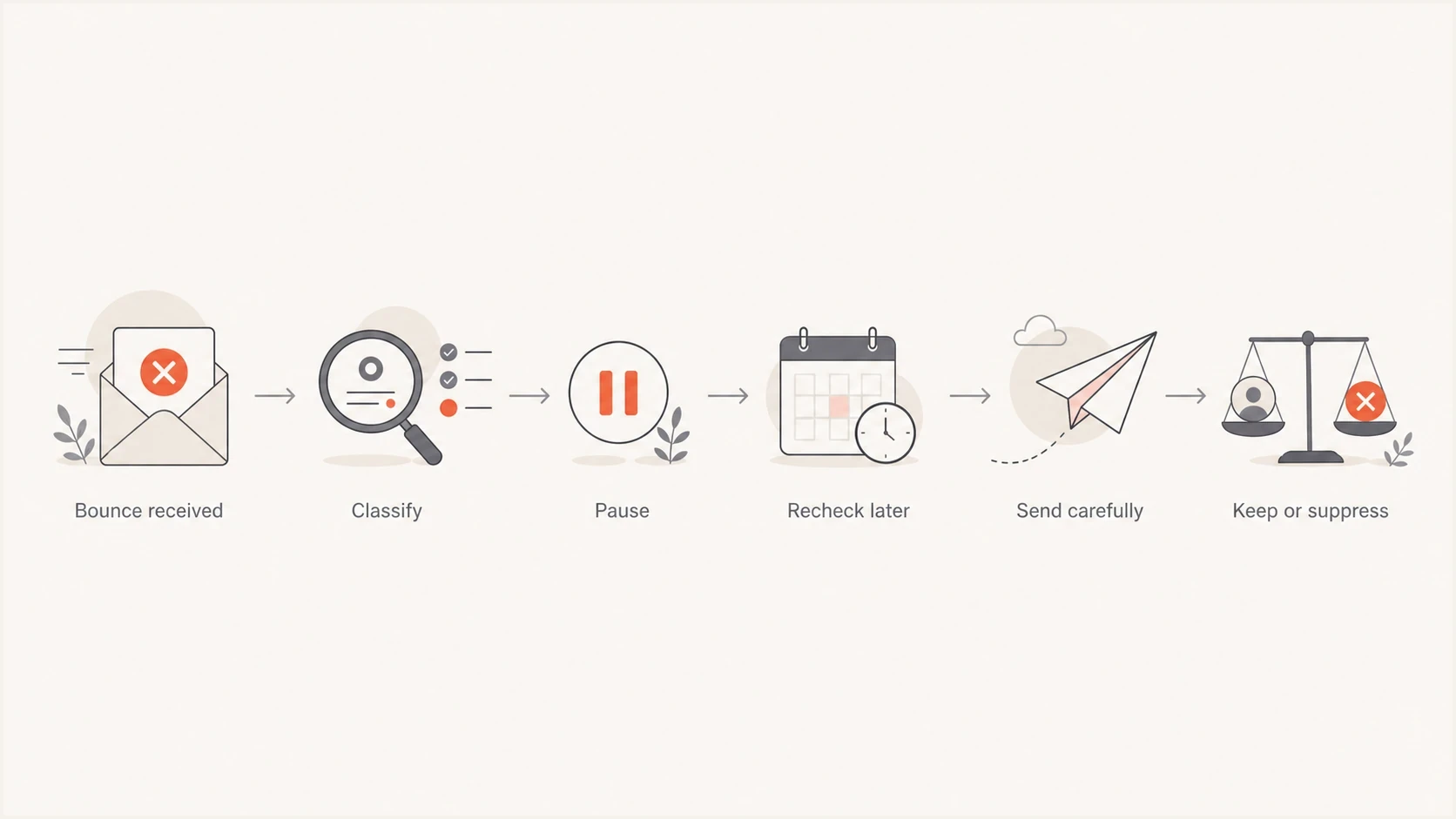
Flowchart showing how to pause, recheck, and decide on disabled mailbox bounces.
- Reactivation: The user or administrator restored access to the mailbox.
- Provider behavior: The receiving system changed how it answers SMTP recipient checks.
- Catch-all routing: A business, school, or institution accepts mail broadly without proving a person reads it.
- Verifier error: The previous check inferred too much from a partial or blocked SMTP conversation.
- Timing gap: A temporary disablement ended between the scan and the next campaign.
The main caveat is institutional mail. B2B and education domains often have shared administration, aliases, role changes, and catch-all behavior. A mailbox can move from disabled to accepted without becoming a person who expects your campaigns. Require proof from your own data, such as recent opt-in, a recent click, account activity, or a direct relationship.
How to classify and suppress these bounces
Classify the raw enhanced status code before applying campaign suppression. A 5.2.1 permanent response should be suppressed immediately rather than waiting for repeated failures. A 4.2.1 transient response can remain in the sending system's normal retry queue, but the recipient should not receive separate campaign retries while that delivery remains unresolved.
Suggested response thresholds
Use the SMTP status class and recipient evidence to decide whether to continue, pause, suppress, or restore.
Continue
2.x
Keep normal cadence when delivery, consent, and engagement are current.
Queue retry
4.2.1
Let the sending system retry without launching a separate campaign attempt.
Suppress
5.2.1
Remove the recipient from future sends after the permanent response.
Reassess
Accepted later
Require permission or account activity before a controlled return.
- First event: Store the raw reply, enhanced status code, provider, and timestamp.
- Transient 4.x: Let the delivery infrastructure follow its queue policy and pause new campaign attempts.
- Permanent 5.x: Suppress the recipient immediately for ordinary campaign purposes.
- Recovery: Restore only with recent engagement, login activity, purchase activity, a direct reply, or fresh consent.
This approach separates temporary delivery handling from list eligibility. For a wider suppression framework, compare it with how hard bounces affect sender reputation.
How to prevent recurring disabled mailbox bounces
Prevention starts at collection and continues through the subscriber lifecycle. Mailbox validation can catch some invalid addresses, but permission records, engagement history, and final bounce events provide the evidence needed to stop stale recipients before they become a repeated deliverability problem.
- Confirm new subscriptions: Use confirmed opt-in (double opt-in) when address quality or signup abuse is a concern.
- Keep source records: Store the signup source, consent time, form or campaign, and confirmation event.
- Apply a sunset policy: Reduce frequency for inactive recipients and stop promotional mail after your defined inactivity limit.
- Retain bounce evidence: Keep raw status codes and final delivery outcomes so suppression survives ESP migrations.
- Reject risky acquisition: Do not send to purchased, rented, scraped, or unverifiable third-party lists.
These controls reduce invalid recipients and recycled spam trap exposure at the same time. They also make a sudden disabled-mailbox spike easier to trace to a signup source, imported segment, provider change, or data migration.
How these bounces affect deliverability
A single disabled-mailbox response is not a sender reputation diagnosis. The danger is pattern and concentration. If failures cluster around an acquisition source, an old segment, a migration, or a reactivation campaign, mailbox providers can interpret the stream as low-quality mail sent to abandoned recipients.
Track the disabled-mailbox rate separately from the total bounce rate, and count final failures rather than every temporary retry. Review it beside hard bounce rate, complaint rate, negative SMTP responses, engagement decay, consent age, and blocklist or blacklist status. The bounce reason shows what happened at delivery time. The surrounding metrics show whether the pattern comes from list quality, a sending change, provider behavior, or wider reputation trouble.
A practical investigation rule
Do not chase every disabled mailbox individually. Segment results by source, signup date, provider, domain type, and last engagement. A high rate in one old source indicates a hygiene issue. A sudden rate across all sources points to provider handling, bounce mapping, infrastructure migration, or a broad sending change.
If the bounce text is inconsistent, map the raw SMTP response before changing suppression rules. A guide to SMTP bounce codes helps separate temporary deferrals, invalid recipients, and policy blocks.
How to investigate without overreacting
Start with the raw delivery status notification. Confirm the SMTP reply, enhanced status code, receiving provider, affected segment, and whether the event is final. Do not repeatedly probe the affected recipient. If failures span providers or include policy codes, test a real message only with seed addresses that your team controls and inspect the authentication results.
For that step, use an email tester to inspect a sent message, then check the sending domain with a domain health checker. These checks help separate recipient quality from authentication, DNS configuration, message construction, and reputation signals.
Email tester
Send a real email to this address. Suped shows a results button when the test is ready.
?/43tests passed
Then compare the result with recipient history. If the address was recently active, the domain is healthy, and the response was transient, follow the normal retry outcome. If the address has old consent, no recent activity, and a permanent 5.2.1 response, keep it out of normal sends.

Email tester sample report showing total score, email preview, issue summary, and per-section results
Suped's product is useful here because the workflow extends beyond a normalized bounce label. It combines message testing, DMARC monitoring, SPF and DKIM checks, issue detection, alerts, and reputation context. That makes it easier to decide whether a disabled-mailbox spike is a recipient hygiene problem or part of a wider sending issue.
Where Suped fits in the process
Mailbox disabled handling belongs in your ESP or data warehouse, but it should not live alone. Suped's product provides the surrounding controls: DMARC monitoring, hosted SPF, SPF flattening, hosted MTA-STS, blocklist monitoring, alerts, and guided fix steps. That context helps when bounce spikes coincide with migrations, sender changes, ESP moves, or DNS updates.
The practical workflow combines strict recipient suppression with domain monitoring. Suped keeps authentication results, DNS records, blocklist or blacklist status, alerts, and remediation steps in one place, including multi-tenant views for MSPs and agencies. Use that context to investigate the sending domain while the ESP or data warehouse enforces recipient-level suppression.
Bounce-only handling
- Scope: Decides whether one recipient stays eligible.
- Blind spot: Misses authentication drift, DNS mistakes, and blocklist or blacklist symptoms.
- Use case: Suppression logic, list hygiene, and reactivation controls.
Suped workflow
- Scope: Connects domain health, authentication, and reputation signals.
- Strength: Turns detected issues into concrete fix steps.
- Use case: Monitors sender identity while bounce rules protect list quality.
Views from the trenches
Best practices
Pause disabled mailboxes first, then require recent engagement before restoring normal sends.
Group bounces by source and provider before changing suppression rules for all mail.
Use validation data beside consent age, engagement, SMTP codes, and domain health.
Common pitfalls
Treating one later valid check as proof that the recipient still wants campaign mail.
Retrying disabled mailboxes inside the same send as if they were simple deferrals.
Assuming every disabled mailbox is a spam trap instead of testing list hygiene first.
Expert tips
Use stricter suppression for old, inactive, or imported contacts with disabled results.
Keep raw SMTP text so future rule changes can be tested against real bounce history.
Let recent account activity override a verifier result only when consent is clear.
Marketer from Email Geeks says mailbox disabled can be temporary, but it often becomes a permanent invalid recipient signal after repeated failures.
2020-01-30 - Email Geeks
Marketer from Email Geeks says a disabled mailbox that later validates is usually not a traditional spam trap, but the address still needs other quality checks.
2020-01-30 - Email Geeks
What to do with mailbox disabled bounces
Mailbox disabled bounces indicate a mailbox state first and spam trap risk only indirectly. A 4.2.1 response calls for normal queue handling, while a 5.2.1 response calls for immediate suppression. If the address later tests valid, treat it as eligible for careful reassessment rather than automatic restoration. A verifier result does not outweigh old consent, no engagement, or a permanent failure.
Pause new campaign attempts after a transient disabled response, suppress after a permanent disabled response, and restore only when real activity or fresh permission supports it. Pair that policy with domain and reputation monitoring so a bad address problem can be separated from a wider sending problem.




