What causes '503 5.5.0 polite people say HELO first' bounce errors with Ziggo.nl and how are they resolved?

Updated on 26 Jul 2026: We added STARTTLS greeting checks and safer retry guidance for the Ziggo.nl 503 bounce.
The direct answer is that Ziggo.nl returned 503 5.5.0 polite people say HELO first when its receiving SMTP system believed the sender had not completed the required HELO or EHLO greeting before sending the next command. In the observed Ziggo.nl incident, sender-side evidence showed that mail servers did send HELO or EHLO first, the error appeared across several ESPs during a narrow morning window in the Netherlands, and the provider later confirmed a configuration conversion issue. The resolution was to wait for the receiver-side fix and retry affected mail, not to change DMARC, SPF, or DKIM records.
Observed bounce texttext
503 5.5.0 polite people say HELO first
SMTP reply 503 means bad sequence of commands. Ziggo.nl appended 5.5.0 as an enhanced protocol status code, while other receiving systems often use 5.5.1 for an invalid or out-of-sequence command. Troubleshoot the command that received the reply and the surrounding transcript rather than matching only the full numeric string.
That distinction matters. A 503 greeting error is an SMTP conversation problem. It happens before the receiving system has accepted the message body, and it sits closer to transport handling than to inbox placement, content filtering, or DMARC policy enforcement. If the same error suddenly appears against one mailbox provider across unrelated senders, treat it as a provider incident until the logs prove otherwise.
- Immediate cause: The Ziggo.nl SMTP front end rejected a command because its greeting state was wrong or misread.
- Practical fix: Confirm the sending trace includes an accepted HELO or EHLO, then retry after the provider clears the incident.
- What not to do: Do not rush into SPF flattening, DKIM key rotation, or DMARC policy changes for this specific bounce.
What caused the Ziggo.nl HELO bounce
SMTP requires a sending host to identify itself after the receiver sends its 220 banner. Modern senders use EHLO, while older or simpler clients use HELO. If the receiver sees MAIL FROM, RCPT TO, DATA, or another transaction command before accepting that greeting, it can return a 503 response because the commands are out of sequence.
Sending the word EHLO is not enough on its own. The client must supply a valid fully qualified host name, or an address literal when it has no suitable name, and wait for a successful 250 reply before it starts the mail transaction. Some receivers use the same HELO-first wording when they rejected the greeting argument, so preserve both the command and its reply.
Main takeaway
For this Ziggo.nl case, the meaningful signal was not the wording of the error by itself. It was the pattern: multiple ESPs, one receiving provider, a short time window, normal historical traffic, and sender transcripts showing that HELO or EHLO was accepted.
A true sender-side version of this error points to a broken SMTP client, a malformed HELO or EHLO identity, a custom integration that skips the greeting, an SMTP proxy that reorders commands, or lost state after STARTTLS or connection reuse. The Ziggo.nl event looked different because unrelated sending platforms saw the same provider-specific failure at roughly the same time.
|
|
|
|---|---|---|
Several ESPs | Receiver issue | Compare logs |
One provider | Scoped fault | Retry later |
Short window | Incident spike | Track times |
EHLO accepted | Greeting completed | Escalate proof |
Signals that separated a sender defect from a receiver incident.
The error should still be checked, because the same text can appear for a real sender bug. Prove the SMTP sequence and successful greeting reply first, then decide whether to wait, retry, or repair the sender.
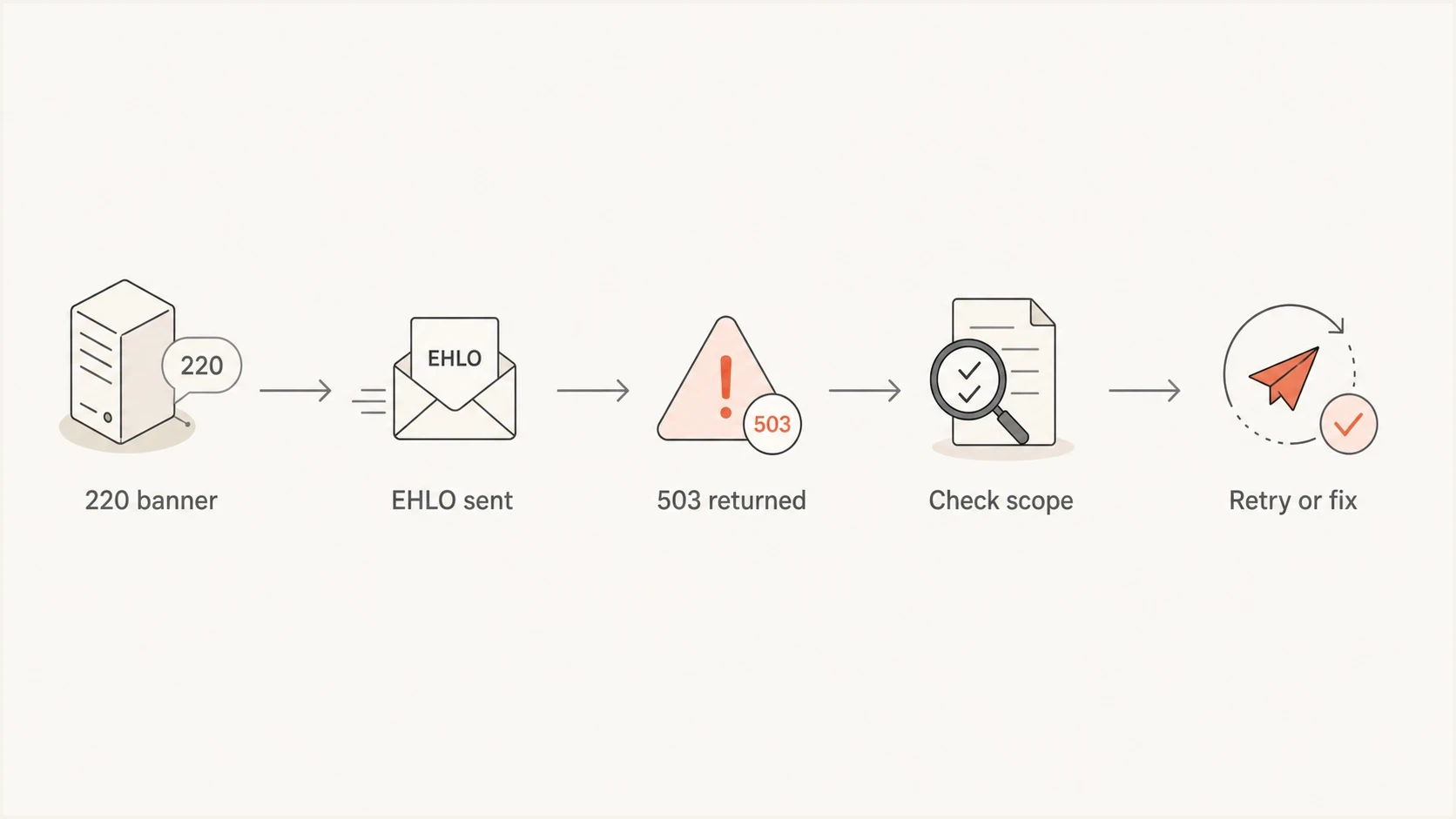
SMTP HELO and EHLO troubleshooting flow for a Ziggo.nl 503 5.5.0 bounce.
How the SMTP conversation should work
A normal SMTP session starts with the receiver banner, then the sender greeting. EHLO is preferred because it lets the receiver advertise extensions such as STARTTLS, SIZE, PIPELINING, and authentication capabilities. HELO is the older fallback. Either one satisfies the basic greeting requirement after the receiver accepts it.
Healthy SMTP command ordertext
220 mx.ziggo.nl ESMTP ready
EHLO mail.sender.example
250-mx.ziggo.nl
250 STARTTLS
MAIL FROM:<bounce@sender.example>
250 2.1.0 OK
RCPT TO:<user@ziggo.nl>
250 2.1.5 OK
If the receiver returns 503 after a trace like that, verify that the EHLO reply completed with 250. That reply is strong evidence that the sender completed the greeting. The next question is whether the receiver has a proxy, load balancer, or MTA configuration path that lost state between the banner, the greeting, and the next command.
Sender-side sequencing fault
- Missing greeting: The trace shows MAIL FROM before HELO or EHLO.
- Rejected greeting: The sender proceeds even though HELO or EHLO did not receive a 250 reply.
- TLS reset: The client does not send EHLO again after a successful STARTTLS handshake.
- Repeatable scope: The same error appears across several receiving domains.
Receiver-side incident
- Greeting accepted: The trace shows a 250 reply before MAIL FROM.
- Provider scope: The bounce clusters around one mailbox provider.
- Cross-sender pattern: Unrelated sending systems report the same response.
- Short duration: The failures stop after the provider corrects routing or configuration.
The phrase polite people say HELO first is not proof on its own. It describes what the receiving server thought happened. The transcript and reply codes show what actually happened on the wire.
Check the greeting again after STARTTLS
STARTTLS resets the SMTP protocol to its initial state after the TLS handshake. The server discards the greeting identity and advertised capabilities from the clear-text session, so the client should send EHLO again and wait for a new 250 reply before MAIL FROM. A client that greeted correctly before TLS but skips the second EHLO can receive a legitimate HELO-first 503.
Healthy STARTTLS greeting ordertext
220 mx.ziggo.nl ESMTP ready
EHLO mail.sender.example
250-STARTTLS
250 PIPELINING
STARTTLS
220 2.0.0 Ready to start TLS
[TLS handshake completes]
EHLO mail.sender.example
250 PIPELINING
MAIL FROM:<bounce@sender.example>
250 2.1.0 OK
- Reissue EHLO: Treat the post-TLS exchange as a new SMTP greeting state.
- Wait for 250: Do not send MAIL FROM until the second EHLO response has completed successfully.
- Handle PIPELINING safely: STARTTLS must be the final command in its pipelined group.
- Reset reused connections: Every new TCP connection needs a fresh 220 banner and accepted HELO or EHLO.
If EHLO succeeds before STARTTLS but MAIL FROM receives a 503 after the handshake, inspect the post-TLS commands first. If the second EHLO is present and receives 250, add both greeting exchanges to the provider escalation. This check finds a real sender fault without changing the conclusion about the documented Ziggo.nl incident.
How to prove it was not your sender
Before escalating to a mailbox provider, collect proof that the sending side followed the protocol. Keep the full SMTP transcript for at least one failed attempt, the timestamp with timezone, the outbound IP, the HELO or EHLO name, the envelope sender, the receiving MX host, and the exact command that received the 503.
- Check order: Confirm the trace shows the receiver banner, then HELO or EHLO with a 250 reply, then MAIL FROM.
- Check TLS state: If STARTTLS was used, confirm a second EHLO received 250 before the transaction resumed.
- Check scope: Compare failures across sending platforms, outbound pools, and recipient domains.
- Check timing: Group bounces by minute so a short incident does not look like a broad reputation issue.
- Check identity: Use a fully qualified EHLO name with sensible forward and reverse DNS, or a valid address literal when no name exists, even though identity was not the root cause here.
A practical test email also helps when you need a fresh sample after the incident. Send a controlled message through an email tester and compare the authentication and transport result with your production logs. For domain-level context, run a domain health check so you do not miss unrelated DNS problems while investigating the bounce.
Email tester
Send a real email to this address. Suped shows a results button when the test is ready.
?/43tests passed
If only Ziggo.nl is affected and your transcript is clean, resist broad sender changes. If several providers start returning different SMTP failures, widen the investigation. At that point, check authentication, reverse DNS, outbound IP reputation, and blocklist (blacklist) status. Suped's blocklist monitoring helps separate a transport incident from a reputation problem.
Evidence threshold before changing sender setup
Use the bounce pattern to decide whether to wait, retry, or change code.
Low confidence
1 source
One sender, no transcript, ongoing failures.
Medium confidence
2-5
Several senders hit one provider in one short window.
High confidence
Confirmed
Transcript shows an accepted EHLO and provider confirms a config fault.
How to resolve the bounces
For the Ziggo.nl incident, the correct resolution was operational rather than technical on the sender side. Once the provider corrected the configuration issue, mail flow returned to normal. The sender action was to preserve evidence, avoid unnecessary DNS changes, and reprocess affected recipients according to the sending platform's bounce handling rules.
Recommended response
- Preserve logs: Keep failed SMTP transcripts and timestamps before retention windows expire.
- Pause changes: Do not change authentication or routing while the provider incident is active.
- Retry carefully: Wait until the receiving provider clears the fault, then requeue a controlled batch with normal backoff.
- Review suppressions: If the ESP treated the 5xx as permanent, restore valid recipients where policy allows.
The awkward part is that 503 5.5.0 is a permanent negative-completion reply for that SMTP attempt, but it is not proof that the recipient address is invalid. During a documented provider incident, the receiver can apply a permanent class to a short-lived internal fault. Do not configure automatic rapid retries for every 5xx. Wait for evidence that the incident has cleared, then manually reclassify and replay the affected cohort according to policy.
If you are comparing this to broader bounce handling, the same principle applies to other SMTP bounces: read the code, then read the context. The code tells you how the receiver classified the failure. The surrounding pattern tells you whether the sender should fix something or retry later.
Where Suped fits
Suped is not needed to fix a one-off Ziggo.nl receiver configuration issue. Its role is to show whether authentication or reputation signals changed at the same time, which helps prevent unnecessary DNS work or list hygiene mistakes.

Email tester sample report showing total score, email preview, issue summary, and per-section results
Suped's product brings DMARC monitoring, SPF and DKIM checks, blocklist (blacklist) monitoring, alerts, and MSP views into one workflow. During a bounce spike, use those signals to rule out authentication or reputation changes while SMTP transcripts establish a transport fault. Suped does not see the live command sequence unless you provide sending logs, so the transcript remains the primary evidence for this 503.
Manual investigation
- Log hunting: You pull transcripts, DNS records, and bounce samples from separate places.
- Slow triage: Authentication, reputation, and transport faults can blur together.
Suped workflow
- Unified view: DMARC, SPF, DKIM, blocklist, and deliverability signals sit together.
- Remediation context: Authentication findings are grouped with checks and alert history.
Views from the trenches
Best practices
Keep SMTP transcripts so a 503 claim can be checked against the actual greeting order.
Compare several ESPs before treating a rare provider-specific spike as a sender defect.
Retry confirmed receiver incidents after the provider clears the config or routing fault.
Common pitfalls
Changing DMARC, SPF, or DKIM during a receiver outage hides the real cause of bounces.
Treating every 5xx response as permanent can suppress valid recipients unnecessarily later.
Ignoring the timestamp window makes one short outage look like a long deliverability issue.
Expert tips
Store connection banners, EHLO names, TLS state, and MAIL FROM timing in one trace.
Ask the provider for the incident window before reclassifying bounces in your CRM.
Use aggregate monitoring to separate authentication failures from SMTP transport faults.
Marketer from Email Geeks says the first check is whether the SMTP transcript shows HELO or EHLO before any mail command.
2022-07-29 - Email Geeks
Marketer from Email Geeks says a short spike across several ESPs against one provider points to a receiver-side incident after sender logs confirm the greeting.
2022-07-29 - Email Geeks
The practical answer
The Ziggo.nl 503 5.5.0 polite people say HELO first bounces were caused by the receiving side mishandling SMTP greeting state during a configuration change. The clean sender transcripts, including accepted greetings, mattered more than the bounce wording. Once Ziggo.nl corrected the configuration, the right sender-side action was to retry affected messages and review any automatic suppressions created during the incident.
Use this rule for similar cases: if your trace skips HELO or EHLO, lacks a 250 greeting reply, or omits EHLO after STARTTLS, fix your sender. If the full trace is clean and the bounce clusters around one receiving provider for a short period, gather evidence, escalate with timestamps, wait for the provider fix, and retry carefully.




