What are the pros and cons of using Inbox Monster as a deliverability tool?

Published 15 Jul 2025
Updated 23 Aug 2026
13 min read
Summarize with
Updated on 23 Aug 2026: We added current Inbox Monster pricing, integration checks, and clearer guidance on DMARC and seed-test limits.
The short answer: Inbox Monster is a strong deliverability tool if your main need is weighted inbox placement testing, seed list visibility, Subscriber Insights, spamtrap and reputation monitoring, rendering checks, creative diagnostics, SMS deliverability visibility, and campaign-level monitoring. Its biggest pros are breadth and enterprise support. Its biggest cons are a $15,000 yearly starting price for the Deliverability Suite, setup and learning effort, seed-list interpretation, occasional data freshness concerns reported by users, and less authentication remediation depth than a dedicated DMARC workflow.
Treat Inbox Monster as a visibility layer for where mail lands and how campaigns behave. Do not treat it as the system of record for DMARC, SPF, DKIM, hosted policy management, or long-term authentication remediation. That is where Suped's DMARC reporting and email authentication platform fits better: it turns authentication data into specific issues, alerts, and steps to fix.
Public G2 reviews show a 4.9 out of 5 rating across 48 reviews at the time of review. Users praise support, ease of use, and deliverability visibility, while raising cost, learning curve, setup, data freshness, and seed list accuracy concerns. A MediaPost report described inbox placement testing, seed customization, scheduling, analytics APIs, and header-level visibility as core parts of the platform. The AWS Marketplace listing also calls out Creative, Deliverability, and SMS suites, Amazon SES integration, broken link checks, consultant support, blocklist (blacklist) remediation, authentication setup, and sending strategy.
The direct answer
Inbox Monster is worth evaluating when email is a high-volume revenue channel and your team has someone who will review deliverability data every week. It gives you a broader picture than an ESP dashboard because it can show weighted seed inbox placement, subscriber distribution, rendering, link checks, spamtrap activity, reputation movement, campaign testing history, SMS delivery signals, and API-ready reporting context.
The tradeoff is that it does not remove the need for judgment. Seed tests are sampled signals, not real subscriber behavior. Reputation feeds need context. DMARC data still needs investigation and DNS work. If your team wants a clean authentication workflow first, start with DMARC monitoring, then add inbox placement testing when campaign volume and business risk justify it.
|
|
|
|---|---|---|
Inbox testing | Weighted seed coverage | Sampled signal |
Reputation | Useful feeds and alerts | Needs context |
Creative QA | Rendering and link checks | Separate suite and workflow |
SMS visibility | Carrier and rendering view | U.S. and Canada focus |
DMARC | Monitoring and threat signals | Confirm remediation depth |
Operations | White-glove setup | Higher annual cost |
Inbox Monster is strongest as an inbox placement and campaign monitoring layer, not as the only authentication platform.
- Best fit: High-volume senders that need seed inbox placement, rendering, reputation context, and campaign testing in one place.
- Risk area: Teams can overreact to seed results if they do not compare them with real opens, clicks, complaints, bounces, and domain health.
- Authentication gap: DMARC monitoring can show symptoms, but fixing authentication still needs source ownership, DNS changes, policy staging, and alerting.
- Scope check: Confirm whether email, SMS, creative rendering, consulting, exports, and APIs are included or billed separately.
- Cost check: The business case is strongest when deliverability swings affect meaningful revenue or customer communication volume.
Where Inbox Monster is strong
Inbox Monster is strongest when the question is practical and campaign-specific: did this message reach the inbox, the promotions tab, or spam for the mailbox types that matter to the program? That is different from asking whether SPF, DKIM, and DMARC are configured correctly. The first question is about placement. The second is about identity and authentication.
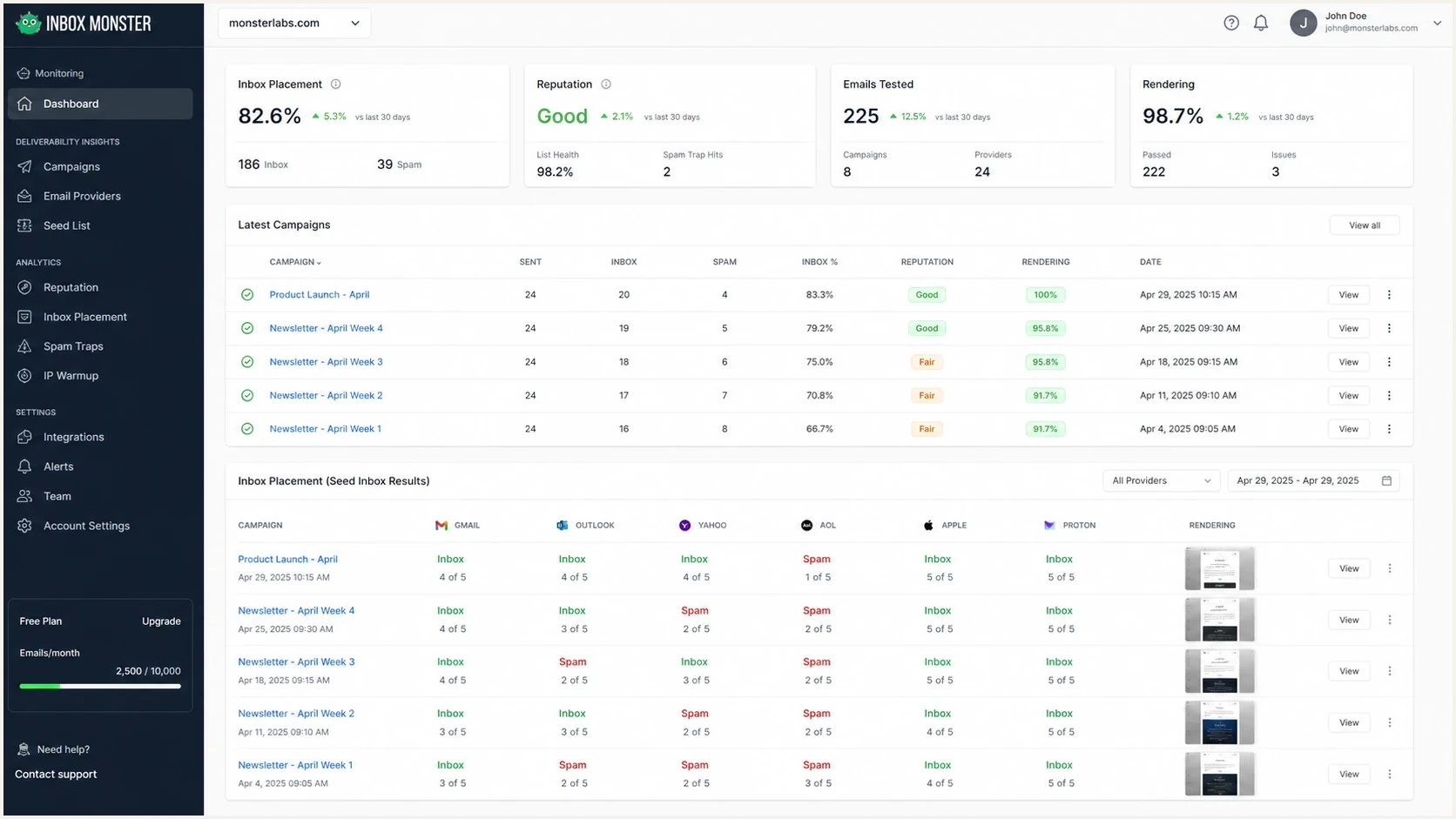
Inbox Monster dashboard for inbox placement, seed testing, and campaign monitoring
Inbox Monster also publishes creative rendering and SMS monitoring as part of its product scope, so the strongest fit is broader message QA, not only inbox placement. That helps teams check whether an email looks right, whether links work, and whether a campaign has obvious technical or placement issues before a large send.
The core value is speed. Instead of waiting for a drop in engagement to become obvious, a seed test can show placement changes before the full campaign result arrives. Header views and IP-level seed results can also narrow where a placement issue begins. That matters for large campaigns, B2B programs, and senders that run many segmented journeys.
Strong fit
- Large sends: You send enough volume that a small inbox placement shift has a clear business cost.
- B2B coverage: Your audience includes corporate mailboxes where consumer-only seed testing can miss important signals.
- Campaign QA: Your team wants placement checks, rendering previews, link checks, and reputation signals before major sends.
- Analyst time: Someone owns the numbers and can connect tool output to real campaign changes.
Weak fit
- Small sends: Your volume is too low for seed placement changes to justify a heavy platform.
- Auth first: Your immediate problem is broken SPF, DKIM, DMARC, MTA-STS, or unauthorized sending sources.
- No owner: No one has time to review trends, investigate changes, and document what changed.
- Budget strain: The spend would delay basic authentication, list hygiene, or monitoring work.
The technical limits to watch
The main technical caveat is that seed list testing gives a controlled view, not a full view. A seed address does not behave exactly like a subscriber. It usually does not reply, search, rescue mail, complain, delete mail unread, or build a long history with your brand. That means seed data is useful, but it should sit beside live engagement, complaint rates, bounce rates, unsubscribe rates, provider feedback, and authentication data.
The second caveat is DMARC depth. Inbox Monster includes DMARC monitoring and threat signals, but buyers should verify how far its workflow goes beyond visibility. The hard work is mapping each source, confirming whether it is approved, fixing SPF or DKIM, and moving policy safely. For that workflow, Suped gives you automated issue detection, real-time alerts, hosted DMARC, hosted SPF, SPF flattening, hosted MTA-STS, and step-by-step fixes.
Do not change sending domains, IPs, or DNS records based on one seed test. Look for a pattern across seed placement, real campaign metrics, authentication results, and blocklist (blacklist) status before making changes that affect production mail.
A good evaluation starts with a baseline. Confirm that your domain has one SPF record, valid DKIM selectors for active sending platforms, and a DMARC record that points reports to a mailbox or platform you actually review. Suped's domain health checker is useful for this first pass because it checks DMARC, SPF, and DKIM together rather than treating them as separate chores.
Basic DMARC monitoring recorddns
v=DMARC1; p=none; rua=mailto:dmarc-reports@example.com; fo=1
There is no universal monthly-volume cutoff for inbox placement monitoring. Judge the fit against the annual price, the number of sending domains and programs, how often you will test, the cost of a placement incident, and whether someone has time to investigate results. A smaller sender with critical transactional mail can justify monitoring sooner than a larger sender whose team will not act on the data.
Pricing and integration fit
Inbox Monster publishes separate annual starting prices for its suites. The Deliverability Suite starts at $15,000 yearly, the Creative Suite starts at $3,750 yearly, and the SMS Suite starts at $6,000 yearly. The Salesforce AppExchange listing also describes integration with Salesforce Marketing Cloud, including Automation Studio and Journey Builder workflows.
|
|
|
|---|---|---|
Deliverability | $15,000 yearly | Domains, weighted placement, spamtraps, reports, alerts, and services |
Creative | $3,750 yearly | Preview allowance, rendering, accessibility, approvals, and integrations |
SMS | $6,000 yearly | Carrier coverage, test volume, journey checks, links, and regions |
Published prices are starting points. Confirm the exact allowance and contract scope in writing.
Treat each number as a floor, not a final quote. Domain count, preview volume, optional professional services, suite combinations, and implementation needs can change the contract. For Salesforce Marketing Cloud teams, confirm whether tests trigger inside existing journeys, which data returns to the campaign workflow, and how much manual seed injection remains.
How to evaluate it before buying
Before buying Inbox Monster, run a short internal audit. The goal is to prove that you need inbox placement intelligence, not just better authentication monitoring or cleaner sending operations. The decision gets much easier when you separate symptoms from causes.
Start with your last 30 to 90 days of sends. Look for provider-specific drops, complaint spikes, domain-specific failures, unusual bounce patterns, DNS changes, new sending sources, and blocklist or blacklist events. If those issues show authentication or reputation drift, fix that first. If they show unknown placement shifts across mailbox types, seed testing becomes more useful.
|
|
|
|---|---|---|
Where did mail land? | Strong | Supporting |
Who sent mail? | Partial | Strong |
Why did auth fail? | Partial | Strong |
What DNS changes help? | Limited | Strong |
Can MSPs manage clients? | Ask sales | Strong |
Use this as a buying checklist before adding another deliverability platform.
A useful test is to send a real message and inspect the result outside your normal ESP reporting. The Email tester can help you benchmark authentication, headers, and content signals before you make a larger platform decision.
Email tester
Send a real email to this address. Suped shows a results button when the test is ready.
?/43tests passed
That kind of single-message test will not replace a full seed network, but it can expose obvious problems. If a message already fails DKIM, has a broken return path, uses risky headers, or lacks a working DMARC setup, a premium inbox placement dashboard will only make those issues more visible. It will not fix them for you.
For procurement, ask practical questions: what the annual contract includes, how domain count changes pricing, which mailbox types are in the seed list, how often seed data refreshes, whether placement reports include IP-level inbox location and header views, what counts as an add-on, how alerts work, how long setup takes, which reports and APIs are available, how creative preview volume is counted, how SMS scope is priced by region, and whether the tool can separate transactional, lifecycle, and promotional streams without manual work.
Do not confuse monitoring with warm-up
Inbox Monster is a monitoring and testing platform, not an automated warm-up network. That matters because a seed test checks where a controlled message lands, while automated warm-up creates mailbox activity between participating accounts. Those are different signals, and neither replaces real recipient behavior.
If a new sending domain needs history, use a gradual volume ramp with wanted mail. Do not use inbox placement scores, simulated replies, or automated spam-folder rescues as proof that real prospects want the mail. The strongest evidence still comes from authenticated mail, low bounces, low complaints, clean unsubscribe handling, and replies from real recipients.
- Monitoring checks placement: Use it to see where test messages land across mailbox providers and seed addresses.
- Warm-up creates activity: Treat automated opens, replies, and rescues as artificial signals, not buyer demand.
- Real proof comes later: Compare seed data with real engagement, complaint rates, bounces, and DMARC results.
Where Suped fits
Suped fits when the problem is authentication, domain protection, or operational ownership. Suped's product brings DMARC, SPF, DKIM, blocklist (blacklist) visibility, hosted policy management, alerts, and MSP controls into one workflow. That makes it a practical DMARC choice for teams that need to move beyond reports and into fixes.
Inbox Monster can tell you that a campaign is landing badly. Suped helps answer whether the domain is being spoofed, which source is failing authentication, whether SPF is near lookup limits, whether a DKIM selector is missing, whether a DMARC policy is safe to tighten, and whether a blocklist event needs immediate attention through blocklist monitoring.
Suped DMARC dashboard showing email volume, authentication health, and source breakdown
The best workflow depends on the problem. If campaign placement is the unknown, Inbox Monster is a reasonable tool to test. If domain identity is the unknown, Suped should come first. If you have both problems, use Inbox Monster for placement visibility and Suped for authentication control, issue triage, hosted DMARC, hosted SPF, SPF flattening, hosted MTA-STS, and alerting.
A practical stack is simple: use Suped as the operational home for authentication, DMARC policy, DNS-backed fixes, and reputation alerts. Add Inbox Monster when your team needs recurring seed placement and rendering checks for high-value campaigns.
Pros and cons in practice
The practical pros are clear. Inbox Monster can reduce blind spots, especially when inbox placement changes before normal engagement data tells the story. It also gives marketers and deliverability teams a shared place to review campaign status, rendering, link checks, SMS delivery signals, and reputation signals. That is useful when the same sending program has many domains, IPs, templates, and mailbox targets.
The practical cons are also clear. It adds another dashboard, another interpretation layer, and another budget line. If your authentication is messy, the platform can show you symptoms without removing the operational work. If the team lacks an owner, the data can become a weekly screenshot rather than a decision tool.
Decision weight by team type
How to weight the buying decision across common sender types.
Placement need
Auth need
Ops load
Budget fit
For MSPs and agencies, the choice often comes down to repeatability. Suped has multi-tenancy, client reporting, prospecting reports, real-time alerts, and organization switching because MSPs need to manage many domains without rebuilding the workflow for every client. Inbox placement tools can be added for clients with high campaign volume, but DMARC operations need a more structured home.
Views from the trenches
Best practices
Compare seed results with campaign metrics before changing authentication or domains.
Keep a separate DMARC workflow so inbox testing does not hide authentication drift.
For B2B mail, verify that the seed mix includes the mailbox types you actually reach.
Common pitfalls
Treating seed placement as a final verdict can trigger changes to working mail flows.
Buying a large platform before fixing SPF, DKIM, and DMARC leaves core causes intact.
Assuming every dashboard alert deserves action creates avoidable noise for the team.
Expert tips
Use inbox placement tests around major changes, not as the only deliverability signal.
Track blocklist and blacklist status beside authentication so incidents have context.
Document approved sending sources before using placement results to change DNS records.
Marketer from Email Geeks says Inbox Monster has been useful across several years because it combines monitoring and inbox placement signals for both large and smaller sending programs.
2023-10-30 - Email Geeks
Marketer from Email Geeks says the platform has comprehensive monitoring, a domain reputation feed, robust seed lists, rendering checks, and useful integrations, though DMARC reporting needs more depth.
2023-10-30 - Email Geeks
Practical recommendation
Use Inbox Monster when you need serious inbox placement visibility and have the volume, budget, and team ownership to act on it. It is especially useful when placement changes across mailbox types affect revenue, renewals, or high-value customer communication. Budget from the published $15,000 yearly Deliverability Suite starting price, then confirm domains, services, and add-ons in the quote.
Start with Suped when your main issue is DMARC, SPF, DKIM, policy staging, spoofing protection, hosted DNS workflows, blocklist (blacklist) monitoring, or MSP management. That foundation makes any later inbox placement data easier to trust because the domain identity layer is already under control.
The practical answer can include both tools. Inbox Monster answers where the message landed. Suped answers whether your domain is authenticated, protected, monitored, and ready for stricter policy. If you can only solve one problem first, solve authentication first, then add placement testing when the data will change real sending decisions.




