
What are the ethical concerns of using Cloudflare for online content protection?

Updated on 18 Oct 2026: We updated the AI crawler settings and clarified the privacy and accountability risks of Cloudflare protection.
The ethical concerns of using Cloudflare for online content protection are traffic visibility, centralized control, abuse handling, user access barriers, complainant safety, legal jurisdiction, AI crawler governance, and dependency on one provider for critical web delivery. Whether the tradeoff is acceptable depends on the site's data, audience, and attack risk. A reverse proxy changes who can see, route, challenge, cache, and interrupt access to a site, so the decision needs a real risk review instead of a quick security checkbox.
Cloudflare is a powerful security control with ethical side effects. It can absorb attacks, hide origin infrastructure, and reduce commodity abuse. It also places a major intermediary between a publisher and the reader. That intermediary can affect privacy, due process, abuse reporting, and access for people using VPNs, Tor, hardened browsers, older devices, or unstable networks.
- Traffic visibility: Requests to a proxied hostname pass through Cloudflare's edge, including private paths that are excluded from caching.
- Abuse shielding: The same protection that keeps a legitimate site online can also make harmful or illegal operators harder to disrupt.
- Access fairness: Bot scoring, challenges, and rate limits can block real people who look risky to automated systems.
- Power concentration: One provider can become a policy choke point for DNS, TLS, WAF rules, analytics, AI crawler access, and availability.
DDoS protection and centralized control
Cloudflare separates hosting products, security services, and core Internet services. In its 2022 explanation of its abuse policies, Cloudflare says it has stronger content removal responsibility where it hosts content, while its proxy and security services are treated more like protective infrastructure. That distinction matters technically, but it does not remove the ethical burden for a site owner choosing the service.
Withdrawing DDoS protection based on public pressure can become a form of private censorship. Restrictive intervention policies can leave people reporting harm dealing with slow or indirect remedies. Centralization also creates correlated failure risk because an edge rule, control-plane fault, or shared dependency can affect many protected sites at once. A responsible decision names these tensions and tests a fallback path instead of hiding behind the word "security".
What Cloudflare protects
- Availability: DDoS absorption keeps sites reachable during volumetric attacks.
- Origin privacy: Reverse proxying can hide the origin server address.
- Attack filtering: WAF rules and bot controls reduce routine exploitation attempts.
What Cloudflare concentrates
- Visibility: The proxy can inspect traffic needed for filtering and caching.
- Control: Rules at the edge can challenge, block, or route visitors and crawlers.
- Policy power: Abuse, legal, crawler, and account decisions can change access quickly.
What Cloudflare can see
The privacy question starts with the connection path. DNS-only use does not put Cloudflare in the HTTP request path, although Cloudflare still handles authoritative DNS queries. With the proxy enabled, the browser's HTTPS connection terminates at Cloudflare, giving the edge technical access to HTTP headers and request bodies, including credentials or form submissions sent to that hostname. Cloudflare's TLS documentation describes the separate connection to the origin. Full (strict) validates the origin certificate; Flexible leaves that connection unencrypted. HTTPS through a reverse proxy is not end-to-end encryption that excludes the proxy.
Recommended HTTPS path with Full (strict)text
User browser
  |
TLS session to Cloudflare edge
  |
WAF, bot rules, cache, logging
  |
Separate TLS session to origin server
Origin certificate validated with Full (strict)
That does not mean Cloudflare staff read every request. It means the architecture creates technical access and operational dependency. For a brochure site, that is usually a manageable trust decision. For account dashboards, abuse intake forms, private communities, healthcare, legal, or payment flows, the trust decision is much larger. For self-hosted services, running the origin yourself does not remove the proxy's access to traffic.
The review should separate transient processing needed to filter a request from data retained in logs. Document which fields are collected, how long they are kept, who can access them, where processing occurs, and which cross-border transfer terms apply. Minimize optional logging and redact sensitive values where supported. Check provider-managed logs separately, since disabling your own logs does not disable all service processing.
Proxy exposure review
These are qualitative review categories, not measured security scores. DNS-only reduces HTTP visibility but removes proxy-based web protections.
DNS visibility
DNS only
Authoritative DNS queries pass through Cloudflare; HTTP traffic does not.
Public content
Static proxy
Proxy a dedicated public-assets hostname; keep sensitive hostnames DNS-only.
Dynamic content
Dynamic proxy
Dynamic requests and account paths pass through the edge.
Sensitive workflows
Sensitive data
Sensitive data, safety reports, or regulated workflows.
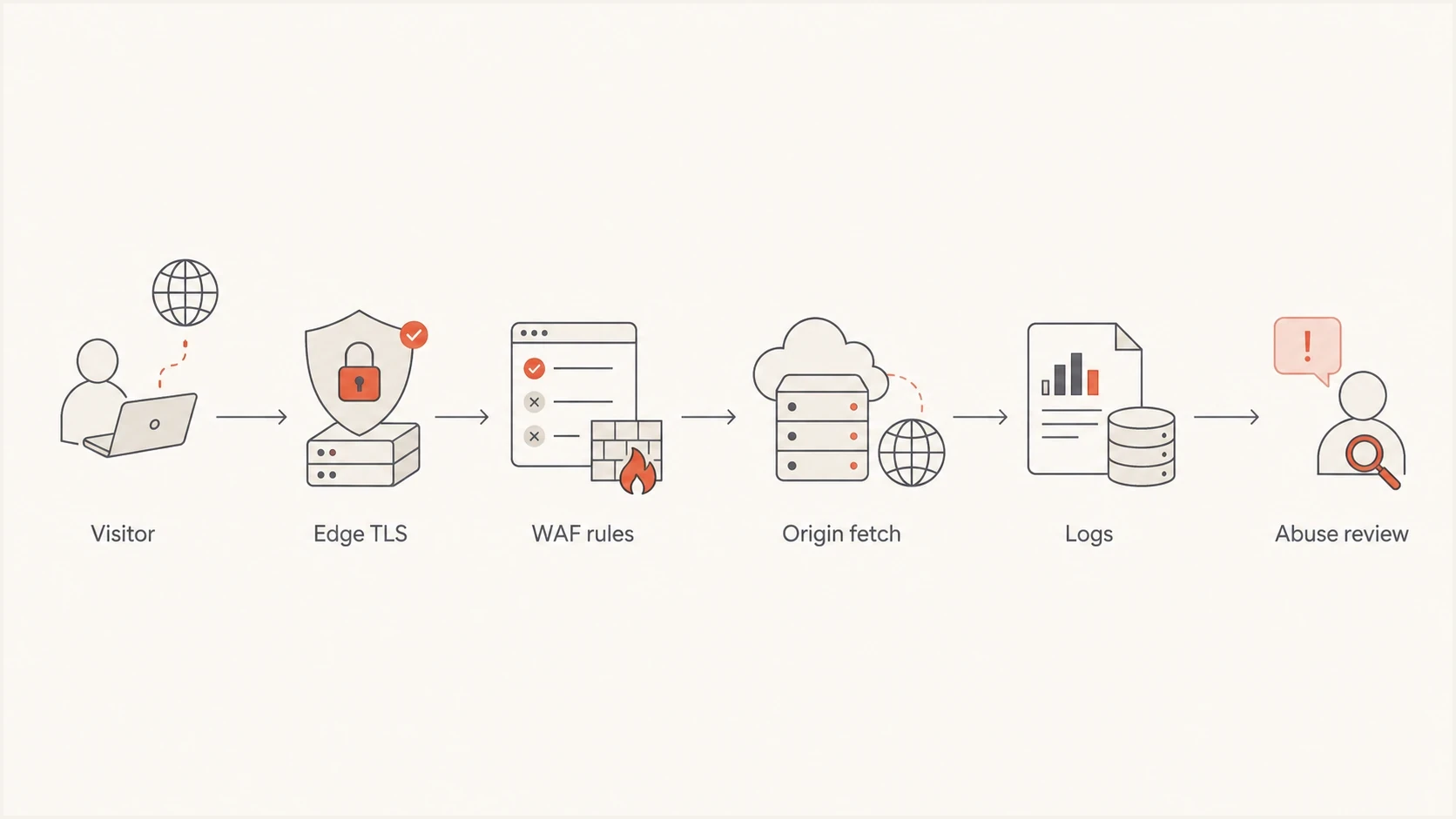
Cloudflare reverse proxy trust path showing edge TLS, WAF rules, origin requests and logging.
Abuse handling and accountability
Abuse handling is an ethical concern when protection makes harmful content harder to report or disrupt. A proxy provider often has enough control to disrupt access, but not enough control to remove the underlying content from the origin host. That gap creates frustration for people reporting harassment, illegal content, malware, phishing, impersonation, or other harm.
Cloudflare's current abuse approach distinguishes content it hosts from pass-through security services. For pass-through services, it generally forwards reports to the website operator and hosting provider; some report categories let submitters withhold forwarding to the operator. The distinction has a technical basis, but site owners still need to ask whether the proxy makes harm harder to trace, report, or stop.
Before submitting a sensitive complaint, review the category-specific forwarding and contact-sharing options. Include the affected URLs and enough evidence to investigate, but omit personal details that are unnecessary. Do not assume a report is anonymous or that a recipient will keep it confidential.
|
|
|
|---|---|---|
Traffic | TLS terminates at the edge | Trust concentration |
Abuse | Complaint forwarding | Slow remedies or reporter exposure |
Access | Bot scoring | User exclusion |
DNS | Authoritative DNS dependency | Outage and migration risk |
Law | Legal or policy restrictions | Overbroad loss of access |
Risks associated with Cloudflare content protection.
Do not outsource the moral decision
A vendor policy is not your ethics policy. If your site handles sensitive reports, vulnerable users, political speech, or user-generated content, document what evidence you retain, who handles urgent abuse reports, what data is forwarded to third parties, and how you protect reporters from exposure.
Censorship and due process
Cloudflare's current abuse approach allows termination of non-hosting services in narrowly defined circumstances, including legal requirements and voluntary action it considers proportionate under its Human Rights Policy. Its 2022 policy essay should not be read as a promise that protection continues until a court orders otherwise.
An order aimed at one jurisdiction can affect readers elsewhere if the remedy disables a whole domain or global DNS service. The ethical questions concern the scope of restrictions and whether affected people have a way to challenge mistakes. Use the provider's policy and transparency reporting to assess these questions.
- Notice: Ask what reasons and evidence customers receive when service is restricted, including any limits on disclosure.
- Proportionality: Ask whether a restriction can target specific content or a jurisdiction before affecting an entire site.
- Appeal: Confirm how customers can request human review, correct an error, and seek restoration of service.
- Accountability: Name an owner for legal requests and urgent harm reports, and document decisions without exposing complainants.
User access and privacy costs
Cloudflare can challenge or block traffic that looks automated, risky, or abusive. That is useful during attacks. It also means a person using a privacy browser, a shared network, a VPN, Tor, or accessibility tooling can receive more friction than a person using a common browser on a common network.
This is an ethical issue because access friction is not evenly distributed. People who need privacy protections often have a reason. Journalists, activists, whistleblowers, domestic abuse survivors, and ordinary people on restricted networks can look suspicious to automated systems. If those people are part of your audience, default bot settings are a policy decision. Cloudflare's browser support documentation confirms that script blockers and modified browsers can interfere with challenges.
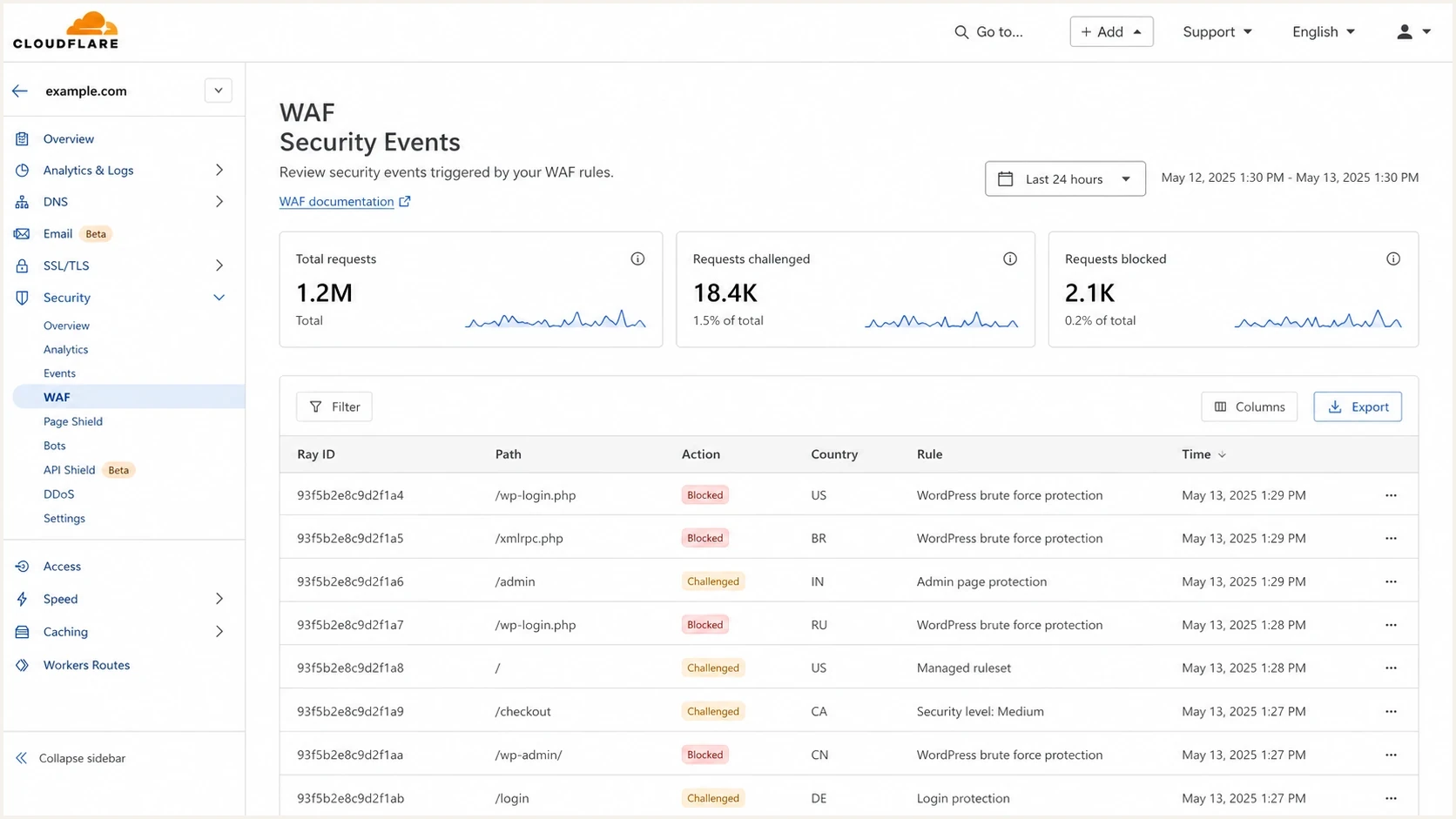
Illustration of Cloudflare WAF security events with challenged and blocked requests.
- Test friction: Check login, checkout, contact, and abuse-report paths with VPNs, Tor, mobile networks, restricted JavaScript, keyboard navigation, and screen readers.
- Separate paths: Keep safety reporting, legal notices, and emergency contact pages reachable with minimal automated friction.
- Review logs: Audit blocked request patterns for false positives before raising challenge levels.
- Publish recourse: Give real users a way to report access problems without requiring the blocked session to work.
AI scraping and publisher control
Cloudflare lets site owners review identified AI crawler activity and choose actions for individual crawlers. Managed robots.txt and Content Signals express preferences for search, AI input, and AI training. Cloudflare's AI bot policy documentation separates Search, Agent, and Training behavior. Defaults effective September 15, 2026 block Training and Agent bots on pages displaying ads for new domains, while Search remains allowed; training blocks also cover crawlers used for both Search and Training. Check the saved settings for your domain rather than assuming one default covers every page.
AI Crawl Control can block identified crawlers, and paid plans support custom HTTP 402 responses. A 402 response communicates that payment is required; it does not collect payment by itself. Pay Per Crawl remains in closed beta and adds a payment workflow for participating crawlers.
These controls strengthen publisher choice, but they also give Cloudflare more influence over which automated systems reach protected content and on what terms. A crawler policy can affect research archives, accessibility services, search discovery, and small operators that cannot establish verified identities or payment relationships. Site owners should decide which uses they want to permit instead of treating every automated request as equivalent.
|
|
|
|---|---|---|
robots.txt | Publishes crawl preferences | Compliance is voluntary |
Content Signals | Separates search, AI input, and training preferences | Expresses preferences; does not enforce access |
AI Crawl Control | Blocks identified crawlers at the edge | Detection quality varies by plan and crawler identity |
Pay Per Crawl | Allows, blocks, or charges selected crawlers | Closed beta; participation and payment setup are required |
AI crawler controls and their ethical limits.
Treat crawler controls as policy
Blocking an identified crawler does not prove that all automated collection has stopped. AI Crawl Control's free-plan analytics identify known crawlers by user-agent strings; this limitation should not be treated as a description of every Cloudflare bot control. Disguised traffic remains difficult to classify. Review false positives and mixed-purpose crawler settings, and remember that a new block does not remove copies collected earlier.
A practical decision framework
Do not make this a brand debate first. Make it a data-flow and harm-reduction exercise. Start with what the site handles, who gets hurt if the site goes down, who gets hurt if the proxy fails open or blocks legitimate users, and who gets hurt if an abuse complaint is mishandled.
- Map data: List paths that carry credentials, private messages, uploads, safety reports, or payment data.
- Set scope: Use DNS-only for hostnames that do not need the web proxy, or proxy a dedicated static-assets hostname. DNS proxy status cannot exclude a URL path; bypassing cache or WAF rules still leaves the edge in the request path.
- Choose controls: Prefer precise rate limits, WAF rules, and crawler-specific policies over broad country blocks or aggressive challenges.
- Plan exit: Keep DNS exports, origin logs, and runbooks ready. Test direct access with a browser-trusted origin certificate and suitable firewall rules; bypassing the proxy exposes the origin and removes its web protections.
- Audit outcomes: Review blocked users, abuse handling time, crawler decisions, legal requests, and support tickets after rollout.
The tradeoff is reasonable when
- Public content: The site mainly publishes public pages and static assets.
- High attack risk: DDoS exposure threatens availability more than proxy visibility threatens users.
- Clear controls: Rules, logs, privacy review, and vendor exit steps are documented.
Require additional review when
- Sensitive workflows: The site receives confidential or regulated reports and the proxy's data access has not been reviewed.
- No recourse: Blocked users have no independent way to reach support.
- Weak governance: Nobody owns abuse escalation, privacy review, or incident exit.
Security requirements checklisttext
1. Require HTTPS and Full (strict) to validate the origin certificate
2. Bypass caching on private account paths
3. Retain minimal, access-controlled origin and application logs
4. Name an abuse escalation owner and protect reporter identities
5. Test VPN, Tor, mobile, keyboard, and screen-reader access
6. Test DNS exit, browser-trusted certificates, and origin firewall rules
7. Review AI bot categories, saved settings, and robots.txt
Where email security fits
Website protection and email authentication meet at DNS. Changing web proxy rules does not authenticate mail, but moving authoritative DNS can disrupt mail if records are missing or changed. Preserve MX records, SPF and DMARC TXT records, and DKIM TXT or CNAME records. Keep mail-server hostnames and DKIM CNAME records DNS-only, then send a real message and check the receiver's authentication results. Cloudflare's DNS proxy guidance explains why mail-server hostnames need DNS-only records.
Suped is our DMARC reporting and email authentication platform. During a DNS migration, use Suped to compare DMARC aggregate reports before and after the change, investigate legitimate senders that start failing, and track configuration fixes. Aggregate reports arrive after delivery attempts, so also verify DNS directly.
- Domain review: Use a domain health checker after DNS changes to catch broken SPF, DKIM, and DMARC records.
- Policy rollout: Use DMARC monitoring to investigate SPF or DKIM failures and whether the authenticated domain matches the visible From domain before tightening the policy.
- Reputation review: Use blocklist monitoring to investigate blacklist signals if sending IPs or domains also change. A web proxy change alone does not establish an email reputation problem.
?
What's your domain score?
Deep-scan SPF, DKIM & DMARC records for email deliverability and security issues.
Suped DMARC dashboard showing email volume, authentication health, and source breakdown
When Cloudflare protection is appropriate
Use the least proxy access needed for the site's security requirements. Review sensitive traffic, test who gets blocked, document abuse and crawler policies, and keep a tested exit path.
For a public marketing site under attack, Cloudflare can be a reasonable choice with proper settings. For a site that handles vulnerable users, private reports, regulated data, or high-stakes speech, require privacy review, legal review, fallback routing, and independent logging before enabling the proxy for dynamic traffic.




