Should you suppress 0% values in Gmail spam identifier API data?

Updated on 22 Oct 2026: We clarified how to validate Gmail Feedback Loop zeroes, preserve missing API data, and check identifier setup before reporting rates.
Suppress a returned 0% value in Gmail spam identifier API data when it fails basic validity checks, but do not suppress every zero. Keep suspect returned values provisional and absent results missing. Count a zero only when the identifier had real Gmail exposure, a later API pull returns the same value, and the surrounding data does not contradict it.
A 0% Gmail Feedback Loop rate can be valid, but it does not always mean the campaign had healthy inbox placement or no complaints across all delivered mail. Gmail calculates user-reported spam using eligible messages delivered to engaged recipients' inboxes, and automatically filtered mail can leave few inbox messages available to generate complaints. An impossible pre-send value, an absent API result converted to zero, or an unstable fresh row should not drag an average down.
The practical answer is a classifier, not a blanket rule. Use labels such as observed, confirmed_zero, provisional_zero, and missing. Only validated non-zero values and confirmed zeroes belong in summaries. Here, confirmed_zero is an internal data quality label, not Google's certification that no complaints occurred. Everything else should remain visible for auditing but stay out of decision metrics.
Which 0% values should you suppress?
Do not average raw Gmail spam identifier API rows until impossible, missing, and provisional observations have been filtered. Exclude a zero before the identifier's first send, a missing API result that an ETL job filled with zero, or a returned zero that has not survived a later API refresh.
- Suppress returned zeroes that appear before the identifier was sent or remain inconsistent with the source data.
- Keep zeroes that remain after a later pull and have credible Gmail exposure behind them.
- Store suspect zeroes and absent results separately so reporting gaps do not look like strong performance.
This matters because identifier-level data is often used to compare campaigns, segments, templates, and customer cohorts. A false zero makes a weak stream look cleaner than it is. A blanket suppression rule has the opposite problem: it can hide a legitimate zero and inflate the apparent complaint rate.
Also separate "suppress this API data point" from "suppress a recipient." Gmail spam identifier data is aggregate feedback. It does not identify the person who complained. Use it for trend analysis and message fixes, not individual subscriber removal.
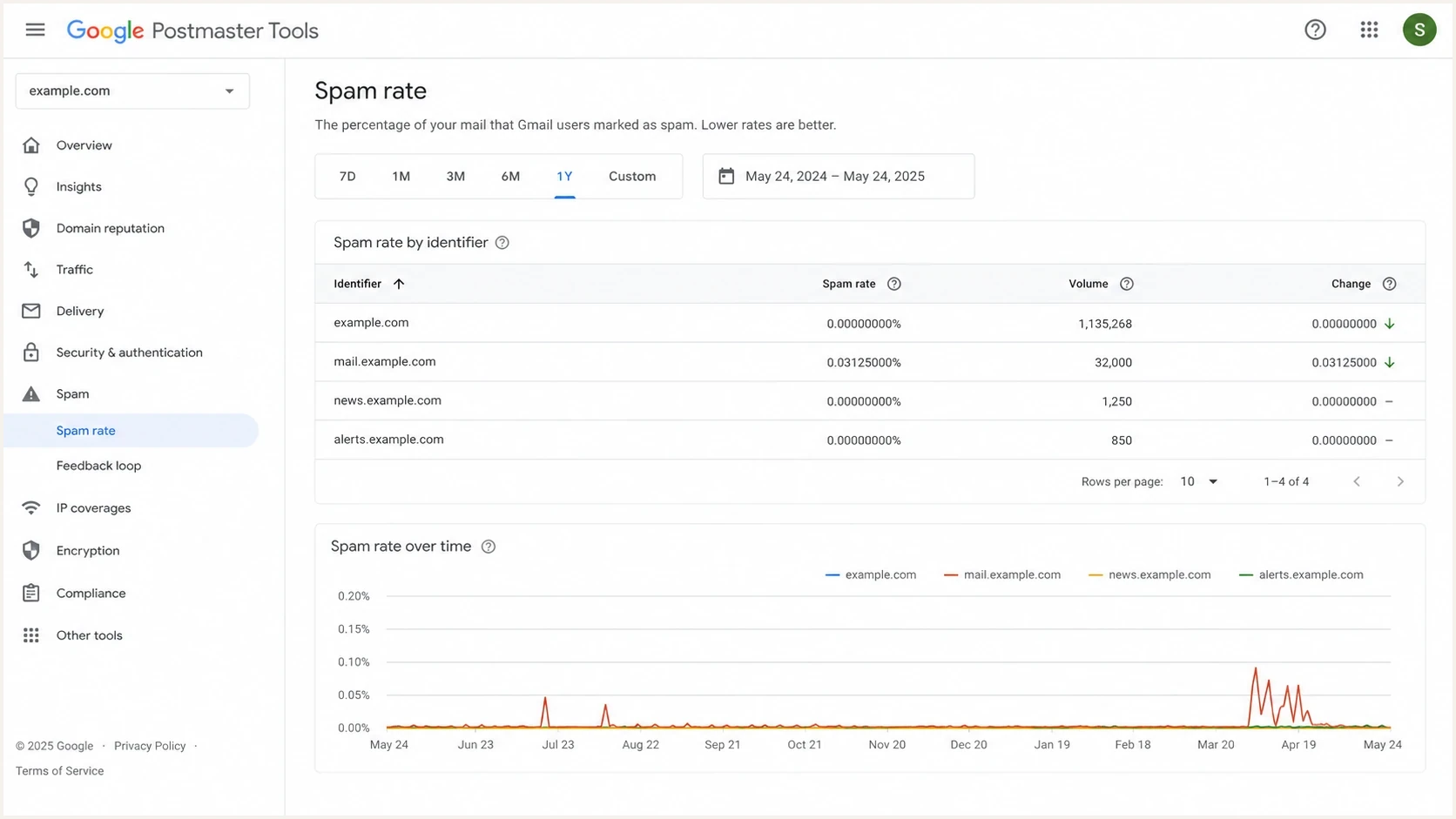
Google Postmaster Tools Feedback Loop identifier spam rates with a date filter.
Why Gmail identifier zeroes are tricky
Identifier data comes from the Feedback-ID header and Gmail's reporting pipeline. It narrows complaints below the domain level, but it remains aggregated and subject to reporting delays plus privacy thresholds. Gmail generates Feedback Loop reports only when an identifier has sufficient mail volume and distinct user spam reports, and the dashboard highlights unusual spam rates. An absent identifier is not evidence of zero complaints. A returned row is useful evidence, but it is not a sender-visible complaint count or denominator.
Example Feedback-ID headertext
Feedback-ID: promo42:segment7:welcome:espname
If an identifier has a 0% value before its first send, check identifier reuse, date mapping, and data-fill logic before classifying it as impossible. Google documents UTC reporting dates; compare send logs in UTC rather than the campaign's local time zone. A zero after a send needs context too. It can be a valid reported rate or a fresh value that changes after another pull.
Naive averaging
- Every API row and filled date is treated as a measured complaint rate.
- False zeroes lower the mean and make noisy identifiers look safer.
- The team reacts late because the metric looks calmer than Gmail filtering feels.
Validity filtering
- Each row is checked against send dates, source volume, pull history, and API presence.
- Confirmed zeroes stay while impossible and provisional observations are excluded.
- The model needs extra fields and a clear audit trail.
Do not use the Gmail identifier API as the only source of truth. Compare it with campaign send logs, Gmail delivery volume, broader complaint trends, and other deliverability evidence. For domain-level checks, Suped's domain health check helps confirm whether authentication or DNS health is confusing the complaint analysis.
Check Feedback-ID setup before interpreting missing data
Known Gmail traffic is not enough if Gmail cannot associate it with the identifier being queried. Google's Feedback Loop requirements limit this data to @gmail.com recipients and require the Feedback-ID header to be added before DKIM signing with a domain you control and have verified in Postmaster Tools.
- Check a delivered message for one Feedback-ID header and a valid DKIM signature that covers that header.
- Keep the mandatory final SenderId consistent across the mail stream. It must contain 5-15 characters.
- Use campaign or segment identifiers shared by multiple messages. A unique identifier for every message fragments volume and undermines reporting.
- Avoid reusing the same value across unrelated identifier fields. Gmail aggregates each identifier independently, so collisions combine traffic you intended to separate.
If these checks fail, fix the header or domain setup and keep unavailable observations missing. Do not infer a measured 0% rate. Google also requires sufficient message volume and distinct spam reports, so valid setup does not guarantee a row for every identifier-day.
How to classify 0% rows
Classify each returned 0% value before it reaches a chart, summary, or alert. Keep absent v2 results in a separate missing state. This removes obvious data errors without erasing valid zero-rate observations.
|
|
|
|---|---|---|
Before first send in UTC | Suppress after scope checks | Rule out date errors and identifier reuse first. |
No API result | Mark missing | v2 returns only available dates. |
Missing or invalid numeric value | Keep missing or invalid | A parse failure is not a measured zero. |
Returned zero, first pull | Hold | The value can still change. |
Later pull agrees | Count if other checks pass | Repeatability supports an internal label, not proof of accuracy. |
A/A mismatch | Investigate | Sampling and reporting thresholds can produce differences. |
A compact rule set for 0% Gmail spam identifier rows.
The "later pull agrees" rule is an internal safeguard. If the API returns 0% on the first pull, leave that row out of summaries. When a later pull still returns 0%, the identifier had known Gmail traffic, and the date mapping is sound, the zero can enter the dataset as a stable reported value. Keep it provisional if the same identifier and reporting scope conflict with the Feedback Loop dashboard. Repeatability does not establish API accuracy or prove inbox placement.
Recommended confidence workflow
An internal validation policy, not a Google guarantee of accuracy or a backfill deadline.
First pull
Hold
Treat a returned zero as provisional and keep it out of summaries.
Later pull
Review
Check that the same date, identifier, and aggregation view still return zero.
Stable history
Count
Count under the internal policy when traffic, date, and source checks also pass.
Classifier pseudocodejavascript
function classify(row) {
  if (!row.apiResultPresent) return "missing";
  if (row.rate == null) return "missing_value";
  if (!Number.isFinite(row.rate) || row.rate < 0) {
    return "invalid_value";
  }
  // Date checks use validated UTC YYYY-MM-DD strings.
  if (!row.dateMappingValid) return "invalid_date_mapping";
  if (row.date < row.firstSendDate) return "invalid_pre_send";
  if (row.sourceConflict) return "provisional_conflict";
  if (row.rate > 0) return "observed";
  if (!row.gmailTrafficKnown || !(row.confirmationPulls >= 1)) {
    return "provisional_zero";
  }
  return "confirmed_zero"; // Internal validation label only.
}
Keep the unrounded numeric value for classification. A positive rate displayed as 0.00% after rounding is not an exact zero. More decimal places do not mean more trust: 0.00000000 does not prove that no Gmail users complained or that every delivered message reached the inbox.
How to preserve missing data in API v2
The API v2 query reference says domain statistics are returned only for available dates. If a requested date has no DomainStat for the Feedback Loop spam-rate metric, store it as missing. Do not create a 0% row while expanding the response onto a complete calendar.
- Preserve the API version, domain, response date, metric definition and filter, value type, pull time, aggregation granularity, and raw response before transforming the data.
- Query FEEDBACK_LOOP_ID and FEEDBACK_LOOP_SPAM_RATE with the same aggregation key type. The rate query requires feedback_loop_id; FROM_HEADER is the default, while ALL_DKIM includes matching DKIM signing domains.
- Follow nextPageToken until it is empty so a partial page does not look like missing identifiers or dates.
- Record a separate missing reason for absent API data, failed requests, filtered rows, and dates before first send.
- Use send logs to define eligible identifier dates so no-send days do not reduce the coverage metric.
Missing-safe transformationjavascript
// DAILY query only. metricDefinitionsByName maps each request
// metric name to its full definition, including the identifier filter.
const definition = metricDefinitionsByName.get(stat.metric);
const date = stat.date ? toDate(stat.date) : null;
if (!definition || !date) throw new Error("Unexpected metric or date");

// Example for a numeric rate returned as doubleValue.
// Handle a different documented value type explicitly; never coerce it.
const rawRate = stat.value?.doubleValue;
const valid = Number.isFinite(rawRate) && rawRate >= 0;
const key = JSON.stringify([
  apiVersion, domain, definition, aggregationGranularity, date
]);
observations.set(key, {
  value: valid ? rawRate : null,
  state: rawRate == null ? "missing_value" :
    valid ? "unclassified" : "invalid_value",
  apiResultPresent: true,
  pulledAt,
  raw: stat
});

// Numeric 0 survives. Absent dates stay missing, never { value: 0 }.
// Store each pull separately so later queries do not erase history.
Keep the aggregation view with every observation. Google's metric definitions distinguish FROM_HEADER and ALL_DKIM populations; mixing them can create an apparent movement unrelated to campaign behavior. Use DAILY for identifier-day classification. An OVERALL response covers the requested period and must not be copied onto individual dates. The response schema maps each returned metric to its request name and provides typed values. Preserve numeric zero explicitly; JavaScript expressions such as value || null discard a real zero.
How to report rates without skewed averages
After classification, calculate summaries from confirmed observations and report coverage beside them. Do not present a sender-volume-weighted average as Gmail's official spam rate. Gmail's rate uses its own eligible population, and the API does not expose the denominator needed to reconstruct that rate exactly.
- Use Gmail's returned SPAM_RATE for the domain-level rate. Keep FEEDBACK_LOOP_SPAM_RATE tied to its identifier and query scope.
- Use cleaned identifier rates to compare campaigns only when coverage and reporting conditions are similar. Threshold-based reporting makes the available rows a selected sample.
- Label any weighting by sender-side Gmail delivery volume as an internal estimate, not an official Gmail rate.
- Show coverage so stakeholders can see how much requested identifier-date data was usable.
A useful report shows the cleaned spam rate, identifiers included, zeroes suppressed, missing dates, and reason codes. Do not combine overlapping campaign, segment, and SenderId rates as separate populations: the same message can carry several identifiers. If half the eligible observations are unusable, report weak coverage instead of interpreting the available rows as a low overall spam rate.
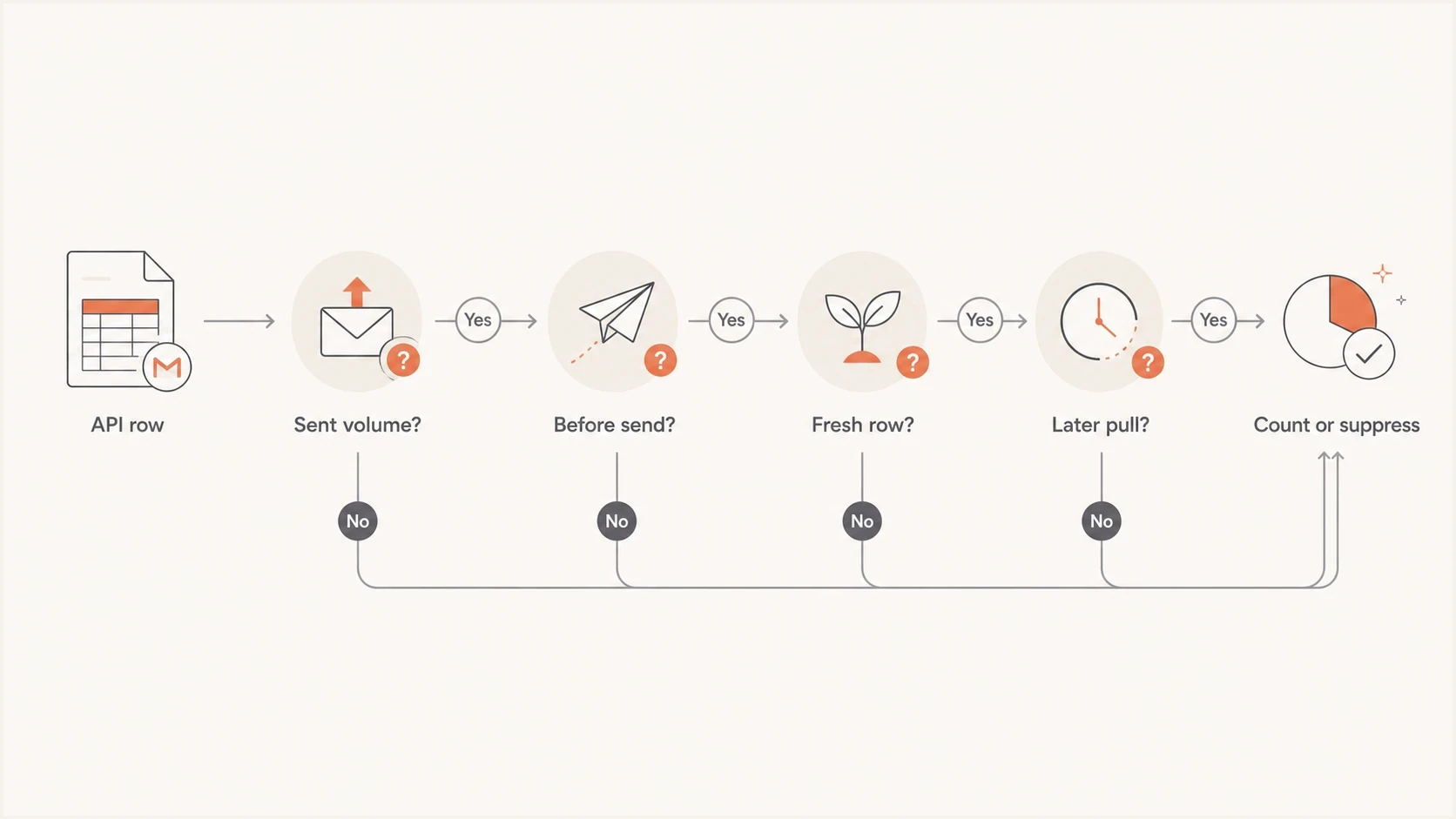
Flowchart for counting, holding, or suppressing a 0% Gmail Feedback Loop API observation.
It also helps to compare cleaned identifier data with the complaint trends and scope limits covered in spam rate accuracy. Identifier rows help diagnose campaign differences, but they do not provide exact complaint attribution.
How Suped fits into the workflow
Gmail identifier analysis shows where user-reported complaint pressure appears. It does not prove why Gmail is filtering mail, and it does not replace authentication or reputation monitoring. Suped is our product, and the practical workflow treats Gmail identifier data as one signal within a wider email health process.
Issues page showing top issues, verified sources, unverified sources, and authentication pass rates
Suped is our DMARC reporting and email authentication platform. When Gmail complaint data is noisy, use its DMARC reports to check whether expected sending sources pass authentication and whether unfamiliar sources are using the domain. Authentication results add context; they do not establish inbox placement or validate a Feedback Loop zero.
For this problem, pair cleaned Gmail identifier data with Suped's DMARC monitoring and blocklist monitoring for blocklist (blacklist) signals. If a Gmail identifier spikes while authentication and blocklist status stay clean, inspect content, audience quality, sending frequency, or expectation mismatch next.
For a message-level check, send a live campaign sample through Suped's email tester before changing the audience or template. This keeps API cleanup connected to the real message rather than an isolated spreadsheet.
Email tester
Send a real email to this address. Suped shows a results button when the test is ready.
?/43tests passed
A practical implementation plan
Implement a data quality layer between the Google API pull and every downstream report. Keep the raw table intact while preventing missing or misleading observations from reaching dashboards.
- Save the exact API response, pull time, requested date range, identifier, aggregation view, and raw rate.
- Attach the identifier's first send date in UTC, @gmail.com volume, and campaign metadata without treating that volume as Gmail's rate denominator.
- Create explicit rows for observed, confirmed_zero, provisional_zero, missing, and invalid states.
- Repeat the same API version, domain, metric filters, dates, and aggregation settings before confirming a zero, and retain each pull for comparison.
- Investigate non-zero complaint spikes and sudden drops to zero with sending logs and message samples.
A/A testing is a useful sanity check, but equivalent traffic does not guarantee identical reported complaint rates. Random allocation, sparse complaints, and reporting thresholds can produce differences. Check the allocation and sample size before attributing a persistent mismatch to the API, and use identifier comparisons for direction rather than precise causal claims.
A useful dashboard shows the filtered complaint rate and the data coverage rate. Coverage shows how much requested Gmail identifier data was trusted enough to use.
Coverage metrictext
coverage = usable_identifier_days / eligible_identifier_days

// Return null when eligible_identifier_days is 0.
// Define eligibility using known traffic with the relevant identifier.
Coverage distinguishes a campaign with a reported 0.04% rate and 95% coverage from one with 0.00% and 35% coverage. It measures usable observations, not inbox placement, and threshold-based reporting can still bias a summary with high coverage.
For a deeper complaint investigation workflow, the next useful read explains how to interpret Google Postmaster Tools complaints. The same caution applies: use Gmail data to narrow the search, then confirm it with message evidence plus audience and sending-source context.
Views from the trenches
Best practices
Hold fresh 0% rows until repeat pulls, UTC send dates, and source checks support their use.
Keep raw and cleaned tables separate so every suppressed Gmail value remains auditable.
Use coverage metrics beside complaint rates so missing data is not treated as success.
Common pitfalls
Averaging raw 0% values makes identifier-level complaint rates look artificially low.
Treating pre-send rows as real complaint rates creates false confidence in a campaign.
Using identifier rows for subscriber suppression overstates what Gmail data can prove.
Expert tips
Check A/A allocation and sample size before blaming rate differences on the Gmail API.
Compare Gmail rows with send logs and reputation data before changing the program.
Keep absent rows missing; label returned zeroes provisional or confirmed after validation.
Marketer view
Marketer from Email Geeks says Gmail reporting in both API versions can be sporadic, delayed, and skipped, so a 0% row should be counted only after later reporting confirms it.
2026-06-10 - Email Geeks
Marketer view
Marketer from Email Geeks says a 0.00000000 value is not automatically believable when Gmail can return many decimal places and related reputation data is absent.
2026-06-11 - Email Geeks
When to include 0% in reports
Suppress suspect returned zeroes from summaries, preserve them in raw data, and keep absent v2 results as missing. Include a returned zero under your internal policy when it is tied to real Gmail traffic, survives a repeat pull with identical query settings, and passes UTC timeline and source checks. Reopen its classification if later data contradicts it.