Should I use multiple subdomains for different email streams or a single stream?

Updated on 25 Jul 2026: We added current DMARC policy discovery and bulk-sender guidance for multi-subdomain email programs.
Use multiple subdomains when the email streams are meaningfully different. Use a single warmed subdomain when the stream is one operational flow with the same audience, content pattern, sending system, and complaint profile. Move regular sending off the root domain, but do not split one alert stream into several cold subdomains only so traffic can move when something gets blocked.
For example, profile and one-time password mail can sit on users.example.com, marketing mail can sit on marketing.example.com, and alerts can sit on alerts.example.com. If alerts send 26 million messages per day, one alert subdomain is still viable when the stream is stable and has enough IP capacity. Splitting that same alert stream into alerts1, alerts2, and alerts3 only makes sense when all of them send real, steady traffic and each one has a clear diagnostic purpose.
- Separate streams: Use different subdomains for transactional, security, lifecycle, marketing, and bulk alert mail when the streams behave differently.
- Keep streams stable: Do not move recipients between subdomains casually. Stability makes reputation, complaints, and fixes easier to read.
- Avoid cold failover: A cold backup subdomain has no established stream-specific sending history. Moving millions of messages onto it at once creates a new reputation event.
- Fix root causes: If one stream is blocked, isolate the audience, content, IPs, and authentication results before shifting volume.
The practical answer
The cleanest design is separation by purpose, not separation by fear. A subdomain is useful when it maps to a real operational boundary. That boundary can be a message type, a sending platform, an IP pool, a consent model, a compliance requirement, or a different team that owns the mail.
This pattern gives receivers and internal teams consistent signals. The domain in the visible From address, the envelope sender, the DKIM signing domain, the unsubscribe handling, and the content all point to the same kind of mail. When something breaks, the investigation starts with fewer variables.
|
|
|
|---|---|---|
One-time passcodes | users | Fast recovery and low tolerance for filtering delays. |
Critical alerts | alerts | High volume with consistent content and audience behavior. |
Marketing campaigns | marketing | Different consent, cadence, complaint rate, and unsubscribe handling. |
Multiple ESPs | per ESP | Different infrastructure needs separate diagnosis. |
Cold backup route | avoid | No stream-specific history and higher snowshoeing risk. |
Recommended subdomain patterns by stream type.
The operating rule
Create a subdomain when it improves accountability. Do not create a subdomain only to escape the consequences of the same recipients, same content, and same sending behavior.
Many teams confuse visible branding with routing. The visible 5322.From address can use different local parts, such as alerts@ or security@, without needing a new subdomain for every notification category. The envelope sender and DKIM signing domain carry authentication and reputation signals, so plan both identifiers with the visible From domain.
When one stream should stay single
A single stream should usually stay on one subdomain when the mail is wanted, predictable, and already has enough volume to build a clear reputation. High volume alone is not a reason to split. In many cases, high volume makes the reputation signal more stable because receivers see enough data to make consistent decisions.
One warmed stream
- Best fit: One alert stream with the same message type and subscriber expectation.
- Main benefit: Simpler reputation history and fewer DNS, routing, and monitoring objects.
- Main risk: A stream-wide issue affects the whole stream until the cause is fixed.
Several active streams
- Best fit: A massive stream split by region, product, business unit, or recipient cohort.
- Main benefit: Incidents can be contained to the affected slice when each slice sends daily.
- Main risk: More domains create more operational work and more chances for bad routing.
If the real choice is marketing versus transactional mail, split them. That narrower decision is covered in more detail in separate subdomains.
How many subdomains per stream
Use this as a planning guide before adding routing complexity.
Normal
1
One clear stream with stable content and a known audience.
Operational split
2-4
Distinct cohorts, regions, products, or ESPs with daily volume.
Specialist design
5-10
Very high volume with strong monitoring and routing controls.
Risk zone
10+
Many similar domains with the same content and shifting traffic.
Every active subdomain needs enough steady traffic to develop useful stream-specific history. A backup domain that sits idle until an incident is not a resilient design. It is a cold start waiting for the worst moment.
Why cold failover is risky
Cold failover sounds useful because it promises a spare route. In practice, it often creates the same problem in a new place. If a block happens because the content, list source, cadence, complaint rate, or unsubscribe process is bad, moving the mail to another subdomain carries the bad signal with it.
Do not confuse isolation with evasion
Isolation means each mail stream has a stable identity and can be diagnosed cleanly. Evasion means moving the same problematic mail across domains to avoid a blocklist (blacklist), receiver throttle, or reputation penalty. Receivers and blocklist operators can connect those patterns.
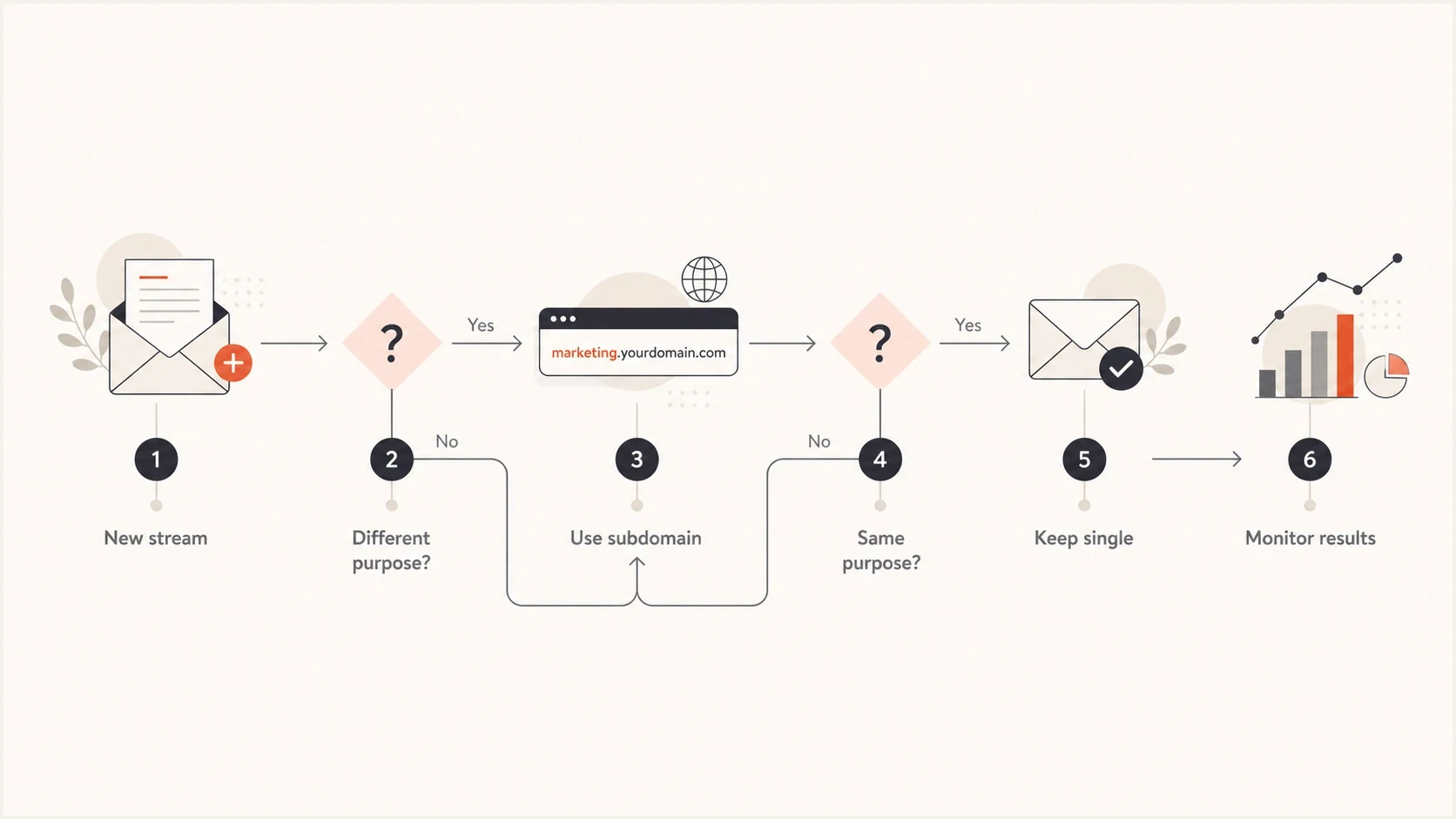
Flowchart for deciding whether an email stream needs its own subdomain.
If an incident happens, reduce or pause the affected slice, compare authentication and delivery signals, and send test messages through an email tester before routing more mail. That gives you a header-level view instead of relying on aggregate metrics alone.
For alert mail at tens of millions per day, a controlled reduction on one warmed route is usually cleaner than a sudden move to another route. If you intentionally run three alert subdomains, all three should carry normal production volume before any incident, and recipients should stay assigned to predictable cohorts.
Authentication setup for subdomains
Each sending subdomain needs SPF and DKIM that support DMARC alignment. RFC 9989 now defines DMARC policy discovery with a DNS Tree Walk. A valid record at the exact Author Domain controls that domain. Otherwise, the Organizational Domain policy can apply to an existing subdomain through sp, or through p when sp is absent. Publish an explicit DMARC record when an important stream needs its own policy or reporting address.
Example DMARC recordsdns
_dmarc.example.com. 3600 IN TXT "v=DMARC1; p=quarantine; sp=none; rua=mailto:dmarc@example.com"
_dmarc.alerts.example.com. 3600 IN TXT "v=DMARC1; p=none; rua=mailto:dmarc-alerts@example.com"
Use DMARC monitoring while you stage the policy. Start with visibility, confirm the real senders, then enforce policy only after legitimate sources pass DMARC through an aligned SPF or DKIM identity. Under relaxed alignment, the authenticated identity and visible From domain must share the same Organizational Domain. Strict alignment requires an exact domain match.
Example SPF and DKIM recordsdns
alerts.example.com. 3600 IN TXT "v=spf1 include:send.example -all"
selector1._domainkey.alerts.example.com. 3600 IN CNAME selector1.example.net.
SPF also needs discipline. Publish SPF for the domain used as the envelope sender. The include, a, mx, ptr, and exists mechanisms plus the redirect modifier count toward the limit of 10 DNS-querying terms, including nested evaluations. More than 10 returns permerror. A quick SPF checker pass catches lookup-limit problems, missing includes, and accidental softfail records before a stream goes live.
DMARC record detail view showing SPF, DKIM, DMARC, rDNS diagnostics, and DNS records
Suped's product supports this workflow by keeping DMARC aggregate reports and DNS diagnostics together for each sending domain. Teams can review SPF, DKIM, DMARC, rDNS, and related record changes in one place, then track the same stream as policy or infrastructure changes roll out.
Monitoring and reputation isolation
Subdomains help most when they make monitoring cleaner. If marketing complaints rise, the marketing subdomain should show it. If one alert cohort has a Gmail-specific delay, the alert subdomain or cohort route should show it. If an IP or domain appears on a blocklist (blacklist), the operational owner should know which stream caused the issue.
The number of subdomains matters less than whether each one has a named owner, a stable routing rule, and a visible health signal. Suped's blocklist monitoring connects domain and IP reputation checks with the DMARC and authentication failures reviewed for the same stream.
Incident blast radius example
Active subdomains can reduce blast radius only when each one already has steady traffic.
Affected
Unaffected
The chart is not an argument for creating ten alert subdomains by default. It shows the routing share affected when one equal route has a stream-specific incident. Mailbox providers can still connect reputation through the Organizational Domain, DKIM domain, sending IPs, content, and user feedback. More routes improve containment only when routing is already warmed, documented, and monitored.
Subdomains do not reset sender requirements
Splitting traffic across subdomains does not turn a bulk sender into several small senders. Gmail counts messages sent from the same primary domain toward its threshold of about 5,000 messages to personal Gmail accounts in a 24-hour period. Once classified as a bulk sender, the sender keeps that classification.
- Authenticate every stream: Bulk mail needs SPF and DKIM to pass, with the visible From domain aligned through at least one DMARC path.
- Keep infrastructure valid: Use matching forward and reverse DNS for sending IPs, send over TLS, and keep messages in valid RFC 5322 format.
- Control complaints: Keep user-reported spam below 0.3%, and treat a lower rate as the operational target.
- Support unsubscribe: Marketing and promotional mail needs one-click unsubscribe, and requests should be honored within 48 hours.
Architecture does not replace compliance
Use subdomains to separate operational signals. Do not use them to divide volume on paper, avoid sender classification, or work around enforcement. Gmail bulk-sender requirements still apply across the primary domain.
A controlled rollout plan
Roll out the design in stages, with the root domain protected and new subdomains warmed deliberately. The goal is to give each mail stream a durable identity that receivers can learn and the sending team can operate.
- Inventory sources: List every platform, IP pool, bounce domain, DKIM selector, and visible From domain currently sending mail.
- Define streams: Group mail by purpose, audience expectation, consent model, content type, and operational owner.
- Name clearly: Use recipient-recognizable names such as alerts, users, receipts, billing, or marketing.
- Publish DNS: Set the envelope sender, SPF, DKIM, DMARC, MX where needed, bounce handling, and return-path records before traffic moves. Confirm that SPF or DKIM aligns with the visible From domain.
- Warm slowly: Move a controlled share of traffic, watch authentication results and complaints, then increase volume only when the data stays stable.
- Document ownership: Record who can pause, reroute, or change each stream, and what data must be checked first.
Suggested naming
Sequential names are fine when they sit under a meaningful parent. Random brand-adjacent names make troubleshooting and recipient trust harder. Use names that explain the stream without needing a private routing map.
Clear subdomain namingtext
alerts.example.com
users.example.com
marketing.example.com
a.alerts.example.com
b.alerts.example.com
For the alert example, start with one alert subdomain and an appropriate IP pool. If the business requires a smaller blast radius, split by a real operational boundary, such as region or product line, and keep each slice sending every day. Do not create spare domains that stay quiet until the day a block happens.
Views from the trenches
Best practices
Separate mail by purpose, owner, consent, and content before adding extra domains.
Keep every active subdomain sending steady traffic before it has incident duties.
Use clear stream names so reports, routing maps, and recipient expectations match.
Common pitfalls
Treating spare subdomains as cold failover routes can look like snowshoeing fast.
Moving bad mail to a new route carries the same complaints and content problems.
Creating many domains without owners makes authentication problems harder to fix.
Expert tips
Assign stable cohorts so complaints, deferrals, and block events stay traceable.
Use subdomains to reduce blast radius, not to outrun a reputation problem quickly.
Check SPF, DKIM, DMARC, and blocklist data together before rerouting volume again.
Expert from Email Geeks says high-volume alert mail can run on multiple active subdomains, but each one needs daily traffic and clear diagnostics.
2022-03-23 - Email Geeks
Marketer from Email Geeks says splitting mail streams by purpose is sound, but moving blocked traffic across spare domains risks burning each route.
2022-03-24 - Email Geeks
The recommended setup
For most teams, use one subdomain per major email stream: users, alerts, marketing, receipts, billing, lifecycle, or whatever maps to the business. Keep the root domain out of regular sending, then use DMARC policy and reporting to protect the parent domain and each important subdomain.
For a 26 million per day alert stream, do not split the stream just because the number is large. Split only when the division has a stable operational meaning. If the team needs smaller incident impact, run multiple alert subdomains in parallel, keep each one warm, assign stable cohorts, and document exactly when traffic can be reduced or moved.
Suped's product is useful after the architecture decision because the daily work is proving which sources pass DMARC, catching SPF lookup risk, checking DKIM selectors, tracking blocklist or blacklist status, and alerting when a stream changes. A clear subdomain plan creates stable lanes, and the reports show when one lane changes.




